MP3 Bitrate Calculation Methods


Free Download Mp4Gain
picture

MP3 Bitrate Calculation Methods

MP3 Bitrate
MP3 Bitrate
MP3 Bitrate
MP3 Bitrate

What is MP3 Bitrate?

MP3 bitrate is the amount of data that is used to encode an MP3 audio file. The higher the bitrate, the higher the quality of the audio file. However, higher bitrates also result in larger file sizes.

How is MP3 Bitrate Calculated?

MP3 bitrate is calculated using a variety of factors, including the complexity of the audio signal, the desired quality of the audio file, and the target file size.

What are the Different Types of MP3 Bitrate Calculation Methods?

There are two main types of MP3 bitrate calculation methods:

  • Constant bitrate (CBR): This method uses a constant bitrate for the entire audio file. This results in a consistent audio quality throughout the file, but it can also result in larger file sizes for complex audio signals.
  • Variable bitrate (VBR): This method uses a variable bitrate, which means that the bitrate changes depending on the complexity of the audio signal. This results in smaller file sizes for complex audio signals, but it can also result in a slight variation in audio quality.

Which MP3 Bitrate Calculation Method is Best?

The best MP3 bitrate calculation method depends on your needs. If you need a consistent audio quality throughout the file, then CBR is the best option. If you are more concerned about file size, then VBR is the best option.

How to Choose the Right MP3 Bitrate for Your Needs

When choosing the right MP3 bitrate for your needs, you should consider the following factors:

  • The type of audio signal: Complex audio signals, such as those that contain a lot of high-frequency content, require a higher bitrate than simple audio signals.
  • The desired quality of the audio file: If you want the highest possible quality, then you should use a higher bitrate. If you are more concerned about file size, then you can use a lower bitrate.
  • The target file size: If you have a specific file size in mind, then you can use a bitrate calculator to determine the bitrate that you need.

Conclusion

MP3 bitrate is an important factor to consider when encoding audio files. By understanding the different types of MP3 bitrate calculation methods and how to choose the right bitrate for your needs, you can ensure that your audio files sound great and have a reasonable file size.

Here are some additional details about the different types of MP3 bitrate calculation methods:

  • Constant bitrate (CBR): This method is the simplest to understand and implement. It is also the most reliable, as it ensures that the audio quality is consistent throughout the file. However, it can result in larger file sizes for complex audio signals.
  • Variable bitrate (VBR): This method is more complex than CBR, but it can result in smaller file sizes for complex audio signals. This is because VBR allows the encoder to use a lower bitrate for less complex parts of the audio signal, and a higher bitrate for more complex parts of the audio signal. However, VBR can result in a slight variation in audio quality, depending on the complexity of the audio signal.

Ultimately, the best MP3 bitrate calculation method for you depends on your specific needs. If you need a consistent audio quality throughout the file, then CBR is the best option. If you are more concerned about file size, then VBR is the best option.


Free Download Mp4Gain
picture


Mp4Gain Main Window
picture


Mp4Gain Features
picture


Free Download Mp4Gain
picture

What’s behind the MP3 Audio Format?

What’s behind the MP3 Audio Format?

MP3 Audio Format
MP3 Audio Format

When most people hear the word MP3, they usually think of songs, podcasts, and other compressed audio files. While it’s worth acknowledging the role these uncompressed files have played in the world of music, the goal of this guide is to explain in detail what’s behind these files, how they work, and what makes them so popular. Through this understanding guide, we hope to cover the core concepts behind the MP3 audio format, such as bitrate and samplerate, as well as offer some tips and tricks to ensure you’re getting the best audio quality from your MP3 files.

MP3 Audio Format
MP3 Audio Format

What is MP3 Format?

MP3 is a digital audio format used to compress audio files without losing quality. This is made possible by an audio compression algorithm called MPEG-1 Audio Layer 3, also known as MP3. Compression technology involves reducing the amount of data without losing the fundamental attributes of the original audio. Compressed data can be saved as a higher quality audio file in a much smaller size. This means MP3 files are easier to stream and share online.

MP3 files can be compressed at different bit rates depending on the user. Bitrate is generally in kilobits per second. For example, a 128 kbps (kilobits per second) MP3 file uses 128,000 bits to encode the audio every second. While bitrate is an important factor in determining the quality of an audio file, there are other factors as well, such as samplerate. The samplerate is the number of audio samples taken every second. An audio file recorded at a sample rate of 44.1 kHz (kilohertz) means that 44,100 audio samples were taken every second. The higher the samplerate, the better the audio quality.

The magic behind the MP3 format lies in its ability to shed unnecessary data without compromising audio quality. This is accomplished by removing inaudible components from the audio. These inaudible components are called high and low frequencies. MP3 is a lossy audio compression codec, which means that deleted data cannot be recovered. This is why an MP3 file encoded at a small size cannot recover the audio quality of a file encoded at a larger size. MP3 is an extremely popular audio format, as it allows you to compress audio files without losing quality.

How You Can Improve the Quality of MP3 Audio Files

How can you improve the quality of audio files in MP3 format? The answer to this is to use an audio conversion program like MP3gain to adjust the volume of your audio files. MP3Gain is a free and open source tool that you can use to normalize the volume of your audio and video files. This tool is not only useful for improving audio quality, but also for saving space on your hard drive, as MP3 files encoded at lower sample rate and bitrate are smaller in size.

Of course, there is a downside to MP3 audio compression. As with any type of compression, there is a chance that the audio may become distorted or lose quality. While MP3 files encoded at a small size will have lower audio quality than those encoded at a larger size, if the proper bitrate and samplerate are selected, the audio will not be excessively distorted. The key is to find the balance between file size and sound quality.

Conclusion

We hope this guide has provided you with a clear and simple explanation of the concepts behind the MP3 audio format. While this article has mainly focused on the basics and technology behind MP3 audio files, we hope we’ve also provided some helpful tips on how to get the best audio quality out of your MP3 files. Finally, it is also important to mention the importance of using an audio conversion program like MP4Gain to normalize the volume of all audio and video files.

How to distinguish the sound quality of Mp3 songs?

How to distinguish the sound quality of Mp3 songs?

Mp3 quality

Factors that affect audio quality are the number of channels, the sampling rate, and the number of quantization bits.

Mp3 Quality

It’s not directly related to file size, I think friends who have used Audition or play more music will be more familiar with it.

-Number of channels

Channel count is easy to understand and is often referred to as channel count. Usually we talk about left and right channels, single and double channels, which refers to the number of channels.

The music that we listen to often in life is basically two-channel, that is, the left and right channels. Generally speaking, the higher the number of channels, the better the audio quality. Then the stereoscopic feeling of the sound will be stronger. It will feel more real. When a person speaks or an object makes a sound, the sound also spreads in all directions, and of course there are more than two channels. So, in fact, it is difficult for digital audio to achieve real sound realism.

-Sampling frequency

For example, when Audition exports audio files, there is a sample rate option. What exactly is this sample rate?

Sampling rate is explained in official words: the number of samples per unit of time (within 1S). The higher the sample rate, the more data it collects and the better the sound quality.

But you will find that music in real life is generally 44100HZ sampling rate, like the lossless music in the picture above. So there are so many miscellaneous sample rate options in the image below. What does this mean? The reason is that the audible sound range of the human ear is between 20 and 20,000 Hz. Even if you increase the sample rate, it will still sound the same to ordinary people, so there is no need.

-Quantization bits

This is also very understandable. It’s like the number of bits that people often say about the computer. Audio also has the concept of bits. A common number of bits for audio is 16 bits. Generally speaking, the higher the number of bits, the better the sound quality. The popular understanding of quantization is to digitize the sampled value, that is, in the binary form recognized by the computer.

The property display in Windows may not display these parameters intuitively, but you can see them with the help of tools. Sound quality is determined by the above three aspects. Instead of looking at the size of the file. Of course, the audio is basically compressed and transcoded when it is broadcast to the audience. After all, high volume digital audio is not conducive to broadcasting.


FAQ

How to distinguish the sound quality of an mp3?

It is important to look at several elements to distinguish its sound quality. Of course, first is the quality of the recording, then the bitrate and samplerate.

Your can improve the sound quality of an mp3?

It is possible, using Mp4Gain, to improve the perception of the quality of an mp3 or any other audio or video format. In addition to modifying the bitrate and sample rate, we can modify the “color” with an equalizer and even slightly modify the pitch and of course normalize the audio.

Music producers: iPod and MP3 ruin sound quality

Hi-Fi is no longer a sales pitch: “Quality is determined by consumer demand.”

mp3

“Meanwhile, each band listens to the music on the iPod immediately after completing a piece.”

The proliferation of the MP3 standard and the success of the iPod have led to a deterioration in audio quality standards in the music industry. Music producers, sound engineers and artists are increasingly complaining that they have to assume in the recording studio that later music will be heard in poor quality through poor quality headphones. “Now all bands listen to the music on their iPod as soon as they finish a song,” Alan Douches, who has worked with Fleetwood Mac in the past, told the Wall Street Journal. “Today, young musicians believe that MP3 is a high-quality medium and iPods are the latest in technology.”

Mp3

“But quality is determined by consumer demand”

“The sound quality of MP3 is not good and from the audiophile point of view I agree,” says Peter Rantasa, Director of the Austrian Music Information Center (mica). “But the quality is determined by consumer demand. The different applications of modern use, for example, when moving with the iPod in a noisy environment, do not require the highest quality of sound. The same applies when I let the music plays in the background as background music. ”

Noisy

Another concern of producers is volume. Assuming loud music sells better, current productions would be released at a higher volume, which would also affect sound quality. “Quality is important to me, even if young people on the street like what they hear on MySpace, which is still below MP3 standards,” said Stuart Brawley, who recorded for Cher and Michael Jackson. “We try to offer the best quality possible, but we have to be realistic about how much time we can spend.”

Important for music distribution

However, opponents of the MP3 standard also admit that they own iPods and appreciate how they helped spread the music. It is unfortunate that the devices set technical standards for music production. Today, however, the higher audio quality is not a competitive advantage, Rantasa explains. “I think it is very difficult to find audiophile consumers. The media time budget is used differently today. Hardly anyone finds time to listen to a record for hours at home.”

What exactly is an MP3 music file?

Mp3 is a method of compressing digitally stored music. Uncompressed storage of a stereo digital music file takes up a lot of disk space. An average of 10 MB of disk space per minute of recorded music.

However, if you compress a music file and save it as MP3, only a tenth of the original file size remains.

mp3 quality

Since the introduction of the CD, music has been digitally recorded in the form of samples or measurements. Sound is no more or less than vibrating air. These vibrations are also known as sound waves. Sound waves can be measured, recorded and stored.

However, when creative sound waves are produced, there is music.

The number of vibrations per second determines the pitch of the sound. A large amount of vibration produces a high tone, a small amount of vibration produces a low tone.

The number of vibrations per second is expressed in Hertz. Human hearing can perceive sounds between 20 Hz and 20,000 Hz.

Once it has been scientifically established that to capture the highest tone, a measurement must be taken 44,100 times per second. Therefore, the number 44,100 is the sampling frequency expressed in hertz needed for a good quality recording.

In addition to the high and low tones, a piece of music also contains hard and smooth passages. The difference between the highest and smoothest passage is called the dynamic range. For dynamic range on a digitally recordable track, you can choose 256 steps (8 bits) between the softest and loudest part, or 65536 (16 bits).

The dynamic range is highest when recording with 16-bit samples or 65536 steps.

If we then add a calculation to this data, we see that it takes 44,100 measurements for a second of music. Each measurement (sample) is 16 bits (2 bytes) in size. That means that 1 second of music takes up 88,200 bytes or 88 KB of disk space.

But since we like to listen to music in stereo, we can multiply that number by 2. For example, a second of music in stereo already takes up 176 Kb of disk space and, as said, 10 MB per minute.

When a compressed MP3 file is made from an original music file, it is done with a lossy compression method.

Data is lost on lossy compression. With an MP3 file, this means that the information is outside the file that is beyond human hearing range.

For example, people are more sensitive to sounds between 2 kHz and 4 kHz. And we can’t hear loud, soft sounds at the same time. Therefore, only loud sound needs to be preserved. In technical terms, this is called psychoacoustic masking.

What determines the quality of an MP3?

The MP3 format was developed by the German research institute Fraunhofer ISS. In addition to taking advantage of the limitations of human hearing just mentioned, the format consists of a series of mathematical formulas. This allows you to reduce the original file by a factor of 3 to 12.

The amount of compression is related to the bit rate. Bit rate is the amount of data processed per unit time. This means, among other things, that the more data there is in a second, the larger the MP3 file will be. But also the sound quality of the mp3 will be better.

For speech, a bit rate of 64 to 96 kbps is sufficient. A bit rate of 128 kbps is used for a good quality music file. Excellent quality can be achieved with a bit rate of 192 kbps or higher, with a maximum bit rate of 320 kbps.

A bit rate of 192 kbps or higher is useful only if the recording quality of the track is also excellent.

Check the quality of an MP3

Unfortunately, the quality of MP3 music is not always good. This applies, for example, when an MP3 comes from a somewhat unknown source. But of course you can also make an MP3 from a recording that is not very good in itself.

Generally, if you create MP3s from music on your own CDs or other sound media, you can guarantee the quality of the MP3s simply by choosing the appropriate settings in the software you are using.

However, if you get MP3 music in other ways like downloading from the internet for free, it will be a slightly different story.

Then you have to settle for what you get. With the knowledge of this article, it is already much easier to distinguish a low quality MP3 from a good quality MP3.

Something that can be useful. Because there is not much good to do of poor quality.

In summary, we can say that a good MP3 meets the following requirements:

-The MP3 file must have a bit rate of 128 kbps.
A higher bit rate is only desirable for excellent recordings.
-The recording quality must be good.
-The recording quality can be checked by listening to each MP3 before buying and / or downloading it. Preferably with headphones. This gives you the best impression of sound quality.

The MP3s that you buy online, for example at the Apple Store, are usually of good quality. Usually, it is the MP3 files you download from other sources that you should carefully check and listen before using them.

Music you download from sources other than online stores will definitely end up in the Downloads folder.

You can check the MP3 music downloaded from the Internet as follows:

Launch File Explorer and navigate to the Downloads folder.
To display only MP3 files in File Explorer, type: * .mp3 in the search box. This search will show you all the files in the Downloads folder with the extension .mp3.
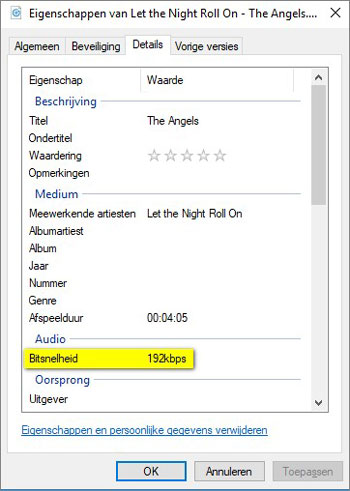
Right-click on the MP3 file you want to check and click Properties in the context menu that opens.
The [Music file name] property window is then displayed. The Details tab shows the exact bit rate of the MP3.

When you close the Properties window and double-click the selected MP3 file, the corresponding MP3 file will be loaded into your PC’s MP3 player and played.
That’s basically all you can do. A bad MP3 is impossible to improve on. Converting music to an MP3 file not only compresses but also removes data from the music file that you have been able to read.

And the lower the bit rate, the more data is generally lost and impossible to recover.

This means that when you have downloaded a low quality MP3 file, you have no choice but to search for a better quality MP3. The same goes for an MP3 whose recording quality is not very good.

Collecting the best possible MP3 files takes some effort. But this effort will be amply rewarded once you start listening to your favorite music, and the sound quality will certainly contribute to the actual enjoyment of the music.