Mp3 is a method of compressing digitally stored music. Uncompressed storage of a stereo digital music file takes up a lot of disk space. An average of 10 MB of disk space per minute of recorded music.
However, if you compress a music file and save it as MP3, only a tenth of the original file size remains.

Since the introduction of the CD, music has been digitally recorded in the form of samples or measurements. Sound is no more or less than vibrating air. These vibrations are also known as sound waves. Sound waves can be measured, recorded and stored.
However, when creative sound waves are produced, there is music.
The number of vibrations per second determines the pitch of the sound. A large amount of vibration produces a high tone, a small amount of vibration produces a low tone.
The number of vibrations per second is expressed in Hertz. Human hearing can perceive sounds between 20 Hz and 20,000 Hz.
Once it has been scientifically established that to capture the highest tone, a measurement must be taken 44,100 times per second. Therefore, the number 44,100 is the sampling frequency expressed in hertz needed for a good quality recording.
In addition to the high and low tones, a piece of music also contains hard and smooth passages. The difference between the highest and smoothest passage is called the dynamic range. For dynamic range on a digitally recordable track, you can choose 256 steps (8 bits) between the softest and loudest part, or 65536 (16 bits).
The dynamic range is highest when recording with 16-bit samples or 65536 steps.
If we then add a calculation to this data, we see that it takes 44,100 measurements for a second of music. Each measurement (sample) is 16 bits (2 bytes) in size. That means that 1 second of music takes up 88,200 bytes or 88 KB of disk space.
But since we like to listen to music in stereo, we can multiply that number by 2. For example, a second of music in stereo already takes up 176 Kb of disk space and, as said, 10 MB per minute.
When a compressed MP3 file is made from an original music file, it is done with a lossy compression method.
Data is lost on lossy compression. With an MP3 file, this means that the information is outside the file that is beyond human hearing range.
For example, people are more sensitive to sounds between 2 kHz and 4 kHz. And we can’t hear loud, soft sounds at the same time. Therefore, only loud sound needs to be preserved. In technical terms, this is called psychoacoustic masking.
What determines the quality of an MP3?
The MP3 format was developed by the German research institute Fraunhofer ISS. In addition to taking advantage of the limitations of human hearing just mentioned, the format consists of a series of mathematical formulas. This allows you to reduce the original file by a factor of 3 to 12.
The amount of compression is related to the bit rate. Bit rate is the amount of data processed per unit time. This means, among other things, that the more data there is in a second, the larger the MP3 file will be. But also the sound quality of the mp3 will be better.
For speech, a bit rate of 64 to 96 kbps is sufficient. A bit rate of 128 kbps is used for a good quality music file. Excellent quality can be achieved with a bit rate of 192 kbps or higher, with a maximum bit rate of 320 kbps.
A bit rate of 192 kbps or higher is useful only if the recording quality of the track is also excellent.
Check the quality of an MP3
Unfortunately, the quality of MP3 music is not always good. This applies, for example, when an MP3 comes from a somewhat unknown source. But of course you can also make an MP3 from a recording that is not very good in itself.
Generally, if you create MP3s from music on your own CDs or other sound media, you can guarantee the quality of the MP3s simply by choosing the appropriate settings in the software you are using.
However, if you get MP3 music in other ways like downloading from the internet for free, it will be a slightly different story.
Then you have to settle for what you get. With the knowledge of this article, it is already much easier to distinguish a low quality MP3 from a good quality MP3.
Something that can be useful. Because there is not much good to do of poor quality.
In summary, we can say that a good MP3 meets the following requirements:
-The MP3 file must have a bit rate of 128 kbps.
A higher bit rate is only desirable for excellent recordings.
-The recording quality must be good.
-The recording quality can be checked by listening to each MP3 before buying and / or downloading it. Preferably with headphones. This gives you the best impression of sound quality.
The MP3s that you buy online, for example at the Apple Store, are usually of good quality. Usually, it is the MP3 files you download from other sources that you should carefully check and listen before using them.
Music you download from sources other than online stores will definitely end up in the Downloads folder.
You can check the MP3 music downloaded from the Internet as follows:
Launch File Explorer and navigate to the Downloads folder.
To display only MP3 files in File Explorer, type: * .mp3 in the search box. This search will show you all the files in the Downloads folder with the extension .mp3.
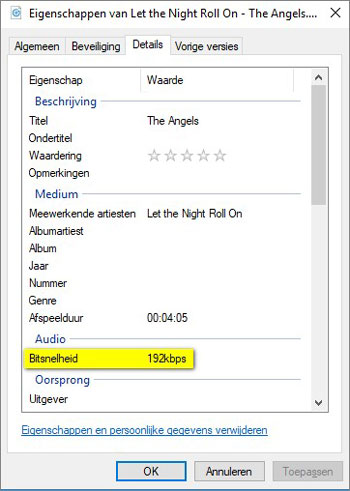
Right-click on the MP3 file you want to check and click Properties in the context menu that opens.
The [Music file name] property window is then displayed. The Details tab shows the exact bit rate of the MP3.
When you close the Properties window and double-click the selected MP3 file, the corresponding MP3 file will be loaded into your PC’s MP3 player and played.
That’s basically all you can do. A bad MP3 is impossible to improve on. Converting music to an MP3 file not only compresses but also removes data from the music file that you have been able to read.
And the lower the bit rate, the more data is generally lost and impossible to recover.
This means that when you have downloaded a low quality MP3 file, you have no choice but to search for a better quality MP3. The same goes for an MP3 whose recording quality is not very good.
Collecting the best possible MP3 files takes some effort. But this effort will be amply rewarded once you start listening to your favorite music, and the sound quality will certainly contribute to the actual enjoyment of the music.