MP3: quality standard?


Free Download Mp4Gain
picture

For many, dematerialized music rhymes with illegally downloaded MP3.

If this comment is often true, since illegal music sharing platforms have made mp3 the primary format for music playback, you obviously need not limit yourself to the single mp3 format.

Mp3

MP3: birth of a format

The MP3 was democratized on the music exchange platforms of the time like Napster, Kazaa, Emule … in the late 90’s and for good reason they allowed you to download an entire album in a few minutes by compressing the music and thus shrinking the files.

Therefore, it is the need to exchange files and shorten the download time (remember we were paying the internet at that time according to your connection time …) making the development of mp3 essential and for many synonymous with dematerialized music.

The MP3 principle is therefore simple and attractive on paper: enable file sharing by drastically reducing the weight of files (more than 90%), and only by keeping what the human ear can do. listen, that is, the frequencies between 20 Hz and 20 kHz.

MP3: bad reputation

Unfortunately, the main consequence of this thin race is that the quality deteriorates: every mp3 has a compression level. The higher it is, the more the musical signal is cut off: this is called destructive compression: we eliminate all information that is considered useless and impossible to return.

Mp3

Therefore, during this period there was the spread of the famous 128 kbps MP3: this figure indicates the amount of information in the file and therefore its quality, the higher and better the sound will be. Therefore, some sort of standard has gradually been established around this bit rate of 128 kbps (kilobits per second), since it is inseparable as the quality of the CD at 1411 kbps.

mp3 – Napster

The Napster interface, one of the first illegal music sharing programs. Note the music ratio at 128 kbps (see less …)

It is clear that we do not reduce the amount of musical information by 90% with impunity and the results are often poor, the quality of the mp3 with 128 kbps is much lower and perfectly noticeable from the original CD. Then the new bit rates of 160 kbps, 192 kbps, 256 kbps and 320 kbps came to maximum, then “VBR” formats for “Variable Bit Rate” and against CBR (constant bit rate)) used earlier: we decreased the bit rate at rest and increased if necessary.

Therefore, we can see that it is difficult to pronounce the MP3 format in general: the results will be very different between a 128 kbps CBR mp3 and a 320 kbps VBR and, to a large extent, for the latter, for the price of one double weight.

Alternatives to MP3

MP3 is not the only dematerialized music format, it is first necessary to divide the compression formats into two categories:

Destructive Compression Formats: We remove content to reduce its size

MP3: the readable standard for 100% of music devices released in 20 years

AAC: Used by Apple in the iTunes music store (Apple Audio Codec), almost as universal as MP3

Ogg Vorbis: a free, efficient yet non-standard format

WMA: Microsoft format, not very standard either, except on Windows PC (can Microsoft have anything to do with it?)

Non-destructive compression formats: we compress the data for storage and decompress it when reading, therefore the sound reproduction is lossless, but it generates files 3 times larger:

FLAC: Free Lossless Audio Codec, it is somewhat the equivalent of Ogg in that it is royalty free and has established itself as the current standard for non-destructive formats (lossless in English)

ALAC: The Apple version of FLAC, which has also been in free form for some time, has the advantage of being compatible with the brand’s products and computers and offers the same benefits as FLAC.



Free Download Mp4Gain
picture


Mp4Gain Main Window
picture


Mp4Gain Features
picture


Free Download Mp4Gain
picture

What exactly is an MP3 music file?

Mp3 is a method of compressing digitally stored music. Uncompressed storage of a stereo digital music file takes up a lot of disk space. An average of 10 MB of disk space per minute of recorded music.

However, if you compress a music file and save it as MP3, only a tenth of the original file size remains.

mp3 quality

Since the introduction of the CD, music has been digitally recorded in the form of samples or measurements. Sound is no more or less than vibrating air. These vibrations are also known as sound waves. Sound waves can be measured, recorded and stored.

However, when creative sound waves are produced, there is music.

The number of vibrations per second determines the pitch of the sound. A large amount of vibration produces a high tone, a small amount of vibration produces a low tone.

The number of vibrations per second is expressed in Hertz. Human hearing can perceive sounds between 20 Hz and 20,000 Hz.

Once it has been scientifically established that to capture the highest tone, a measurement must be taken 44,100 times per second. Therefore, the number 44,100 is the sampling frequency expressed in hertz needed for a good quality recording.

In addition to the high and low tones, a piece of music also contains hard and smooth passages. The difference between the highest and smoothest passage is called the dynamic range. For dynamic range on a digitally recordable track, you can choose 256 steps (8 bits) between the softest and loudest part, or 65536 (16 bits).

The dynamic range is highest when recording with 16-bit samples or 65536 steps.

If we then add a calculation to this data, we see that it takes 44,100 measurements for a second of music. Each measurement (sample) is 16 bits (2 bytes) in size. That means that 1 second of music takes up 88,200 bytes or 88 KB of disk space.

But since we like to listen to music in stereo, we can multiply that number by 2. For example, a second of music in stereo already takes up 176 Kb of disk space and, as said, 10 MB per minute.

When a compressed MP3 file is made from an original music file, it is done with a lossy compression method.

Data is lost on lossy compression. With an MP3 file, this means that the information is outside the file that is beyond human hearing range.

For example, people are more sensitive to sounds between 2 kHz and 4 kHz. And we can’t hear loud, soft sounds at the same time. Therefore, only loud sound needs to be preserved. In technical terms, this is called psychoacoustic masking.

What determines the quality of an MP3?

The MP3 format was developed by the German research institute Fraunhofer ISS. In addition to taking advantage of the limitations of human hearing just mentioned, the format consists of a series of mathematical formulas. This allows you to reduce the original file by a factor of 3 to 12.

The amount of compression is related to the bit rate. Bit rate is the amount of data processed per unit time. This means, among other things, that the more data there is in a second, the larger the MP3 file will be. But also the sound quality of the mp3 will be better.

For speech, a bit rate of 64 to 96 kbps is sufficient. A bit rate of 128 kbps is used for a good quality music file. Excellent quality can be achieved with a bit rate of 192 kbps or higher, with a maximum bit rate of 320 kbps.

A bit rate of 192 kbps or higher is useful only if the recording quality of the track is also excellent.

Check the quality of an MP3

Unfortunately, the quality of MP3 music is not always good. This applies, for example, when an MP3 comes from a somewhat unknown source. But of course you can also make an MP3 from a recording that is not very good in itself.

Generally, if you create MP3s from music on your own CDs or other sound media, you can guarantee the quality of the MP3s simply by choosing the appropriate settings in the software you are using.

However, if you get MP3 music in other ways like downloading from the internet for free, it will be a slightly different story.

Then you have to settle for what you get. With the knowledge of this article, it is already much easier to distinguish a low quality MP3 from a good quality MP3.

Something that can be useful. Because there is not much good to do of poor quality.

In summary, we can say that a good MP3 meets the following requirements:

-The MP3 file must have a bit rate of 128 kbps.
A higher bit rate is only desirable for excellent recordings.
-The recording quality must be good.
-The recording quality can be checked by listening to each MP3 before buying and / or downloading it. Preferably with headphones. This gives you the best impression of sound quality.

The MP3s that you buy online, for example at the Apple Store, are usually of good quality. Usually, it is the MP3 files you download from other sources that you should carefully check and listen before using them.

Music you download from sources other than online stores will definitely end up in the Downloads folder.

You can check the MP3 music downloaded from the Internet as follows:

Launch File Explorer and navigate to the Downloads folder.
To display only MP3 files in File Explorer, type: * .mp3 in the search box. This search will show you all the files in the Downloads folder with the extension .mp3.
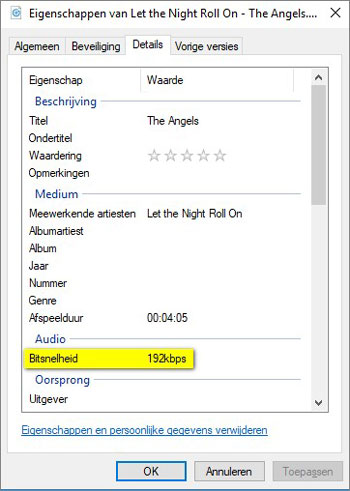
Right-click on the MP3 file you want to check and click Properties in the context menu that opens.
The [Music file name] property window is then displayed. The Details tab shows the exact bit rate of the MP3.

When you close the Properties window and double-click the selected MP3 file, the corresponding MP3 file will be loaded into your PC’s MP3 player and played.
That’s basically all you can do. A bad MP3 is impossible to improve on. Converting music to an MP3 file not only compresses but also removes data from the music file that you have been able to read.

And the lower the bit rate, the more data is generally lost and impossible to recover.

This means that when you have downloaded a low quality MP3 file, you have no choice but to search for a better quality MP3. The same goes for an MP3 whose recording quality is not very good.

Collecting the best possible MP3 files takes some effort. But this effort will be amply rewarded once you start listening to your favorite music, and the sound quality will certainly contribute to the actual enjoyment of the music.

Mp3: Advantages of MP3

MP3 refers to an encoding format that is formally referred to as MPEG-1 Audio Layer III for digital audio. Designated MP3 or MP3 data that stores basic MPEG-2 audio data or MPEG-1 audio data that is encoded. They do not contain any completely different complexity than the format. Find out more about the MP3 file format and its benefits.

As worrying as audio compression is, MP3 is a lossy compression module for encoding data with the expectation of partial rejection and inaccurate approximations of the data. And this ends with a noticeable reduction in file size, now no longer like with uncompressed audio.

The small size and excellent audio quality led to the provision of song data on Highway Records in the 1990s. MP3 served as expanded storage capacity and bandwidth in these hardly expensive times.

In about a year, the MP3 format has addressed controversy surrounding song piracy and copyright infringement. Instead, this file format became a custom format with the advent of avid portable gamers, including smartphones.

How does this compression work? This compression reduces the precision of the explicit parts of the sound that people can no longer hear. This method is ceaselessly referred to as perceptual coding or psychoacoustic modeling.

Then the free time of audio knowledge is recorded with the extraction of the allocated memory. FFT and MDCT algorithms are used here. Unlike CD audio, this audio compression design can reduce file size by up to 95%. Every time you document a conversion at a fixed bit rate of 128 kb / s, the file size is 9% more realistic than the audio on the actual CD.

Advantages of MP3

Here’s a hint about one of the benefits the MP3 audio file format offers. For these benefits, you can also lift whenever you can safely move around in this format, or opt for a lossless option.

One of the main advantages of this file format is that you can document songs, speeches or conversations for hours without affecting the allocated storage space. Basically, up to 95% of the allocated storage space is allocated. And the most important thing is that fine audio is identical with completely different codecs that take a lot of assignment.

The small size of such audio data allows you to map hundreds of data onto a small memory card or memory card. In other words, you can also save more than 170 songs on a CD with a storage capacity of 700 MB. On the other hand, the CDDA option does not mean that more than 15 tracks can be saved.

Instead, due to the logic that the file size is extremely small, you don’t have to spend a lot of bandwidth every time you get a lot of songs. Therefore, MP3 is a great wish for all types of users.

The best thing about MP3 is that you can change the audio level you want based on the available memory allocation. It can also rise between 32 kbps and 320 kbps. On the other hand, indicate that the higher the bit price, the larger the file size.

Audio quality: Bitrate in MP3 files

In many cases the term Bitrate is used, which is the bit rate per second that a multimedia file (Audio or Video) has. Currently the MP3 music format is one of the most widespread (Although there are currently other more current formats such as OGG Vorbis, AAC, Flac, Monkey Audio, …) however the audio quality is variable, this is due to the characteristics with which the MP3 in question has been compressed, including:

Mode: It can be of two types mainly:
Mono: With a single channel (The right and left channel go together, not separated which gives worse audio quality).
Stereo: Two channels (Right and Left, improve audio quality).

Sampling frequency: Audio CDs use 44,100 Hz (22,050 Hz per channel), although there are higher frequencies such as 48,000 Hz used in DVDs and lower, the higher the frequency, the higher the quality.

Bits: Audio CDs have 16 Bits (Although MP3 can be compressed at a lower quality such as 8 Bits).

Bitrate (Bit Rate per second): Audio CDs have about 1,400 Kbps (44100 Hz * 16 Bits * 2 channels), meaning that an Audio CD would have a bitrate of 1,400 Kbps (In MP3 format the maximum Bitrate is 320 Kbps, however, it is assumed that an MP3 with a 128 Kbps Bitrate has a quality similar to CD, although in many cases to achieve a quality similar to CD it is necessary to use a Bitrate of 192 Kbps, and to obtain CD quality it is necessary use 256 Kbps or 320 Kbps).

Some of the most common Bitrates are:
8 Kbps Mono: Telephone Sound.
16 Kbps Mono: Better quality than shortwave.
32 Kbps Mono: Better quality than AM.
64 Kbps Stereo: Better quality than FM.
112 – 128 Kbps: Quality close to CD.
160 Kbps: Quality closer to CD.
192 Kbps: Virtually CD quality.
256 Kbps: Quality CD practically undisputed from an original CD.
320 Kbps: CD quality.

Coding method: It can be of two types:
VBR (Variable Bit Rate, Bit Rate Variable): Encodes the file in MP3 with a variable Bitrate.
CBR (Constant Bit Rate, Constant Bit Rate): Encodes the MP3 file with a fixed Bitrate.
In addition, another factor that influences the encoding of the MP3 file is the CODEC (Encoder-Decoder) used, one of the most common and the best result is LAME (Lame Ain’t an MP3 Encoder) which is also free.
One point to keep in mind is that if we recompress an MP3 file that originally has a 128 Kbps bitrate and convert them to 192 Kbps for example, audio quality is not really gained because the MP3 format has some quality loss (MP3 is a loss algorithm, also called lossy). which has occurred when converting the original file (Ex: CD Audio or a 320 Kbps MP3 to a 128 Kbps MP3) so this recompression does not make much sense since we will not gain in audio quality (As they say where there is no one can not get) and the only thing we will achieve in any case is to increase the initial size of the file.
The opposite case (Recompress a 320 Kbps MP3 file for example at 192 Kbps) if it makes some sense because in this case although we lose some audio quality we reduce the weight (Kilobytes or Megabytes) of each MP3 file somewhat.
In conclusion, it can be said that if we need to encode / compress an MP3 file with good quality, the “ideal” would be to do so:
To be able to start from an Audio CD, although an MP3 at 320 or 256 Kbps could also be valid for a recompression of the file.
In stereo mode (With two channels, right and left).
With at least 44100 Khz sampling rate and 16 Bits.
With a minimum bitrate of 192 Kbps or at most 256 Kbps (Using 320 Kbps would give higher quality but also increase the file size considerably).