MP3 Compression: Bitrate and Audio Quality Tradeoffs
MP3 CompressionMP3 Compression
MP3 Compression
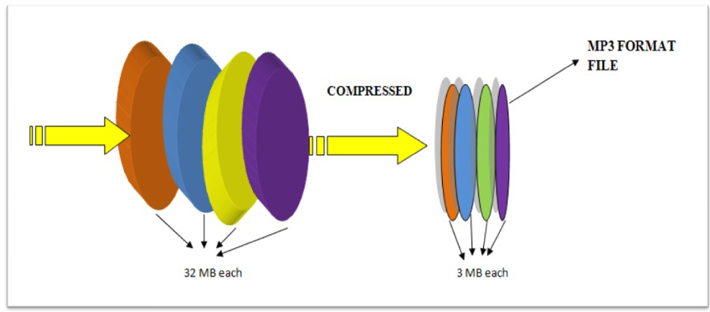
MP3 is a popular format for digital audio. It is a lossy format, which means that some of the original audio data is discarded in order to reduce the file size. The amount of data that is discarded is determined by the bitrate, which is a measure of the amount of data per second. A higher bitrate results in a higher quality audio file, but also a larger file size.
How MP3 Compression Works
MP3 compression works by using a technique called psychoacoustic coding. Psychoacoustic coding takes advantage of the fact that the human ear is not equally sensitive to all frequencies. For example, we can hear lower frequencies better than higher frequencies. Psychoacoustic coding uses this information to discard frequencies that are not as important to human hearing.
Bitrate and Audio Quality
The bitrate is the most important factor that determines the audio quality of an MP3 file. A higher bitrate results in a higher quality audio file, but also a larger file size. For example, a 128 kbps MP3 file will sound better than a 64 kbps MP3 file, but the 128 kbps file will be twice as large.
Choosing the Right Bitrate
The best bitrate to choose depends on how you plan to use the MP3 file. If you are going to listen to the file on a high-quality audio system, then you will want to use a high bitrate. If you are going to listen to the file on a portable device, then you may want to use a lower bitrate to save space.
Other Factors That Affect Audio Quality
In addition to the bitrate, there are other factors that can affect the audio quality of an MP3 file. These factors include the sampling rate, the bit depth, and the encoder used.
The sampling rate is the number of times per second that the audio signal is sampled. A higher sampling rate results in a higher quality audio file.
The bit depth is the number of bits used to represent each sample. A higher bit depth results in a higher quality audio file.
The encoder is the software that is used to compress the audio file. Different encoders use different algorithms, and some encoders produce better quality audio files than others.
Conclusion
MP3 compression is a popular and effective way to reduce the file size of digital audio files. By using a high bitrate, you can ensure that the audio quality of your MP3 files is good enough for your needs.
Frequently Asked Questions
What is the difference between MP3 and lossless audio formats?
MP3 is a lossy format, which means that some of the original audio data is discarded in order to reduce the file size. Lossless audio formats, such as FLAC and WAV, do not discard any data, so they retain the original audio quality. However, lossless audio files are much larger than MP3 files.
What is the best bitrate for MP3 files?
The best bitrate for MP3 files depends on how you plan to use them. If you are going to listen to the files on a high-quality audio system, then you will want to use a high bitrate. If you are going to listen to the files on a portable device, then you may want to use a lower bitrate to save space.
What are some tips for improving the audio quality of MP3 files?
There are a few things you can do to improve the audio quality of MP3 files. First, use a high bitrate. Second, use a high-quality encoder. Third, avoid using compression plugins or software that may degrade the audio quality.
What are some common problems with MP3 files?
Some common problems with MP3 files include:
Crackling or popping noises
Loss of high-frequency sounds
Muffled or distorted sound
These problems can be caused by a number of factors, including:
Low bitrate
Poor quality encoder
Damage to the file
If you are experiencing problems with your MP3 files, try using a different encoder or a higher bitrate. You can also try repairing the file using a file repair utility.
As someone who has been working with audio files for years, I can tell you that MP3 compression is one of the most important topics in the industry. It’s a technique that has revolutionized the way we listen to music, and it’s something that every audio enthusiast should understand.
How MP3 Compression Works
At its core, MP3 compression is all about removing data that the human ear can’t hear. This is done by analyzing the audio file and identifying sounds that are outside of the range of human hearing. These sounds are then removed, resulting in a smaller file size without any noticeable loss in quality.
As the book “The Art of Digital Audio” explains, “MP3 compression is based on the psychoacoustic principle that the human ear cannot discern certain sounds that are masked by other sounds.” This means that by removing these masked sounds, we can significantly reduce the file size of an audio file without sacrificing quality.
The Benefits of MP3 Compression
One of the biggest benefits of MP3 compression is the ability to store more music on your device. Before MP3 compression, most audio files were too large to be stored on a computer or portable music player. With MP3 compression, you can store hundreds or even thousands of songs on a single device.
Another benefit of MP3 compression is the ability to stream music over the internet. Without MP3 compression, streaming music would be nearly impossible due to the large file sizes of most audio files. MP3 compression allows for fast and efficient streaming, making it possible to listen to music on the go.
The Future of MP3 Compression
While MP3 compression has been around for decades, it’s still an evolving technology. As new audio formats and compression techniques are developed, we can expect MP3 compression to continue to improve.
One area where MP3 compression is likely to see significant growth is in the field of virtual and augmented reality. As these technologies become more advanced, the need for high-quality, low-latency audio will become increasingly important. MP3 compression is likely to play a key role in meeting this need.
MP3 Compression vs. Other Audio Formats
When it comes to audio formats, there are a lot of options out there. From WAV to FLAC to AAC, each format has its own strengths and weaknesses. So how does MP3 compression stack up against the competition?
MP3 Compression vs. WAV
WAV is a lossless audio format that is often used in professional audio production. While WAV files offer the highest possible audio quality, they also come with a large file size. This makes them impractical for most consumer applications.
MP3 compression, on the other hand, offers a good balance between file size and audio quality. While MP3 files are not as high-quality as WAV files, they are much smaller and more practical for everyday use.
MP3 Compression vs. FLAC
FLAC is another lossless audio format that is often used by audiophiles. Like WAV, FLAC files offer high-quality audio, but they also come with a large file size.
While FLAC files are great for archiving and preserving high-quality audio, they are not practical for everyday use. MP3 compression, on the other hand, offers a good compromise between file size and audio quality, making it the ideal format for most consumer applications.
MP3 Compression vs. AAC
AAC is a newer audio format that was developed by Apple. Like MP3 compression, AAC is a lossy format that offers a good balance between file size and audio quality.
While AAC files are generally smaller than MP3 files, they also tend to offer slightly better audio quality. However, because AAC is a proprietary format, it is not as widely supported as MP3 compression.
The Science Behind MP3 Compression
At its core, MP3 compression is all about the science of sound. By understanding how sound works and how the human ear perceives it, we can create audio files that are smaller and more efficient without sacrificing quality.
The Psychoacoustic Model
The key to MP3 compression is the psychoacoustic model. This model is based on the fact that the human ear is not equally sensitive to all frequencies of sound. In fact, our ears are much more sensitive to sounds in the midrange frequencies than they are to sounds in the high or low frequencies.
By taking advantage of this fact, MP3 compression is able to remove sounds that are outside of the range of human hearing. This results in a smaller file size without any noticeable loss in quality.
The Bitrate
Another important factor in MP3 compression is the bitrate. The bitrate is the amount of data that is used to represent each second of audio. A higher bitrate means that more data is being used, which results in a higher-quality audio file.
However, higher bitrates also mean larger file sizes. This is why most MP3 files are encoded at a bitrate of 128 kbps or 192 kbps. These bitrates offer a good balance between file size and audio quality.
The Future of MP3 Compression
As technology continues to evolve, we can expect MP3 compression to continue to improve. New compression techniques and audio formats are likely to emerge, offering even better audio quality and smaller file sizes.
However, even as new technologies emerge, MP3 compression is likely to remain a key part of the audio industry. Its ability to offer high-quality audio in a small file size makes it the ideal format for most consumer applications.
MP3 Compression Techniques
There are a number of different techniques that can be used to compress MP3 files. Each technique has its own strengths and weaknesses, and the best technique to use will depend on the specific needs of the user.
Constant Bitrate Encoding
Constant bitrate encoding is the simplest and most common technique used to compress MP3 files. With constant bitrate encoding, the bitrate is kept constant throughout the entire audio file.
While constant bitrate encoding is easy to implement, it can result in larger file sizes than other techniques. This is because the bitrate is not adjusted to match the complexity of the audio.
Variable Bitrate Encoding
Variable bitrate encoding is a more advanced technique that adjusts the bitrate based on the complexity of the audio. This means that more data is used to represent complex sounds, while less data is used to represent simpler sounds.
Variable bitrate encoding can result in smaller file sizes than constant bitrate encoding, while still maintaining high audio quality. However, it can be more difficult to implement than constant bitrate encoding.
Joint Stereo Encoding
Joint stereo encoding is a technique that takes advantage of the fact that most audio files are recorded in stereo. With joint stereo encoding, the left and right channels of the audio are analyzed separately, and the data is compressed based on the similarities between the two channels.
This technique can result in smaller file sizes than other techniques, while still maintaining high audio quality. However, it can also result in some loss of stereo separation.
The Benefits of MP3 Compression
As someone who has been working with audio files for years, I can tell you that MP3 compression is one of the most important topics in the industry. It’s a technique that has revolutionized the way we listen to music, and it’s something that every audio enthusiast should understand.
Storing More Music
One of the biggest benefits of MP3 compression is the ability to store more music on your device. Before MP3 compression, most audio files were too large to be stored on a computer or portable music player. With MP3 compression, you can store hundreds or even thousands of songs on a single device.
This is something that I’ve personally experienced. As someone who loves music, I used to have to carry around a large collection of CDs or cassette tapes. With MP3 compression, I can now carry my entire music collection in my pocket.
Streaming Music
Another benefit of MP3 compression is the ability to stream music over the internet. Without MP3 compression, streaming music would be nearly impossible due to the large file sizes of most audio files. MP3 compression allows for fast and efficient streaming, making it possible to listen to music on the go.
This is something that I’ve personally experienced as well. As someone who travels frequently, I rely on streaming music services to keep me entertained on long flights or train rides. Without MP3 compression, this would not be possible.
The Future of MP3 Compression
While MP3 compression has been around for decades, it’s still an evolving technology. As new audio formats and compression techniques are developed, we can expect MP3 compression to continue to improve.
One area where MP3 compression is likely to see significant growth is in the field of virtual and augmented reality. As these technologies become more advanced, the need for high-quality, low-latency audio will become increasingly important. MP3 compression is likely to play a key role in meeting this need.
MP3 Compression for Beginners
If you’re new to the world of audio files, MP3 compression can seem like a daunting topic. However, with a little bit of knowledge, you can quickly become an expert.
Choosing the Right Bitrate
One of the most important things to consider when compressing MP3 files is the bitrate. The bitrate is the amount of data that is used to represent each second of audio. A higher bitrate means that more data is being used, which results in a higher-quality audio file.
However, higher bitrates also mean larger file sizes. This is why most MP3 files are encoded at a bitrate of 128 kbps or 192 kbps. These bitrates offer a good balance between file size and audio quality.
Using the Right Software
Another important factor to consider when compressing MP3 files is the software that you use. While there are many different programs available for compressing audio files, not all of them are created equal.
If you’re looking for a reliable and easy-to-use program for compressing MP3 files, I would recommend checking out MP4Gain. This program offers a wide range of compression options, making it easy to find the right settings for your needs.
Conclusion
In conclusion, MP3 compression is an important topic for anyone who works with audio files. Whether you’re a professional audio engineer or just someone who loves music, understanding MP3 compression is essential.
By taking advantage of the techniques and technologies available for MP3 compression, you can store more music on your device, stream music over the internet, and enjoy high-quality audio without sacrificing file size. So if you haven’t already, I would encourage you to start exploring the world of MP3 compression today.
How to distinguish the sound quality of Mp3 songs?
Factors that affect audio quality are the number of channels, the sampling rate, and the number of quantization bits.
It’s not directly related to file size, I think friends who have used Audition or play more music will be more familiar with it.
-Number of channels
Channel count is easy to understand and is often referred to as channel count. Usually we talk about left and right channels, single and double channels, which refers to the number of channels.
The music that we listen to often in life is basically two-channel, that is, the left and right channels. Generally speaking, the higher the number of channels, the better the audio quality. Then the stereoscopic feeling of the sound will be stronger. It will feel more real. When a person speaks or an object makes a sound, the sound also spreads in all directions, and of course there are more than two channels. So, in fact, it is difficult for digital audio to achieve real sound realism.
-Sampling frequency
For example, when Audition exports audio files, there is a sample rate option. What exactly is this sample rate?
Sampling rate is explained in official words: the number of samples per unit of time (within 1S). The higher the sample rate, the more data it collects and the better the sound quality.
But you will find that music in real life is generally 44100HZ sampling rate, like the lossless music in the picture above. So there are so many miscellaneous sample rate options in the image below. What does this mean? The reason is that the audible sound range of the human ear is between 20 and 20,000 Hz. Even if you increase the sample rate, it will still sound the same to ordinary people, so there is no need.
-Quantization bits
This is also very understandable. It’s like the number of bits that people often say about the computer. Audio also has the concept of bits. A common number of bits for audio is 16 bits. Generally speaking, the higher the number of bits, the better the sound quality. The popular understanding of quantization is to digitize the sampled value, that is, in the binary form recognized by the computer.
The property display in Windows may not display these parameters intuitively, but you can see them with the help of tools. Sound quality is determined by the above three aspects. Instead of looking at the size of the file. Of course, the audio is basically compressed and transcoded when it is broadcast to the audience. After all, high volume digital audio is not conducive to broadcasting.
FAQ
How to distinguish the sound quality of an mp3?
It is important to look at several elements to distinguish its sound quality. Of course, first is the quality of the recording, then the bitrate and samplerate.
Your can improve the sound quality of an mp3?
It is possible, using Mp4Gain, to improve the perception of the quality of an mp3 or any other audio or video format. In addition to modifying the bitrate and sample rate, we can modify the “color” with an equalizer and even slightly modify the pitch and of course normalize the audio.
MP3 refers to an encoding format that is formally referred to as MPEG-1 Audio Layer III for digital audio. Designated MP3 or MP3 data that stores basic MPEG-2 audio data or MPEG-1 audio data that is encoded. They do not contain any completely different complexity than the format. Find out more about the MP3 file format and its benefits.
As worrying as audio compression is, MP3 is a lossy compression module for encoding data with the expectation of partial rejection and inaccurate approximations of the data. And this ends with a noticeable reduction in file size, now no longer like with uncompressed audio.
The small size and excellent audio quality led to the provision of song data on Highway Records in the 1990s. MP3 served as expanded storage capacity and bandwidth in these hardly expensive times.
In about a year, the MP3 format has addressed controversy surrounding song piracy and copyright infringement. Instead, this file format became a custom format with the advent of avid portable gamers, including smartphones.
How does this compression work? This compression reduces the precision of the explicit parts of the sound that people can no longer hear. This method is ceaselessly referred to as perceptual coding or psychoacoustic modeling.
Then the free time of audio knowledge is recorded with the extraction of the allocated memory. FFT and MDCT algorithms are used here. Unlike CD audio, this audio compression design can reduce file size by up to 95%. Every time you document a conversion at a fixed bit rate of 128 kb / s, the file size is 9% more realistic than the audio on the actual CD.
Advantages of MP3
Here’s a hint about one of the benefits the MP3 audio file format offers. For these benefits, you can also lift whenever you can safely move around in this format, or opt for a lossless option.
One of the main advantages of this file format is that you can document songs, speeches or conversations for hours without affecting the allocated storage space. Basically, up to 95% of the allocated storage space is allocated. And the most important thing is that fine audio is identical with completely different codecs that take a lot of assignment.
The small size of such audio data allows you to map hundreds of data onto a small memory card or memory card. In other words, you can also save more than 170 songs on a CD with a storage capacity of 700 MB. On the other hand, the CDDA option does not mean that more than 15 tracks can be saved.
Instead, due to the logic that the file size is extremely small, you don’t have to spend a lot of bandwidth every time you get a lot of songs. Therefore, MP3 is a great wish for all types of users.
The best thing about MP3 is that you can change the audio level you want based on the available memory allocation. It can also rise between 32 kbps and 320 kbps. On the other hand, indicate that the higher the bit price, the larger the file size.