MP3 Bitrate Comparison: 128 kbps vs 320 kbps


Free Download Mp4Gain
picture

MP3 Bitrate Comparison: 128 kbps vs 320 kbps

MP3 Bitrate Comparison: 128 kbps vs 320 kbps

Let’s talk about MP3 bitrate comparison: 128 kbps vs 320 kbps

In the world of MP3, the battle between 128 kbps and 320 kbps bitrates is a big topic. As a specialist, I get asked all the time about which bitrate delivers the best balance between quality and file size. For someone seeking a rich listening experience, knowing the difference between these bitrates is essential. Let’s dig deeper into each bitrate’s strengths, drawbacks, and when one might work better than the other.

Understanding Bitrate in MP3 Files

Bitrate is a major player in audio quality. In simple terms, bitrate represents the amount of data processed over a specific time frame. For MP3 files, it’s measured in kilobits per second (kbps). Think of it like a water pipe: the higher the bitrate, the wider the pipe, letting more “data” flow through, meaning you get more audio detail and quality. But with all that comes larger file sizes, which may not be ideal for everyone.

The Benefits and Drawbacks of 128 kbps

128 kbps has long been a standard for MP3 files, especially in the early days of digital music when storage was limited. But does it still hold up?

Advantages of 128 kbps

  • Smaller File Size – Great for portable devices or limited storage space.
  • Faster Downloads – Quick download times on slower internet connections.
  • Good for Speech – Sufficient for audiobooks or podcasts where music quality isn’t crucial.

Drawbacks of 128 kbps

  • Loss of Audio Detail – Some subtle sounds get lost due to compression.
  • Noticeable Artifacts – More likely to have audio “glitches” or “artifacts” in complex songs.
  • Limited Range – Highs and lows in sound may feel “clipped” or flat.

What 320 kbps Offers for Audio Enthusiasts

On the flip side, 320 kbps is the go-to for anyone wanting a “full” listening experience. It’s like getting a high-definition version of a video – everything sounds sharper, fuller, and richer. But that improvement comes with its own set of considerations.

Advantages of 320 kbps

  • Superior Sound Quality – Preserves more audio details and nuances.
  • Better for Music – Ideal for complex tracks, with a better balance between lows, mids, and highs.
  • High Dynamic Range – Provides a broader range of sounds, from quiet tones to powerful beats.

Drawbacks of 320 kbps

  • Large File Size – Not ideal if storage space is an issue.
  • Longer Download Times – Requires faster internet to avoid long waits.
  • Overkill for Casual Listening – The quality may go unnoticed on basic speakers or headphones.

Sound Quality Comparison: 128 kbps vs 320 kbps

When we get down to the nitty-gritty, 128 kbps and 320 kbps provide vastly different experiences. At 128 kbps, audio quality is functional but compressed. Imagine watching a movie in standard definition versus high definition – that’s the kind of difference we’re talking about. At 320 kbps, you get more detail, clarity, and richness, especially in the mid to high ranges where a lot of music “lives.”

Impact on Storage and File Sizes

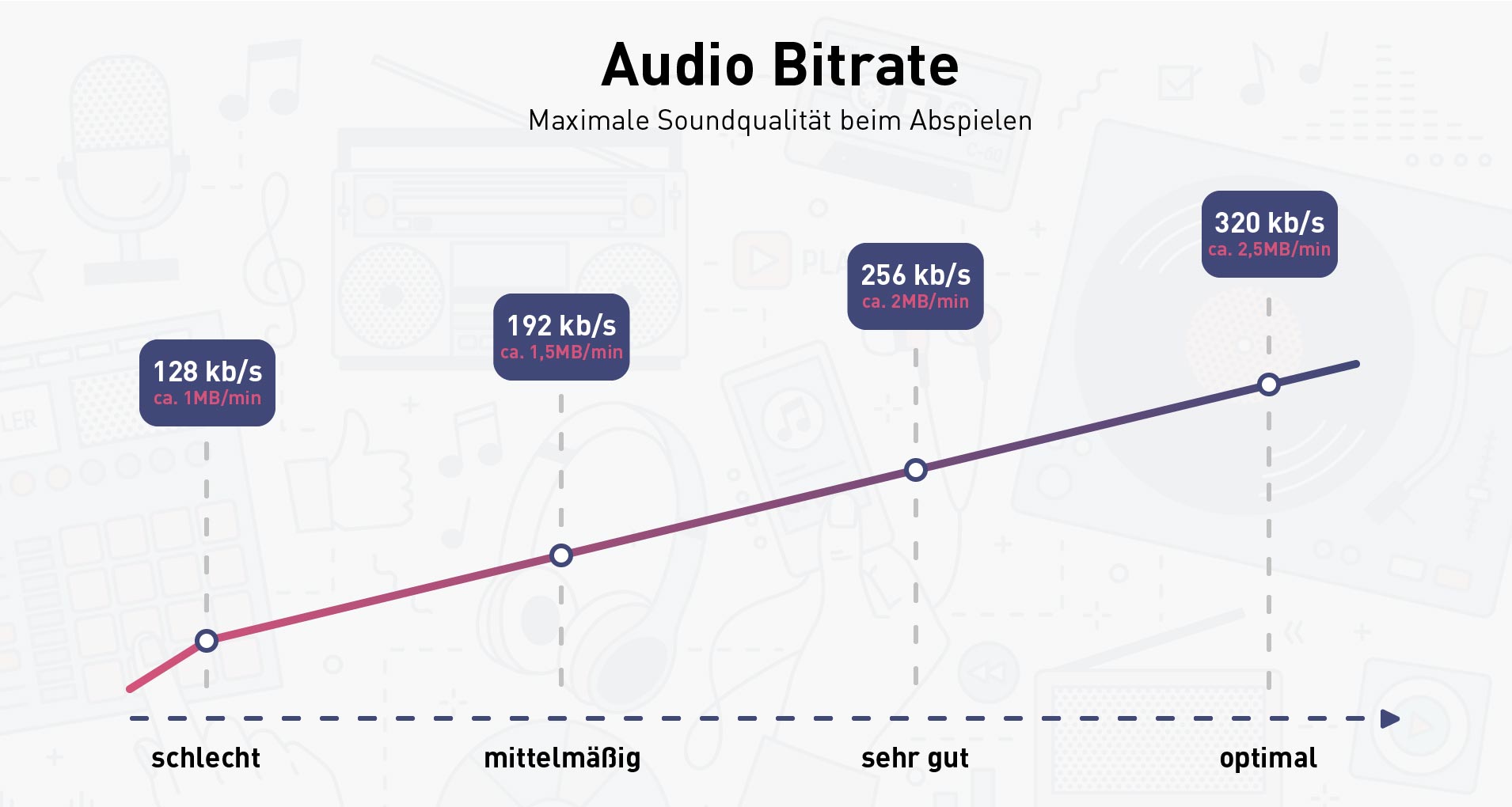
For many people, file size is just as important as sound quality. The difference between 128 kbps and 320 kbps is significant: a song at 128 kbps might take up about 3 MB, while the same track at 320 kbps could use up to 10 MB. This means fewer songs on a smaller device at the higher bitrate, but if quality matters more than quantity, 320 kbps wins.

Choosing the Right Bitrate for Different Scenarios

The right bitrate often depends on what you’re using it for. If you’re setting up a playlist for a road trip with limited data, 128 kbps might be perfect. But if you’re crafting a high-quality playlist for your home sound system, 320 kbps is likely worth the extra space.

Compatibility and Playback Differences

Most modern devices can handle both 128 kbps and 320 kbps, but there are situations where compatibility matters. Some older devices might struggle with larger 320 kbps files, and streaming services often compress tracks to reduce buffering. Knowing your device’s limits can help guide your choice.

Popular Use Cases for 128 kbps vs 320 kbps

When 128 kbps is Ideal

  • For Portable Listening – Smaller files allow for a bigger music library.
  • When Data Usage is a Concern – Limited internet data can make lower bitrates appealing.
  • For Voice-Only Content – Audiobooks, podcasts, and news broadcasts don’t require high-quality audio.

When 320 kbps is Worth It

  • For High-Quality Music – Perfect for critical listening on good speakers or headphones.
  • When Storage is Not an Issue – Allows for top audio quality without worrying about space.
  • For Professional Audio Needs – Ideal for DJs, music producers, or any scenario needing pristine sound.

Final Thoughts on MP3 Bitrate Choices

Deciding between 128 kbps and 320 kbps can feel tricky, but it boils down to balancing quality and convenience. In my experience, I’ve found that higher bitrates give you more life-like sound, especially when using quality playback devices. Yet, 128 kbps remains a practical choice for everyday use, especially on portable devices with limited storage. Ultimately, the best bitrate for you depends on your priorities and listening habits.

Latest Words on MP3 bitrate comparison: 128 kbps vs 320 kbps

Both 128 kbps and 320 kbps have their place in the MP3 world, but each serves a different need. If you value sound clarity, 320 kbps is worth the extra space. On the other hand, if convenience and file size take priority, 128 kbps still provides a reliable listening experience. For anyone serious about audio quality, Mp4Gain provides solutions that can enhance and normalize MP3 playback, ensuring your music always sounds its best.

MP3 Bitrate Comparison: 128 kbps vs 320 kbps – Frequently Asked Questions

What is the difference between 128 kbps and 320 kbps in MP3 files?

The main difference between 128 kbps and 320 kbps MP3 files is the audio quality and file size. At 128 kbps, the file is more compressed, resulting in lower quality and smaller file sizes, ideal for casual listening and saving space. At 320 kbps, the audio is less compressed, preserving more detail for high-quality sound, but with larger file sizes. Higher bitrates, like 320 kbps, offer richer sound with clearer highs and lows, making it better for those prioritizing audio quality.

Is 128 kbps good enough for listening to music?

Yes, 128 kbps is suitable for everyday listening, especially on standard speakers or headphones where subtle details may not be noticeable. It’s particularly useful for casual listeners and mobile devices with limited storage, as it saves space. However, if you’re looking for a fuller sound experience, especially on high-end equipment, 320 kbps may be a better choice.

Does 320 kbps MP3 quality sound better than 128 kbps?

Yes, 320 kbps MP3 files generally sound better than 128 kbps due to the higher bitrate, which preserves more audio detail. This results in clearer, richer sound, especially noticeable in complex music tracks with varied instruments and frequencies. For audiophiles and music enthusiasts, the difference is significant, although casual listeners may not notice as much difference on standard audio devices.

How much storage space does a 128 kbps MP3 use compared to a 320 kbps MP3?

A 128 kbps MP3 file typically takes up around 1 MB per minute of audio, while a 320 kbps file can use up to 2.5 MB per minute. This means 320 kbps files are more than twice the size of 128 kbps files, which can impact storage significantly if you have a large music library. For people with storage limitations, 128 kbps offers a better balance between quality and space efficiency.

When should I choose 128 kbps instead of 320 kbps?

Choosing 128 kbps is ideal when you need to save space, have limited data, or are listening on basic audio equipment where fine details in sound may not be noticeable. This bitrate is also suitable for podcasts, audiobooks, and other spoken content where audio fidelity is less critical. However, for music, especially with complex sound, 320 kbps can enhance the listening experience.

Does 320 kbps MP3 quality make a difference on all devices?

The improvement in audio quality with 320 kbps MP3 is most noticeable on high-quality audio equipment. Standard headphones or speakers may not showcase the difference as clearly, but on quality headphones or sound systems, the enhanced depth and clarity of 320 kbps is significant. For portable devices or casual listening, 128 kbps may be sufficient, while 320 kbps excels on setups designed for high-quality audio playback.

Is there a downside to using 320 kbps MP3 files?

The main downside of 320 kbps MP3 files is their larger size, which can fill up storage space quickly, especially on devices with limited capacity. Additionally, they require more bandwidth for streaming and take longer to download compared to 128 kbps files. For users who prioritize storage and speed, 128 kbps may be more practical, while 320 kbps is better for users focused on quality.

Can I convert 128 kbps MP3 to 320 kbps to improve quality?

No, converting a 128 kbps MP3 to 320 kbps will not improve its quality. Once audio data is compressed at 128 kbps, the lost details cannot be recovered by converting it to a higher bitrate. This process only increases the file size without any enhancement in quality. For the best sound quality, always start with a high-bitrate file or the original source.

Comments:

DaveT: I used to think 128 kbps was fine until I got a new set of headphones! Now I can really hear the difference. Great breakdown, this article really helped clarify why 320 kbps is worth the extra space for me.

MusicFan88: Interesting stuff! I didn’t realize how much I was missing with 128 kbps. I might start switching my files to 320 kbps for better quality.

JoeyB: My internet is slow, so I still use 128 kbps files for streaming. Honestly, this article explains why it’s a good compromise even if I lose a bit of quality.

Sophie91: Wow, this article is really thorough! I’ve been torn between saving space and getting good sound quality. This breakdown makes it easy to decide when 320 kbps is worth it.

LisaC: As a podcast junkie, 128 kbps works fine for me, but I can definitely tell the difference with music. Nice article explaining all this so clearly!

TomAudio: Finally, someone explains this in a way that makes sense. I’ve been struggling to decide, but now I think I’ll go with 320 kbps for my main playlist. Thanks for this!

Redman: This explains why my music sounds flat at 128 kbps. Going to try out 320 kbps for my favorite tracks, thanks for the insights!

AliceG: Great article! I always thought 128 kbps was good enough, but now I’m really curious to hear the difference with 320 kbps.

AudioSnob: Can’t listen to 128 kbps anymore, once you go 320 kbps you never go back. Glad someone’s explaining it so clearly for everyone else.

RyanK: Awesome breakdown, this actually made me realize why my speakers sound weird sometimes. Going to check out Mp4Gain too, sounds like a good option!

MelMusic: I’m a DJ, so 320 kbps is a must. Never realized how much of a difference it made until I upgraded my system. Thanks for this comprehensive guide!

JohnnyD: I’ve never been able to hear much difference but this article makes me think I need better headphones! Maybe I’ll upgrade to 320 kbps soon.

BigBen: Just what I needed to read! 320 kbps seems like a no-brainer now for my playlists. Thanks for laying it out so well!

SaraM: Finally understand why my friend keeps pushing me to switch to 320 kbps. Great explanation, easy to follow!


Free Download Mp4Gain
picture


Mp4Gain Main Window
picture


Mp4Gain Features
picture


Free Download Mp4Gain
picture

What’s behind the MP3 Audio Format?

What’s behind the MP3 Audio Format?

MP3 Audio Format
MP3 Audio Format

When most people hear the word MP3, they usually think of songs, podcasts, and other compressed audio files. While it’s worth acknowledging the role these uncompressed files have played in the world of music, the goal of this guide is to explain in detail what’s behind these files, how they work, and what makes them so popular. Through this understanding guide, we hope to cover the core concepts behind the MP3 audio format, such as bitrate and samplerate, as well as offer some tips and tricks to ensure you’re getting the best audio quality from your MP3 files.

MP3 Audio Format
MP3 Audio Format

What is MP3 Format?

MP3 is a digital audio format used to compress audio files without losing quality. This is made possible by an audio compression algorithm called MPEG-1 Audio Layer 3, also known as MP3. Compression technology involves reducing the amount of data without losing the fundamental attributes of the original audio. Compressed data can be saved as a higher quality audio file in a much smaller size. This means MP3 files are easier to stream and share online.

MP3 files can be compressed at different bit rates depending on the user. Bitrate is generally in kilobits per second. For example, a 128 kbps (kilobits per second) MP3 file uses 128,000 bits to encode the audio every second. While bitrate is an important factor in determining the quality of an audio file, there are other factors as well, such as samplerate. The samplerate is the number of audio samples taken every second. An audio file recorded at a sample rate of 44.1 kHz (kilohertz) means that 44,100 audio samples were taken every second. The higher the samplerate, the better the audio quality.

The magic behind the MP3 format lies in its ability to shed unnecessary data without compromising audio quality. This is accomplished by removing inaudible components from the audio. These inaudible components are called high and low frequencies. MP3 is a lossy audio compression codec, which means that deleted data cannot be recovered. This is why an MP3 file encoded at a small size cannot recover the audio quality of a file encoded at a larger size. MP3 is an extremely popular audio format, as it allows you to compress audio files without losing quality.

How You Can Improve the Quality of MP3 Audio Files

How can you improve the quality of audio files in MP3 format? The answer to this is to use an audio conversion program like MP3gain to adjust the volume of your audio files. MP3Gain is a free and open source tool that you can use to normalize the volume of your audio and video files. This tool is not only useful for improving audio quality, but also for saving space on your hard drive, as MP3 files encoded at lower sample rate and bitrate are smaller in size.

Of course, there is a downside to MP3 audio compression. As with any type of compression, there is a chance that the audio may become distorted or lose quality. While MP3 files encoded at a small size will have lower audio quality than those encoded at a larger size, if the proper bitrate and samplerate are selected, the audio will not be excessively distorted. The key is to find the balance between file size and sound quality.

Conclusion

We hope this guide has provided you with a clear and simple explanation of the concepts behind the MP3 audio format. While this article has mainly focused on the basics and technology behind MP3 audio files, we hope we’ve also provided some helpful tips on how to get the best audio quality out of your MP3 files. Finally, it is also important to mention the importance of using an audio conversion program like MP4Gain to normalize the volume of all audio and video files.

The bitrate and its relationship with the audio quality in an MP3

The bitrate and its relationship with the audio quality in an MP3

The bitrate and its relationship with the audio quality in an MP3

The bitrate is a measure of the amount of audio information that is encoded per second in a compressed audio file, such as an MP3. Bit rate is measured in kilobits per second (kbps).

The bitrate and its relationship with the audio quality in an MP3

The higher the bitrate, the higher the audio quality. However, a larger file size will also be required to store the same amount of audio time. Therefore, it is important to choose a suitable bitrate to balance quality and file size.

For music files, a bitrate of at least 128 kbps is recommended for decent sound quality. However, if you want higher sound quality, you can go for a higher bitrate, such as 256 kbps or even 320 kbps.

For voice audio files, a bit rate of 64 kbps is sufficient for clear sound quality. However, if you want higher sound quality, you can go for a higher bitrate, such as 96 kbps or 128 kbps.

In short, bitrate is an important factor in the audio quality of an MP3 file. It is important to choose a suitable bitrate to balance quality and file size.

Also, it’s important to note that bitrate isn’t the only factor that affects the audio quality of an MP3. Other important factors include the sample rate and the number of channels. The sample rate refers to the number of times the sound is measured per second, while the number of channels refers to the number of audio channels in the file.

For example, an audio file with a bit rate of 128 kbps and a sample rate of 44.1 kHz and 2 audio channels will have higher sound quality than a file with the same bit rate but a sample rate of 22 kHz and 1 audio channel.

In conclusion, if you want to get the best audio quality from an MP3 file, it’s important not only to choose a suitable bitrate, but also to consider the sample rate and number of channels. It is advisable to choose an optimal combination of these factors to obtain the best sound quality.

In addition, it is important to mention that there are other audio formats, such as WAV, FLAC, AIFF, which, unlike MP3, are not compressed, which means that they do not lose audio quality to the compression process. However, these formats often have much larger file sizes than compressed formats like MP3.

So, if you want the best audio quality, it’s recommended to use uncompressed formats like WAV or FLAC, but it’s also important to consider storage space and compatibility with different devices and audio players. In case of opting for compressed formats, it is important to choose an appropriate bitrate and take into account other factors such as the sampling frequency and the number of channels.

In summary, bitrate is an important factor in the audio quality of an MP3 file, but it is not the only factor to consider. It is important to choose a suitable bitrate, as well as take into account the sample rate and the number of channels to obtain the best sound quality. In addition, there are other uncompressed audio formats that offer higher sound quality, but also have a larger file size.

Why are MP3 bitrates often multiples of 32? (power of 2)

Why are MP3 bitrates often multiples of 32? (power of 2)

MP3 Bitrate
MP3 Bitrate

Some people say:

MP3 Bitrate
MP3 Bitrate

I understand why multiples of 2 often show up on computers since they are binary, but I can’t figure out how the most common mp3 bitrates (64kbps, 128kbps, 160kbps, 192kbps, 256kbps, 320kbps, etc.) also tend to follow this rule.

Since MP3 is just a sequential encoding of sound waves, why is it important to represent each second in kilobits divisible by 2?
Does a music player like iTunes continue to read the file and play the encoded sound regardless of the second limit, or does it read the file every second?
In the latter case, reading a 256kbps file requires reading slightly fewer memory pages than a 257kbps file, but the player can always read 256KB chunks, regardless of their bitrate, and just process them automatically. incremental, right, Bar?
Are 128kbps MP3 songs popular simply because it’s a generally accepted bitrate, or do they really have any advantages over 126kbps and 131kbps files, apart from a very slight difference in quality/file size?

For constant bit rate (CBR) encoding, the MPEG-1 Audio Layer III standard specifies standard bit rates of 32, 40, 48, 56, 64, 80, 96, 112, 128, 160, 192, 224, 256 and 320 kbit/second. There are a few others defined in the MPEG-2 standard, but they are also multiples of 2 (actually all multiples of 8 in the range 8 to 160 – see the table called “Bitrate Index” in the link above) .

Technically, there is nothing that limits the MP3 bitrate to a multiple of 2, since variable bitrate encoding can be used, or a custom bitrate can be achieved using some flags not used in the MPEG specification ( although this must be implemented manually). . In order for MP3 to be MPEG-compliant, and therefore compatible with most MP3 decoders, it must have a bitrate defined by the specification, so all CBR-encoded MP3 files have a bitrate of two.

What is a good bitrate guide for mp3 files?

What is a good bitrate guide for mp3 files?

Mp3 Bit Rate
Mp3 Bit Rate

(a good bitrate guideline for mp3 files?)

Mp3 Bit Rate
Mp3 Bit Rate

MP3 files are compressed audio files created from audio formats such as wave (.wav). Wave files replicate analog recordings and digital sound files at the expense of large file size, while MP3 files sacrifice some quality for a smaller footprint. There are several factors that mitigate the quality sacrifice during the conversion process. With the correct bitrate and settings, MP3 files can provide very high quality results, making them very close to the original wave files when played on portable audio players.

An mp3 player.

The balance between file size and quality is somewhat subjective. For audiophiles, any difference is noticeable. Others may simply not be able to tell the difference between a high quality MP3 file and a raw wave source. In many cases, the nuances of the sound environment will only become clearer when played through a high-quality stereo system.

MP3s are compressed digital music files that sacrifice quality for file size.
MP3 files are primarily targeted at portable audio players. In this field, high-quality MP3 files are played with incredible sound due to their small file size. With the limited memory of portable players, it makes sense that one would want MP3 files to be as small as possible while maintaining the highest possible quality.

For this, one of the most important factors when creating MP3 files is the bit rate. In general, the more bits per second that are preserved from the original file, the higher the quality of the MP3 and the larger the file size. Lower bit rates reduce size and quality. The idea is to use the bitrate for maximum realism without saving unnecessary data, which just creates larger files with no noticeable difference to the ear.

For voice recordings such as lectures or language lessons saved to waveforms, a bit rate of 32 kilobits per second (kbps) is acceptable, although 64 kbps may offer better quality, depending on the source. At 32 kbps, the sound may sound “flat”, but that’s understandable. A 64 kbps MP3 file created from a voice recording should sound nearly identical to the original.

Desaturated acoustic music with simple arrangements should work fine at 192kbps bitrate. You can choose 256 kbps if the music will be played on a high quality device. Music that falls into this category includes folk, boy band songs, easy listening, and folk music. There are also works by many classic artists such as James Taylor, Linda Longstadt, Jonny Mitchell, and Simon Garfunkel.

What is bit rate? Knowledge of the MP3 audio format.

What is bit rate? Knowledge of the MP3 audio format.


bit rate
bit rate

Digital audio formats are audio signals that are recorded, processed, and reproduced in digital form.

bit rate
bit rate

The emergence of digital audio formats is to meet the needs of high-fidelity playback, storage and transmission. Simply put, early analog audio formats had issues with playback distortion and glitches due to media wear. Since the advent of the CD, digital format audio files have become popular, but another problem has arisen: the limitation of the storage volume, and the CD still has the phenomenon of wear. Saving to hard drive (relatively longer storage time) is not a good solution when storage media (mainly hard drives) are still expensive at the time. The rise of the Internet has created a requirement for long-distance file transmission. Under the restriction of bandwidth, the demand to reduce file size has become more intense. All this has led to the generation of lossy compressed digital audio formats from external factors!

In terms of internal factors, with the improvement of computing and coding capabilities, the progress of various acoustic psychological models has promoted the emergence of various lossy compressed digital audio formats. Some of the most commonly used audio formats in MP3 players are briefly introduced below: MP3 (CBR, VBR, ABR), WMA, WAV, ADPCM, and the emerging audio formats AAC, ASF, and OGG.

Before introducing various digital audio formats, let’s clarify one concept: bitrate.

In the field of computing, all information is digitized. Bit is the smallest unit of data in a computer, it refers to a number of 0 or 1, which is a mathematical binary number, a “0” or “1” , is a bit. For example, when we say a 2-digit number, it means that it is a two-digit binary number, and there are 4 combinations of “00”, “01”, “10” and “11”, which represent 0, 1, 2 and 3 is four numbers.

How to distinguish the sound quality of Mp3 songs?

How to distinguish the sound quality of Mp3 songs?

Mp3 quality

Factors that affect audio quality are the number of channels, the sampling rate, and the number of quantization bits.

Mp3 Quality

It’s not directly related to file size, I think friends who have used Audition or play more music will be more familiar with it.

-Number of channels

Channel count is easy to understand and is often referred to as channel count. Usually we talk about left and right channels, single and double channels, which refers to the number of channels.

The music that we listen to often in life is basically two-channel, that is, the left and right channels. Generally speaking, the higher the number of channels, the better the audio quality. Then the stereoscopic feeling of the sound will be stronger. It will feel more real. When a person speaks or an object makes a sound, the sound also spreads in all directions, and of course there are more than two channels. So, in fact, it is difficult for digital audio to achieve real sound realism.

-Sampling frequency

For example, when Audition exports audio files, there is a sample rate option. What exactly is this sample rate?

Sampling rate is explained in official words: the number of samples per unit of time (within 1S). The higher the sample rate, the more data it collects and the better the sound quality.

But you will find that music in real life is generally 44100HZ sampling rate, like the lossless music in the picture above. So there are so many miscellaneous sample rate options in the image below. What does this mean? The reason is that the audible sound range of the human ear is between 20 and 20,000 Hz. Even if you increase the sample rate, it will still sound the same to ordinary people, so there is no need.

-Quantization bits

This is also very understandable. It’s like the number of bits that people often say about the computer. Audio also has the concept of bits. A common number of bits for audio is 16 bits. Generally speaking, the higher the number of bits, the better the sound quality. The popular understanding of quantization is to digitize the sampled value, that is, in the binary form recognized by the computer.

The property display in Windows may not display these parameters intuitively, but you can see them with the help of tools. Sound quality is determined by the above three aspects. Instead of looking at the size of the file. Of course, the audio is basically compressed and transcoded when it is broadcast to the audience. After all, high volume digital audio is not conducive to broadcasting.


FAQ

How to distinguish the sound quality of an mp3?

It is important to look at several elements to distinguish its sound quality. Of course, first is the quality of the recording, then the bitrate and samplerate.

Your can improve the sound quality of an mp3?

It is possible, using Mp4Gain, to improve the perception of the quality of an mp3 or any other audio or video format. In addition to modifying the bitrate and sample rate, we can modify the “color” with an equalizer and even slightly modify the pitch and of course normalize the audio.