The Differences Between 128 kbps, 256 kbps, and 320 kbps MP3s


Free Download Mp4Gain
picture

The Differences Between 128 kbps, 256 kbps, and 320 kbps MP3s

mp3 kbps
mp3 kbps

When it comes to MP3s, bitrate is one of the most important factors to consider. Bitrate is the number of bits that are processed per second and is typically measured in kilobits per second (kbps). Common bitrates for MP3s include 128 kbps, 256 kbps, and 320 kbps, but what exactly do these numbers mean, and how do they affect the overall quality of the audio?

mp3 kbps
mp3 kbps

128 kbps

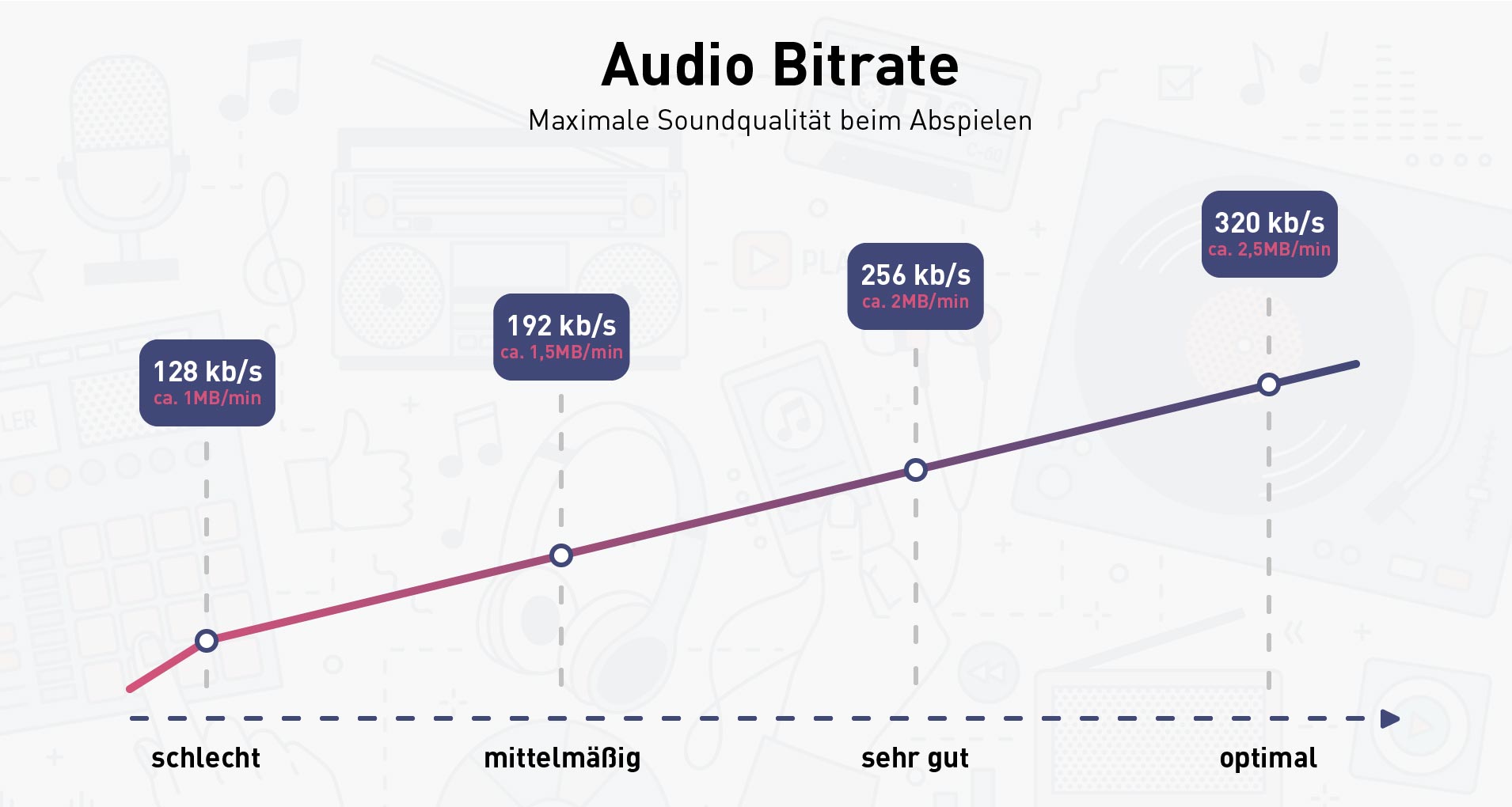
128 kbps is a standard bitrate for MP3s and is considered to be a good balance between file size and sound quality. At this bitrate, a four-minute song will take up approximately 4 megabytes of space. Audio encoded at 128 kbps will sound decent on most devices, but it may not be suitable for those who are particularly picky about sound quality. It is often used in streaming services and online platforms because of the small file size which allows for faster streaming and less data consumption.

256 kbps

Compared to 128 kbps, 256 kbps offers a significant improvement in sound quality. The increased bitrate means that more data is used to represent the audio, resulting in a more accurate representation of the original recording. A four-minute song at 256 kbps will take up approximately 8 megabytes of space. This bitrate is recommended for music enthusiasts who want to enjoy a higher quality sound without having to sacrifice too much storage space.

320 kbps

320 kbps is considered the highest quality bitrate for MP3s and offers the best representation of the original audio. The increased bitrate means that even more data is used to represent the audio, resulting in a near-perfect representation of the original recording. A four-minute song at 320 kbps will take up approximately 10 megabytes of space. This bitrate is recommended for audiophiles or professional musicians who want to ensure that their music sounds as close to the original recording as possible. However, due to the large file size, it may not be practical for streaming or online platforms.

Compression

When converting audio to an MP3, the file is compressed to make it smaller in size. However, this process can cause a loss of audio quality, especially at lower bitrates. The higher the bitrate, the less compression is applied and the better the audio quality will be. For example, a 128 kbps MP3 will have more compression than a 256 kbps MP3, resulting in a lower quality sound.

Conclusion

In conclusion, the bitrate of an MP3 can have a big impact on the overall sound quality. 128 kbps is a good balance between file size and sound quality, while 256 kbps offers a significant improvement in sound quality. 320 kbps offers the best representation of the original audio, but the large file size may not be practical for streaming or online platforms. To optimize the sound quality of your MP3s, one of the best solutions is MP4Gain, that optimizes the audio of your files, making them sound better than ever before.


Free Download Mp4Gain
picture


Mp4Gain Main Window
picture


Mp4Gain Features
picture


Free Download Mp4Gain
picture

The bitrate and its relationship with the audio quality in an MP3

The bitrate and its relationship with the audio quality in an MP3

The bitrate and its relationship with the audio quality in an MP3

The bitrate is a measure of the amount of audio information that is encoded per second in a compressed audio file, such as an MP3. Bit rate is measured in kilobits per second (kbps).

The bitrate and its relationship with the audio quality in an MP3

The higher the bitrate, the higher the audio quality. However, a larger file size will also be required to store the same amount of audio time. Therefore, it is important to choose a suitable bitrate to balance quality and file size.

For music files, a bitrate of at least 128 kbps is recommended for decent sound quality. However, if you want higher sound quality, you can go for a higher bitrate, such as 256 kbps or even 320 kbps.

For voice audio files, a bit rate of 64 kbps is sufficient for clear sound quality. However, if you want higher sound quality, you can go for a higher bitrate, such as 96 kbps or 128 kbps.

In short, bitrate is an important factor in the audio quality of an MP3 file. It is important to choose a suitable bitrate to balance quality and file size.

Also, it’s important to note that bitrate isn’t the only factor that affects the audio quality of an MP3. Other important factors include the sample rate and the number of channels. The sample rate refers to the number of times the sound is measured per second, while the number of channels refers to the number of audio channels in the file.

For example, an audio file with a bit rate of 128 kbps and a sample rate of 44.1 kHz and 2 audio channels will have higher sound quality than a file with the same bit rate but a sample rate of 22 kHz and 1 audio channel.

In conclusion, if you want to get the best audio quality from an MP3 file, it’s important not only to choose a suitable bitrate, but also to consider the sample rate and number of channels. It is advisable to choose an optimal combination of these factors to obtain the best sound quality.

In addition, it is important to mention that there are other audio formats, such as WAV, FLAC, AIFF, which, unlike MP3, are not compressed, which means that they do not lose audio quality to the compression process. However, these formats often have much larger file sizes than compressed formats like MP3.

So, if you want the best audio quality, it’s recommended to use uncompressed formats like WAV or FLAC, but it’s also important to consider storage space and compatibility with different devices and audio players. In case of opting for compressed formats, it is important to choose an appropriate bitrate and take into account other factors such as the sampling frequency and the number of channels.

In summary, bitrate is an important factor in the audio quality of an MP3 file, but it is not the only factor to consider. It is important to choose a suitable bitrate, as well as take into account the sample rate and the number of channels to obtain the best sound quality. In addition, there are other uncompressed audio formats that offer higher sound quality, but also have a larger file size.

Why are MP3 bitrates often multiples of 32? (power of 2)

Why are MP3 bitrates often multiples of 32? (power of 2)

MP3 Bitrate
MP3 Bitrate

Some people say:

MP3 Bitrate
MP3 Bitrate

I understand why multiples of 2 often show up on computers since they are binary, but I can’t figure out how the most common mp3 bitrates (64kbps, 128kbps, 160kbps, 192kbps, 256kbps, 320kbps, etc.) also tend to follow this rule.

Since MP3 is just a sequential encoding of sound waves, why is it important to represent each second in kilobits divisible by 2?
Does a music player like iTunes continue to read the file and play the encoded sound regardless of the second limit, or does it read the file every second?
In the latter case, reading a 256kbps file requires reading slightly fewer memory pages than a 257kbps file, but the player can always read 256KB chunks, regardless of their bitrate, and just process them automatically. incremental, right, Bar?
Are 128kbps MP3 songs popular simply because it’s a generally accepted bitrate, or do they really have any advantages over 126kbps and 131kbps files, apart from a very slight difference in quality/file size?

For constant bit rate (CBR) encoding, the MPEG-1 Audio Layer III standard specifies standard bit rates of 32, 40, 48, 56, 64, 80, 96, 112, 128, 160, 192, 224, 256 and 320 kbit/second. There are a few others defined in the MPEG-2 standard, but they are also multiples of 2 (actually all multiples of 8 in the range 8 to 160 – see the table called “Bitrate Index” in the link above) .

Technically, there is nothing that limits the MP3 bitrate to a multiple of 2, since variable bitrate encoding can be used, or a custom bitrate can be achieved using some flags not used in the MPEG specification ( although this must be implemented manually). . In order for MP3 to be MPEG-compliant, and therefore compatible with most MP3 decoders, it must have a bitrate defined by the specification, so all CBR-encoded MP3 files have a bitrate of two.

What is a good bitrate guide for mp3 files?

What is a good bitrate guide for mp3 files?

Mp3 Bit Rate
Mp3 Bit Rate

(a good bitrate guideline for mp3 files?)

Mp3 Bit Rate
Mp3 Bit Rate

MP3 files are compressed audio files created from audio formats such as wave (.wav). Wave files replicate analog recordings and digital sound files at the expense of large file size, while MP3 files sacrifice some quality for a smaller footprint. There are several factors that mitigate the quality sacrifice during the conversion process. With the correct bitrate and settings, MP3 files can provide very high quality results, making them very close to the original wave files when played on portable audio players.

An mp3 player.

The balance between file size and quality is somewhat subjective. For audiophiles, any difference is noticeable. Others may simply not be able to tell the difference between a high quality MP3 file and a raw wave source. In many cases, the nuances of the sound environment will only become clearer when played through a high-quality stereo system.

MP3s are compressed digital music files that sacrifice quality for file size.
MP3 files are primarily targeted at portable audio players. In this field, high-quality MP3 files are played with incredible sound due to their small file size. With the limited memory of portable players, it makes sense that one would want MP3 files to be as small as possible while maintaining the highest possible quality.

For this, one of the most important factors when creating MP3 files is the bit rate. In general, the more bits per second that are preserved from the original file, the higher the quality of the MP3 and the larger the file size. Lower bit rates reduce size and quality. The idea is to use the bitrate for maximum realism without saving unnecessary data, which just creates larger files with no noticeable difference to the ear.

For voice recordings such as lectures or language lessons saved to waveforms, a bit rate of 32 kilobits per second (kbps) is acceptable, although 64 kbps may offer better quality, depending on the source. At 32 kbps, the sound may sound “flat”, but that’s understandable. A 64 kbps MP3 file created from a voice recording should sound nearly identical to the original.

Desaturated acoustic music with simple arrangements should work fine at 192kbps bitrate. You can choose 256 kbps if the music will be played on a high quality device. Music that falls into this category includes folk, boy band songs, easy listening, and folk music. There are also works by many classic artists such as James Taylor, Linda Longstadt, Jonny Mitchell, and Simon Garfunkel.

What is bit rate? Knowledge of the MP3 audio format.

What is bit rate? Knowledge of the MP3 audio format.


bit rate
bit rate

Digital audio formats are audio signals that are recorded, processed, and reproduced in digital form.

bit rate
bit rate

The emergence of digital audio formats is to meet the needs of high-fidelity playback, storage and transmission. Simply put, early analog audio formats had issues with playback distortion and glitches due to media wear. Since the advent of the CD, digital format audio files have become popular, but another problem has arisen: the limitation of the storage volume, and the CD still has the phenomenon of wear. Saving to hard drive (relatively longer storage time) is not a good solution when storage media (mainly hard drives) are still expensive at the time. The rise of the Internet has created a requirement for long-distance file transmission. Under the restriction of bandwidth, the demand to reduce file size has become more intense. All this has led to the generation of lossy compressed digital audio formats from external factors!

In terms of internal factors, with the improvement of computing and coding capabilities, the progress of various acoustic psychological models has promoted the emergence of various lossy compressed digital audio formats. Some of the most commonly used audio formats in MP3 players are briefly introduced below: MP3 (CBR, VBR, ABR), WMA, WAV, ADPCM, and the emerging audio formats AAC, ASF, and OGG.

Before introducing various digital audio formats, let’s clarify one concept: bitrate.

In the field of computing, all information is digitized. Bit is the smallest unit of data in a computer, it refers to a number of 0 or 1, which is a mathematical binary number, a “0” or “1” , is a bit. For example, when we say a 2-digit number, it means that it is a two-digit binary number, and there are 4 combinations of “00”, “01”, “10” and “11”, which represent 0, 1, 2 and 3 is four numbers.

Better 16 bit or 24 bit? Which audio sampling rate should I choose?

Record 16 bit or 24 bit, what changes?

16 or 24 bits

Today we live in the middle of the digital age, which has made the total distribution of music possible. Thanks to this, we can download an entire album “free” from the Internet in a few minutes. The benefits of the digital age were really impressive, but today we’re not going to talk about it, but rather focus the discussion on what the ideal recording is, choose between 16 bit or 24 bit and identify the sound differences between the two registration modes with the case’s various useful tips . The times when everything was recorded in analogue are far away. Think of the sound of Pink Floyd’s “Dark Side of the Moon”, “In the Court of the Crimson King” by King CrimsonO, Lonely Hearts Sergeant Pepper’s club band by The Beatles.

16 or 24 bits

We live in a time when digital is the master, but it is true that analog resists and can offer much higher quality. Let’s see what the differences between these two recording modes are between 16 and 24 bit. Before we start the decision with rather challenging speeches, we need to know what the word “bit” means, which indicates the amount of information in each sample and describes its resolution. Let us take a few explanatory examples: 16 bit is the sound depth used on audio CDs, while 24 bit is the definition of audio that can be achieved on an audio DVD. Now think about it: The CD generally has a storage capacity of around 700 MB instead of a 4.7 GB audio DVD, okay?

How are the audio files played?

We can say that a set of digital information is converted into an analog signal, which allows the sound waveform to be reproduced. Among the advantages that we undoubtedly have for an absolutely perfect sound cleaning, the digital audio file takes up considerably less space than the analog one, or rather we can determine the size of the file that we want to record or capture.

Let’s start with the recent past, when the widespread frequency on compact discs was 16 bit and 44,100 Hz, all albums and collections were recorded on audio CDs. This limit began to exceed thanks to the launch of new devices. Like drum machines, for example, the bits began to gradually increase from 16 to 18, 20 to 24 bits.

Today it is evident that an audio interface can work with 24 bits, including other alternatives to the recording mode, which can be performed at frequencies of 44.1, 48, 88.2, 96 to 192 kHz. Digital systems convert an analog signal to a digital format to store and transmit data using PCM (pulse code modulation). This quality is given by two factors, the first being determined by the bit depth and the second by the recorded frequency of samples. The first factor, bit depth, indicates the number of bits used that quantify the number of levels that characterize a tone in a second. In other words, the more bits a sound has, the more it is defined in level (for example, 16,536 levels are available per second for 16-bit recording.) We can say that the higher the sampling frequency, the more the sound area becomes defined, with the result that the transformation of the signal from analog to digital would be more accurate.
That means we can conclude with one consideration, ie the greater the bit depth, the greater the sampling frequency and the more audio information is stored, the more defined the audio quality. The development and continuous search for effective systems is a subject in which many studies are carried out.

Now we will delve deeper and deeper into our discussion by analyzing the different modes of audio resolution that enable sound quality and size. Suppose the larger the sound you want, the larger the file size.

What are Flac files?

FLAC is an acronym that stands for Free Lossless Audio Codec. As the English terms indicate, this literally means that it is a type of coding with which a signal can be read and written without data loss and which differs from the “lossy” types (Ogg Vorbis, MP3 or AAC). FLAC was deliberately designed and developed to compress audio files, which was not the case with other encoding types such as ZIP and gzip. For this reason, significant compressions can be achieved, which can be reduced from 30 to 50%

Differences between 16 and 24 bit audio, understand it clearly

When we got into digital audio, everything was easier. The products recorded and generated in digital audio were all in 16 bit. The Compact Discs, the main method of music distribution has a bit depth of 16 bits and a sample rate of 44.1 kHz

16 bits vs 24 bits

Gradually, the products began to appear with greater Bit Depth until the recordings reached 24 bit today. But what does all this mean and how important is it. To start, let’s define the terms.

Bit Depth (bit depth) refers to the number of bits the audio has to capture. The easiest way to visualize this is as a series of levels, which can be sliced ​​audio energy at a given time. With 16-bit audio, there are 65,536 possible levels. With all the higher resolution bits, the number of levels is doubled. By the time we reach 24 bits, we actually have 16777216 levels. Remember that we are talking about a frozen audio segment in an instant of time.

Now, let’s add our friend time to our explanation … and that is when we find the Sample Rate.

Sample Rate is the number of times your sound is measured per second (samples). So in the Red Book standard for CDs the sampling frequency is 44.1 kHz or 44,100 samples every second. So what is the sampling rate 96 kHz? You guessed it. It is 96,000 audio samples shown every second.

Therefore, to make things clear:

-24/96 recording means higher audio resolution-more than 250 times higher than in 16 / 44.1
-The recording in 24/96 occupies approximately 3.25 times the recording space in 16 / 44.1

16 bits vs 24 bits

Now we are going to get to the subjective part of how music plays at these different bit depths and sampling frequencies. No one can quantify how much better a song recorded on 24/96 will sound. The fact that a 24/96 file has 250 times the audio resolution does not mean it will sound 250 times better, but it will not even sound twice as high. Actually, unless you have a very trained ear and a very good audio system you won’t even notice the difference. Can you hear the difference between a CD / MP3 file and a wave or vinyl file? If so, then you are likely to notice the difference between 24 bits and 16 bits of audio. Now, let’s try to be more objective with everything.

Let’s talk about the Sample Rate and the Nyquist theory. This theory says that the current upper threshold of a piece of digital audio will reach its maximum in the middle of the Sample Rate. So if you are recording at 44.1, the highest frequencies are generated around 22 kHz, this is 2kHz higher than typical human capacity with an excellent ear. Experts and music lovers have claimed since the beginning of digital audio that vinyl records are a better sound system than digital audio. In fact, you can find evidence that analog recording and playback equipment can be measured up to 50 kHz, more than double our listening threshold. Here is the great mystery. The theory is that audio energy, although I don’t hear it, exists as it has an effect on the lowest frequencies we can feel. Returning to Nyquist’s theory, a 96 kHz sampling rate will result in the potential audio output at 48 kHz, not far from analog sound reproduction. This leads us to assume that the same principle is applicable. The audio has been improved in a threshold that we cannot perceive but that makes us hear it “better”, however confusing this may seem.

Having understood all this, we already have the basis for our next article in the 24-bit audio player equipment blog and the need for storage, where our QNAP Turbo NAS come in. We will see as brands like Linn, known worldwide in the world of music for the most enthusiastic, recommends the QNAP brand as a store for all our music libraries.