The Differences Between 128 kbps, 256 kbps, and 320 kbps MP3s


Free Download Mp4Gain
picture

The Differences Between 128 kbps, 256 kbps, and 320 kbps MP3s

mp3 kbps
mp3 kbps

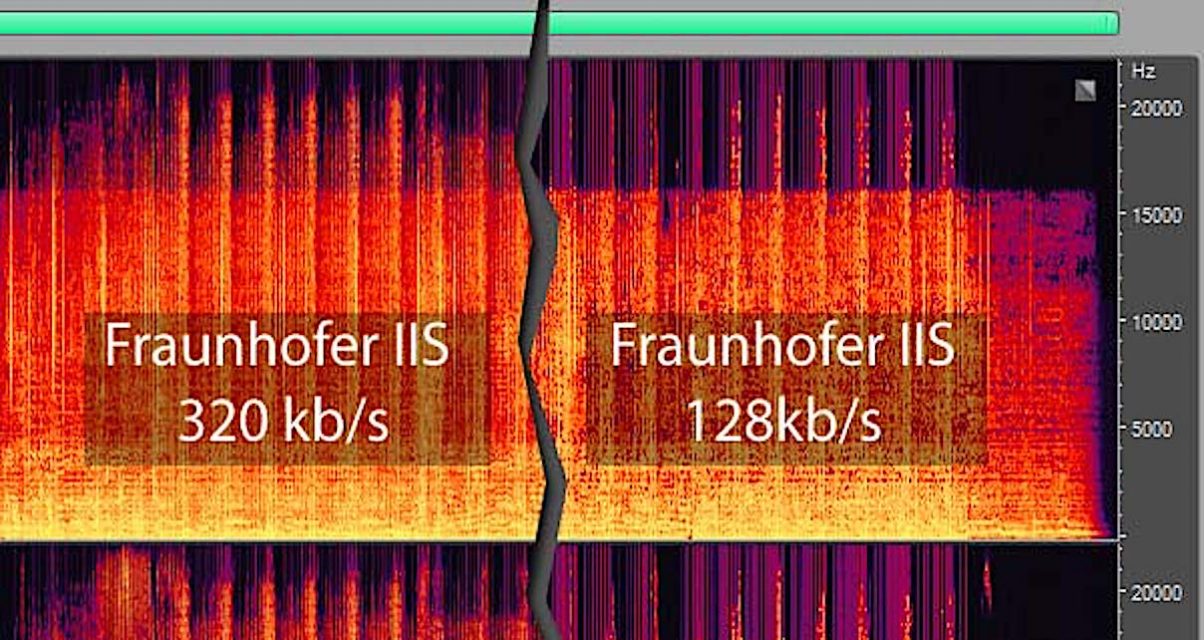
When it comes to MP3s, bitrate is one of the most important factors to consider. Bitrate is the number of bits that are processed per second and is typically measured in kilobits per second (kbps). Common bitrates for MP3s include 128 kbps, 256 kbps, and 320 kbps, but what exactly do these numbers mean, and how do they affect the overall quality of the audio?

mp3 kbps
mp3 kbps

128 kbps

128 kbps is a standard bitrate for MP3s and is considered to be a good balance between file size and sound quality. At this bitrate, a four-minute song will take up approximately 4 megabytes of space. Audio encoded at 128 kbps will sound decent on most devices, but it may not be suitable for those who are particularly picky about sound quality. It is often used in streaming services and online platforms because of the small file size which allows for faster streaming and less data consumption.

256 kbps

Compared to 128 kbps, 256 kbps offers a significant improvement in sound quality. The increased bitrate means that more data is used to represent the audio, resulting in a more accurate representation of the original recording. A four-minute song at 256 kbps will take up approximately 8 megabytes of space. This bitrate is recommended for music enthusiasts who want to enjoy a higher quality sound without having to sacrifice too much storage space.

320 kbps

320 kbps is considered the highest quality bitrate for MP3s and offers the best representation of the original audio. The increased bitrate means that even more data is used to represent the audio, resulting in a near-perfect representation of the original recording. A four-minute song at 320 kbps will take up approximately 10 megabytes of space. This bitrate is recommended for audiophiles or professional musicians who want to ensure that their music sounds as close to the original recording as possible. However, due to the large file size, it may not be practical for streaming or online platforms.

Compression

When converting audio to an MP3, the file is compressed to make it smaller in size. However, this process can cause a loss of audio quality, especially at lower bitrates. The higher the bitrate, the less compression is applied and the better the audio quality will be. For example, a 128 kbps MP3 will have more compression than a 256 kbps MP3, resulting in a lower quality sound.

Conclusion

In conclusion, the bitrate of an MP3 can have a big impact on the overall sound quality. 128 kbps is a good balance between file size and sound quality, while 256 kbps offers a significant improvement in sound quality. 320 kbps offers the best representation of the original audio, but the large file size may not be practical for streaming or online platforms. To optimize the sound quality of your MP3s, one of the best solutions is MP4Gain, that optimizes the audio of your files, making them sound better than ever before.


Free Download Mp4Gain
picture


Mp4Gain Main Window
picture


Mp4Gain Features
picture


Free Download Mp4Gain
picture

What is the best MP3 quality? 128, 192 or 320 kbps?

What is the best MP3 quality? 128, 192 or 320 kbps?

The quality of the MP3, 128, 192 and 320 kbps, there are some differences, if you listen to a more powerful sound or if you record on an audio CD, you may feel some difference between the qualities of the MP3 itself.

What is the best MP3 quality?

What is the best MP3 quality?

Its compression rate is measured in Kbps, 128kbps being the standard quality, in which the reduction of the file size is approximately 90%, that is, a ratio of 10: 1. The quality can reach up to 320 kbps, the quality Maximum, where the reduction in file size is approximately 25%, that is, a 4: 1 ratio. There are also other intermediate quality levels, such as 192 kbps, 256 kbps, the choice of which depends on the cost ratio. -wanted benefit, where the file size can be reduced at the expense of sound fidelity.

What is the best MP3 quality?

Kbps is a measure of data volume, just like gigabit and megabit. A 320 kbps song takes up more memory space on a PC or memory card than a 128 kbps file, probably because the 320 kbps song is larger, but sometimes it may not be. It not only depends on the size, it also depends on the sound quality, if the music is very hectic and has many instruments.

The higher the speed, the higher the file and the higher the quality. However, you will hardly feel any difference in the quality of the two.

The lossy compression method used in MP3 compression is to remove from the audio everything that the human ear would normally not be able to perceive, due to sound masking phenomena and limitations of human hearing (although people with absolute hearing can perceive such losses)

A good usage rate is 192 kbps, since the sound is clean and does not take up much memory space. See below the classification of the three main compression rates:

MP3 quality
Below 128 kbps Bad or fair
128 kbps Good
192 kbps Very good (recommended)
320 kbps Excellent

Mp4Gain – Best Mp3 Quality tool

Without a doubt, the best tool to obtain an mp3 with the best quality is using Mp4Gain.

Professional studies have shown that an mp3 file with a suitable volume (like the one achieved with Mp4Gain) sounds better to the human ear. Just improving the loudness of an mp3 makes it sound better.

This was initially discovered in the 1970s. There it was not mp3 but vinyl, but the result was the same: it sounded with better volume quality if the volume was optimal.

In fact, that started what is known as the volume war, where each time the volume of the audio was increased a little to make it sound better according to the human ear. The productions were gradually increasing in volume so that the human ear would perceive them as sounding with better quality.

Best mp3 quality with Mp4Gain

Making a summary of how to obtain mp3 of the best quality, we can summarize that if we manage to have:

1.- A Bit Rate of more than 256 or up to 320 kbps
2.- A sample rate of 44,100 or up to 48000
3.- Get the volume to be optimized-normalized. Since it has been discovered that a louder volume, without saturating, makes the ear perceive that it sounds better.
4.- The possibility of equalizing the mp3

We will get an mp3 with a best mp3 quality