Bitrate Can Help You Get Better Quality in MP3 and MP4


Free Download Mp4Gain
picture

Bitrate Can Help You Get Better Quality in MP3 and MP4
Bitrate Can Help You Get Better Quality in MP3 and MP4

Let’s Talk About Bitrate in MP3 and MP4

Bitrate can make or break the quality of your music or video files. I’ve spent years working with audio and video, and I can tell you that bitrate is a game-changer when it comes to getting the best sound and picture quality. Imagine a water pipe: the bitrate is like the pipe’s width. A wider pipe (higher bitrate) lets more water (data) flow through, giving you a richer sound or clearer video. Lower bitrate, on the other hand, restricts the data flow, which is like squeezing a pipe down; the result is less quality. Let’s dive into how bitrate impacts MP3 and MP4 quality and why understanding this can transform your listening and viewing experience.

What is Bitrate and Why Does It Matter?

Bitrate is the rate at which data is processed and transferred. In MP3s and MP4s, bitrate affects quality more than you might think. Higher bitrate means better quality, but also larger file sizes. Think of it like digital storage in your closet: high-bitrate files store every detail, but they take up more space. Lower bitrate compresses the details, which saves space but sacrifices some quality.

How Bitrate Affects MP3 Quality

For MP3 audio, bitrate is crucial. High-bitrate MP3s preserve more of the original recording’s sound detail, making music sound full and dynamic. I remember testing low-bitrate MP3s on different sound systems, and each time, they sounded flat and lifeless. If you want rich bass and clear vocals, go for a higher bitrate.

Common MP3 Bitrates

  • 128 kbps – Standard quality, good for most casual listeners.
  • 192 kbps – Enhanced clarity, offering decent audio for music enthusiasts.
  • 256 kbps – Higher quality with noticeable improvements in bass and vocals.
  • 320 kbps – Top-notch quality, closest to the original recording without being lossless.

How Bitrate Affects MP4 Quality

With MP4 video files, bitrate impacts both the video and audio components. When I watch a movie in high-bitrate MP4, the colors are vivid, and the sounds are rich. A low-bitrate MP4 might show pixelation and murky audio, especially on larger screens. This is why bitrate matters for video just as much as audio.

Recommended MP4 Bitrates

  • 500-1000 kbps – Suitable for low-resolution video, good for small screens.
  • 1000-2500 kbps – Ideal for standard definition video.
  • 2500-5000 kbps – Recommended for HD quality, providing clearer visuals.
  • 5000+ kbps – Best for Full HD and higher, excellent clarity on large screens.

Choosing the Right Bitrate: Balancing Quality and File Size

When selecting bitrate, it’s essential to balance quality with file size. You don’t always need the highest bitrate—sometimes, it’s more about fitting your needs. For instance, if you’re streaming on a mobile device, a lower bitrate can still provide good quality while saving data. However, if you’re playing files on high-end speakers, go for the highest bitrate possible.

Bitrate and Streaming: What You Should Know

When streaming MP3 or MP4 files, bitrate influences both quality and buffering speed. Higher bitrate streams may deliver better quality but can cause more buffering if your internet speed isn’t up to par. Personally, I recommend adjusting bitrate based on your internet connection to avoid interruptions.

How to Check and Adjust Bitrate

Checking bitrate is straightforward. On most devices, you can view the bitrate information within the file properties. Adjusting bitrate usually requires re-encoding with software that allows you to choose the bitrate. It’s like resizing a photo; changing bitrate affects file quality and size, so choose the right balance based on your needs.

Is Higher Always Better? When to Opt for Lower Bitrate

While high bitrate typically means better quality, there are cases where lower bitrate works just fine. For podcasts or spoken-word audio, for instance, a lower bitrate still delivers good clarity without taking up much space. It’s all about the type of content and how you’re consuming it.

Comparing Bitrate to Sample Rate and Resolution

Though bitrate is vital, sample rate and resolution also play roles in quality. For MP3s, sample rate affects audio fidelity, and for MP4s, resolution impacts video clarity. Together, these factors determine overall quality. I find that focusing on bitrate alone can sometimes mislead; balancing all three aspects yields the best results.

Practical Tips for Optimal Bitrate Selection

To optimize bitrate, consider both your device and personal preferences. For everyday music listening on headphones, 192 kbps MP3 might be enough. But for home theater setups, I suggest 320 kbps or lossless formats. Adjusting based on usage can save storage and still offer great sound.

Latest Words on Bitrate and Quality

Bitrate is a powerful factor in determining the quality of MP3 and MP4 files. Whether you’re listening to music or watching videos, selecting the right bitrate makes a difference. With the right tools, like Mp4Gain, you can achieve the perfect balance between quality and file size for any format or device.

Comments:

Wow, this article really explained bitrate well! I always thought higher was better but now I see it’s not that simple. Good job!

I wish there was more info on sample rates. I think that impacts quality too, right?

My friend shared this with me, and I have to say, it’s been super helpful. I feel like I finally get what bitrate is!

This article cleared up so much for me. I was struggling to understand why my audio files were so big, now I get it. Thanks!

Could you go into detail about bitrate in streaming? I think that’s a big topic too!

I’m not a tech person, but this really helped me understand why my audio files sound different at different bitrates. Nice work!

My son is a musician, and I shared this with him to help with his recordings. He said it’s super helpful, thank you!

I was looking for info on MP4 bitrate specifically, and this nailed it! I’m a video editor, so quality is everything to me.

Love the real-life examples in this! Makes something technical feel easy to understand. Keep up the great work!

I’m kinda new to this and was overwhelmed with all the info about bitrate. This is really straightforward. Appreciate it!

Thanks for explaining bitrate so clearly. I always had a hard time choosing settings, but now I know exactly what to do.

Just what I was looking for! Really needed a simple explanation of bitrate and this article delivered. Thanks!

Can you add a section on bitrate comparison? Like a chart or something. It’d be useful for quick reference!

This article was so informative! I’d been looking for something like this that’s easy to understand. Cheers!

I work in audio production, and I shared this with my team. Great explanations, especially for beginners. Thank you!

https://x.com/ricardo_mx_news/status/1850664808464474479


Free Download Mp4Gain
picture


Mp4Gain Main Window
picture


Mp4Gain Features
picture


Free Download Mp4Gain
picture

The Differences Between 128 kbps, 256 kbps, and 320 kbps MP3s

The Differences Between 128 kbps, 256 kbps, and 320 kbps MP3s

mp3 kbps
mp3 kbps

When it comes to MP3s, bitrate is one of the most important factors to consider. Bitrate is the number of bits that are processed per second and is typically measured in kilobits per second (kbps). Common bitrates for MP3s include 128 kbps, 256 kbps, and 320 kbps, but what exactly do these numbers mean, and how do they affect the overall quality of the audio?

mp3 kbps
mp3 kbps

128 kbps

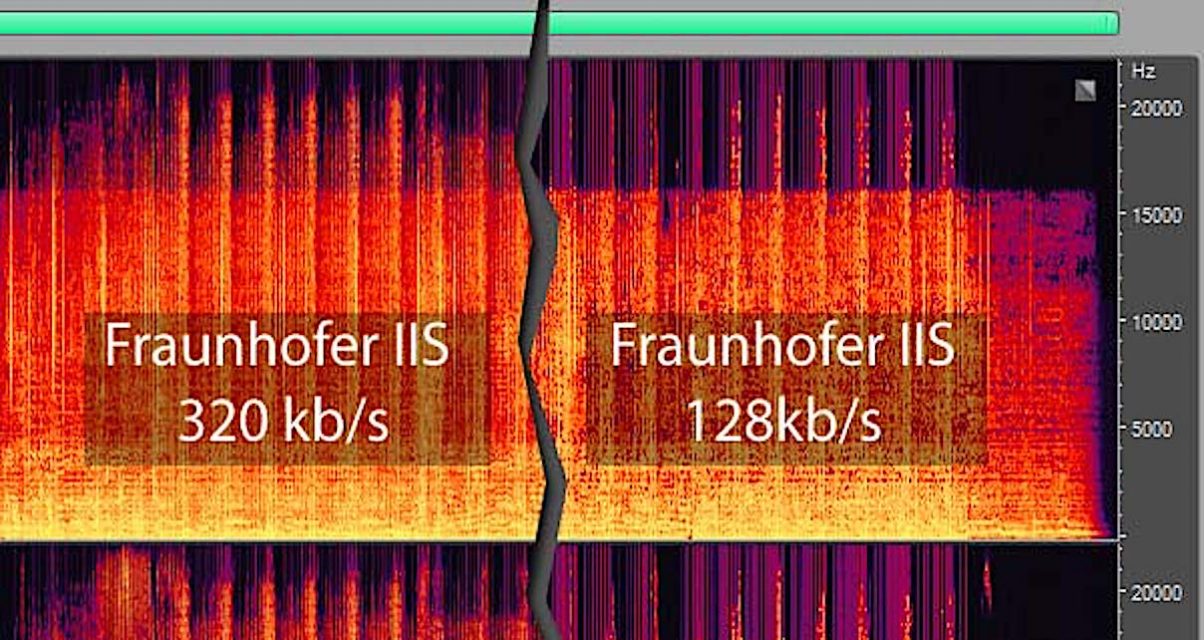
128 kbps is a standard bitrate for MP3s and is considered to be a good balance between file size and sound quality. At this bitrate, a four-minute song will take up approximately 4 megabytes of space. Audio encoded at 128 kbps will sound decent on most devices, but it may not be suitable for those who are particularly picky about sound quality. It is often used in streaming services and online platforms because of the small file size which allows for faster streaming and less data consumption.

256 kbps

Compared to 128 kbps, 256 kbps offers a significant improvement in sound quality. The increased bitrate means that more data is used to represent the audio, resulting in a more accurate representation of the original recording. A four-minute song at 256 kbps will take up approximately 8 megabytes of space. This bitrate is recommended for music enthusiasts who want to enjoy a higher quality sound without having to sacrifice too much storage space.

320 kbps

320 kbps is considered the highest quality bitrate for MP3s and offers the best representation of the original audio. The increased bitrate means that even more data is used to represent the audio, resulting in a near-perfect representation of the original recording. A four-minute song at 320 kbps will take up approximately 10 megabytes of space. This bitrate is recommended for audiophiles or professional musicians who want to ensure that their music sounds as close to the original recording as possible. However, due to the large file size, it may not be practical for streaming or online platforms.

Compression

When converting audio to an MP3, the file is compressed to make it smaller in size. However, this process can cause a loss of audio quality, especially at lower bitrates. The higher the bitrate, the less compression is applied and the better the audio quality will be. For example, a 128 kbps MP3 will have more compression than a 256 kbps MP3, resulting in a lower quality sound.

Conclusion

In conclusion, the bitrate of an MP3 can have a big impact on the overall sound quality. 128 kbps is a good balance between file size and sound quality, while 256 kbps offers a significant improvement in sound quality. 320 kbps offers the best representation of the original audio, but the large file size may not be practical for streaming or online platforms. To optimize the sound quality of your MP3s, one of the best solutions is MP4Gain, that optimizes the audio of your files, making them sound better than ever before.

The higher the kbps value of the mp3 file, the better the sound quality? Part 2

The higher the kbps value of the mp3 file, the better the sound quality? Part 2

Mp3 quality

MPEG audio encoding has a high compression ratio, MP1 and MP2 have a compression ratio of 4:1 and 6:1-8:1 respectively, while MP3 has a compression ratio of up to 10:1-12: 1, which means that one minute Uncompressed CD-quality music requires 10 MB of storage space, but only about 1 MB after MP3 compression encoding, and its sound quality is basically distortion-free.

mp3 128kbps To 320kbps

Although it is a distorted compression, its biggest advantage is a higher compression ratio in exchange for very little sound distortion. Usually a CD can only store a dozen CDs, but it can store hundreds of MP3 songs, which is why MP3 is popular all over the world. Currently, MP3 is the most common music format on the Internet. Music files of the same length are stored in the MP3 format, usually only 1/10 of the WAV format. Due to their small file size and good sound quality, they can achieve a sound effect that is closer to the original sound source. Therefore, until now, the status of MP3 format as the mainstream audio format is still hard to shake. Simply put, WMA is smaller than MP3 and MP3 has better sound quality than WMA. Currently, the music format with the best sound quality is APE, which is equivalent to the sound quality of a CD, but relatively large. A song weighs about 20 MB! 1 or so, another advantage of WMA is that content providers can add copy protection through DRM (Digital Rights Management) solutions, such as Windows Media Rights Manager 7. This copyright protection technology built-in author can limit the playback time and number of playback, and even the playback machine, etc., which is a boon for music companies that have been defeated by piracy. MP3 format: MP3 technology originated From MPEG technology, MPEG is short for Moving Picture Experts Group. MPEG audio encoding has a high compression ratio, MP1 and MP2 have a compression ratio of 4:1 and 6:1-8:1 respectively, while MP3 has a compression ratio of up to 10:1-12: 1, which means that one minute Uncompressed CD-quality music requires 10 MB of storage space, but only about 1 MB after MP3 compression encoding, and its sound quality is basically distortion-free.

The higher the kbps value of the mp3 file, the better the sound quality?

The higher the kbps value of the mp3 file, the better the sound quality?

kbps mp3

Kbps refers to the number of bits (bit rate) of mp3, and bit rate refers to the amount of information that can be transmitted per second in a data stream.

mp3 kbps

Kbps means “kilobytes per second,” so a higher value means more data, a higher bit rate, more information, and better sound quality, but it also means more processing to decode the information. the more space the file should take up. (But this is nothing compared to today’s hardware, and many people put ape directly on the hard drive!) For mp3, 128kbps is a qualified quality! As for the bit rate you use, it depends on your own needs. If the requirements are high, use CBR320kbps, CBR192kbps or VBR variable bit rate. If the file size is required to be small for network streaming or online playback, please use CBR128kbps or lower bit rate can be. Sound quality is closely tied to its compression ratio. In fact, WMA is slightly worse than MP3 at a rate of 192 kb/s or higher, but it is quite close to the effect of the original WAVE file. The difference is that the treble component of WMA in the same ratio is greater than that. of MP3 in the ratio of 96K and 64K. Simply saying that WMA is more advanced than MP3 is untenable. In fact, their principles are the same, and they are similar in the case of high ratios. Also, there is a problem with the compression software: if you use Hero Jieba to compress high-quality MP3, it will definitely be worse than WMA. Now LAME has grown considerably and is stronger than WMA at ratios above 128K. Comparing 96K WMA with 128K MP3, MP3 is definitely better. So it depends on your needs, if you need low baud, MP3 PRO or WMA is recommended (MP3 PRO is much better than WMA at 64K ratio), and if it’s high quality MP3, it doesn’t matter, but it’s still recommended. MP3, because after all it is a fairly open format, unlike WMA, which is monopolized by the Microsoft family, and can only be played with WMP. For that, I only use MP3. WMA format: WMA sound quality is stronger than MP3 format, its “body” is thinner than MP3, and it supports data transmission technology (Stream), which can be downloaded and listened to on the Internet. The characteristic of WMA is that when a song is compressed to a very small size, it can still maintain good sound quality, which is much better than RA format. It is the same as the VQF format developed by YAMAHA in Japan. Reduces data stream but maintains sound quality method to achieve higher compression ratio than MP3. The compression ratio of WMA can generally reach around 18:1. Another advantage of WMA is that content providers can add copy protection through DRM (Digital Rights Management) solutions, such as Windows Media Rights Manager 7. This built-in copyright protection technology can limit the playing time and the number of plays, and even the playing machine, etc., which is a blessing for music companies that have been defeated by piracy .MP3 Format: MP3 technology originated from MPEG technology, MPEG is short for Moving Picture Experts Group. MPEG audio encoding has a high compression ratio, MP1 and MP2 have a compression ratio of 4:1 and 6:1-8:1 respectively, while MP3 has a compression ratio of up to 10:1-12: 1, which means that one minute Uncompressed CD-quality music requires 10 MB of storage space, but only about 1 MB after MP3 compression encoding, and its sound quality is basically distortion-free. Although it is a distorted compression, its biggest advantage is a higher compression ratio in exchange for very little sound distortion. Usually a CD can only store a dozen CDs, but it can store hundreds of MP3 songs, which is why MP3 is popular all over the world. Currently, MP3 is the most common music format on the Internet. Music files of the same length are stored in the MP3 format, usually only 1/10 of the WAV format. Due to their small file size and good sound quality, they can achieve a sound effect that is closer to the original sound source. Therefore, until now, the status of MP3 format as the mainstream audio format is still hard to shake. Simply put, WMA is smaller than MP3 and MP3 has better sound quality than WMA. Currently, the music format with the best

What is bit rate, bit rate and KBPS?

What is bit rate, bit rate and KBPS?

Kbps

People often use Kbps to describe the hearing effect and audio quality.

Mbps- Mbps

On Windows systems and some players, kbps is called “bit rate” and “bit rate”.
16Kbps=phone sound quality
24Kbps=Increased telephone sound quality, short wave transmission, long wave transmission, European standard medium wave transmission
40Kbps=US standard medium wave transmission
56Kbps=Voice
64Kbps=Voice boost, mobile phone ringtones the best bit rate (Kbps) setting value, mobile phone The best setting for mono MP3 players is
112 Kbps = FM FM stereo transmission 128 Kbps =
best setup for cassettes, mobile phone stereo MP3 players, best setup for low-end MP3 players
192 Kbps = the best setting for mid-range MP3 players The fixed value of
320 Kbps = the best setting for high-end MP3 players (the highest bit rate on the
MP3 format) The highest quality of the MP3 format is 320 Kbps

2. How to distinguish true and false KBPS
The maximum quality in MP3 format, the bitrate is 320Kbps, but it is not ruled out that some unscrupulous merchants convert low quality audio (such as: 40, 64, 128 kbps) to the maximum quality (320kbps);
for a long time, many people Judgment on sound quality depends entirely on the bitrate of the dance music, i.e. whether the audio file is 192k, 256k or 320k (the bitrate in the file mp3-properties-detailed information), but in fact, this parameter does not really reflect a song. The sound quality of music is data that can be falsified and cannot fully represent the actual sound quality of a song. For example, using software such as QianqianjingTing, you can convert a 64Kbps music to 320Kbps, but before conversion and conversion After the sound quality is the same, the sound quality has not really improved.

What does kbps mean? Part 2

What does kbps mean? Part 2

Kilobits Per Second (Kbps)

With the proliferation of digital storage and streaming, few people listen to music with physical objects.

kbps

Earlier I asked a high school student that he didn’t use the tape and that he didn’t know what it was. It was really shocking!

That’s the tape thank you!

Now almost all the music we listen to comes from the internet, be it Youtube or Soundcloud, Spotify or songs downloaded from iTunes or Beatport. Most of the time we don’t think that the sound transmitted by these different platforms is different, but there are times when we suddenly feel that the “sound quality” is not very good, but often we don’t know what the sound is. quality is What is the meaning?

Today we will introduce you to what this “sound quality” really means and the principle behind it.

First of all, everything we hear from the Internet are digital files, that is, the real (continuous) sound is saved by sampling (slicing) and then restored by decoding. So generally the quality of the sound we hear has two levels: one is how finely the song itself is sampled, and the other is how realistic our playback system is when playing it.

If you take a video as an example, you can see the fineness of 480p, 1080p, 4K video in the image below.

And this is similar to the finesse of the song itself: the finer the sample, the better the sound quality. But we actually see the image through the screen, so even though I have 4K HD video, I still see it on a traditional VCR. It may be the same as 480p, because your player can’t play it. Good quality. It’s like buying a CD and listening to it with the 39 yuan headphones Daiso bought.

But today we are more focused on the level of sophistication of the original song. The two most important elements that affect the sound quality of digital music are the sample rate (Hz) and the bit depth (bits), which are the horizontal and vertical axes in the figure below.

The so-called sample rate is the number of points we want to take in 1 second to sample (horizontal axis), and the bit depth is the density of the scale we want to set on the vertical axis.

The following image shows the difference between the sample rate of 100 Hz and 33 Hz, respectively. The black line is the original waveform.

Connect the sampled lines and compare them to the original waveform to learn the effect of the sample rate on the sound. 100 Hz is significantly closer to reality than 33 Hz.

At this time, someone will ask, so you can get 100 million Hz, and it is guaranteed to be the same as the real thing. Basically yes, but there will be a big problem with this, the file will be very big and it can take a year to upload a song. And the numbers are generated to speed up the transmission speed, so this is not acceptable!

To achieve a perfect balance, you need to set a suitable sample rate, which makes people sound good, but the file is not too big, and the bottom line is that it should be at least 44.1kHz. Because according to the sampling theory, the sampling frequency should be greater than twice the bandwidth of the sampled signal, and people can hear the sound up to 20,000 Hz, so we take a little more than 2 times as the standard minimum.

The object of comparison is that the general local dialect is 8000Hz. You can listen to the CD and compare the microphones.

Of course, there are 48,000 Hz and 96,000 Hz or even more, but 96,000 Hz is enough by industry standards.

The following is the common bit depth of 16 bits, 24 bits, which is the 16th power of 2 and the 24th power. What it affects is the part of the vertical axis that we just mentioned, as shown in the figure.

It can be seen that the dynamic range that 24-bit can record is larger than that of 16-bit, in other words, the sound you hear can be more vivid, in other words, it can accommodate a larger dynamic range.

What does kbps mean?

What does kbps mean?

KBPS

What does cbr320kbps mean?

kbps

When downloading music, we often see these options: lossless sound quality and normal sound quality, lossless sound quality requires members to download, otherwise only normal sound quality can be downloaded. Since it is a fee, the lossless sound quality must be higher than the normal sound quality, so what are the differences between them?

What does kbps mean?
Different compression encoding methods

Commonly seen MP3, WMA, OGG are called lossy compression. As the name suggests, lossy compression is to reduce the audio sample rate and bit rate, and the output audio file will be smaller than the original file, which is normal sound quality. we often see.

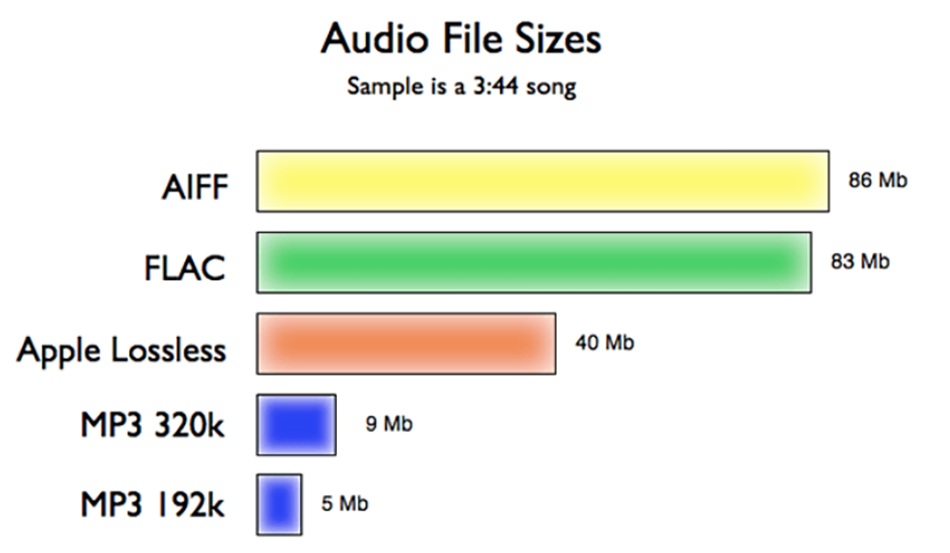
Another audio compression is called lossless compression, which can compress the volume of the audio file to a smaller size on the premise of saving 100% of all the data in the original file. Same size, same bitrate. Lossless compression formats include APE, FLAC, WAV, WavPack, LPAC, WMALossless, AppleLossless, TTA, Tak, TAC, La, OptimFROG, Shorten, while common and conventional lossless compression formats today include APE, FLAC, TTA, TAK, WAV, Generally CDs are lossless music.

What does kbps mean?
different file sizes

Common MP3, WMA and other formats occupy about 1M-5M space for single-handed songs, while for music in lossless formats such as ape and flac, the space occupied by a single song can generally reach tens of megabytes, or even more than 100M.

different bit rates

Bit rate (Kbps) refers to the transmission rate of digital signals, that is, how many thousands of bits of information are transmitted per second (K means thousands of bits, Kb means how many thousands of bits). For music, theoretically this The higher the value, the better the sound quality. Ordinary music, such as WMA, is generally 128kbps music, MP3 is mostly 128 or 192 or 320kbps/, while the bit rate of lossless music generally reaches 800-900kbps, and traditional CD even reaches 1411 Kbps. Using lossless compression, the sound quality is the most perfect.

What does kbps mean?
different sound

The feature of lossless music is that regardless of whether there is sound between the beats, its data always flows smoothly, so the fast magnetic vibration in your headphones is stable, and the sound is natural and real; while lossy formats such as MP3 are due to the loss of people The ear can not hear part of the data, so the magnetic block in the earphone vibrates unnaturally, causing it to vibrate when there is sound, and do not vibrate when there is no sound, so the magnet block vibrates excessively and unstable, which will produce burr noise. If professional equipment is used, it is easy to hear right and wrong.