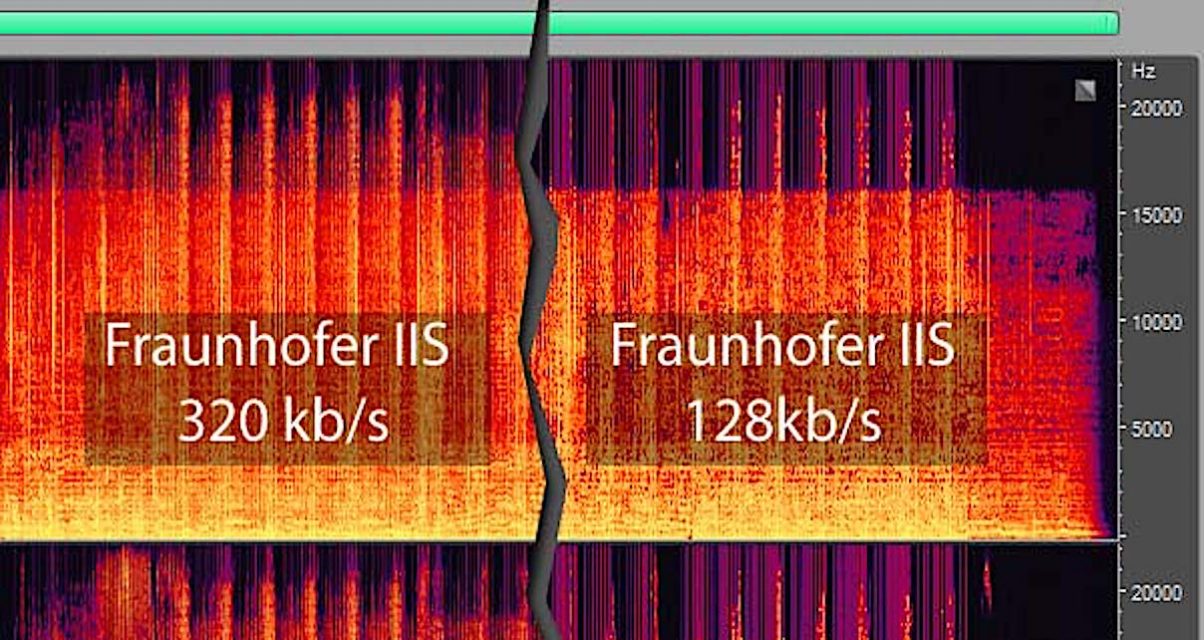
128 kbps vs 320 kbps


Free Download Mp4Gain
picture

128 kbps vs 320 kbps

128 kbps vs 320 kbps

What is Audio Bitrate?

Before we dive into the comparison between 128 kbps and 320 kbps, let’s first define what audio bitrate is. Audio bitrate refers to the amount of data per second that is used to encode an audio file. In simpler terms, it determines the quality of the audio file. The higher the bitrate, the better the quality of the audio file.

What is 128 kbps?

128 kbps stands for 128 kilobits per second, which is a common audio bitrate used in digital audio files such as MP3s. This bitrate is considered to be the minimum acceptable bitrate for digital audio files. It is typically used for streaming services and online downloads where file size and bandwidth usage are important factors.

What is 320 kbps?

320 kbps stands for 320 kilobits per second, which is a higher audio bitrate than 128 kbps. It is often considered to be the highest bitrate that is practical for digital audio files. This bitrate is commonly used for audio files that require high-quality audio, such as music files that are intended for audiophiles or professional audio recordings.

What is the Difference Between 128 kbps and 320 kbps?

The main difference between 128 kbps and 320 kbps is the audio quality. 320 kbps audio files are of higher quality compared to 128 kbps audio files. This is because the higher bitrate allows for more audio data to be included in the file. This results in a richer, fuller sound with more detail and depth. However, this increased audio quality comes at the cost of larger file sizes.

When Should You Use 128 kbps?

128 kbps is suitable for situations where file size and bandwidth usage are important factors. For example, streaming services such as Spotify and Apple Music use 128 kbps for their standard quality audio streams. This allows for smooth streaming without buffering or interruptions, even on slower internet connections. 128 kbps is also suitable for audio files that are intended for casual listening, such as podcasts or background music.

When Should You Use 320 kbps?

320 kbps is suitable for situations where audio quality is the top priority. This includes music files that are intended for audiophiles or professional audio recordings. 320 kbps is also suitable for audio files that are intended for playback on high-end audio equipment such as high-end headphones or speakers. However, it is important to note that 320 kbps audio files have larger file sizes compared to 128 kbps audio files, which may not be practical for certain situations such as streaming or downloading over limited internet bandwidth.

Does Bitrate Affect File Size?

Yes, bitrate affects file size. Higher bitrates result in larger file sizes while lower bitrates result in smaller file sizes. This is because higher bitrates include more audio data in the file, which results in a larger file size.

Does Higher Bitrate Mean Better Quality?

Not necessarily. While higher bitrates generally result in better audio quality, there are other factors that can affect audio quality such as the audio codec used and the mastering of the audio file. It is possible for a well-mastered 128 kbps audio file to sound better than a poorly-mastered 320 kbps audio file.

Can You Convert a 128 kbps Audio File to 320 kbps?

No, you cannot convert a 128 kbps audio file to 320 kbps. Converting a lower bitrate audio file to a higher bitrate will not improve the audio quality. In fact, it may even worsen the audio quality since the original audio file is being compressed again with a higher bitrate.

However, you can convert a 320 kbps audio file to a lower bitrate such as 128 kbps. This is because the higher bitrate includes more audio data, which can be compressed to a lower bitrate without significant loss in audio quality.

What Factors Should You Consider When Choosing Audio Bitrate?

When choosing audio bitrate, there are several factors to consider such as:

  • The intended use of the audio file
  • The available bandwidth and storage space
  • The quality of the audio source
  • The type of audio content (music, speech, etc.)
  • The playback equipment (headphones, speakers, etc.)

It is important to choose the appropriate bitrate based on these factors to ensure that the audio file meets the desired quality and functionality.

What is Lossless Audio?

Lossless audio refers to audio files that are compressed without any loss in audio quality. This is achieved by using compression algorithms that retain all of the original audio data, resulting in a file that is identical in quality to the original audio source. Lossless audio files typically have larger file sizes compared to compressed audio files such as MP3s.

Is Lossless Audio Better Than Compressed Audio?

It depends on the intended use of the audio file. Lossless audio files are generally of higher quality compared to compressed audio files such as MP3s. However, they also have larger file sizes, which may not be practical for certain situations such as streaming or downloading over limited internet bandwidth. Lossless audio is more suitable for situations where audio quality is the top priority, such as professional audio recordings or music files for audiophiles.

What is the Best Audio Bitrate for Music?

The best audio bitrate for music depends on several factors such as the type of music, the quality of the audio source, and the playback equipment. Generally, a bitrate of 256 kbps or higher is recommended for music files that are intended for audiophiles or professional audio recordings. However, for casual listening or streaming, a bitrate of 128 kbps may be sufficient.

What is the Best Audio Bitrate for Podcasts?

For podcasts, a bitrate of 64 kbps to 128 kbps is typically sufficient. This allows for a balance between audio quality and file size, making it practical for both streaming and downloading.

What is the Best Audio Bitrate for Speech?

For speech, a bitrate of 64 kbps to 96 kbps is typically sufficient. Speech files do not require as high of a bitrate compared to music files since they contain less audio data.

What is the Relationship Between Audio Bitrate and Frequency Response?

The audio bitrate has a direct relationship with the frequency response of the audio file. Higher bitrates allow for a wider frequency response, which results in a richer and fuller sound with more detail and depth. Lower bitrates limit the frequency response, resulting in a less detailed and flat sound.

What is the Difference Between Bitrate and Sample Rate?

Bitrate and sample rate are both important factors in determining the quality of an audio file. Bitrate refers to the amount of data per second used to encode an audio file, while sample rate refers to the number of samples per second that are used to capture the audio



Free Download Mp4Gain
picture


Mp4Gain Main Window
picture


Mp4Gain Features
picture


Free Download Mp4Gain
picture

The Differences Between 128 kbps, 256 kbps, and 320 kbps MP3s

The Differences Between 128 kbps, 256 kbps, and 320 kbps MP3s

mp3 kbps
mp3 kbps

When it comes to MP3s, bitrate is one of the most important factors to consider. Bitrate is the number of bits that are processed per second and is typically measured in kilobits per second (kbps). Common bitrates for MP3s include 128 kbps, 256 kbps, and 320 kbps, but what exactly do these numbers mean, and how do they affect the overall quality of the audio?

mp3 kbps
mp3 kbps

128 kbps

128 kbps is a standard bitrate for MP3s and is considered to be a good balance between file size and sound quality. At this bitrate, a four-minute song will take up approximately 4 megabytes of space. Audio encoded at 128 kbps will sound decent on most devices, but it may not be suitable for those who are particularly picky about sound quality. It is often used in streaming services and online platforms because of the small file size which allows for faster streaming and less data consumption.

256 kbps

Compared to 128 kbps, 256 kbps offers a significant improvement in sound quality. The increased bitrate means that more data is used to represent the audio, resulting in a more accurate representation of the original recording. A four-minute song at 256 kbps will take up approximately 8 megabytes of space. This bitrate is recommended for music enthusiasts who want to enjoy a higher quality sound without having to sacrifice too much storage space.

320 kbps

320 kbps is considered the highest quality bitrate for MP3s and offers the best representation of the original audio. The increased bitrate means that even more data is used to represent the audio, resulting in a near-perfect representation of the original recording. A four-minute song at 320 kbps will take up approximately 10 megabytes of space. This bitrate is recommended for audiophiles or professional musicians who want to ensure that their music sounds as close to the original recording as possible. However, due to the large file size, it may not be practical for streaming or online platforms.

Compression

When converting audio to an MP3, the file is compressed to make it smaller in size. However, this process can cause a loss of audio quality, especially at lower bitrates. The higher the bitrate, the less compression is applied and the better the audio quality will be. For example, a 128 kbps MP3 will have more compression than a 256 kbps MP3, resulting in a lower quality sound.

Conclusion

In conclusion, the bitrate of an MP3 can have a big impact on the overall sound quality. 128 kbps is a good balance between file size and sound quality, while 256 kbps offers a significant improvement in sound quality. 320 kbps offers the best representation of the original audio, but the large file size may not be practical for streaming or online platforms. To optimize the sound quality of your MP3s, one of the best solutions is MP4Gain, that optimizes the audio of your files, making them sound better than ever before.

What’s behind the MP3 Audio Format?

What’s behind the MP3 Audio Format?

MP3 Audio Format
MP3 Audio Format

When most people hear the word MP3, they usually think of songs, podcasts, and other compressed audio files. While it’s worth acknowledging the role these uncompressed files have played in the world of music, the goal of this guide is to explain in detail what’s behind these files, how they work, and what makes them so popular. Through this understanding guide, we hope to cover the core concepts behind the MP3 audio format, such as bitrate and samplerate, as well as offer some tips and tricks to ensure you’re getting the best audio quality from your MP3 files.

MP3 Audio Format
MP3 Audio Format

What is MP3 Format?

MP3 is a digital audio format used to compress audio files without losing quality. This is made possible by an audio compression algorithm called MPEG-1 Audio Layer 3, also known as MP3. Compression technology involves reducing the amount of data without losing the fundamental attributes of the original audio. Compressed data can be saved as a higher quality audio file in a much smaller size. This means MP3 files are easier to stream and share online.

MP3 files can be compressed at different bit rates depending on the user. Bitrate is generally in kilobits per second. For example, a 128 kbps (kilobits per second) MP3 file uses 128,000 bits to encode the audio every second. While bitrate is an important factor in determining the quality of an audio file, there are other factors as well, such as samplerate. The samplerate is the number of audio samples taken every second. An audio file recorded at a sample rate of 44.1 kHz (kilohertz) means that 44,100 audio samples were taken every second. The higher the samplerate, the better the audio quality.

The magic behind the MP3 format lies in its ability to shed unnecessary data without compromising audio quality. This is accomplished by removing inaudible components from the audio. These inaudible components are called high and low frequencies. MP3 is a lossy audio compression codec, which means that deleted data cannot be recovered. This is why an MP3 file encoded at a small size cannot recover the audio quality of a file encoded at a larger size. MP3 is an extremely popular audio format, as it allows you to compress audio files without losing quality.

How You Can Improve the Quality of MP3 Audio Files

How can you improve the quality of audio files in MP3 format? The answer to this is to use an audio conversion program like MP3gain to adjust the volume of your audio files. MP3Gain is a free and open source tool that you can use to normalize the volume of your audio and video files. This tool is not only useful for improving audio quality, but also for saving space on your hard drive, as MP3 files encoded at lower sample rate and bitrate are smaller in size.

Of course, there is a downside to MP3 audio compression. As with any type of compression, there is a chance that the audio may become distorted or lose quality. While MP3 files encoded at a small size will have lower audio quality than those encoded at a larger size, if the proper bitrate and samplerate are selected, the audio will not be excessively distorted. The key is to find the balance between file size and sound quality.

Conclusion

We hope this guide has provided you with a clear and simple explanation of the concepts behind the MP3 audio format. While this article has mainly focused on the basics and technology behind MP3 audio files, we hope we’ve also provided some helpful tips on how to get the best audio quality out of your MP3 files. Finally, it is also important to mention the importance of using an audio conversion program like MP4Gain to normalize the volume of all audio and video files.

What is the best MP3 quality? 128, 192 or 320 kbps?

What is the best MP3 quality? 128, 192 or 320 kbps?

The quality of the MP3, 128, 192 and 320 kbps, there are some differences, if you listen to a more powerful sound or if you record on an audio CD, you may feel some difference between the qualities of the MP3 itself.

What is the best MP3 quality?

What is the best MP3 quality?

Its compression rate is measured in Kbps, 128kbps being the standard quality, in which the reduction of the file size is approximately 90%, that is, a ratio of 10: 1. The quality can reach up to 320 kbps, the quality Maximum, where the reduction in file size is approximately 25%, that is, a 4: 1 ratio. There are also other intermediate quality levels, such as 192 kbps, 256 kbps, the choice of which depends on the cost ratio. -wanted benefit, where the file size can be reduced at the expense of sound fidelity.

What is the best MP3 quality?

Kbps is a measure of data volume, just like gigabit and megabit. A 320 kbps song takes up more memory space on a PC or memory card than a 128 kbps file, probably because the 320 kbps song is larger, but sometimes it may not be. It not only depends on the size, it also depends on the sound quality, if the music is very hectic and has many instruments.

The higher the speed, the higher the file and the higher the quality. However, you will hardly feel any difference in the quality of the two.

The lossy compression method used in MP3 compression is to remove from the audio everything that the human ear would normally not be able to perceive, due to sound masking phenomena and limitations of human hearing (although people with absolute hearing can perceive such losses)

A good usage rate is 192 kbps, since the sound is clean and does not take up much memory space. See below the classification of the three main compression rates:

MP3 quality
Below 128 kbps Bad or fair
128 kbps Good
192 kbps Very good (recommended)
320 kbps Excellent

Mp4Gain – Best Mp3 Quality tool

Without a doubt, the best tool to obtain an mp3 with the best quality is using Mp4Gain.

Professional studies have shown that an mp3 file with a suitable volume (like the one achieved with Mp4Gain) sounds better to the human ear. Just improving the loudness of an mp3 makes it sound better.

This was initially discovered in the 1970s. There it was not mp3 but vinyl, but the result was the same: it sounded with better volume quality if the volume was optimal.

In fact, that started what is known as the volume war, where each time the volume of the audio was increased a little to make it sound better according to the human ear. The productions were gradually increasing in volume so that the human ear would perceive them as sounding with better quality.

Best mp3 quality with Mp4Gain

Making a summary of how to obtain mp3 of the best quality, we can summarize that if we manage to have:

1.- A Bit Rate of more than 256 or up to 320 kbps
2.- A sample rate of 44,100 or up to 48000
3.- Get the volume to be optimized-normalized. Since it has been discovered that a louder volume, without saturating, makes the ear perceive that it sounds better.
4.- The possibility of equalizing the mp3

We will get an mp3 with a best mp3 quality