In this article, we will explore the technical aspects of audio bitrates. We will discuss what a bitrate is, how it affects audio quality, and how to choose the right bitrate for your needs.
What is a bitrate?
A bitrate is the number of bits per second that are used to encode an audio file. The higher the bitrate, the more data is used to encode the file, and the higher the quality of the audio will be. However, higher bitrates also result in larger file sizes.
How does bitrate affect audio quality?
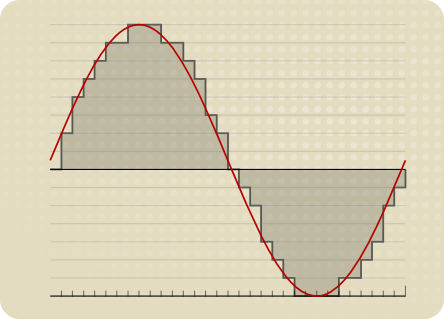
Bitrate affects audio quality by determining how much data is used to represent the original sound waves. Higher bitrates allow for more data to be used, which results in more accurate representations of the original sound waves. This results in better audio quality, such as increased clarity and reduced noise.
How to choose the right bitrate
The right bitrate for you will depend on a number of factors, including:
The type of audio you are listening to. For example, music and speech have different requirements.
The quality of your audio equipment. Higher-quality equipment can reproduce higher bitrates without introducing any noticeable distortion.
Your personal preferences. Some people may prefer the sound of higher bitrates, while others may not notice a difference.
General bitrate recommendations
Here are some general bitrate recommendations for different types of audio:
Speech: 32 kbps to 96 kbps
Music: 128 kbps to 320 kbps
High-quality audio: 256 kbps to 512 kbps or higher
It is important to note that these are just general recommendations. The best way to determine the right bitrate for you is to experiment and see what sounds best to your ears.
Final words about audio bitrates
Audio bitrate is an important factor to consider when choosing an audio file format or when setting up an audio streaming service. By understanding how bitrate affects audio quality, you can choose the right bitrate for your needs and get the best possible listening experience.
MP3 bitrate is the amount of data that is used to encode an MP3 audio file. The higher the bitrate, the higher the quality of the audio file. However, higher bitrates also result in larger file sizes.
How is MP3 Bitrate Calculated?
MP3 bitrate is calculated using a variety of factors, including the complexity of the audio signal, the desired quality of the audio file, and the target file size.
What are the Different Types of MP3 Bitrate Calculation Methods?
There are two main types of MP3 bitrate calculation methods:
Constant bitrate (CBR): This method uses a constant bitrate for the entire audio file. This results in a consistent audio quality throughout the file, but it can also result in larger file sizes for complex audio signals.
Variable bitrate (VBR): This method uses a variable bitrate, which means that the bitrate changes depending on the complexity of the audio signal. This results in smaller file sizes for complex audio signals, but it can also result in a slight variation in audio quality.
Which MP3 Bitrate Calculation Method is Best?
The best MP3 bitrate calculation method depends on your needs. If you need a consistent audio quality throughout the file, then CBR is the best option. If you are more concerned about file size, then VBR is the best option.
How to Choose the Right MP3 Bitrate for Your Needs
When choosing the right MP3 bitrate for your needs, you should consider the following factors:
The type of audio signal: Complex audio signals, such as those that contain a lot of high-frequency content, require a higher bitrate than simple audio signals.
The desired quality of the audio file: If you want the highest possible quality, then you should use a higher bitrate. If you are more concerned about file size, then you can use a lower bitrate.
The target file size: If you have a specific file size in mind, then you can use a bitrate calculator to determine the bitrate that you need.
Conclusion
MP3 bitrate is an important factor to consider when encoding audio files. By understanding the different types of MP3 bitrate calculation methods and how to choose the right bitrate for your needs, you can ensure that your audio files sound great and have a reasonable file size.
Here are some additional details about the different types of MP3 bitrate calculation methods:
Constant bitrate (CBR): This method is the simplest to understand and implement. It is also the most reliable, as it ensures that the audio quality is consistent throughout the file. However, it can result in larger file sizes for complex audio signals.
Variable bitrate (VBR): This method is more complex than CBR, but it can result in smaller file sizes for complex audio signals. This is because VBR allows the encoder to use a lower bitrate for less complex parts of the audio signal, and a higher bitrate for more complex parts of the audio signal. However, VBR can result in a slight variation in audio quality, depending on the complexity of the audio signal.
Ultimately, the best MP3 bitrate calculation method for you depends on your specific needs. If you need a consistent audio quality throughout the file, then CBR is the best option. If you are more concerned about file size, then VBR is the best option.
How to Calculate Audio Bitrate: A Comprehensive Guide
Audio Bitrate
Calculating audio bitrate is an essential skill for anyone working with digital audio files. Bitrate is the amount of data used to encode one second of audio, and it plays a significant role in the quality of audio files. In this comprehensive guide, we will discuss everything you need to know about audio bitrate and how to calculate it.
Audio Bitrate
What is Audio Bitrate?
Bitrate is the number of bits used to encode one second of audio. It is typically measured in kilobits per second (kbps) and determines the audio file’s size and quality. The higher the bitrate, the larger the audio file’s size and the better the audio quality.
Audio bitrate is determined by several factors, including:
The audio format
The audio codec
The audio signal characteristics
Audio Format and Codec
The audio format and codec are two critical factors that determine audio bitrate. Audio format refers to the type of audio file, such as MP3, WAV, or FLAC. Each audio format has its own advantages and disadvantages, including file size, compatibility, and audio quality.
The audio codec, on the other hand, is the software used to compress and decompress audio data. Codecs determine how efficiently audio data is compressed and how much data is used to encode one second of audio.
It is essential to choose the right audio format and codec for your needs, as they can significantly impact the audio bitrate and quality. For example, MP3 files are smaller in size but lower in quality than WAV or FLAC files.
Audio Signal Characteristics
The characteristics of the audio signal, such as its frequency range and amplitude, can also affect the effectiveness of audio compression and the resulting audio bitrate. Higher frequencies and amplitudes require more data to encode accurately, resulting in a higher bitrate.
Other factors that can affect audio bitrate include the number of audio channels and the audio’s dynamic range. Stereo audio files require more data than mono audio files, while audio files with a wide dynamic range require more data than those with a narrow dynamic range.
Calculating Audio Bitrate
Calculating audio bitrate requires you to know the audio file’s duration, size, and format. Once you have this information, you can use the following formula to calculate audio bitrate:
Bitrate = (File size in bits / Duration in seconds) / 1000
For example, if you have a 3-minute MP3 audio file with a size of 4,320,000 bytes:
Convert the file size to bits: 4,320,000 x 8 = 34,560,000 bits
Convert the duration to seconds: 3 x 60 = 180 seconds
In this example, the audio file has a bitrate of 192 kbps.
Conclusion
Calculating audio bitrate is an essential skill for anyone working with digital audio files. Understanding audio format, codec, and signal characteristics can help you choose the right audio settings for your needs and ensure the best audio quality possible. By following the formula above, you can easily calculate the required bitrate for your audio files and adjust the settings accordingly. Keep in mind that bitrate is not the only factor that affects audio quality, so be sure to consider other factors such as the audio format, codec, and signal characteristics when selecting your settings.
When working with audio, it’s important to strike a balance between file size and audio quality. Higher bitrates generally result in better audio quality, but also larger file sizes. It’s up to you to determine the optimal balance for your specific needs and use case.
Final Thoughts
Calculating audio bitrate may seem like a daunting task, but with the right tools and knowledge, it can be a straightforward process. By understanding the different factors that affect audio quality and file size, you can make informed decisions when selecting your audio settings.
Remember, bitrate is just one of many factors that affect audio quality. Other factors, such as the audio format and codec, can also have a significant impact. By taking these factors into consideration and making informed decisions, you can achieve the best possible audio quality for your needs.
Whether you’re an audio professional or simply someone who enjoys working with digital audio files, understanding how to calculate audio bitrate is an important skill to have. By following the guidelines outlined in this article, you can ensure that your audio files are optimized for the best possible quality and file size.
Note: The information provided in this article is for educational purposes only and should not be construed as professional advice. Always consult a professional audio engineer or other qualified expert for advice on specific audio projects or issues.
The Differences Between 128 kbps, 256 kbps, and 320 kbps MP3s
mp3 kbps
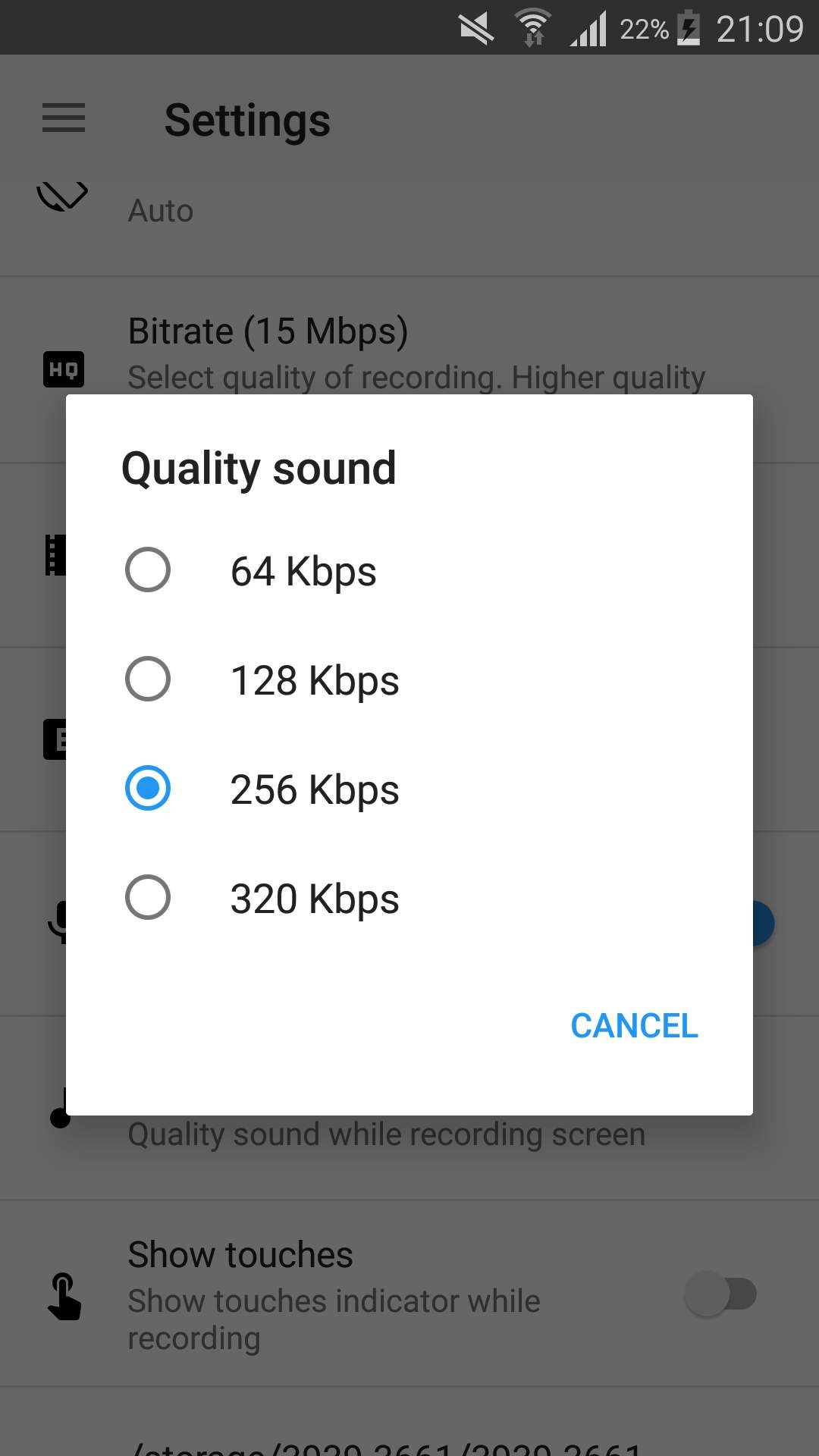
When it comes to MP3s, bitrate is one of the most important factors to consider. Bitrate is the number of bits that are processed per second and is typically measured in kilobits per second (kbps). Common bitrates for MP3s include 128 kbps, 256 kbps, and 320 kbps, but what exactly do these numbers mean, and how do they affect the overall quality of the audio?
mp3 kbps
128 kbps
128 kbps is a standard bitrate for MP3s and is considered to be a good balance between file size and sound quality. At this bitrate, a four-minute song will take up approximately 4 megabytes of space. Audio encoded at 128 kbps will sound decent on most devices, but it may not be suitable for those who are particularly picky about sound quality. It is often used in streaming services and online platforms because of the small file size which allows for faster streaming and less data consumption.
256 kbps
Compared to 128 kbps, 256 kbps offers a significant improvement in sound quality. The increased bitrate means that more data is used to represent the audio, resulting in a more accurate representation of the original recording. A four-minute song at 256 kbps will take up approximately 8 megabytes of space. This bitrate is recommended for music enthusiasts who want to enjoy a higher quality sound without having to sacrifice too much storage space.
320 kbps
320 kbps is considered the highest quality bitrate for MP3s and offers the best representation of the original audio. The increased bitrate means that even more data is used to represent the audio, resulting in a near-perfect representation of the original recording. A four-minute song at 320 kbps will take up approximately 10 megabytes of space. This bitrate is recommended for audiophiles or professional musicians who want to ensure that their music sounds as close to the original recording as possible. However, due to the large file size, it may not be practical for streaming or online platforms.
Compression
When converting audio to an MP3, the file is compressed to make it smaller in size. However, this process can cause a loss of audio quality, especially at lower bitrates. The higher the bitrate, the less compression is applied and the better the audio quality will be. For example, a 128 kbps MP3 will have more compression than a 256 kbps MP3, resulting in a lower quality sound.
Conclusion
In conclusion, the bitrate of an MP3 can have a big impact on the overall sound quality. 128 kbps is a good balance between file size and sound quality, while 256 kbps offers a significant improvement in sound quality. 320 kbps offers the best representation of the original audio, but the large file size may not be practical for streaming or online platforms. To optimize the sound quality of your MP3s, one of the best solutions is MP4Gain, that optimizes the audio of your files, making them sound better than ever before.
The bitrate and its relationship with the audio quality in an MP3
The bitrate and its relationship with the audio quality in an MP3
The bitrate is a measure of the amount of audio information that is encoded per second in a compressed audio file, such as an MP3. Bit rate is measured in kilobits per second (kbps).
The bitrate and its relationship with the audio quality in an MP3
The higher the bitrate, the higher the audio quality. However, a larger file size will also be required to store the same amount of audio time. Therefore, it is important to choose a suitable bitrate to balance quality and file size.
For music files, a bitrate of at least 128 kbps is recommended for decent sound quality. However, if you want higher sound quality, you can go for a higher bitrate, such as 256 kbps or even 320 kbps.
For voice audio files, a bit rate of 64 kbps is sufficient for clear sound quality. However, if you want higher sound quality, you can go for a higher bitrate, such as 96 kbps or 128 kbps.
In short, bitrate is an important factor in the audio quality of an MP3 file. It is important to choose a suitable bitrate to balance quality and file size.
Also, it’s important to note that bitrate isn’t the only factor that affects the audio quality of an MP3. Other important factors include the sample rate and the number of channels. The sample rate refers to the number of times the sound is measured per second, while the number of channels refers to the number of audio channels in the file.
For example, an audio file with a bit rate of 128 kbps and a sample rate of 44.1 kHz and 2 audio channels will have higher sound quality than a file with the same bit rate but a sample rate of 22 kHz and 1 audio channel.
In conclusion, if you want to get the best audio quality from an MP3 file, it’s important not only to choose a suitable bitrate, but also to consider the sample rate and number of channels. It is advisable to choose an optimal combination of these factors to obtain the best sound quality.
In addition, it is important to mention that there are other audio formats, such as WAV, FLAC, AIFF, which, unlike MP3, are not compressed, which means that they do not lose audio quality to the compression process. However, these formats often have much larger file sizes than compressed formats like MP3.
So, if you want the best audio quality, it’s recommended to use uncompressed formats like WAV or FLAC, but it’s also important to consider storage space and compatibility with different devices and audio players. In case of opting for compressed formats, it is important to choose an appropriate bitrate and take into account other factors such as the sampling frequency and the number of channels.
In summary, bitrate is an important factor in the audio quality of an MP3 file, but it is not the only factor to consider. It is important to choose a suitable bitrate, as well as take into account the sample rate and the number of channels to obtain the best sound quality. In addition, there are other uncompressed audio formats that offer higher sound quality, but also have a larger file size.
Today’s mp3 market can be described as a hundred flowers in bloom, and the competition between the major manufacturers is splendid. In order to take the lead and gain the most market share, various manufacturers, especially those with strength, have their own unique tricks. In terms of appearance, mpio’s fl200 has won the award with its mini round cake design. unique pendant. The latest mp3 title, Truly’s mp379, also created the trend of big screen mp3, and Samsung also released its sports mp3 concept, which is absolutely stunning in the market. Some small manufacturers have also adopted imitation methods, making the market of all kinds of mp3 like a sky full of countless stars. Simple repeat, record and fm functions can also meet the needs of the market. Line-in, features, e-book reading, gaming, and colorful backlights are slowly creeping into the new mp3 design. However, the author believes that no matter how cool it looks and how perfect its functions are, the mp3 is used to enjoy music in the final analysis. An mp3 without good sound quality is at least not a qualified mp3. If you just go for looks and function (actually, we rarely use some functions), and ignore its sound quality performance, you will feel a bit like buying a scorpion.
A decoder chip inherent in mp3
The decoder chip used by the Mp3 itself is the key to its sound quality. The sound quality displayed by high quality decoder chips is unmatched by those of the poorest. Friends who have listened to the famous iriver series of mp3s will know that its sound quality characteristics are very obvious, the bass is strong and powerful, the vocals are restored to truth, the high-frequency field is wide, and the increase is enough, which is very pleasing to the ears. This series mp3 adopts Philips SAA7750, the most advanced decoder chip in the market, and its quality and performance are excellent. The major Korean manufacturer MPIPO (Dewei Technology) also uses this decoder chip. The reputation and market feedback of these two mp3 sound quality brands are very good, and they are highly praised by the industry and outside the industry. It proves that mp3 sound quality is better than md’s ace gun. Due to the relatively high cost of the chip and the control chip, it is rarely used except for some brands. The cost is high, and the price is of course expensive. This is also the threshold that restricts many mp3 lovers from enjoying the beautiful sound quality.
Mp3 ape flac What is the difference between the three music formats?
When we often download songs, we want to download some of the best sound quality, and we are also confused about which sound quality is the best.
If you ask the friends around you, they will definitely all say that you want to download lossless files, but how good is the sound quality of lossless files?
First of all, the first impression is that the volume of lossless files is obviously different from normal MP3 files. Normally, the size of normal MP3 music file is only 2-5M, but the volume of lossless APE files of the same version is about 30M, a difference of 10M times more.
In the case of the same playback time, why is there such a big volume difference?
Here to talk about a term – bitrate It is a data factor that determines whether the quality of a song file is good or bad, bitrate refers to the number of bits transmitted per second (bit). The unit is bps (bits per second). The higher the bit rate, the higher the data transmission speed. The bit rate in sound refers to the amount of binary data per unit of time after converting an analog sound signal (a signal with sound properties such as amplitude and frequency) into a digital sound signal (i.e., a binary signal such as 010101 stored on a computer’s hard drive) is an indirect measure of audio quality. The principle of bit rate (bit rate) in video is the same as in sound, which refers to the amount of binary data per unit of time after the analog signal is converted to a digital signal.
Bitrate Property for Lossless Files
Bitrate Properties for High Quality MP3
The bit rate of MP3 files with ordinary sound quality is generally 128 kbps, the bit rate of high-quality MP3 files is generally 320 kbps, and the bit rate of lossless files is generally 960 kbps. kbps or even more. The difference in bit rate can be understood as the vibration frequency of the sound decoded by the decoder at the same time. The higher the bit rate, the higher the vibration frequency and the better the corresponding sound. Good timbre means that the restoration of sound details is relatively complete, that is, the sound quality is good. However, this is also the reason for the large size of the lossless files.
Why are MP3 bitrates often multiples of 32? (power of 2) part 2
MP3 Bitrate
Depending on the resource, VBR can be encoded by changing the bitrate between a fixed rate above each frame, or by sharing the available bits in adjacent frames (effectively producing a non-standard bitrate for the two frames combined).
MP3 Bitrate
the fixed frame depends on the sampling rate, 1152 samples per frame. There is no limit to the size of the frame itself, nor to the base 2 size of the frame (ie 417 bytes for a 128 kbit/s MP3 sampled at 44.1 kHz).
In the end, a file encoded at 126kbps will sound worse than a file encoded at 128kbps, and similarly a file encoded at 131kbps will sound better. However, MP3s are encoded according to the compression psychoacoustic model of a specific encoder. The amount by which a file sounds “better” or “worse” at a given bitrate largely depends on the algorithm used to implement the model, but in general higher bitrates allow for more data, presumably for rebuild a more accurate original transmission. audio signal
Why are MP3 bitrates often multiples of 32? (power of 2)
MP3 Bitrate
Some people say:
MP3 Bitrate
I understand why multiples of 2 often show up on computers since they are binary, but I can’t figure out how the most common mp3 bitrates (64kbps, 128kbps, 160kbps, 192kbps, 256kbps, 320kbps, etc.) also tend to follow this rule.
Since MP3 is just a sequential encoding of sound waves, why is it important to represent each second in kilobits divisible by 2?
Does a music player like iTunes continue to read the file and play the encoded sound regardless of the second limit, or does it read the file every second?
In the latter case, reading a 256kbps file requires reading slightly fewer memory pages than a 257kbps file, but the player can always read 256KB chunks, regardless of their bitrate, and just process them automatically. incremental, right, Bar?
Are 128kbps MP3 songs popular simply because it’s a generally accepted bitrate, or do they really have any advantages over 126kbps and 131kbps files, apart from a very slight difference in quality/file size?
For constant bit rate (CBR) encoding, the MPEG-1 Audio Layer III standard specifies standard bit rates of 32, 40, 48, 56, 64, 80, 96, 112, 128, 160, 192, 224, 256 and 320 kbit/second. There are a few others defined in the MPEG-2 standard, but they are also multiples of 2 (actually all multiples of 8 in the range 8 to 160 – see the table called “Bitrate Index” in the link above) .
Technically, there is nothing that limits the MP3 bitrate to a multiple of 2, since variable bitrate encoding can be used, or a custom bitrate can be achieved using some flags not used in the MPEG specification ( although this must be implemented manually). . In order for MP3 to be MPEG-compliant, and therefore compatible with most MP3 decoders, it must have a bitrate defined by the specification, so all CBR-encoded MP3 files have a bitrate of two.
Bit rate refers to the number of bits (bits) transmitted per second. The unit is bps (Bit per second) The higher the bit rate, the faster the data transmission speed.
Mp3 bitrate
Bitrate in sound refers to the amount of binary data per unit of time after converting an analog sound signal to a digital sound signal, which is an indirect measure of audio quality.
Bitrate refers to the sampling rate at which digital sound is converted from analog to digital format. The higher the sampling rate, the better the quality of the restored sound. As a benchmark for the efficiency of digital music compression, bit rate indicates the rate of the number of bits bps (bit per second, bits per second) transmitted per unit of time (1 second). Kbps (in layman’s terms is 1000 bits per second) is usually used as the unit. The bit rate of digital music on CD is 1411.2 kbps (that is, to burn 1 second of CD music, 1411.2 × 1024 data bits are required), the high BIT RATE of the digital music file music means that it should be processed in a unit of time (1 second) The amount of data (BIT) is large, which means that the sound quality of the music file is good. However, when the BITRATE is high, the file size increases, which will take up a lot of memory capacity. The most commonly used bitrate for music files is 128 kbps, and MP3 files can generally use 8 to 320 kbps. In the same way, most of them are 32-256 Kbps. Of course, the wider the rate, the better, but 320 Kbps is the highest level at the moment.
Bitrate calculation formula
The basic algorithm is: [Bit rate] (kbps)=[file size] (bytes) X8/[time] (seconds)/1000
Special algorithm for audio files: [bit rate] (kbps) = [quantization sample point] (kHz) × [bit depth] (bit/sampling point) × [number of channels] (typically 2)
For example, the D5 drive has a capacity of 4.3G, which takes into account different audio formats, so it is calculated as 600M (so the remaining capacity is 4.3*1000-600=3700M), so the video file should not be larger than 3.7G, in this example, take The capacity of the video file is 3.446G, and the length of the video is 100 minutes (6000 seconds). The calculation result: the bit rate is approximately equal to 4933kbps.