High Bitrate Music


Free Download Mp4Gain
picture

High Bitrate Music

High Bitrate Music
High Bitrate Music
High Bitrate Music
High Bitrate Music

Introduction to High Bitrate Music

High bitrate music has become a buzzword in the music industry in recent years. It refers to audio files with a higher bitrate, or the number of bits of information processed per second, than the standard compressed audio formats like MP3 or AAC. The higher the bitrate, the more information can be captured and the better the quality of the sound. In this article, we will dive deep into the world of high bitrate music, discussing its benefits, potential drawbacks, and answering frequently asked questions about this topic.

What is High Bitrate Music and Why is it Important?

High bitrate music refers to audio files that contain more data than standard compressed audio formats. It is important because it offers a more accurate representation of the original sound recording, resulting in better sound quality. The higher the bitrate, the more information is captured, resulting in a more detailed and nuanced sound.

Benefits of High Bitrate Music

There are several benefits to high bitrate music, including:

1. Better sound quality: As mentioned earlier, high bitrate music captures more information, resulting in better sound quality.

2. More accurate representation of the original recording: High bitrate music captures more detail in the original recording, resulting in a more accurate representation of the artist’s intended sound.

3. Increased dynamic range: High bitrate music can capture a wider range of sound, from the quietest whispers to the loudest screams, resulting in increased dynamic range.

4. Improved listening experience: High bitrate music provides a more immersive and engaging listening experience.

Potential Drawbacks of High Bitrate Music

While high bitrate music offers many benefits, there are also some potential drawbacks to consider, including:

1. Larger file sizes: High bitrate music files are larger than standard compressed audio files, which can take up more storage space on your device.

2. Increased bandwidth requirements: High bitrate music files require more bandwidth to stream or download, which can be an issue for those with slower internet connections.

3. Compatibility issues: Some devices and software may not be able to play high bitrate music files.

How to Access High Bitrate Music

There are several ways to access high bitrate music, including:

1. Purchasing high-resolution audio files: Many online music stores offer high-resolution audio files in various formats.

2. Streaming services: Some streaming services offer high-quality audio streaming, including Tidal and Qobuz.

3. Local music libraries: Some users may have their own high bitrate music files stored locally on their devices.

Common Formats for High Bitrate Music

There are several formats for high bitrate music, including:

1. FLAC: FLAC stands for Free Lossless Audio Codec and is a popular format for high-resolution audio files.

2. ALAC: ALAC stands for Apple Lossless Audio Codec and is the Apple version of FLAC.

3. WAV: WAV stands for Waveform Audio File Format and is a popular format for high-quality audio files.

FAQ

Q: Can high bitrate music be played on any device?

A: Not all devices are compatible with high bitrate music. Some older devices or software may not be able to play high bitrate music files.

Q: Is high bitrate music worth the extra cost?

A: This is a personal preference. If you value high-quality sound and are willing to invest in it, then high bitrate music may be worth the extra cost. However, if you are content with standard compressed audio formats, then high bitrate music may not be worth the added expense.

Q: Can high bitrate music improve the sound of low-quality recordings?

A: High bitrate music can only capture what is in the original recording. It cannot improve the quality of a low-quality recording or fix any issues with the original source. However, it can provide a more accurate representation of the original recording and may sound better than a compressed version of the same recording.

Q: Do I need special equipment to listen to high bitrate music?

A: While you don’t necessarily need special equipment to listen to high bitrate music, you will need a device that is compatible with the format and can handle the larger file sizes. Additionally, high-quality headphones or speakers can enhance the listening experience.

Q: How can I tell if a music file is high bitrate?

A: The bitrate of a music file can usually be found in the file’s properties or metadata. It is typically measured in kilobits per second (kbps) or megabits per second (mbps). High bitrate music files will typically have a bitrate of 1,411 kbps or higher.

Q: Can high bitrate music improve the sound of streaming services?

A: Some streaming services offer high-quality audio streaming, including high bitrate music. However, the quality of the sound will also depend on the quality of your internet connection and the device you are using to stream the music.

Q: Is there a noticeable difference between high bitrate music and standard compressed audio formats?

A: Yes, there is a noticeable difference between high bitrate music and standard compressed audio formats. High bitrate music captures more detail in the original recording, resulting in a more accurate and nuanced sound.

Q: Are there any free sources of high bitrate music?

A: While most high bitrate music sources require payment, some websites offer free high-resolution audio downloads, such as the Free Lossless Audio Codec website.

Q: How do I convert standard compressed audio files to high bitrate music?

A: You cannot convert standard compressed audio files to high bitrate music, as the information captured in the original recording cannot be added back. To access high bitrate music, you will need to acquire a high-resolution audio file in the desired format.

Q: Are there any downsides to converting standard compressed audio files to high bitrate music?

A: Yes, converting compressed audio files to high bitrate music will not improve the quality of the original recording and may result in larger file sizes without any added benefits.

Conclusion

High bitrate music offers many benefits, including better sound quality, increased dynamic range, and an improved listening experience. However, there are also potential drawbacks to consider, including larger file sizes and compatibility issues. Understanding the formats and sources for high bitrate music can help you access and enjoy this high-quality audio format.



Free Download Mp4Gain
picture


Mp4Gain Main Window
picture


Mp4Gain Features
picture


Free Download Mp4Gain
picture

Can you really hear the difference in the sound quality of music?

Can you really hear the difference in the sound quality of music?

difference in the sound quality of music

A brief discussion of the principle of audio compression

difference in the sound quality of music


grade headphones – performance, equipment – can you really hear the difference in music quality? A brief discussion of the principle of audio compression
When you listen to music, most of the time the format being played is MP3 or AAC.

Both formats are smaller formats in which the audio is processed and compressed. To reduce size and save space, they actually remove a portion of the sound signal compared to the original audio. But can you hear it?

In this article, we will introduce the principles of music compression and discuss a question: Does music compression really affect the music you listen to?

The principle of musical compression.
Most of the digital audio we receive every day, whether played online or stored as a file, uses the principle of lossy compression. Lossy compression not only compresses the data, but also deletes the original data, and with lossy compression, some data is gone forever.

But keep in mind that this censored data is not randomly selected. Audio compression formats apply psychoacoustics to remove sounds that are beyond our hearing range and that we are not aware of.

audio compression – operation, equipment – can you really hear the difference in music quality? A brief discussion of the principle of audio compression
The human ear has a hearing range of about 20 Hz to 20 kHz, and sound signals beyond this range cannot be detected even if they are removed. And as we age, the range of hearing decreases. Therefore, it can be said that the sounds that everyone hears are not really absolutely the same, even if they come from the same sound source.

The audio below can help you find your hearing range, you can listen to it with headphones to see how far away you can hear the sound signal. Be careful to control the volume at any time during the listening process, otherwise it may damage your hearing.

Also, when high-frequency sounds and low-frequency sounds are present at the same time, high-frequency sounds will be more difficult to hear clearly. For example, the constant drumbeats in the music can cause you to ignore the slight differences between the melodies.

This phenomenon is called “shadowing” and is used in the principle of compression. If there are louder low-frequency sounds, it can mask the sonic loss of high-frequency sounds. High and low here are relative, so this principle can be applied globally. But sounds above 15 kHz are more susceptible to masking, so that’s also a prime issue for compression.

Although it is obvious that the sound signal removed by lossy compression should be mostly useless data, there are still people who believe that these “ambient sounds” being removed will affect the three-dimensionality of the sound and flatten it.

In general, the key to lossy compression is finding a balance between reducing size and preserving sound quality.

What does the quality of the audio or video depend on?

What does the quality of the audio or video depend on?

Sample Rate
Sample Rate

What factors are crucial for a higher or lower quality in digital files?

Sample Rate
Sample Rate

Files like WAV are not compressed, but they take up a lot of space and contain a lot of inaudible and unnecessary information.

This forced them to look for ways to be able to compress this audio or video to save space and so that they were also lighter to watch or listen to live on sites like YouTube or Spotify, etc.

Let’s see what are the important parameters:

1.- Bit Rate

It is the bit transfer rate. Said in an easy to understand way, it is the amount of information that can be transmitted per second. It is obvious that the more information that can be transmitted, the greater the detail and therefore the greater the quality.

Sometimes the transfer rate is fixed (CBR) but it can also be variable. Where the bitrate chosen for each moment will depend on the amount of information needed.

An audio with a lot of silence and few sounds will need to transfer much less information per second than an audio full of sounds and nuances.

2.- Sampling rate

The amount of information per second that is sampled will mark the number of details that are captured and can be transmitted.

But obviously also the higher the sampling rate, the greater the information contained.

Therefore, we see as a very simplified summary that a higher quality requires greater detail and therefore better information stored and a higher speed of transmission of that information.

Therefore higher bitrate and higher samplerate will usually mean higher quality, and will also take up more space.

Which is better, MP3, FLAC or WAV? Part 2

Which is better, MP3, FLAC or WAV? Part 2


The right audio file format can do more with less

M4A

M4A is a format compatible with Apple products such as iPhone and iPod, and corresponds to MPEG-4 video files. M4A files have lossless compression and can be edited multiple times without quality loss. Compared to other audio file formats, M4A has similar quality but smaller file size.

CCA

Like MP3, Advanced Audio Coding (AAC) files are also lossy formats. However, AAC files are of much higher quality in their original state than all other audio file formats, and AAC files are generally similar in size to MP3, but slightly higher in quality.

In addition, AAC also offers variable bitrate or constant bitrate encoding, and AAC files are also open source, which means you don’t have to pay royalties to create and share them (unlike MP3 files). .

AAC files are usually used in iTunes, but can also be used in other player devices and game consoles.

undefined

OGA

Like AAC, OGA files are open source and use lossy compression. They use a variable bit rate to reduce file size without reducing the overall sound quality. In practice, OGA files tend to be of higher quality than MP3s, but many programs don’t support OGA.

FLAC

Like M4A, FLAC is a lossless format, but unlike M4A, FLAC is an open source encoding and has a more efficient compression algorithm that reduces the file to 50% to 70% of its original size. This format is popular with audiophiles as a way to collect music in its highest quality form. Because it is open source, it is compatible with many devices and programs.

PCM, WAV and AIFF

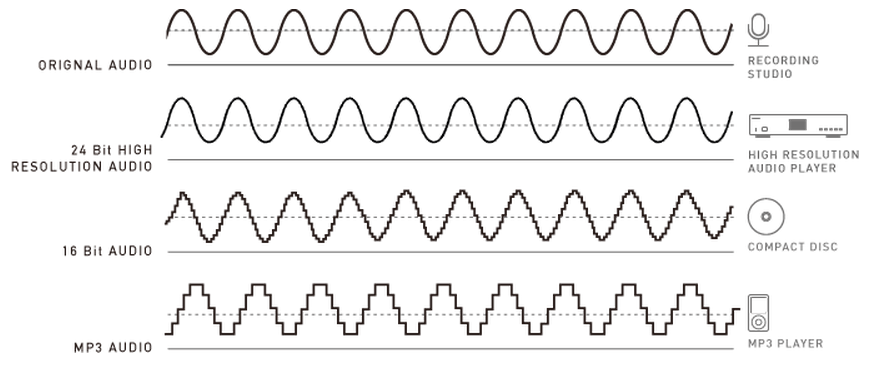
PCM (Pulse-Code Modulation) is an uncompressed audio file format commonly used on CDs and DVDs. This format uses a “sample rate” and a “bit depth”, where the sample rate represents the sample rate of the original audio file and the bit depth represents how many bits are used to define each sample.

WAV (Waveform Audio File Format) is generally used as a format for storing PCM audio files, which makes it more suitable for Windows computers.

AIFF (Audio Interchange File Format, Audio Interchange File Format) like WAV is commonly used to store audio files in PCM format (except Mac).

How to choose the correct audio file format

Choosing the right format completely depends on the audio file you intend to use, you should choose a format that expresses the sound quality of the desired audio file, unnecessary high quality audio files can be difficult to move, share, convert and manage . Consider the following two cases:

If you plan to edit audio files (such as podcasts), use uncompressed formats (including PCM, WAV, and AIFF) so that the quality of the audio files is maintained each time you edit and save the file. Once completed, it can be generated in a compressed format that is easy to share.
If you are an audiophile and want to listen to your music in high fidelity, choose a lossless compressed file format, including FLAC, WMA, M4A. It uses less storage space than uncompressed formats, but still retains the original full file quality.
If you don’t care about the quality of audio files, want to share files on the Internet, or need to save hard disk space, choose a format that uses lossy audio file compression, including MP3, OGA, AAC. Fortunately, lossy compression has gotten so good in recent years that most people can’t tell the difference between lossy and lossless compression.
In conclusion

In summary, the most popular types of audio files are:

MP3
M4A
CAA
OGA
FLAC
WAV
PCM
AIFF
In some cases it is better to use one file format than the other, in which case you should convert between the two file formats. To programmatically convert between audio or video file types, you can use Filestack’s Audio Transcoding API or Video Transcoding API. The Filestack API also supports splitting audio files from video files, cropping or resizing video files, video file thumbnails, and more.

Which is better, MP3, FLAC or WAV?

Which is better, MP3, FLAC or WAV?

MP3, FLAC or WAV
MP3, FLAC or WAV


The right audio file format can do more with less

MP3, FLAC or WAV
MP3, FLAC or WAV

Starting with MP3, M4A, and AAC, etc., when you process audio or video in your program, you will find many audio file formats. In this article, we’ll take an in-depth look at the different types of formats and when to use them in an audio or video file.


First, let’s answer some frequently asked questions:

What is the best audio format for sound quality?

Lossless formats like FLAC, WAV and AIFF are the best formats for audio files, these types of audio files are considered “high resolution” because the quality is better than a CD, but these files take up a lot of space.

Which audio file format is best to use on the web?

From a browser compatibility point of view, MP3 and MP4 are the most suitable formats to use on web pages. Modern browsers, including IE9, support this format, and some also support other formats, such as OGG, WebM, AAC, and WAV.

What are the most popular audio formats?

MP3 files are the most widely used format, and the popularity of MP3 in recent decades has led to the rise of many MP3-compatible players on the market, which continues to this day. MP3 offers a variety of different bit rates to balance quality and file size, and efficient size makes it a standard format for exchanging audio files over the Internet.

How to convert audio files from one format to another?

To convert formats manually, use a program like VLC Media Player to convert between popular audio file formats.

To programmatically convert files, Filestack provides an audio file transcoding API that makes converting audio files easy and convenient.

audio file format

MP3

MP3 is the most common audio file format and has lossy compression, which means that its quality will decrease with further editing. But compared to other audio file formats, the file size of MP3 is still relatively large.

MP3 files can be encoded at a constant or variable bit rate. Constant bit rate ensures the same quality throughout the audio file, but results in a larger file; Reduces quality when near silent, which reduces overall file size. Most smartphones and music players use the MP3 format.

How to normalize the volume of several mp3s?

How to normalize the volume of several mp3s?

Normalize Mp3
Normalize Mp3

How to get my mp3s to sound with a similar volume/loudness?

Normalize Mp3
Normalize Mp3

When the music was distributed on vinyl and recorded in an analog way, it was an exception that one audio sounded louder or quieter than the others.

On the other hand, since it took several seconds to change the disk, our mental reference to the volume of the previous disk had been erased, we were no longer so clear.

Today, with digitalized music and videos and with digital players that can play playlists, it is extremely noticeable if there is a change, jump, etc. in the volume or loudness level from one audio to another or from one video to another.

Mp4Gain is the professional mass solution that has been developed so far and it is very simple to use: just load the audios (of any popular format, not just mp3s) and the same with audios and press a button and soon we will have the problem of the resolved volume.

Explain why this happens in the digital age and did not happen in the analog one does not fall back on the myths of the supposed analog superiority.

Rather, today we have equipment to reproduce much higher quality that detects and makes it noticeable, since we have become accustomed to high fidelity, which perhaps in the analog era would have gone unnoticed.

We also find that now almost any audio or video file that reaches us has been manipulated in one way or another by an “intermediary”. That is, someone encoded or re-encoded that audio or mvideo, chose a bitrate, etc. and it is NOT reaching us, in that sense the original file. And this manipulation done by amateurs greatly influences the quality and loudness.

How many KB is the best sound quality for mp3? Part 3

How many KB is the best sound quality for mp3? Part 3

MP3 Quality
MP3 Quality

WMA is a digital music format promoted by Microsoft, under the premise of the same sound quality as mp3, the volume can be reduced by half, which almost doubles the capacity of the mp3 player.

MP3 Quality
MP3 Quality

You can easily transcribe CD to WMA through the media player that comes with Window. However, WMA has a disadvantage: Due to the music copyright issue, some WMA files cannot be simply copied to the mp3 player for playback. Of course, the higher the sound quality, the larger the file size. 320kb mp3 files are as large as 9m, and an mp3 with 128m of memory can only hold about 12 songs, which is highly impractical. The size is the ideal choice. Of course, if you have the money, it would be better to buy an mp3 hard drive, even if you put 320kb files on it, it will be easier to enjoy high quality music.
2. Quality of music playback files
The decoder chip is important, but in order to enjoy high-quality music, the factor that affects the sound source itself is very large. In turn, the quality of the audio source depends on the music file format and compression ratio. Nowadays, the most popular music formats are of course mp3 and wma, almost all mp3 players support these two formats. MP3 should be considered as the most lossy compressed digital audio format currently used by users. The mp3 files that we usually listen to have a bit compression rate of 128kbps, the compression rate is about 1:10, and the file size is usually only 4m. to a more balanced position. The compression rate of the songs we download from the Internet is usually relatively low, often only 96kbps or even less, and the effect is not very ideal. This is a practice where websites deliberately lower the compression rate due to download speed and copyright issues. To enjoy real sound quality, the best way is to find a better quality CD disc and compress it yourself. Generally speaking, the sound quality of mp3 files with a compression ratio of 192 kbps is relatively good. When played with a good mp3 player, the effect is very similar to md. If compressed to 320 kbps, the sound quality is very similar. to the CD player It’s hard to tell the difference. (Excluding those with golden ears, of course)
The most famous mp3 decoder is of course the free LAME mp3 encoding software, and most of the users have affirmed the sound quality of the mp3 encoded by it. The first MP3 encoding used a fixed code rate (CBR) method, and now it’s slowly starting to use a variable code rate (VBR) compression method. Good balance. It is worth noting that older mp3s are not compatible with VBR encoded mp3s.
WMA is a digital music format promoted by Microsoft, under the premise of the same sound quality as mp3, the volume can be reduced by half, which almost doubles the capacity of the mp3 player. You can easily transcribe CD to WMA through the media player that comes with Window. However, WMA has a disadvantage: Due to the music copyright issue, some WMA files cannot be simply copied to the mp3 player for playback. Of course, the higher the sound quality, the larger the file size. 320kb mp3 files are as large as 9m, and an mp3 with 128m of memory can only hold about 12 songs, which is highly impractical. The size is the ideal choice. Of course, if you have the money, it would be better to buy an mp3 hard drive, even if you put 320kb files on it, it will be easier to enjoy high quality music.

How many KB is the best sound quality for mp3? Part 2

How many KB is the best sound quality for mp3? Part 2

Mp3 Quality
Mp3 Quality

The most widely used decoder chip on the market today is, of course, the well-known STMP3410 from Sigmatel.

Mp3 Quality
Mp3 Quality

Whenever you disassemble your mp3, you will find that your mp3 uses STMP3410 decoder chip. The decoder chip is highly integrated and has concentrated functions. It is easy for manufacturers to develop or add new features such as letter display and electronic dictionary. The relative cost is relatively low. It ranges from high-end brands like Samsung, MSC, and Giving to some misc and even names All brands that cannot be called are used, the sound quality is quite satisfactory, the low frequency is a bit weak, the voices and the musical instruments are not bad. Of course, the sound quality performance of mp3 using STMP3410 decoder chip is not the same and sometimes even very different. The reason lies in the internal circuit design of the mp3, the soldering process, the material of the circuit board, and the difference between various manufacturers, especially There is a big difference between the big manufacturers and some non-brand manufacturers. These are also the key factors that affect the work of the decoding chip and the sound quality output. Take two high-end machines that also use the STMP3410 chip and compare the unbranded machines to understand. Therefore, due to many factors within the mp3, the price of the mp3 that also uses the STMP3410 chip varies.
What’s more, there are some unscrupulous manufacturers on the market who use discarded or recycled second-hand FLASH chips, along with inferior circuit design, quickly made an mp3 and sold it to the market. Usually the price of this kind of mp3 is very low, and the 128m memory is sometimes cheaper than the same capacity U disk, and the sound quality can be described as rubbish. Come to think of it, we all know that manufacturers have to survive on such a small profit, unless there is something in the mp3, who will make it for free? So when you come across this kind of mp3, you should pay more attention, no matter how good the sound quality is, it can’t be better. Other decoder chips such as Sigmatel’s STMP1342, Telechip’s TCC730, Samsung’s S3C2410, etc. will not be discussed in detail due to their similar performance.
With the deepening of the market, some powerful manufacturers are also constantly exploring to dedicate the best sound quality to consumers. JNC’s new SSF-800 machine uses the SIGMATEL3420 chip, and the sound quality is very impressive. The next new mp3 just released by iriver uses the most powerful SIGMATEL3520, which is worth waiting for. The good news is that the Meizu me released by the national brand Meizu also uses the SIGMATEL3520 decoder chip, which is the first time for a national brand. It appears that the national brand is slowly creeping into the ranks of premium sound effects as well.
Second, the quality of music playback files The
decoding chip is important, but in order to enjoy high-quality music, the factor that affects the sound source itself is very large. In turn, the quality of the audio source depends on the music file format and compression ratio. Nowadays, the most popular music formats are of course mp3 and wma, almost all mp3 players support these two formats. MP3 should be considered as the most lossy compressed digital audio format currently used by users. The mp3 files that we usually listen to have a bit compression rate of 128kbps, the compression rate is about 1:10, and the file size is usually only 4m. to a more balanced position. The compression rate of the songs we download from the Internet is usually relatively low, often only 96kbps or even less, and the effect is not very ideal. This is a practice where websites deliberately lower the compression rate due to download speed and copyright issues. To enjoy real sound quality, the best way is to find a better quality CD disc and compress it yourself. Generally speaking, the sound quality of mp3 files with a compression ratio of 192 kbps is relatively good. When played with a good mp3 player, the effect is very similar to md. If compressed to 320 kbps, the sound quality is very similar. to the CD player It’s hard to tell the difference. (Of course, those with golden ears are excluded)

How many KB is the best sound quality for mp3?

How many KB is the best sound quality for mp3?

Mp3 Quality
Mp3 Quality

Four Factors That Determine MP3 Sound Quality

Mp3 Quality
Mp3 Quality

Today’s mp3 market can be described as a hundred flowers in bloom, and the competition between the major manufacturers is splendid. In order to take the lead and gain the most market share, various manufacturers, especially those with strength, have their own unique tricks. In terms of appearance, mpio’s fl200 has won the award with its mini round cake design. unique pendant. The latest mp3 title, Truly’s mp379, also created the trend of big screen mp3, and Samsung also released its sports mp3 concept, which is absolutely stunning in the market. Some small manufacturers have also adopted imitation methods, making the market of all kinds of mp3 like a sky full of countless stars. Simple repeat, record and fm functions can also meet the needs of the market. Line-in, features, e-book reading, gaming, and colorful backlights are slowly creeping into the new mp3 design. However, the author believes that no matter how cool it looks and how perfect its functions are, the mp3 is used to enjoy music in the final analysis. An mp3 without good sound quality is at least not a qualified mp3. If you just go for looks and function (actually, we rarely use some functions), and ignore its sound quality performance, you will feel a bit like buying a scorpion.
A decoder chip inherent in mp3
The decoder chip used by the Mp3 itself is the key to its sound quality. The sound quality displayed by high quality decoder chips is unmatched by those of the poorest. Friends who have listened to the famous iriver series of mp3s will know that its sound quality characteristics are very obvious, the bass is strong and powerful, the vocals are restored to truth, the high-frequency field is wide, and the increase is enough, which is very pleasing to the ears. This series mp3 adopts Philips SAA7750, the most advanced decoder chip in the market, and its quality and performance are excellent. The major Korean manufacturer MPIPO (Dewei Technology) also uses this decoder chip. The reputation and market feedback of these two mp3 sound quality brands are very good, and they are highly praised by the industry and outside the industry. It proves that mp3 sound quality is better than md’s ace gun. Due to the relatively high cost of the chip and the control chip, it is rarely used except for some brands. The cost is high, and the price is of course expensive. This is also the threshold that restricts many mp3 lovers from enjoying the beautiful sound quality.

What is the difference between 128k and 320k music?

What is the difference between 128k and 320k music?

audio bitrate
audio bitrate


Some time ago, a colleague came across a very troubled client. The mess was said to have been caused by the client asking him to provide song files larger than 100MB-200MB in size.

bit depth
bit depth

And my colleagues don’t know much about audio formats, so they started endlessly fumbling about FLAC, WAV and audio size. In the end, the colleague did not clearly explain to the customer what was going on.

After that, other things happened that made me feel that in the music industry there are too many practitioners around me who have an extremely poor understanding of music and even lack some basic knowledge related to music. I don’t even have the idea to understand, which makes me very sad. It seems that music has only one merchandise attribute, and our practitioners only need to organize the shelves, encode various merchandise, and use the big data of users’ purchase records to recommend merchandise to users, no matter why to users. they like this. features that these products have, and provide users with various services with cold data.

Therefore, I think it is necessary to write something. I don’t expect practitioners to become people who really love music. I just hope that even if you still think of “her” as a commodity, you can first figure out what you’re selling. and what is..

PS: The content of the first lesson is about media files. Since the relevant content involves a lot of technical issues, it seems a bit boring, but if you read it carefully, you will find that it is actually very easy to understand, but this basic knowledge can be very helpful.Improve your skill well. Also expect more interesting content about records, musical styles, etc. which I will post soon.

【text】

Bit Rate, Sample Rate, Lossless, MP3, FLAC, APE, 320kb, 192kb, 128kb, 44.1khz, CBR, VBR. Does this bunch of various names make you both familiar and unknown?

The higher the bitrate, the better the sound quality. Lossless music is the highest sound quality, right? So, let’s start with the sound collection.

【Audio composition】

Nowadays, when we talk about audio, everything is digital audio. Digital audio consists of three parts: sample rate, sample precision, and number of sound channels.

Sample Rate: Both the sample rate, which refers to the number of samples per second when recording the sound, expressed in Hertz (Hz).

Sampling Precision: Refers to the dynamic range of the recorded sound, measured in bits (Bit).