Can you really hear the difference in the sound quality of music?


Free Download Mp4Gain
picture

Can you really hear the difference in the sound quality of music?

difference in the sound quality of music

A brief discussion of the principle of audio compression

difference in the sound quality of music


grade headphones – performance, equipment – can you really hear the difference in music quality? A brief discussion of the principle of audio compression
When you listen to music, most of the time the format being played is MP3 or AAC.

Both formats are smaller formats in which the audio is processed and compressed. To reduce size and save space, they actually remove a portion of the sound signal compared to the original audio. But can you hear it?

In this article, we will introduce the principles of music compression and discuss a question: Does music compression really affect the music you listen to?

The principle of musical compression.
Most of the digital audio we receive every day, whether played online or stored as a file, uses the principle of lossy compression. Lossy compression not only compresses the data, but also deletes the original data, and with lossy compression, some data is gone forever.

But keep in mind that this censored data is not randomly selected. Audio compression formats apply psychoacoustics to remove sounds that are beyond our hearing range and that we are not aware of.

audio compression – operation, equipment – can you really hear the difference in music quality? A brief discussion of the principle of audio compression
The human ear has a hearing range of about 20 Hz to 20 kHz, and sound signals beyond this range cannot be detected even if they are removed. And as we age, the range of hearing decreases. Therefore, it can be said that the sounds that everyone hears are not really absolutely the same, even if they come from the same sound source.

The audio below can help you find your hearing range, you can listen to it with headphones to see how far away you can hear the sound signal. Be careful to control the volume at any time during the listening process, otherwise it may damage your hearing.

Also, when high-frequency sounds and low-frequency sounds are present at the same time, high-frequency sounds will be more difficult to hear clearly. For example, the constant drumbeats in the music can cause you to ignore the slight differences between the melodies.

This phenomenon is called “shadowing” and is used in the principle of compression. If there are louder low-frequency sounds, it can mask the sonic loss of high-frequency sounds. High and low here are relative, so this principle can be applied globally. But sounds above 15 kHz are more susceptible to masking, so that’s also a prime issue for compression.

Although it is obvious that the sound signal removed by lossy compression should be mostly useless data, there are still people who believe that these “ambient sounds” being removed will affect the three-dimensionality of the sound and flatten it.

In general, the key to lossy compression is finding a balance between reducing size and preserving sound quality.


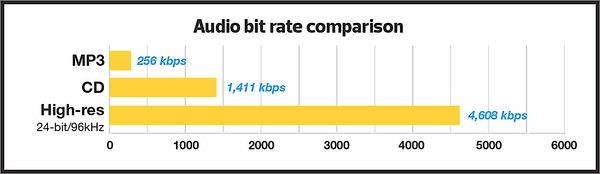
Free Download Mp4Gain
picture


Mp4Gain Main Window
picture


Mp4Gain Features
picture


Free Download Mp4Gain
picture

MP3 Bit Rate Guide – Quality and Differences Explained

Bit rate Quality

When compressing audio and video files, the MP3 bit rate indicates how many bits are available to the decoder to encode exactly one second of a track. The higher the bit rate of the MP3 file, the better the quality achieved. The bit rate can be constant (constant bit rate, CBR) or variable (variable bit rate, VBR). Our guide explains the differences.

Bitrate  Quality

MP3 has established itself as a leading music format on the Internet in recent years and all popular MP3 players support this format. It was developed by the Fraunhofer Institute and is now considered the best known standard for Audiocodierun g. But where are the differences in the jungle of MP3 bit rates?

What MP3 bitrates are there anyway?

A distinction is made between the following common bit rates for MP3 files:

32, 40, 48, 56, 64, 80, 96, 112, 128, 160, 192, 224, 256 and 320 kBit / s.

This increases the quality of MP3s, but also the size of the files created. Compared to the original, an MP3 file only requires about 10 percent of the original storage space.

Starting at a bit rate of 192 kbit / s, you can hardly hear any difference from the quality of the original CD in many pieces of music.

Low bit rates: 32 to 128 kBit / s
Average bit rates: between 128 and 192 kBit / s
High bit rates: more than 192 kBit / s

What is the best bit rate for MP3 compression?

Again and again the question arises of what bit rate to select when converting songs to MP3 to achieve roughly CD quality. An MP3 compression with 192 kbit / s variable bit rate here is an ideal compromise between size and quality.

At just 128 kb / s, you can often hear a distinct difference from the original songs on CD. Music pieces with a lot of dynamics suffer more if the compression is too high (weak bass, lack of treble). So here it is better to use a higher bit rate.

How does the quality of bit rates differ depending on the compression method?

Constant Bit Rate (CBR)

With constant bit rate, each unit of time (for example, one second) is always allocated the same amount of storage space in the entire MP3 file. Therefore, the quality may vary depending on the piece of music. For this, the size of the resulting file can be calculated more precisely.

Variable Bit Rate (VBR)

Variable bit rate is usually the best compression method for normal use, as it can be used to produce consistent high quality. With Acapella parts, 320 kBit / s are not required, as only a few complex frequencies need to be encoded here. However, if you are playing a full orchestra, 128 kBit / s is usually not enough to cover the entire frequency spectrum of the various instruments. Depending on the piece of music, more bits are used when they are important, or those that are not can be omitted. In return, the file size varies more.

Average Bit Rate (ABR)

Some MP3 encoders also support average data rates. Technically, this variant is almost identical to Variable Bit Rate (VBR). Here, too, the encoder software always tries to achieve a uniform quality of the musical piece. However, the bit rate achieved often deviates slightly.

As an example: if you want a target bit rate of 128 kBit / s, then the bandwidth of the achieved bit rate is between 120 and 140 kBit / s. To achieve the desired average bit rate as accurately as possible, some codecs offer a two-pass compression process. The material is analyzed first and is only encoded in the second run. The ABR mode corresponds to a mix of CBR and VBR and is therefore qualitatively more in the middle.