MP3 Bit Rate Guide – Quality and Differences Explained


Free Download Mp4Gain
picture

Bit rate Quality

When compressing audio and video files, the MP3 bit rate indicates how many bits are available to the decoder to encode exactly one second of a track. The higher the bit rate of the MP3 file, the better the quality achieved. The bit rate can be constant (constant bit rate, CBR) or variable (variable bit rate, VBR). Our guide explains the differences.
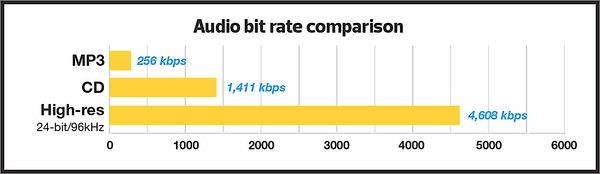
Bitrate  Quality

MP3 has established itself as a leading music format on the Internet in recent years and all popular MP3 players support this format. It was developed by the Fraunhofer Institute and is now considered the best known standard for Audiocodierun g. But where are the differences in the jungle of MP3 bit rates?

What MP3 bitrates are there anyway?

A distinction is made between the following common bit rates for MP3 files:

32, 40, 48, 56, 64, 80, 96, 112, 128, 160, 192, 224, 256 and 320 kBit / s.

This increases the quality of MP3s, but also the size of the files created. Compared to the original, an MP3 file only requires about 10 percent of the original storage space.

Starting at a bit rate of 192 kbit / s, you can hardly hear any difference from the quality of the original CD in many pieces of music.

Low bit rates: 32 to 128 kBit / s
Average bit rates: between 128 and 192 kBit / s
High bit rates: more than 192 kBit / s

What is the best bit rate for MP3 compression?

Again and again the question arises of what bit rate to select when converting songs to MP3 to achieve roughly CD quality. An MP3 compression with 192 kbit / s variable bit rate here is an ideal compromise between size and quality.

At just 128 kb / s, you can often hear a distinct difference from the original songs on CD. Music pieces with a lot of dynamics suffer more if the compression is too high (weak bass, lack of treble). So here it is better to use a higher bit rate.

How does the quality of bit rates differ depending on the compression method?

Constant Bit Rate (CBR)

With constant bit rate, each unit of time (for example, one second) is always allocated the same amount of storage space in the entire MP3 file. Therefore, the quality may vary depending on the piece of music. For this, the size of the resulting file can be calculated more precisely.

Variable Bit Rate (VBR)

Variable bit rate is usually the best compression method for normal use, as it can be used to produce consistent high quality. With Acapella parts, 320 kBit / s are not required, as only a few complex frequencies need to be encoded here. However, if you are playing a full orchestra, 128 kBit / s is usually not enough to cover the entire frequency spectrum of the various instruments. Depending on the piece of music, more bits are used when they are important, or those that are not can be omitted. In return, the file size varies more.

Average Bit Rate (ABR)

Some MP3 encoders also support average data rates. Technically, this variant is almost identical to Variable Bit Rate (VBR). Here, too, the encoder software always tries to achieve a uniform quality of the musical piece. However, the bit rate achieved often deviates slightly.

As an example: if you want a target bit rate of 128 kBit / s, then the bandwidth of the achieved bit rate is between 120 and 140 kBit / s. To achieve the desired average bit rate as accurately as possible, some codecs offer a two-pass compression process. The material is analyzed first and is only encoded in the second run. The ABR mode corresponds to a mix of CBR and VBR and is therefore qualitatively more in the middle.


Free Download Mp4Gain
picture


Mp4Gain Main Window
picture


Mp4Gain Features
picture


Free Download Mp4Gain
picture

Does it make sense to convert a file to a higher audio bit rate?

When a particular file (mp4, flv, etc.) has a 95 kbps audio bit rate, does it make sense to convert it to a higher bit rate when converting to mp3 or other format (lost or lost)?

Change bitrate

Would this result in higher audio quality or just a larger file?

I’m not talking about a higher quality of output than an input: this is obviously not possible. (Apart from switching from a lossless format to the original waveform.) I want to know if an output with a higher bit rate than the input will have a better quality than it would.

Note that conversion between lost formats is not recommended. Only in some cases, an original CD / wave may not be available. The question is more or less about the utility of possibly increasing the bit rate during conversion.

maybe a sub question is helpful: does the answer depend on the type of output file (lossless or lost)?

The top two answers below seem to be different, namely the latter indicating that the bit rates are not directly comparable, and if the original sound is in a more efficient format, the (less efficient) audio output should have a somewhat higher bit rate (same idea here and here), but if mp3 is the least effective, I’m not sure which formats are more effective. (Is it aac?) (- And in general, the answers seem to fall into one of the two attitudes represented by the most reconciled responses).

bitrate

Yes, it may make sense if you need to change the format.

If you have a 95 kbps file in a very efficient format to maintain the same quality, a relatively inefficient format like the mp3 format requires a higher bit rate.

Bitrate

Of course, you never recover anything that was lost in the first place. Conversely, MP3 encoding will further reduce the quality. Each lost format uses a different means to reduce the amount of stored data, eliminating “unnecessary” (unnecessary) portions of the data. Come and go through a bunch of different formats and there’s not much left …

Therefore, if you want to stay as close to the quality of your file as possible, choose a higher bit rate. Probably 320 kbps of space is wasted, but for mp3 format, a value between 128 and 192 is required to maintain, or at least get close to, the quality of a more efficient 95 kbps file.

Generally, this will usually not result in higher sound quality. The basic reason is that you cannot create sounds that are not in the original file.

Ideally, the only result that you suggest will be larger files.

At worst, the quality of the files may be even worse as the second lossy encoder tries to encode the output of a previous lossy encoder. It encodes noise and actual data.

Recording at a higher speed can have benefits if you have a lossless source and make it a lost output. This will minimize any loss of output lost.

If you can, it is much better to go back to the original source and re-code it at the highest bit rate you want.

By increasing the bit rate you will not get better sound quality.

Think of it this way: when it was converted from the original media (such as a CD), it was compressed to contain the “content” in a smaller “box”, thus losing a lot of data (read in loss-making and loss-free formats). If you then increase the speed, you simply expand the “box”, but the “content” is always the same.