What is the bit rate in a Mp4?


Free Download Mp4Gain
picture

What is the bit rate in a Mp4?

Mp4 Bitrate

Bit rate, also known as data transfer rate, is measured in seconds and determines the rate at which data travels through a communications network. Both video and audio have bit rates, and understanding what that is will help you better deal with your media.

Mp4 Bitrate

1. What is video bit rate (MP4)?

Video bit rate is defined as the number of bits that are processed and the unit is measured in bits per second. This is the speed at which the video is streaming at any given time. The higher the bitrate of mp4, the greater the data transfer at any given time. The exact bit rate of a video can be determined based on the device it will be played on. Good quality video on the web has a bit rate of about 2 Mbps, while standard definition DVDs have a bit rate of 6 Mbps.

2. What is the audio bit rate (MP3)?

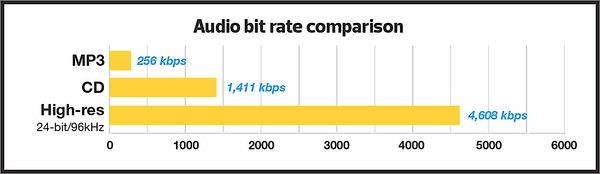
The audio bit rate is defined as the number of bits that are used for the playing time per unit to represent the audio after encoding the source. It is defined as the degree of compression used to encode files in the audio aspect. The higher the MP3 bit rate, the better the sound quality and file size.

Part 2. How to choose the right bitrate for your video / audio
After examining the definition of video and audio bit rate, you should know how to choose the correct bit rate for your video or audio files. Since bit rate is related to the quality and size of your video and audio, it is important to choose and change the bit rate for your file. The two most frequently asked questions are listed below:

1.What is a good 1080p bitrate to upload to YouTube?

For YouTube uploads, the recommended video bit rate for a 1080p file is 8 Mbps for standard frame rates (24, 25, and 30). For high frame rates (48, 50, 60), the recommended bit rate for 1080p files is 12 Mbps.

2. What is the best bit rate for iTunes Audio?

Music files in the iTunes store are encoded in 256 kbps AAC by default. Previously, the bitrate of an iTunes song was 128 kbps and now it is 256 kbps. AAC codec files support up to 320 kbps.

Part 3. How to Change Video Bitrate with Simple Steps
There are many ways to compress a video, for example change the video resolution, trim the unwanted part, and convert the video format. However, changing the video bitrate is also a good option.


Free Download Mp4Gain
picture


Mp4Gain Main Window
picture


Mp4Gain Features
picture


Free Download Mp4Gain
picture

MP3 Bit Rate Guide – Quality and Differences Explained

Bit rate Quality

When compressing audio and video files, the MP3 bit rate indicates how many bits are available to the decoder to encode exactly one second of a track. The higher the bit rate of the MP3 file, the better the quality achieved. The bit rate can be constant (constant bit rate, CBR) or variable (variable bit rate, VBR). Our guide explains the differences.

Bitrate  Quality

MP3 has established itself as a leading music format on the Internet in recent years and all popular MP3 players support this format. It was developed by the Fraunhofer Institute and is now considered the best known standard for Audiocodierun g. But where are the differences in the jungle of MP3 bit rates?

What MP3 bitrates are there anyway?

A distinction is made between the following common bit rates for MP3 files:

32, 40, 48, 56, 64, 80, 96, 112, 128, 160, 192, 224, 256 and 320 kBit / s.

This increases the quality of MP3s, but also the size of the files created. Compared to the original, an MP3 file only requires about 10 percent of the original storage space.

Starting at a bit rate of 192 kbit / s, you can hardly hear any difference from the quality of the original CD in many pieces of music.

Low bit rates: 32 to 128 kBit / s
Average bit rates: between 128 and 192 kBit / s
High bit rates: more than 192 kBit / s

What is the best bit rate for MP3 compression?

Again and again the question arises of what bit rate to select when converting songs to MP3 to achieve roughly CD quality. An MP3 compression with 192 kbit / s variable bit rate here is an ideal compromise between size and quality.

At just 128 kb / s, you can often hear a distinct difference from the original songs on CD. Music pieces with a lot of dynamics suffer more if the compression is too high (weak bass, lack of treble). So here it is better to use a higher bit rate.

How does the quality of bit rates differ depending on the compression method?

Constant Bit Rate (CBR)

With constant bit rate, each unit of time (for example, one second) is always allocated the same amount of storage space in the entire MP3 file. Therefore, the quality may vary depending on the piece of music. For this, the size of the resulting file can be calculated more precisely.

Variable Bit Rate (VBR)

Variable bit rate is usually the best compression method for normal use, as it can be used to produce consistent high quality. With Acapella parts, 320 kBit / s are not required, as only a few complex frequencies need to be encoded here. However, if you are playing a full orchestra, 128 kBit / s is usually not enough to cover the entire frequency spectrum of the various instruments. Depending on the piece of music, more bits are used when they are important, or those that are not can be omitted. In return, the file size varies more.

Average Bit Rate (ABR)

Some MP3 encoders also support average data rates. Technically, this variant is almost identical to Variable Bit Rate (VBR). Here, too, the encoder software always tries to achieve a uniform quality of the musical piece. However, the bit rate achieved often deviates slightly.

As an example: if you want a target bit rate of 128 kBit / s, then the bandwidth of the achieved bit rate is between 120 and 140 kBit / s. To achieve the desired average bit rate as accurately as possible, some codecs offer a two-pass compression process. The material is analyzed first and is only encoded in the second run. The ABR mode corresponds to a mix of CBR and VBR and is therefore qualitatively more in the middle.