Exploring Audio Bitrates: Technical Deep Dive


Free Download Mp4Gain
picture

Exploring Audio Bitrates: Technical Deep Dive

Audio Bitrates
Audio Bitrates
Audio Bitrates
Audio Bitrates

In this article, we will explore the technical aspects of audio bitrates. We will discuss what a bitrate is, how it affects audio quality, and how to choose the right bitrate for your needs.

What is a bitrate?

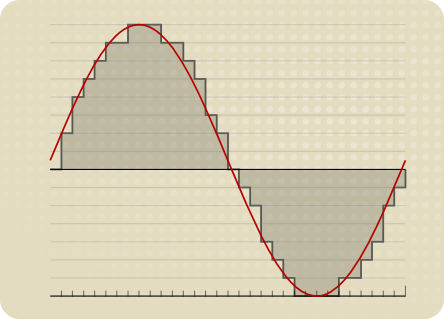
A bitrate is the number of bits per second that are used to encode an audio file. The higher the bitrate, the more data is used to encode the file, and the higher the quality of the audio will be. However, higher bitrates also result in larger file sizes.

How does bitrate affect audio quality?

Bitrate affects audio quality by determining how much data is used to represent the original sound waves. Higher bitrates allow for more data to be used, which results in more accurate representations of the original sound waves. This results in better audio quality, such as increased clarity and reduced noise.

How to choose the right bitrate

The right bitrate for you will depend on a number of factors, including:

  • The type of audio you are listening to. For example, music and speech have different requirements.
  • The quality of your audio equipment. Higher-quality equipment can reproduce higher bitrates without introducing any noticeable distortion.
  • Your personal preferences. Some people may prefer the sound of higher bitrates, while others may not notice a difference.

General bitrate recommendations

Here are some general bitrate recommendations for different types of audio:

  • Speech: 32 kbps to 96 kbps
  • Music: 128 kbps to 320 kbps
  • High-quality audio: 256 kbps to 512 kbps or higher

It is important to note that these are just general recommendations. The best way to determine the right bitrate for you is to experiment and see what sounds best to your ears.

Final words about audio bitrates

Audio bitrate is an important factor to consider when choosing an audio file format or when setting up an audio streaming service. By understanding how bitrate affects audio quality, you can choose the right bitrate for your needs and get the best possible listening experience.


Mp4Gain

Mp4Gain


Free Download Mp4Gain
picture


Mp4Gain Main Window
picture


Mp4Gain Features
picture


Free Download Mp4Gain
picture

What is the relationship between audio and video bit depth?

What is the relationship between audio and video bit depth?

audio and video bit depth

Audio Bit Depth and Video Bit Depth

Audio and video quality are two essential components of any multimedia content. Bit depth is one of the key factors that determine the quality of audio and video content. The bit depth of audio refers to the number of bits used to represent the amplitude of a sound wave. In contrast, video bit depth refers to the number of bits used to represent the color and brightness of each pixel in an image or video frame.

The higher the bit depth, the more accurately the audio or video content can be represented. A higher bit depth allows for a greater dynamic range and more subtle variations in sound or image. In general, a higher bit depth is desirable for both audio and video content.

As a personal experience, I have worked with audio and video editing for several years, and I have noticed a significant improvement in quality when using a higher bit depth. I often use a bit depth of 24 bits for audio and 10 bits for video when working on high-quality content.

Audio and Video Synchronization

The synchronization between audio and video is crucial for creating a seamless multimedia experience. When the audio and video are out of sync, it can be distracting and diminish the overall quality of the content.

The bit depth of both audio and video can affect the synchronization. For example, if the audio has a higher bit depth than the video, the audio may appear to be out of sync with the video. This can occur because the audio takes longer to process due to the higher bit depth. To avoid this issue, it is essential to ensure that both the audio and video have the same bit depth.

As a personal tip, I recommend using software that allows for precise synchronization adjustments. I have found that the use of keyframes and markers can significantly improve the accuracy of synchronization between audio and video.

Audio and Video Codecs and File Formats

Audio and video codecs and file formats can also affect the bit depth and overall quality of multimedia content. A codec is a software program that compresses and decompresses audio or video data, while a file format determines how the compressed data is stored.

Lossy codecs, such as MP3 and H.264, compress audio and video data by discarding information deemed unnecessary. This can result in a lower bit depth and lower overall quality. In contrast, lossless codecs, such as FLAC and ProRes, maintain the original quality by compressing the data without discarding any information.

As a personal preference, I usually work with lossless codecs and file formats when editing audio and video content. However, it is essential to consider the intended use and distribution of the content when choosing codecs and file formats. For example, lossy codecs are often used for streaming and web distribution due to their smaller file sizes.

Final Words

In conclusion, bit depth is a critical factor in determining the quality of audio and video content. A higher bit depth allows for greater accuracy and dynamic range. Ensuring that the audio and video have the same bit depth is crucial for synchronization. Codecs and file formats can also affect the bit depth and overall quality of multimedia content. Choosing the right codecs and file formats depends on the intended use and distribution of the content.

Remember that mp4gain is a great solution to normalize and convert audio and video files to ensure they have the same bit depth and quality.

How to Calculate Audio Bitrate: A Comprehensive Guide

How to Calculate Audio Bitrate: A Comprehensive Guide

Audio Bitrate
Audio Bitrate

Calculating audio bitrate is an essential skill for anyone working with digital audio files. Bitrate is the amount of data used to encode one second of audio, and it plays a significant role in the quality of audio files. In this comprehensive guide, we will discuss everything you need to know about audio bitrate and how to calculate it.


Audio Bitrate
Audio Bitrate

What is Audio Bitrate?

Bitrate is the number of bits used to encode one second of audio. It is typically measured in kilobits per second (kbps) and determines the audio file’s size and quality. The higher the bitrate, the larger the audio file’s size and the better the audio quality.

Audio bitrate is determined by several factors, including:

  • The audio format
  • The audio codec
  • The audio signal characteristics

Audio Format and Codec

The audio format and codec are two critical factors that determine audio bitrate. Audio format refers to the type of audio file, such as MP3, WAV, or FLAC. Each audio format has its own advantages and disadvantages, including file size, compatibility, and audio quality.

The audio codec, on the other hand, is the software used to compress and decompress audio data. Codecs determine how efficiently audio data is compressed and how much data is used to encode one second of audio.

It is essential to choose the right audio format and codec for your needs, as they can significantly impact the audio bitrate and quality. For example, MP3 files are smaller in size but lower in quality than WAV or FLAC files.

Audio Signal Characteristics

The characteristics of the audio signal, such as its frequency range and amplitude, can also affect the effectiveness of audio compression and the resulting audio bitrate. Higher frequencies and amplitudes require more data to encode accurately, resulting in a higher bitrate.

Other factors that can affect audio bitrate include the number of audio channels and the audio’s dynamic range. Stereo audio files require more data than mono audio files, while audio files with a wide dynamic range require more data than those with a narrow dynamic range.

Calculating Audio Bitrate

Calculating audio bitrate requires you to know the audio file’s duration, size, and format. Once you have this information, you can use the following formula to calculate audio bitrate:

Bitrate = (File size in bits / Duration in seconds) / 1000

For example, if you have a 3-minute MP3 audio file with a size of 4,320,000 bytes:

  1. Convert the file size to bits: 4,320,000 x 8 = 34,560,000 bits
  2. Convert the duration to seconds: 3 x 60 = 180 seconds
  3. Calculate the bitrate: (34,560,000 / 180) / 1000 = 192 kbps

In this example, the audio file has a bitrate of 192 kbps.

Conclusion

Calculating audio bitrate is an essential skill for anyone working with digital audio files. Understanding audio format, codec, and signal characteristics can help you choose the right audio settings for your needs and ensure the best audio quality possible. By following the formula above, you can easily calculate the required bitrate for your audio files and adjust the settings accordingly. Keep in mind that bitrate is not the only factor that affects audio quality, so be sure to consider other factors such as the audio format, codec, and signal characteristics when selecting your settings.

When working with audio, it’s important to strike a balance between file size and audio quality. Higher bitrates generally result in better audio quality, but also larger file sizes. It’s up to you to determine the optimal balance for your specific needs and use case.

Final Thoughts

Calculating audio bitrate may seem like a daunting task, but with the right tools and knowledge, it can be a straightforward process. By understanding the different factors that affect audio quality and file size, you can make informed decisions when selecting your audio settings.

Remember, bitrate is just one of many factors that affect audio quality. Other factors, such as the audio format and codec, can also have a significant impact. By taking these factors into consideration and making informed decisions, you can achieve the best possible audio quality for your needs.

Whether you’re an audio professional or simply someone who enjoys working with digital audio files, understanding how to calculate audio bitrate is an important skill to have. By following the guidelines outlined in this article, you can ensure that your audio files are optimized for the best possible quality and file size.

References

Note: The information provided in this article is for educational purposes only and should not be construed as professional advice. Always consult a professional audio engineer or other qualified expert for advice on specific audio projects or issues.

The Importance of Bitrate in Digital Audio and Video

The Importance of Bitrate in Digital Audio and Video

The Importance of Bitrate in Digital Audio and Video

Have you ever watched a video that was all glitchy and the sound was all messed up? Or listened to a song and it sounded like it was being played on a scratched record? Well, that’s because of something called the bitrate.

The Importance of Bitrate in Digital Audio and Video

What is Bitrate?

Bitrate is the number of bits of information that are processed in a certain amount of time. In digital audio and video, it determines the quality of the sound and video. The higher the bitrate, the better the quality, and the more information is processed.

Why is Bitrate Important?

When you watch a video or listen to a song, the bitrate helps to determine the quality of the sound and video. The higher the bitrate, the more information is processed, and the better the quality. If the bitrate is low, then the quality will be poor and you might miss out on important details.

For example, if you’re watching a video of a concert and the bitrate is low, then you might not be able to hear the singer’s voice clearly or see the instruments being played. This can be really frustrating and ruin the whole experience for you.

How Does Bitrate Affect Digital Audio and Video?

Bitrate affects digital audio and video in several ways. For one, it affects the file size. If the bitrate is high, then the file size will be large, and if the bitrate is low, then the file size will be small.

Another way that bitrate affects digital audio and video is by affecting the quality. If the bitrate is high, then the quality will be good, and if the bitrate is low, then the quality will be poor. This can be especially noticeable when you’re watching a video with a lot of movement, like a sports game or a music video.

Finally, bitrate can also affect how long it takes to download or upload a video or audio file. If the bitrate is high, then it will take longer to download or upload, and if the bitrate is low, then it will take less time.

How to Choose the Right Bitrate for Your Digital Audio and Video

When it comes to choosing the right bitrate for your digital audio and video, there are a few things to keep in mind. First, think about what you’re using the video or audio for. If it’s for personal use, then a lower bitrate might be okay, but if it’s for professional use, then a higher bitrate is probably better.

Another thing to consider is the quality of the video or audio. If you want the best quality possible, then a higher bitrate is the way to go. But if you don’t need the best quality and just want something that’s good enough, then a lower bitrate might be fine.

Finally, think about the file size. If you don’t have a lot of storage space, then a lower bitrate might be a good choice, but if you have plenty of storage space, then a higher bitrate might be the way to go.

Can you really hear the difference in the sound quality of music?

Can you really hear the difference in the sound quality of music?

difference in the sound quality of music

A brief discussion of the principle of audio compression

difference in the sound quality of music


grade headphones – performance, equipment – can you really hear the difference in music quality? A brief discussion of the principle of audio compression
When you listen to music, most of the time the format being played is MP3 or AAC.

Both formats are smaller formats in which the audio is processed and compressed. To reduce size and save space, they actually remove a portion of the sound signal compared to the original audio. But can you hear it?

In this article, we will introduce the principles of music compression and discuss a question: Does music compression really affect the music you listen to?

The principle of musical compression.
Most of the digital audio we receive every day, whether played online or stored as a file, uses the principle of lossy compression. Lossy compression not only compresses the data, but also deletes the original data, and with lossy compression, some data is gone forever.

But keep in mind that this censored data is not randomly selected. Audio compression formats apply psychoacoustics to remove sounds that are beyond our hearing range and that we are not aware of.

audio compression – operation, equipment – can you really hear the difference in music quality? A brief discussion of the principle of audio compression
The human ear has a hearing range of about 20 Hz to 20 kHz, and sound signals beyond this range cannot be detected even if they are removed. And as we age, the range of hearing decreases. Therefore, it can be said that the sounds that everyone hears are not really absolutely the same, even if they come from the same sound source.

The audio below can help you find your hearing range, you can listen to it with headphones to see how far away you can hear the sound signal. Be careful to control the volume at any time during the listening process, otherwise it may damage your hearing.

Also, when high-frequency sounds and low-frequency sounds are present at the same time, high-frequency sounds will be more difficult to hear clearly. For example, the constant drumbeats in the music can cause you to ignore the slight differences between the melodies.

This phenomenon is called “shadowing” and is used in the principle of compression. If there are louder low-frequency sounds, it can mask the sonic loss of high-frequency sounds. High and low here are relative, so this principle can be applied globally. But sounds above 15 kHz are more susceptible to masking, so that’s also a prime issue for compression.

Although it is obvious that the sound signal removed by lossy compression should be mostly useless data, there are still people who believe that these “ambient sounds” being removed will affect the three-dimensionality of the sound and flatten it.

In general, the key to lossy compression is finding a balance between reducing size and preserving sound quality.

How does the bit rate affect the quality of the music?
How does the bit rate affect the quality of the music?

Audio Bitrate Quality

Does the bit rate affect the quality of the music?

There is a lot of talk these days that we have lost real music with the advent of compressed audio formats like MP3, AAC and the like. Is it really so? Will lossless music save music? Can an inexperienced listener tell the difference between MP3 and FLAC music? Let’s take a look at this problem.
Audio Bitrate

What is Bitrate?

You’ve probably heard the term “bitrate” before and you probably have a basic idea of ​​what it means, but it might be a good idea to familiarize yourself with its official definition so you know how it all works.

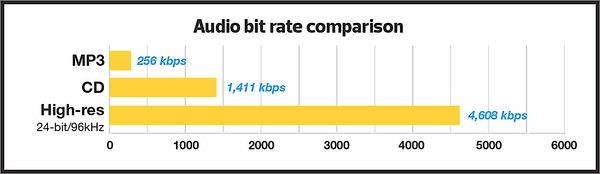
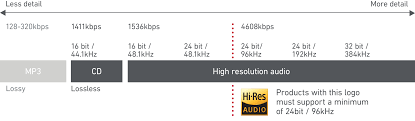
Bit rate is the number of bits or the amount of data that is processed over a period of time. In audio, this generally means kilobits per second. For example, the music you buy from iTunes is 256 kilobytes per second, which means that every second of the song contains 256 kilobytes of data.

The higher the bit rate of the track, the more space it will take up on your computer. Audio CDs typically take up quite a bit of space, so it has become common practice to compress these files so that you can burn more music to your hard drive (or iPod, Dropbox or whatever). This is where the “lossy” and “lossy” formats conflict.

Lossless and Lossy formats: what’s the difference?

When we say lossless, we mean that we haven’t really changed the original file. That is, we copy a track from the CD to our hard drive, but we do not compress it to the point of losing data. Essentially the same as the original CD track.

However, most of the time, you will probably extract your music in Lossy format. That is, you took a CD, copied it to your hard drive, and compressed the tracks so they don’t take up a lot of space. A typical MP3 or AAC album is probably about 100MB. The same album in a lossless format like FLAC or ALAC (aka Apple Lossless) will be around 300MB, so it has become common practice to use lossy formats for faster downloads and more hard drive savings. .

The problem is that when you compress a file to save space, you are removing chunks of data. Just like when you take a high quality image and compress it to JPEG, your computer grabs the raw data and “tricks” certain parts of the image into being basically the same, but with some loss of clarity and quality.

An example of how the JPEG graphics compression algorithm works
Remember that you are saving hard drive space by compressing music in lossy formats, which can make a big difference for an iPhone with 32GB of storage, but is only a trade-off in terms of size / quality.

There are different levels of compression: 128 Kbps, for example, takes up very little space, but it will also have a lower quality of playback than a larger 320 Kbps file, which in turn is of lower quality than the 1,411 reference file Kbps. From. 1,411 kbps is an audio CD level quality, which is more than sufficient in most cases.

The problem is not how much the music is compressed, but what equipment you listen to it on.

Does bit rate really matter?

As memory gets cheaper every year, listening to sound at a higher bit rate, or even lossless formats, is starting to become more and more popular. But is it worth the time, effort, and storage space on your phone or computer?

I don’t like answering questions this way, but sadly the answer is: it depends.

Part of the equation is the hardware you use. If you are using a good quality pair of headphones or speakers, you are used to wide frequency and dynamic range. As such, you are more likely to notice the downsides that come with compressing music into lower bitrate files. You may notice that low-quality MP3 files lack a certain level of detail; Subtle backing tracks may be harder to hear, the highs and lows won’t be as dynamic, or you may hear distortion in the lead vocal. In these cases, you may want a higher bit rate track.

However, if you’re listening to your music with a cheap pair of headphones on your iPod, you probably won’t notice the difference between a 128Kbps file and a 320Kbps file, let alone 1,411Kbps lossless music. Remember when you I showed the image a few paragraphs above and noticed that you probably had to look at it to see the flaws? Your headphones are like a truncated version of the image: they will make these imperfections difficult to perceive, as they are not physically capable of reproducing the music for you the way you want them to.

The other part of the equation is, of course, your own ears. It can be very difficult for some people to distinguish between two different bit rates for the simple reason: they listen to little music. Listening skills, like any other, develop with practice. If you listen to your favorite music often and a lot, your hearing becomes more accurate and begins to pick up small details and midtones. But until then, doesn’t it really matter what bitrate you use?

So what format and bit rate should you choose yourself? Is 320 Kbps enough for you or do you definitely need Lossless format?

The point is that it is difficult to hear the difference between a lossless file and a 320Kbps MP3 file. To hear the difference, you need serious high-quality equipment, good hearing, and some kind of music (for example, classical or jazz). .

For the vast majority of people, 320 Kbps is more than enough to listen to.

What else should you consider?

Music recorded in the Lossless format can be useful. Lossless files are more reliable in the future, in the sense that you can always compress them to Lossy format when you need to, but you can’t do the opposite and restore original CD quality from MP3 file. This, again, is one of the fundamental problems of online music stores: if you have created a huge music library on iTunes and one day you decide that you need more bitrate, you will have to buy it again, but this time only in CD format . …

Whenever I can, I always buy or copy music in Lossless format for backup.

I understand that audiophiles are like a needle under your nails. Like I said, it all depends on you, your audition and the equipment you have.

Compare two tracks recorded in Lossless and Lossy formats. Try a few different audio formats, listen to them for a while and see if it makes a difference for you or not.