Variable bitrate vs constant bitrate in audio formats


Free Download Mp4Gain
picture

Variable bitrate vs constant bitrate in audio formats

Variable bitrate vs constant bitrate in audio formats

Let’s talk about variable bitrate vs constant bitrate in audio formats

When I first learned about audio formats, the terms “variable bitrate” (VBR) and “constant bitrate” (CBR) seemed complex. But understanding them makes all the difference if you care about sound quality, file size, or streaming performance. VBR and CBR refer to how data is allocated during encoding, and they have very different impacts on how your audio sounds and behaves.

CBR uses a consistent amount of data per second throughout an audio file. For example, if you encode a file at 320 kbps, it stays that way from beginning to end, even during silent or low-complexity parts. In contrast, VBR adjusts the bitrate dynamically, allocating more data to complex sections and less to simpler ones. Think of it like pouring water into different-sized containers: VBR adapts, while CBR pours the same amount, regardless of the container’s size.

This difference matters because VBR often achieves better audio quality at smaller file sizes. For instance, I’ve encoded podcasts and noticed that VBR creates smaller files without losing clarity. On the other hand, CBR is better for scenarios where consistency matters, such as live streaming or ensuring compatibility with older devices.

The pros and cons of constant bitrate (CBR)

CBR’s biggest strength is predictability. When you know a file will always use a set amount of data per second, it’s easier to estimate file sizes and ensure smooth streaming. This is why many broadcasters and streaming platforms prefer CBR. If you’ve ever streamed music or video over a shaky internet connection, you’ve likely benefited from CBR’s reliability.

However, CBR isn’t perfect. Its inflexibility can lead to wasted space. Silent sections or simple sounds don’t need the same data as a complex guitar solo, but CBR still allocates the same bitrate to both. This inefficiency is like packing a suitcase with only one size of clothing, even if you’re only traveling for a weekend. It works, but it’s not always practical.

Still, I find CBR valuable when working with older devices or software. Many of these systems don’t handle VBR well, leading to playback issues or glitches. For example, I once encoded music for an older MP3 player and had to choose CBR to avoid compatibility problems.

Why variable bitrate (VBR) stands out

VBR shines when you want to balance quality and file size. By adjusting the bitrate based on the complexity of the audio, it ensures that you’re not wasting data on simple parts of a track. This efficiency means that VBR often delivers higher quality at smaller file sizes compared to CBR.

One real-life example is encoding music with a wide dynamic range, like classical symphonies. These pieces have quiet moments and loud crescendos, and VBR adapts perfectly. During silent pauses, it uses less data, but when the orchestra swells, it ramps up the bitrate to preserve every detail. It’s like using a zoom lens that adjusts automatically based on what you’re photographing.

However, there are challenges. VBR files can be harder to stream because the data rate isn’t consistent. If you’re on a slow or unreliable network, this fluctuation might cause buffering. Still, for offline listening or storage, VBR is often my go-to choice. It’s especially useful for audiophiles or anyone looking to save space without compromising on quality.

How to choose between CBR and VBR

Deciding between VBR and CBR depends on your needs. If you’re streaming, CBR is often the better option because it ensures steady playback. Streaming services like Spotify use a version of CBR for this reason—it prevents interruptions, even on slower networks.

On the other hand, if you’re archiving music or creating downloadable files, VBR is typically more efficient. I’ve seen this firsthand when managing large music libraries. By using VBR, I’ve saved gigabytes of space without losing noticeable quality. It’s ideal for personal collections or professional audio projects where storage and sound matter.

For those who work with video files, the same principles apply. If you’re editing videos or uploading them to platforms, consider whether you need consistency (CBR) or flexibility (VBR). Each has its place, and understanding the trade-offs is key.

Latest words on variable bitrate vs constant bitrate in audio formats

Variable bitrate and constant bitrate serve different purposes, and there’s no one-size-fits-all answer. If you value compatibility and predictability, CBR is the way to go. But if you prioritize efficiency and quality, VBR might be your best bet. In my experience, choosing between them comes down to the specific use case.

For those who need precise control over their audio files, tools like Mp4Gain can help you fine-tune these parameters. Whether you’re working with music, podcasts, or video, optimizing bitrate ensures the best possible experience for your listeners.

FAQ about variable bitrate vs constant bitrate in audio formats

What is constant bitrate (CBR)?

Constant bitrate means the audio file uses the same amount of data per second throughout its duration, ensuring predictable file sizes and steady streaming.

What is variable bitrate (VBR)?

Variable bitrate adjusts the data rate based on the complexity of the audio, resulting in better quality and smaller file sizes compared to CBR.

Which is better for streaming, CBR or VBR?

CBR is better for streaming because it provides a consistent data rate, ensuring smoother playback and fewer interruptions on slow networks.

Does VBR affect sound quality?

VBR often improves sound quality by allocating more data to complex sections of audio while saving data on simpler parts.

Are VBR files compatible with all devices?

Not all devices support VBR. Older hardware or software might struggle to play VBR files, making CBR a safer choice in such cases.

How does CBR handle silent sections?

CBR allocates the same amount of data to silent sections as it does to complex audio, which can lead to wasted space.

Can I convert CBR to VBR?

Yes, you can convert CBR to VBR using audio conversion tools, but the quality improvement might be minimal if the original file is already compressed.

What bitrate is best for podcasts?

For podcasts, VBR is often best because it reduces file sizes while maintaining clear audio quality for speech.

Why is CBR preferred for live streaming?

CBR provides a stable bitrate, preventing buffering and ensuring consistent quality during live streaming sessions.

Which bitrate is better for music files?

VBR is generally better for music files as it adapts to the audio’s complexity, providing better quality while reducing file size.

Comments:

This was super helpful. I was always confused about what bitrate to use, but now I feel like I get it. Thanks for breaking it down!

Honestly, I still don’t know if VBR works with my old MP3 player. Gonna give it a try but would’ve loved more details about compatibility issues!

I didn’t know VBR was so efficient. I have tons of music files taking up space. Will definitely look into this to save some storage.

Great explanation, but I feel like the article should have talked more about the impact of different bitrates on streaming services.

This was an awesome read! I never understood the difference between CBR and VBR until now. You nailed it. Thanks for sharing!

Can someone confirm if this works for audiobooks? I’ve been looking to compress my files but don’t want to lose clarity.

Wow, I didn’t even realize that bitrate could make such a difference. Definitely learned something new today. Thanks!

Good article, but I wish you talked more about using these bitrates for videos. Are the principles the same for MP4 files?

Thanks for explaining this in simple terms. I always thought VBR was just for professionals, but now I’ll use it for my music files.

Honestly, this article saved me hours of research. So much better than the generic stuff I’ve read elsewhere!

I still don’t fully understand how to set the right VBR settings. Could you add a guide on how to configure it properly?

This was super helpful. Can you also talk about how these bitrates affect battery usage on portable devices?

I appreciate the effort, but I feel like some sections could’ve gone into more detail about lossless vs lossy formats alongside CBR and VBR.


Free Download Mp4Gain
picture


Mp4Gain Main Window
picture


Mp4Gain Features
picture


Free Download Mp4Gain
picture

Why is important bitrate in audio quality?

Why is important bitrate in audio quality?

Why is important bitrate in audio quality?

Bitrate

Bitrate is a crucial factor when it comes to audio quality. It refers to the amount of data processed per unit of time in an audio file.

Audio Quality

Audio quality is directly influenced by the bitrate of an audio file. Higher bitrates result in better sound reproduction and a more accurate representation of the original sound.

Sound Reproduction

The level of detail and accuracy in sound reproduction is determined by the bitrate of an audio file. A higher bitrate allows for more information to be captured and preserved, resulting in a clearer and more immersive listening experience.

Data Compression

Bitrate and data compression go hand in hand. Lower bitrates often involve more aggressive compression techniques, which can lead to a loss of audio data and a reduction in audio quality.

File Size

The bitrate of an audio file directly affects its file size. Higher bitrates require more data to be stored, resulting in larger file sizes. It’s important to strike a balance between audio quality and file size, especially when considering storage limitations or bandwidth constraints.

Streaming Services

Streaming services rely on efficient compression techniques to deliver audio files over the internet. Bitrate plays a crucial role in determining the streaming quality. Higher bitrates result in better audio fidelity but require more bandwidth.

Internet Bandwidth

The choice of bitrate for streaming or downloading audio files depends on the available internet bandwidth. Higher bitrates require more bandwidth to ensure a smooth streaming experience without interruptions or buffering.

Audio Formats

Different audio formats support varying levels of bitrate and, consequently, audio quality. Lossless formats like FLAC and WAV offer the highest audio fidelity as they preserve all the original data. Lossy formats like MP3 and AAC sacrifice some audio data to reduce file size.

Lossless

Lossless audio formats preserve all the original data, resulting in the highest audio fidelity. They are ideal for audiophiles and professionals who require the utmost accuracy in sound reproduction.

Lossy

Lossy audio formats use compression algorithms to reduce file size by sacrificing some audio data. They offer a good balance between audio quality and file size, making them suitable for everyday listening and storage purposes.

Listening Environment

The listening environment can significantly impact the perception of audio quality. Factors such as background noise, acoustics, and speaker quality can affect our ability to discern subtle differences in bitrate.

Background Noise

In a noisy environment, a lower bitrate may be sufficient as the background noise masks some of the audio details. However, in a quiet and controlled environment, a higher bitrate becomes more noticeable, providing a more immersive and enjoyable listening experience.

Acoustics

The acoustics of a room or space can influence the way audio is perceived. Proper acoustic treatment can enhance the overall audio quality, allowing for better sound reproduction and minimizing unwanted reflections or distortions.

Speaker Quality

The quality of speakers or headphones used for audio playback also plays a significant role in the overall audio experience. Higher quality speakers can better reproduce the nuances and details captured in high-bitrate audio files.

Music

Bitrate is particularly important when it comes to music. Higher bitrates allow for a more accurate representation of the original recording, resulting in a richer and more immersive musical experience.

Podcasts

Podcasts, like music, can greatly benefit from higher bitrates. Clearer and more detailed audio reproduction enhances the listening experience, making it easier to follow conversations and understand the content being discussed.

Audio Content

Whether it’s music, podcasts, audiobooks, or other forms of audio content, bitrate plays a crucial role in delivering a high-quality listening experience. Choosing the right bitrate ensures that the audio is faithfully reproduced and enjoyed to its fullest potential.

Exploring Audio Bitrates: Technical Deep Dive

Exploring Audio Bitrates: Technical Deep Dive

Audio Bitrates
Audio Bitrates
Audio Bitrates
Audio Bitrates

In this article, we will explore the technical aspects of audio bitrates. We will discuss what a bitrate is, how it affects audio quality, and how to choose the right bitrate for your needs.

What is a bitrate?

A bitrate is the number of bits per second that are used to encode an audio file. The higher the bitrate, the more data is used to encode the file, and the higher the quality of the audio will be. However, higher bitrates also result in larger file sizes.

How does bitrate affect audio quality?

Bitrate affects audio quality by determining how much data is used to represent the original sound waves. Higher bitrates allow for more data to be used, which results in more accurate representations of the original sound waves. This results in better audio quality, such as increased clarity and reduced noise.

How to choose the right bitrate

The right bitrate for you will depend on a number of factors, including:

  • The type of audio you are listening to. For example, music and speech have different requirements.
  • The quality of your audio equipment. Higher-quality equipment can reproduce higher bitrates without introducing any noticeable distortion.
  • Your personal preferences. Some people may prefer the sound of higher bitrates, while others may not notice a difference.

General bitrate recommendations

Here are some general bitrate recommendations for different types of audio:

  • Speech: 32 kbps to 96 kbps
  • Music: 128 kbps to 320 kbps
  • High-quality audio: 256 kbps to 512 kbps or higher

It is important to note that these are just general recommendations. The best way to determine the right bitrate for you is to experiment and see what sounds best to your ears.

Final words about audio bitrates

Audio bitrate is an important factor to consider when choosing an audio file format or when setting up an audio streaming service. By understanding how bitrate affects audio quality, you can choose the right bitrate for your needs and get the best possible listening experience.


Mp4Gain

Mp4Gain

What is the Bitrate for DVD Quality Video?

What is the Bitrate for DVD Quality Video?

DVD Bit Rate
DVD Bit Rate
DVD Bit Rate
DVD Bit Rate


DVD Quality Video Bitrate Explained

As a video enthusiast, I’m sure you’ve come across the term “bitrate” before. Bitrate refers to the amount of data being transmitted in a given amount of time, typically measured in bits per second (bps). When it comes to DVD quality video, the bitrate plays a crucial role in determining the video’s overall quality.
In order to achieve DVD quality video, the optimal bitrate for video compression is typically between 4-9 Mbps. This ensures that the video remains clear and smooth throughout playback without any pixelation or lagging. However, the bitrate can also vary depending on the specific codec being used and the length of the video.

As author and filmmaker J.D. Lasica once said, “Bitrate is like the resolution of your camera – the higher it is, the more detail and quality you’ll get.” So, if you’re looking to produce high-quality DVD videos, it’s important to understand the role of bitrate and how it can impact the final product.

Choosing the Optimal Bitrate for DVD Video

When it comes to choosing the optimal bitrate for your DVD video, there are a few factors to consider. These include the length of the video, the codec being used, and the amount of available storage space.
In general, longer videos with higher resolutions will require a higher bitrate to maintain the desired level of quality. On the other hand, shorter videos with lower resolutions can get away with a lower bitrate without compromising on quality.

It’s also worth noting that different codecs have different compression efficiencies, which can affect the required bitrate. For example, H.264 is a popular codec for DVD video because it offers high compression efficiency without sacrificing quality.

In my experience, choosing the optimal bitrate for DVD video often requires some trial and error. By experimenting with different bitrates and codecs, you can find the sweet spot that delivers the quality you want while keeping the file size manageable.

The Importance of Bitrate for DVD Video Quality

When it comes to producing high-quality DVD videos, bitrate is a crucial factor that cannot be overlooked. A higher bitrate typically results in better video quality, while a lower bitrate can lead to pixelation, lagging, and other visual issues.
As filmmaker Steven Soderbergh once said, “The final product is all about the quality of the information going in.” By understanding the role of bitrate in DVD video quality, you can ensure that your videos are of the highest possible standard.

In my experience, investing in a quality video encoder and taking the time to experiment with different bitrates and codecs can make all the difference when it comes to producing professional-grade DVD videos. With a little patience and dedication, you can achieve stunning results that are sure to impress your audience.

Final Words:
In conclusion, understanding bitrate is crucial when it comes to producing high-quality DVD videos. By choosing the optimal bitrate for your video and experimenting with different codecs, you can achieve the level of quality you desire. And remember, when it comes to DVD video quality, bitrate is king.

What is the Best Bitrate for Audio Recording?

What is the Best Bitrate for Audio Recording?

Bit Rate Audio Recording


Bit Rate Audio Recording


The Importance of Bitrate for Audio Recording Quality

As a musician and audio engineer, I’ve learned that bitrate is crucial to achieving high-quality audio recordings. The bitrate determines the amount of data that is processed and transmitted for each second of audio recording. A higher bitrate means more data is being processed, resulting in better audio quality.

In my experience, the optimal bitrate for professional audio recording is 24-bit/96kHz. This allows for a wide dynamic range and captures every detail of the sound. As filmmaker Christopher Nolan once said, “The sound and music are 50% of the entertainment in a movie.” This applies to music recording as well. Without proper audio recording settings, even the most talented musician’s performance can fall flat.

When recording music, it’s important to remember that bitrate isn’t the only factor that affects audio quality. Other factors like microphone placement, room acoustics, and instrument quality can also have a significant impact on the final recording. However, by starting with the right bitrate, you’re setting yourself up for success.

How to Choose the Best Bitrate for Your Audio Recording

When choosing the best bitrate for your audio recording, it’s important to consider your specific needs and goals. If you’re recording for personal use, a lower bitrate may be sufficient. However, if you’re recording professionally, it’s worth investing in higher-quality equipment and choosing a higher bitrate.

In addition to considering the purpose of your recording, you should also consider the file format you’ll be using. Different file formats have different requirements for bitrate and other audio settings. For example, WAV files require a higher bitrate than MP3 files to maintain the same level of audio quality.

Ultimately, the best bitrate for your audio recording will depend on your individual needs and preferences. Don’t be afraid to experiment with different settings and seek advice from other audio professionals. With the right bitrate and equipment, you can capture every detail of your sound and create high-quality audio recordings that stand the test of time.

The Benefits of Using an Audio Normalizer and Converter

As someone who has recorded and produced music for years, I know firsthand how frustrating it can be when audio levels are inconsistent across different tracks. This is where an audio normalizer and converter can come in handy.

An audio normalizer like MP4Gain can analyze and adjust the volume of your audio tracks to ensure they’re consistent and balanced. This can save you time and effort in post-production and help you achieve a more professional sound.

Additionally, an audio converter can help you convert your audio files to different formats, making them compatible with a wider range of devices and software. MP4Gain is a powerful audio converter that supports a variety of formats, including MP3, WAV, FLAC, and more.

By using an audio normalizer and converter like MP4Gain, you can streamline your audio production workflow and achieve higher-quality results with less effort. It’s just one more tool in your arsenal as an audio professional or enthusiast.

best bitrate for audio recording, optimal audio recording bitrate, audio recording quality, bitrate for professional audio recording, recording audio with high quality, improve audio recording bitrate, audio bitrate for music recording, ideal audio recording settings, audio engineering, audio quality, dynamic range, high-quality audio recordings, microphone placement, room acoustics, instrument quality,

How to Calculate Audio Bitrate: A Comprehensive Guide

How to Calculate Audio Bitrate: A Comprehensive Guide

Audio Bitrate
Audio Bitrate

Calculating audio bitrate is an essential skill for anyone working with digital audio files. Bitrate is the amount of data used to encode one second of audio, and it plays a significant role in the quality of audio files. In this comprehensive guide, we will discuss everything you need to know about audio bitrate and how to calculate it.


Audio Bitrate
Audio Bitrate

What is Audio Bitrate?

Bitrate is the number of bits used to encode one second of audio. It is typically measured in kilobits per second (kbps) and determines the audio file’s size and quality. The higher the bitrate, the larger the audio file’s size and the better the audio quality.

Audio bitrate is determined by several factors, including:

  • The audio format
  • The audio codec
  • The audio signal characteristics

Audio Format and Codec

The audio format and codec are two critical factors that determine audio bitrate. Audio format refers to the type of audio file, such as MP3, WAV, or FLAC. Each audio format has its own advantages and disadvantages, including file size, compatibility, and audio quality.

The audio codec, on the other hand, is the software used to compress and decompress audio data. Codecs determine how efficiently audio data is compressed and how much data is used to encode one second of audio.

It is essential to choose the right audio format and codec for your needs, as they can significantly impact the audio bitrate and quality. For example, MP3 files are smaller in size but lower in quality than WAV or FLAC files.

Audio Signal Characteristics

The characteristics of the audio signal, such as its frequency range and amplitude, can also affect the effectiveness of audio compression and the resulting audio bitrate. Higher frequencies and amplitudes require more data to encode accurately, resulting in a higher bitrate.

Other factors that can affect audio bitrate include the number of audio channels and the audio’s dynamic range. Stereo audio files require more data than mono audio files, while audio files with a wide dynamic range require more data than those with a narrow dynamic range.

Calculating Audio Bitrate

Calculating audio bitrate requires you to know the audio file’s duration, size, and format. Once you have this information, you can use the following formula to calculate audio bitrate:

Bitrate = (File size in bits / Duration in seconds) / 1000

For example, if you have a 3-minute MP3 audio file with a size of 4,320,000 bytes:

  1. Convert the file size to bits: 4,320,000 x 8 = 34,560,000 bits
  2. Convert the duration to seconds: 3 x 60 = 180 seconds
  3. Calculate the bitrate: (34,560,000 / 180) / 1000 = 192 kbps

In this example, the audio file has a bitrate of 192 kbps.

Conclusion

Calculating audio bitrate is an essential skill for anyone working with digital audio files. Understanding audio format, codec, and signal characteristics can help you choose the right audio settings for your needs and ensure the best audio quality possible. By following the formula above, you can easily calculate the required bitrate for your audio files and adjust the settings accordingly. Keep in mind that bitrate is not the only factor that affects audio quality, so be sure to consider other factors such as the audio format, codec, and signal characteristics when selecting your settings.

When working with audio, it’s important to strike a balance between file size and audio quality. Higher bitrates generally result in better audio quality, but also larger file sizes. It’s up to you to determine the optimal balance for your specific needs and use case.

Final Thoughts

Calculating audio bitrate may seem like a daunting task, but with the right tools and knowledge, it can be a straightforward process. By understanding the different factors that affect audio quality and file size, you can make informed decisions when selecting your audio settings.

Remember, bitrate is just one of many factors that affect audio quality. Other factors, such as the audio format and codec, can also have a significant impact. By taking these factors into consideration and making informed decisions, you can achieve the best possible audio quality for your needs.

Whether you’re an audio professional or simply someone who enjoys working with digital audio files, understanding how to calculate audio bitrate is an important skill to have. By following the guidelines outlined in this article, you can ensure that your audio files are optimized for the best possible quality and file size.

References

Note: The information provided in this article is for educational purposes only and should not be construed as professional advice. Always consult a professional audio engineer or other qualified expert for advice on specific audio projects or issues.

The Importance of Bitrate in Digital Audio and Video

The Importance of Bitrate in Digital Audio and Video

The Importance of Bitrate in Digital Audio and Video

Have you ever watched a video that was all glitchy and the sound was all messed up? Or listened to a song and it sounded like it was being played on a scratched record? Well, that’s because of something called the bitrate.

The Importance of Bitrate in Digital Audio and Video

What is Bitrate?

Bitrate is the number of bits of information that are processed in a certain amount of time. In digital audio and video, it determines the quality of the sound and video. The higher the bitrate, the better the quality, and the more information is processed.

Why is Bitrate Important?

When you watch a video or listen to a song, the bitrate helps to determine the quality of the sound and video. The higher the bitrate, the more information is processed, and the better the quality. If the bitrate is low, then the quality will be poor and you might miss out on important details.

For example, if you’re watching a video of a concert and the bitrate is low, then you might not be able to hear the singer’s voice clearly or see the instruments being played. This can be really frustrating and ruin the whole experience for you.

How Does Bitrate Affect Digital Audio and Video?

Bitrate affects digital audio and video in several ways. For one, it affects the file size. If the bitrate is high, then the file size will be large, and if the bitrate is low, then the file size will be small.

Another way that bitrate affects digital audio and video is by affecting the quality. If the bitrate is high, then the quality will be good, and if the bitrate is low, then the quality will be poor. This can be especially noticeable when you’re watching a video with a lot of movement, like a sports game or a music video.

Finally, bitrate can also affect how long it takes to download or upload a video or audio file. If the bitrate is high, then it will take longer to download or upload, and if the bitrate is low, then it will take less time.

How to Choose the Right Bitrate for Your Digital Audio and Video

When it comes to choosing the right bitrate for your digital audio and video, there are a few things to keep in mind. First, think about what you’re using the video or audio for. If it’s for personal use, then a lower bitrate might be okay, but if it’s for professional use, then a higher bitrate is probably better.

Another thing to consider is the quality of the video or audio. If you want the best quality possible, then a higher bitrate is the way to go. But if you don’t need the best quality and just want something that’s good enough, then a lower bitrate might be fine.

Finally, think about the file size. If you don’t have a lot of storage space, then a lower bitrate might be a good choice, but if you have plenty of storage space, then a higher bitrate might be the way to go.

Can you really hear the difference in the sound quality of music?

Can you really hear the difference in the sound quality of music?

difference in the sound quality of music

A brief discussion of the principle of audio compression

difference in the sound quality of music


grade headphones – performance, equipment – can you really hear the difference in music quality? A brief discussion of the principle of audio compression
When you listen to music, most of the time the format being played is MP3 or AAC.

Both formats are smaller formats in which the audio is processed and compressed. To reduce size and save space, they actually remove a portion of the sound signal compared to the original audio. But can you hear it?

In this article, we will introduce the principles of music compression and discuss a question: Does music compression really affect the music you listen to?

The principle of musical compression.
Most of the digital audio we receive every day, whether played online or stored as a file, uses the principle of lossy compression. Lossy compression not only compresses the data, but also deletes the original data, and with lossy compression, some data is gone forever.

But keep in mind that this censored data is not randomly selected. Audio compression formats apply psychoacoustics to remove sounds that are beyond our hearing range and that we are not aware of.

audio compression – operation, equipment – can you really hear the difference in music quality? A brief discussion of the principle of audio compression
The human ear has a hearing range of about 20 Hz to 20 kHz, and sound signals beyond this range cannot be detected even if they are removed. And as we age, the range of hearing decreases. Therefore, it can be said that the sounds that everyone hears are not really absolutely the same, even if they come from the same sound source.

The audio below can help you find your hearing range, you can listen to it with headphones to see how far away you can hear the sound signal. Be careful to control the volume at any time during the listening process, otherwise it may damage your hearing.

Also, when high-frequency sounds and low-frequency sounds are present at the same time, high-frequency sounds will be more difficult to hear clearly. For example, the constant drumbeats in the music can cause you to ignore the slight differences between the melodies.

This phenomenon is called “shadowing” and is used in the principle of compression. If there are louder low-frequency sounds, it can mask the sonic loss of high-frequency sounds. High and low here are relative, so this principle can be applied globally. But sounds above 15 kHz are more susceptible to masking, so that’s also a prime issue for compression.

Although it is obvious that the sound signal removed by lossy compression should be mostly useless data, there are still people who believe that these “ambient sounds” being removed will affect the three-dimensionality of the sound and flatten it.

In general, the key to lossy compression is finding a balance between reducing size and preserving sound quality.

The higher the bitrate, the higher the sound quality and the larger the file size.

The higher the bitrate, the higher the sound quality and the larger the file size.

audio bit rate
audio bit rate

but the quality of the source file determines the final quality.

audio bit rate
audio bit rate

From highest to lowest, the sound quality will be worse, but from lowest to highest, the sound quality will remain unchanged at most, but the file will be larger.Many

General mp3 are good with bit rate around 128, and also 3-4 BM in size.

The bitrate, choosing it, directly affects the size of your mp3 file and the listening experience. High compression ratio has high distortion, and low compression ratio has low distortion, but how do we find a balance point that we can accept on both counts? This requires careful exploration in the experiment. Considering that the sound quality of low bitrate files is not suitable for playing music, the minimum set is 128kbps, and four fixed bitrate files of 128, 192, 256 and 320 are used for comparison. and try.

The compression ratio of 128 kbps is still relatively rough, and the high-frequency part is highly distorted after compression. It sounds hollow, wrinkled, rough, and there are often flickering sounds. Misunderstanding, the compressed volume of a 3 minute 39 piece of music is 3414 Kb. Although the volume is not large, the sound is not satisfactory, and there are relatively large defects.

192kbps bit rate compression effect is much better than 128. First of all, the sound is solid, at least there is no empty feeling, the high-frequency distortion is also much less, the sound is compact, the noise is small and clean, and achieve relatively ideal listening The sound effect, just because the compression is still relatively strong, the detail performance is still not very good, the texture of musical instruments, especially instruments of wind, it is still very hard, unreal and lacks musicality. The compressed size is 5123kb, and I think the compression ratio is 128~ It is better to use it in a mp3 player with a capacity of ~256m, which can not only satisfy the basic sense of hearing, but also is suitable in size.128m can store about 95 minutes of music, and 256m can double to 190 minutes of music.

The 256 kbps compression rate is naturally a step higher than 192 in terms of sound quality. Take the first 10 seconds of the track, the low frequency of the cello is obviously less grainy, and the sound is more smooth and natural, with texture and texture. It is also clearer, with much more detail, the rendering of the atmosphere is more prominent, the rotation of parts in the following songs is also more expressive, the clarity of large and small signals is also improved, and the sound is more detailed and lasting. But at the same time, the file size has also increased to 6831kb, which is still affordable for a 256m mp3 player. It is not difficult to know by calculation. According to the bit rate of 256, about 135 minutes of music can be stored. Generally speaking, it is enough, 128m is a bit less and can only support a little over an hour, so it is recommended to use 192 bitrate for 128m.

320 kbps is the maximum bitrate that lame can provide. The final file generated is 8592kb which is about 8.4M. Compared to the 37M of the wav file the compression ratio is basically 4.5:1 but the generated mp3 file sounds very distorted Now on Compared with other 320 bit rate, the natural advantage is obvious, the tone, details, etc. are very delicate, basically achieve the sound quality of the original CD copy, especially in the CD player with playback function from mp3, the basic No difference, but I use relatively high-end earplugs with high resolution, plus my experience and skill with music and equipment, I can still hear a lot of differences compared to wav files, first Instead, the compressed mp3 sounds a bit The crunch feeling is relatively dry on the whole. Without the wav file, it sounds fresh and dynamic. In terms of final details, nuances and sense of space, the separation is not as high as the quality of the wav file, but it is quite close in terms of timbre, but the performance is poor and the digital flavor is relatively strong. So if you are using a miniature hard drive player like an iPod, I recommend you use 320kbps compression ratio, which can get the best listening experience. Of course listening to wav directly is the best~

The bit rate directly affects the sound quality.

The bit rate directly affects the sound quality.

audio bit rate
audio bit rate

High bitrate is good and low bitrate is bad.

audio bit rate
audio bit rate

The code rate is the number of data bits transmitted per unit of time during data transmission. Generally, the unit we use is kbps, that is, kilobits per second.

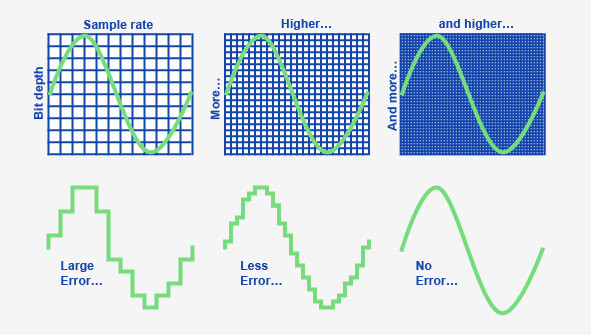
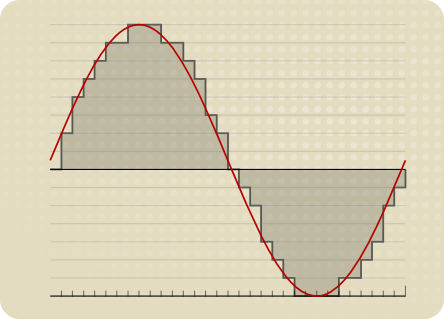
The popular understanding is the sampling rate. The higher the sampling rate per unit time, the higher the precision, and the processed file is closer to the original file, but the file size is proportional to the sampling rate, so almost all encoding formats pay attention. It’s about how to use the lowest code rate to achieve the least distortion. The cbr (fixed code rate) and vbr (variable code rate) derived from this core are all articles in this regard, but things are not absolute, in terms of audio, the higher the bit rate, the lower the compressed ratio, the smaller the sound quality loss and the closer it is to the sound quality of the audio source.
The information in the computer is represented by binary 0 and 1, and each 0 or 1 is called a bit, which is represented by lowercase b, that is, bit (bit); uppercase B represents byte, ie byte, one byte = Eight bits, ie 1B=8b; the capital K in front stands for thousand, that is, thousand bits (Kb) or kilobytes (KB). Indicates the size of the file, usually using bytes (KB) to indicate the size of the file.

Kbps: The first thing to understand is that ps refers to /s, which is every second. Kbps refers to the speed of the network, that is, how many thousands of bits of information are transmitted per second (K means thousands of bits, Kb means how many thousands of bits), it is expressed in kb (kilobit), and in the case KBps means how many kilobytes are transferred per second. 1KBps = 8Kbps. The Internet speed of ADSL is 512 Kbps. If converted to bytes, it is 512/8 = 64 KBps (that is, 64 kilobytes per second).

A frame is a still image, and continuous frames form an animation, like a television image.
We normally say the number of frames. Simply put, it is the number of image frames transmitted in 1 second. It can also be understood that the graphics processor can update several times per second, usually expressed in fps (Frames Per Second). Each frame is a still image, and showing frames in rapid succession creates the illusion of movement. Higher frame rates result in smoother, more realistic animations. The more frames per second (fps), the smoother the motion is displayed.

What is the bitrate of the music?
It can also be called bit rate, which is nothing more than the amount of data reproduced per second by a type of music, the unit is expressed in bits, that is, binary bits. bps is the bit rate. b is bit, s is second, p is per, and one byte is equal to 8 binary bits. That is, the file size of a 4-minute song at 128bps is calculated as (128/8)*4*60=3840kB=3.8MB, which means that the same song with the same bit rate (bps) will not no matter what format (such as mp3 wma) The capacity is basically the same, which can only represent a transmission rate, not the sound quality. Due to different compression engines, the sound quality of different formats varies a lot. However, for the same format, the higher the bitrate, the larger the file and the better the sound quality.

What is the sample rate of the music?
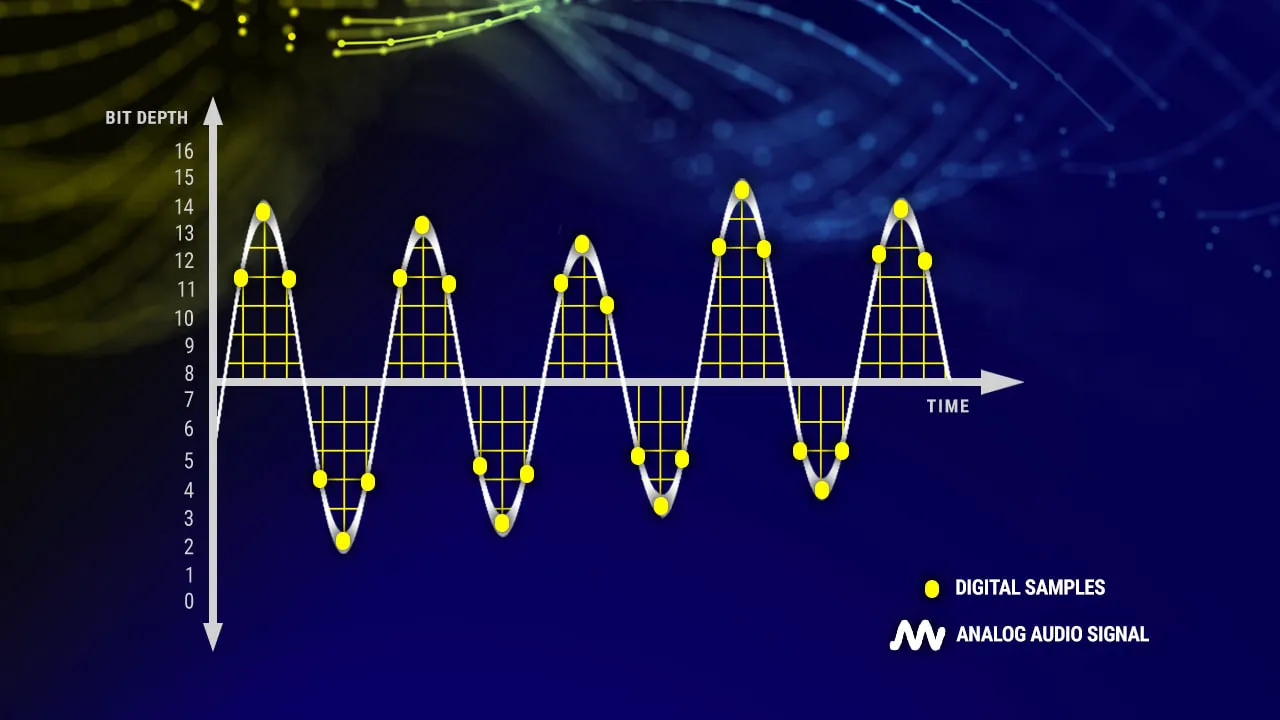
Sampling rate refers to the number of samples per unit of time. The sampling rate is 44KHz, which means the number of samples per second is 44K, which means that 44,000 pieces of data are used to describe the sound waveform in 1 second. That is, the higher the sample rate, the better the sound quality. But he and bitrate are two completely different concepts.