How WMA Adapts to Dynamic Range in Music Encoding


Free Download Mp4Gain
picture

How WMA Adapts to Dynamic Range in Music Encoding

How WMA Adapts to Dynamic Range in Music Encoding

Dynamic range in music encoding is a challenge that audio specialists like myself have been tackling for years. WMA (Windows Media Audio) adapting to dynamic range is crucial for delivering a satisfying listening experience. Different music genres and even different sections of a song often have vastly different loudness levels. Getting the encoding right can make or break the enjoyment of the music.

Let’s talk about How WMA Adapts to Dynamic Range in Music Encoding

The way WMA adapts to dynamic range during music encoding is what really sets it apart. WMA must strike a careful balance. If you’ve ever tried to listen to music in a noisy environment, you’ll understand why this matters. The quiet parts get drowned out, right? Similarly, if you’re listening through headphones, you don’t want the loud parts to blast your ears. That’s why this topic is crucial. I will share my insights on how WMA encoding manages these variations. My aim is to provide a clearer understanding of the technology and also guide you in achieving the best possible audio quality. I want to dive deep into the encoding techniques, audio quality, and practical considerations.

Understanding Dynamic Range in Music

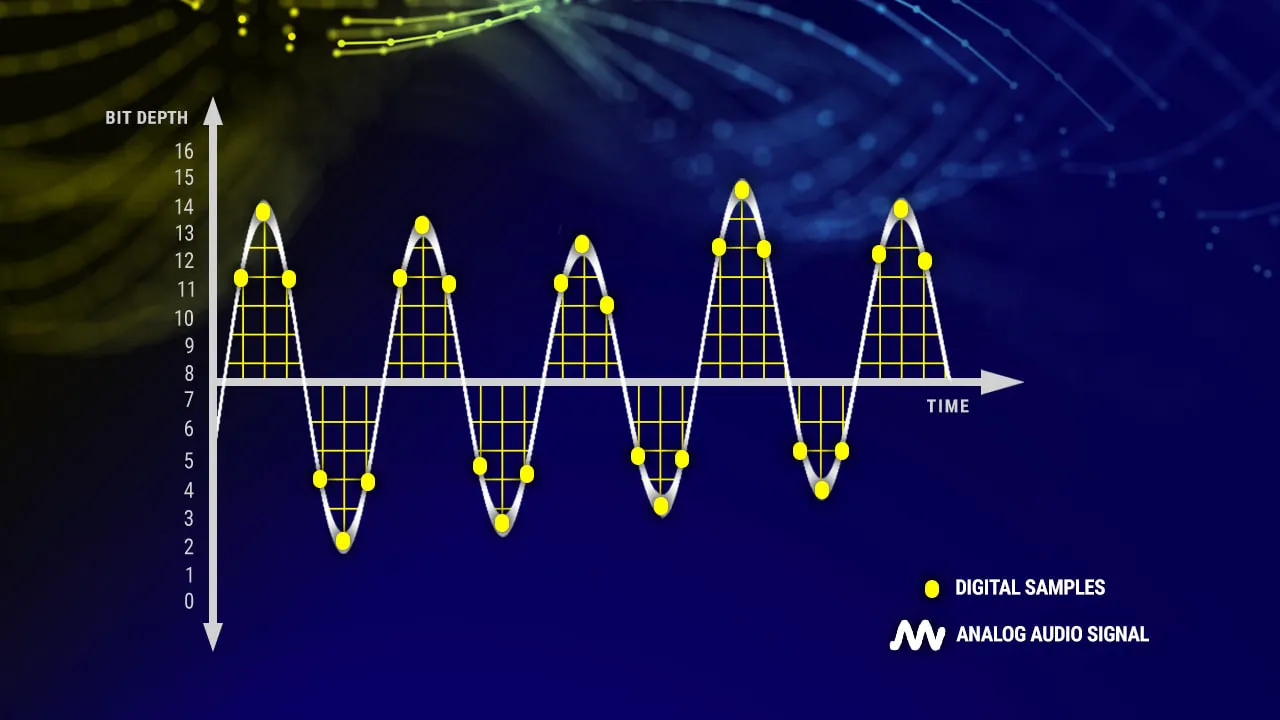
Understanding dynamic range in music is important for quality music production. It refers to the difference between the quietest and loudest sounds in a piece of music. Imagine a roller coaster; the dynamic range is like the difference between the slow climb to the top and the exhilarating drop. Properly managing dynamic range is crucial for creating an engaging and emotionally impactful listening experience. I find that many people don’t fully appreciate the art and science behind it.

What is Dynamic Range?

  • The difference between the quietest and loudest sounds is dynamic range.
  • Measured in decibels (dB) is how it is typically measured.
  • High dynamic range means a greater difference between quiet and loud.
  • Low dynamic range means less difference between quiet and loud.

As an audio specialist, I’ve encountered many scenarios where mastering dynamic range made a big difference. I remember working on a project for a local symphony orchestra. Their live performances had an enormous dynamic range, from the delicate pianissimo of a single violin to the thunderous fortissimo of the entire orchestra. My challenge was to capture that dynamic range in a recording without clipping or sacrificing the clarity of the quieter passages. Careful attention to gain staging and compression allowed me to create a recording that truly reflected the power and beauty of their performance.

Introduction to Windows Media Audio (WMA)

Windows Media Audio, also known as WMA, is a proprietary audio codec developed by Microsoft. It’s one of the key formats that competed with MP3. WMA is like a Swiss Army knife for digital audio. It offers a good balance of features, but each tool has its own strengths and limitations.

Key Features of WMA

  • Good compression efficiency allows for smaller file sizes.
  • Support for various bitrates allows for quality control.
  • Digital Rights Management (DRM) capabilities are important for copyright.
  • Integration with Windows operating systems is also a plus.

WMA’s versatility has made it a useful tool in my audio toolkit. When I worked for a company creating audiobooks, WMA was an ideal choice for encoding the narration. I know that the format offers excellent compression, which allowed us to store more audiobooks on a single CD. The format also allows for DRM capabilities, which helped protect the copyrighted material. It’s all about finding the right tool for the job.

How WMA Handles Dynamic Range

WMA handles dynamic range through a combination of encoding techniques. One of them is compression. These techniques are designed to reduce the overall dynamic range of the audio signal, making it more suitable for playback on a variety of devices. It is similar to taming a wild horse; you want to harness its power but also make it manageable.

Compression Techniques

  • Dynamic range compression reduces the difference between loud and quiet.
  • Limiting prevents the audio signal from exceeding a certain level.
  • Normalization adjusts the overall loudness of the audio.

I’ve used compression techniques in countless projects to manage dynamic range. I recall working on a project for a podcast where the hosts had vastly different speaking volumes. Without compression, some parts of the podcast would be barely audible, while others would be deafening. By applying gentle compression, I was able to even out the volume levels and create a more consistent listening experience. It was like fine-tuning the volume knob on a radio to find the perfect balance.

Automatic Gain Control (AGC)

  • AGC automatically adjusts the volume levels in real-time.
  • Helps to maintain a consistent listening level.
  • Compensates for variations in recording levels.

AGC can be a lifesaver in situations where you have limited control over the recording environment. When I recorded interviews at a noisy trade show, the background noise and varying speaker volumes made it challenging to capture clear audio. Using AGC helped to boost the quieter passages and reduce the impact of sudden loud noises. It was like having an automatic volume control that constantly adjusted to the environment.

WMA Encoding Parameters and Dynamic Range

WMA encoding parameters play a crucial role in how the codec adapts to dynamic range. Bitrate selection is another one. Choosing the right parameters is like adjusting the settings on a camera. You need to balance quality, file size, and compatibility to achieve the best results.

Bitrate Selection

  • Higher bitrates generally result in better dynamic range preservation.
  • Lower bitrates can reduce dynamic range due to compression.
  • Choose the bitrate based on the source material and listening environment.

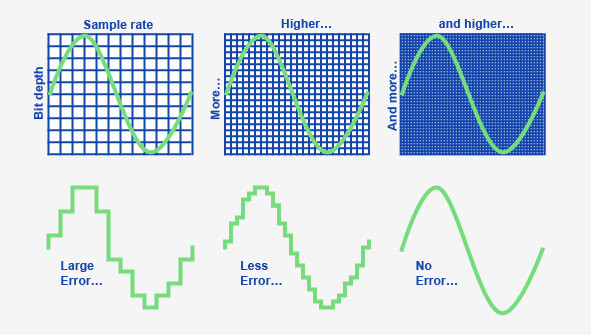
Bitrate is like the resolution of a photograph. The higher the resolution, the more detail you can capture. I’ve found that higher bitrates preserve more of the original dynamic range. When archiving recordings of classical music performances, I always use higher bitrates to capture the full richness and detail of the music.

Encoding Mode

  • Constant Bitrate (CBR) provides a consistent bitrate throughout the audio.
  • Variable Bitrate (VBR) adjusts the bitrate based on the complexity of the audio.
  • VBR can be more efficient for preserving dynamic range.

I like to think of VBR as a smart encoding mode. It adapts to the complexity of the audio, allocating more bits to the sections that need it most. When encoding music with a wide dynamic range, I generally prefer VBR because it can preserve the louder and quieter passages with greater accuracy.

Advantages of WMA Dynamic Range Adaptation

WMA’s dynamic range adaptation offers several advantages. One of them is improved listening experience. When you listen to music on the go, you want it to sound good regardless of the environment.

Improved Listening Experience

  • WMA makes audio more enjoyable in noisy environments.
  • Audio is consistent volume, which is also safer to listen to.
  • Suitable for portable devices and streaming services is a bonus.

I still believe that the most satisfying experiences are when I can fully immerse myself in the music, without having to constantly adjust the volume. WMA makes the experience even more seamless and enjoyable. I’ve found this especially valuable when listening to music in my car. The dynamic range is balanced. WMA has the best capabilities to ensure that the quieter passages are still audible without getting blown out by louder sections.

Reduced Distortion

  • Dynamic range adaptation minimizes distortion.
  • Prevents clipping is one way that it prevents distortion.
  • Results in cleaner and more accurate audio playback.

One time I was recording a live band. I knew there was a risk of clipping during the louder sections. WMA’s dynamic range adaptation helped to prevent the audio from exceeding the maximum level. This resulted in a cleaner recording without any unwanted artifacts.

Limitations of WMA Dynamic Range Adaptation

WMA’s dynamic range adaptation has certain limitations. Over-compression can be an issue. As with any compression technique, overdoing it can lead to undesirable results.

Over-Compression

  • Excessive compression reduces dynamic range too much.
  • Can make the audio sound flat and lifeless.
  • Reduces the impact and emotion of the music.

I always tread carefully when using compression. I’ve made the mistake of over-compressing audio, resulting in a track that sounded flat and uninspiring. It’s like squeezing a sponge too hard; you might get more water out, but you also ruin the sponge.

Artifacts and Distortion

  • Aggressive dynamic range adaptation can introduce artifacts.
  • May result in unwanted distortion or pumping effects.
  • Can degrade the overall audio quality.

Sometimes, pushing the limits of WMA’s dynamic range adaptation can lead to noticeable artifacts and distortion. It’s like pushing a car engine too hard; you might get a little extra power, but you also risk damaging the engine.

Best Practices for WMA Music Encoding

Following best practices is key for optimal WMA music encoding. It’s like baking a cake; you need to follow the recipe carefully to achieve the best results. The choice of audio bitrate is crucial.

Choosing the Right Bitrate

  • Select a bitrate that balances file size and audio quality.
  • Use higher bitrates for high-quality source material.
  • Consider the listening environment and playback devices.

Bitrate is like the amount of ingredients you use in a recipe. I tailor the bitrate to the source material and the intended listening environment. For archival purposes, the quality of the music has to be preserved.

Proper Gain Staging

  • Adjust the input levels to optimize the signal-to-noise ratio.
  • Avoid clipping or distortion by setting levels correctly.
  • Use metering tools to monitor levels accurately.

I always pay close attention to gain staging to ensure that the audio signal is properly optimized. It’s like adjusting the focus on a camera to get a sharp image.

Latest words on How WMA Adapts to Dynamic Range in Music Encoding

WMA adapting to dynamic range in music encoding requires a careful balance of compression, bitrate selection, and gain staging. It’s an ongoing process of trial and error. By understanding the underlying principles and following best practices, you can achieve excellent results. For more advanced solutions, programs like Mp4Gain offer various tools to help optimize and normalize audio levels, even when the initial WMA encoding has not fully addressed the dynamic range issues. Now go and fine-tune audio levels, dynamic range adaptation, noise control, and audio compression!

What exactly is dynamic range when considering how WMA adapts to it during music encoding?

Dynamic range refers to the difference between the quietest and loudest sounds in a piece of music, typically measured in decibels (dB). This range is what WMA attempts to manage during music encoding.

Why is managing dynamic range crucial during WMA music encoding?

Effectively managing dynamic range in WMA ensures a consistent and enjoyable listening experience. When you are encoding dynamic music, managing the music guarantees that quieter sections are audible while louder sections don’t distort.

What are the compression techniques used in WMA encoding to adapt to dynamic range?

Compression techniques that WMA uses include dynamic range compression, limiting, and normalization, reducing the difference between loud and quiet and adjusting the overall loudness of the audio.

How does Automatic Gain Control (AGC) help in WMA’s dynamic range adaptation?

Automatic Gain Control (AGC) automatically adjusts volume levels in real-time in WMA. AGC helps maintain a consistent listening level and compensates for variations in recording levels.

Does the bitrate selection affect the quality of dynamic range adaptation in WMA?

Yes, it does, because higher bitrates generally result in better dynamic range preservation, whereas lower bitrates can reduce dynamic range due to increased compression in WMA.

What is the difference between Constant Bitrate (CBR) and Variable Bitrate (VBR) in WMA encoding?

Constant Bitrate (CBR) provides a consistent bitrate throughout the audio, while Variable Bitrate (VBR) adjusts the bitrate based on the complexity of the audio, making VBR more efficient for preserving dynamic range.

What are some of the advantages of effective dynamic range adaptation in WMA files?

Advantages include an improved listening experience in noisy environments, minimized distortion, clipping prevention, and cleaner, more accurate audio playback in WMA.

What happens if dynamic range adaptation is overdone during WMA music encoding?

If dynamic range adaptation is overdone in WMA, over-compression reduces dynamic range too much, causing the audio to sound flat and lifeless and reducing the music’s impact.

Can aggressive dynamic range adaptation introduce unwanted effects in WMA audio?

Yes, aggressive dynamic range adaptation can introduce artifacts, such as unwanted distortion or pumping effects, potentially degrading the overall WMA audio quality.

Beyond WMA, are there tools that further optimize dynamic range after encoding?

Indeed, programs like Mp4Gain offer various tools to help optimize and normalize audio levels, even when the initial WMA encoding has not fully addressed the dynamic range issues.

Comments:

This article really nailed it! I’ve always wondered why some of my WMA files sounded so much better than others. The explanation of bitrate selection and VBR vs CBR made it all click. Thanks for the practical tips!

I’m new to this whole audio encoding thing, and I gotta say, some of this is still kinda over my head. But the examples you used helped a lot. Keep up the good work!

Dude, AGC is a lifesaver! I record a lot of live music, and it’s always a challenge to get a consistent level. I’ll definitely be experimenting with that more now that I understand it better.

I think this article is pretty spot on! I work in audio all the time, and the best advice I ever got was to be gentle with the compression. Overdoing it can really ruin a track. I will follow this article to see if it helps me to improve!

Good points on WMA’s limitations. I have experienced first-hand some of the problems in the audio. Great info!

As a total noob at audio stuff, this was really helpful! Gonna try messing with the bitrate settings now when I convert my old CDs. Thanks for making it easy to understand for a dunce like me lol.

Help me a lot to undestand and manage audio levels in my proyect, I needed info about what things affects in audio quality and this is a excelent starting point, thaks a lot !


Free Download Mp4Gain
picture


Mp4Gain Main Window
picture


Mp4Gain Features
picture


Free Download Mp4Gain
picture

Adaptive Audio Streaming

Adaptive Audio Streaming

Adaptive Audio Streaming

Adaptive audio streaming, a critical aspect of modern digital media delivery, has revolutionized how we experience audio content. In this comprehensive guide, I will delve into the intricacies of adaptive audio streaming and its significance in providing top-notch streaming audio quality.

Understanding Adaptive Audio Streaming

Adaptive audio streaming is a dynamic approach that optimizes audio quality based on the viewer’s network conditions. It ensures a seamless audio experience by adjusting the audio codec’s parameters and the bitrate of the audio stream in real-time. This adaptation is vital to prevent audio interruptions, buffering, and loss of quality, especially in the ever-changing world of online content delivery.

Imagine a journey on a highway where the traffic flow constantly changes. Adaptive streaming is like having a smart vehicle that adjusts its speed to maintain a smooth ride. Similarly, when your internet connection fluctuates, adaptive audio streaming adapts the audio quality to ensure you experience a continuous, high-quality audio stream.

The Science Behind Streaming Audio Quality

To grasp the science behind adaptive audio streaming, let’s explore some of the key technical aspects. Adaptive streaming relies on efficient audio codecs that compress and decompress audio data. These codecs use various algorithms to reduce the size of audio files while preserving audio quality. The choice of codec and its efficiency play a significant role in determining the quality of the audio stream.

In a real-world analogy, think of audio codecs as skilled chefs preparing a sumptuous dish. A masterful chef knows how to retain the flavors while reducing the dish’s size, making it easier to serve. Likewise, efficient audio codecs preserve the audio’s fidelity while making it compatible with varying network conditions.

The Impact of Latency in Audio Streaming

Latency, the delay between audio production and playback, is a crucial factor in adaptive audio streaming. While some latency is inevitable due to data transmission and codec processing, excessive latency can disrupt the streaming experience. Adaptive streaming technologies aim to strike a balance between audio quality and latency.

Think of latency as the time it takes for a letter to reach its destination through traditional mail compared to email. Adaptive audio streaming ensures the audio reaches your ears with minimal delay, akin to the swift delivery of an email. This balance is essential for real-time applications like online gaming or live broadcasts, where low latency is a top priority.

Now, let’s address the questions that often arise regarding adaptive audio streaming:

How Does Adaptive Bitrate Streaming Work?

Adaptive bitrate streaming, a close sibling to adaptive audio streaming, involves adjusting not only the audio quality but also the video quality based on network conditions. It works by dividing the audio and video content into small chunks of data and delivering them in varying quality levels. Players then choose the best quality for a seamless viewing experience.

What Technologies Drive Adaptive Audio Streaming?

Adaptive audio streaming leverages several technologies, including HTTP Live Streaming (HLS), Dynamic Adaptive Streaming over HTTP (DASH), and Real-Time Messaging Protocol (RTMP). These technologies enable adaptive streaming by optimizing content delivery over the internet, ensuring that audio quality remains consistent across different devices and network conditions.

Why Is Mobile Audio Streaming Challenging?

Mobile audio streaming presents unique challenges due to the variability of cellular networks and the limited processing power of mobile devices. Adaptive audio streaming is particularly crucial in this context, as it ensures a smooth listening experience, even when on the move. It’s like having an audio companion that adjusts to your surroundings, providing uninterrupted music or podcasts as you travel.

Last Words about Adaptive Audio Streaming

In the era of digital media, adaptive audio streaming is the unsung hero that ensures you enjoy a high-quality audio experience regardless of your network conditions. I’ve shared my knowledge and expertise on this topic, revealing the science behind streaming audio quality and the role of efficient codecs. Understanding the impact of latency and the technologies driving adaptive streaming is key to appreciating its significance. As an expert in the field, I encourage you to embrace the world of adaptive audio streaming, where your audio content is tailored to your network conditions, just like a perfectly orchestrated symphony.

Why is important bitrate in audio quality?

Why is important bitrate in audio quality?

Why is important bitrate in audio quality?

Bitrate

Bitrate is a crucial factor when it comes to audio quality. It refers to the amount of data processed per unit of time in an audio file.

Audio Quality

Audio quality is directly influenced by the bitrate of an audio file. Higher bitrates result in better sound reproduction and a more accurate representation of the original sound.

Sound Reproduction

The level of detail and accuracy in sound reproduction is determined by the bitrate of an audio file. A higher bitrate allows for more information to be captured and preserved, resulting in a clearer and more immersive listening experience.

Data Compression

Bitrate and data compression go hand in hand. Lower bitrates often involve more aggressive compression techniques, which can lead to a loss of audio data and a reduction in audio quality.

File Size

The bitrate of an audio file directly affects its file size. Higher bitrates require more data to be stored, resulting in larger file sizes. It’s important to strike a balance between audio quality and file size, especially when considering storage limitations or bandwidth constraints.

Streaming Services

Streaming services rely on efficient compression techniques to deliver audio files over the internet. Bitrate plays a crucial role in determining the streaming quality. Higher bitrates result in better audio fidelity but require more bandwidth.

Internet Bandwidth

The choice of bitrate for streaming or downloading audio files depends on the available internet bandwidth. Higher bitrates require more bandwidth to ensure a smooth streaming experience without interruptions or buffering.

Audio Formats

Different audio formats support varying levels of bitrate and, consequently, audio quality. Lossless formats like FLAC and WAV offer the highest audio fidelity as they preserve all the original data. Lossy formats like MP3 and AAC sacrifice some audio data to reduce file size.

Lossless

Lossless audio formats preserve all the original data, resulting in the highest audio fidelity. They are ideal for audiophiles and professionals who require the utmost accuracy in sound reproduction.

Lossy

Lossy audio formats use compression algorithms to reduce file size by sacrificing some audio data. They offer a good balance between audio quality and file size, making them suitable for everyday listening and storage purposes.

Listening Environment

The listening environment can significantly impact the perception of audio quality. Factors such as background noise, acoustics, and speaker quality can affect our ability to discern subtle differences in bitrate.

Background Noise

In a noisy environment, a lower bitrate may be sufficient as the background noise masks some of the audio details. However, in a quiet and controlled environment, a higher bitrate becomes more noticeable, providing a more immersive and enjoyable listening experience.

Acoustics

The acoustics of a room or space can influence the way audio is perceived. Proper acoustic treatment can enhance the overall audio quality, allowing for better sound reproduction and minimizing unwanted reflections or distortions.

Speaker Quality

The quality of speakers or headphones used for audio playback also plays a significant role in the overall audio experience. Higher quality speakers can better reproduce the nuances and details captured in high-bitrate audio files.

Music

Bitrate is particularly important when it comes to music. Higher bitrates allow for a more accurate representation of the original recording, resulting in a richer and more immersive musical experience.

Podcasts

Podcasts, like music, can greatly benefit from higher bitrates. Clearer and more detailed audio reproduction enhances the listening experience, making it easier to follow conversations and understand the content being discussed.

Audio Content

Whether it’s music, podcasts, audiobooks, or other forms of audio content, bitrate plays a crucial role in delivering a high-quality listening experience. Choosing the right bitrate ensures that the audio is faithfully reproduced and enjoyed to its fullest potential.

What are the different types of audio equalizers

What are the different types of audio equalizers?

audio equalizers
audio equalizers
audio equalizers
audio equalizers

Graphic Equalizers

I’ve always been a fan of graphic equalizers. They allow you to adjust the levels of different frequency bands, giving you more control over the sound. As the name suggests, graphic equalizers use a graphical interface to display the frequency response of the audio signal. This makes it easy to see which frequencies need to be boosted or cut. In the words of the legendary music producer Quincy Jones, “Equalization is the magic key to good sound.”

Parametric Equalizers

Parametric equalizers are a bit more complex than graphic equalizers, but they offer even more control over the sound. With a parametric equalizer, you can adjust the center frequency, bandwidth, and gain of each individual band. This allows you to target specific problem areas in the frequency spectrum. I’ve found that parametric equalizers are particularly useful for fixing issues with vocals, which can often sound harsh or nasal.

Mastering Equalizers

Mastering equalizers are a special type of equalizer that are used in the final stages of music production. They are designed to make subtle adjustments to the overall sound of a mix, rather than targeting specific problem areas. Mastering equalizers are often used to add warmth, depth, and clarity to a mix. As the mastering engineer Bob Katz once said, “Equalization is the final touch that can make or break a mix.”

Equalizer Presets

Equalizer presets are pre-configured settings that are designed to work well with specific types of music or audio content. For example, you might have a preset for rock music, which boosts the bass and treble frequencies. Or you might have a preset for podcasts, which emphasizes the midrange frequencies. I’ve found that presets can be a great starting point for adjusting the sound, especially if you’re not sure where to begin.

Equalizer Settings

When it comes to equalizer settings, there’s no one-size-fits-all solution. The best settings will depend on the specific audio content you’re working with, as well as your personal preferences. That being said, there are some general guidelines that can help. For example, it’s usually a good idea to cut frequencies that are causing problems, rather than boosting them. And it’s important to be subtle with your adjustments, as too much equalization can lead to a distorted or unnatural sound.
Final Words:
In conclusion, audio equalizers are a powerful tool for shaping the sound of your music or audio content. Whether you’re using a graphic equalizer, a parametric equalizer, or a mastering equalizer, the key is to be patient and experiment with different settings. And if you’re looking for a reliable and effective equalizer software, I highly recommend checking out mp4gain. It’s a great solution for normalizing and converting audio and video files, with an integrated equalizer that can help you achieve the perfect sound.