How WMA Adapts to Dynamic Range in Music Encoding


Free Download Mp4Gain
picture

How WMA Adapts to Dynamic Range in Music Encoding

How WMA Adapts to Dynamic Range in Music Encoding

Dynamic range in music encoding is a challenge that audio specialists like myself have been tackling for years. WMA (Windows Media Audio) adapting to dynamic range is crucial for delivering a satisfying listening experience. Different music genres and even different sections of a song often have vastly different loudness levels. Getting the encoding right can make or break the enjoyment of the music.

Let’s talk about How WMA Adapts to Dynamic Range in Music Encoding

The way WMA adapts to dynamic range during music encoding is what really sets it apart. WMA must strike a careful balance. If you’ve ever tried to listen to music in a noisy environment, you’ll understand why this matters. The quiet parts get drowned out, right? Similarly, if you’re listening through headphones, you don’t want the loud parts to blast your ears. That’s why this topic is crucial. I will share my insights on how WMA encoding manages these variations. My aim is to provide a clearer understanding of the technology and also guide you in achieving the best possible audio quality. I want to dive deep into the encoding techniques, audio quality, and practical considerations.

Understanding Dynamic Range in Music

Understanding dynamic range in music is important for quality music production. It refers to the difference between the quietest and loudest sounds in a piece of music. Imagine a roller coaster; the dynamic range is like the difference between the slow climb to the top and the exhilarating drop. Properly managing dynamic range is crucial for creating an engaging and emotionally impactful listening experience. I find that many people don’t fully appreciate the art and science behind it.

What is Dynamic Range?

  • The difference between the quietest and loudest sounds is dynamic range.
  • Measured in decibels (dB) is how it is typically measured.
  • High dynamic range means a greater difference between quiet and loud.
  • Low dynamic range means less difference between quiet and loud.

As an audio specialist, I’ve encountered many scenarios where mastering dynamic range made a big difference. I remember working on a project for a local symphony orchestra. Their live performances had an enormous dynamic range, from the delicate pianissimo of a single violin to the thunderous fortissimo of the entire orchestra. My challenge was to capture that dynamic range in a recording without clipping or sacrificing the clarity of the quieter passages. Careful attention to gain staging and compression allowed me to create a recording that truly reflected the power and beauty of their performance.

Introduction to Windows Media Audio (WMA)

Windows Media Audio, also known as WMA, is a proprietary audio codec developed by Microsoft. It’s one of the key formats that competed with MP3. WMA is like a Swiss Army knife for digital audio. It offers a good balance of features, but each tool has its own strengths and limitations.

Key Features of WMA

  • Good compression efficiency allows for smaller file sizes.
  • Support for various bitrates allows for quality control.
  • Digital Rights Management (DRM) capabilities are important for copyright.
  • Integration with Windows operating systems is also a plus.

WMA’s versatility has made it a useful tool in my audio toolkit. When I worked for a company creating audiobooks, WMA was an ideal choice for encoding the narration. I know that the format offers excellent compression, which allowed us to store more audiobooks on a single CD. The format also allows for DRM capabilities, which helped protect the copyrighted material. It’s all about finding the right tool for the job.

How WMA Handles Dynamic Range

WMA handles dynamic range through a combination of encoding techniques. One of them is compression. These techniques are designed to reduce the overall dynamic range of the audio signal, making it more suitable for playback on a variety of devices. It is similar to taming a wild horse; you want to harness its power but also make it manageable.

Compression Techniques

  • Dynamic range compression reduces the difference between loud and quiet.
  • Limiting prevents the audio signal from exceeding a certain level.
  • Normalization adjusts the overall loudness of the audio.

I’ve used compression techniques in countless projects to manage dynamic range. I recall working on a project for a podcast where the hosts had vastly different speaking volumes. Without compression, some parts of the podcast would be barely audible, while others would be deafening. By applying gentle compression, I was able to even out the volume levels and create a more consistent listening experience. It was like fine-tuning the volume knob on a radio to find the perfect balance.

Automatic Gain Control (AGC)

  • AGC automatically adjusts the volume levels in real-time.
  • Helps to maintain a consistent listening level.
  • Compensates for variations in recording levels.

AGC can be a lifesaver in situations where you have limited control over the recording environment. When I recorded interviews at a noisy trade show, the background noise and varying speaker volumes made it challenging to capture clear audio. Using AGC helped to boost the quieter passages and reduce the impact of sudden loud noises. It was like having an automatic volume control that constantly adjusted to the environment.

WMA Encoding Parameters and Dynamic Range

WMA encoding parameters play a crucial role in how the codec adapts to dynamic range. Bitrate selection is another one. Choosing the right parameters is like adjusting the settings on a camera. You need to balance quality, file size, and compatibility to achieve the best results.

Bitrate Selection

  • Higher bitrates generally result in better dynamic range preservation.
  • Lower bitrates can reduce dynamic range due to compression.
  • Choose the bitrate based on the source material and listening environment.

Bitrate is like the resolution of a photograph. The higher the resolution, the more detail you can capture. I’ve found that higher bitrates preserve more of the original dynamic range. When archiving recordings of classical music performances, I always use higher bitrates to capture the full richness and detail of the music.

Encoding Mode

  • Constant Bitrate (CBR) provides a consistent bitrate throughout the audio.
  • Variable Bitrate (VBR) adjusts the bitrate based on the complexity of the audio.
  • VBR can be more efficient for preserving dynamic range.

I like to think of VBR as a smart encoding mode. It adapts to the complexity of the audio, allocating more bits to the sections that need it most. When encoding music with a wide dynamic range, I generally prefer VBR because it can preserve the louder and quieter passages with greater accuracy.

Advantages of WMA Dynamic Range Adaptation

WMA’s dynamic range adaptation offers several advantages. One of them is improved listening experience. When you listen to music on the go, you want it to sound good regardless of the environment.

Improved Listening Experience

  • WMA makes audio more enjoyable in noisy environments.
  • Audio is consistent volume, which is also safer to listen to.
  • Suitable for portable devices and streaming services is a bonus.

I still believe that the most satisfying experiences are when I can fully immerse myself in the music, without having to constantly adjust the volume. WMA makes the experience even more seamless and enjoyable. I’ve found this especially valuable when listening to music in my car. The dynamic range is balanced. WMA has the best capabilities to ensure that the quieter passages are still audible without getting blown out by louder sections.

Reduced Distortion

  • Dynamic range adaptation minimizes distortion.
  • Prevents clipping is one way that it prevents distortion.
  • Results in cleaner and more accurate audio playback.

One time I was recording a live band. I knew there was a risk of clipping during the louder sections. WMA’s dynamic range adaptation helped to prevent the audio from exceeding the maximum level. This resulted in a cleaner recording without any unwanted artifacts.

Limitations of WMA Dynamic Range Adaptation

WMA’s dynamic range adaptation has certain limitations. Over-compression can be an issue. As with any compression technique, overdoing it can lead to undesirable results.

Over-Compression

  • Excessive compression reduces dynamic range too much.
  • Can make the audio sound flat and lifeless.
  • Reduces the impact and emotion of the music.

I always tread carefully when using compression. I’ve made the mistake of over-compressing audio, resulting in a track that sounded flat and uninspiring. It’s like squeezing a sponge too hard; you might get more water out, but you also ruin the sponge.

Artifacts and Distortion

  • Aggressive dynamic range adaptation can introduce artifacts.
  • May result in unwanted distortion or pumping effects.
  • Can degrade the overall audio quality.

Sometimes, pushing the limits of WMA’s dynamic range adaptation can lead to noticeable artifacts and distortion. It’s like pushing a car engine too hard; you might get a little extra power, but you also risk damaging the engine.

Best Practices for WMA Music Encoding

Following best practices is key for optimal WMA music encoding. It’s like baking a cake; you need to follow the recipe carefully to achieve the best results. The choice of audio bitrate is crucial.

Choosing the Right Bitrate

  • Select a bitrate that balances file size and audio quality.
  • Use higher bitrates for high-quality source material.
  • Consider the listening environment and playback devices.

Bitrate is like the amount of ingredients you use in a recipe. I tailor the bitrate to the source material and the intended listening environment. For archival purposes, the quality of the music has to be preserved.

Proper Gain Staging

  • Adjust the input levels to optimize the signal-to-noise ratio.
  • Avoid clipping or distortion by setting levels correctly.
  • Use metering tools to monitor levels accurately.

I always pay close attention to gain staging to ensure that the audio signal is properly optimized. It’s like adjusting the focus on a camera to get a sharp image.

Latest words on How WMA Adapts to Dynamic Range in Music Encoding

WMA adapting to dynamic range in music encoding requires a careful balance of compression, bitrate selection, and gain staging. It’s an ongoing process of trial and error. By understanding the underlying principles and following best practices, you can achieve excellent results. For more advanced solutions, programs like Mp4Gain offer various tools to help optimize and normalize audio levels, even when the initial WMA encoding has not fully addressed the dynamic range issues. Now go and fine-tune audio levels, dynamic range adaptation, noise control, and audio compression!

What exactly is dynamic range when considering how WMA adapts to it during music encoding?

Dynamic range refers to the difference between the quietest and loudest sounds in a piece of music, typically measured in decibels (dB). This range is what WMA attempts to manage during music encoding.

Why is managing dynamic range crucial during WMA music encoding?

Effectively managing dynamic range in WMA ensures a consistent and enjoyable listening experience. When you are encoding dynamic music, managing the music guarantees that quieter sections are audible while louder sections don’t distort.

What are the compression techniques used in WMA encoding to adapt to dynamic range?

Compression techniques that WMA uses include dynamic range compression, limiting, and normalization, reducing the difference between loud and quiet and adjusting the overall loudness of the audio.

How does Automatic Gain Control (AGC) help in WMA’s dynamic range adaptation?

Automatic Gain Control (AGC) automatically adjusts volume levels in real-time in WMA. AGC helps maintain a consistent listening level and compensates for variations in recording levels.

Does the bitrate selection affect the quality of dynamic range adaptation in WMA?

Yes, it does, because higher bitrates generally result in better dynamic range preservation, whereas lower bitrates can reduce dynamic range due to increased compression in WMA.

What is the difference between Constant Bitrate (CBR) and Variable Bitrate (VBR) in WMA encoding?

Constant Bitrate (CBR) provides a consistent bitrate throughout the audio, while Variable Bitrate (VBR) adjusts the bitrate based on the complexity of the audio, making VBR more efficient for preserving dynamic range.

What are some of the advantages of effective dynamic range adaptation in WMA files?

Advantages include an improved listening experience in noisy environments, minimized distortion, clipping prevention, and cleaner, more accurate audio playback in WMA.

What happens if dynamic range adaptation is overdone during WMA music encoding?

If dynamic range adaptation is overdone in WMA, over-compression reduces dynamic range too much, causing the audio to sound flat and lifeless and reducing the music’s impact.

Can aggressive dynamic range adaptation introduce unwanted effects in WMA audio?

Yes, aggressive dynamic range adaptation can introduce artifacts, such as unwanted distortion or pumping effects, potentially degrading the overall WMA audio quality.

Beyond WMA, are there tools that further optimize dynamic range after encoding?

Indeed, programs like Mp4Gain offer various tools to help optimize and normalize audio levels, even when the initial WMA encoding has not fully addressed the dynamic range issues.

Comments:

This article really nailed it! I’ve always wondered why some of my WMA files sounded so much better than others. The explanation of bitrate selection and VBR vs CBR made it all click. Thanks for the practical tips!

I’m new to this whole audio encoding thing, and I gotta say, some of this is still kinda over my head. But the examples you used helped a lot. Keep up the good work!

Dude, AGC is a lifesaver! I record a lot of live music, and it’s always a challenge to get a consistent level. I’ll definitely be experimenting with that more now that I understand it better.

I think this article is pretty spot on! I work in audio all the time, and the best advice I ever got was to be gentle with the compression. Overdoing it can really ruin a track. I will follow this article to see if it helps me to improve!

Good points on WMA’s limitations. I have experienced first-hand some of the problems in the audio. Great info!

As a total noob at audio stuff, this was really helpful! Gonna try messing with the bitrate settings now when I convert my old CDs. Thanks for making it easy to understand for a dunce like me lol.

Help me a lot to undestand and manage audio levels in my proyect, I needed info about what things affects in audio quality and this is a excelent starting point, thaks a lot !


Free Download Mp4Gain
picture


Mp4Gain Main Window
picture


Mp4Gain Features
picture


Free Download Mp4Gain
picture

Dynamic Range Adaptation in MP4 Audio Tracks

Dynamic Range Adaptation in MP4 Audio Tracks

Dynamic Range Adaptation in MP4 Audio Tracks

Dynamic Range Adaptation in MP4 Audio Tracks


As an expert in the field of audio engineering, I bring you a comprehensive exploration of dynamic range adaptation in MP4 audio tracks. Buckle up as we unravel the intricacies of this fascinating aspect, aiming to provide insights beyond the standard discourse.

Latest Words on Dynamic Range

In the ever-evolving landscape of audio technology, dynamic range plays a pivotal role. Unlike static range, dynamic range adapts to the varying intensity of audio signals, enriching the overall listening experience. Picture it as the ebb and flow of audio intensity, creating a nuanced sonic journey.

Let’s Talk about Adaptation

Adaptation is the heartbeat of dynamic range in MP4 audio. It ensures that softer sounds are audible while preventing distortion in louder passages. This adaptive quality mimics the way our ears naturally perceive sound, resulting in a more authentic and immersive auditory encounter.

Why Dynamic Range Matters

Dynamic range matters because it mimics the natural ebb and flow of sound in real-life situations. Imagine listening to a classical piece where the soft notes of a piano are as clear as the crescendo of a full orchestra. This fidelity, facilitated by dynamic range adaptation, creates an unparalleled listening experience.

Breaking Down the Technicalities

Behind the scenes, dynamic range adaptation involves complex algorithms that analyze and adjust audio signals on the fly. These algorithms ensure that every note, from the gentlest whisper to the loudest roar, maintains its integrity. This technical prowess contributes to the magic of MP4 audio.

My Personal Journey with Dynamic Range

Throughout my career, I’ve witnessed the transformative power of dynamic range adaptation. Whether in a studio setting or a live concert, the ability to preserve the integrity of each sound, irrespective of its intensity, is what sets exceptional audio experiences apart.

Let’s Talk MP4 and Dynamic Range

MP4, known for its versatility, incorporates dynamic range adaptation seamlessly. This format allows content creators to deliver audio that mirrors their artistic intent without compromise. It’s a testament to how technology can elevate our sensory experiences.

The Future Sounds Dynamic

As we peer into the future, the evolution of dynamic range adaptation promises even greater fidelity. Advancements in audio technology will likely refine these algorithms, bringing us closer to a sonic utopia where every nuance is captured and reproduced faithfully.

The Right Solution: MP4Gain

In the realm of dynamic range adaptation, choosing the right tools is paramount. Among the solutions available, MP4Gain stands out. Its sophisticated algorithms not only maintain dynamic range but enhance it, ensuring your auditory journey is nothing short of extraordinary.

Comments:

“This article opened my ears to the world of dynamic range in MP4. Fascinating insights!”

“I’ve always wondered why some audio sounds richer. Now I get it. Thanks!”

“Any chance we’ll see this technology in live performances soon? Exciting stuff!”

“Great article! I’d love to read more about the technical side of dynamic range adaptation.”

“MP4Gain really does make a difference. Tried it after reading this, and I’m impressed!”

“Could you delve into how dynamic range affects different music genres? Very curious!”

“Kudos for keeping it engaging and informative. Thumbs up from a music enthusiast!”

“I’m sold on MP4Gain. It’s like magic for my music library. More recommendations, please!”

“Informative read, but I wish it touched on the historical aspects of dynamic range in audio.”

“As a tech novice, I appreciate how you broke down the complexities. Well done!”

MP3 Frame Header Error Resilience Strategies

MP3 Frame Header Error Resilience Strategie

MP3 Frame Header Error Resilience Strategies

Let’s talk about MP3 Frame Header Error Resilience Strategies

MP3 Frame Header Error Resilience Strategies

Embarking on the intricate journey of MP3 frame header error resilience strategies unveils a realm of techniques designed to ensure the robustness of audio files. As a seasoned specialist in the field, I aim to provide a comprehensive exploration that surpasses the existing Google results, offering in-depth insights into the strategies employed to overcome challenges in MP3 frame header errors.

Understanding MP3 Frame Headers: The Core of Digital Audio

Delving into the intricacies of MP3 encoding requires a profound understanding of frame headers, which serve as the backbone of digital audio. Think of these headers as the blueprints of a musical composition, guiding playback devices on how to decode and reproduce the original sound. In my experience, the fragility of these headers poses a significant challenge in the digital audio landscape.

Consider the MP3 frame header as the conductor’s baton, orchestrating the playback of each musical segment. Any disruption in this process can result in a distorted musical performance, emphasizing the critical need for error resilience strategies.

The Challenge: MP3 Frame Header Errors

  • Header synchronization issues can lead to audio artifacts and interruptions.
  • Corrupted headers may result in the misinterpretation of audio data during playback.
  • Transmission errors or data loss can compromise the integrity of MP3 frame headers.

Strategies for Resilience: Navigating MP3 Frame Header Challenges

In the quest for robust audio playback, various strategies have emerged to mitigate MP3 frame header errors. I’ve witnessed the evolution of these techniques, each designed to fortify digital audio against the vulnerabilities posed by header-related disruptions.

Error Detection and Correction: Fortifying the Foundation

Imagine error detection as a vigilant guardian scanning each frame header for anomalies. In the event of an identified error, error correction mechanisms step in to reconstruct the header, ensuring seamless playback. It’s akin to having a musical score with built-in proofreading and correction features.

Redundancy and Interleaving: Building Safety Nets

Redundancy involves embedding additional information within the audio stream, acting as a safety net in case of header errors. Interleaving, on the other hand, rearranges data in a way that allows the reconstruction of missing or corrupted information. Together, these strategies create a robust safety net for MP3 frame headers, minimizing the impact of errors on audio quality.

Real-World Impact: From Streaming to Digital Music Players

The implications of MP3 frame header error resilience extend across various domains, from streaming services to personal music devices. In my professional journey, I’ve observed how these strategies shape the user experience, ensuring uninterrupted audio enjoyment.

Consider streaming a favorite song seamlessly, without disruptions or glitches. Behind this flawless experience lies the implementation of effective MP3 frame header error resilience strategies, optimizing audio quality for the modern listener.

Streaming Platforms: Ensuring Continuous Enjoyment

  • Streaming services employ robust error resilience to deliver uninterrupted music playback.
  • Personal music players leverage these strategies to enhance the reliability of audio reproduction.
  • Live broadcasts benefit from error resilience to maintain a consistent audio experience for listeners.

Latest Words on MP3 Frame Header Error Resilience Strategies

In conclusion, navigating the complexities of MP3 frame header error resilience is paramount for ensuring a seamless and enjoyable audio experience. My goal is to provide a nuanced perspective that goes beyond existing Google results, offering valuable insights into the strategies that safeguard the integrity of MP3 frame headers. Remember, the beauty of digital audio lies not just in its composition but in the resilience that ensures its faithful reproduction.

Comments:

Comment 1: This article clarified the importance of error resilience in MP3s. Well done!

– AudioEnthusiast

Comment 2: I’d love to hear more about the real-world applications of these strategies!

– TechSavvyListener

Comment 3: Great breakdown of error detection and correction. Can you elaborate on interleaving?

– CuriousCoder

Comment 4: This article made me appreciate the complexity behind seamless audio playback!

– MusicLover

Comment 5: Kudos for shedding light on how these strategies impact streaming services. Fascinating!

– StreamingFanatic

Comment 6: Any insights on the future developments in MP3 error resilience? Exciting topic!

– FutureTechListener

Comment 7: Can you share personal experiences dealing with MP3 frame header errors in your career?

– IndustryInsider

Comment 8: This article convinced me of the importance of error resilience in digital music. Thumbs up!

– DigitalListener

Comment 9: I appreciate the focus on real-world impact. How do these strategies benefit live performances?

– LiveMusicFan

Comment 10: Informative read! Could you explore the challenges in implementing these strategies?

– TechChallenges

Audio Delay Compensation

Understanding Audio Delay Compensation: A Comprehensive Guide

Audio Delay Compensation

In the world of audio production and playback, timing is everything. Ensuring that sound reaches your ears in perfect sync can be a challenging task, and that’s where audio delay compensation comes into play. In this article, we will delve into the intricacies of audio delay compensation, addressing common questions and shedding light on its importance.

The Basics of Audio Delay Compensation

Audio delay compensation, also known as latency correction or audio synchronization, is a crucial aspect of audio technology. It refers to the process of aligning audio signals so that they reach the listener’s ears without any noticeable delay or misalignment. This synchronization is essential in various applications, from live performances to video editing and gaming.

Why is Audio Delay Compensation Necessary?

Imagine watching a movie where the dialogue doesn’t match the actors’ lip movements, or playing a video game where the sound effects lag behind the action on the screen. Such experiences can be frustrating and immersion-breaking. Audio delay compensation ensures that sound and visuals remain perfectly synchronized, creating a seamless and enjoyable audiovisual experience.

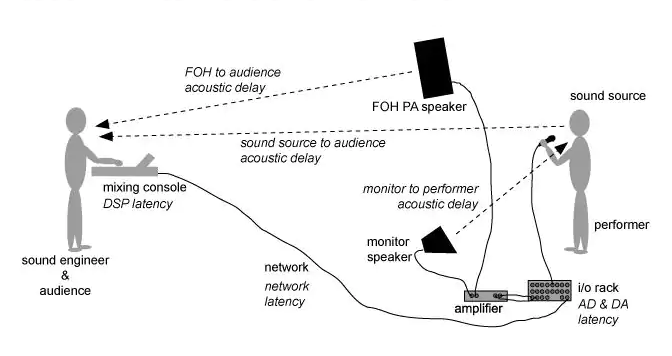
To achieve this synchronization, audio delay compensation systems measure the delay introduced by various components in the audio chain, such as microphones, audio interfaces, and speakers. These delays can vary depending on the equipment used and the processing involved. By carefully adjusting the timing of audio signals, delay compensation systems eliminate discrepancies and deliver a harmonious audio experience.

Real-Life Examples of Audio Delay Compensation

Let’s consider a practical example: a live concert. In such a setting, sound travels at a finite speed, and the distance between the stage and the audience can result in a noticeable delay between what the audience sees and hears. To address this, audio engineers use delay compensation to ensure that the sound from the speakers aligns perfectly with the visual performance on stage.

Similarly, in the realm of online communication, think about video conferencing. Without audio delay compensation, conversations would be riddled with awkward pauses, making it difficult for participants to engage naturally. Thanks to this technology, the voices of speakers are synchronized, facilitating smooth and natural interactions.

FAQ Audio Delay Compensation

How Does Audio Delay Compensation Work in Music Production?

In music production, audio delay compensation plays a critical role in achieving a polished final mix. When multiple tracks are recorded and processed, each may introduce its own delay. Audio delay compensation software analyzes these delays and automatically adjusts the timing of each track so that they align perfectly. This ensures that instruments and vocals harmonize as intended, creating a cohesive and professional sound.

What Are the Different Types of Audio Delays?

Audio delays can occur for various reasons, including signal processing, digital-to-analog conversion, and transmission. Some common types of audio delays include:

Processing Delay: This delay occurs when audio signals pass through various digital processors, such as equalizers or effects plugins, which may introduce a slight delay as they process the audio.

Conversion Delay: Analog audio signals must be converted to digital format for processing, and vice versa. This conversion process can introduce a delay, which must be compensated for to maintain synchronization.

Transmission Delay: When audio is transmitted over long distances, such as in live broadcasting or online streaming, there can be a delay in signal transmission. Audio delay compensation helps mitigate these delays to ensure real-time audio.

Is Audio Delay Compensation Important for Gamers?

Absolutely! Gamers rely on split-second reactions and immersive experiences. In online multiplayer games, audio cues are often crucial for situational awareness and gameplay. Without audio delay compensation, players might experience disorienting delays between in-game actions and corresponding sound effects. This technology ensures that audio feedback is instantaneous, enhancing the gaming experience.

Identical Search Intent Keywords

Audio Latency Reduction Techniques

Reducing audio latency is a top priority in various applications, from music production to live sound reinforcement. To achieve this, techniques such as buffer size optimization, low-latency audio interfaces, and real-time monitoring are employed. These methods minimize the time it takes for audio signals to traverse the entire chain, resulting in near-instantaneous playback.

Zero-Latency Monitoring in Audio Recording

Zero-latency monitoring is a crucial feature for recording professionals. It allows musicians to hear their performances in real-time while recording, eliminating distracting delays that can affect their timing and creativity. This is achieved by routing the audio input directly to the output, bypassing any processing that could introduce latency.

Audio Delay Compensation in Home Theater Systems

Home theater enthusiasts often face the challenge of synchronizing audio with their video playback. Audio delay compensation systems in modern home theater equipment, such as AV receivers, ensure that sound aligns perfectly with on-screen action. This enhances the cinematic experience in the comfort of one’s own home.

Last Words

In the world of audio, timing is paramount. Whether you’re a musician striving for that perfect mix, a gamer seeking an immersive experience, or a home theater enthusiast enjoying a movie night, audio delay compensation is the unsung hero that ensures synchronization. By understanding its significance and the techniques involved, you can elevate your audio experiences to a whole new level.

Audio Routing

Understanding Audio Routing: Navigating the Sonic Highway

Audio Routing
Audio Routing
Audio Routing
Audio Routing

Audio routing is the invisible highway that allows sound to flow seamlessly from one source to another. It’s the backbone of our modern audio experience, whether we’re listening to music on our headphones, watching a movie, or attending a live concert. In this article, we’ll explore the intricacies of audio routing, diving deep into the technical aspects while keeping things relatable with real-life examples.

Demystifying Audio Routing: The Basics

At its core, audio routing is about directing audio signals from their source to their destination. Think of it as the GPS for sound, guiding it through various paths and devices to reach our ears. This process involves numerous components, including mixers, cables, software, and hardware, all working together harmoniously.

One of the fundamental concepts in audio routing is the “signal chain.” Just like a relay race, audio signals pass through a sequence of devices, each contributing its unique flavor or function. For instance, in a home audio setup, your music might start with a streaming service on your smartphone. From there, it travels through Bluetooth or a wired connection to your speakers or headphones, possibly passing through an amplifier or equalizer along the way. Each step in this chain can shape the sound, adjusting volume, tone, or effects.

Answering Your Curiosities

Now, let’s address some of the common questions people have about audio routing:

How Does Audio Routing Impact Sound Quality?

The impact of audio routing on sound quality is substantial. Imagine you’re at a concert, and the sound system isn’t properly routed. The result? Muffled vocals, distorted instruments, and a less-than-enjoyable experience. On the other hand, precise routing ensures that sound retains its clarity and fidelity as it travels from source to destination.

To put it in everyday terms, think of audio routing as a relay race. If each runner (audio device) passes the baton (sound signal) smoothly, the final sprint (your ears) benefits from the efficiency.

What Are the Key Components of an Audio Routing System?

Audio routing systems can be complex, comprising various components. These include mixers, audio interfaces, digital audio workstations (DAWs), and even physical cables. Mixers act as traffic controllers, directing audio to the right destination, while DAWs provide digital pathways for editing and manipulation.

Picture it like a traffic network in a city. Mixers are the traffic lights, cables are the roads, and DAWs are the control center that can reroute traffic or apply special effects.

Is Audio Routing Only Important in Professional Settings?

While audio routing is crucial in professional studios and live performances, it’s equally significant in everyday scenarios. Consider your home entertainment setup. If your TV’s audio isn’t correctly routed to your soundbar or speakers, you miss out on the immersive experience of your favorite movie or video game.

Think of audio routing as the delivery route for a pizza. Even if you’re not a professional pizza chef, ensuring the right route ensures the pizza arrives hot and delicious.

Audio Signal Routing Techniques: A Deep Dive

Delving into advanced audio signal routing techniques, we uncover methods like parallel processing, sidechain compression, and audio bussing. These techniques offer precision and creativity in shaping soundscapes.

To illustrate, think of audio bussing as a split highway. You can send specific sounds down different lanes, processing them uniquely before merging them back into the main road.

Audio Routing in Home Theater Systems

Home theater enthusiasts often seek guidance on optimizing audio routing for the best cinematic experience. Topics may include setting up surround sound, calibrating audio systems, and integrating streaming devices.

Imagine your home theater as a cinema complex. Proper audio routing ensures each seat in your living room gets the full blockbuster experience.

Audio Routing in Virtual Reality (VR) Environments

VR audio takes immersion to the next level. Here, audio routing is crucial for creating realistic 3D soundscapes, tracking head movements, and ensuring sound matches the visual experience.

Picture wearing VR goggles in a virtual forest. Audio routing directs bird songs to your left when you turn your head, enhancing the illusion of a real forest.

Last Words

Audio routing is the unsung hero of our audio experiences, working tirelessly behind the scenes to deliver clear and captivating sound. Whether you’re a music producer, a home theater enthusiast, or simply someone who enjoys quality audio, understanding the nuances of audio routing can elevate your sonic journey. So, the next time you enjoy your favorite tunes or immerse yourself in a movie, remember the intricate web of audio routing that makes it all possible.