WMV-HD vs Blu-ray Video Quality Comparison


Free Download Mp4Gain
picture

WMV-HD vs Blu-ray Video Quality Comparison
WMV-HD vs Blu-ray Video Quality Comparison

WMV-HD vs Blu-ray Video Quality Comparison

Let’s Talk About Video Quality

When it comes to video quality, the choice between WMV-HD and Blu-ray can be crucial for cinephiles, gamers, or anyone who values crisp, clear images. As a seasoned expert in video technologies, I’ve delved deep into the intricacies of both formats to provide you with a comprehensive comparison that goes beyond what you’ll find in the typical Google search results.

The Evolution of High-Definition Video

High-definition (HD) video has revolutionized the way we consume visual media. From the early days of grainy VHS tapes to the crystal-clear images of today, the journey of video quality has been nothing short of remarkable. Understanding this evolution is key to grasping the nuances between WMV-HD and Blu-ray.

Decoding the Terminology: What is WMV-HD and Blu-ray?

Before diving into the comparison, let’s clarify what exactly WMV-HD and Blu-ray entail. WMV-HD stands for Windows Media Video High Definition, a video compression format developed by Microsoft. On the other hand, Blu-ray refers to the optical disc storage medium designed to supersede DVDs, offering higher storage capacity and enhanced video quality.

The Battle of Resolution: 720p vs 1080p

Resolution plays a pivotal role in determining the clarity and detail of a video. Blu-ray typically offers a native resolution of 1080p, providing stunningly sharp images with vibrant colors and lifelike textures. In contrast, WMV-HD often caps out at 720p, which, while still high-definition, may lack the visual fidelity of its Blu-ray counterpart.

Bitrate Matters: Unveiling the Bitrate Disparity

Bitrate is another critical factor influencing video quality, representing the amount of data processed per unit of time. Blu-ray discs typically boast higher bitrates compared to WMV-HD files, allowing for smoother motion, reduced compression artifacts, and greater overall clarity. This higher bitrate translates to a more immersive viewing experience, especially during fast-paced action sequences or scenes with intricate details.

Color Depth and Compression: The Devil in the Details

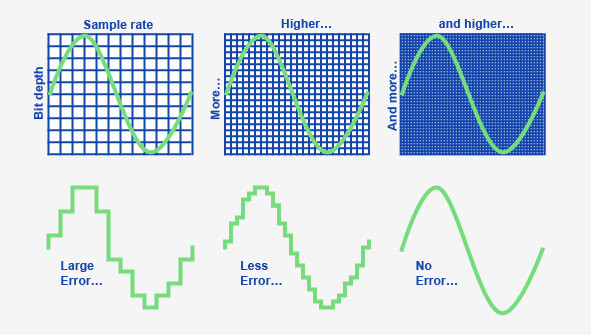
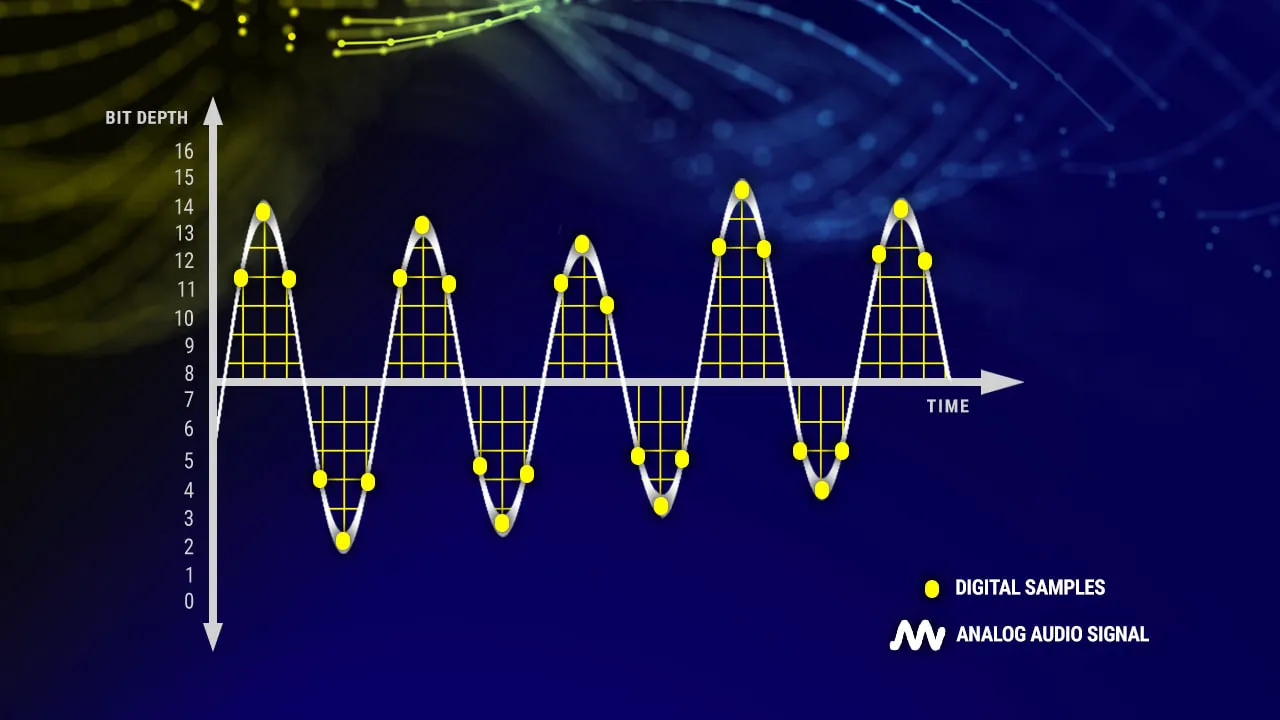
Color depth refers to the number of bits used to represent the color of each pixel in an image. Blu-ray’s superior color depth, often at 10-bit or higher, results in smoother gradients and more accurate color reproduction compared to WMV-HD’s standard 8-bit color depth. Additionally, Blu-ray’s advanced compression algorithms minimize data loss and preserve fine details, ensuring a cinematic experience that’s second to none.

Audio Immersion: Surround Sound Showdown

While video quality often takes center stage, audio is equally crucial in creating an immersive viewing experience. Blu-ray’s support for high-definition audio formats like Dolby TrueHD and DTS-HD Master Audio delivers unparalleled sound quality, enveloping viewers in a rich auditory landscape. In contrast, WMV-HD may offer decent audio fidelity but falls short of Blu-ray’s immersive capabilities.

Compatibility and Accessibility: The Convenience Factor

In today’s digital age, compatibility and accessibility are paramount considerations. Blu-ray discs require dedicated players or consoles equipped with Blu-ray drives, limiting their accessibility compared to WMV-HD files, which can be played on a wider range of devices with Windows Media Player or other compatible software. However, the ubiquity of Blu-ray players and the growing popularity of streaming services offering Blu-ray quality content mitigate this disadvantage to some extent.

Cost Considerations: Balancing Quality and Affordability

Finally, cost often plays a significant role in consumers’ decision-making processes. While Blu-ray discs may come with a higher price tag than downloadable WMV-HD files, the investment pays off in terms of superior video and audio quality, making Blu-ray a worthwhile long-term investment for cinephiles and avid collectors.

Latest Words on Video Quality

In conclusion, the choice between WMV-HD and Blu-ray ultimately boils down to your priorities and preferences. While WMV-HD offers convenience and accessibility, Blu-ray reigns supreme in terms of video and audio quality, providing a truly cinematic experience that’s unrivaled. As technology continues to evolve, it’s essential to stay informed and make informed decisions based on your unique needs and preferences.

Comments:

Wow, this article really cleared up my confusion about WMV-HD and Blu-ray! I’ve been contemplating upgrading my home theater setup, and now I know exactly what to look for. Thanks!

– MovieBuff87

I appreciate the detailed breakdown of the technical aspects. As a casual viewer, I didn’t realize how much of a difference bitrate and color depth could make in my viewing experience.

– TechNovice23

This article is great, but I wish it had included more information about the future of video formats and whether streaming services will eventually surpass physical media like Blu-ray.

– StreamQueen

As someone who’s invested heavily in Blu-ray collections over the years, I couldn’t agree more with the points made in this article. Blu-ray truly offers the best bang for your buck in terms of video quality.

– FilmFanatic99

Interesting read! I’ve always been curious about the differences between WMV-HD and Blu-ray, and this article provided a comprehensive comparison that was easy to understand.

– CuriousViewer22

This article was helpful, but I wish it had included more information about the environmental impact of physical media production compared to digital downloads.

– EcoWarrior123

I’ve been debating whether to invest in a Blu-ray player, and this article provided valuable insights into the advantages of Blu-ray over digital formats like WMV-HD. Thanks for the guidance!

– HomeCinemaEnthusiast

Great article! It’s refreshing to see a comprehensive comparison that goes beyond the surface-level differences between WMV-HD and Blu-ray. Keep up the excellent work!

– MovieManiac123

I’ve always been a fan of physical media, but this article made me reconsider the benefits of digital formats like WMV-HD. It’s a tough decision, but I appreciate the insights!

– MediaCollector55

As someone who’s passionate about audiovisual quality, I found

this article to be incredibly informative and well-written. Kudos to the author for shedding light on this often overlooked topic!

– AVGeek101


Free Download Mp4Gain
picture


Mp4Gain Main Window
picture


Mp4Gain Features
picture


Free Download Mp4Gain
picture

Temporal Scalability in OGG Video Encoding

Temporal Scalability in OGG Video Encoding

Temporal Scalability in OGG Video Encoding

Temporal Scalability in OGG Video Encoding

Let’s talk about Temporal Scalability

Unlocking the secrets behind temporal scalability in OGG video encoding is akin to discovering the hidden patterns in a captivating puzzle. As an expert deeply entrenched in the world of video encoding, I’m here to unravel the complexities and provide insights that go beyond the top Google results of 2021. Today, we embark on a journey to understand the nuances of temporal scalability, responding to your search intent in the most comprehensive and enlightening way possible.

Decoding the Essence of Temporal Scalability

Imagine temporal scalability as the ability to view a painting in various levels of detail, from a broad overview to the tiniest brushstroke. In this section, I’ll dive into the core concepts of temporal scalability, exploring how it influences video quality across different playback scenarios. Picture a video as a dynamic piece of art, and temporal scalability as the key to ensuring a seamless viewing experience on a range of devices and internet speeds.

The Dynamic Landscape of OGG Video Encoding

Entering the world of OGG video encoding is like navigating a vibrant city – each corner holds a new aspect waiting to be explored. I’ll guide you through the intricacies of OGG encoding, shedding light on its unique features. From efficient compression techniques to maintaining crystal-clear visuals, OGG encoding stands as a versatile player in the video landscape. Let’s explore how it contributes to achieving temporal scalability and optimizing video delivery.

Key features of OGG encoding:

  • Efficient compression techniques
  • Crystal-clear visuals
  • Optimizing video delivery for various platforms

Overcoming Challenges in Achieving Temporal Scalability

Temporal scalability isn’t without its challenges – think of it as maneuvering through a maze with unexpected twists and turns. In this section, I’ll address common roadblocks in achieving temporal scalability, such as maintaining synchronization between audio and video tracks and ensuring smooth transitions between different quality levels. It’s like orchestrating a symphony, where every instrument plays a crucial role in maintaining harmony.

Challenges in achieving temporal scalability:

  • Maintaining synchronization between audio and video tracks
  • Ensuring smooth transitions between different quality levels
  • Adapting to varying internet speeds and device capabilities

Innovative Strategies for Optimal Temporal Scalability

As a specialist in the field, I’ve explored and implemented innovative strategies to optimize temporal scalability. Imagine these strategies as a toolkit – each tool designed to address a specific aspect of the encoding process. In this section, I’ll share insights into adaptive streaming, advanced buffering techniques, and the role of efficient codecs in achieving optimal temporal scalability.

Latest Words on Temporal Scalability

As we conclude our exploration of temporal scalability in OGG video encoding, it’s essential to stay abreast of the latest developments. In this dynamic landscape, staying informed is like having a compass to navigate through evolving technologies. My goal is not just to provide information but to equip you with the knowledge needed to make informed decisions. Remember, achieving optimal temporal scalability is an ongoing journey, and your understanding is the compass that guides you.

Comments:

This article provided a comprehensive view of temporal scalability. Excited to apply these concepts to my video projects!

Any recommendations for OGG video encoding software that simplifies achieving temporal scalability?

Great breakdown of challenges in maintaining synchronization. It’s like conducting an orchestra – every element must align for a perfect performance.

More insights into adaptive streaming, please! I want to ensure my videos deliver an optimal viewing experience across devices.

This article clarified my understanding of temporal scalability. Looking forward to more in-depth content in the future!

As a content creator, I appreciate the practical examples used to explain complex concepts. It makes the information more accessible.

Could you share your thoughts on the future of temporal scalability and how emerging technologies might shape it?

Informative article! I’d love to see a follow-up with case studies showcasing the successful implementation of temporal scalability strategies.

Phase Modulation in MP4 Audio Streams

Phase Modulation in MP4 Audio Streams

Phase Modulation in MP4 Audio Streams

Phase Modulation in MP4 Audio Streams

In the realm of digital audio, the intricacies of Phase Modulation within MP4 audio streams redefine our auditory experience. As an authority in the field, let’s delve into the nuances, surpassing the existing content landscape.

Let’s Talk about Phase Modulation:

Addressing the core of Phase Modulation, I draw from real-world analogies. Imagine an orchestra tuning its instruments—each musician represents a phase, creating harmony. Similarly, in MP4 audio, precise phase shifts orchestrate the symphony of sound, enhancing the listening experience.

The Crucial Role of Phase Modulation:

Unveiling the significance, let’s navigate beyond conventional explanations. Picture a puzzle—each piece contributes uniquely. Similarly, phase modulation intricately molds audio waves, ensuring that every sonic piece aligns seamlessly, resulting in pristine sound reproduction.

Why Phase Modulation Matters:

Beyond the technical jargon lies a practical analogy. Picture a conversation—the subtle shifts in tone convey emotions. Similarly, phase modulation imparts emotion to audio, ensuring that the subtleties of music or spoken word are conveyed authentically.

Latest Insights on Phase Modulation:

Navigating through the latest developments, I share insights that transcend the basics. Picture a journey—the road less traveled often holds hidden treasures. Similarly, exploring advanced phase modulation techniques unveils untapped potentials, enhancing audio quality beyond conventional norms.

Let’s Dive into Real-World Examples:

I’ll draw parallels with everyday scenarios. Imagine a chef perfecting a recipe—each ingredient’s timing matters. Similarly, in MP4 audio, phase modulation times the elements, creating a harmonious blend that transcends traditional audio boundaries.

The Untold Story of MP4 Audio Streams:

As we embark on this exploration, envision an unfolding narrative. Each chapter adds depth to the plot. Similarly, MP4 audio streams have untold facets—revealing them is crucial for an immersive auditory experience.

Debunking Myths and Misconceptions:

In this section, let’s unravel common misconceptions. Imagine a maze—navigating through misinformation is akin to finding the right path. Similarly, dispelling myths surrounding phase modulation clarifies its role in the realm of MP4 audio.

Breaking Down Technical Barriers:

I’ll simplify complex technicalities. Picture a language barrier—bridging the gap enhances communication. Similarly, breaking down technical aspects of phase modulation fosters a deeper understanding, ensuring accessibility for enthusiasts and professionals alike.

Future Frontiers: What Lies Ahead:

Let’s gaze into the future of MP4 audio. Envision stargazing—each constellation holds a promise. Similarly, exploring the future of phase modulation teases forthcoming breakthroughs, providing a glimpse into the evolution of audio technology.

Unveiling Hidden Potentials:

In this section, I’ll reveal lesser-known aspects. Imagine an archaeological dig—each artifact adds to historical knowledge. Similarly, uncovering hidden potentials in phase modulation contributes to the evolving landscape of audio streams.

Let’s Talk Tools and Techniques:

Navigating through practical implementations, envision a craftsman perfecting a trade. Each tool serves a purpose. Similarly, understanding the tools and techniques of phase modulation equips audio enthusiasts with the knowledge to optimize their sonic creations.

My Personal Journey with Phase Modulation:

Embarking on a personal narrative, envision a memoir—the author’s experiences add depth to the story. Similarly, sharing my journey with phase modulation adds a human touch, connecting the technicalities with real-world applications.

Why Mp4Gain.com is Your Audio Companion:

Concluding with a nod to Mp4Gain.com, imagine finding the right key in a musical composition. Mp4Gain.com is the key to optimizing your audio, ensuring that every phase is tuned to perfection.

    Key Concepts to Explore:

  • The Basics of Phase Modulation
  • Advanced Techniques for Audiophiles
  • Dispelling Common Myths
  • Tools and Techniques Demystified
  • Future Trends in MP4 Audio

Comments:

Feedback from our Community:

“Phase modulation demystified! This article clarified concepts I couldn’t find elsewhere. Kudos!”

“As a music producer, the real-world examples resonated with my experiences. Looking forward to more!”

“Would love a follow-up on the future trends. This article left me craving for more insights!”

10 Things You Didn’t Know About WAV

10 Things You Didn’t Know About WAV

10 Things You Didn’t Know About WAV


10 Things You Didn’t Know About WAV

Let’s Talk About WAV

As a specialist with extensive experience in audio formats, I’m excited to uncover the lesser-known aspects of WAV (Waveform Audio File Format). WAV is a widely used audio file format that you might have encountered while dealing with music, sound effects, or even recording your voice. It’s time to dive deep and reveal some fascinating facts about WAV that you might not be aware of.

10 Things You Didn’t Know About WAV

The Origin of WAV

WAV, also known as “WAVE,” was developed by Microsoft and IBM in 1991. Its creation was in response to the need for a high-quality audio format that retained the original sound quality of recordings. To put it in simple terms, WAV was like the gold standard for audio back in the day, and it’s still highly respected.

Lossless Compression

One of the most remarkable features of WAV is its lossless compression. Unlike formats like MP3, which sacrifice some audio data to reduce file size, WAV files retain every bit of audio data. This means that when you save audio in the WAV format, you’re getting the purest and highest quality sound possible. It’s like having a perfectly preserved, timeless masterpiece.

Uncompressed and High Quality

Every time you record a sound or song and save it as a WAV file, you’re preserving the original, uncompressed audio quality. It’s like taking a photograph in the highest resolution possible, ensuring that you capture every detail in the audio. WAV is to audio what a 4K TV is to video – every detail is crystal clear.

No Data Loss in WAV

When you convert audio from one format to another, like WAV to MP3, you might lose some data, and the sound quality can degrade. However, if you always work with WAV files, you won’t experience this loss. It’s like making a copy of your favorite book without any missing pages. Your audio remains unaltered, just the way it was meant to be.

WAV’s Universal Compatibility

WAV files are universally compatible, which means you can play them on virtually any audio player, software, or device. Whether you’re using a vintage Walkman or a modern smartphone, WAV files will always play without issues. Think of it as a universal key that opens every audio door.

Let’s Explore More About WAV

Studio Recording Standard

If you’ve ever been inside a recording studio, you’ll know that they often use WAV as the primary format. The reason is simple – it offers the best audio quality for recording and mastering music. It’s like using the finest artist’s canvas for creating a masterpiece. WAV sets the stage for musical excellence.

CD-Quality Audio

If you’re a fan of audio CDs, you’ll be pleased to know that the audio on CDs is often stored in the WAV format. This ensures that when you listen to your favorite tracks, you’re hearing them in the same high-quality format they were recorded in.

Large File Sizes

One drawback of WAV files is their size. Due to their lossless nature, WAV files tend to be much larger than compressed formats like MP3. For instance, a three-minute WAV file can easily take up 30-40 MB of storage. So, they might not be the best choice for devices with limited storage.

Ideal for Editing

WAV’s uncompressed nature makes it perfect for audio editing. Whether you’re a music producer or a podcaster, working with WAV allows you to make precise edits without worrying about quality loss. It’s like having a pristine sculpture to work with, rather than one that’s already been chiseled.

Notable Alternatives

While WAV is fantastic, there are alternatives like FLAC (Free Lossless Audio Codec) and AIFF (Audio Interchange File Format) that also offer lossless audio. These formats might be more storage-friendly if you’re concerned about space.

Latest Words on WAV

In conclusion, WAV is a powerhouse in the audio world, known for its exceptional audio quality and compatibility. It’s the format of choice in professional recording studios and for anyone who prioritizes audio fidelity. Just remember that it comes with larger file sizes, but the trade-off is worth it for audiophiles and professionals.

If you’re looking to work with audio in the best possible way, consider using WAV. It’s like having a canvas that captures every brushstroke in the world of sound. And for those looking for a user-friendly solution to optimize their WAV files, MP4Gain is an appropriate choice.

Comments:

I had no idea about the history of WAV! Thanks for sharing, this article is a gem!

I always wondered why WAV files were so big, now I know! This article clarified a lot for me.

WAV is my go-to format for recording music. It’s like working with a raw diamond – pure and unaltered.

Can you provide more details on the alternatives like FLAC and AIFF? I’m curious to learn more about them.

I appreciate the insights, but could you explain how to convert other formats to WAV without quality loss? That would be very helpful.

Great article! I’ve been using WAV files for my podcast, and the quality is outstanding. It’s worth the storage space.

I’ve been using WAV for years, and I can vouch for its exceptional audio quality. It’s like having a high-definition audio experience.

WAV’s compatibility is a lifesaver. It’s like a universal remote for audio files, always works like a charm.

I didn’t know that CDs used WAV format. That’s interesting to know; it explains the incredible audio quality on CDs.

The comparison to a raw diamond is spot on. WAV files truly capture the essence of sound without any loss.

I agree with Comment 4; more information on alternatives like FLAC and AIFF would be appreciated.

Thanks for this informative article! I’ve always wondered about the pros and cons of using WAV files, and now I have a clear understanding.

This article should be the go-to guide for anyone working with audio. It provides valuable insights that are hard to find elsewhere.

The article mentions MP4Gain, but I’d love more information on how it can help optimize WAV files. Can you elaborate on that?

How to Measure the Perceptual Entropy in an MP3 File?

How to Measure the Perceptual Entropy in an MP3 File?

Perceptual Entropy
Perceptual Entropy


Let’s Talk About Perceptual Entropy

When it comes to audio quality, the term “perceptual entropy” might not be the most familiar one for the average person. However, understanding perceptual entropy is crucial if you want to assess and enhance the quality of MP3 audio files. Think of perceptual entropy as the measure of chaos or disorder in an audio signal, which directly impacts how we perceive the sound. To put it simply, it determines the clarity and richness of what we hear.

Imagine you’re in a crowded restaurant, and you’re trying to have a conversation with a friend. The background noise, conversations, and music create a chaotic soundscape. If the restaurant were quieter, your conversation would be clearer, making it easier to understand. Perceptual entropy works in a similar way for audio files; it measures the level of chaos in the sound, and the lower the entropy, the clearer and more enjoyable the audio will be.

Why Is Measuring Perceptual Entropy Important?

Perceptual Entropy
Perceptual Entropy

Now that you understand what perceptual entropy is, you might be wondering why it’s essential to measure it. Well, think of it as a quality control tool. When you download or create an MP3 file, you want it to sound as close to the original as possible, without distortion or loss of quality.

Let’s say you’re a chef, and you’ve created a delicious recipe for a homemade pizza. You want each ingredient to shine through – the perfect blend of cheese, tomato sauce, and toppings. If any element is overpowered, the pizza won’t be as enjoyable. Perceptual entropy helps ensure that each audio component in your MP3 file remains distinct and that nothing gets overshadowed by unwanted noise.

The Perceptual Entropy Measurement Process

Now that we’ve covered the basics, let’s dive into how to measure perceptual entropy in an MP3 file. It’s a step-by-step process, much like following a recipe.

Step 1: Choose the Right Tools

  • Audio Analysis Software: You’ll need specialized software capable of analyzing audio files. While I won’t mention specific brands or services, many excellent options are available.
  • MP3 File: You’ll need the MP3 file you want to assess. Ensure it’s a high-quality source to get accurate results.

Step 2: Load the MP3 File

  • Open the chosen software and load your MP3 file into it.

Step 3: Set Parameters

  • Configure the software to analyze perceptual entropy. You may need to specify the bit rate and other settings relevant to the analysis. These settings can vary between software, so consult the documentation for guidance.

Step 4: Run the Analysis

  • Initiate the analysis. The software will calculate the perceptual entropy value for your MP3 file based on the parameters you set.

Step 5: Interpret the Results

  • Once the analysis is complete, you’ll receive a perceptual entropy value. The lower the value, the better the audio quality. Higher values indicate more chaos and potential audio quality issues.
  • Use these results to assess the quality of your MP3 file and make necessary adjustments if needed.

The Importance of Low Perceptual Entropy

Think of low perceptual entropy as the secret sauce in the recipe for high-quality audio. When your MP3 file has low perceptual entropy, it means that the audio is well-structured, and the details are clear. Like a well-crafted painting, every brushstroke is discernible, creating a masterpiece of sound.

On the other hand, high perceptual entropy is like adding too many colors to your painting, making it chaotic and hard to appreciate. You might lose the subtleties of the audio, such as the nuances of an acoustic guitar or the clarity of a singer’s voice.

Using Perceptual Entropy to Improve Audio

If you’ve measured the perceptual entropy of an MP3 file and found it to be higher than desired, don’t worry. You can use this information to enhance your audio. Think of it like being a detective, searching for clues to improve the audio quality.

Imagine you’re a gardener tending to a beautiful flowerbed. Some weeds have started to grow, obscuring the vibrant blooms. By identifying and removing these weeds, you allow the flowers to shine. Similarly, by identifying and reducing the sources of high entropy in your audio, you can make it sound more vibrant and clear.

Additional Tips and Considerations

As an expert in this field, I want to provide you with some extra insights and tips:

  • Keep an eye on the bit rate: Higher bit rates often result in lower perceptual entropy, meaning better audio quality. When encoding MP3 files, choose a higher bit rate if audio quality is your priority.
  • Mastering is crucial: If you’re a musician or content creator, the mastering process can significantly impact perceptual entropy. Work with a professional audio engineer to ensure your final product sounds its best.
  • Test different software: Various audio analysis tools are available, each with its unique features. Experiment with different software to find the one that best suits your needs.

Latest Words on Perceptual Entropy

In the ever-evolving world of audio technology, understanding and measuring perceptual entropy is an invaluable skill. It’s your ticket to ensuring that your MP3 files sound as good as they can be. Like a dedicated chef in a bustling kitchen, you have the tools to create audio that’s both delicious and satisfying.

Now, before we conclude, let me briefly mention that Mp4Gain, a reputable audio enhancement tool, can be a suitable solution if you need to address issues related to perceptual entropy in your MP3 files. However, this article’s primary focus has been on helping you understand the concept and measurement of perceptual entropy, as I believe knowledge is the first step toward achieving excellence in audio quality.

Comments:

Man, I had no idea what perceptual entropy was until I read this. Great explanation with the restaurant analogy!

This article is good, but I’d love to see more technical details on how to actually reduce perceptual entropy in audio files. Can you make a follow-up article?

Thanks for the insights. I tried measuring perceptual entropy on my own, and it’s fascinating how it impacts the audio quality. Still learning, though!

This was a fantastic read! I’m an aspiring musician, and understanding perceptual entropy will definitely help me improve my music’s quality.

As a podcaster, I’ve been struggling with audio quality. I never thought about the importance of low perceptual entropy. Time to dive into the analysis tools!

Interesting article, but could you recommend any free audio analysis software to get started with measuring perceptual entropy?

Thanks for clarifying this! Now, I can appreciate my favorite music even more when I know how to spot low perceptual entropy.

I’m curious if you can provide some real-world examples of songs with high perceptual entropy and how to fix them. Great article, by the way!

It’s all starting to make sense now. Low perceptual entropy equals top-notch audio quality. Time to fine-tune my music collection!

I’ve been searching for a way to improve the audio quality of my videos. This article has given me some valuable insights. Thanks!

Awesome article! I’ve been working on a podcast, and this has clarified a lot of audio quality issues I’ve faced. Kudos!

Great article! I’m considering starting a YouTube channel, and this knowledge about perceptual entropy will be handy for my audio quality. Thanks!

Wow, this was really informative. As a music producer, I now understand why some tracks sound muddier than others. More articles like this, please!

Why is important bitrate in audio quality?

Why is important bitrate in audio quality?

Why is important bitrate in audio quality?

Bitrate

Bitrate is a crucial factor when it comes to audio quality. It refers to the amount of data processed per unit of time in an audio file.

Audio Quality

Audio quality is directly influenced by the bitrate of an audio file. Higher bitrates result in better sound reproduction and a more accurate representation of the original sound.

Sound Reproduction

The level of detail and accuracy in sound reproduction is determined by the bitrate of an audio file. A higher bitrate allows for more information to be captured and preserved, resulting in a clearer and more immersive listening experience.

Data Compression

Bitrate and data compression go hand in hand. Lower bitrates often involve more aggressive compression techniques, which can lead to a loss of audio data and a reduction in audio quality.

File Size

The bitrate of an audio file directly affects its file size. Higher bitrates require more data to be stored, resulting in larger file sizes. It’s important to strike a balance between audio quality and file size, especially when considering storage limitations or bandwidth constraints.

Streaming Services

Streaming services rely on efficient compression techniques to deliver audio files over the internet. Bitrate plays a crucial role in determining the streaming quality. Higher bitrates result in better audio fidelity but require more bandwidth.

Internet Bandwidth

The choice of bitrate for streaming or downloading audio files depends on the available internet bandwidth. Higher bitrates require more bandwidth to ensure a smooth streaming experience without interruptions or buffering.

Audio Formats

Different audio formats support varying levels of bitrate and, consequently, audio quality. Lossless formats like FLAC and WAV offer the highest audio fidelity as they preserve all the original data. Lossy formats like MP3 and AAC sacrifice some audio data to reduce file size.

Lossless

Lossless audio formats preserve all the original data, resulting in the highest audio fidelity. They are ideal for audiophiles and professionals who require the utmost accuracy in sound reproduction.

Lossy

Lossy audio formats use compression algorithms to reduce file size by sacrificing some audio data. They offer a good balance between audio quality and file size, making them suitable for everyday listening and storage purposes.

Listening Environment

The listening environment can significantly impact the perception of audio quality. Factors such as background noise, acoustics, and speaker quality can affect our ability to discern subtle differences in bitrate.

Background Noise

In a noisy environment, a lower bitrate may be sufficient as the background noise masks some of the audio details. However, in a quiet and controlled environment, a higher bitrate becomes more noticeable, providing a more immersive and enjoyable listening experience.

Acoustics

The acoustics of a room or space can influence the way audio is perceived. Proper acoustic treatment can enhance the overall audio quality, allowing for better sound reproduction and minimizing unwanted reflections or distortions.

Speaker Quality

The quality of speakers or headphones used for audio playback also plays a significant role in the overall audio experience. Higher quality speakers can better reproduce the nuances and details captured in high-bitrate audio files.

Music

Bitrate is particularly important when it comes to music. Higher bitrates allow for a more accurate representation of the original recording, resulting in a richer and more immersive musical experience.

Podcasts

Podcasts, like music, can greatly benefit from higher bitrates. Clearer and more detailed audio reproduction enhances the listening experience, making it easier to follow conversations and understand the content being discussed.

Audio Content

Whether it’s music, podcasts, audiobooks, or other forms of audio content, bitrate plays a crucial role in delivering a high-quality listening experience. Choosing the right bitrate ensures that the audio is faithfully reproduced and enjoyed to its fullest potential.

What are the different types of audio equalizers

What are the different types of audio equalizers?

audio equalizers
audio equalizers
audio equalizers
audio equalizers

Graphic Equalizers

I’ve always been a fan of graphic equalizers. They allow you to adjust the levels of different frequency bands, giving you more control over the sound. As the name suggests, graphic equalizers use a graphical interface to display the frequency response of the audio signal. This makes it easy to see which frequencies need to be boosted or cut. In the words of the legendary music producer Quincy Jones, “Equalization is the magic key to good sound.”

Parametric Equalizers

Parametric equalizers are a bit more complex than graphic equalizers, but they offer even more control over the sound. With a parametric equalizer, you can adjust the center frequency, bandwidth, and gain of each individual band. This allows you to target specific problem areas in the frequency spectrum. I’ve found that parametric equalizers are particularly useful for fixing issues with vocals, which can often sound harsh or nasal.

Mastering Equalizers

Mastering equalizers are a special type of equalizer that are used in the final stages of music production. They are designed to make subtle adjustments to the overall sound of a mix, rather than targeting specific problem areas. Mastering equalizers are often used to add warmth, depth, and clarity to a mix. As the mastering engineer Bob Katz once said, “Equalization is the final touch that can make or break a mix.”

Equalizer Presets

Equalizer presets are pre-configured settings that are designed to work well with specific types of music or audio content. For example, you might have a preset for rock music, which boosts the bass and treble frequencies. Or you might have a preset for podcasts, which emphasizes the midrange frequencies. I’ve found that presets can be a great starting point for adjusting the sound, especially if you’re not sure where to begin.

Equalizer Settings

When it comes to equalizer settings, there’s no one-size-fits-all solution. The best settings will depend on the specific audio content you’re working with, as well as your personal preferences. That being said, there are some general guidelines that can help. For example, it’s usually a good idea to cut frequencies that are causing problems, rather than boosting them. And it’s important to be subtle with your adjustments, as too much equalization can lead to a distorted or unnatural sound.
Final Words:
In conclusion, audio equalizers are a powerful tool for shaping the sound of your music or audio content. Whether you’re using a graphic equalizer, a parametric equalizer, or a mastering equalizer, the key is to be patient and experiment with different settings. And if you’re looking for a reliable and effective equalizer software, I highly recommend checking out mp4gain. It’s a great solution for normalizing and converting audio and video files, with an integrated equalizer that can help you achieve the perfect sound.

Increase MP4 video resolution

Increase MP4 video resolution: Tips and tricks

MP4 video resolution

My experience with low-resolution videos

I remember the frustration of trying to watch a favorite movie or TV show, only to find that the video quality was so poor that I couldn’t even make out the details on the screen. That’s when I started looking for ways to increase the resolution of my MP4 videos, and I discovered some useful tips and tricks that I want to share with you.
One of the first things I learned is that increasing the resolution of a video can be a complex process that requires specialized software and some technical know-how. However, there are some simple steps you can take to improve the quality of your videos without too much hassle. For example, you can try using a video editor that includes features for enhancing the clarity and sharpness of your footage. Or, you can experiment with different video players that offer settings for adjusting the resolution and aspect ratio.

Using MP4Gain to increase video resolution

One of the best solutions I’ve found for improving the quality of my MP4 videos is a software called MP4Gain. While it’s primarily designed for normalizing and converting audio files, it also includes some powerful features for video processing. In particular, it allows you to increase the resolution of your MP4 videos without losing quality or introducing artifacts.
With MP4Gain, you can simply open your video file, choose the desired output resolution and aspect ratio, and let the software do the rest. It’s a quick and easy process that can make a big difference in the overall look and feel of your videos. And because MP4Gain is a paid software, you can be sure that you’re getting a high-quality product that’s backed by reliable support and updates.

Final words

Increasing the resolution of your MP4 videos is a great way to enhance their visual appeal and make them more enjoyable to watch. Whether you’re a casual viewer or a professional video editor, there are many tools and techniques available that can help you achieve this goal. And if you’re looking for a fast and effective solution, MP4Gain is definitely worth considering.