10 Things You Didn’t Know About WAV


Free Download Mp4Gain
picture

10 Things You Didn’t Know About WAV

10 Things You Didn’t Know About WAV


10 Things You Didn’t Know About WAV

Let’s Talk About WAV

As a specialist with extensive experience in audio formats, I’m excited to uncover the lesser-known aspects of WAV (Waveform Audio File Format). WAV is a widely used audio file format that you might have encountered while dealing with music, sound effects, or even recording your voice. It’s time to dive deep and reveal some fascinating facts about WAV that you might not be aware of.

10 Things You Didn’t Know About WAV

The Origin of WAV

WAV, also known as “WAVE,” was developed by Microsoft and IBM in 1991. Its creation was in response to the need for a high-quality audio format that retained the original sound quality of recordings. To put it in simple terms, WAV was like the gold standard for audio back in the day, and it’s still highly respected.

Lossless Compression

One of the most remarkable features of WAV is its lossless compression. Unlike formats like MP3, which sacrifice some audio data to reduce file size, WAV files retain every bit of audio data. This means that when you save audio in the WAV format, you’re getting the purest and highest quality sound possible. It’s like having a perfectly preserved, timeless masterpiece.

Uncompressed and High Quality

Every time you record a sound or song and save it as a WAV file, you’re preserving the original, uncompressed audio quality. It’s like taking a photograph in the highest resolution possible, ensuring that you capture every detail in the audio. WAV is to audio what a 4K TV is to video – every detail is crystal clear.

No Data Loss in WAV

When you convert audio from one format to another, like WAV to MP3, you might lose some data, and the sound quality can degrade. However, if you always work with WAV files, you won’t experience this loss. It’s like making a copy of your favorite book without any missing pages. Your audio remains unaltered, just the way it was meant to be.

WAV’s Universal Compatibility

WAV files are universally compatible, which means you can play them on virtually any audio player, software, or device. Whether you’re using a vintage Walkman or a modern smartphone, WAV files will always play without issues. Think of it as a universal key that opens every audio door.

Let’s Explore More About WAV

Studio Recording Standard

If you’ve ever been inside a recording studio, you’ll know that they often use WAV as the primary format. The reason is simple – it offers the best audio quality for recording and mastering music. It’s like using the finest artist’s canvas for creating a masterpiece. WAV sets the stage for musical excellence.

CD-Quality Audio

If you’re a fan of audio CDs, you’ll be pleased to know that the audio on CDs is often stored in the WAV format. This ensures that when you listen to your favorite tracks, you’re hearing them in the same high-quality format they were recorded in.

Large File Sizes

One drawback of WAV files is their size. Due to their lossless nature, WAV files tend to be much larger than compressed formats like MP3. For instance, a three-minute WAV file can easily take up 30-40 MB of storage. So, they might not be the best choice for devices with limited storage.

Ideal for Editing

WAV’s uncompressed nature makes it perfect for audio editing. Whether you’re a music producer or a podcaster, working with WAV allows you to make precise edits without worrying about quality loss. It’s like having a pristine sculpture to work with, rather than one that’s already been chiseled.

Notable Alternatives

While WAV is fantastic, there are alternatives like FLAC (Free Lossless Audio Codec) and AIFF (Audio Interchange File Format) that also offer lossless audio. These formats might be more storage-friendly if you’re concerned about space.

Latest Words on WAV

In conclusion, WAV is a powerhouse in the audio world, known for its exceptional audio quality and compatibility. It’s the format of choice in professional recording studios and for anyone who prioritizes audio fidelity. Just remember that it comes with larger file sizes, but the trade-off is worth it for audiophiles and professionals.

If you’re looking to work with audio in the best possible way, consider using WAV. It’s like having a canvas that captures every brushstroke in the world of sound. And for those looking for a user-friendly solution to optimize their WAV files, MP4Gain is an appropriate choice.

Comments:

I had no idea about the history of WAV! Thanks for sharing, this article is a gem!

I always wondered why WAV files were so big, now I know! This article clarified a lot for me.

WAV is my go-to format for recording music. It’s like working with a raw diamond – pure and unaltered.

Can you provide more details on the alternatives like FLAC and AIFF? I’m curious to learn more about them.

I appreciate the insights, but could you explain how to convert other formats to WAV without quality loss? That would be very helpful.

Great article! I’ve been using WAV files for my podcast, and the quality is outstanding. It’s worth the storage space.

I’ve been using WAV for years, and I can vouch for its exceptional audio quality. It’s like having a high-definition audio experience.

WAV’s compatibility is a lifesaver. It’s like a universal remote for audio files, always works like a charm.

I didn’t know that CDs used WAV format. That’s interesting to know; it explains the incredible audio quality on CDs.

The comparison to a raw diamond is spot on. WAV files truly capture the essence of sound without any loss.

I agree with Comment 4; more information on alternatives like FLAC and AIFF would be appreciated.

Thanks for this informative article! I’ve always wondered about the pros and cons of using WAV files, and now I have a clear understanding.

This article should be the go-to guide for anyone working with audio. It provides valuable insights that are hard to find elsewhere.

The article mentions MP4Gain, but I’d love more information on how it can help optimize WAV files. Can you elaborate on that?


Free Download Mp4Gain
picture


Mp4Gain Main Window
picture


Mp4Gain Features
picture


Free Download Mp4Gain
picture

Audio Quantization Error

Audio Quantization Error

Audio Quantization Error

In the fascinating world of digital audio, the concept of “Audio Quantization Error” plays a pivotal role. Understanding this term is essential for anyone seeking high-quality audio reproduction. Allow me to share my expertise on this subject, starting with a broad overview.

Demystifying Audio Quantization Error

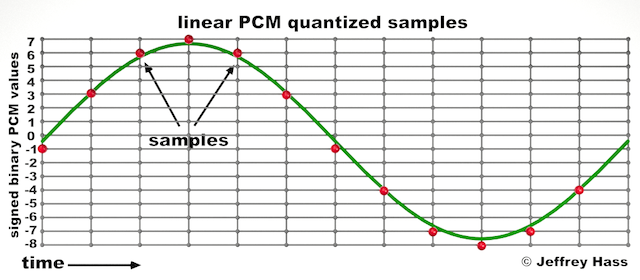
Audio quantization error is a fundamental aspect of digital audio processing. When analog sound waves are converted into digital signals, they undergo quantization. This means that the continuous analog signal is sampled and approximated in discrete steps. These steps are represented by binary values, typically in the form of bits (e.g., 16-bit, 24-bit). Now, what’s crucial to grasp here is that these discrete steps can lead to imperfections in audio reproduction.

Quantization error, often referred to as “quantization noise,” occurs when the actual analog signal deviates from the approximated digital representation. Imagine you have a beautiful painting, and you’re asked to replicate it using only a limited set of colors. The more restricted your color palette, the less accurate your reproduction will be. In the same way, the fewer bits you use for audio quantization, the more pronounced the quantization error becomes.

Quantization Levels and the Impact on Sound Quality

The number of quantization levels (related to bit depth) directly affects the precision of audio representation. For instance, a 16-bit audio recording has 65,536 possible levels, while a 24-bit recording provides a staggering 16,777,216 levels. This increased bit depth allows for a much finer representation of the original analog signal. Hence, a higher bit depth results in a reduction of quantization error, leading to superior sound quality.

To illustrate this, consider a grayscale image with only two colors: black and white. This is akin to an extremely low bit depth in audio, where the audio signal is either “on” or “off.” Now, imagine a high-resolution image with millions of colors, similar to the detail you get in a 24-bit audio recording. The difference in quality is apparent.

The Role of Dithering in Minimizing Quantization Error

One might wonder if there’s a way to mitigate quantization error in low-bit-depth audio recordings. Enter “dithering.” Dithering is a technique that introduces low-level noise to the audio signal, effectively spreading out the quantization error across a broader spectrum. Think of it as adding a sprinkle of fine grains of sand to a painting to blend the colors. This subtle noise masks the harshness of quantization error and makes it less noticeable to the human ear.

Now, as we’ve explored the fundamentals of audio quantization error, let’s delve into the questions that often arise:

How Does Quantization Error Affect Music Production?

In the realm of music production, quantization error can be a significant concern, particularly for professionals aiming to achieve top-tier sound quality. When producing music, especially in genres where subtle nuances are crucial, such as classical or jazz, quantization errors become more perceptible. To maintain audio fidelity, a higher bit depth is preferred during recording and production, ensuring minimal quantization noise.

Is There an Ideal Bit Depth for Audio Recording?

The ideal bit depth for audio recording is a subject of debate among audio enthusiasts. While 24-bit recording is commonly favored for its excellent dynamic range and low quantization error, it’s worth noting that the final audio format for most consumer applications, like CDs or streaming, is often 16-bit. The choice of bit depth should be based on the specific requirements of the project, keeping in mind the trade-off between audio quality and file size.

Can Quantization Error be Completely Eliminated?

Regrettably, quantization error cannot be entirely eliminated, as it’s an inherent part of the digital audio conversion process. However, it can be minimized to the point where it’s imperceptible to the human ear. Through techniques like dithering and the use of higher bit depths, the impact of quantization error can be significantly reduced, allowing for exceptional audio quality.

Last Words about Audio Quantization Error

In the ever-evolving world of audio technology, understanding audio quantization error is a fundamental step towards achieving superior sound quality. As an expert in the field, I’ve shared insights, experiences, and technical knowledge to demystify this concept. Remember, the bit depth you choose in audio recording significantly influences the extent of quantization error, and techniques like dithering play a pivotal role in mitigating its effects. The quest for pristine audio quality is an ongoing journey, but armed with this knowledge, you’re better equipped to make informed decisions in your audio endeavors.

What is the real benefit of Hi-Res Audio support?

What is the real benefit of Hi-Res Audio support?

hi res

About the Hi-Res Audio Certificate

hi res

Today, many products carry the high resolution logo, which stands for high resolution support. For sources such as portable players, sound cards, and USB headphones, this means support for sample rates above 44/48 kHz.

But if you don’t use special audiophile recordings in high resolution formats and you don’t touch on the controversial issue of audibility of frequencies above 20 kHz, is there any benefit to this support for normal use? For example, when watching YouTube videos or sound in games?

As practice shows, there is also a very notable one.

Hi-Res Audio certification is awarded to devices capable of reproducing sound at frequencies above 20 kHz. For headphones with an analog connection, this certificate is advertising tinsel, because all headphones are capable of reproducing frequencies above 20 kHz; only some models play them silently, while others are very quiet. The criteria for the threshold of this “silence” does not have a Hi-Res Audio certificate (or supposedly exists, but is not subject to disclosure). Consequently, absolutely any headset can get it.

For digital sources, the reproduction of frequencies above 20 kHz is dependent on the sample rates supported by the DAC, and consequently all devices containing a modern DAC are Hi-Res Audio certified.

The system mixer is to blame.

The fact is that in modern devices, both on a computer and on a smartphone, all sound passes through the system mixer. He is in charge of mixing all the audio streams of different programs. All separate sounds from YouTube, video player, Skype, music player and other programs need to be converted to stereo broadcast.

The mixer always runs at a specific sample rate.

All incoming audio streams are converted to the frequency at which the system mixer operates. The higher the frequency, the less distortion will go into the audible frequency range.

Where does the distortion come from when the sample rate is increased?
It’s like taking a photo of a checkerboard and zooming in slightly from 8×8 pixels to 15×15 pixels. Obviously, with multiple magnifications, you can’t just double pixels to preserve the original image. And in a multiple magnification, there will be a question, the new pixels should simply double the adjacent ones or contain an intermediate color between the original pixels.

The best option will depend on the type of image. But the higher the resolution of the final image relative to the source, the less visible the artifacts of resizing will be.

In our case, as the pixel resolution increases, each pixel will be smaller. Those. By increasing the image in pixels, we are essentially increasing the pixel density for the same visual image size.

Similarly, with an increase in sample rate, from an increase in sample rate, we do not get fundamentally new sounds, tonality measurements, or playback speed. But at the same time, by changing the sample rate, we get additional distortions in the sound. The higher the sample rate of the system mixer, the more distortion will fall in the inaudible high-frequency range.

If there is only one sound reproduction source, then the system mixer is not needed in the signal path. But for the stability of the whole system, it processes the audio stream regardless of whether the sound is reproduced by only one program or ten.

For those who want to listen to high-quality music, it makes sense to use the sound output bypassing the system mixer.

This is compatible with some Windows and Android players (and professional sound processing software). This is not possible in games, browsers, or instant messaging. For the Android operating system, the RAA project conducts separate tests for software players, identifying players with optimal settings and smartphones on which it works.

In games on low-power systems, excessively high frequency can reduce overall performance; Here it is worth making a reasonable compromise between quality and performance (if possible).

Sound enhancement at high sample rates
Quality can significantly depend on the conversion algorithm.