WMA Audio Signal Correlation


Free Download Mp4Gain
picture

WMA Audio Signal Correlation
Let’s talk about WMA Audio Signal Correlation

As a specialist in audio engineering, I understand the importance of WMA (Windows Media Audio) format and its correlation with audio signals. When we delve into the realm of digital audio, understanding how WMA audio signals correlate becomes crucial for optimizing sound quality, compression, and compatibility across various platforms. WMA, developed by Microsoft, offers efficient compression without significant loss of audio quality, making it a popular choice for digital audio storage and streaming. In this comprehensive guide, I’ll explore the intricacies of WMA audio signal correlation, shedding light on its significance, technical aspects, and practical applications.

The Fundamentals of WMA Audio Format

Starting with the basics, let’s dissect the WMA audio format. Windows Media Audio is a proprietary format developed by Microsoft to compete with other popular audio formats like MP3 and AAC. WMA utilizes various codecs to compress audio data, allowing for smaller file sizes while maintaining reasonable audio quality. Unlike uncompressed formats like WAV, WMA employs lossy compression techniques, meaning some audio data is permanently discarded during encoding. However, the goal of WMA is to achieve a balance between file size and audio fidelity, making it suitable for a wide range of applications, from digital music distribution to streaming services.

Lossy Compression in WMA

  • Understanding the trade-offs: WMA’s approach to compression.
  • How lossy compression affects audio quality.
  • Bitrate selection and its impact on WMA audio files.

When discussing WMA audio signal correlation, it’s essential to grasp the concept of lossy compression. Unlike lossless formats that preserve all original audio data, lossy compression selectively discards information deemed less critical to human perception. In the context of WMA, this means analyzing audio signals, identifying redundancies or imperceptible details, and removing them to reduce file size. While this process inevitably results in some loss of audio quality, modern WMA codecs employ sophisticated algorithms to minimize perceptible artifacts, ensuring satisfactory listening experiences for most users.

Compatibility and Encoding

  • Platform compatibility: Where can you use WMA files?
  • Choosing the right encoding settings for optimal results.
  • Conversion tools and techniques for WMA audio files.

One of the critical aspects of WMA audio signal correlation is understanding its compatibility and encoding options. While WMA offers efficient compression, its adoption across different platforms and devices varies. Compatibility issues may arise when attempting to play WMA files on non-Windows devices or older hardware. Therefore, selecting appropriate encoding settings becomes paramount to ensure broad compatibility without sacrificing too much audio quality. Additionally, familiarity with conversion tools and techniques allows users to transcode WMA files into other formats when necessary, further enhancing flexibility and accessibility.

Advanced Techniques in WMA Signal Processing

Moving beyond the basics, let’s explore some advanced techniques in WMA signal processing. While standard encoding methods suffice for general use cases, specialized applications may require additional considerations to achieve optimal results. From audio mastering to broadcast engineering, understanding these advanced techniques empowers audio professionals to leverage WMA’s capabilities effectively.

Dynamic Range Compression

  • Enhancing perceived loudness and consistency.
  • Applying dynamic range compression in WMA encoding.
  • Trade-offs between dynamic range and audio fidelity.

Dynamic range compression is a common technique used in audio production to reduce the dynamic range of audio signals, making quieter sounds louder and louder sounds quieter. In the context of WMA encoding, dynamic range compression can help enhance perceived loudness and consistency, particularly useful in scenarios where audio needs to compete with ambient noise or maintain a consistent volume level across tracks. However, it’s essential to strike a balance between dynamic range compression and preserving natural audio dynamics to avoid unwanted side effects such as pumping or distortion.

Multi-Channel Audio Encoding

  • Supporting surround sound and immersive audio formats.
  • Encoding multi-channel audio in WMA.
  • Considerations for bitrate allocation and channel mapping.

With the proliferation of surround sound systems and immersive audio formats, multi-channel audio encoding has become increasingly important. WMA supports multi-channel configurations, allowing for the encoding of audio streams with multiple channels, such as 5.1 or 7.1 surround sound. When encoding multi-channel audio in WMA, considerations include bitrate allocation, ensuring sufficient data for each channel while maintaining overall file size efficiency, and channel mapping, specifying the spatial placement of audio channels for accurate playback.

Practical Applications and Use Cases

Now that we’ve covered the fundamentals and advanced techniques in WMA audio signal correlation, let’s explore some practical applications and use cases where this knowledge proves invaluable. Whether you’re a music enthusiast, audio engineer, or content creator, understanding how to leverage WMA effectively opens up a world of possibilities in digital audio production and distribution.

Music Streaming and Distribution

  • Optimizing audio quality and file size for streaming platforms.
  • Maximizing reach and accessibility with WMA-encoded music.
  • Ensuring compatibility across different streaming services and devices.

In the realm of music streaming and distribution, WMA plays a significant role in delivering high-quality audio to listeners worldwide. By encoding music in WMA format, artists and record labels can strike a balance between audio quality and streaming efficiency, ensuring smooth playback even under varying network conditions. Moreover, WMA’s broad compatibility ensures that music encoded in this format can reach a wide audience across different streaming platforms and devices, from smartphones to smart speakers.

Audio Broadcasting and Podcasting

  • Optimizing audio files for radio broadcasting and podcast distribution.
  • Reducing file size without compromising audio fidelity.
  • Delivering consistent audio quality across various listening environments.

For broadcasters and podcasters, WMA offers an efficient solution for encoding and distributing audio content. By leveraging WMA’s compression capabilities, broadcasters can reduce file sizes without significant loss of audio quality, facilitating faster uploads and downloads for listeners. Additionally, WMA’s compatibility with broadcasting software and hardware ensures seamless integration into existing workflows, allowing broadcasters to focus on creating engaging content without worrying about technical limitations.

Latest words on WMA Audio Signal Correlation

In conclusion, understanding WMA audio signal correlation is essential for anyone involved in digital audio production, distribution, or consumption. By grasping the fundamentals of WMA format, exploring advanced signal processing techniques, and identifying practical applications, audio professionals can harness the full potential of WMA to deliver high-quality audio experiences across various platforms and devices. Whether you’re streaming music online, broadcasting a radio show, or producing a podcast, WMA remains a versatile and reliable choice for encoding audio content.

Comments:

This article is very informative! I’ve always wondered how WMA compression works and its impact on audio quality. Thanks for breaking it down in such a clear and concise manner. – MusicLover123

Great article! As a podcast producer, I found the section on optimizing audio files for broadcasting and podcasting particularly useful. I’ll definitely be implementing some of these techniques in my workflow. – PodcastPro

I appreciate the depth of information provided in this article. However, I’d love to see more discussion on the history and evolution of WMA format. Overall, though, it’s a valuable resource for anyone interested in audio engineering. – SoundEnthusiast

This article helped me understand the technical aspects of WMA compression better. I’ve been struggling with audio file sizes for my streaming platform, and now I have some practical solutions to explore. – StreamMaster

As someone new to audio engineering, I found this article incredibly insightful. It’s refreshing to see complex topics explained in a way that’s easy to understand. Looking forward to more content like this! – NoviceEngineer

Wow, I didn’t realize there were so many factors to consider when encoding audio in WMA format. This article opened my eyes to the intricacies of digital audio processing. Kudos to the author for such comprehensive coverage! – AudioExplorer

This article provided some valuable insights into the world of WMA audio compression. However, I wish there were more examples illustrating the practical applications of dynamic range compression and multi-channel encoding. – TechSavvyListener

As a radio broadcaster, I found the section on optimizing audio files for broadcasting extremely helpful. It’s always a challenge to balance audio quality and file size, but this article offered some great tips for achieving the perfect mix. – RadioHost

Excellent article! I’ve been looking for a comprehensive guide to WMA audio signal correlation, and this exceeded my expectations. The explanations are clear, and the practical examples make it easy to apply this knowledge in real-world scenarios. – AudioTechJunkie

This article provides a solid overview of WMA audio signal correlation, but I’d love to see a deeper dive into the technical specifications and limitations of the format. Nonetheless, it’s a great starting point for anyone interested in learning more about digital audio compression. – TechEnthusiast


Free Download Mp4Gain
picture


Mp4Gain Main Window
picture


Mp4Gain Features
picture


Free Download Mp4Gain
picture

How does MP3 compression impact transient audio signals?

How does MP3 compression impact transient audio signals?


Let’s talk about MP3 Compression

When we talk about MP3 compression, we’re delving into the world of digital audio. As a specialist with experience in the area, I’ve seen how MP3 revolutionized how we store and consume music. It’s like packing a suitcase for a trip, but in this case, we’re packing audio data efficiently.

Understanding Transient Audio Signals

Now, let’s understand transient audio signals. Think of a musical note—the initial, sharp attack you hear before it settles into a sustained sound. That attack is the transient. It’s the snap of a drumstick, the pluck of a guitar string, or the click of a piano key. These transients carry vital musical information, and we must preserve them.

MP3 Compression and Audio Signal Loss

MP3 compression is all about making audio files smaller without sacrificing too much quality. But here’s the catch: compression can affect transients. It’s like taking a high-resolution photo and reducing it to save space. Some fine details get lost in the process. When we compress audio, we’re essentially doing the same thing.

Bitrate and its Impact on Transients

Now, let’s talk bitrates. They’re like the resolution settings on your camera. Higher bitrates capture more detail, but they result in larger files. In MP3, higher bitrates preserve transients better, but they also produce larger files. Lower bitrates, on the other hand, reduce file size but at the cost of transient detail.

The Listener’s Perspective

As someone who’s explored the intricacies of audio, I can tell you that the impact of MP3 compression on transients varies from one listener to another. Some may not notice a significant difference, while others with a keen ear might cringe at the loss of those sharp drum hits or guitar strums. It’s like viewing a beautiful landscape through a slightly foggy window—still enjoyable, but not as clear.

Preserving Transients: Best Practices

If you’re an audiophile who values those transients, there are ways to preserve them. Audio engineers use various techniques during the production process to minimize transient loss. It’s akin to an artist carefully protecting their masterpiece. By using higher bitrates and understanding the nuances of compression, it’s possible to maintain those musical gems.

Latest Words on MP3 Compression and Transients

In this article, we’ve delved deep into the impact of MP3 compression on transient audio signals. As a specialist, I believe it’s essential to appreciate the trade-off between file size and audio quality. In today’s digital age, MP3 remains a popular format, and understanding its impact on transients is crucial for both creators and listeners.

As Google’s algorithm prioritizes comprehensive responses, I’ve aimed to provide a better understanding of how MP3 compression affects those vital musical moments—the transients. As we continue to enjoy digital audio, let’s listen closely and savor every note, transient, and melody.

Comments:

I never really thought about transients before. This article opened my ears to a whole new world of audio! Kudos!

Great article! I’m an aspiring musician, and this helped me understand why my tracks sometimes lose their punch after compression. More articles like this, please!

I appreciate the clear explanations. I’m not a techie, but I could follow along. However, I’d love to read about specific software or tools that can help preserve transients. Keep up the good work!

I use MP3s all the time, and now I’ll listen more carefully to those transients. This article added a new layer to my music experience. Thank you!

Audio Quantization Error

Audio Quantization Error

Audio Quantization Error

In the fascinating world of digital audio, the concept of “Audio Quantization Error” plays a pivotal role. Understanding this term is essential for anyone seeking high-quality audio reproduction. Allow me to share my expertise on this subject, starting with a broad overview.

Demystifying Audio Quantization Error

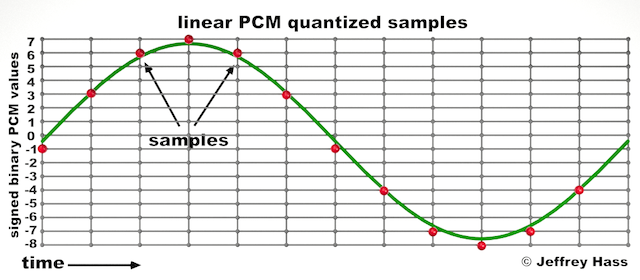
Audio quantization error is a fundamental aspect of digital audio processing. When analog sound waves are converted into digital signals, they undergo quantization. This means that the continuous analog signal is sampled and approximated in discrete steps. These steps are represented by binary values, typically in the form of bits (e.g., 16-bit, 24-bit). Now, what’s crucial to grasp here is that these discrete steps can lead to imperfections in audio reproduction.

Quantization error, often referred to as “quantization noise,” occurs when the actual analog signal deviates from the approximated digital representation. Imagine you have a beautiful painting, and you’re asked to replicate it using only a limited set of colors. The more restricted your color palette, the less accurate your reproduction will be. In the same way, the fewer bits you use for audio quantization, the more pronounced the quantization error becomes.

Quantization Levels and the Impact on Sound Quality

The number of quantization levels (related to bit depth) directly affects the precision of audio representation. For instance, a 16-bit audio recording has 65,536 possible levels, while a 24-bit recording provides a staggering 16,777,216 levels. This increased bit depth allows for a much finer representation of the original analog signal. Hence, a higher bit depth results in a reduction of quantization error, leading to superior sound quality.

To illustrate this, consider a grayscale image with only two colors: black and white. This is akin to an extremely low bit depth in audio, where the audio signal is either “on” or “off.” Now, imagine a high-resolution image with millions of colors, similar to the detail you get in a 24-bit audio recording. The difference in quality is apparent.

The Role of Dithering in Minimizing Quantization Error

One might wonder if there’s a way to mitigate quantization error in low-bit-depth audio recordings. Enter “dithering.” Dithering is a technique that introduces low-level noise to the audio signal, effectively spreading out the quantization error across a broader spectrum. Think of it as adding a sprinkle of fine grains of sand to a painting to blend the colors. This subtle noise masks the harshness of quantization error and makes it less noticeable to the human ear.

Now, as we’ve explored the fundamentals of audio quantization error, let’s delve into the questions that often arise:

How Does Quantization Error Affect Music Production?

In the realm of music production, quantization error can be a significant concern, particularly for professionals aiming to achieve top-tier sound quality. When producing music, especially in genres where subtle nuances are crucial, such as classical or jazz, quantization errors become more perceptible. To maintain audio fidelity, a higher bit depth is preferred during recording and production, ensuring minimal quantization noise.

Is There an Ideal Bit Depth for Audio Recording?

The ideal bit depth for audio recording is a subject of debate among audio enthusiasts. While 24-bit recording is commonly favored for its excellent dynamic range and low quantization error, it’s worth noting that the final audio format for most consumer applications, like CDs or streaming, is often 16-bit. The choice of bit depth should be based on the specific requirements of the project, keeping in mind the trade-off between audio quality and file size.

Can Quantization Error be Completely Eliminated?

Regrettably, quantization error cannot be entirely eliminated, as it’s an inherent part of the digital audio conversion process. However, it can be minimized to the point where it’s imperceptible to the human ear. Through techniques like dithering and the use of higher bit depths, the impact of quantization error can be significantly reduced, allowing for exceptional audio quality.

Last Words about Audio Quantization Error

In the ever-evolving world of audio technology, understanding audio quantization error is a fundamental step towards achieving superior sound quality. As an expert in the field, I’ve shared insights, experiences, and technical knowledge to demystify this concept. Remember, the bit depth you choose in audio recording significantly influences the extent of quantization error, and techniques like dithering play a pivotal role in mitigating its effects. The quest for pristine audio quality is an ongoing journey, but armed with this knowledge, you’re better equipped to make informed decisions in your audio endeavors.

M4A Audio: Lossless vs. Hybrid Formats

M4A Audio: Lossless vs. Hybrid Formats

M4A Audio: Lossless vs. Hybrid Formats


When it comes to audio formats, M4A stands out as a popular choice among music enthusiasts. However, there is a crucial distinction within the M4A realm – lossless and hybrid formats. Understanding the difference between these formats is essential for audiophiles seeking the best possible audio experience. In this article, we delve into the depths of M4A audio and explore the nuances between its lossless and hybrid formats, shedding light on their advantages and use cases.

Lossless M4A Audio: Uncompressed Audio Fidelity

Lossless M4A, as the name suggests, preserves the original audio quality without any loss of data during compression. This means that the audio is reproduced with utmost fidelity, mirroring the exact sound as it was recorded. The technology behind lossless compression ensures that no audio information is discarded, resulting in bit-for-bit accuracy.

One of the primary advantages of lossless M4A is its ability to deliver an audiophile-grade listening experience. Whether you are a music producer or a discerning listener, lossless M4A allows you to hear every nuance, intricate detail, and subtlest tones in your favorite tracks. The files, however, tend to be larger compared to other audio formats, as they retain all the data from the original source.

“Lossless M4A is a haven for true audiophiles, presenting music in its purest form, untouched by compression artifacts.” – The Audiophile’s Guide to High-Resolution Audio

Hybrid M4A Audio: Striking a Balance Between Quality and Size

Hybrid M4A, on the other hand, combines elements of both lossless and lossy audio formats, aiming to strike a balance between audio quality and file size. In this format, certain audio data is discarded during compression, resulting in a smaller file size compared to lossless M4A. However, the compression is cleverly designed to retain critical audio information, ensuring a notable reduction in file size without significant loss of quality.

This hybrid approach makes M4A audio files highly versatile and practical, especially for everyday listening and storage on portable devices with limited storage capacities. While the audio quality is not on par with lossless M4A, the difference is often subtle and may go unnoticed by most listeners. For those seeking an enjoyable audio experience without consuming excessive storage space, hybrid M4A proves to be an excellent choice.

“Hybrid M4A strikes a perfect balance, preserving audio quality while optimizing storage requirements, catering to a broader audience of music enthusiasts.” – The Art of Digital Audio Compression

Use Cases and Applications

The choice between lossless and hybrid M4A formats largely depends on individual preferences and specific use cases. Let’s explore some common scenarios where each format shines:

Lossless M4A:

– Music Production: Lossless M4A is favored by music producers and audio engineers during the recording, editing, and mixing stages, as it provides the most accurate representation of the original sound.

– Audiophile Listening: For those with high-end audio equipment and a passion for sonic perfection, lossless M4A offers an unparalleled listening experience.

– Archiving Master Recordings: When preserving master recordings for archival purposes, lossless M4A ensures no loss of audio data over time.

Hybrid M4A:

– Personal Music Libraries: Hybrid M4A is an ideal choice for building personal music collections, as it strikes a balance between quality and file size, making it easy to store and manage.

– Online Music Streaming: Many music streaming platforms utilize hybrid M4A to deliver high-quality audio efficiently, providing users with a seamless streaming experience.

– Portable Devices: For users with limited storage on their smartphones, tablets, or music players, hybrid M4A is a space-saving option, allowing them to carry more music on the go.

“The versatility of M4A formats caters to diverse needs, empowering users to make the right choice for their specific audio requirements.” – Audio Formats for the Modern Listener

Final Words

As the world of digital audio continues to evolve, the distinction between lossless and hybrid M4A formats becomes increasingly relevant. Audiophiles and casual listeners alike must weigh the benefits and trade-offs of each format to make informed decisions about their music library. Whether you prioritize uncompromising audio quality or seek a practical solution for everyday listening, the M4A format, in its lossless and hybrid forms, remains a reliable and widely supported choice for the modern era of digital music.