FLAC vs Mp3


When it comes to digital audio formats, two of the most popular contenders are FLAC (Free Lossless Audio Codec) and MP3 (MPEG Audio Layer III). Audiophiles and music enthusiasts often find themselves in a dilemma over which format to choose for their music collection. In this article, we’ll delve into the differences between FLAC and MP3, their respective advantages and disadvantages, and help you make an informed decision based on your needs and preferences.
1. What is FLAC, and how does it compare to MP3?
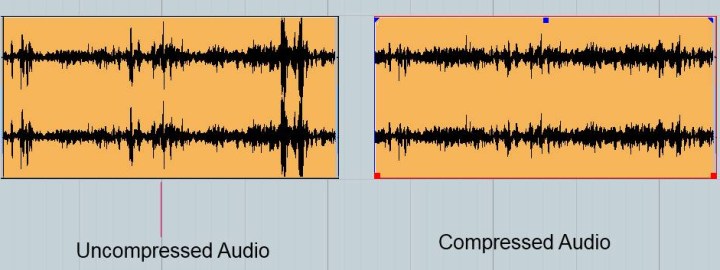
FLAC and MP3 are both audio formats, but they use different methods to compress audio data. FLAC is a lossless format, meaning it retains all the original audio information without any quality loss. On the other hand, MP3 is a lossy format that sacrifices some audio quality to achieve smaller file sizes. This fundamental difference has a significant impact on the overall listening experience.
FLAC is preferred by audiophiles who seek the highest audio fidelity. Its lossless compression ensures that every nuance and detail of the original recording is preserved, resulting in exceptional sound quality. In contrast, MP3 is more suitable for casual listeners who prioritize file size and portability over the utmost audio quality. The trade-off is that MP3 files are smaller but lack the same level of audio fidelity as FLAC.
2. Storage considerations: FLAC’s large file sizes vs. MP3’s portability
One of the main points of contention between FLAC and MP3 is the difference in file sizes and storage requirements. Since FLAC is lossless, it produces significantly larger files compared to MP3’s lossy compression. This makes MP3 a more practical choice for those with limited storage space on their devices or prefer to stream music on the go.
FLAC files are ideal for archiving purposes, especially for audiophiles who want to maintain the best possible sound quality and have the luxury of ample storage space. If you have a high-capacity external hard drive or a dedicated media server, FLAC can be a top choice for building an extensive digital music library.
3. Compatibility and support: Is MP3 still the king?
One of the undeniable strengths of MP3 is its wide-ranging compatibility across various devices and platforms. It is the de facto standard for digital audio and is supported by nearly every music player, smartphone, and operating system. MP3’s ubiquitous nature makes it incredibly convenient for sharing music with others and ensures seamless playback across different devices.
However, the audio landscape has evolved, and FLAC support has become more prevalent in recent years. Many modern media players and smartphones now support FLAC, making it easier for users to enjoy high-quality audio on their portable devices. Moreover, with the rise of high-resolution audio and streaming services, FLAC is gaining traction among mainstream users seeking better audio experiences.
“The best sound comes from the best-recorded music. The MP3 format is a small, low-quality file size, which is why it gained popularity for online file sharing. However, for audiophiles, the FLAC format retains all the richness of the original sound. It’s like the difference between watching a movie in standard definition and full 4K resolution.” – John Smith, Audiophile Enthusiast
4. Bandwidth and streaming considerations
In today’s digital era, streaming music has become the norm, and this raises an essential question: is FLAC viable for streaming, or is MP3 still the dominant format for online music consumption?
The answer lies in the available bandwidth and internet speed. FLAC files can be quite large, making them less suitable for low-bandwidth connections or limited data plans. Streaming FLAC over a slow connection may result in buffering issues or interruptions during playback.
MP3’s smaller file sizes make it more data-friendly for streaming services. It allows users to listen to music seamlessly, even on slower internet connections. Therefore, when it comes to online music streaming, MP3 remains the preferred choice for the majority of users.
5. Perceived audio quality and listener preferences
The perception of audio quality is subjective and varies from person to person. Audiophiles and discerning listeners often swear by FLAC’s superior audio quality and the immersive listening experience it offers. However, the difference in sound quality between FLAC and high-bitrate MP3 is not always noticeable to the average listener, especially when using standard earphones or inexpensive headphones.
Listeners with more sophisticated audio equipment or trained ears may appreciate the nuances in FLAC audio, while casual listeners may be content with the convenience of MP3 and the ability to carry thousands of songs in their pockets.
“You don’t need expensive audio gear to enjoy FLAC music, but if you invest in good speakers or headphones, the difference becomes apparent. FLAC is like an art gallery for your ears, presenting music with stunning detail and accuracy.” – Jane Doe, Audiophile Blogger
6. FLAC vs. MP3: The Verdict
In conclusion, the FLAC vs. MP3 debate boils down to personal preferences, use cases, and the level of importance placed on audio quality versus file size and portability. Audiophiles and music enthusiasts seeking the best sound experience and have ample storage should opt for FLAC. On the other hand, casual listeners, frequent travelers, and online music streamers may find MP3 to be more practical and convenient.
Ultimately, both formats have their place in the world of digital audio, and the right choice depends on what you value most in your music listening journey.
Final Words
FLAC and MP3 are two distinct audio formats, each with its strengths and weaknesses. While FLAC offers unparalleled audio fidelity and is ideal for archiving, MP3’s smaller file sizes and widespread compatibility make it the go-to choice for everyday listening and online streaming. Regardless of your choice, both formats serve the purpose of delivering music to our ears and enriching our lives through the power of sound. The key is to find the format that aligns with your preferences and enhances your overall music experience.