MP3 vs. AAC


Free Download Mp4Gain
picture

MP3 vs. AAC: Audio Quality Comparison

MP3 vs. AAC
MP3 vs. AAC
MP3 vs. AAC
MP3 vs. AAC

MP3 Audio Compression

MP3, or MPEG Audio Layer-3, is a widely-used audio format known for its efficient compression. It uses perceptual coding techniques to discard certain audio frequencies that are less perceptible to the human ear. This compression allows for smaller file sizes while maintaining an acceptable level of audio quality.

AAC Audio Codec

AAC, or Advanced Audio Coding, is a successor to MP3 and offers improved audio quality at similar bitrates. AAC utilizes more advanced compression algorithms, including perceptual noise shaping and temporal noise shaping, resulting in better sound reproduction and higher fidelity compared to MP3.

Differences in Audio Quality

When comparing MP3 and AAC in terms of audio quality, there are several factors to consider. AAC generally provides better sound quality than MP3 at similar bitrates. This is because AAC is capable of preserving more audio details and nuances, resulting in a more accurate reproduction of the original sound.

Bitrate Efficiency

One advantage of MP3 over AAC is its superior bitrate efficiency. MP3 achieves good audio quality while keeping file sizes relatively small. This makes it suitable for applications with limited storage or low bandwidth, such as online music streaming or portable audio players.

Transparent Compression

AAC is often considered a “transparent” audio codec, meaning it can achieve audio quality indistinguishable from the original source, even at lower bitrates. This makes AAC a preferred choice for high-quality audio applications, such as digital music distribution and professional audio production.

Compatibility and Support

MP3 enjoys broad compatibility across various devices and platforms due to its widespread adoption. It is supported by virtually all audio players, software, and hardware devices. AAC, on the other hand, may require specific codecs or software support, although it has gained significant popularity and compatibility in recent years.

Application Considerations

Choosing between MP3 and AAC depends on the specific application and user preferences. If file size and compatibility are the primary concerns, MP3 may be the preferred choice. However, for applications where audio quality is paramount, such as music production or high-fidelity audio playback, AAC offers a superior option.

Transcoding and Conversion

Transcoding or converting audio files from one format to another may result in some loss of audio quality. If transcoding from MP3 to AAC, the original MP3 compression artifacts may be retained or exacerbated. It is generally recommended to use the highest-quality source file available to maintain audio fidelity.

Subjective Listening Tests

Subjective listening tests involving trained listeners have consistently shown that AAC often provides better audio quality compared to MP3 at similar bitrates. However, individual preferences can vary, and some listeners may not perceive significant differences between the two formats in certain scenarios.

Choosing the Right Format

Ultimately, the choice between MP3 and AAC depends on factors such as the intended use, available storage or bandwidth, desired audio quality, and compatibility requirements. Evaluating these factors and conducting listening tests can help determine the most suitable audio format for a specific application or use case.

Optimizing Audio Quality

To optimize audio quality, it is important to consider not only the choice of audio format but also factors such as the source recording quality, mastering techniques, and the playback equipment used. Additionally, using higher bitrates


Free Download Mp4Gain
picture


Mp4Gain Main Window
picture


Mp4Gain Features
picture


Free Download Mp4Gain
picture

AAC vs. MP3

Understanding Audio Codecs: AAC vs. MP3

AAC vs. MP3
AAC vs. MP3
AAC vs. MP3
AAC vs. MP3


Audio codecs are a type of data compression algorithm that is used to reduce the size of digital audio files. This makes it possible to store and transfer audio files more efficiently, and to play them back on devices with limited storage space.

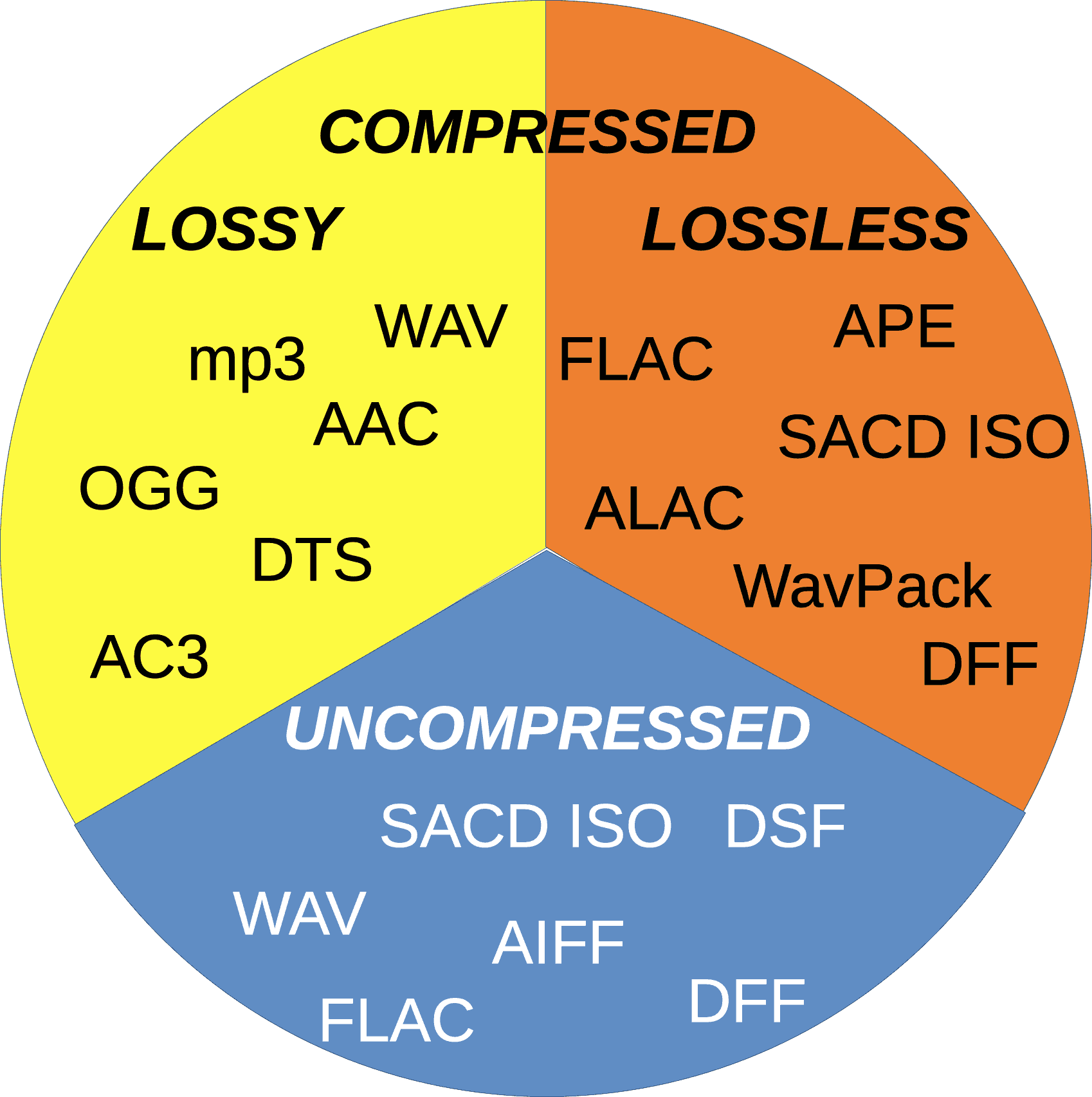
There are two main types of audio codecs: lossy and lossless. Lossy codecs reduce the size of audio files by removing some of the data from the original audio signal. This can result in a loss of quality, but it can also result in a significant reduction in file size. Lossless codecs, on the other hand, do not remove any data from the original audio signal. This means that the quality of the audio is preserved, but the file size is not reduced as much.

In this article, we will compare two of the most popular audio codecs: AAC and MP3. We will discuss the advantages and disadvantages of each codec, and we will help you decide which codec is right for you.

AAC

AAC stands for Advanced Audio Coding. It is a lossy audio codec that was developed by the Moving Picture Experts Group (MPEG). AAC is designed to provide better sound quality than MP3 at the same file size. AAC is also more efficient than MP3, which means that it can achieve even better sound quality at lower file sizes.

AAC is supported by a wide range of devices, including smartphones, tablets, computers, and home audio systems. It is also the default audio format for many streaming services, such as Spotify and Apple Music.

MP3

MP3 stands for MPEG-1 Audio Layer 3. It is a lossy audio codec that was developed by the Moving Picture Experts Group (MPEG). MP3 is the most popular audio codec in the world. It is supported by a wide range of devices, and it is the default audio format for many music file sharing services.

MP3 is not as efficient as AAC, which means that it cannot achieve the same sound quality at lower file sizes. However, MP3 is still a good choice for most people. It is a reliable and widely supported codec that offers good sound quality at a reasonable file size.

Which Audio Codec is Right for You?

The best audio codec for you depends on your needs. If you want the best possible sound quality, then AAC is the better choice. However, if you are looking for a codec that is widely supported and that offers good sound quality at a reasonable file size, then MP3 is a good option.

Conclusion

AAC and MP3 are two of the most popular audio codecs in the world. Both codecs offer good sound quality, but AAC is generally considered to be the better choice for people who want the best possible sound quality. MP3 is a good option for people who are looking for a codec that is widely supported and that offers good sound quality at a reasonable file size.

FLAC vs. OGG

FLAC vs. OGG: Comparing Open Source Audio Formats

FLAC vs. OGG
FLAC vs. OGG
FLAC vs. OGG
FLAC vs. OGG

Introduction

FLAC and OGG are two popular open source audio formats. They are both lossless, which means that they can perfectly reproduce the original audio signal. However, there are some key differences between the two formats.

FLAC

FLAC stands for Free Lossless Audio Codec. It is a lossless audio format that was developed by the Xiph.Org Foundation. FLAC files are typically smaller than WAV files, but they retain the same audio quality. FLAC is a popular format for audiophiles and music lovers who want to store their music in the highest possible quality.

OGG

OGG is a container format that can store a variety of audio and video codecs, including Vorbis, Theora, and Speex. Vorbis is a lossy audio codec that was developed by the Xiph.Org Foundation. Ogg Vorbis files are typically smaller than FLAC files, but they do not offer the same level of audio quality. Ogg Vorbis is a popular format for streaming audio and for distributing music online.

Comparison

The following table compares the key features of FLAC and OGG:

Feature FLAC OGG
Audio quality Lossless Lossy
File size Larger Smaller
Compatibility Widely compatible Not as widely compatible
Licensing Free and open source Free and open source

Which Format is Right for You?

The best format for you depends on your needs and preferences. If you want the highest possible audio quality, then FLAC is the best option. If you are looking for a smaller file size and compatibility with a wider range of devices, then OGG is a better choice.

Conclusion

FLAC and OGG are both great options for storing and playing audio files. FLAC offers the highest possible audio quality, while OGG offers a smaller file size and compatibility with a wider range of devices. The best format for you depends on your needs and preferences.

Frequently Asked Questions

What is the difference between FLAC and OGG?

FLAC and OGG are both audio formats, but they are different in a few ways. FLAC is lossless, which means that it can perfectly reproduce the original audio signal. OGG is lossy, which means that some of the original audio data is discarded in order to reduce the file size.

Which format is better, FLAC or OGG?

FLAC and OGG are both great formats, but they have different strengths and weaknesses. FLAC offers the highest possible audio quality, while OGG offers a smaller file size and compatibility with a wider range of devices. The best format for you depends on your needs and preferences.

What are some of the benefits of using FLAC or OGG?

There are a number of benefits to using FLAC or OGG, including:

  • Smaller file sizes: FLAC and OGG files are typically much smaller than WAV files, which makes them easier to store and transfer.
  • Higher quality: FLAC and OGG files offer higher quality audio than MP3 files.
  • Compatibility: FLAC and OGG files are compatible with a wide range of devices, including computers, smartphones, and portable music players.

What are some of the drawbacks of using FLAC or OGG?

There are a few drawbacks to using FLAC or OGG, including:

  • Larger file sizes: FLAC and OGG files are typically larger than MP3 files, which can take up more storage space on your device.
  • Not as widely supported: FLAC and OGG files are not as widely supported as MP3 files, which means that you may not be able to play them on all devices.

Conclusion

FLAC and OGG are both great options for storing and playing audio files. They offer a number of benefits, including smaller file sizes, higher quality audio, and compatibility with a wide range of devices. However, they also have a few drawbacks, including larger file sizes and not being as widely supported as MP3 files. The best format for you depends on your needs and preferences.

What Are the Key Differences Between MP3 and OGG Audio Formats?

What Are the Key Differences Between MP3 and OGG Audio Formats?

MP3 vs Ogg
MP3 vs Ogg

Introduction

Ogg vs MP3
Ogg vs MP3

Digital audio formats play a vital role in the storage and transmission of audio files. They determine the quality, file size, and compatibility of audio files with different devices and software. In this article, we will explore the technical specifications, advantages, and disadvantages of two popular audio formats: MP3 and OGG. We will also compare and contrast the features of these formats to help you choose the best one for your needs.

Technical Specifications of MP3

MP3 is a widely used audio format that utilizes a lossy compression algorithm to reduce the file size without significantly affecting the quality of audio output. The compression algorithm removes some of the audio data that is less perceptible to the human ear, resulting in a smaller file size. The bit rate of an MP3 file typically ranges from 32 to 320 kbps, while the sampling rate ranges from 8 to 48 kHz.

MP3 uses a psychoacoustic model that takes advantage of the human ear’s limitations to mask certain sounds that are less perceptible to the human ear. The model discards or reduces the bits in the audio that are masked, resulting in a smaller file size without compromising the overall quality. However, the compression algorithm used in MP3 can result in a loss of audio quality, especially at lower bit rates.

The main advantage of MP3 is its widespread compatibility with different devices and software. It is supported by most media players, mobile devices, and operating systems. However, the file size of MP3 files can also be relatively large compared to other audio formats.

Technical Specifications of OGG

OGG is a free, open-source audio format that uses a lossy compression algorithm similar to that used in MP3. However, the compression algorithm used in OGG is generally considered to be more efficient than that used in MP3. OGG files can have a variable bit rate that ranges from 16 to 500 kbps, while the sampling rate can range from 8 to 48 kHz.

OGG uses a Vorbis psychoacoustic model that takes advantage of the human ear’s limitations to remove the bits that are less audible. The model analyzes the audio signal and selects the bits to be discarded based on the masking properties of the audio. This results in a higher compression ratio without compromising the audio quality. OGG is particularly good at compressing audio that has complex and variable structures, such as classical music and speech.

One of the main advantages of OGG is its higher audio quality at lower bit rates compared to MP3. OGG files also have a smaller file size compared to MP3 files, making them more suitable for streaming and online distribution. However, OGG is not as widely supported as MP3 and may not be compatible with some devices and software.

Comparison of MP3 and OGG

The main difference between MP3 and OGG is the compression algorithm used. MP3 uses a simpler compression algorithm that can result in a loss of audio quality, especially at lower bit rates. OGG uses a more efficient compression algorithm that can achieve higher audio quality at lower bit rates. As a result, OGG files are generally smaller in size than MP3 files of similar audio quality.

In terms of compatibility, MP3 is more widely supported by different devices and software. It is the standard format for most digital audio players and online music stores. OGG, on the other hand, may not be supported by some devices and software.

In terms of file size, OGG files are generally smaller than MP3 files. This makes them more suitable for streaming and online distribution, as they take up less bandwidth and storage space. However, the smaller file size of OGG files can also result in a lower overall audio quality compared to MP3 files of the same bit rate. Additionally, the smaller market share of OGG may make it harder to find audio content in this format.

One advantage of OGG over MP3 is its support for advanced audio features, such as multi-channel audio and variable bit rates. OGG can also support metadata tags, which allow you to add information such as album, artist, and track title to your audio files.

Conclusion

In conclusion, both MP3 and OGG have their own strengths and weaknesses when it comes to audio quality, file size, and compatibility. MP3 is a widely supported audio format that is compatible with most devices and software. However, its compression algorithm can result in a loss of audio quality, especially at lower bit rates. OGG, on the other hand, uses a more efficient compression algorithm that can achieve higher audio quality at lower bit rates. It is suitable for streaming and online distribution, but may not be compatible with some devices and software.

Ultimately, the choice between MP3 and OGG depends on your specific needs and preferences. If you prioritize compatibility and widespread support, MP3 may be the better choice. However, if you value audio quality and smaller file sizes, OGG may be the way to go. Whatever format you choose, make sure to use high-quality encoding software to ensure the best possible audio output.

MP3 vs FLAC: Which audio format is better for you?

MP3 vs FLAC: Which audio format is better for you?

FLAC vs MP3
FLAC vs MP3

If you like listening to music, you’ve probably heard of the MP3 and FLAC formats. Both are popular, but which one is best for you?

FLAC vs. MP3
FLAC vs. MP3

What is the MP3 format?

MP3 is a very popular audio format used to compress music files. This means you can have more songs on your phone or computer without taking up a lot of storage space. Plus, it’s easy to play on most devices, including phones, computers, and MP3 players.

What is the FLAC format?

FLAC is a lossless audio format, which means that no audio quality is lost during compression. This means that you will hear the music exactly as it was recorded by the artists. FLAC is ideal for those who value audio quality and want to hear their music with maximum clarity and detail.

What is the difference between MP3 and FLAC?

The main difference between MP3 and FLAC is the audio quality. MP3 is a compressed format that may lose some audio quality during the process, while FLAC is a lossless format that maintains all of the original quality of the recording. Also, FLAC files are larger than MP3 files, which means you need more storage space to save them.

Which is best for you?

It depends on your personal needs and preferences. If you want more music on your device and don’t mind a slight drop in audio quality, then MP3 may be the best option for you. If you are a music enthusiast and want to hear your music with maximum clarity and detail, then FLAC is the perfect choice for you.

Mp4Gain is the ideal program to normalize and convert both formats because it is the software developed exactly for that purpose for most audio and video formats.

MP3 and FLAC audio formats Part 6

MP3 and FLAC audio formats Part 6

Audio Formats

At the conclusion of this article, I cannot ignore one of the most popular questions from locals: which is better, FLAC or MP3?

Audio Format

The questioner generally wants to get a simple, unequivocal, and fair answer in all cases. However, there is no such thing and it cannot be. Below, I will give my opinion on when and why each of the discussed formats should be used.

In terms of sound quality, experience shows that with a competent approach to the MP3 compression process, the difference between MP3 and non-hearing loss formats is very small in the vast majority of situations. Only well-trained people can reliably record differences when listening to proper music on high-end equipment. Yes, there are specially selected test samples where the lossy compression artifacts are clearly visible to everyone, but ask yourself a question: are you planning to listen to these samples or is it just ordinary music? Overall, the bottom line is clear: MP3 is more than adequate as a music storage format for high-quality playback. But I will repeat once more: this thesis is true only if the audio files are prepared correctly. Unfortunately, the web is full of MP3s,

To form your own unbiased opinion on the topic under discussion, I strongly recommend that the reader personally try different formats in blind tests. This is not only educational, but also quite an exciting activity.

Now let’s see the advantages of using FLAC or other lossless formats.

Unlike the situation with MP3, where the quality of the output is highly dependent on the encoder ratings, in principle it is impossible to spoil the sound with compression in FLAC. Therefore, the question of how and how the material was coded loses its relevance (with the exception of the clinical cases of FLAC production by loss described above, but this is easily verified). When listening to lossless music, you can be sure that imperfections in the sound, if any, are not the result of someone’s crooked hands at the compression stage, but rather a property of the original phonogram that you have to accept with.
The same confidence that the registry is stored “as is”, without irreversible loss, provides some people with psychological comfort. In an area as subtle as audio, this factor can be quite significant.
The lossless material is ideal for a variety of processes: it can be compressed into any other format, edited, cut into samples without fear of getting “canned meat” at the output. For those who are serious about sound, this is important.
Isn’t all of the above about you? Then there is no point in bothering with lossless formats, feel free to use MP3 or other lossy formats.

Personally, at home, I save and listen to music mainly in FLAC, and I make MP3 myself if necessary, for example to use on portable devices.

MP3 and FLAC audio formats Part 5

MP3 and FLAC audio formats Part 5

Audio File Format

FLAC encoding and decoding

audio file format

Let’s consider file compression with the FLAC encoder, which can be downloaded here. For it to work, we need the flac.exe file. If you run it without parameters, you will get a short help on using the encoder. For detailed help, type flac –help (the information will be displayed) or flac –help> usage.txt (the information will be displayed in the uses.txt file).

WAV to FLAC encoding with default compression ratio (5):

flac infile.wav

WAV to FLAC encoding with specified compression ratio:

flac -n infile.wav where n is a number from 0 (minimum compression) to 8 (maximum compression).

FLAC to WAV decoding:

flac -d infile.flac

To ensure that FLAC compresses the data without loss, you can use any software that can compare files bit by bit, for example the built-in Windows utility fc. For the experiment, select any WAV file and perform the following transformations on it: original.wav (original file)> compressed.flac (encode file to FLAC)> decompressed.wav (decode FLAC back to WAV). Next, compare original.wav and decompressed.wav using fc in binary comparison mode:

fc / b original.wav decompressed.wav

After the verification is complete, the utility will display the message “No differences found between files”, indicating your full identity. This means that when converting to FLAC and vice versa, not a single bit was lost, which needed testing. If you do the same experiment with MP3, the result will be completely different, there will be a lot of differences between the files.

MP3 and FLAC audio formats Part 4

MP3 and FLAC audio formats Part 4

Audio File Formats

Does the encoder setting affect the sound quality when compressing in FLAC? What compression ratio should I choose?

Music File Formats

The FLAC encoder settings do not affect the sound quality at all. Only the size of the resulting files and the time spent on compression can depend on them, and even that is negligible. So most of the time I don’t bother and code in FLAC with the default settings, which I advise you to do as well. In rare cases, when you need to get files of the minimum size and have to save every byte, it makes sense to increase the compression ratio to the maximum value.

Does the cable box affect the sound quality when listening to FLAC material? What is the best way to play FLAC on your PC?

In the case of FLAC and other lossless formats, the decoder does not affect the sound quality, the original audio data is restored with bit precision during playback. Therefore, to listen to FLAC, you can use any player that supports this format and you personally like it. However, I will once again recommend foobar2000 as a time-tested all-in-one solution for playing music on Windows.

MP3 encoding and decoding with LAME
As mentioned above, in the case of MP3, the sound quality of the resulting files is directly dependent on the choice of the encoder and its settings during compression. To date, the LAME encoder provides the best results for this format. The original project site seems a bit confusing, so I’ll immediately give a link to the files. From the archive, we need the lame.exe file. We open the command line.

For a quick reference on using LAME, type lame –help (the information will be displayed) or lame –help> usage.txt (the information will be displayed in the uses.txt file). For detailed help, replace –help with –longhelp.

Let’s get straight to the compression functionality. Should bit rate and other compression settings be specified separately? No, this is completely optional, the developers did most of the work for us, making it as easy as possible to use the encoder. LAME has a set of presets (presets) that allow the user to obtain excellent results with a minimum of technical knowledge. Almost all presets use VBR (Variable Bit Rate) mode, which provides an optimal balance between sound quality and file size. The command invokes help for the lame presets –preset help. Let’s consider the most relevant presets.

The preset standard. Description of built-in help:

This preset should be “transparent” to most people in most music, with a fairly high quality.

The average bit rate when using the standard is 170-210 kbps, the HF cutoff starts at about 18.7 kHz. I recommend using this preset as the default mode, it is the most balanced in terms of combination of features.

Encode WAV to MP3 with this preset:

lame –preset standard infile.wav outfile.mp3, where infile.wav is the name of the source WAV file, outfile.mp3 is the name of the resulting MP3 file (the latter can be omitted).

Extreme preset. Description of built-in help:

If you have extremely good hearing and the same equipment, this preset will give you slightly higher-than-standard quality.

The average bit rate when extreme is used is 220-260 kbps, the high pass filter is not used. I recommend using this preset when you want to get MP3 with very high sound quality. When listening to music on an average computer, this preset, compared to the standard, generally does nothing more than increase the file size.

Encode WAV to MP3 with this preset:

lame –preset extreme infile.wav outfile.mp3

MP3 and FLAC audio formats Part 3

MP3 and FLAC audio formats Part 3

Audio File Formats

Is it possible to compress material from loss to loss, eg MP3 with lower bit rate to MP3 with higher bit rate?

audio file formats

If you want to get an improvement in the quality of such a clamp, then no, you do not need to do this: the sound will not only not improve, but will even slightly deteriorate. If your goal is to reduce file size and sound quality is not very critical, then compressing from a higher bit rate to a lower one is quite justified.

Which lossless format is the best in terms of sound quality: FLAC, Monkey’s Audio, WavPack?

As mentioned above, lossless formats compress data losslessly. This means that, in terms of sound quality, they are all absolutely identical. You should choose a lossless format to use in each specific case, focusing solely on its compatibility with the software / equipment and your personal preferences.

Does the choice of encoder and its settings affect the sound quality when compressing material to MP3?

It affects significantly. About which encoder and with what settings provides the optimal result, I will tell you below.

Does the cable box affect the sound quality when listening to MP3 material? What is the best way to play MP3 on PC?

The MP3 decoder can affect the sound quality. Some decoders (especially older ones) noticeably distort the sound when playing MP3, which can create a false impression of the inferiority of this format as such. To play music on a PC, you must use proven playback programs, preferably the latest versions. I use foobar2000, which I recommend to everyone; it has no problem with the quality of playback of MP3 and other supported formats.

Does the encoder setting affect the sound quality when compressing in FLAC? What compression ratio should I choose?

The FLAC encoder settings do not affect the sound quality at all. Only the size of the resulting files and the time spent on compression can depend on them, and even that is negligible. So most of the time I don’t bother and code in FLAC with the default settings, which I advise you to do as well. In rare cases, when you need to get files of the minimum size and have to save every byte, it makes sense to increase the compression ratio to the maximum value.

Does the cable box affect the sound quality when listening to FLAC material? What is the best way to play FLAC on your PC?

In the case of FLAC and other lossless formats, the decoder does not affect the sound quality, the original audio data is restored with bit precision during playback. Therefore, to listen to FLAC, you can use any player that supports this format and you personally like it. However, I will once again recommend foobar2000 as a time-tested all-in-one solution for playing music on Windows.

MP3 and FLAC Audio Formats Part 2

MP3 and FLAC Audio Formats Part 2

Audio Formats

MP3 (MPEG-1 Layer 3) is historically the first and most widespread lossy compression format.

AUDIO FORMAT

Despite the fact that, due to the era of MP3, today it does not shine with the efficiency of compression, its popularity is still very high due to its versatility: any plate can reproduce this format. At the same time, if a suitable encoder and decoder are used, the MP3 sound quality is at a very decent level. The combination of these two factors justifies the use of the format today. The MP3 compression ratio while maintaining high sound quality is 6 to 9 times. The average bit rate of such an MP3 with 16-bit / 44.1 kHz / stereo parameters is 150-240 kbps, the file size of a five-minute recording in this form is 6-9 MB.

FLAC (Free Lossless Audio Codec) is currently the most popular lossless audio compression format. If lossless support is claimed for any software or hardware, this software / hardware can almost certainly play FLAC. The format is the de facto standard among lovers of high-quality sound. The FLAC compression ratio is 1.2 to 3.5 times. FLAC bitrate with 16 bit / 44.1 kHz / stereo parameters – 400-1200 kbps, the file size of a five minute recording in this form is 15-44 MB. For lossless formats, of which FLAC is a representative, the rule “higher bit rate – higher sound quality” does not work, the quality always remains identical to the original. The compression ratio and bit rate vary depending on the complexity of the material to be compressed; for example, singing on a guitar lends itself to compression better than recording a symphony orchestra.

Is it possible to compress material without loss to loss, for example from FLAC to MP3?

It is possible and often necessary. For example, if you want to listen to music in “field” conditions from a portable device without audiophile habits, and your source material is stored in lossless format, then it makes sense to make the desired tracks lossy before transferring them to the laptop. . This will reduce the file size and save much more music on your mobile device. Most likely, you won’t feel the sound degradation from such a transformation at all.

Is it possible to compress material from lossy to lossless, eg from MP3 to FLAC?

This should not be done in any case, as the sound quality will not improve and the file size will increase significantly. Also, such a pseudo-lossless, then caught by other people, will deceive them. How to rule out such fakes when downloading losslessly from the network, read this article.

Is it possible to compress material from loss to loss, eg MP3 with lower bit rate to MP3 with higher bit rate?

If you want to get an improvement in the quality of such a clamp, then no, you do not need to do this: the sound will not only not improve, but will even slightly deteriorate. If your goal is to reduce file size and sound quality is not very critical, then compressing from a higher bit rate to a lower one is quite justified.

Which lossless format is the best in terms of sound quality: FLAC, Monkey’s Audio, WavPack?

As mentioned above, lossless formats compress data losslessly. This means that, in terms of sound quality, they are all absolutely identical. You should choose a lossless format to use in each specific case, focusing solely on its compatibility with the software / equipment and your personal preferences.

Is it possible to compress material without loss to loss, for example from FLAC to MP3?

It is possible and often necessary. For example, if you want to listen to music in “field” conditions from a portable device without audiophile habits, and your source material is stored in lossless format, then it makes sense to make the desired tracks lossy before transferring them to the laptop. . This will reduce the file size and save much more music on your mobile device. Most likely, you won’t feel the sound degradation from such a transformation at all.

Is it possible to compress material from lossy to lossless, eg from MP3 to FLAC?

This should not be done in any case, as the sound quality will not improve and the file size will increase significantly. Also, such a pseudo-lossless, then caught by other people, will deceive them. How to rule out such fakes when downloading losslessly from the network, read this article.