MP3 vs. AAC


Free Download Mp4Gain
picture

MP3 vs. AAC: Audio Quality Comparison

MP3 vs. AAC
MP3 vs. AAC
MP3 vs. AAC
MP3 vs. AAC

MP3 Audio Compression

MP3, or MPEG Audio Layer-3, is a widely-used audio format known for its efficient compression. It uses perceptual coding techniques to discard certain audio frequencies that are less perceptible to the human ear. This compression allows for smaller file sizes while maintaining an acceptable level of audio quality.

AAC Audio Codec

AAC, or Advanced Audio Coding, is a successor to MP3 and offers improved audio quality at similar bitrates. AAC utilizes more advanced compression algorithms, including perceptual noise shaping and temporal noise shaping, resulting in better sound reproduction and higher fidelity compared to MP3.

Differences in Audio Quality

When comparing MP3 and AAC in terms of audio quality, there are several factors to consider. AAC generally provides better sound quality than MP3 at similar bitrates. This is because AAC is capable of preserving more audio details and nuances, resulting in a more accurate reproduction of the original sound.

Bitrate Efficiency

One advantage of MP3 over AAC is its superior bitrate efficiency. MP3 achieves good audio quality while keeping file sizes relatively small. This makes it suitable for applications with limited storage or low bandwidth, such as online music streaming or portable audio players.

Transparent Compression

AAC is often considered a “transparent” audio codec, meaning it can achieve audio quality indistinguishable from the original source, even at lower bitrates. This makes AAC a preferred choice for high-quality audio applications, such as digital music distribution and professional audio production.

Compatibility and Support

MP3 enjoys broad compatibility across various devices and platforms due to its widespread adoption. It is supported by virtually all audio players, software, and hardware devices. AAC, on the other hand, may require specific codecs or software support, although it has gained significant popularity and compatibility in recent years.

Application Considerations

Choosing between MP3 and AAC depends on the specific application and user preferences. If file size and compatibility are the primary concerns, MP3 may be the preferred choice. However, for applications where audio quality is paramount, such as music production or high-fidelity audio playback, AAC offers a superior option.

Transcoding and Conversion

Transcoding or converting audio files from one format to another may result in some loss of audio quality. If transcoding from MP3 to AAC, the original MP3 compression artifacts may be retained or exacerbated. It is generally recommended to use the highest-quality source file available to maintain audio fidelity.

Subjective Listening Tests

Subjective listening tests involving trained listeners have consistently shown that AAC often provides better audio quality compared to MP3 at similar bitrates. However, individual preferences can vary, and some listeners may not perceive significant differences between the two formats in certain scenarios.

Choosing the Right Format

Ultimately, the choice between MP3 and AAC depends on factors such as the intended use, available storage or bandwidth, desired audio quality, and compatibility requirements. Evaluating these factors and conducting listening tests can help determine the most suitable audio format for a specific application or use case.

Optimizing Audio Quality

To optimize audio quality, it is important to consider not only the choice of audio format but also factors such as the source recording quality, mastering techniques, and the playback equipment used. Additionally, using higher bitrates


Free Download Mp4Gain
picture


Mp4Gain Main Window
picture


Mp4Gain Features
picture


Free Download Mp4Gain
picture

AAC vs. MP3

Understanding Audio Codecs: AAC vs. MP3

AAC vs. MP3
AAC vs. MP3
AAC vs. MP3
AAC vs. MP3


Audio codecs are a type of data compression algorithm that is used to reduce the size of digital audio files. This makes it possible to store and transfer audio files more efficiently, and to play them back on devices with limited storage space.

There are two main types of audio codecs: lossy and lossless. Lossy codecs reduce the size of audio files by removing some of the data from the original audio signal. This can result in a loss of quality, but it can also result in a significant reduction in file size. Lossless codecs, on the other hand, do not remove any data from the original audio signal. This means that the quality of the audio is preserved, but the file size is not reduced as much.

In this article, we will compare two of the most popular audio codecs: AAC and MP3. We will discuss the advantages and disadvantages of each codec, and we will help you decide which codec is right for you.

AAC

AAC stands for Advanced Audio Coding. It is a lossy audio codec that was developed by the Moving Picture Experts Group (MPEG). AAC is designed to provide better sound quality than MP3 at the same file size. AAC is also more efficient than MP3, which means that it can achieve even better sound quality at lower file sizes.

AAC is supported by a wide range of devices, including smartphones, tablets, computers, and home audio systems. It is also the default audio format for many streaming services, such as Spotify and Apple Music.

MP3

MP3 stands for MPEG-1 Audio Layer 3. It is a lossy audio codec that was developed by the Moving Picture Experts Group (MPEG). MP3 is the most popular audio codec in the world. It is supported by a wide range of devices, and it is the default audio format for many music file sharing services.

MP3 is not as efficient as AAC, which means that it cannot achieve the same sound quality at lower file sizes. However, MP3 is still a good choice for most people. It is a reliable and widely supported codec that offers good sound quality at a reasonable file size.

Which Audio Codec is Right for You?

The best audio codec for you depends on your needs. If you want the best possible sound quality, then AAC is the better choice. However, if you are looking for a codec that is widely supported and that offers good sound quality at a reasonable file size, then MP3 is a good option.

Conclusion

AAC and MP3 are two of the most popular audio codecs in the world. Both codecs offer good sound quality, but AAC is generally considered to be the better choice for people who want the best possible sound quality. MP3 is a good option for people who are looking for a codec that is widely supported and that offers good sound quality at a reasonable file size.

MP3 to AAC

MP3 to AAC

MP3 to AAC
MP3 to AAC
MP3 to AAC
MP3 to AAC

MP3 to AAC – Introduction

If you’re looking to convert your MP3 files to AAC, there are a few things you need to know. AAC (Advanced Audio Coding) is a lossy compression format that offers better sound quality than MP3 at the same bit rate. It is also the default audio format for iOS devices and iTunes.

In this article, we’ll cover everything you need to know about converting MP3 to AAC, including why you might want to do it, the technical differences between the two formats, and how to convert your files using the mp4gain tool.

Why Convert MP3 to AAC?

There are several reasons why you might want to convert your MP3 files to AAC. First, as we mentioned earlier, AAC offers better sound quality than MP3 at the same bit rate. This means that if you’re looking to improve the sound quality of your music library, converting your MP3 files to AAC is a good option.

Second, if you’re an iOS user, you might want to convert your files to AAC because it is the default audio format for iOS devices and iTunes. This means that if you want to play your music on your iPhone, iPad, or iPod, converting your files to AAC will ensure the best possible sound quality.

Technical Differences Between MP3 and AAC

MP3 and AAC are both lossy compression formats, which means that they compress audio files by discarding some of the original data. However, there are some technical differences between the two formats that are worth noting.

One of the main differences is that AAC is capable of producing better sound quality than MP3 at the same bit rate. This is because AAC uses more advanced compression algorithms that are able to preserve more of the original audio data.

Another difference is that AAC is able to support higher sampling rates than MP3. This means that if you’re working with high-quality audio files, converting them to AAC will allow you to preserve more of the original audio data.

How to Convert MP3 to AAC Using mp4gain

Now that you understand why you might want to convert your MP3 files to AAC and the technical differences between the two formats, let’s talk about how to actually do the conversion using the mp4gain tool.

Mp4gain is a simple and effective tool for converting audio files from one format to another. It supports a wide range of audio formats, including MP3 and AAC, and is available for both Windows and Mac.

To convert your MP3 files to AAC using mp4gain, follow these simple steps:

  1. Download and install mp4gain on your computer.
  2. Launch mp4gain and click on the “Add Files” button to select the MP3 files you want to convert.
  3. Click on the “Format” dropdown menu and select “AAC” as the output format.
  4. Adjust the audio settings if necessary, such as the bit rate or sampling rate.
  5. Click on the “Convert” button to start the conversion process.

Once the conversion is complete, you’ll have AAC versions of your original MP3 files that you can use on your iOS devices or anywhere else that supports the AAC format.

FAQ

Is it legal to convert MP3 to AAC?

Yes, it is legal to convert your own personal MP3 files to AAC or any other audio format for personal use. However, it is illegal to distribute copyrighted music files, even if you have converted them to a different

ENCODING PRINCIPLES OF THE MP3 FORMAT.

ENCODING PRINCIPLES OF THE MP3 FORMAT.

Mp3 Encoding

Mp3, or fully MPEG-1, 2 and 2.5 Layer 3, is one of the most popular and widespread standards for storing audio data.

MP3 ENCODING

In this article, we will not delve into the history of creation and further development, but will consider the basic principles of the standard and examples of its implementation.

The mp3 standard does not establish a specific compression algorithm to “encode” the source data, but rather describes the essence of the possible methods.

The quality of the result obtained depends on the modification of the algorithm used, embedded in any encoding program of the “codec”, and on the quality of the original audio data.

There are 3 most common modifications of the mp3 format, which differ in the compression ratio parameters of the original audio data.

Name
Modification of the rule
Data rate per second (bit rate) Possible sample rates
MPEG-1 layer 3
32 – 320 kbps 32000 Hz
44100 Hz
48000 Hz
MPEG-2 Layer 3 16 – 160 kbps 16000 Hz
22050 Hz
24000 Hz
MPEG-2.5 Layer 3 8 – up to 160 kbps 8000 Hz
11025 Hz

Processing begins with dividing the original audio signal into equal time intervals: equal frames, for example 0.05 or 0.26 seconds, after which each frame is analyzed and compressed according to general or individual parameters based on the data of the previous and next frames.

Most of the compression algorithms used are based on the perceptual characteristics of the human ear. Let’s consider the main options, which, as a rule, are applied in a complex way.

It is worth starting with the fact that, by ear, the average person is capable of perceiving a frequency range of approximately 10 Hz to 20,000 Hz. With growth, changes occur in the hearing aid and, for most, the sensitivity the higher frequency range decreases, as a result of which, in some mp3 modifications, during compression, all frequencies above 16000 hertz are cut off, which can significantly reduce the amount of information.

Audio recordings can be encoded in stereo (a surround sound effect that uses separate channels for the left and right speakers) or mono (the opposite of stereo). In mp3 format, different tracks are not recorded for each of your speakers, but information about the differences between the left and right channels.

In acoustics, there is a concept like “harmonics”, these are the frequencies of the “sounds” that sound together with the main and most prominent tone. For example, when hitting a drum, the loudest sound will be the tone and the minor, weaker, will be the harmonics.

After such a loud sound, the so-called “period of deafness” occurs, during a period of duration in which a person’s hearing practically does not respond to changes.

If in the intervals of the “deafness period”, remove all frequencies, then the errors of perception, will practically not allow to notice their absence, because of this, during compression, the weakest harmonics are cut off, located close to the most sounds. strong: tones.

A method is used to replace the near peak values ​​of the signal “peaks” (in terms of volume) with an average value.

There is a concept as bit rate: this is a value that characterizes the number of transmitted bits of information “units” during a period of time, usually one second.
The higher the bit rate, the better the audio detail will be, as long as the original, uncompressed audio data is of high quality.

As you can guess, digital formats consist of certain code sequences, in other words of sequences 0 and 1.
To save space, frequent joins within a file are assigned unique identifiers that replace long sequences.

Thanks to such complex influences, it is possible to compress the original audio signal into one of the popular formats with loss of quality – the mp3 format.

Various experiments have been carried out many times in order to reveal how significant the differences are before and after compression in mp3. As tests have shown, differences, some similar moments were not always possible, quickly and to distinguish, even when reproduced on equipment with higher fidelity.

For those who have never had the opportunity to directly compare the original and compressed audio recording, in most cases it will take some time or even find obvious differences.

Find out in detail what is the MP3 and ACC music format

Find out in detail what is the MP3 and ACC music format

MP3 o AAC

Songs have become part of our daily life and we rarely listen to a single song during our day, during our breaks or in our free time. New music never stops appearing and it is likely that on many occasions we would like to download these songs.

MP3 VS AAC

Many of us listen to hundreds of songs by our favorite bands every day, and we may never really analyze the format of each song in detail. We have heard of the existing formats, but we really do not know the benefits of each of them and their characteristics.

For this reason, Solvetic on this day will analyze in detail the two most common formats at a musical level, such as MP3 and ACC.

What is AAC?

AAC (Advanced Audio Coding) is a new audio format developed by the Fraunhofer Institute in Germany in collaboration with companies such as AT&T, Nokia, Sony and Dolby.

AAC, whose extension is m4a, is responsible for compressing a part of the audio files of an element called lossy compression, that is, some data that affects its optimal quality since inaudible frequencies are removed from the audio element, etc.

This AAC format is based on the international standard ISO / IEC 13818-7 and is basically an extension of MPEG-2. It is important to note that Apple chose AAC as the default format for the iPod and for iTunes, demonstrating its high level of quality.

Among its main characteristics we find:

It uses a bit rate encoding variable called VBR, which adapts the number of bits used in one second to encrypt the audio data.
Supports up to 48 channels for polyphonic sounds
It offers frequencies ranging from 8Hz to 96.0kHz.
They are smaller in MP3 size
AAC focuses on broadband usage
Provide high quality sound
As we can see little by little, AAC is establishing itself as one of the best music formats of the time.

What is MP3

MP3 (Motion Picture Experts Group) is an audio format that delivers quality while drastically reducing file size.

MP3 uses a lossy algorithm with which we can reduce the size of an element without losing its quality. This format, like AAC, was developed at the Fraunhofer Institute in Germany. MP3 has the ability to compress using a lower or higher bit rate, which will affect the sound quality.

Its main characteristics are:

Supports frequencies from 16 to 48 kHz
Allows compression of the audio object with a ratio of 11: 1
With the MP3 format, music is divided 44,100 times per second and each of these parts is 16 bits.
MP3 can contain tags with information about the included file
With these concepts in mind, we will see that AAC and MP3 behave in certain situations.

Audio file size

Both formats perform the function of reducing the size of the original file while maintaining sound quality. At this point AAC reduces the file size more than MP3, for example a 20MB MP3 file will weigh 16MB in AAC format.

compatibility

As we already mentioned, the ACC is being implemented by Apple for its devices, and therefore there is no doubt that the most compatible format is MP3, since since the 90s it has accompanied us on various devices such as cell phones, audio systems, televisions. , team. calculations, etc.

Sound quality

In this regard, AAC surpasses Mp3 for technical reasons such as a higher audio frequency, a higher level of audio compression to eliminate elements that affect its quality, better encoding, among other things.

Next, we will see the relationship between these two audio files:

The death of the MP3 has been mentioned in some places, but this is not really the case where the licenses of this format have stopped being active, so the MP3 will continue to be active in many of the songs we listen to, and there is no doubt that that ACC will gradually gain strength until it surpasses it. MP3 medium term, but for now, AAC users can enjoy and appreciate AAC.

Let’s continue enjoying our favorite songs and remember that the purpose of these files is to offer quality sound in a small storage space.

AAC vs mp3 quality

AAC vs mp3 quality

MP3 vs AAC

Answer 1 :
Q: What is the difference between AAC and MP3?

AAC vs MP3

The other answers here helped to talk about the technical differences between the two lossy compression formats.

I’ll take a different tactic with this answer and explain how they sound different to the ear.

To explain the difference in abbreviated form, at any given bitrate, AAC will sound better in the higher ranges, while MP3 will sound better in the lower ranges.

MP3 compression adds a specific sound to the sound. This is very noticeable at bit rates of 128 kbps and below; everything sounds confusing. At higher bit rates like 256 kbps (where it’s hard to hear) or 320 kbps (where you need high-end hardware to listen to artifacts), MP3 compression is much less of a problem.

AAC compression is much better at high frequencies. “AAC” in AAC is that music sounds weak, especially at low bit rates. If you like music with significant low frequency content (drums, electronic drums, bass, bass, etc.), you will miss some of that bass in AAC files; they just sound like they lack solidity. However, as with MP3, the higher the bit rate, the less problem you will be able to hear.

At any bit rate below 256 kbps, I personally prefer AAC. The lack of solidity in AAC compressed music is less undesirable than in Futz with MP3 compression.

At 320 kbps, these artifacts are very difficult to hear in any compression format, so the fact that MP3 is more compatible in most cases gives this compression algorithm an advantage.

But we also live in today’s world where conventional hard drives have more than 12 terabytes. A completely uncompressed album (that is, AIFF or WAV format) is less than 650 megabytes in size. (** grip calculator **) You can put 18,461 uncompressed WAV or AIFF albums on a 12TB hard drive. So why do we continue to use MP3 and AAC today?

Answer 2:
Both are compressed audio files, and although the audio quality is fairly similar, the AAC format was designed to improve over MP3 in the following ways:

Higher sampling frequency (8 kHz to 96 kHz) than MP3 (16 kHz to 48 kHz)
Up to 48 channels (MP3 supports up to two channels in MPEG-1 mode and up to 5.1 channels in MPEG-2 mode)
Arbitrary bit rates and variable frame length. A constant bit rate standardized with a bit pool.
Higher efficiency and simpler filter bank (uses pure MDCT instead of hybrid MP3 encoding)
Higher encoding efficiency for stationary signals (AAC uses a block size of 1024 or 960 samples, which can be encoded more efficiently than 576 MP3 blocks)
Higher encoding precision for transition signals (AAC uses 128 or 120 sample block size, which provides more precise encoding than 192 MP3 sample blocks)
You can use a Kaiser-Bessel derived window function to eliminate spectral leakage by enlarging the main lobe
Much better handling of audio frequencies above 16 kHz
More flexible articulation stereo (different methods can be used in different frequency ranges)
Add additional modules (tools) to improve compression efficiency: TNS, inverse prediction, PNS, etc. These modules can be combined to create different encoding profiles.

Answer 3:
Both are lossy codecs, aimed at significantly reducing file size without affecting sound quality as much as you might think.

AAC is 2 generations younger than MP3, so by then the algorithms had improved significantly, and most tests confirmed that 256 kbps AAC sounds just as good, if not better than 320 kbps MP3, which is why Apple chose this file format for iTunes.

AAC supports higher sample rates than MP3, although I’ve recently seen some weird MP3 implementations (incompatible with just about everything) that do this too.

After all, storage and internet speed are not an issue, lossy compression should be gone by now in favor of FLAC or ALAC. It seems that some bad habits are very difficult to break. 🙂

Answer 4:
AAC stands for Advanced Audio Coding. It was developed by the same people who invented MP3 and is destined to be its successor. Audio in AAC is better than MP3 in almost all cases.

It is more efficient than MP3 in terms of file size precision (bit rate). In other words, an AAC encoded song will sound as good or better than an MP3 encoded with the same bit rate. Therefore, encoding a file at 256 kbps AAC will give you better sound and smaller file size than MP3 at 320 kbps.

MP3 ENCODING

MP3 ENCODING

Mp3 encoding

The first step in encoding by the user is to specify a bit rate. This indicates the quality and at the same time the storage requirement of an MP3 file.

MP3 encoding

COMPRESSION RATES

With most recording programs, the quality of an MP3 file can be freely selected before recording begins. According to the Fraunhofer Institute, the CD quality of an MP3 file is a bit rate of 112 to 128 kbit per second, other measurements put CD quality at up to 160 kbit per second. However, the most used and sufficient for most listeners is 128 kbit.

In comparison, a corresponding CD quality for Layer 1 is 384 kbit / s and 256 kbit / s for Layer 2. A wave file works with a 1.4 Mbit / s bit rate and therefore works with roughly the same space requirements. as a CD audio track (CDA).

74 or 80 minutes of music can be put on a CD (depending on the size of the sound carrier), in MP3 format with a bit rate of 128 kbit / s, 11.5 or 12.4 hours would be possible.

PSYCHOACOUSTICS

MP3 audio compression relies on filtering out unnecessary information. Psychoacoustics is a science that deals with the perception of sound by the human ear.

Eg: You are in a disco. Loud music blasts through huge speakers and you try to talk to each other. This is almost impossible unless you yell. In acoustics, this is called masking. To eliminate masking, the sound level of speech should be raised to such an extent that the interfering signal (in this case music) no longer covers it.

Processes like this belong to the fundamental areas of psychoacoustics.

Tones below this threshold are not heard and therefore become noise during MP3 recording (skipped).

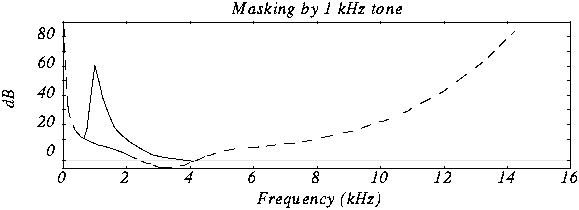
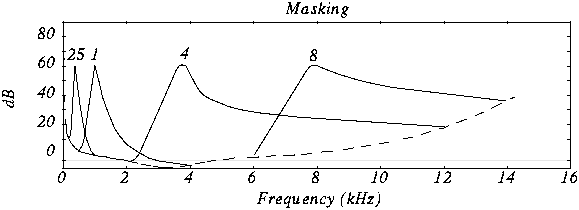
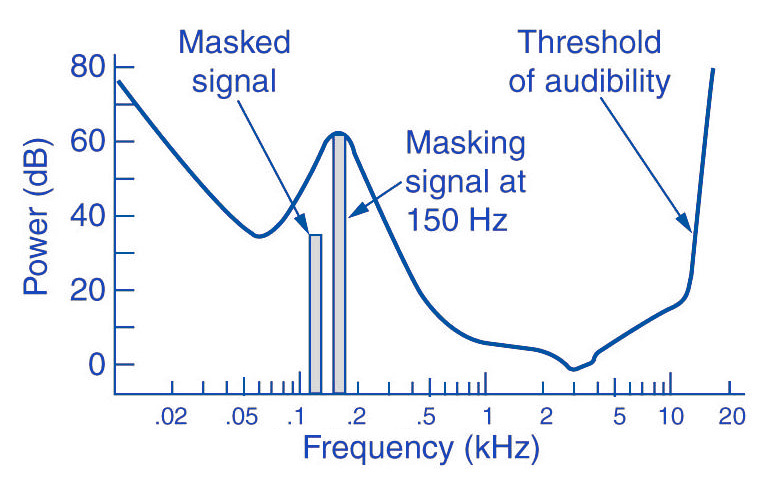
The overlays work as follows: you have, for example (picture 2) a tone with 1 kHz (1) and another tone with 1.1 kHz, which is approximately 18 dB lower (2). The second shade is completely superimposed on the first. This also works for other weaker tones (see Fig. 2). Another tone with a frequency of 2 kHz, which is also 18 dB quieter than the first, would not overlap because it is just outside the threshold of the first tone.

Noise can be another compression option for MP3 recording. The fact that when a sound is digitized it cannot be sampled at an infinite frequency, a noise imperceptible to the human ear (quantization noise) is generated. It is used as a model for the MPEG audio layer and thus increases the noise around a tone. Above all, loud and short tones mask a certain range in the frequency range before and after themselves where the weakest signals would not be audible. With MP3 encoding, the noise level increases in this area, as if digitized at a lower resolution.

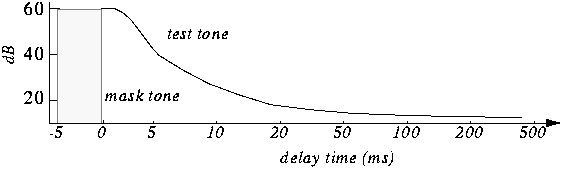
There is also masking in the temporal area: hearing needs a so-called “recovery time” for loud and quiet noises until it is fully functional again. This is especially noticeable with strong, short, and rapidly rising tones. After a delay of about 5 ms, the hearing threshold drops again and after about 200 ms it reaches the normal level, the so-called resting hearing threshold. This effect is called post-masking. The effect of pre-masking is less important, but even more impressive: it is based on the fact that the brain processes loud sounds more quickly than soft ones. To some extent, the strong impulse outweighs the silent one on the way to the brain. This results in a pre-masking time of up to 20 ms.

The above psychoacoustic algorithm is used in the following steps:
– Audio information is divided into subbands
– Subbands are reduced
– 16-bit samples are generated
– Samples are compressed
– Compressed samples are combined into blocks
– Coding according to Huffmann Procedure
: summary in tables

DIVIDED INTO SUBBANDS

Depending on the frequency of the acoustic information, it is divided into 32 subbands. The bands are of different sizes due to adaptation to the human ear according to a psychoacoustic model.

The division is done with the help of a polyphase filter. This means that the samples are decimated and filtered simultaneously.

In layers 1 and 2, the bands were the same size with a bandwidth of 625 Hz each. The reason for this division is to provide the algorithm with a better target.

SUBBAND ​​REDUCTION

The MP3 encoder now examines each of the subbands according to the psychoacoustic model for expendable frequencies. Here, the masking threshold is determined, then the subbands whose level is below this masking function are removed. Another reason for dropping an entire sub-band could be that it is inaudible due to the pitch, similar to a dog’s whistle.

CONVERSION INTO 16-BIT SAMPLES

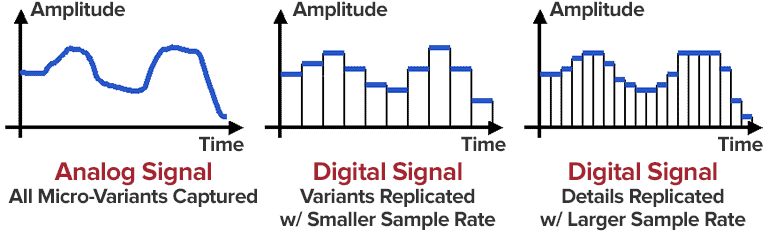
The frequency bands are sampled and converted to 16-bit samples. Tones are broken down into digital signals and further processed as numerical values. The sample rate determines the length of the sample intervals. However, neither the measurement of the amplitude nor the size of the sampling intervals can be infinitely precise. For this reason, with analog-digital conversion, a value is rounded between two sample points. This results in rounding errors that are noted in what is known as quantization noise. This can be kept inaudible using the highest possible resolution: with 8-bit, a maximum of 256 levels can be displayed, with 12-bit and 4096 and with 16-bit 65536 individual steps, so that noise is not heard.

However, some samples are also digitized with a lower sample rate. In the eighth subband, for example, there is a tone with 1 kHz and 60 dB. The MPEG audio encoder now calculates the masking threshold and recognizes that it is 36dB lower. The acceptable signal-to-noise ratio here is 24 dB, which corresponds to a 4-bit resolution, since the two values ​​are directly related. Leaving one bit out of resolution increases the noise level by 6dB. Since an audio CD is generally digitized with 16 bits, considerable data reduction can be applied here.

SAMPLE COMPRESSION

The next step is to compress the samples further. However, this process no longer has anything to do with the original shades. From here on, compression is only data-driven.

Each sample consists of 16 bits, but not all of them are absolutely necessary to represent a level. For example, leading zeros can be omitted. If, for example, the value 0000011101010101 is obtained for a sample, the algorithm truncates the result to 11101010101. To reconstruct the original 16 bits from this information, the decoder needs two pieces of information: the scale factor and the bit allocation. The scale factor indicates where the remaining bits of the sample were in their original state. The bit mapping contains the information about how many bits are left in the sample, since you can no longer calculate with a fixed 16-bit number. However, if you were to store these values ​​individually for each sample, you wouldn’t gain much,

GROUPING THE SAMPLES

The 16-bit samples that were just created are now combined into blocks. There are two different block lengths for this purpose: the short blocks with twelve samples and the long blocks with 36 samples.

Long blocks are used for low frequencies. However, long blocks would not allow sufficient resolution at higher frequencies; short blocks are used here. In the so-called mixed block mode, long blocks are used for the two frequency bands with the lowest frequencies. For the remaining 30 frequency bands, it is the turn of the short blocks. This mode allows better frequency resolution in the low frequencies without paying tribute to the sampling frequency in the high frequencies.

HUFFMANN CODING

The last step in MP3 compression is Huffmann encoding. This algorithm is also used, for example, in packaging programs such as WinZip. The frequency of certain values ​​is important here. However, the subbands are organized in advance. Subbands with lower frequencies tend to contain significantly more values ​​than those with high frequencies. The subbands are divided into three groups according to their frequency. Each area has its own Huffmann tree (Fig. 3) to achieve the optimal compression factor.

As a first step, the encoder excludes high frequencies; encoding is not necessary here, as its size can be derived from those of the other two regions. The mid-frequency range is treated as is, and the low frequencies are again divided into three regions, each of which is assigned its own Huffmann tree. The appearance of a Huffmann tree is stored in the MP3 file.

The structure of a Huffmann tree works as follows: frequently occurring values ​​are given a short sequence of bits, while rare values ​​are given a long one, so the algorithm first determines the distribution of values ​​within the data to be compressed.

To determine what is known as the Huffman tree, you start with the two rarest values. They are assigned a “0” or a “1”. The two values ​​are summarized, in the order that they are now represented by the sum of their frequency. The same is true for the next two rarer values. This process ends when only one value remains. The result of this procedure is a tree structure. The encoding is based on this structure. Each branch on the left receives a 0, each branch on the right is identified by a “1”. In our little example, the least common would be

Value 4 represented by the sequence of bits 010. The most common value 6, on the other hand, is assigned a simple 1.

FRAMEWORK SUMMARY

The result of the above compression is summarized in so-called frames. Each of these frames contains 1152 samples (32 subbands x 36 samples). A frame consists of a header, a checksum check, the actual audio data, and in certain circumstances a so-called bit repository. Such a deposit arises when the samples within the frame can be compressed in such a way that the full theoretical number of bits in a frame is not required. The encoder can fall back on these buckets if the available bits are insufficient for a subsequent frame. A distinction must be made between two terms: frame size and frame length.

The size of the frame is determined by the number of samples and is constant within a layer. In Layer 1 format, this is always 384 samples per frame, in Layers 2 and 3 1152 per frame. However, the length of the frame may differ at Layer 3 due to the change in bit rate or the pool of unfilled bits. The frame also contains the aforementioned information about the scale factor and bit allocation to be able to reconstruct all the samples again.

A file header, as it is known from other file formats, does not exist in an MP3 file. In the case of an image file, a header would contain information about the entire image (e.g. size, color depth, resolution


MP3, WAV or AAC: audio formats at a glance

MP3, WAV or AAC: audio formats at a glance

MP3 vs FLAC vs WAV vs AAC

Anyone who works with a computer will encounter a wide variety of audio formats over time. Whether you want to use or create audio files yourself, you will inevitably have to deal with the multitude of different programs for playback, codecs, and file formats. But what is behind the ending .wav, .mp3 or .aac and why are there so many different audio formats?

Audio Formats

Why are there different formats?

In different file formats, digital data is organized in different ways. For the storage of a file, a fixed specification of the encoding must be followed. Ultimately, this ensures that the data can subsequently be read and interpreted correctly.

In addition, the different file formats differ mainly in terms of their degree of compression: without the different formats and the possibility of significantly reducing the file size through compression, our current media consumption through streaming services such as Spotify or Amazon Prime Music would not be possible.

There are basically three types of audio formats:

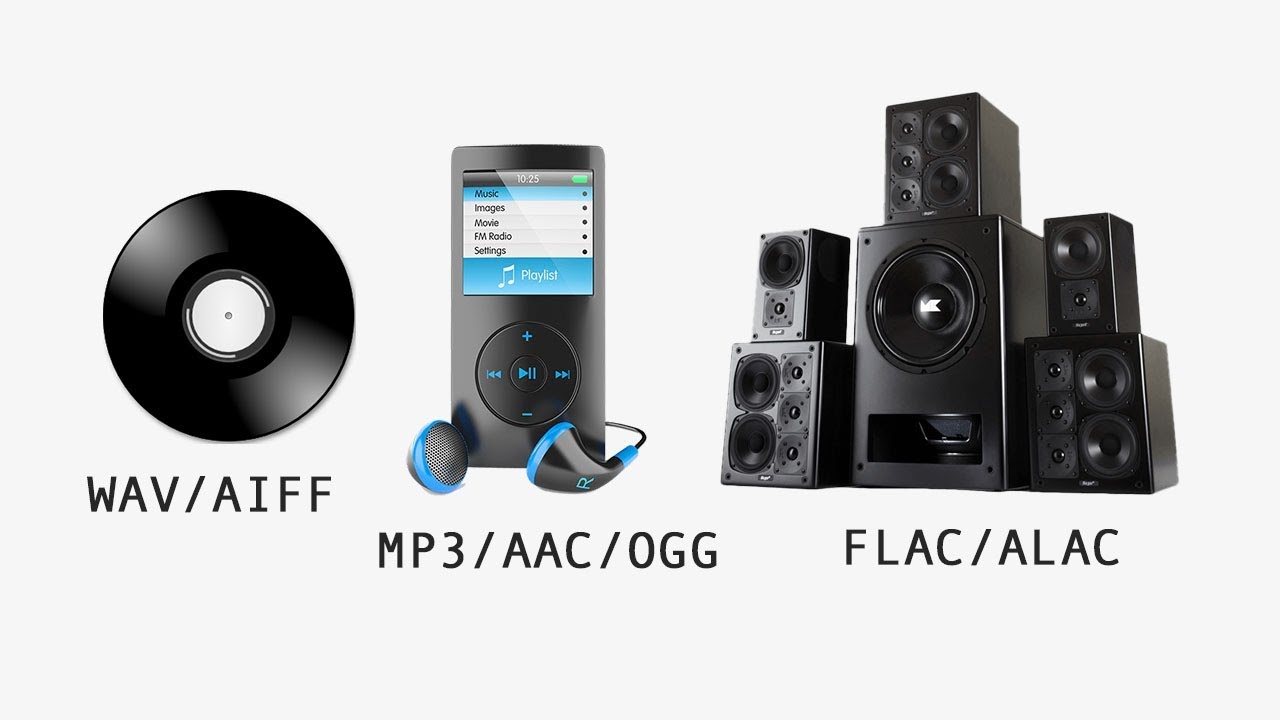
Formats that do without compression and therefore work without loss of quality,
Compressed audio formats that sacrifice some of the sound information for size and
Audio formats that use a lossless compression process and therefore allow file size reduction without loss of quality.
Thanks to modern audio converters, changing the format and converting to different formats is no longer a problem.

The original audio formats without loss of information

It is not necessary to compress all digitized sound recordings. When it comes to keeping sound quality as high as possible, uncompressed formats are clearly an advantage. Therefore, they are also often used for recording and editing. A distinction is made between WAVE and AIFF formats, which basically have the same specifications, but come from competing companies. While the WAVE format with the .wav file extension was developed by Microsoft in cooperation with IBM for use on Windows PCs, the .aif format extension is based on Apple development work and is primarily used on Macs.

Lossy compressed: the development of MP3, ACC and MP4

The MP3, AAC, OGG, or WMA formats that are widely used today are called lossy formats. This means that the digital audio format has less data than the original format, for example on a CD.

The MP3 file

The MP3 format has become indispensable.
The MP3 format developed by the Fraunhofer Institute in 1982 has become indispensable today. With this format, the current form of music consumption over the Internet was realized for the first time. The format, actually known as MPEG-1 Audio Layer 3 with the ending .mp3, uses a technology that makes it possible to reduce the size of audio files considerably without having to accept a clearly audible loss of quality. In principle, the technology behind this is quickly explained: when files are converted to MP3 format, all noise information that is not audible to the human ear is removed.

This procedure reduces the amount of information and therefore also the size of the files. Data rate, also known as sample rate or sample rate, plays an important role in the quality of music in MP3 format. From an average data rate of 200 kilobits per second, most listeners can no longer distinguish the sound quality of the original recording. However, the file is reduced to approximately one-seventh of its original size.

It was only the comparatively small files that made music distribution possible over the Internet. New technical possibilities were recognized by music listeners long before the music industry. Illegal copying of music through Napster and other file-sharing networks was extremely popular. Suddenly, music lovers had all their music in MP3 format on their hard drives.

AAC vs MP3: which one sounds better?

AAC vs MP3: which one sounds better?

AAC Vs. MP3

AAC and MP3 are now widespread and established in the hardware and software markets. AAC is often touted as the successor to MP3. But is the successor really better? We tell you who sounds better and why.

MP3 to AAC

What are AAC and MP3?

You are probably familiar with AAC and MP3 from your music downloads, audiobooks and audio software for ripping audio CDs or compressing WAV or AIFF files.
Both formats are lossy audio codecs. In a special practical tip, we will explain what exactly a codec is.
Sound in AAC format is often hidden behind M4A and MP4 file extensions.
In a practical advice we explain in detail the differences between MP3 and MP4.
MP3 and AAC are both based on psychoacoustic models of loudness and masking that were developed in the 1960s by Eberhard Zwicker, for example.
Although there are newer and more precise models, the innovations since MP3 mainly reside in more sophisticated signal processing.

AAC vs. MP3: which one sounds better?

AAC is newer than MP3. Does newer mean better? At least the AAC innovations compared to MP3 have the potential for significantly stronger compression with the same sound quality or, conversely, significantly better sound quality with the same compression:
As described above, both codecs are based on practically the same psychoacoustic models.
However, AAC allows more flexible window sizes to better react to transient or stationary signals, depending on the signal.

Unlike MP3, AAC also offers more flexible windows. Used sensibly, this can improve frequency accuracy in applied spectrum analysis.
AAC also allows for frequency-dependent stereo ensemble. This can save quite a bit of storage space with little effort, as the low frequencies in audiobooks, music, and movie sound are often kept mono.
Since AAC offers significantly more flexibility on the encoder side, even a good MP3 encoder cannot keep up with a good AAC encoder.

On the other hand, a poorly conceived AAC encoder can also sound significantly worse than an MP3 of the same size. If you encode an MP3 optimally, the result can compete with many AAC encoders.

However, in our 2003 audio encoder quality comparison test, AAC wins, followed by Warning, OGG over MP3.
Also in our 2005 AAC encoder audio codec test from Nero also wins.
AAC is also more flexible than MP3 for the user. For example, AAC supports sample rates from 8 to 96 kHz, MP3 only from 16 to 48 kHz. If you go for 96 kHz music DVDs, even the highest quality MP3 won’t give you a good sample rate.
AAC also supports up to 48 channels, MP3 only 5.1. In AAC, in theory, it could also encode audio material for 7.1 sound, high-order ambisonics, Dolby Atmos, and Auro-3D.

By the way, there is an important rule to keep in mind: converting an MP3 to AAC or vice versa is quite detrimental to the audio quality. You should only convert for compatibility reasons, if, for example, your portable MP3 player does not support the AAC format.

MP3 COMPRESSION

MP3 COMPRESSION

To achieve such a dramatic reduction in the number of bits required to transmit an MP audio signal, use different techniques. These techniques include those based on perceptual coding and others such as byte reservation, stereo assembly or Huffman codes. Percentage coding consists of removing all the information that goes into the audio signal that the human ear is not capable of detecting. We will now describe them:

PERCEPTUAL CODING

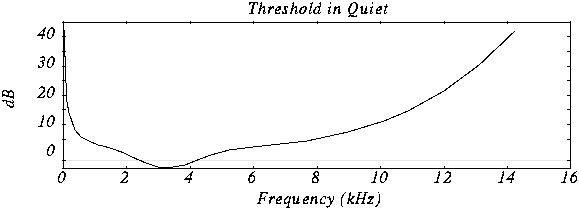
Minimum hearing threshold The ear’s minimum hearing threshold is the power below which a tone at a given frequency is not capable of being detected by the ear. This threshold is non-linear. As we see in the figure, which represents the Fletcher and Mundson law, the frequencies in which we hear best are those between 2 and 5 Khz. Therefore frequencies outside that band are not totally essential since they will hardly be perceived. Therefore it is possible to remove the content of the audio signal outside these frequencies.

As we can see in the drawing, the range in which a lower power is needed for the tone to be heard is between 2 and 4 Khz.

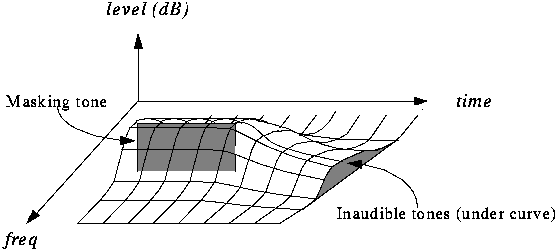
The masking effect This effect consists in that, when an audio signal has a tone at a given frequency, it produces a masking effect at the frequencies close to it, so that if at these nearby frequencies the signal does not exceed a certain power threshold cannot be heard and therefore it is not necessary to encode them. The form that this power threshold will take according to the position of the tone or the masking tones is what is called the psychoacoustic model, which as the name itself indicates is a perception model that tries to emulate the perception of the human ear.

In this graph we can see how if we put a tone at 1 Khz of 60 dB (masking tone) and then we put another tone at, for example 1.1 Khz and we vary the frequency of this, it is not possible to detect the presence of this second tone until its power exceeds the threshold presented in the figure.

In this case we see various masking tones and the resulting new hearing thresholds. In MP3, what is done is to divide the spectrum to be transmitted (that is, between 2 and 5 Khz) into frequency subbands, so that the power of the subband is evaluated and the masking threshold is created in the nearby subbands. Nearby subbands that exceed that power threshold are coded and those that do not exceed it are not coded.

Furthermore, the masking is not only in appearance but also in time as we can see in the figure.

The byte reserve: Often, some passages of a musical piece cannot be encoded at the same rate without altering the quality of the music. MP · then uses a small byte reservation that acts as a buffer using the capacity of passages that can be encoded at a lower rate in the given stream.
The stereo assembly In the case of a stereo signal, the MP3 format can use a few more tools to further compress the data.
Intensity stereo (IS) The human ear is not able to locate with complete certainty the spatial origin of sounds for very high or very low frequencies. This technique takes advantage of this, recording some frequencies as a monophonic signal, so that a minimum of spatial content is subtracted from the sound.
Mid / Side (M / S) Stereo When the left and right channels are similar then a middle channel (L + R) and a side channel (LR) are created, which are encoded instead of encoding the left channel on one side and the right for another. In this way it is possible to reduce the transmitted data using fewer bits for the lateral channel. Then during playback the MP3 decoder will reconstruct the left and right channels.

Huffman Coding: This coding technique is used at the end of the whole process. It works by creating variable-length codes, so that the symbols that appear in the bitstream most likely have shorter codes. The translation between symbols and codes is done using a table. Each code has a unique prefix so that the codes can be decoded correctly despite their variable length. This type of coding allows on average to reduce by 20% the amount of data to be transmitted. It is an ideal complement to perceptual coding since, during great polyphonies, perceptual coding is very efficient since many sounds are masked, but nevertheless little information is identical and Huffman’s algorithm becomes inefficient. During pure sounds there are few masking effects, but Huffman encoding is very efficient since digitized sound contains many repeating bytes.