Structure of an mp3


Free Download Mp4Gain
picture

Structure of an mp3


Structure of an mp3
Structure of an mp3

audio compression

Structure of an mp3
Structure of an mp3


The MP3 format began in the mid-1980s and the Fraunhofer Institute in Erlangen, Germany, was committed to high-quality, low-data-rate audio coding.

MP3 audio compression includes encoding and decoding in two parts. Encoding is converting the data in the WAV file into a highly compressed bitstream format, and decoding is accepting the bitstream and reconstructing it into the WAV file.

MP3 uses the distortion algorithm of Perceptual Audio Coding (PerceptualAudioCoding). The frequency range of sound perceived by the human ear is from 20 Hz to 220 kHz. MP3 cuts out a lot of redundant signals and irrelevant signals. The encoder transforms the original sound into the frequency domain through a hybrid filter bank. Using the psychoacoustic model, it is estimated that it may simply be The perceived noise level is quantized and converted to Huffman coding to form an MP3 bitstream. The decoder is much simpler and its task is to extract the sound signal from the encoded spectral line components through inverse quantization and inverse transformation.

When compressing audio data, the original sound data is first divided into fixed blocks, and then direct MDCT is performed. MDCT itself does not perform data compression, but only converts a set of time-domain data to frequency-domain data to obtain time-domain data. In case of change, the direct MDCT converts the value of each block into 512 MDCT coefficients. Quantization compresses data, and when bits are allocated to transformed samples after quantization, it is necessary to consider making the entire quantized block the smallest, which becomes lossy compression. When decompressing, the 512 coefficients are restored to the original sound data by reverse MDCT, and the original sound data before and after are inconsistent, because redundant and irrelevant data are removed during the compression process.


MP3 file structure
MP3 files are roughly divided into three parts: TAG_V2(ID3V2), Frame, TAG_V1(ID3V1)

ID3V2 Contains information such as author, composer, album, etc., the duration is not fixed, expanding the amount of information of ID3V1
framework


A series of frames, the number is determined by the file size and frame length

The length of each frame can be variable or fixed, determined by the bit rate.

Each FRAME is divided into two parts: frame header and data entity

The frame header records the bitrate, sample rate, version, and other mp3 information, and each frame is independent of each other.

ID3V1    Contains author, composer, album and other information, length is 128BYTE


Free Download Mp4Gain
picture


Mp4Gain Main Window
picture


Mp4Gain Features
picture


Free Download Mp4Gain
picture

Structure of an mp3

Structure of an mp3


Structure of an mp3
Structure of an mp3

The full name of MP3 is MPEG Audio Layer3, which is an efficient computer audio coding scheme.

Structure of an mp3
Structure of an mp3

It converts audio files into smaller files with .MP3 extension with a higher compression ratio and basically keeps the sound quality of the original file. MP3 is part of the ISO/MPEG standard. The ISO/MPEG standard describes audio compression using a high-performance perceptual coding scheme. This standard has been continuously updated to meet the pursuit of “high quality, low volume”. MPEGLayer1, Layer2 , and Layer 3 have now formed three audio codec schemes. The compression rate of MPEGLayer3 can reach from 1:10 to 1:12. A 1M MP3 file can play for 1 minute, while a 1 minute CD-quality WAV file (44100 Hz, 16-bit, two channels, 60 seconds) will take up 10M of space. , A 650M MP3 disc should play for more than 10 hours, while a CD with the same capacity should play for about 70 minutes. The advantages of MP3 are unmatched by CD.

MPEG audio standard
MPEG (Motion Picture Experts Group) is a moving picture expert group under ISO, and the MPEG standard it creates is widely used in various multimedia. MPEG standards include video and audio standards, among which MPEG-1, MPEG-2, MPEG-2AAC, and MPEG-4 audio standards have been developed.

The MPEG-1 and MPEG-2 standards use the same family of audio codecs: Layer 1, 2, and 3. A new feature of MPEG-2 is the use of low sample rate expansion to reduce data traffic, and another feature is multi-channel expansion, which increases the number of main channels to five. The MPEG-2AAC (MPEG-2 Advanced Audio Coding) standard was released by FraunhoferIIS and AT&T in 1997, with the goal of significantly reducing data traffic. MPEG22AAC adopts the Modified Discrete Cosine Transform (MDCT) algorithm and the sampling rate can be between 8 KHz and 96 KHz. The number of channels can be between 1 and 48.

MPEG Audio Layer1, 2, and 3 use the same filter bank, bitstream structure, and header information, and the sample rate is either 32 KHz, 4411 KHz, or 48 KHz. Layer1 is designed for DCC (DigitalCompactCassette) digital compression tape, the data rate is 384kbps, Layer2 has made a compromise between complexity and performance, and the data rate has been reduced to 256kbps-192kbps. Layer 3 was designed for low data traffic from the start, and data traffic ranges from 128 kbps to 112 kbps. Layer 3 adds MDCT transform, making its frequency resolution 18 times higher than Layer 2. Layer 3 also uses EntropyCoding similar to MPEGVid2eo, reducing redundant information. The vast majority of MP3s use the MPEG21 standard.

What are MP3 files?

What are MP3 files?

What are MP3 files?


The audio format is directly related to the quality and purpose of the audio track, i.e. where and on which device it will be played and what is its purpose.

What are MP3 files?

But before you can figure out the difference between them and choose the best audio format for your music, you need to know what categories they fall into. Let’s keep going!

Uncompressed audio is like a picture, and uncompressed audio is of better quality, larger file size, safer to copy, and nearly identical in detail to the original sound.

WAV is the most widely used of these audio formats and plays music just as accurately as it records it.

compressed audio
When music is compressed, the files become smaller and can be easily stored on a device. Due to this advantage, users tend to choose compressed audio more.

However, it must be remembered that some audio formats in this category may lose quality depending on the option selected, just like MP3 and AAC.

What is the best audio format?
As we said before, the first step in deciding on an audio format is to know the final objective of the track. Whether it’s for music lessons, performances, karaoke, auditions, or recording versions, you need to understand the pros and cons of each option.

WAV
WAV (Waveform Audio File Format) is an uncompressed format and therefore requires ample storage space. This is suitable for those who already work with music, such as subject matter experts, or users who want to edit audio.

At high fidelity rates, WAV faithfully reproduces the elements and characteristics of the original soundtrack. Also, this format allows you to choose between different sample rates and bit rates and can be used on multiple platforms.

FLAC
FLAC (Free Lossless Audio Codec) is one of the most widely used compression formats by music lovers these days.

Digital audio encoding allows you to preserve its quality, but the resulting file will be smaller. Over the years, this format has become more widely used and compatible with different devices and platforms.

FLAC is free and open source, ready to use and can be easily played on smartphones and other devices.

MP3
Before deciding on the best audio format, it is worth taking a look at the most famous format in the world of music: MP3.

MP3 is one of the leading audio compression formats, and has become synonymous with the convenience and efficiency of producing files quickly, with smaller files, and at a certain level of quality.

Many devices and programs can play this format. But MP3 is difficult to use in professional audio processing and advanced audio editing.

As is known, this format exists on almost all platforms and is ideal for sharing audio.

Another interesting factor is its bitrate, although in a compressed format it can vary depending on the user’s objectives and quality improvements.

AAC Like MP3, Advanced Audio Coding (AAC) is a more efficient audio format than its predecessor.

If you need to create smaller files with less storage space, AAC is a great choice, reducing the file size for the user while maintaining a high-quality audio track.

Compatible with different platforms and devices, it is convenient to apply in different situations.

Analysis of the above audio formats leads to the conclusion that it is impossible to say which format is better than the other, just that each target has its own ideal format. So before downloading or uploading a file, check what platform the music will play on and what it is for.

What are MP3 files?

What are MP3 files?

What are MP3 files?
What are MP3 files?

A file with the .mp3 extension is a digitally encoded file format for audio files, officially based on MPEG-1 Audio Layer III or MPEG-2 Audio Layer III.

What are MP3 files?
What are MP3 files?

It was developed by the Moving Picture Experts Group (MPEG) using Layer 3 audio compression. The compression achieved by the MP3 file format is 1/10 the size of a .WAV or .AIF file. This format offers the advantage of streaming such audio files over the Internet for online listening, which was previously not possible due to the large size of audio files. The sound quality of MP3 audio files can be controlled by setting parameters such as bit rate, sample rate, common or normal stereo.

A brief history of MP3

The MP3 format was invented and developed by a German company, Fraunhofer-Gesellshart. The algorithm has licensed patents for the compression techniques it uses. Here’s a helpful MP3 schedule:

• 1987 : The Fraunhofer Institute in Germany begins research on high-quality, low-bitrate audio coding. It’s called the EUREKA project EU147, Digital Audio Broadcasting.

• January 1988: The Moving Picture Experts Group (MPEG) is formed.

• **April 1989**: Fraunhofer patented the MP3 in Germany.

• 1992-Dieter Seitzer, who helped Fraunhofer with his research, integrated his audio encoding with MPEG-1.

• 1993 – Publication of the MPEG-1 standard.

• 1994 – The MPEG-2 standard was developed and released a year later.

• November 26, 1996 : US patent for MP3 is published.

• September 1998 – Fraunhofer begins to enforce the patent. People who used the MP3 audio codec paid Fraunhofer a license fee.

• February 1999 – SubPop, a record label, releases music in MP3 format, the first to do so.

• 1999 – The first portable MP3 player appears.

File format MP3##
MP3 files consist of MP3 frames, where each frame consists of a header and a data block. Frames are not independent and generally cannot be mined at arbitrary frame boundaries. The data blocks of a file contain frequency and amplitude information about the audio. The sync word in the header identifies the start of a valid frame. This is followed by 3 bits where the first bit indicates that it is an MPEG standard and the remaining 2 bits indicate that layer 3 is used; therefore, MPEG-1 Audio Layer 3 or MP3. After this, the value will vary depending on the MP3 file. ISO/IEC 11172-3 defines the range of values for each part of the header and the header specification. Most current MP3 files contain ID3 metadata, which precedes or follows the MP3 frame, as shown. Data streams may contain an optional checksum.

Mp3 (an audio encoding method) Part 3

Mp3 (an audio encoding method) Part 3

MP3 ENCODING

To generate bit-compliant (Layer 1.Layer 2.Layer 3) MPEGAudio files, ISO MPEG Audio committee members developed reference simulation software in C called ISO 11172-5.

MP3 ENCODING

It can demonstrate the first real-time DSP-based hardware decoding of compressed audio on some non-real-time operating systems. Various other MPEG audio was developed in real time for digital broadcasting (DAB radio and DVB TV) for consumer receivers and set-top boxes.
Later on July 7, 1994, Fraunhofer-Gesellschaft released the first MP3 encoder called l3enc.
The Fraunhofer development team selected the .mp3 extension on July 14, 1995 (previously the extension was .bit). Using Winplay3 (released September 9, 1995), the first real-time software MP3 player, many people were able to encode and play MP3 files on their own personal computers. Since hard drives at the time were relatively small (such as 500MB), this technology was essential for storing entertainment music on computers.
MP2, MP3 and Internet
In October 1993, MP2 (MPEG-1 Audio Layer 2) files appeared on the Internet and were often played by Xing MPEG Audio Player and later MAPlay developed by Tobias Bading for Unix. MAPplay was first released on February 22, 1994 and ported to the Microsoft Windows platform.
The only MP2 encoder products at first were Xing Encoder and CDDA2WAV, a CD ripper that converts audio tracks from CDs to WAV format.
Often considered the father of the online music revolution, the Internet Underground Music Archive (IUMA) was the first hi-fi music site on the Internet, with thousands of licensed MP2 recordings before MP3 and the web became popular. .
From the first half of 1995 to the end of the 1990s, MP3 began to flourish on the Internet. MP3’s popularity is largely due to the success of companies and software packages such as Winamp released by Nullsoft in 1997 and Napster released by Napster in 1999, and they are mutually reinforcing. These programs make it easy for normal users to play, create, share and collect MP3 files.
The debate about sharing MP3 files between peers has spread rapidly in recent years, mainly because compression makes file sharing possible, uncompressed files are too large to share. Since MP3 files are widely spread over the Internet, Napster has been sued by some of the major record labels to protect their copyright (see Copyright).
Commercial online music distribution services, such as the iTunes Music Store, often choose other proprietary or DRM-enabled music file formats to control and limit the use of digital music. Formats that support DRM are used to protect copyrighted material from copyright infringement, but most protection mechanisms can be broken in some way. Computer experts can use these methods to generate unlocked files that can be freely copied. One notable exception is Microsoft’s Windows Media Audio 10 format, which has yet to be cracked. If a compressed audio file is desired, the recorded audio stream must be compressed and the sound quality will be degraded.
streaming audio quality
Because MP3 is a lossy compression format, it offers a variety of options for different “bit rates,” that is, the number of encoded data bits needed to represent the audio per second. Typical speeds are between 128 kbps and 320 kbps (kbit/s). In contrast, the uncompressed audio bitrate on a CD is 1411.2 kbps (16 bits/sample × 44100 samples/sec × 2 channels).
MP3 files encoded with lower bit rates generally play at a lower quality. If you use too low a bitrate, “compression artifact” (sounds not present in the original recording) will appear during playback. A good example of compression noise is the sound of compressed cheering; due to its randomness and sharp changes, encoder errors are more pronounced and sound like echoes.

Mp3 (an audio encoding method) Part 2

Mp3 (an audio encoding method) Part 2

mp3 3ncoding

MPEG-1 Audio Layer 2 encoding began as a digital audio broadcast (DAB) managed by Egon Meier-Engelen at the German Deutsche Forschungs- und Versuchsanstalt für Luft- und Raumfahrt (later known as Deutsches Zentrum für Luft- und Raumfahrt, German Space Center). )draft.

mp3 encoding

This project is funded by the European Union as a EUREKA research project, and its name is commonly known as EU-147. The study period for EU-147 was from 1987 to 1994.
2. By 1991, two proposals had emerged: Musicam (called Layer 2) and ASPEC (Adaptive Spectrum Sensing Entropy Coding). The Musicam method proposed by Philips of the Netherlands, CCETT of France, and the Institut für Rundfunktechnik of Germany was chosen due to its simplicity, error robustness, and lower computational effort in high-quality compression. The Musicam format based on subband coding is a key factor in determining the MPEG audio compression format (sample rate, frame structure, header, sample points per frame). This technology and its design philosophy are fully integrated into the definition of ISO MPEG Audio Layer I, II and later Layer III (MP3) formats. The standard was developed by Leon van de Kerkhof (Layer I) and Gerhard Stoll (Layer II) under the auspices of Prof. Mussmann (University of Hannover).
3. A working group consisting of Leon Van de Kerkhof from the Netherlands, Gerhard Stoll from Germany, Yves-François Dehery from France and Karlheinz Brandenburg from Germany absorbed design ideas from Musicam and ASPEC and added their own design ideas to develop an MP3. MP3 can achieve MP2 sound quality from 192 kbit/s to 128 kbit/s.
4. All of these algorithms eventually became part of the first group of MPEG standards, MPEG-1, in 1992, resulting in the international standard ISO/IEC 11172-3 published in 1993. Further work on MPEG audio was eventually became part of the MPEG-2 standard, a second group of MPEG standards developed in 1994, officially known as ISO/IEC 13818-3, first published in 1995.
5. The compression efficiency of the encoder is generally defined by the bit rate, because the compression rate depends on the number of bits (: in: bit depth) and the sampling rate of the input signal. However, there are often products that use CD parameters (44.1 kHz, two channels, 16 bits per channel, or 2×16 bits) as the compression ratio reference, and the compression ratio using this reference is usually higher, which which also shows that the compression ratio is very important for lossy compression problems.
6. Karlheinz Brandenburg used Suzanne Vega’s song Tom’s Diner on CD to test MP3 compression algorithms. This song is used because the song’s smooth and simple melody makes it easier to hear glitches in the compressed format during playback. Some jokingly refer to Suzanne Vega as “the mother of MP3”. Some more serious and critical audio extracts (glockenspiel, triangle, accordion…) from the EBU V3/SQAM reference CD are used by professional audio engineers to assess the subjective perceived quality of the MPEG audio format.

Mp3 (an audio encoding method)

Mp3 (an audio encoding method)

Mp3 encxoding

MP3 is an audio compression technology, its full name is Moving Picture Experts Group Audio Layer III, called MP3.

mp3 encoding

It is designed to drastically reduce the amount of audio data. Using MPEG Audio Layer 3 technology, music is compressed into a smaller capacity file with a compression ratio of 1:10 or even 1:12, and for most users, playback quality is not as good as the original uncompressed. audio Significant decrease. It was invented and standardized in 1991 by a group of engineers at the Fraunhofer-Gesellschaft research organization in Erlangen, Germany. Music stored in the form of MP3 is called MP3 music, and a machine that can play MP3 music is called an MP3 player.

Motion Picture Expert Compression Standard Audio Layer 3 foreign name Moving Picture Expert Group Audio Layer III research organization Fraunhofer-Gesellschaft type audio coding advantage Drastically reduce the amount of audio data defect sound quality loss
content
1 Features
2 story
▪ origin
▪ go to the masses
3 audio quality
4 patent issues
transmission characteristics
MP3 converts the time-domain waveform signal to a frequency-domain signal by taking advantage of the human ear’s insensitivity to high-frequency sound signals and splits it into multiple frequency bands, using different compression rates. for different frequency bands and increasing the compression ratio for high frequencies (even ignoring the signal) Use a small compression ratio for low frequency signals to ensure that the signal is not distorted. In this way, it is equivalent to discarding the high-frequency sound that is basically inaudible to the human ear [1], keeping only the audible low-frequency part, thus compressing the sound with a compression ratio of 1:10 or even 1: 12. Because the full name of this compression method is called MPEG Audio Player3, people call it MP3 for short.
According to the MPEG specification, AAC (Advanced Audio Coding) in MPEG-4 will be the next generation of the MP3 format.
Compared to CD, FLAC and APE lossless compression formats, the sound quality of the highest parameter MP3 (320 Kbps) is not much different.
MP3 players are dying
When they first came out, MP3 players were at the forefront of the digital revolution. However, sales of iPods and other MP3 players in the UK fell sharply in 2012 as consumers turned to other digital products such as smartphones.
In 2012, sales of MP3 players in the UK market were £110m ($178m), just 29% of the £381m in 2011, according to market research firm Mintel. Mintel expects total MP3 player sales in the UK market to halve by 2017. In the worst case scenario, total MP3 player sales in the UK market will be just 25 million dollars five years later. [23]
1. MP3 is a data compression format;
2. Discards pulse code modulation (PCM) audio data that is not important to the human ear (similar to JPEG is a lossy image compression), resulting in a much smaller file size;
3. MP3 audio can be compressed according to different bit rates, providing a variety of trade-offs between data size and sound quality. The MP3 format uses a mixed conversion mechanism to convert audio domain signals. time in frequency domain signals;
4. 32 band polyphase integral filter (PQF);
Modified discrete cosine filter (MDCT) of 5, 36 or 12 taps; each subband size can be independently selected between 0…1 and 2…31;
6. MP3 not only has extensive client software support, but also has a lot of hardware support, such as portable media players (referring to MP3 players), DVD and CD players, outgoing calls

ENCODING PRINCIPLES OF THE MP3 FORMAT.

ENCODING PRINCIPLES OF THE MP3 FORMAT.

Mp3 Encoding

Mp3, or fully MPEG-1, 2 and 2.5 Layer 3, is one of the most popular and widespread standards for storing audio data.

MP3 ENCODING

In this article, we will not delve into the history of creation and further development, but will consider the basic principles of the standard and examples of its implementation.

The mp3 standard does not establish a specific compression algorithm to “encode” the source data, but rather describes the essence of the possible methods.

The quality of the result obtained depends on the modification of the algorithm used, embedded in any encoding program of the “codec”, and on the quality of the original audio data.

There are 3 most common modifications of the mp3 format, which differ in the compression ratio parameters of the original audio data.

Name
Modification of the rule
Data rate per second (bit rate) Possible sample rates
MPEG-1 layer 3
32 – 320 kbps 32000 Hz
44100 Hz
48000 Hz
MPEG-2 Layer 3 16 – 160 kbps 16000 Hz
22050 Hz
24000 Hz
MPEG-2.5 Layer 3 8 – up to 160 kbps 8000 Hz
11025 Hz

Processing begins with dividing the original audio signal into equal time intervals: equal frames, for example 0.05 or 0.26 seconds, after which each frame is analyzed and compressed according to general or individual parameters based on the data of the previous and next frames.

Most of the compression algorithms used are based on the perceptual characteristics of the human ear. Let’s consider the main options, which, as a rule, are applied in a complex way.

It is worth starting with the fact that, by ear, the average person is capable of perceiving a frequency range of approximately 10 Hz to 20,000 Hz. With growth, changes occur in the hearing aid and, for most, the sensitivity the higher frequency range decreases, as a result of which, in some mp3 modifications, during compression, all frequencies above 16000 hertz are cut off, which can significantly reduce the amount of information.

Audio recordings can be encoded in stereo (a surround sound effect that uses separate channels for the left and right speakers) or mono (the opposite of stereo). In mp3 format, different tracks are not recorded for each of your speakers, but information about the differences between the left and right channels.

In acoustics, there is a concept like “harmonics”, these are the frequencies of the “sounds” that sound together with the main and most prominent tone. For example, when hitting a drum, the loudest sound will be the tone and the minor, weaker, will be the harmonics.

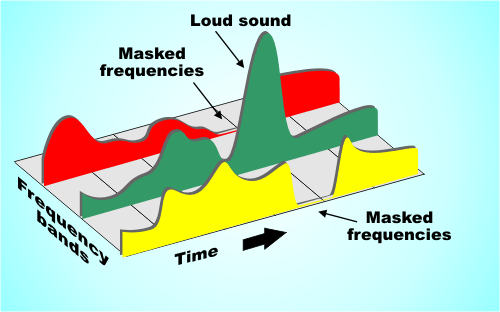
After such a loud sound, the so-called “period of deafness” occurs, during a period of duration in which a person’s hearing practically does not respond to changes.

If in the intervals of the “deafness period”, remove all frequencies, then the errors of perception, will practically not allow to notice their absence, because of this, during compression, the weakest harmonics are cut off, located close to the most sounds. strong: tones.

A method is used to replace the near peak values ​​of the signal “peaks” (in terms of volume) with an average value.

There is a concept as bit rate: this is a value that characterizes the number of transmitted bits of information “units” during a period of time, usually one second.
The higher the bit rate, the better the audio detail will be, as long as the original, uncompressed audio data is of high quality.

As you can guess, digital formats consist of certain code sequences, in other words of sequences 0 and 1.
To save space, frequent joins within a file are assigned unique identifiers that replace long sequences.

Thanks to such complex influences, it is possible to compress the original audio signal into one of the popular formats with loss of quality – the mp3 format.

Various experiments have been carried out many times in order to reveal how significant the differences are before and after compression in mp3. As tests have shown, differences, some similar moments were not always possible, quickly and to distinguish, even when reproduced on equipment with higher fidelity.

For those who have never had the opportunity to directly compare the original and compressed audio recording, in most cases it will take some time or even find obvious differences.

MP3 ENCODING

MP3 ENCODING

Mp3 encoding

The first step in encoding by the user is to specify a bit rate. This indicates the quality and at the same time the storage requirement of an MP3 file.

MP3 encoding

COMPRESSION RATES

With most recording programs, the quality of an MP3 file can be freely selected before recording begins. According to the Fraunhofer Institute, the CD quality of an MP3 file is a bit rate of 112 to 128 kbit per second, other measurements put CD quality at up to 160 kbit per second. However, the most used and sufficient for most listeners is 128 kbit.

In comparison, a corresponding CD quality for Layer 1 is 384 kbit / s and 256 kbit / s for Layer 2. A wave file works with a 1.4 Mbit / s bit rate and therefore works with roughly the same space requirements. as a CD audio track (CDA).

74 or 80 minutes of music can be put on a CD (depending on the size of the sound carrier), in MP3 format with a bit rate of 128 kbit / s, 11.5 or 12.4 hours would be possible.

PSYCHOACOUSTICS

MP3 audio compression relies on filtering out unnecessary information. Psychoacoustics is a science that deals with the perception of sound by the human ear.

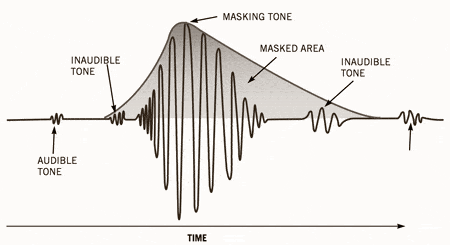
Eg: You are in a disco. Loud music blasts through huge speakers and you try to talk to each other. This is almost impossible unless you yell. In acoustics, this is called masking. To eliminate masking, the sound level of speech should be raised to such an extent that the interfering signal (in this case music) no longer covers it.

Processes like this belong to the fundamental areas of psychoacoustics.

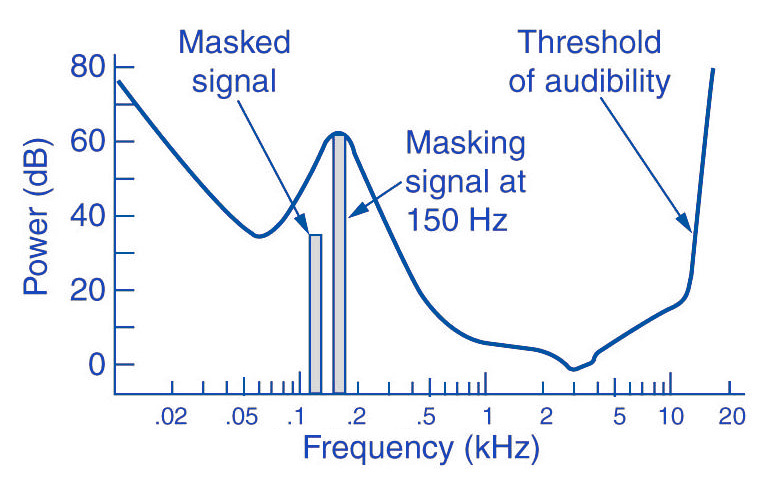
Tones below this threshold are not heard and therefore become noise during MP3 recording (skipped).

The overlays work as follows: you have, for example (picture 2) a tone with 1 kHz (1) and another tone with 1.1 kHz, which is approximately 18 dB lower (2). The second shade is completely superimposed on the first. This also works for other weaker tones (see Fig. 2). Another tone with a frequency of 2 kHz, which is also 18 dB quieter than the first, would not overlap because it is just outside the threshold of the first tone.

Noise can be another compression option for MP3 recording. The fact that when a sound is digitized it cannot be sampled at an infinite frequency, a noise imperceptible to the human ear (quantization noise) is generated. It is used as a model for the MPEG audio layer and thus increases the noise around a tone. Above all, loud and short tones mask a certain range in the frequency range before and after themselves where the weakest signals would not be audible. With MP3 encoding, the noise level increases in this area, as if digitized at a lower resolution.

There is also masking in the temporal area: hearing needs a so-called “recovery time” for loud and quiet noises until it is fully functional again. This is especially noticeable with strong, short, and rapidly rising tones. After a delay of about 5 ms, the hearing threshold drops again and after about 200 ms it reaches the normal level, the so-called resting hearing threshold. This effect is called post-masking. The effect of pre-masking is less important, but even more impressive: it is based on the fact that the brain processes loud sounds more quickly than soft ones. To some extent, the strong impulse outweighs the silent one on the way to the brain. This results in a pre-masking time of up to 20 ms.

The above psychoacoustic algorithm is used in the following steps:
– Audio information is divided into subbands
– Subbands are reduced
– 16-bit samples are generated
– Samples are compressed
– Compressed samples are combined into blocks
– Coding according to Huffmann Procedure
: summary in tables

DIVIDED INTO SUBBANDS

Depending on the frequency of the acoustic information, it is divided into 32 subbands. The bands are of different sizes due to adaptation to the human ear according to a psychoacoustic model.

The division is done with the help of a polyphase filter. This means that the samples are decimated and filtered simultaneously.

In layers 1 and 2, the bands were the same size with a bandwidth of 625 Hz each. The reason for this division is to provide the algorithm with a better target.

SUBBAND ​​REDUCTION

The MP3 encoder now examines each of the subbands according to the psychoacoustic model for expendable frequencies. Here, the masking threshold is determined, then the subbands whose level is below this masking function are removed. Another reason for dropping an entire sub-band could be that it is inaudible due to the pitch, similar to a dog’s whistle.

CONVERSION INTO 16-BIT SAMPLES

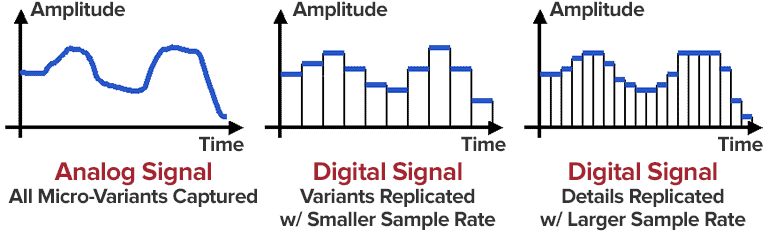
The frequency bands are sampled and converted to 16-bit samples. Tones are broken down into digital signals and further processed as numerical values. The sample rate determines the length of the sample intervals. However, neither the measurement of the amplitude nor the size of the sampling intervals can be infinitely precise. For this reason, with analog-digital conversion, a value is rounded between two sample points. This results in rounding errors that are noted in what is known as quantization noise. This can be kept inaudible using the highest possible resolution: with 8-bit, a maximum of 256 levels can be displayed, with 12-bit and 4096 and with 16-bit 65536 individual steps, so that noise is not heard.

However, some samples are also digitized with a lower sample rate. In the eighth subband, for example, there is a tone with 1 kHz and 60 dB. The MPEG audio encoder now calculates the masking threshold and recognizes that it is 36dB lower. The acceptable signal-to-noise ratio here is 24 dB, which corresponds to a 4-bit resolution, since the two values ​​are directly related. Leaving one bit out of resolution increases the noise level by 6dB. Since an audio CD is generally digitized with 16 bits, considerable data reduction can be applied here.

SAMPLE COMPRESSION

The next step is to compress the samples further. However, this process no longer has anything to do with the original shades. From here on, compression is only data-driven.

Each sample consists of 16 bits, but not all of them are absolutely necessary to represent a level. For example, leading zeros can be omitted. If, for example, the value 0000011101010101 is obtained for a sample, the algorithm truncates the result to 11101010101. To reconstruct the original 16 bits from this information, the decoder needs two pieces of information: the scale factor and the bit allocation. The scale factor indicates where the remaining bits of the sample were in their original state. The bit mapping contains the information about how many bits are left in the sample, since you can no longer calculate with a fixed 16-bit number. However, if you were to store these values ​​individually for each sample, you wouldn’t gain much,

GROUPING THE SAMPLES

The 16-bit samples that were just created are now combined into blocks. There are two different block lengths for this purpose: the short blocks with twelve samples and the long blocks with 36 samples.

Long blocks are used for low frequencies. However, long blocks would not allow sufficient resolution at higher frequencies; short blocks are used here. In the so-called mixed block mode, long blocks are used for the two frequency bands with the lowest frequencies. For the remaining 30 frequency bands, it is the turn of the short blocks. This mode allows better frequency resolution in the low frequencies without paying tribute to the sampling frequency in the high frequencies.

HUFFMANN CODING

The last step in MP3 compression is Huffmann encoding. This algorithm is also used, for example, in packaging programs such as WinZip. The frequency of certain values ​​is important here. However, the subbands are organized in advance. Subbands with lower frequencies tend to contain significantly more values ​​than those with high frequencies. The subbands are divided into three groups according to their frequency. Each area has its own Huffmann tree (Fig. 3) to achieve the optimal compression factor.

As a first step, the encoder excludes high frequencies; encoding is not necessary here, as its size can be derived from those of the other two regions. The mid-frequency range is treated as is, and the low frequencies are again divided into three regions, each of which is assigned its own Huffmann tree. The appearance of a Huffmann tree is stored in the MP3 file.

The structure of a Huffmann tree works as follows: frequently occurring values ​​are given a short sequence of bits, while rare values ​​are given a long one, so the algorithm first determines the distribution of values ​​within the data to be compressed.

To determine what is known as the Huffman tree, you start with the two rarest values. They are assigned a “0” or a “1”. The two values ​​are summarized, in the order that they are now represented by the sum of their frequency. The same is true for the next two rarer values. This process ends when only one value remains. The result of this procedure is a tree structure. The encoding is based on this structure. Each branch on the left receives a 0, each branch on the right is identified by a “1”. In our little example, the least common would be

Value 4 represented by the sequence of bits 010. The most common value 6, on the other hand, is assigned a simple 1.

FRAMEWORK SUMMARY

The result of the above compression is summarized in so-called frames. Each of these frames contains 1152 samples (32 subbands x 36 samples). A frame consists of a header, a checksum check, the actual audio data, and in certain circumstances a so-called bit repository. Such a deposit arises when the samples within the frame can be compressed in such a way that the full theoretical number of bits in a frame is not required. The encoder can fall back on these buckets if the available bits are insufficient for a subsequent frame. A distinction must be made between two terms: frame size and frame length.

The size of the frame is determined by the number of samples and is constant within a layer. In Layer 1 format, this is always 384 samples per frame, in Layers 2 and 3 1152 per frame. However, the length of the frame may differ at Layer 3 due to the change in bit rate or the pool of unfilled bits. The frame also contains the aforementioned information about the scale factor and bit allocation to be able to reconstruct all the samples again.

A file header, as it is known from other file formats, does not exist in an MP3 file. In the case of an image file, a header would contain information about the entire image (e.g. size, color depth, resolution