Mp3: Frequency band allocation in MP3 encoding


Free Download Mp4Gain
picture

Frequency Band Allocation in MP3 Encoding

Frequency Band Allocation in MP3 Encoding

Let’s talk about frequency band allocation in MP3 encoding

When I first learned about frequency band allocation in MP3 encoding, it reminded me of organizing items in a suitcase. The suitcase is the MP3 file, and the items are the audio frequencies. Each item—or frequency—needs just the right space to ensure everything fits while keeping what’s essential. This is the magic behind MP3 encoding. It breaks audio into smaller chunks or frequency bands, prioritizing what the human ear can hear best and discarding the rest. This ensures the file size stays manageable while preserving quality.

The MP3 format utilizes psychoacoustic models to understand which frequencies are most important. High-priority bands hold rich, detailed sounds, while less critical bands—those our ears are less sensitive to—might be reduced or eliminated. It’s like deciding to pack a sweater over a scarf when you’re short on space. This concept fundamentally transforms how we store and share music.

Understanding frequency bands in audio compression

Frequency bands in audio compression are like compartments in a toolbox. Each one serves a specific purpose, organizing the sound spectrum into manageable chunks. Low frequencies, like bass, occupy one area, while mid and high frequencies, like vocals and cymbals, take other sections.

This segmentation allows MP3 encoders to apply different levels of compression to each band. For instance, low frequencies need more data for clarity because they carry much of the song’s energy. High frequencies, on the other hand, are often less noticeable to our ears and can handle more compression. The brilliance lies in tailoring the process for each band, maintaining a balance between quality and file size.

The psychoacoustic principle and its role

The psychoacoustic principle is the science behind why MP3s sound good despite compression. When I explain it, I think about sunglasses. Sunglasses filter out harsh light while letting in the parts that help you see clearly. Similarly, MP3 encoding filters out inaudible sounds while preserving those we notice most.

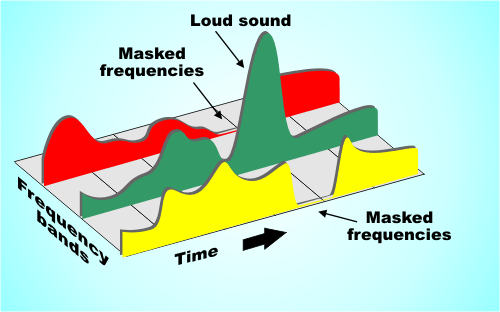
This principle is based on auditory masking, where louder sounds mask softer ones in similar frequencies. For example, a drumbeat can overpower a faint whisper in a recording. MP3 encoding uses this natural phenomenon to reduce file size by discarding sounds you wouldn’t hear anyway. It’s an elegant way of mimicking how our ears work.

How MP3 divides and processes frequency bands

MP3 encoding divides audio into 32 sub-bands using a filter bank, much like slicing a pizza into smaller pieces. Each slice— or sub-band—represents a portion of the audio spectrum. The encoder assigns bits to these slices based on their importance and complexity.

Critical bands, such as those carrying vocals or melody, receive more bits to preserve quality. Meanwhile, less significant bands, like subtle background noise, are given fewer bits. This division allows MP3s to shrink file sizes dramatically without losing the essence of the audio.

The importance of bit allocation per band

Bit allocation per band in MP3 encoding is like budgeting money. You spend more on essentials, like rent, and less on luxuries, like a fancy coffee. In MP3s, bits are currency, and they’re distributed across frequency bands based on priority.

When a band carries complex or prominent sounds, like a lead guitar riff, the encoder assigns more bits to capture its detail. Simpler or quieter bands get fewer bits, preserving overall quality while minimizing file size. This selective allocation ensures an efficient use of storage space.

Challenges with frequency band allocation

Frequency band allocation isn’t without its hurdles. One challenge is balancing compression and quality. Over-compression can make audio sound “tinny” or lose its depth. I’ve heard poorly encoded files where vocals sounded muffled, ruining the listening experience.

Another issue is compatibility. Not all playback devices process MP3s equally well. Older hardware might struggle with files that heavily compress certain frequency bands. This makes finding the right encoding balance vital for universal usability.

Advanced techniques to improve frequency band allocation

Advancements in MP3 encoding have introduced smarter ways to handle frequency bands. Dynamic bit allocation, for example, adjusts bit distribution in real-time based on audio complexity. It’s like turning up the AC in a car when driving through a hot desert—adaptive and efficient.

Another technique is joint stereo, which optimizes how stereo channels share data. Instead of encoding each channel separately, joint stereo focuses on shared information, saving bits without sacrificing quality. These innovations keep MP3s relevant even as audio technology evolves.

Frequency band allocation in modern MP3 encoding

Modern MP3 encoding leverages AI-driven algorithms to refine frequency band allocation. These algorithms analyze the audio content more accurately, predicting how listeners will perceive changes. I’ve noticed newer MP3s sounding much richer despite smaller file sizes, thanks to these advancements.

Additionally, encoders now focus more on preserving spatial cues. For example, they ensure that a listener can still distinguish instruments in a symphony, maintaining an immersive experience. This shift toward perceptual accuracy shows how far MP3 technology has come.

Latest words on frequency band allocation in MP3 encoding

Frequency band allocation in MP3 encoding is an intricate dance of science and art. By prioritizing the most critical sounds and optimizing bit distribution, MP3s achieve a balance between quality and file size. This process, rooted in psychoacoustics, has made MP3s a cornerstone of digital audio.

If you’re looking for a way to enhance your MP3 files, Mp4Gain offers tools to improve their sound quality. It’s an excellent choice for users who want more control over their audio files.


FAQ About frequency band allocation

What is frequency band allocation?

Frequency band allocation is the process of dividing an audio signal into distinct frequency ranges, optimizing how they’re encoded to preserve quality.

Why is frequency band allocation important in MP3 encoding?

It helps reduce file size by prioritizing important sounds and discarding inaudible ones, maintaining a balance between quality and compression.

How do psychoacoustics influence MP3 encoding?

Psychoacoustics determines how humans perceive sound, guiding MP3 encoding to focus on audible frequencies and mask others.

What are critical bands in MP3 encoding?

Critical bands are frequency ranges that our ears process similarly, helping encoders decide where to allocate bits most efficiently.

How does dynamic bit allocation work?

Dynamic bit allocation adjusts the number of bits assigned to frequency bands in real-time, depending on audio complexity.

What is joint stereo in MP3 encoding?

Joint stereo encodes shared audio data between channels, reducing file size while preserving stereo effects.

Can MP3 encoding handle spatial audio?

Modern MP3 encoders incorporate techniques to preserve spatial cues, ensuring an immersive listening experience.

How do modern MP3 encoders differ?

They use AI-driven algorithms for better frequency band allocation, improving quality without increasing file size.

What are the challenges of frequency band allocation?

Challenges include balancing compression and quality, ensuring compatibility with devices, and preserving auditory depth.

How does frequency band allocation improve MP3s?

It ensures the most important sounds are preserved, creating high-quality files that are compact and efficient.

Comments:

This was super helpful! I always wondered how MP3s manage to keep their quality while being so small.

Wow, learned so much. Could you go deeper into the role of AI in MP3 encoding? That part fascinated me!

I don’t know about anyone else, but my old MP3 files sound nothing like this description. Is there a way to fix them?

This makes it so much easier to understand. The comparison to packing a suitcase nailed it. Thanks a ton!

Great article. I still feel like some points about joint stereo could be clearer. Maybe add an example?

This article really explained things in a simple way. It’s exactly what I needed for my music project.


Free Download Mp4Gain
picture


Mp4Gain Main Window
picture


Mp4Gain Features
picture


Free Download Mp4Gain
picture

Mp3 (an audio encoding method) Part 3

Mp3 (an audio encoding method) Part 3

MP3 ENCODING

To generate bit-compliant (Layer 1.Layer 2.Layer 3) MPEGAudio files, ISO MPEG Audio committee members developed reference simulation software in C called ISO 11172-5.

MP3 ENCODING

It can demonstrate the first real-time DSP-based hardware decoding of compressed audio on some non-real-time operating systems. Various other MPEG audio was developed in real time for digital broadcasting (DAB radio and DVB TV) for consumer receivers and set-top boxes.
Later on July 7, 1994, Fraunhofer-Gesellschaft released the first MP3 encoder called l3enc.
The Fraunhofer development team selected the .mp3 extension on July 14, 1995 (previously the extension was .bit). Using Winplay3 (released September 9, 1995), the first real-time software MP3 player, many people were able to encode and play MP3 files on their own personal computers. Since hard drives at the time were relatively small (such as 500MB), this technology was essential for storing entertainment music on computers.
MP2, MP3 and Internet
In October 1993, MP2 (MPEG-1 Audio Layer 2) files appeared on the Internet and were often played by Xing MPEG Audio Player and later MAPlay developed by Tobias Bading for Unix. MAPplay was first released on February 22, 1994 and ported to the Microsoft Windows platform.
The only MP2 encoder products at first were Xing Encoder and CDDA2WAV, a CD ripper that converts audio tracks from CDs to WAV format.
Often considered the father of the online music revolution, the Internet Underground Music Archive (IUMA) was the first hi-fi music site on the Internet, with thousands of licensed MP2 recordings before MP3 and the web became popular. .
From the first half of 1995 to the end of the 1990s, MP3 began to flourish on the Internet. MP3’s popularity is largely due to the success of companies and software packages such as Winamp released by Nullsoft in 1997 and Napster released by Napster in 1999, and they are mutually reinforcing. These programs make it easy for normal users to play, create, share and collect MP3 files.
The debate about sharing MP3 files between peers has spread rapidly in recent years, mainly because compression makes file sharing possible, uncompressed files are too large to share. Since MP3 files are widely spread over the Internet, Napster has been sued by some of the major record labels to protect their copyright (see Copyright).
Commercial online music distribution services, such as the iTunes Music Store, often choose other proprietary or DRM-enabled music file formats to control and limit the use of digital music. Formats that support DRM are used to protect copyrighted material from copyright infringement, but most protection mechanisms can be broken in some way. Computer experts can use these methods to generate unlocked files that can be freely copied. One notable exception is Microsoft’s Windows Media Audio 10 format, which has yet to be cracked. If a compressed audio file is desired, the recorded audio stream must be compressed and the sound quality will be degraded.
streaming audio quality
Because MP3 is a lossy compression format, it offers a variety of options for different “bit rates,” that is, the number of encoded data bits needed to represent the audio per second. Typical speeds are between 128 kbps and 320 kbps (kbit/s). In contrast, the uncompressed audio bitrate on a CD is 1411.2 kbps (16 bits/sample × 44100 samples/sec × 2 channels).
MP3 files encoded with lower bit rates generally play at a lower quality. If you use too low a bitrate, “compression artifact” (sounds not present in the original recording) will appear during playback. A good example of compression noise is the sound of compressed cheering; due to its randomness and sharp changes, encoder errors are more pronounced and sound like echoes.

Mp3 (an audio encoding method) Part 2

Mp3 (an audio encoding method) Part 2

mp3 3ncoding

MPEG-1 Audio Layer 2 encoding began as a digital audio broadcast (DAB) managed by Egon Meier-Engelen at the German Deutsche Forschungs- und Versuchsanstalt für Luft- und Raumfahrt (later known as Deutsches Zentrum für Luft- und Raumfahrt, German Space Center). )draft.

mp3 encoding

This project is funded by the European Union as a EUREKA research project, and its name is commonly known as EU-147. The study period for EU-147 was from 1987 to 1994.
2. By 1991, two proposals had emerged: Musicam (called Layer 2) and ASPEC (Adaptive Spectrum Sensing Entropy Coding). The Musicam method proposed by Philips of the Netherlands, CCETT of France, and the Institut für Rundfunktechnik of Germany was chosen due to its simplicity, error robustness, and lower computational effort in high-quality compression. The Musicam format based on subband coding is a key factor in determining the MPEG audio compression format (sample rate, frame structure, header, sample points per frame). This technology and its design philosophy are fully integrated into the definition of ISO MPEG Audio Layer I, II and later Layer III (MP3) formats. The standard was developed by Leon van de Kerkhof (Layer I) and Gerhard Stoll (Layer II) under the auspices of Prof. Mussmann (University of Hannover).
3. A working group consisting of Leon Van de Kerkhof from the Netherlands, Gerhard Stoll from Germany, Yves-François Dehery from France and Karlheinz Brandenburg from Germany absorbed design ideas from Musicam and ASPEC and added their own design ideas to develop an MP3. MP3 can achieve MP2 sound quality from 192 kbit/s to 128 kbit/s.
4. All of these algorithms eventually became part of the first group of MPEG standards, MPEG-1, in 1992, resulting in the international standard ISO/IEC 11172-3 published in 1993. Further work on MPEG audio was eventually became part of the MPEG-2 standard, a second group of MPEG standards developed in 1994, officially known as ISO/IEC 13818-3, first published in 1995.
5. The compression efficiency of the encoder is generally defined by the bit rate, because the compression rate depends on the number of bits (: in: bit depth) and the sampling rate of the input signal. However, there are often products that use CD parameters (44.1 kHz, two channels, 16 bits per channel, or 2×16 bits) as the compression ratio reference, and the compression ratio using this reference is usually higher, which which also shows that the compression ratio is very important for lossy compression problems.
6. Karlheinz Brandenburg used Suzanne Vega’s song Tom’s Diner on CD to test MP3 compression algorithms. This song is used because the song’s smooth and simple melody makes it easier to hear glitches in the compressed format during playback. Some jokingly refer to Suzanne Vega as “the mother of MP3”. Some more serious and critical audio extracts (glockenspiel, triangle, accordion…) from the EBU V3/SQAM reference CD are used by professional audio engineers to assess the subjective perceived quality of the MPEG audio format.

Mp3 (an audio encoding method)

Mp3 (an audio encoding method)

Mp3 encxoding

MP3 is an audio compression technology, its full name is Moving Picture Experts Group Audio Layer III, called MP3.

mp3 encoding

It is designed to drastically reduce the amount of audio data. Using MPEG Audio Layer 3 technology, music is compressed into a smaller capacity file with a compression ratio of 1:10 or even 1:12, and for most users, playback quality is not as good as the original uncompressed. audio Significant decrease. It was invented and standardized in 1991 by a group of engineers at the Fraunhofer-Gesellschaft research organization in Erlangen, Germany. Music stored in the form of MP3 is called MP3 music, and a machine that can play MP3 music is called an MP3 player.

Motion Picture Expert Compression Standard Audio Layer 3 foreign name Moving Picture Expert Group Audio Layer III research organization Fraunhofer-Gesellschaft type audio coding advantage Drastically reduce the amount of audio data defect sound quality loss
content
1 Features
2 story
▪ origin
▪ go to the masses
3 audio quality
4 patent issues
transmission characteristics
MP3 converts the time-domain waveform signal to a frequency-domain signal by taking advantage of the human ear’s insensitivity to high-frequency sound signals and splits it into multiple frequency bands, using different compression rates. for different frequency bands and increasing the compression ratio for high frequencies (even ignoring the signal) Use a small compression ratio for low frequency signals to ensure that the signal is not distorted. In this way, it is equivalent to discarding the high-frequency sound that is basically inaudible to the human ear [1], keeping only the audible low-frequency part, thus compressing the sound with a compression ratio of 1:10 or even 1: 12. Because the full name of this compression method is called MPEG Audio Player3, people call it MP3 for short.
According to the MPEG specification, AAC (Advanced Audio Coding) in MPEG-4 will be the next generation of the MP3 format.
Compared to CD, FLAC and APE lossless compression formats, the sound quality of the highest parameter MP3 (320 Kbps) is not much different.
MP3 players are dying
When they first came out, MP3 players were at the forefront of the digital revolution. However, sales of iPods and other MP3 players in the UK fell sharply in 2012 as consumers turned to other digital products such as smartphones.
In 2012, sales of MP3 players in the UK market were £110m ($178m), just 29% of the £381m in 2011, according to market research firm Mintel. Mintel expects total MP3 player sales in the UK market to halve by 2017. In the worst case scenario, total MP3 player sales in the UK market will be just 25 million dollars five years later. [23]
1. MP3 is a data compression format;
2. Discards pulse code modulation (PCM) audio data that is not important to the human ear (similar to JPEG is a lossy image compression), resulting in a much smaller file size;
3. MP3 audio can be compressed according to different bit rates, providing a variety of trade-offs between data size and sound quality. The MP3 format uses a mixed conversion mechanism to convert audio domain signals. time in frequency domain signals;
4. 32 band polyphase integral filter (PQF);
Modified discrete cosine filter (MDCT) of 5, 36 or 12 taps; each subband size can be independently selected between 0…1 and 2…31;
6. MP3 not only has extensive client software support, but also has a lot of hardware support, such as portable media players (referring to MP3 players), DVD and CD players, outgoing calls

MP3 COMPRESSION

MP3 COMPRESSION

To achieve such a dramatic reduction in the number of bits required to transmit an MP audio signal, use different techniques. These techniques include those based on perceptual coding and others such as byte reservation, stereo assembly or Huffman codes. Percentage coding consists of removing all the information that goes into the audio signal that the human ear is not capable of detecting. We will now describe them:

PERCEPTUAL CODING

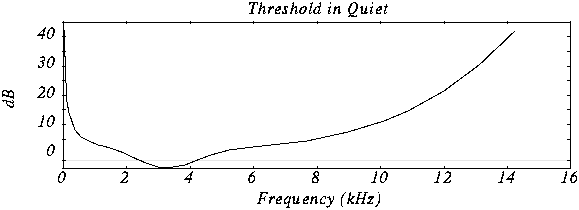
Minimum hearing threshold The ear’s minimum hearing threshold is the power below which a tone at a given frequency is not capable of being detected by the ear. This threshold is non-linear. As we see in the figure, which represents the Fletcher and Mundson law, the frequencies in which we hear best are those between 2 and 5 Khz. Therefore frequencies outside that band are not totally essential since they will hardly be perceived. Therefore it is possible to remove the content of the audio signal outside these frequencies.

As we can see in the drawing, the range in which a lower power is needed for the tone to be heard is between 2 and 4 Khz.

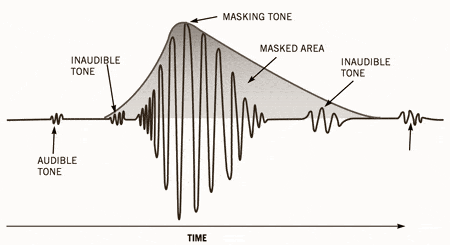
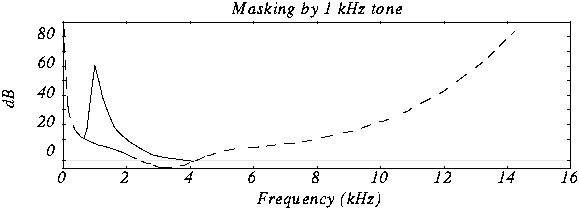
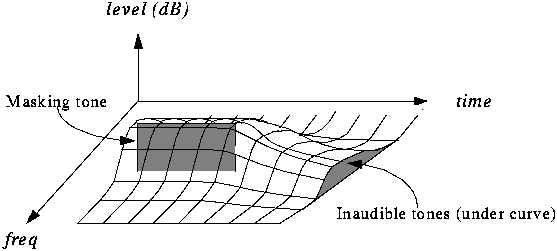
The masking effect This effect consists in that, when an audio signal has a tone at a given frequency, it produces a masking effect at the frequencies close to it, so that if at these nearby frequencies the signal does not exceed a certain power threshold cannot be heard and therefore it is not necessary to encode them. The form that this power threshold will take according to the position of the tone or the masking tones is what is called the psychoacoustic model, which as the name itself indicates is a perception model that tries to emulate the perception of the human ear.

In this graph we can see how if we put a tone at 1 Khz of 60 dB (masking tone) and then we put another tone at, for example 1.1 Khz and we vary the frequency of this, it is not possible to detect the presence of this second tone until its power exceeds the threshold presented in the figure.

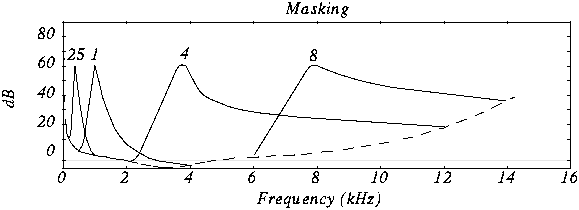
In this case we see various masking tones and the resulting new hearing thresholds. In MP3, what is done is to divide the spectrum to be transmitted (that is, between 2 and 5 Khz) into frequency subbands, so that the power of the subband is evaluated and the masking threshold is created in the nearby subbands. Nearby subbands that exceed that power threshold are coded and those that do not exceed it are not coded.

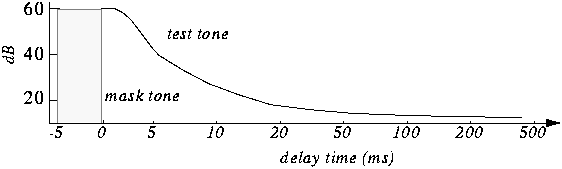
Furthermore, the masking is not only in appearance but also in time as we can see in the figure.

The byte reserve: Often, some passages of a musical piece cannot be encoded at the same rate without altering the quality of the music. MP · then uses a small byte reservation that acts as a buffer using the capacity of passages that can be encoded at a lower rate in the given stream.
The stereo assembly In the case of a stereo signal, the MP3 format can use a few more tools to further compress the data.
Intensity stereo (IS) The human ear is not able to locate with complete certainty the spatial origin of sounds for very high or very low frequencies. This technique takes advantage of this, recording some frequencies as a monophonic signal, so that a minimum of spatial content is subtracted from the sound.
Mid / Side (M / S) Stereo When the left and right channels are similar then a middle channel (L + R) and a side channel (LR) are created, which are encoded instead of encoding the left channel on one side and the right for another. In this way it is possible to reduce the transmitted data using fewer bits for the lateral channel. Then during playback the MP3 decoder will reconstruct the left and right channels.

Huffman Coding: This coding technique is used at the end of the whole process. It works by creating variable-length codes, so that the symbols that appear in the bitstream most likely have shorter codes. The translation between symbols and codes is done using a table. Each code has a unique prefix so that the codes can be decoded correctly despite their variable length. This type of coding allows on average to reduce by 20% the amount of data to be transmitted. It is an ideal complement to perceptual coding since, during great polyphonies, perceptual coding is very efficient since many sounds are masked, but nevertheless little information is identical and Huffman’s algorithm becomes inefficient. During pure sounds there are few masking effects, but Huffman encoding is very efficient since digitized sound contains many repeating bytes.