mp3 audio format, the most popular


Free Download Mp4Gain
picture

mp3 audio format, the most popular

mp3 audio format, the most popular

With the rapid development of file compression technology, MP3 has become the most popular music format today.

mp3 audio format, the most popular

MP3 File Format Analysis MP3 file data is made up of multiple frames, and the frame is the smallest unit of the MP3 file. Each frame consists of a frame header, additional information, and sound data. The playback time of each frame is 0.026 seconds, and its duration varies with the bit rate. Some MP3 files have extra bytes at the end to store description information for non-audio data. The structure of the MP3 file is shown in Figure 2. 3.1 Frame header format The frame header is 4 bytes long. For fixed bitrate MP3 files, the frame header format of all frames is the same. The data structure is as follows: typedef FrameHeader{ unsigned int sync:11;//Sync information unsigned int version:2 ;//version unsigned int layer:2;//layer unsigned int protection:1;//CRC check unsigned int bitrate:4;//unsigned bitrate int frequency:2;//unsigned frequency int padding:1;//unsigned frame length setting int private:1;//unsigned reserved word int mode:2; //unsigned channel mode int mode extension:2;//unsigned extended mode int copyright:1;//unsigned copyright int original:1 ;//unsigned original logo int emphasis:2;//emphasis mode }HEADER, *LPHEADER; See Table 1 for a description of the 4 byte frame header. Table 1 Explanation of the use of MP3 frame header bytes Name Length (bits) Description Synchronization information 11 All bits in the 1st and 2nd byte are 1, and the 1st byte is always FF. Version 200-MPEG 2. 5 01-undefined 10-MPEG 2 11-MPEG 1 layer 2 00-undefined 01-Layer 3 10-Layer 2 11-Layer 1 CRC check 1 0-check 1-no check Bit rate 4 The third bit Tuple sampling rate, the unit is kbps, such as MPEG-1 Layer 3, 64 kbps, the value is 0101. Frequency 2 Sampling frequency, for MPEG-1: 00-44.1 kHz 01-48 kHz 10 -32 kHz 11-setting frame length undefined 1 is used to set the length of the file header, 0-no setting, 1-setting, the specific setting calculation method see below. Reserved word 1 is not used. Channel Mode 2 The fourth byte indicates the channel, 00-Stereo 01-Joint Stereo 10-Dual Channel 11-Mono Expansion Mode 2 Only used when the channel mode is 01. Copyright 1 Whether the file is legal or not, 0-Illegal 1-Original logo legal 1 If original, 0-Not original 1-Original emphasis method 2 Used for classification of sound compensation after noise reduction and compression, which is rarely used and is it may not work in the future. 00-Undefined 01-50/15ms 10-Reserved 11-CCITT J.17 MP3 frame length depends on bit rate and frequency, the calculation formula is: frame length = 144×bit rate∕ frequency+padding For example: bit rate is 64kbps, frequency is 44.1kHz, when padding is 1, frame length is 210 bytes. After the table header there is additional information of variable length. For standard MP3 files, their length is 32 bytes, followed by compressed audio data, which will be decoded when the decoder reads here. For Constant Bit Rate (CBR) MP3 files, not all frames are the same length, and some frames may be one or more bytes longer. There is also Variable Bitrate (VBR) MP3, to minimize the length of MP3 file and ensure sound quality, compared to CBR file, except for the first frame, the rest is the same. The first frame of VBR does not contain audio data and its length is 156 bytes, which is used to store information such as standard audio frame header (4 bytes), VBR file identifier, frame number, number file byte, etc. See table 2 for the description of the structure. Table 2 Description of the first byte of the frame structure of the VBR 1-4 file The same standard sound frame header as CBR 5-40 Store the logo of the VBR file “Xing” (58 69 6E 67), the specific position of this logo depends on the adopted MPEG standard and the sound depends on the channel mode.



Free Download Mp4Gain
picture


Mp4Gain Main Window
picture


Mp4Gain Features
picture


Free Download Mp4Gain
picture

mp3 audio format, the most popular

mp3 audio format, the most popular

mp3 audio format, the most popular

With the rapid development of file compression technology, MP3 has become the most popular music format today.

mp3 audio format, the most popular

The encoder transforms the original sound into the frequency domain through a hybrid filter bank. Using a psychoacoustic model, it is estimated that it may be sufficient to be The perceived noise level is then quantized and converted to Huffman coding to form an MP3 bitstream. The decoder is much simpler and its task is to extract the sound signal from the encoded spectral line components through inverse quantization and inverse transformation.
2.4 Modified Discrete Cosine Transform Modified Discrete Cosine Transform (MDCT) refers to converting a set of time-domain data to frequency-domain data for time-domain variation. MDCT is an enhancement of the DCT algorithm. The first fast algorithm is the Fast Fourier Transform (FFT), but FFT has operations on complex numbers and MDCT are all operations on real numbers, which is convenient for programming. When compressing audio data, first divide the original audio data into fixed blocks, and then perform forward MDCT (Forward MDCT) to convert the value of each block into MDCT 512 coefficients. When decompressing, the reverse MDCT (Reverse MDCT) The 512 coefficients are restored to the original sound data, and the original sound data before and after are inconsistent, because redundant and irrelevant data are removed during the compression process. The FMDCT transformation formula is: k=0, 1,…, N/2-1 where N is the length of the transformation window, that is, the number of sample points per block, N=8, 16 ,… ., 1024, 2048. n0=(N/2+1)/2, X(n) is the value in the time domain, X(k) is the value in the frequency domain. If N takes 1024 points, it will become 512 frequency domain values. The IMDCT transformation formula is: 4 Modified Discrete Cosine Transform Modified Discrete Cosine Transform (MDCT) refers to converting a set of time-domain data to frequency-domain data to learn the changes in the domain. weather. MDCT is an enhancement of the DCT algorithm. The first fast algorithm is the Fast Fourier Transform (FFT), but FFT has operations on complex numbers and MDCT are all operations on real numbers, which is convenient for programming. When compressing audio data, first divide the original audio data into fixed blocks, and then perform forward MDCT (Forward MDCT) to convert the value of each block into MDCT 512 coefficients. When decompressing, the reverse MDCT (Reverse MDCT) The 512 coefficients are restored to the original sound data, and the original sound data before and after are inconsistent, because redundant and irrelevant data are removed during the compression process. The FMDCT transformation formula is: k=0, 1,…, N/2-1 where N is the length of the transformation window, that is, the number of sample points per block, N=8, 16 ,… ., 1024, 2048. n0=(N/2+1)/2, X(n) is the value in the time domain, X(k) is the value in the frequency domain. If N takes 1024 points, it will become 512 frequency domain values. The IMDCT transformation formula is: 4 Modified Discrete Cosine Transform Modified Discrete Cosine Transform (MDCT) refers to converting a set of time-domain data to frequency-domain data to learn the changes in the domain. weather. MDCT is an enhancement of the DCT algorithm. The first fast algorithm is the Fast Fourier Transform (FFT), but FFT has operations on complex numbers and MDCT are all operations on real numbers, which is convenient for programming. When compressing audio data, first divide the original audio data into fixed blocks, and then perform forward MDCT (Forward MDCT) to convert the value of each block into MDCT 512 coefficients. When decompressing, the reverse MDCT (Reverse MDCT) The 512 coefficients are restored to the original sound data, and the original sound data before and after are inconsistent, because redundant and irrelevant data are removed during the compression process. The FMDCT transformation formula is: k=0, 1,…, N/2-1 where N is the length of the transformation window, that is, the number of sample points per block, N=8, 16 ,… ., 1024, 2048. n0=(N/2+1)/2, X(n) is the value in the time domain, X(k) is the value in the frequency domain.

mp3 audio format, the most popular

mp3 audio format, the most popular

mp3 audio format
mp3 audio format

With the rapid development of file compression technology, MP3 has become the most popular music format today.

mp3 audio format
mp3 audio format

High-quality music quickly spreads to all parts of the world with the arrangement of 0 and 1, shaking people’s hearts. What is MP3? The full name of MP3 is MPEG Audio Layer 3. It is an efficient computer audio coding scheme. It converts audio files into smaller files with .MP3 extension with a higher compression ratio and basically maintains the sound quality of the file. original. MP3 is part of the ISO/MPEG standard. The ISO/MPEG standard describes audio compression using a high-performance perceptual coding scheme. This standard has been continuously updated to meet the pursuit of “high quality and small quantity”, and now has formed MPEG Layer 1, Layer 2. Layer 3 three audio encoding and decoding schemes. The compression rate of MPEG Layer 3 can reach from 1:10 to 1:12. A 1M MP3 file can be played for 1 minute, while a 1 minute CD-quality WAV file (44100Hz, 16bit, 2ch, 60sec) occupies 10M of space, so Calculated, the time The playback time of a 650M MP3 disc should be more than 10 hours, while the playback time of a CD with the same capacity is about 70 minutes. The advantages of MP3 are unmatched by CD. 2 Analysis of the principle of MP3 2.1 MPEG audio standard MPEG (Moving Picture Experts Group) is a moving picture expert group under ISO, and the MPEG standard formulated by it is widely used in various multimedia. MPEG standards include video and audio standards, among which MPEG-1, MPEG-2, MPEG-2 AAC, and MPEG-4 audio standards have been developed. The MPEG-1 and MPEG-2 standards use the same family of audio codecs: Layer 1, 2 and 3. A new feature of MPEG-2 is the use of low sample rate expansion kits to reduce data traffic , and another feature is the multi-channel expansion kit, which increases the number of main channels to five. Fraunhofer IIS and AT&T released the MPEG-2 AAC (MPEG-2 Advanced Audio Coding) standard in 1997 to significantly reduce data traffic. The MDCT (Modified Discrete Cosine Transform) algorithm adopted by MPEG-2 AAC, The sampling frequency can be between 8 KHz and 96 KHz, and the number of channels can be between 1 and 48. MPEG Audio Layer 1, 2 and 3 use the same filter bank, bitstream structure, and header information, and the sample rate is either 32 KHz, 44.1 KHz, or 48 KHz. Layer 1 is designed for DCC (digital compact cassette) digital compression tape, the data rate is 384 kbps, and layer 2 has made a compromise between complexity and performance, and the data rate has been reduced to 256 kbps- 192kbps. Layer 3 was designed for low data rate from the beginning, and the data rate is 128Kbps-112Kbps. Layer 3 adds MDCT transform, which makes its frequency resolution 18 times higher than that of Layer 2. Layer 3 also uses information averaging similar to MPEG video entropy coding to reduce redundant information. The vast majority of MP3 uses the MPEG-1 standard. 2.2 The purpose of audio compression The MP3 format began in the mid-1980s, and the Fraunhofer Institute in Erlangen, Germany, was committed to high-quality, low-data-rate audio coding. Let’s look at an example: You want to sample a song you like that is about 4 minutes long, store it on a disc, and sample it in CD-quality WAV format at a sample rate of 44.1 kHz, which means receiving 44100 per second. , stereo, each sample data is 16 bits (2 bytes), so the space occupied by this song is: 44100×2 channels x2 bytes x60 seconds x4 minutes=40.4MB If you download this song from the Internet, assume the transmission speed is of 56kbps, the download time is: 40.4x106x8/56x103x60=96 minutes. Even a 1M broadband network takes more than 5 minutes. It can be seen that audio compression is especially important to reduce the storage space of audio data. 2.3 MP3 encoding and decoding MP3 audio compression involves encoding and decoding in two parts. Encoding is turning the data in a WAV file into a highly compressed bitstream, and decoding is taking the bitstream and reconstructing it into a WAV file. MP3 uses a distortion algorithm called Perceptual Audio Coding. The frequency range of sound perceived by the human ear is from 20 Hz to 20 kHz. MP3 cuts out a lot of redundant and irrelevant signals.

MP3 encoder

MP3 encoder

Mp3 Encoder
Mp3 Encoder

1. MP3 Encoder FAQ

Mp3 Encoder
Mp3 Encoder

: what is an MP3 encoder?
An MP3 encoder is a piece of software that uses the MP3 codec algorithm (compression/decompression) to create mp3 files. Most encoders only convert
a WAV file to an MP3 file, although many can convert other formats such as WMA, Real Audio, Ogg, etc.

There are only a few standalone encoders, and a lot of software also only uses 4 main encoding engines, largely due to
to Fraunhofer Gesellschaft patents and various companies helping with ISO sources. Although no company owns the license, the
Developers must pay expensive license fees no matter what proprietary MP3 encoder they use. Major MP3 encoding engines include: LAME (
non-ISO source), BladeEnc, Fraunhofer, and Real Networks’ Xing encoder.

– How does the MP3 encoder work?
The core technology under MPEG-Layer 3 is included in the MP3 encoder. The decoding process uses a series of algorithms and rules to compress audio.
The encoder also detect sounds that occur at the same time
and they try to rule out any that might be “masked” or “inaudible” by other sounds.

– What is a good MP3 encoder?
Xing is the fastest encoder in terms of speed, but the worst in quality. For smaller file sizes, Fraunhofer FastEnc
offers the best quality. LAME is a very good encoder, and one version is faster than the previous one, BladeEnc
it is the best quality for large files, but very slow.

2. Dissection of MP3 files
In addition to proficiency in using the basic features of the MP3 encoder, ordinary users do not need to know how the internal structure of the MP3 file is encoded, just like the situation when
face JPEG or DOC files. Out of morbid curiosity, here’s an X-ray view of an MP3 file:

– Box header
As mentioned above, MP3 files are made up of thousands of “frame frames”, each frame containing a part (second part) of valuable audio data.
for the decoder to reconstruct the audio data. The first part above is the box header. (Frame Header), which consists of 32-bit metadata related to the
later data, see the figure below. The MP3 header begins with an 11-bit “sync timing” block, which allows the player to seek and lock the first
legal framework available, which is useful in MP3 streaming, which can quickly move or jump ID3 from the playback source block to a normal one.
position . However, simply detecting synchronized blocks is theoretically not enough, so it is necessary to check the header.

– transmission lock
MP3 was originally designed for broadcast, and as a result it became important that the MP3 receiver could be synchronized with the signal at any part of the broadcast,
so the frame header is placed at the beginning of any frame transmission, so when an MP3 receiver “tunes” to a data stream, it picks up the
signal instantly and you can play it immediately. Interestingly, this fact makes it possible to cut MPEG files into small segments, each of which can be played independently. But unfortunately
not possible in 3-layer (MP3) files, where frames often depend on other frames, so you can’t just
Edit .

– Frames per second
Just as the movie industry has a standard for the number of frames per second in film to ensure proper viewing on any projector,
A similar standard is used in the MP3 standard, regardless of the file’s bitrate, MPEG-1 A frame in the file is 26 ms, approximately 38 fps frames per second. If the bit rate
is , the frame size is correspondingly larger, and vice versa. Also, the number of samples contained in an MP3 frame is constant, 1152 samples per frame.

The total size of any given frame can be calculated with the following formula:

FrameSize = 144 * BitRate / (SampleRate + Padding).

MP3 COMPRESSION

MP3 COMPRESSION

To achieve such a dramatic reduction in the number of bits required to transmit an MP audio signal, use different techniques. These techniques include those based on perceptual coding and others such as byte reservation, stereo assembly or Huffman codes. Percentage coding consists of removing all the information that goes into the audio signal that the human ear is not capable of detecting. We will now describe them:

PERCEPTUAL CODING

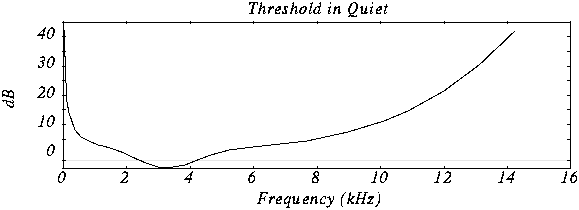
Minimum hearing threshold The ear’s minimum hearing threshold is the power below which a tone at a given frequency is not capable of being detected by the ear. This threshold is non-linear. As we see in the figure, which represents the Fletcher and Mundson law, the frequencies in which we hear best are those between 2 and 5 Khz. Therefore frequencies outside that band are not totally essential since they will hardly be perceived. Therefore it is possible to remove the content of the audio signal outside these frequencies.

As we can see in the drawing, the range in which a lower power is needed for the tone to be heard is between 2 and 4 Khz.

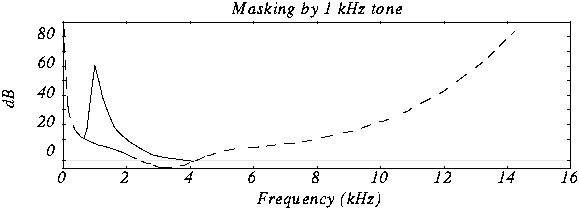
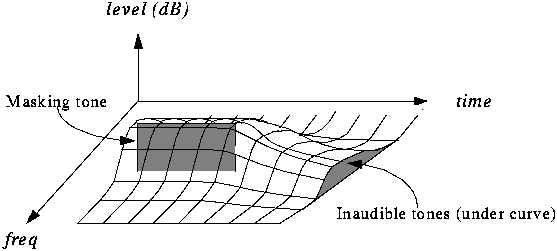
The masking effect This effect consists in that, when an audio signal has a tone at a given frequency, it produces a masking effect at the frequencies close to it, so that if at these nearby frequencies the signal does not exceed a certain power threshold cannot be heard and therefore it is not necessary to encode them. The form that this power threshold will take according to the position of the tone or the masking tones is what is called the psychoacoustic model, which as the name itself indicates is a perception model that tries to emulate the perception of the human ear.

In this graph we can see how if we put a tone at 1 Khz of 60 dB (masking tone) and then we put another tone at, for example 1.1 Khz and we vary the frequency of this, it is not possible to detect the presence of this second tone until its power exceeds the threshold presented in the figure.

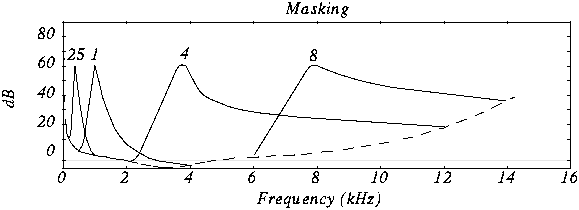
In this case we see various masking tones and the resulting new hearing thresholds. In MP3, what is done is to divide the spectrum to be transmitted (that is, between 2 and 5 Khz) into frequency subbands, so that the power of the subband is evaluated and the masking threshold is created in the nearby subbands. Nearby subbands that exceed that power threshold are coded and those that do not exceed it are not coded.

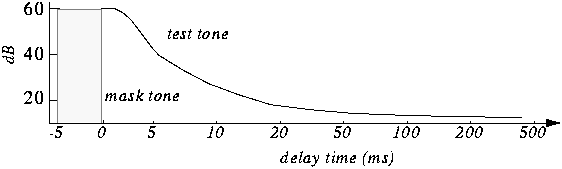
Furthermore, the masking is not only in appearance but also in time as we can see in the figure.

The byte reserve: Often, some passages of a musical piece cannot be encoded at the same rate without altering the quality of the music. MP · then uses a small byte reservation that acts as a buffer using the capacity of passages that can be encoded at a lower rate in the given stream.
The stereo assembly In the case of a stereo signal, the MP3 format can use a few more tools to further compress the data.
Intensity stereo (IS) The human ear is not able to locate with complete certainty the spatial origin of sounds for very high or very low frequencies. This technique takes advantage of this, recording some frequencies as a monophonic signal, so that a minimum of spatial content is subtracted from the sound.
Mid / Side (M / S) Stereo When the left and right channels are similar then a middle channel (L + R) and a side channel (LR) are created, which are encoded instead of encoding the left channel on one side and the right for another. In this way it is possible to reduce the transmitted data using fewer bits for the lateral channel. Then during playback the MP3 decoder will reconstruct the left and right channels.

Huffman Coding: This coding technique is used at the end of the whole process. It works by creating variable-length codes, so that the symbols that appear in the bitstream most likely have shorter codes. The translation between symbols and codes is done using a table. Each code has a unique prefix so that the codes can be decoded correctly despite their variable length. This type of coding allows on average to reduce by 20% the amount of data to be transmitted. It is an ideal complement to perceptual coding since, during great polyphonies, perceptual coding is very efficient since many sounds are masked, but nevertheless little information is identical and Huffman’s algorithm becomes inefficient. During pure sounds there are few masking effects, but Huffman encoding is very efficient since digitized sound contains many repeating bytes.

Codecs: an introduction – MP3

Two ways to assign information: CBR and VBR

Recall that it is possible to have an approximate appreciation of the quality of an audio (or also video) file based on the amount of kilobits per second (kbps) with which that file is encoded – although, as stated in the previous post, Making comparisons considering this single parameter is not the best. We can define the measure of kbps as the amount of information that is allocated for each second of audio or video: if a song is encoded at 256 kbps, it means that for every second of audio 256 kilobits of information have been assigned (eye, which we are talking about kilobits, not kilobytes).

To determine how much information is going to be assigned to each second, there are mainly two methods: Constant Bitrate (CBR) and Variable Bitrate (VBR). As their names indicate, in the first one the data assignment is done in relation to a constant measurement, that is, if we want to obtain an audio file at 320kbps, the codec will assign this amount of data to every second of the song, without import its level of complexity (it is different to compress the acoustic information of a silent passage or one with many instruments playing simultaneously). The VBR method works in another way: quality is prioritized, so the amount of data to be assigned depends on the complexity of the piece of song being encoded. For example, in a part where there is silence, less information will be assigned, while in a part that for example has sounds of trumpets, violins, etc., the assigned information will be greater; Of course this range is determined by certain parameters.

There is a third method, “Average Bit Rate” (ABR), which is not so much a different method but rather a mixture of the previous two: a certain Bit Rate (a certain amount of kbps) is set, the which would be the average Bit Rate that will be assigned to the fragments of the file to be processed.

MP3: MPEG Audio Layer 3

For many reasons (and even when there are many arguments against it), MP3 is the king of lossy audio compressors. It is so widely known that it hardly needs an introduction, it has been going around a lot of time, and although many competitors (some of them very good) have come to the fore, its end is not seen at all near.

MP3 was born in 1987, mainly thanks to the research of the Fraunhofer Institute for Integrated Circuits IIS. In 1995 the files generated with this codec began to carry the extension .mp3, name with which this specification was popularized.

The rise of the internet and this format went hand in hand: the explosion of Napster and the P2P exchange programs during the second half of the 90s can be counted as one of the most important causes for the development of the network.

As of 2002, a series of competitors began to emerge, which have slowly caused this format to have lost some ground against formats such as AAC and WMA (introduced and backed by brands such as Apple and Microsoft, respectively), although it remains As the leader in presence.

Pros:

It requires little processing power for reproduction.
It is widely known, so there is a wide range of decoders
It is an ISO standard, part of the MPEG specification
Easy adjustment of compression quality, there are several options depending on whether you decide to privilege the resulting size or audio quality
Most (all?) Of today’s computers come with software to play MP3s, as well as the wide range of portable players

Cons:

Performance / efficiency lower than more modern codecs
There are no implementations for multiple channels (cannot generate 5.1 audio, for example)
The maximum bitrate (320kbps) is sometimes not enough
Unusable for high definition audio