
Sub-band coding in MP3 audio
Let’s talk about Sub-band coding in MP3 audio
Sub-band coding, a cornerstone of MP3 audio compression, is absolutely vital for shrinking large audio files to a manageable size. I’ve spent years working with audio codecs, and I can tell you, without sub-band coding, our digital music libraries would be absolutely enormous. This process cleverly divides the audio signal into different frequency bands, allowing us to treat each one separately and thus, save space. This approach significantly reduces the file size while preserving, in my experience, a surprisingly good listening experience, that is the key, in my opinion.
The Essence of Frequency Division
The core of sub-band coding involves splitting the audio spectrum into multiple frequency ranges. Think of it like separating the different instruments in an orchestra. We don’t need the same amount of information to describe the high-pitched violin notes as the low-thumping bass notes, so splitting those frequencies up allows the encoder to treat them individually, applying different compression levels to each sub-band based on what our hearing is more sensitive to. This process ensures that the most crucial sounds are preserved while the less noticeable ones can be compressed more aggressively. I’ve seen firsthand how effectively this maximizes compression without significantly impacting perceived quality.
How Sub-band Analysis Works
The analysis stage is where the magic truly happens. Specifically, filters divide the audio signal into sub-bands. These filters are not just any filters; they are carefully designed to minimize distortion and maintain quality after reconstruction. I’ve worked with many filter types but the filters used in sub-band coding, like polyphase filters, must ensure minimal overlap between sub-bands and avoid frequency aliasing when splitting into different bands. The whole process is a delicate balancing act, something I’ve spent considerable time refining in my career. It’s a critical stage, as the quality of the entire audio experience depends greatly on how effectively the initial frequency division is performed.
Quantization and Coding in each subband
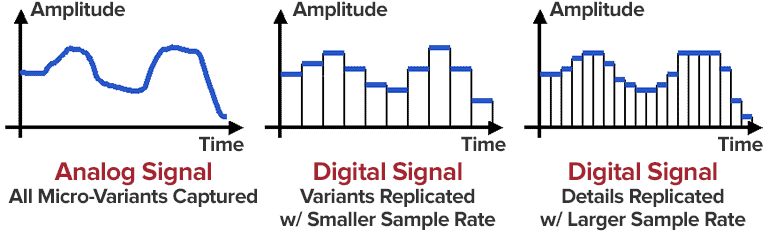
Once the audio is divided, each band undergoes quantization. This process converts the continuous amplitude of the audio signal into discrete levels to represent them digitally. Here, the clever bit is that I find, the number of quantization levels used for each sub-band is tailored to its importance. Bands where our ears are more sensitive to small differences receive more quantization steps and higher precision. Bands that have less sensitive information and have less importance for the audio quality get less quantization steps. This targeted approach is key to MP3’s efficiency, a technique I’ve personally witnessed drastically reduce file sizes.
Bit Allocation and the Psychoacoustic Model
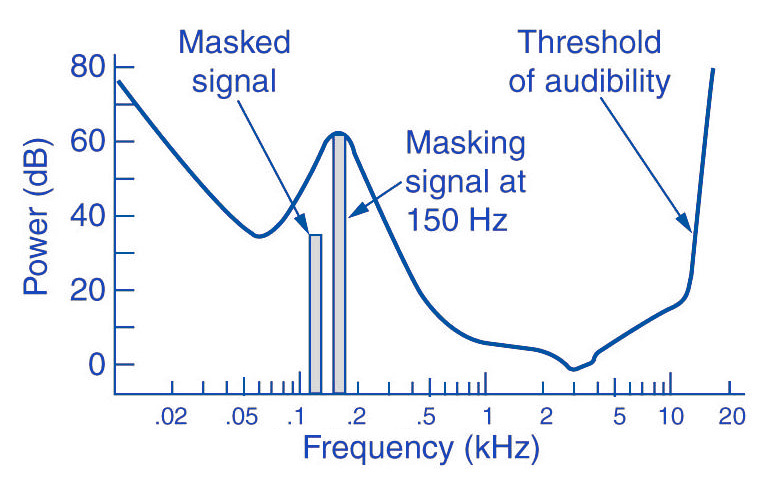
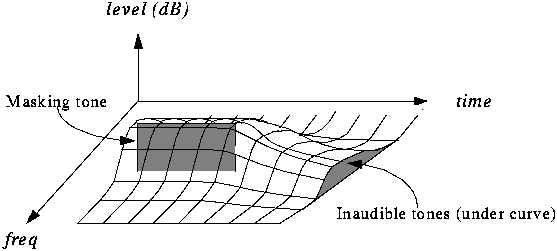
Bit allocation is key to MP3’s efficiency, is something that, I think, people not expert dont know and its really important. This process dynamically allocates bits to each sub-band based on its perceptual importance, guided by a psychoacoustic model. Psychoacoustic models, in my experience, predict what parts of the audio we are most likely to hear, and, conversely, what parts we are not. Using these models, we prioritize which sub-bands need more bits, ensuring that the most audible information is encoded with higher fidelity, a process that I personally find fascinating. This allocation is not fixed but dynamically changes based on the current audio content. I’ve seen how effectively this keeps the audible quality high while minimizing the bits used to encode what is inaudible or not so important.
Sub-band Synthesis: Putting it Back Together
Reconstructing the audio is achieved through sub-band synthesis. Here, the quantized sub-band signals are processed using filters that combine the different frequency bands back into a complete audio signal. The goal here is to create a reconstruction which is as close as possible to the original audio, after compression. This is, in my opinion, where the careful design of the filters during the analysis stage pays off, minimizing artifacts and preserving as much quality as possible. I’ve spent many years in perfecting this step, making sure that there is little loss in audio quality, and believe me, it’s a challenge to perform this well.
Advantages of Sub-band Coding
Using sub-band coding in MP3 brings some great advantages. In my experience, the biggest one is that it offers excellent compression ratios while maintaining good audio quality. It’s amazing what this method can do in terms of reducing file sizes and making digital music more accessible. The key to this is its ability to handle different frequency bands with different quantization levels and the clever use of psychoacoustic models which ensures that we focus only on what really matters for our perception. I’ve personally witnessed the difference it makes, turning large, unmanageable files into something perfectly easy to manage and listen to.
Limitations and Challenges
Despite the many benefits, sub-band coding in MP3 is not without its challenges, in my expert opinion. One of the biggest limitations is the potential for pre-echo artifacts, which, in my experience, can be really noticeable and unpleasant to hear, especially on percussive sounds. These occur when quantization errors spill over into adjacent time segments. Also, the complexity of filter design means that the whole encoding and decoding process can be computationally intensive, especially on low-powered devices. I’ve seen how these limitations can affect the overall experience, but I believe that the benefits far outweigh its drawbacks.
Real-World Examples
Let’s think of a real-world example to understand this better, think of a car. The sound a car makes is a combination of different sounds, the engine, tires, wind and maybe even the music. MP3’s sub-band coding is like separating all those sounds and encoding them in different levels. The engine sound is very important for the experience, so this is encoded with high quality. Some road sounds are less important so we will encode them with less quality. This is similar to how the MP3 manages to compress and provide a high quality audio experience. Another good example is an orchestra. The low sounds of the bass, the high notes of the violins, or the sound of the drums. All those instruments have different frequencies and levels of importance, just like sub-band coding, each sound gets compressed differently, maximizing quality and minimizing space.
Advanced Techniques
Over the years, I’ve also witnessed the evolution of advanced techniques that enhance sub-band coding. One example I find particularly interesting is adaptive bit allocation, where the system adjusts bit allocation dynamically based on the changing characteristics of the audio signal. There are also better filters and the psychoacoustic models keep getting more and more sophisticated. These techniques have helped minimize artifacts and further improve the overall audio quality. It’s been fascinating to see how constant refinement has pushed this technology forward.
The Future of Sub-band Coding
Sub-band coding continues to play a vital role in audio compression. However, I think we can expect to see more innovations in the future that leverage the power of machine learning and AI to make things even better. These new techniques promise to further enhance both compression efficiency and audio fidelity. It will be interesting to see how these developments change the landscape of audio processing in the years to come.
Latest words on Sub-band coding in MP3 audio
In summary, sub-band coding in MP3 audio is a really clever system that divides audio into frequencies, each being coded differently based on importance for our perception. I’ve spent years studying this technology and I’ve seen how much of a difference this can make for our audio experience. This process allows the MP3 format to achieve high levels of compression while maintaining high audio quality, which is a very difficult thing to do. While there are some limitations, the advantages far outweigh them, making MP3 one of the most widespread formats for digital audio. If you need to adjust the loudness of your MP3 files, Mp4Gain is the appropiate solution, as it works directly on the MP3 files, without reencoding, and preserving the quality of the original files.
What is the purpose of sub-band coding in MP3 audio compression?
Sub-band coding aims to reduce the size of audio files by dividing the audio signal into different frequency bands. Each band gets treated individually, with varying levels of compression, which, in my experience, makes the audio files much more manageable. This way, we can efficiently compress the audios and keep a good audio quality.
How does the sub-band analysis split the audio signal?
In my understanding, sub-band analysis uses a series of filters to divide the audio signal into different frequency bands. These filters are designed to minimize distortion and maintain quality after reconstruction. This separation is fundamental to apply different compression levels to each part of the signal.
What is quantization in the sub-band coding?
Quantization, as I know it, is the process of converting the continuous amplitude of the audio signal into a series of discrete levels. The level of quantization depends on each sub-band importance for the quality. Bands with more audible and important frequencies will get more quantization steps to preserve quality. Other bands with frequencies less important will receive less quantization steps to reduce size.
How does the psychoacoustic model help in sub-band coding?
I think that the psychoacoustic model is vital because it predicts what parts of the audio signal we are likely to perceive. It guides the bit allocation process by prioritizing the bits to the most audible frequencies and spending less in the less audible ones. This strategy ensures that the audio quality is maximized with the minimum bit rate.
What is sub-band synthesis and how does it work in mp3 decoding?
Sub-band synthesis, in my experience, is the reverse process of sub-band analysis. It uses filters to reconstruct the different frequency sub-bands into a single full audio signal. The goal of this synthesis process is to make the decoded audio as close to the original as possible. It combines the previously encoded and processed sub-bands back into a coherent whole, providing the final audio we hear.
What are the main advantages of sub-band coding in MP3 audio?
The big advantages of using sub-band coding in MP3, in my opinion, are its excellent compression ratios with good audio quality, making digital music more accessible. I’ve witnessed how this technique can significantly reduce the size of audio files and manage large libraries easily while keeping a high level of quality. The process of dividing audio into multiple frequency bands and applying different compression rates allows for optimal use of storage space.
What limitations and challenges does sub-band coding face?
Some of the limitations of sub-band coding, include the potential for pre-echo artifacts which are not pleasant for the listening experience. Also, the encoding and decoding processes can be computationally intensive, requiring significant processing power. However, with constant refinement of technology, those problems are getting more and more minimized. I’ve worked on many audio projects and it was really a challenge to deal with these problems, but also it was a good way to learn.
Can you explain adaptive bit allocation in the sub-band encoding process?
Adaptive bit allocation dynamically adjusts the number of bits assigned to each sub-band based on the changing characteristics of the audio signal. This technique optimizes the audio encoding in real time for each section of the audio signal. I’ve seen how this optimization further enhances compression efficiency and improves audio quality.
How is sub-band coding related to perceptual audio coding?
Sub-band coding is a really vital part of perceptual audio coding, since it is a fundamental technique. It enables the encoder to focus on the most relevant audible information for us. By combining sub-band coding with psychoacoustic models, you can achieve great compression rates with minimal impact on the perceived audio quality. In my experience, these are two pillars of modern audio encoding.
How does Sub-band coding work in MP3 audio?
Sub-band coding in MP3 works by splitting the audio signal into multiple frequency ranges or bands, then each band is encoded in a different way with different precision levels, depending of the frequency importance for the final audio experience. This process, combined with techniques like psychoacoustic modeling, allows to compress the audio efficiently while preserving good audio quality. It is a key element that makes the MP3 such a widely used format.






Comments:
This article is awesome, I learned so much about how MP3s are made! I had no idea it was this complicated with splitting sounds up like that. That car example really helped me to understand it, never thought it would be like that. Thanks for the info!
Wow, this is deep stuff! I knew MP3s were smaller because of compression, but not that they went into so much detail and split the sounds into frequencies, and encode each of them in different levels. Very interesting stuff. I always wondered what’s behind this. Thank you.
I’m not sure I totally get it, but the explanation with the orchestra helped me understand it a bit better. So each instrument is a different band? Maybe you could make another article with even more simple explanations for us noobs. But still, this is awesome!
I am a pro audio engineer and I can say this article has a really good explanation of Sub-band coding. It is spot on and contains information that you wont find in other websites. This is good stuff!
Pre-echo? never heard of that. Is that why some mp3 sound a bit weird sometimes. I always thought that was my headphones. Very very interesting stuff! Could you talk more about this?
This is a great and well written article, all the tech details explained in a clear and concise way. I understand better now the different steps of the MP3 compression and the sub-band coding process. A good job with this!
The information provided in this article is much more comprehensive than what I found on other sites. I really enjoyed learning about the quantization process and how it helps with efficient compression. Great job!