MP3 to AAC


Free Download Mp4Gain
picture

MP3 to AAC

MP3 to AAC
MP3 to AAC
MP3 to AAC
MP3 to AAC

MP3 to AAC – Introduction

If you’re looking to convert your MP3 files to AAC, there are a few things you need to know. AAC (Advanced Audio Coding) is a lossy compression format that offers better sound quality than MP3 at the same bit rate. It is also the default audio format for iOS devices and iTunes.

In this article, we’ll cover everything you need to know about converting MP3 to AAC, including why you might want to do it, the technical differences between the two formats, and how to convert your files using the mp4gain tool.

Why Convert MP3 to AAC?

There are several reasons why you might want to convert your MP3 files to AAC. First, as we mentioned earlier, AAC offers better sound quality than MP3 at the same bit rate. This means that if you’re looking to improve the sound quality of your music library, converting your MP3 files to AAC is a good option.

Second, if you’re an iOS user, you might want to convert your files to AAC because it is the default audio format for iOS devices and iTunes. This means that if you want to play your music on your iPhone, iPad, or iPod, converting your files to AAC will ensure the best possible sound quality.

Technical Differences Between MP3 and AAC

MP3 and AAC are both lossy compression formats, which means that they compress audio files by discarding some of the original data. However, there are some technical differences between the two formats that are worth noting.

One of the main differences is that AAC is capable of producing better sound quality than MP3 at the same bit rate. This is because AAC uses more advanced compression algorithms that are able to preserve more of the original audio data.

Another difference is that AAC is able to support higher sampling rates than MP3. This means that if you’re working with high-quality audio files, converting them to AAC will allow you to preserve more of the original audio data.

How to Convert MP3 to AAC Using mp4gain

Now that you understand why you might want to convert your MP3 files to AAC and the technical differences between the two formats, let’s talk about how to actually do the conversion using the mp4gain tool.

Mp4gain is a simple and effective tool for converting audio files from one format to another. It supports a wide range of audio formats, including MP3 and AAC, and is available for both Windows and Mac.

To convert your MP3 files to AAC using mp4gain, follow these simple steps:

  1. Download and install mp4gain on your computer.
  2. Launch mp4gain and click on the “Add Files” button to select the MP3 files you want to convert.
  3. Click on the “Format” dropdown menu and select “AAC” as the output format.
  4. Adjust the audio settings if necessary, such as the bit rate or sampling rate.
  5. Click on the “Convert” button to start the conversion process.

Once the conversion is complete, you’ll have AAC versions of your original MP3 files that you can use on your iOS devices or anywhere else that supports the AAC format.

FAQ

Is it legal to convert MP3 to AAC?

Yes, it is legal to convert your own personal MP3 files to AAC or any other audio format for personal use. However, it is illegal to distribute copyrighted music files, even if you have converted them to a different



Free Download Mp4Gain
picture


Mp4Gain Main Window
picture


Mp4Gain Features
picture


Free Download Mp4Gain
picture

AAC and MP3 audio quality

AAC and MP3 audio quality

AAC
AAC

AAC and MP3 licenses and patents

AAC
AAC

Stream or distribute content in AAC format without a license or payment. Compared to MP3, this makes AAC a more attractive format for distributing content, especially for streaming content such as Internet radio. However, all manufacturers or developers of AAC codecs require a patent license. Therefore, FOSS implementations such as FAAC and FAAD are distributed only in source code to avoid patent infringement.

On the other hand, Thomson, Fraunhofer IIS, Sisvel (and its American subsidiary Audio MPEG), Texas MP3 Technologies, and Alcatel-Lucent claim legal control over the relevant MP3 patents related to the decoder. Therefore, the legal status of MP3 remains unclear in those countries where the patent is valid. But while these patent and licensing issues plagued the company, consumers generally didn’t care, and the MP3 format’s popularity did not wane.

They have been predicting for years that the mp3 is dead and that the mp3 will no longer be popular and the truth is that it does not happen nor does it seem that it will happen.

The reasons are quite simple, in the first place for the common listener the mp3 has a good enough sound, despite the fact that much is published to the contrary. The truth is that for the devices we currently have, the mp3 can sound good enough if it is treated with software like Mp4Gain.

AAC and MP3 audio quality

AAC and MP3 audio quality

Advanced Audio Codec

The AAC format is designed to enhance MP3 in the following ways:

Advanced Audio Codec

More sample rates (8 kHz to 96 kHz) than MP3 (16 kHz to 48 kHz)
Up to 48 channels (MP3 supports up to two channels in MPEG-1 mode and up to 5.1 channels in MPEG-2 mode)
Arbitrary bit rate and variable frame length. Constant bit rate normalized with bit bank.
More efficient and simpler filter banks (AAC uses pure MDCT instead of hybrid MP3 encoding)
More efficient encoding for still signals (AAC uses a block size of 1024 or 960 samples, which is more efficient than MP3’s 576-sample block)
Higher encoding accuracy for transient signals (AAC uses a 128- or 120-sample block size, allowing more accurate encoding than MP3’s 192-sample block)
Spectral leakage can be removed using a Kaiser-Bessel derived window function, but at the expense of expanding the main lobe
Better audio handling above 16 kHz
More flexible joint stereo (different methods can be used in different frequency ranges)
Added additional modules (tools) to improve compression efficiency: TNS, backward prediction, PNS, etc. These modules can be combined to form different encoding profiles.

In general, the AAC format gives developers more flexibility in codec design than MP3 and can correct many of the design choices made in the original MPEG-1 audio specification. This greater flexibility generally results in more concurrent encoding strategies and thus more efficient compression.

The MP3 specification, although outdated, has proven to be surprisingly robust despite its many flaws. AAC and HE-AAC outperform MP3 at low bit rates (typically less than 128 kb/s). This is especially true at extremely low bit rates, where excellent stereo encoding, pure MDCT, and more ideal conversion window sizes prevent MP3 from competing. However, as the bitrate increases, the efficiency of the audio format becomes less important relative to the efficiency achieved by the encoder, and the inherent advantages of AAC over MP3 no longer dominate.

MP3, WAV or AAC: audio formats at a glance

MP3, WAV or AAC: audio formats at a glance

MP3 vs FLAC vs WAV vs AAC

Anyone who works with a computer will encounter a wide variety of audio formats over time. Whether you want to use or create audio files yourself, you will inevitably have to deal with the multitude of different programs for playback, codecs, and file formats. But what is behind the ending .wav, .mp3 or .aac and why are there so many different audio formats?

Audio Formats

Why are there different formats?

In different file formats, digital data is organized in different ways. For the storage of a file, a fixed specification of the encoding must be followed. Ultimately, this ensures that the data can subsequently be read and interpreted correctly.

In addition, the different file formats differ mainly in terms of their degree of compression: without the different formats and the possibility of significantly reducing the file size through compression, our current media consumption through streaming services such as Spotify or Amazon Prime Music would not be possible.

There are basically three types of audio formats:

Formats that do without compression and therefore work without loss of quality,
Compressed audio formats that sacrifice some of the sound information for size and
Audio formats that use a lossless compression process and therefore allow file size reduction without loss of quality.
Thanks to modern audio converters, changing the format and converting to different formats is no longer a problem.

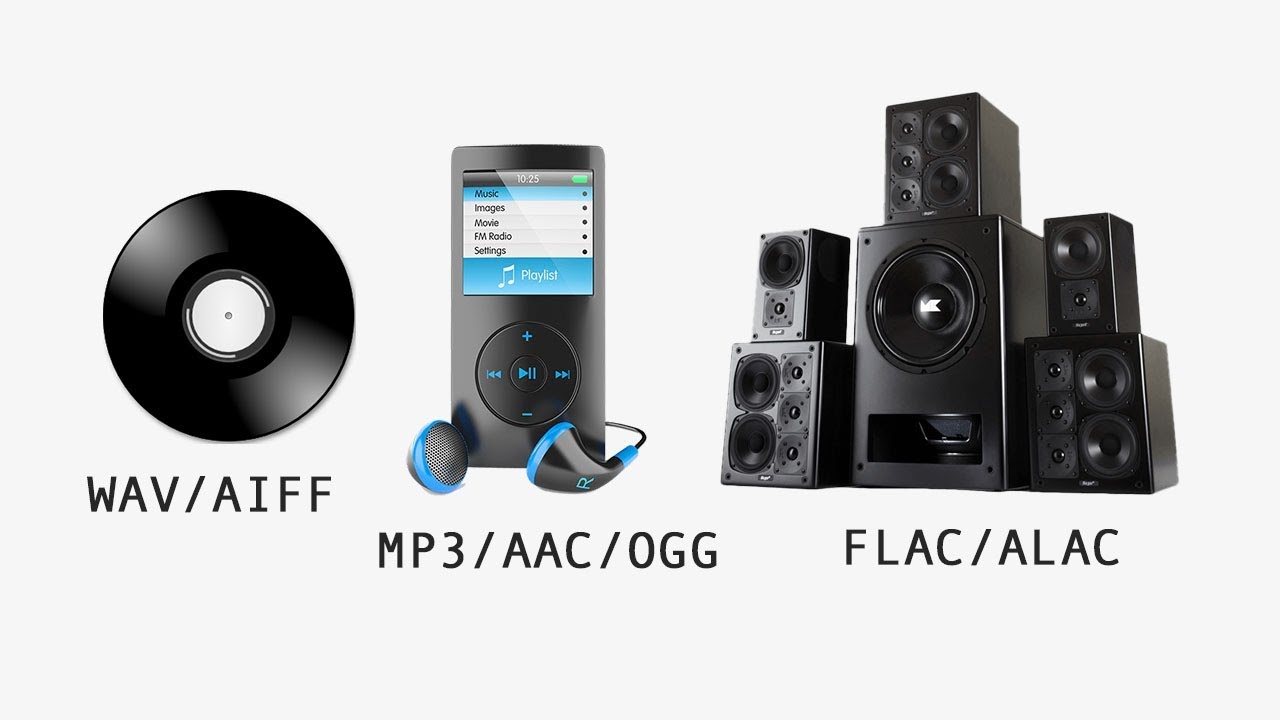
The original audio formats without loss of information

It is not necessary to compress all digitized sound recordings. When it comes to keeping sound quality as high as possible, uncompressed formats are clearly an advantage. Therefore, they are also often used for recording and editing. A distinction is made between WAVE and AIFF formats, which basically have the same specifications, but come from competing companies. While the WAVE format with the .wav file extension was developed by Microsoft in cooperation with IBM for use on Windows PCs, the .aif format extension is based on Apple development work and is primarily used on Macs.

Lossy compressed: the development of MP3, ACC and MP4

The MP3, AAC, OGG, or WMA formats that are widely used today are called lossy formats. This means that the digital audio format has less data than the original format, for example on a CD.

The MP3 file

The MP3 format has become indispensable.
The MP3 format developed by the Fraunhofer Institute in 1982 has become indispensable today. With this format, the current form of music consumption over the Internet was realized for the first time. The format, actually known as MPEG-1 Audio Layer 3 with the ending .mp3, uses a technology that makes it possible to reduce the size of audio files considerably without having to accept a clearly audible loss of quality. In principle, the technology behind this is quickly explained: when files are converted to MP3 format, all noise information that is not audible to the human ear is removed.

This procedure reduces the amount of information and therefore also the size of the files. Data rate, also known as sample rate or sample rate, plays an important role in the quality of music in MP3 format. From an average data rate of 200 kilobits per second, most listeners can no longer distinguish the sound quality of the original recording. However, the file is reduced to approximately one-seventh of its original size.

It was only the comparatively small files that made music distribution possible over the Internet. New technical possibilities were recognized by music listeners long before the music industry. Illegal copying of music through Napster and other file-sharing networks was extremely popular. Suddenly, music lovers had all their music in MP3 format on their hard drives.