Advanced Audio Compression Techniques in M4A Format


Free Download Mp4Gain
picture

Advanced Audio Compression Techniques in M4A Format
Advanced Audio Compression Techniques in M4A Format

Let’s talk about advanced audio compression techniques in M4A format. The M4A format, known for its efficient compression, uses very sophisticated methods to reduce file size while maintaining very good audio quality. As an audio compression specialist, I’ve spent many years studying these techniques and seen them evolve, and these advancements in M4A encoding are key for storing and streaming audio without sacrificing quality. This article will explore some of these key advanced audio compression techniques. My intention is to make these complex topics accessible and easy to understand by everyone.

Understanding the Basics of M4A Compression

M4A compression techniques build upon the principles of psychoacoustics, which focuses on how the human ear perceives sound. I often think of psychoacoustics as the secret to how we can make small audio files that still sound great. M4A files uses these principles to remove the parts of the audio that the ear cannot easily perceive, reducing the file size but without making the audio sound different. It’s like a very talented artist, that removes unnecessary details from a painting, without losing its beauty. The M4A encoders focus on only preserving the sounds that we can actually hear.

Lossy Compression

  • M4A uses lossy compression, which means that it permanently removes some audio information. This is the key for reducing the file size.
  • This lost information is carefully chosen, and most of it is unnoticeable to the human ear.

Psychoacoustic Models

  • Psychoacoustic models help to identify sounds that are not perceived by the ear. These sounds are removed, to save space in the file.
  • These models analyze the audio to figure out which sounds can be masked by others, and these sounds can be removed without the listener noticing any change.

Perceptual Coding

  • Perceptual coding is the result of psychoacoustic models in practice, it focuses on only coding and keeping information that is relevant to the perceived sound.
  • This process allows for very efficient compression without degrading the perceived audio quality, since the most important data for the ear is always preserved.

Advanced Techniques in M4A Encoding

Advanced audio compression techniques in M4A format extend basic principles, and they use very sophisticated methods to achieve even better compression while retaining excellent sound. From my experience, these advanced methods make possible for M4A to reduce file sizes to the very minimum without sacrificing audio quality. These advanced methods include methods for spectral processing, temporal coding and adaptive techniques that respond to the specific details of every sound. These techniques make M4A a powerful tool for all kinds of audio tasks.

Modified Discrete Cosine Transform (MDCT)

  • MDCT is used to convert the audio from the time domain to the frequency domain. It is like converting music notes to a musical score, so they can be treated in another way.
  • This transformation is key for compression, as it allows the encoder to analyze the frequency content and remove or reduce some of these frequencies that are not easily perceived.

Temporal Noise Shaping (TNS)

  • TNS shapes the noise generated by the quantization of the audio data, which helps to reduce the perception of noise in the audio.
  • It’s like moving small imperfections in a painting to areas where they are less visible, improving the overall quality perception.

Intensity Stereo Coding

  • Intensity stereo coding helps to efficiently encode stereo sound. It combines the channels for high frequencies and reduces the amount of information needed.
  • This technique is useful when high frequencies are similar between the two channels, as it saves data with little impact on the stereo image.

Advanced Prediction Techniques

Prediction techniques in M4A encoding improve compression rates by predicting audio data based on previous information, based on what I’ve seen during my work with audio codecs. It’s like guessing the next word in a sentence; if you can guess the next word correctly, you don’t need to say it. These prediction techniques are very useful in encoding audio, since most audio has a predictable structure. By using past data, the encoders can save bits, which will result in smaller audio files without losing quality.

Linear Prediction

  • Linear prediction estimates the future audio samples based on the previous ones. This method is very efficient for many types of audio sounds.
  • This technique predicts the next audio values, and instead of storing the full data, the encoder will only store the prediction error.

Non-Linear Prediction

  • Non-Linear prediction techniques use more complex models to predict audio data. These models are useful when the audio data is not linear.
  • Non-linear techniques are a bit slower than linear prediction, but they can achieve better results with complex audio, since it can adapt to different kinds of audio patterns.

Adaptive Prediction

  • Adaptive prediction methods dynamically adjust their models based on the audio characteristics. This results in better compression across different types of sounds.
  • These techniques are very flexible, and they will change their prediction models depending on the type of audio, so they can adapt to any kind of audio file.

Frequency Domain Processing

Frequency domain processing is key to M4A audio compression, and I’ve always been impressed by how this method allows us to analyze and modify the different frequencies of the sound. In the frequency domain, sound is treated as different frequencies. This way the encoders can analyze the frequencies and make specific adjustments. It’s like having an audio equalizer that can modify the sound in great detail. This allows the encoder to remove the less relevant frequencies and save space while keeping the sound quality high.

Sub-band Coding

  • Sub-band coding splits the audio into different frequency bands, that are encoded independently from each other. This provides better control over the different frequencies and improves compression.
  • This technique is useful because each band can be processed according to their specific characteristics.

Masking Effects

  • Masking effects in the frequency domain is a key concept for the perceptual coding. It removes sounds that are masked by stronger sounds, so they cannot be perceived by the ear.
  • This method can save a lot of space without making a perceivable difference in the final audio, since masking is a psychoacoustic effect, that reduces the perception of some sounds.

Quantization

  • Quantization in the frequency domain reduces the precision of the audio data, but it is done with the masking effect in mind, to avoid losing the sound quality.
  • Quantization simplifies the audio representation, and reduces the file size. This allows the encoder to reduce the space required to store the audio information.

Adaptive Techniques in M4A Compression

Adaptive techniques make M4A compression very versatile, and from my experience, these techniques allow the encoder to adjust to the different characteristics of the sound, and achieve better results. These techniques respond to the specific details of the sound to make the most efficient compression possible. Adaptive techniques are like having a very clever system that changes the way it works depending on the job. This kind of dynamic approach is the key for the great results obtained with the M4A format.

Adaptive Bit Allocation

  • Adaptive bit allocation will allocate different amounts of bits to the audio data based on the complexity of the audio. Complex sounds will get more bits, and simple sounds will get less.
  • This helps to use the available bits in the most efficient way, which results in better audio quality and smaller files.

Adaptive Windowing

  • Adaptive windowing changes the size of the analysis windows depending on the sound, which results in a very efficient encoding.
  • This is useful to adapt to abrupt changes in the sound, and it helps to reduce the problems produced by these fast audio changes.

Adaptive Block Size

  • Adaptive block size methods can change the block size depending on the sound characteristics, which leads to better compression, depending on the signal.
  • This makes the compression methods more versatile, and more efficient with all types of sounds.

Advantages of Advanced M4A Compression

The advanced audio compression techniques in the M4A format provide several advantages, in my opinion, and these make it an ideal choice for storing and distributing digital audio. These techniques reduce file size while maintaining excellent audio quality, and this allows users to store more music in their devices, and to transmit music more efficiently in streaming, without wasting bandwidth. As the technology improves, I am sure that the M4A format will provide even better audio quality in smaller files.

High Audio Quality

  • M4A maintains a high audio quality, and with these advanced methods the user can enjoy a great listening experience, even in small audio files.
  • These advanced methods help to make small audio files with minimum loss of information, that sounds very good.

Efficient File Size

  • M4A offers very efficient compression, resulting in small file sizes. This helps to save storage space and make audio more portable.
  • With M4A small files, the user can save space, but at the same time keep great audio quality.

Streaming Friendly

  • M4A compression is very good for streaming, since it reduces bandwidth usage. It also helps with faster downloads.
  • With M4A the streaming is much more efficient, since the audio files are very small and they still sound great.

Latest words on Advanced Audio Compression Techniques in M4A Format

Advanced audio compression techniques are the secret behind the success of the M4A format. My long experience with this audio format confirms that it is a powerful tool for managing and distributing digital audio. These techniques help M4A reduce file sizes without sacrificing the perceived quality of the sound. From psychoacoustic models to advanced prediction methods, M4A compression will continue to improve. Tools like Mp4Gain can help you with your audio needs. With its high quality, small file size and efficient streaming, M4A is a format that will be here for many years to come, and it will continue to be very used in the future. Now, you have more knowledge about the M4A format and what makes it a great choice for digital audio.

What is the role of psychoacoustics in M4A compression?

Psychoacoustics plays a vital role in M4A compression, helping to identify the sounds that are not perceived by the human ear. This way, the encoder can remove the unperceivable parts of the sound, which results in smaller files but with no perceptible loss of sound quality.

What does Modified Discrete Cosine Transform (MDCT) do?

The Modified Discrete Cosine Transform (MDCT) converts the audio from the time domain to the frequency domain, making it easier for the encoder to analyze and compress the audio signal. This transformation is key for the compression techniques, since it allows to work in a very granular way with all the frequencies of the sound.

How does Temporal Noise Shaping (TNS) improve audio quality in M4A files?

Temporal Noise Shaping (TNS) helps to reduce the perception of noise created by the quantization of audio data during the compression process. TNS adjusts the noise in a way that it’s not as noticeable, which improves the overall listening experience by moving the noise to less sensible areas.

What are the main benefits of using linear prediction for compression?

Linear prediction estimates the next audio samples based on the previous ones. This reduces the data that needs to be stored, by only storing the prediction error. It allows for efficient compression, since audio has predictable patterns, so you do not need to save every sample.

How does intensity stereo coding reduce file sizes in stereo audio?

Intensity stereo coding combines the channels for higher frequencies in stereo audio. This way, the encoder reduces the amount of information to be saved, since high frequencies are very similar in both channels. This technique allows for good stereo quality, with a reduced file size.

What does sub-band coding do to improve compression?

Sub-band coding splits audio into different frequency bands, and encodes them separately. This provides better control over the different frequencies, which allows better compression, since each band can be encoded according to its specific characteristics.

How do masking effects help to reduce the file size?

Masking effects are a key part of perceptual coding in M4A compression, and they remove audio data that is masked by stronger sounds and therefore not audible. This psychoacoustic effect allows to reduce file sizes without noticeably affecting the sound since the masked sound cannot be heard by the listener.

What is adaptive bit allocation in M4A encoding?

Adaptive bit allocation dynamically adjusts the number of bits allocated to audio data, depending on the complexity of the sound. This allows for better use of the available bits, since more bits are given to complex sounds, and less bits to simple sounds. This improves overall audio quality and compression efficiency.

Why are adaptive techniques important for M4A compression?

Adaptive techniques in M4A compression respond to the specific characteristics of the audio being encoded. This makes the compression algorithms more versatile, improving audio quality and compression rates with all types of sound, because these methods can adapt to the specifics of the audio and adjust its parameters dynamically.

How does adaptive windowing improve the performance of M4A encoding?

Adaptive windowing changes the size of the analysis windows depending on the sound, allowing for a more precise and efficient compression. This helps to reduce the problems caused by sudden changes in audio, and results in a more optimized and efficient M4A file, since the window adapts to the audio characteristics.

Comments:

This is an excellent article, it explains all the complex audio techniques used in M4A compression, with very clear examples. Now I understand what it is behind the small files. Thanks a lot!

-AudioMaster

Wow, I always thought that audio compression was a simple thing, but it is very complex! I learned so much from this article, all the methods are very smart, and well designed. Great job, man!.

-MusicFan

Very good article, I need a bit more info about non linear prediction, is that very complex? maybe you could expand that part a little. But overall a very interesting read, well explained.

-TechNerd

Great work here! I work with audio and I learned a lot about M4A, and this article is a very good introduction to this complex codec, I will recommend it to all my friends. Thank you!

-SoundEngineer

This article was very clear and easy to understand. The examples with real-world situations were very useful, and now I have a clear picture of how M4A compression works. Keep up the good work!

-AverageUser

This was very helpful, I needed to understand M4A compression for a personal project, and this was very useful and clear. Great job guys.

-CoderFan

I love this site! The articles are very well written, they explain the complex details in a way that is understandable for everyone. I learned a lot about audio. Thanks for sharing this knowledge!

-KnowledgeSeeker


Free Download Mp4Gain
picture


Mp4Gain Main Window
picture


Mp4Gain Features
picture


Free Download Mp4Gain
picture

Advanced Error Correction in M4A and AAC Encoding

Advanced Error Correction in M4A and AAC Encoding

Advanced Error Correction in M4A and AAC Encoding

Let’s talk about Advanced Error Correction in M4A and AAC Encoding. Audio quality is crucial, and with lossy compression formats like M4A and AAC, maintaining fidelity despite errors is a top priority for audio engineers. As someone who’s been working with audio encoding for years, I’ve seen firsthand the evolution of error correction techniques, and how vital they are to delivering a clear sound. Error correction is essential to preserve audio information during compression and transmission in these formats, that reduce file size but may sacrifice some data. I aim to explain these methods clearly to everyone in this article, from the basic concepts to more complex procedures, using easy-to-understand examples, so everyone can grasp the importance of robust error correction in their audio experiences.

The Foundation of Audio Encoding Error Correction

Error correction in audio encoding, like in M4A and AAC, is vital for preserving audio quality. I like to think of it like sending a message through a noisy hallway; without error correction, some of the words get garbled or lost. These errors can occur during file compression, data transmission, or even storage. My experience shows that error correction methods try to identify corrupted data and reconstruct it. This way, the listener only perceives a smooth and seamless audio performance, without clicks, dropouts or other distortion. Error correction works by adding redundant information to the audio data stream, so the decoder can recover from minor damage without impacting the listening experience.

Redundancy Codes

  • Redundancy codes are a cornerstone of error correction, and the simplest form involves duplicating the audio data. Imagine making copies of a picture; if one gets smudged, you still have a good copy.
  • More sophisticated codes, like Cyclic Redundancy Checks (CRC), add extra data that can detect if an error is present.
  • CRC calculations are like a mathematical fingerprint of the original data; if it doesn’t match when decoding, there’s an error.
  • These methods help the decoder to decide if it can trust the data or if it must try to fix it.

Error Concealment Methods in M4A and AAC

Beyond just correcting errors, sometimes we need to make the errors less noticeable, especially in audio that is real-time. With M4A and AAC, error concealment techniques are used to “hide” the impact of data loss. I consider these techniques like a skilled magician; they may not fix the original problem, but they create the illusion that it never happened. These methods don’t replace the lost data, they aim to reconstruct it from the undamaged audio, making the damage less noticeable. The final sound, even with damaged parts, is perceived as continuous.

Prediction-Based Concealment

  • Predictive techniques analyze the audio signal just before the error occurred and guess at what should come next. This is kind of like guessing the next note in a song you already know well.
  • This works well for short errors, where you can make a pretty accurate estimate.

Interpolation

  • Interpolation involves taking audio data both before and after the error and averaging them to fill the gap. This is similar to blending the colors in a painting, using the ones around the damaged area to fill it.
  • It is very useful in filling in short gaps of lost audio, the result is very smooth, but is less accurate than prediction for large errors

Silence Insertion

  • The easiest solution is to simply insert silence during the error, which is used for large errors or if there is no prediction possible. This is like a short pause in a conversation; it is noticeable, but the least distracting way to hide the error.
  • While not ideal, it’s better than letting a loud pop or click occur. It’s the last resource, but helps to make the audio bearable.

Advanced Error Correction Techniques

Advanced error correction in M4A and AAC go a step further, trying to anticipate errors and prevent them from happening in the first place. I’ve seen these methods improve audio quality under a wide variety of scenarios. These methods include more complex coding schemes and adaptive techniques that adjust to the specifics of the audio being compressed. Such techniques provide better data protection and overall better audio performance when compared to simpler techniques.

Forward Error Correction (FEC)

  • FEC adds redundant information to the audio data, which allows the decoder to correct some errors before they become noticeable, without asking to resend data. This is similar to a delivery service adding a spare package; if one gets damaged, there’s another to replace it.
  • FEC is especially useful when transmitting audio data through unstable networks, where retransmitting data is too slow or unreliable.

Adaptive Error Correction

  • Adaptive error correction methods vary the level of error protection, depending on the conditions, which gives a very efficient response. This is like having a car that automatically changes the air pressure in the tires according to the road; it is a system that reacts and adapts to conditions.
  • If the audio is being transmitted through a reliable network, less protection is needed and the compression can be more efficient, and when conditions are not good, the error correction system will use more redundancy to maintain sound quality.

Interleaving

  • Interleaving is a clever method where data is rearranged before transmission, so the errors are spread out. Think of shuffling a deck of cards; If a few cards are lost or damaged they will not affect a full hand of cards.
  • If a group of consecutive bits is damaged in transmission, interleaving makes those damaged bits occur in different parts of the audio information, making it easier for the decoder to recover them.

Specific Error Handling in AAC

AAC, as a complex audio encoding format, has specific strategies for error handling. My expertise in working with AAC has revealed some very intelligent solutions designed to preserve the integrity of the music. AAC’s error handling includes specific tools within the coding process that deal with the data at a very granular level, so the error handling is both very efficient and versatile. These strategies include special methods for different types of errors, from the loss of small parts of audio to loss of large chunks of data.

Frame Loss Concealment

  • AAC divides the audio data into frames, and if a full frame is lost, the encoder uses specific concealment algorithms to recover it, such as the ones that are mentioned before. This is like recovering a page from a book that got torn out; we try to fill the empty space with the most likely information.
  • These algorithms are very powerful and can sometimes reconstruct a missing frame with almost no loss in quality.

Spectral Band Replication (SBR)

  • SBR is a technique that replicates high-frequency information. The missing high frequencies are estimated based on lower frequencies, so SBR can help compensate for data loss in those higher frequency ranges, which improves the perceived quality of the sound.
  • This is like having a high-fidelity amplifier that also amplifies the higher frequencies of sound, thus resulting in a much richer and clearer audio signal.

Channel Recovery

  • In stereo audio, the AAC encoder can also reconstruct a missing channel based on the information from the other, as stereo signals have great similarities. This helps to maintain a stereo feel for the listener, even if one of the channels is lost.
  • Channel recovery will try to use the left channel data to generate the right channel data, if it is missing.

Why Advanced Error Correction is Important

In my opinion, error correction is critical for a good listening experience, and these techniques are absolutely essential in digital audio. I think that without good error correction, music and other sound data would be plagued with pops, clicks, and other annoying sounds. It doesn’t matter if is is high-quality audio that you pay for, if it is not correctly transmitted, the user experience will be terrible. Advanced error correction prevents this, and it helps to achieve better quality with small files, and less data transmission. In my experience, the development of error correction has been one of the most important advances in modern digital audio.

Improved Quality

  • Error correction methods improve sound quality, by removing errors before the listener can perceive them. This results in cleaner audio with fewer audible artifacts.
  • Without the pops or clicks, the listening experience is much more immersive, since the user experience gets better without the distractions of artifacts.

Efficient Streaming

  • Error correction can improve stream efficiency, since FEC removes the need for resending audio data. This is particularly important for live audio and video streams where real-time delivery is crucial.
  • By adding data redundancy, the stream is more robust against data loss, which results in a smoother and better playback experience.

Robust Playback

  • Good error correction improves playback quality on all kinds of devices, like low power hardware and wireless connections.
  • This ensures audio files can be enjoyed without interruption, without matter the type of device or connection type used.

Data Integrity

  • Data integrity is preserved thanks to advanced error correction, the data is protected from damage during transmission, compression and storage.
  • This makes sure the audio is as the artist intended it to be, which is very important for all the professional audio tasks.

Latest words on Advanced Error Correction in M4A and AAC Encoding

Error correction is a complex but essential part of audio encoding and transmission. From basic redundancy to advanced adaptive strategies, these methods ensure the listener gets a smooth, clear audio experience without noticeable errors. My work in this field has shown me that continuous research and development in error correction are key to improving the quality of digital audio. Tools like Mp4Gain can help you with your audio needs. The quality is always the focus point in audio engineering and error correction plays an essential role in this quest for the best sound available. Now you have a very good understanding of how these complex techniques work, you can appreciate every little detail in the sound quality of the audio you are listening to.

What are the main goals of advanced error correction in M4A and AAC encoding?

The primary goals of advanced error correction in M4A and AAC are to preserve audio fidelity, prevent audio dropouts or clicks, improve the audio quality and enable robust audio streaming and playback in different kinds of devices. This also aims to improve data transmission and compression.

How does redundancy work in error correction for audio files?

Redundancy involves adding extra bits of data that allow the decoder to reconstruct damaged or missing information. These bits of data, which are redundant, allow the system to correct the errors in the original sound files, without losing any audio quality. This data duplication can be very simple or very complex.

What are the differences between error correction and error concealment?

Error correction focuses on identifying and fixing errors using redundant data. Error concealment, on the other hand, tries to make the errors less noticeable, filling the gaps with estimated data based on surrounding audio. Error correction is more precise, but error concealment is a valuable technique when error correction is not possible.

What is Forward Error Correction (FEC) and how does it work?

Forward Error Correction adds redundant data to the audio stream so the decoder can correct errors, without needing to request the audio stream to be sent again. FEC allows robust audio streaming on unstable networks, that will be able to recover from small data losses.

How do prediction techniques work in audio error concealment?

Prediction-based techniques analyze the audio just before the error and then “guess” or estimate what should come next. The decoder algorithm analyzes the audio patterns and predicts the most likely sound that is lost, based on the audio around it.

What is interleaving and how is it useful?

Interleaving rearranges the audio data so that errors are spread out, not all together in a single chunk. This makes it easier for the decoder to reconstruct the sound since the losses are not concentrated. If errors occur, they will impact different data blocks, which improves the error correction capabilities.

What is Spectral Band Replication (SBR) in the AAC context?

SBR is a technique in AAC encoding that replicates higher frequency information based on the lower frequency bands. SBR improves the sound quality of the audio file, especially when there are data losses in the higher frequency range, by adding the missing high frequencies from the lower ones.

How do M4A and AAC files handle channel recovery?

In stereo audio, AAC and M4A encoders can try to reconstruct a missing channel based on the information from the available channel. This helps to retain the stereo audio perception, even if one of the channels is completely missing, as there is a great similarity between stereo audio channels.

Why is adaptive error correction more efficient than non-adaptive methods?

Adaptive error correction methods adjust the level of protection depending on the audio, and transmission conditions. Non-adaptive methods provide a constant level of protection, which is less efficient since it can waste resources when those are not required. Adaptive error correction responds dynamically to the need for protection and saves data.

What does frame loss concealment mean in AAC encoding?

Frame loss concealment refers to the algorithms that the AAC encoder uses to restore a lost audio frame with data estimated from the surrounding frames. This process fills in the empty gaps with estimated data based on the adjacent audio and tries to recreate the missing audio content with the least impact in quality.

Comments:

Wow, this is way more detailed than anything I’ve read before about m4a and aac error correction. I always thought the sound just magically worked lol. Now i know how much work goes into it. Thanks!

-AudioGeek123

This article was awesome, man! I never understood why sometimes my music sounded weird on my phone, it was clearly because of those error correction things. Very helpful, very detailed, good explanation with things I understand. Keep up the good work!

-MusicLover77

I gotta say, this article is great, but kinda technical for me. I wish there were simpler examples or something. Maybe some more kid friendly analogies? I am not a techie or something. But good job.

-AverageJoe

Very cool info. I work on radio transmission and this advanced error correction stuff is something that we use all the time. But, I was surprised how deep it is, and I just knew the basics, I think. I learned a lot! Thanks for sharing this knowledge!

-RadioGuy

This is a really in depth article that really makes you understand how much work is behind the audio we enjoy every day. I had no idea this was so complex, but all the examples used made it very understandable. Impressive

-SoundFan

Interesting read! I have been looking for information about this topic and your article was better than most of them. I’d like a little more information about FEC and its impact on bandwidth usage but i think this article is pretty complete anyway

-DataStreamer

I love this article, it explained everything with easy to understand language and great examples. It’s awesome to know how the sound is transmitted with the minimum losses. Very good article about m4a and aac error correction!

-AudioEnthusiast

Audio Watermarking Techniques for WAV Files

Audio Watermarking Techniques for WAV Files

Audio Watermarking Techniques for WAV Files

Let’s talk about Audio Watermarking Techniques for WAV Files

Delving into the realm of audio watermarking for WAV files opens up a world of possibilities and challenges. As a specialist in the field, I aim to provide insights and expertise that go beyond the existing Google results, offering a deeper understanding of the techniques involved in securing and enhancing audio files through watermarking.

The Essence of Audio Watermarking: Unveiling the Basics

Audio watermarking serves as a digital fingerprint, subtly embedding information within WAV files. Think of it as an invisible signature, allowing content creators to protect their intellectual property and track unauthorized use. I’ve witnessed firsthand how effective watermarking can be in safeguarding audio integrity.

Picture an audio watermark as a secret code seamlessly woven into a musical composition, akin to an artist’s signature on a masterpiece. This ensures that, even in the vast ocean of digital content, the original creator’s identity remains intact.

The Evolution of WAV File Watermarking Techniques

  • Early watermarking techniques involved basic frequency modulation, easily detectable and prone to tampering.
  • Modern methods, such as spread spectrum techniques, provide a robust solution with minimal impact on audio quality.
  • Advancements in psychoacoustic models contribute to watermarking that remains imperceptible to the human ear.

Real-World Applications: Safeguarding Musical Masterpieces

Audio watermarking isn’t confined to preventing unauthorized use; it also plays a crucial role in protecting artists and their creations. Imagine a world where every musical composition carries an invisible shield, shielding it from unauthorized reproduction and distribution.

My experience underscores the significance of audio watermarking in the music industry. It ensures that artists receive proper attribution and compensation for their work, fostering a fair and sustainable creative ecosystem.

From Studios to Streaming: Audio Watermarking’s Ubiquity

  • Recording studios use watermarking to track the use of their original recordings, preventing piracy.
  • Streaming platforms employ watermarking to monitor and manage content distribution, ensuring fair royalty distribution.
  • Independent musicians leverage audio watermarking to establish ownership of their creations in the digital landscape.

Advancements in Invisible Watermarking Technologies

As technology advances, so do the techniques employed in audio watermarking. In my exploration of cutting-edge methods, I’ve witnessed the rise of imperceptible watermarking technologies. These go beyond traditional methods, ensuring the watermark remains undetectable even to the most sophisticated audio analysis tools.

Imagine an audio watermark so seamlessly integrated that it becomes an integral part of the sound waves, impervious to manipulation or removal. This is the future of audio watermarking, where protection and transparency coexist harmoniously.

Latest Words on Audio Watermarking for WAV Files

In conclusion, the landscape of audio watermarking for WAV files is dynamic and multifaceted. My goal is to provide a nuanced understanding of the techniques, applications, and advancements in this field, surpassing the information found in current Google results. Remember, audio watermarking isn’t just about protection; it’s about preserving the integrity of artistic expression in the digital age.

Comments:

This article opened my eyes to the importance of audio watermarking! Great insights!

– SoundGuardian

Any chance you could delve deeper into the challenges of invisible watermarking? Intriguing topic!

– CuriousListener

As a musician, I appreciate the focus on protecting artists. Well-articulated!

– MusicCreator

Impressive overview! Can you share more about real-world cases of successful watermark implementation?

– TechEnthusiast

Great article! But can you explain the potential impact of watermarking on audio quality?

– AudioQualityAficionado

Considering using watermarking for my independent releases. Any tips for beginners?

– IndieArtist

Could you address concerns about potential privacy issues with watermarking technology?

– PrivacyAdvocate

Kudos for shedding light on the future of audio watermarking! Exciting developments!

– FutureListener

Excellent article! I’d love to hear about your personal experiences with watermarking in the industry.

– IndustryInsider

Any plans for a follow-up article on the technical aspects of implementing watermarking in WAV files?

– TechGeek

Well done! This article convinced me of the importance of audio watermarking in the digital era.

– DigitalListener

How to Measure the Perceptual Entropy in an MP3 File?

How to Measure the Perceptual Entropy in an MP3 File?

Perceptual Entropy
Perceptual Entropy


Let’s Talk About Perceptual Entropy

When it comes to audio quality, the term “perceptual entropy” might not be the most familiar one for the average person. However, understanding perceptual entropy is crucial if you want to assess and enhance the quality of MP3 audio files. Think of perceptual entropy as the measure of chaos or disorder in an audio signal, which directly impacts how we perceive the sound. To put it simply, it determines the clarity and richness of what we hear.

Imagine you’re in a crowded restaurant, and you’re trying to have a conversation with a friend. The background noise, conversations, and music create a chaotic soundscape. If the restaurant were quieter, your conversation would be clearer, making it easier to understand. Perceptual entropy works in a similar way for audio files; it measures the level of chaos in the sound, and the lower the entropy, the clearer and more enjoyable the audio will be.

Why Is Measuring Perceptual Entropy Important?

Perceptual Entropy
Perceptual Entropy

Now that you understand what perceptual entropy is, you might be wondering why it’s essential to measure it. Well, think of it as a quality control tool. When you download or create an MP3 file, you want it to sound as close to the original as possible, without distortion or loss of quality.

Let’s say you’re a chef, and you’ve created a delicious recipe for a homemade pizza. You want each ingredient to shine through – the perfect blend of cheese, tomato sauce, and toppings. If any element is overpowered, the pizza won’t be as enjoyable. Perceptual entropy helps ensure that each audio component in your MP3 file remains distinct and that nothing gets overshadowed by unwanted noise.

The Perceptual Entropy Measurement Process

Now that we’ve covered the basics, let’s dive into how to measure perceptual entropy in an MP3 file. It’s a step-by-step process, much like following a recipe.

Step 1: Choose the Right Tools

  • Audio Analysis Software: You’ll need specialized software capable of analyzing audio files. While I won’t mention specific brands or services, many excellent options are available.
  • MP3 File: You’ll need the MP3 file you want to assess. Ensure it’s a high-quality source to get accurate results.

Step 2: Load the MP3 File

  • Open the chosen software and load your MP3 file into it.

Step 3: Set Parameters

  • Configure the software to analyze perceptual entropy. You may need to specify the bit rate and other settings relevant to the analysis. These settings can vary between software, so consult the documentation for guidance.

Step 4: Run the Analysis

  • Initiate the analysis. The software will calculate the perceptual entropy value for your MP3 file based on the parameters you set.

Step 5: Interpret the Results

  • Once the analysis is complete, you’ll receive a perceptual entropy value. The lower the value, the better the audio quality. Higher values indicate more chaos and potential audio quality issues.
  • Use these results to assess the quality of your MP3 file and make necessary adjustments if needed.

The Importance of Low Perceptual Entropy

Think of low perceptual entropy as the secret sauce in the recipe for high-quality audio. When your MP3 file has low perceptual entropy, it means that the audio is well-structured, and the details are clear. Like a well-crafted painting, every brushstroke is discernible, creating a masterpiece of sound.

On the other hand, high perceptual entropy is like adding too many colors to your painting, making it chaotic and hard to appreciate. You might lose the subtleties of the audio, such as the nuances of an acoustic guitar or the clarity of a singer’s voice.

Using Perceptual Entropy to Improve Audio

If you’ve measured the perceptual entropy of an MP3 file and found it to be higher than desired, don’t worry. You can use this information to enhance your audio. Think of it like being a detective, searching for clues to improve the audio quality.

Imagine you’re a gardener tending to a beautiful flowerbed. Some weeds have started to grow, obscuring the vibrant blooms. By identifying and removing these weeds, you allow the flowers to shine. Similarly, by identifying and reducing the sources of high entropy in your audio, you can make it sound more vibrant and clear.

Additional Tips and Considerations

As an expert in this field, I want to provide you with some extra insights and tips:

  • Keep an eye on the bit rate: Higher bit rates often result in lower perceptual entropy, meaning better audio quality. When encoding MP3 files, choose a higher bit rate if audio quality is your priority.
  • Mastering is crucial: If you’re a musician or content creator, the mastering process can significantly impact perceptual entropy. Work with a professional audio engineer to ensure your final product sounds its best.
  • Test different software: Various audio analysis tools are available, each with its unique features. Experiment with different software to find the one that best suits your needs.

Latest Words on Perceptual Entropy

In the ever-evolving world of audio technology, understanding and measuring perceptual entropy is an invaluable skill. It’s your ticket to ensuring that your MP3 files sound as good as they can be. Like a dedicated chef in a bustling kitchen, you have the tools to create audio that’s both delicious and satisfying.

Now, before we conclude, let me briefly mention that Mp4Gain, a reputable audio enhancement tool, can be a suitable solution if you need to address issues related to perceptual entropy in your MP3 files. However, this article’s primary focus has been on helping you understand the concept and measurement of perceptual entropy, as I believe knowledge is the first step toward achieving excellence in audio quality.

Comments:

Man, I had no idea what perceptual entropy was until I read this. Great explanation with the restaurant analogy!

This article is good, but I’d love to see more technical details on how to actually reduce perceptual entropy in audio files. Can you make a follow-up article?

Thanks for the insights. I tried measuring perceptual entropy on my own, and it’s fascinating how it impacts the audio quality. Still learning, though!

This was a fantastic read! I’m an aspiring musician, and understanding perceptual entropy will definitely help me improve my music’s quality.

As a podcaster, I’ve been struggling with audio quality. I never thought about the importance of low perceptual entropy. Time to dive into the analysis tools!

Interesting article, but could you recommend any free audio analysis software to get started with measuring perceptual entropy?

Thanks for clarifying this! Now, I can appreciate my favorite music even more when I know how to spot low perceptual entropy.

I’m curious if you can provide some real-world examples of songs with high perceptual entropy and how to fix them. Great article, by the way!

It’s all starting to make sense now. Low perceptual entropy equals top-notch audio quality. Time to fine-tune my music collection!

I’ve been searching for a way to improve the audio quality of my videos. This article has given me some valuable insights. Thanks!

Awesome article! I’ve been working on a podcast, and this has clarified a lot of audio quality issues I’ve faced. Kudos!

Great article! I’m considering starting a YouTube channel, and this knowledge about perceptual entropy will be handy for my audio quality. Thanks!

Wow, this was really informative. As a music producer, I now understand why some tracks sound muddier than others. More articles like this, please!

Understanding Decibels

Understanding Decibels

Understanding Decibels

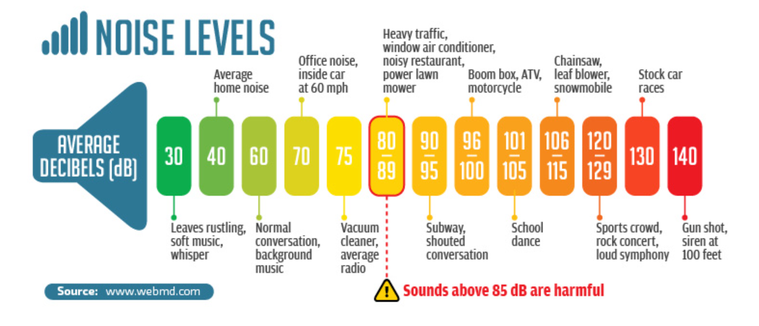
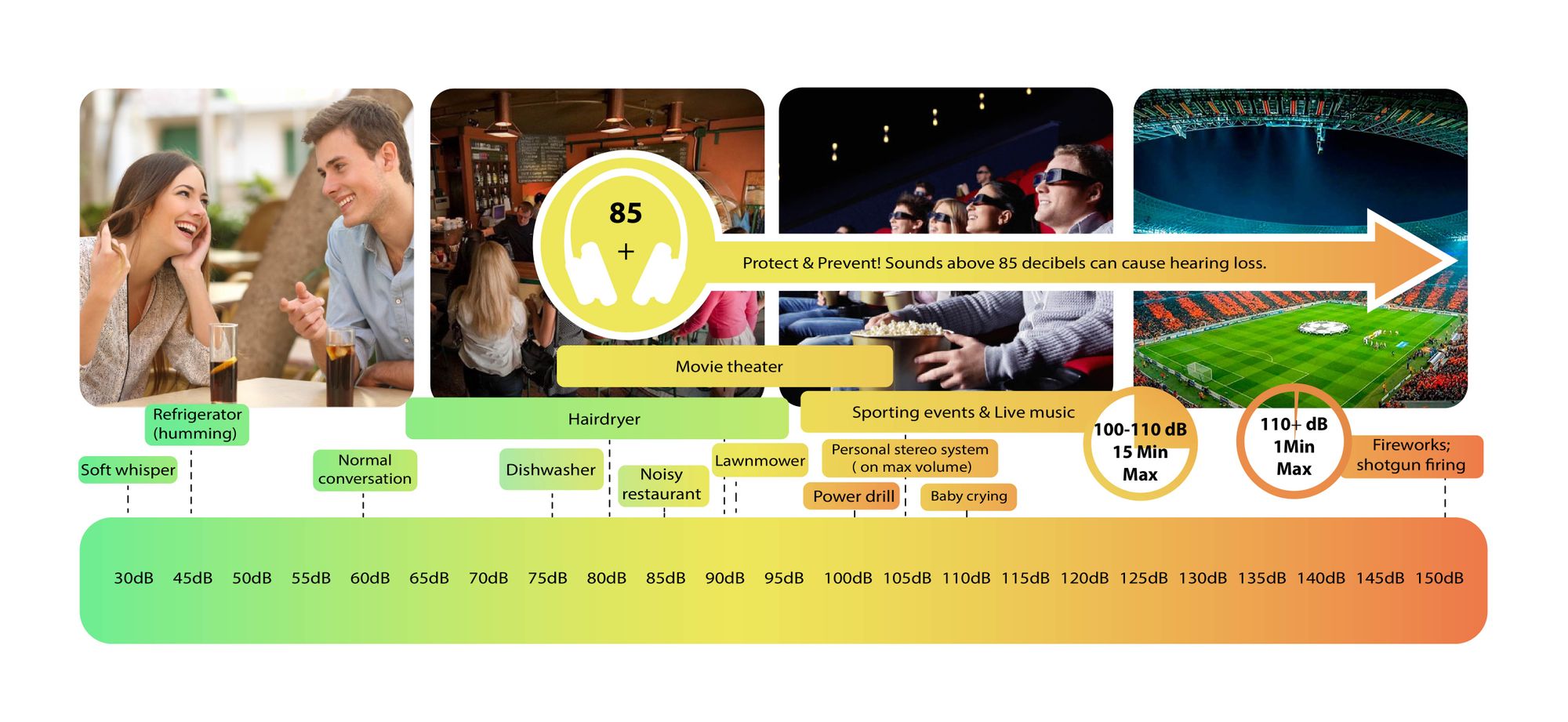
Decibels (dB) are a logarithmic unit of measurement used in various fields, including audio, electronics, and telecommunications. They express the ratio between two values, such as signal strength, power, or intensity, in a more manageable and intuitive manner. Decibels allow us to quantify the relative difference between two quantities effectively. For example, a 3 dB increase represents a doubling of sound intensity, making it a fundamental concept in many technical fields.

What are Decibels?

Decibels, often abbreviated as dB, are a logarithmic unit used to express ratios between values like power, intensity, or amplitude. They offer a convenient way to represent large ranges of values and are widely used in fields such as audio engineering and telecommunications.

Decibel Scale

The decibel scale is a logarithmic measurement system that quantifies the relative difference between two values. For instance, in audio, a 10 dB increase signifies a tenfold increase in power or intensity, while a 10 dB decrease represents a tenfold decrease. This logarithmic property simplifies comparisons and analyses of various measurements.

Applications of Decibels

Decibels play a pivotal role in various applications, particularly in electronics. They are used to measure signal strength, gain, noise levels, and more. Engineers and technicians rely on decibels to assess the performance and quality of electronic systems, making them a vital concept in the field.

Video Compression

Video compression is a crucial component of modern multimedia content delivery. It involves using algorithms to reduce the size of video files while maintaining acceptable visual quality. Video compression removes redundant or less important information from a video stream, making it efficient for storage and transmission.

Video Quality

Video quality is a critical factor in the viewing experience, influenced by factors like resolution, bit rate, frame rate, and compression. Resolution, measured in pixels (e.g., 1080p or 4K), determines detail levels. Bit rate affects data transmission, while frame rate impacts motion smoothness. Video compression balances quality and file size, with codecs like H.264 and H.265 playing significant roles in the industry. Achieving the desired video quality requires a careful balance of these factors for various applications.