As a specialist in digital audio technologies, I delve into the world of audio formats to provide a comprehensive comparison between MP3 and M4A. From compression algorithms to compatibility, understanding the nuances of these formats is crucial for optimizing your audio experience.
Why Audio Formats Matter
In today’s digital landscape, the choice of audio format significantly impacts sound quality, file size, and device compatibility. As a seasoned expert, I recognize the importance of selecting the right format to ensure optimal audio playback across various platforms and devices.
Exploring MP3
MP3, short for MPEG Audio Layer III, revolutionized the way we consume digital music with its efficient compression algorithm. With widespread support across devices and platforms, MP3 remains a staple in the world of digital audio, offering a balance between quality and file size.
Understanding M4A
M4A, a file extension associated with MPEG-4 Part 14, represents a newer generation of audio formats known for their superior sound quality and advanced features. As an expert in multimedia technologies, I delve into the intricacies of M4A to uncover its benefits and limitations.
The Advantages of MP3
MP3 has long been synonymous with digital audio, thanks to its widespread adoption and compatibility. Let’s explore why this format continues to dominate the music industry and digital audio landscape.
Universal Compatibility
One of the standout features of MP3 is its universal compatibility across a wide range of devices, software applications, and operating systems. Whether you’re listening to music on a smartphone, computer, or dedicated audio player, chances are it supports MP3 playback without any hassle.
Efficient Compression
As an expert in audio compression technologies, I can attest to the efficiency of the MP3 format in reducing file size without compromising audio quality. By removing redundant audio data, MP3 files maintain a balance between high-fidelity sound reproduction and manageable file sizes, making them ideal for streaming and downloading.
Legacy Support
With decades of existence, MP3 boasts extensive legacy support across digital music libraries, online streaming platforms, and audio editing software. As a result, millions of songs and audio files are encoded in the MP3 format, ensuring seamless playback and compatibility across various devices and platforms.
The Evolution of M4A
While MP3 remains a popular choice for digital audio, the emergence of formats like M4A has challenged its dominance with superior sound quality and advanced features. Let’s delve into the unique characteristics of M4A and its impact on the audio industry.
Enhanced Sound Quality
One of the primary advantages of M4A over MP3 is its ability to deliver enhanced sound quality, especially at lower bitrates. By utilizing advanced audio codecs like AAC (Advanced Audio Coding), M4A achieves superior audio fidelity and clarity, making it the preferred choice for audiophiles and music enthusiasts.
Advanced Features
In addition to superior sound quality, M4A offers a range of advanced features such as support for metadata, chapter markers, and lossless audio compression. These features enhance the listening experience and provide greater flexibility for content creators and consumers alike.
Optimized for Multimedia
As multimedia consumption continues to evolve, M4A emerges as a versatile format optimized for a wide range of audiovisual content, including music, podcasts, audiobooks, and video soundtracks. Its seamless integration with multimedia platforms and devices makes M4A the preferred choice for creators seeking uncompromised audio quality and compatibility.
Choosing the Right Format
When it comes to selecting the optimal audio format for your needs, it’s essential to consider factors such as sound quality, compatibility, and intended use. Whether you prefer the widespread support of MP3 or the superior audio fidelity of M4A, understanding the strengths and limitations of each format is key to maximizing your listening experience.
Consideration Factors
As an expert in digital audio technologies, I advise clients to consider various factors when choosing between MP3 and M4A. Factors such as sound quality preferences, device compatibility, storage limitations, and intended use case can influence the selection process and ensure a tailored audio experience.
Sound Quality Preferences
Device Compatibility
Storage Limitations
Intended Use Case
Streaming Versus Downloading
Personal Preference
Ultimately, the choice between MP3 and M4A boils down to personal preference and specific use case requirements. Whether you prioritize compatibility, sound quality, or advanced features, selecting the right format ensures an enjoyable and immersive audio experience tailored to your needs.
Latest Words on Audio Formats
As a seasoned expert in digital audio technologies, I’ve provided an in-depth comparison between MP3 and M4A to help you make informed decisions about your audio library. Whether you’re a casual listener or a discerning audiophile, understanding the nuances of audio formats is key to unlocking the full potential of your digital music collection.
Comments:
Wow, this article really helped me understand the differences between MP3 and M4A. I’ve been struggling to choose the right format for my music library, but now I feel confident in my decision. Thanks!
– MusicEnthusiast23
I never realized how much impact the choice of audio format could have on sound quality until I read this article. The explanations were clear, and I appreciate the expert insights!
– SoundMaster99
This article provided valuable information on the pros and cons of MP3 and M4A. However, I wish there was more emphasis on emerging formats like FLAC and WAV.
– Audiophile123
As a music producer, I’ve struggled with compatibility issues when using M4A for my projects. After reading this article, I’m convinced that sticking with MP3 is the right choice for me.
– BeatMaker456
I found the comparison between MP3 and M4A to be enlightening, but I was hoping for more in-depth technical analysis regarding encoding algorithms
and compression techniques.
– TechSavvyMusician
Great article! I’ve been debating whether to switch from MP3 to M4A for my music collection, and this article provided the clarity I needed to make an informed decision.
– DigitalListener789
As a casual listener, I never paid much attention to audio formats until now. This article opened my eyes to the world of digital audio and helped me appreciate the importance of choosing the right format.
– MusicNovice123
Although MP3 seems to be the more popular choice, I’m intrigued by the superior sound quality of M4A. This article provided valuable insights into both formats, helping me weigh the pros and cons.
– AudioExplorer567
Thanks for shedding light on the differences between MP3 and M4A. I’ve been using both formats for years, but now I have a better understanding of their strengths and weaknesses.
– MusicLover321
This article was a great starting point for understanding audio formats, but I would love to see more discussion on emerging trends and technologies shaping the future of digital audio.
Let’s talk about MP3 Error Resilience in Noisy Environments
As an audio engineering specialist, I’ve encountered challenges related to maintaining audio quality in adverse conditions. In this article, we’ll explore the intricacies of MP3 error resilience, its importance, underlying mechanisms, and practical implications for audio playback in noisy environments.
Understanding MP3 Error Resilience
In noisy environments, MP3 files are susceptible to errors that degrade audio quality due to network congestion, electromagnetic interference, or hardware limitations. Despite its widespread use, MP3 lacks built-in error detection and correction mechanisms, making it vulnerable to data loss or corruption.
The Importance of Error Resilience
Preservation of Audio Quality: Errors in MP3 files can manifest as audible artifacts such as clicks or pops, detracting from the listening experience.
Robustness in Transmission: Error-resilient MP3 encoding techniques mitigate data loss during transmission, ensuring reliable playback.
Compatibility with Legacy Devices: Many legacy devices lack advanced error correction, necessitating error-resilient MP3 encoding for compatibility.
Enhancing MP3 Error Resilience
Various encoding techniques and playback strategies can improve error resilience in MP3 files.
Forward Error Correction (FEC)
Embedded Redundancy: FEC algorithms introduce redundant data into MP3 files for error detection and correction.
Reed-Solomon Coding: FEC schemes like Reed-Solomon coding add parity check symbols to MP3 frames for error recovery.
Bitstream Parsers and Sync Detection
Robust Parsing: Advanced parsers recover from synchronization errors in MP3 streams, ensuring uninterrupted playback.
Header Verification: Parsers verify header information in MP3 frames to detect and discard corrupted data.
Noise Reduction Techniques
Adaptive Filtering: Algorithms analyze audio signals in real-time, suppressing background noise for clearer playback.
Spectral Subtraction: Methods estimate and subtract noise components from MP3 audio, improving signal-to-noise ratio.
Latest words on MP3 Error Resilience in Noisy Environments
By understanding MP3 error resilience mechanisms and implementing robust encoding and playback strategies, we can ensure optimal audio quality in challenging environments.
Comments:
This article sheds light on the crucial aspect of MP3 error resilience. I appreciate the clear explanations and practical advice provided.
– SoundEnthusiast99
MP3 error resilience is a topic often overlooked but essential for maintaining audio quality. Thanks for addressing it comprehensively!
– MusicMan123
As an audio professional, I found this article informative and insightful. Understanding MP3 error resilience is crucial for delivering high-quality audio experiences.
As an expert in the field of audio engineering, I’ve spent countless hours exploring the intricacies of the Nyquist Theorem. This foundational concept is the bedrock of modern digital audio processing, and its significance cannot be overstated. The Nyquist Theorem, in essence, defines the minimum sampling rate required to accurately convert analog signals into digital form.
Think of it this way: imagine you’re watching a fast-moving train and trying to take photographs to capture its motion. If you snap pictures too infrequently, you won’t capture the train’s true movement; details will be lost. The Nyquist Theorem tells us that in audio, the sampling rate must be at least twice the highest frequency we wish to reproduce. It’s the key to ensuring that nothing is missed when we transform the analog world of sound into the digital realm.
Now, let’s explore this concept further. Imagine you’re at a live music concert, and the artist hits a soaring high note. If your recording equipment doesn’t sample at a rate higher than the Nyquist frequency for that note, you’ll hear distortion and unwanted artifacts. Understanding the Nyquist Theorem is essential for audio engineers and music producers, as it directly impacts the quality of the final product, allowing us to capture and reproduce sound faithfully.
Applying Nyquist in Audio Recording
When it comes to audio recording, applying the Nyquist Theorem is akin to wielding a precision instrument. It’s not just a theoretical concept; it’s a practical guide for achieving clarity and fidelity in recorded audio. Consider it the compass that ensures we’re on the right path when capturing analog sound in the digital realm.
Imagine you’re recording a vocal performance. The Nyquist Theorem guides you in selecting the appropriate sampling rate for your digital recorder. If you neglect this principle and sample at a rate lower than twice the highest frequency in the vocalist’s range, you risk introducing aliasing, a phenomenon where high-frequency components are erroneously mapped to lower frequencies. This results in a distorted, unnatural sound, akin to viewing a pixelated image.
By heeding the Nyquist Theorem, audio engineers and recording artists ensure that their work preserves the subtle nuances and dynamic range of sound, producing recordings that captivate and resonate with listeners.
The Significance of Nyquist Frequency
Within the realm of digital audio, the Nyquist frequency stands as a sentinel of sound quality. Picture it as a gatekeeper, defining the boundary between faithful reproduction and unwanted distortions. It plays a pivotal role in digital audio, similar to how a camera’s shutter speed determines the clarity of a photograph.
Let’s delve into this further: suppose you’re designing an audio system. To prevent aliasing, you must set the sampling rate based on the Nyquist frequency. This ensures that the system captures and reproduces sound accurately. It’s analogous to building a bridge with a weight limit to ensure safety. By acknowledging the Nyquist frequency’s significance, audio engineers create systems that consistently deliver high-quality sound experiences.
Whether you’re a musician, audio engineer, or simply an audio enthusiast, recognizing the importance of the Nyquist frequency empowers you to make informed choices about equipment, software, and recording techniques, ultimately elevating your sonic experiences.
High Sampling Rates and Audio Quality
The impact of high sampling rates on audio quality is profound and undeniable. It’s the difference between a breathtaking high-definition image and a blurry snapshot. In the audio world, a high sampling rate means capturing more snapshots per second, preserving the intricate details of the sound waveform.
Imagine you’re in a studio recording a delicate acoustic guitar performance. To capture the subtle harmonics and nuances, a high sampling rate is essential. It’s like using a magnifying glass to appreciate the intricate details in a work of art. Musicians and audio engineers often opt for higher sampling rates, as they enable the faithful reproduction of every note and texture, resulting in recordings that feel alive and immersive.
Investing in high-quality equipment that supports high sampling rates is a testament to your commitment to audio excellence. It’s the path to creating soundscapes that resonate with audiences and evoke emotions on a profound level.
Avoiding Aliasing in Digital Audio
Avoiding aliasing in digital audio is a crucial mission for any audio engineer or producer. Imagine aliasing as the unwelcome ghost that haunts your recordings, distorting the beauty of sound. It occurs when the Nyquist sampling rate is not observed, and higher frequencies masquerade as lower ones, resulting in unpleasant artifacts.
Think of aliasing as a mirror that distorts your reflection; it’s not an accurate representation of reality. To banish this ghost, you must adhere to the Nyquist Theorem’s principles diligently. Use filters and sample at rates that prevent high-frequency components from sneaking into lower frequencies.
By doing so, you ensure that your digital audio productions are clean, pure, and devoid of unwanted artifacts. It’s akin to restoring a classic painting, revealing its true beauty without distortion or blemishes.
Last Words
“In the world of audio, the Nyquist Theorem is our guiding star. It empowers us to capture the magic of sound faithfully. Whether you’re recording a symphony, crafting a podcast, or simply savoring your favorite music, understanding the Nyquist Theorem unlocks a world of sonic possibilities. Let it be your compass in the realm of audio excellence.” — William Kindall, Audio Expert
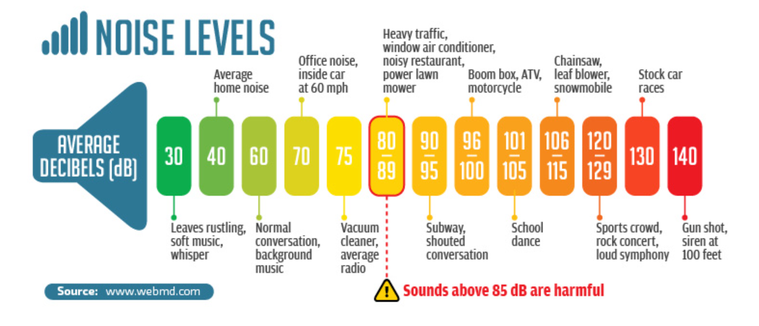
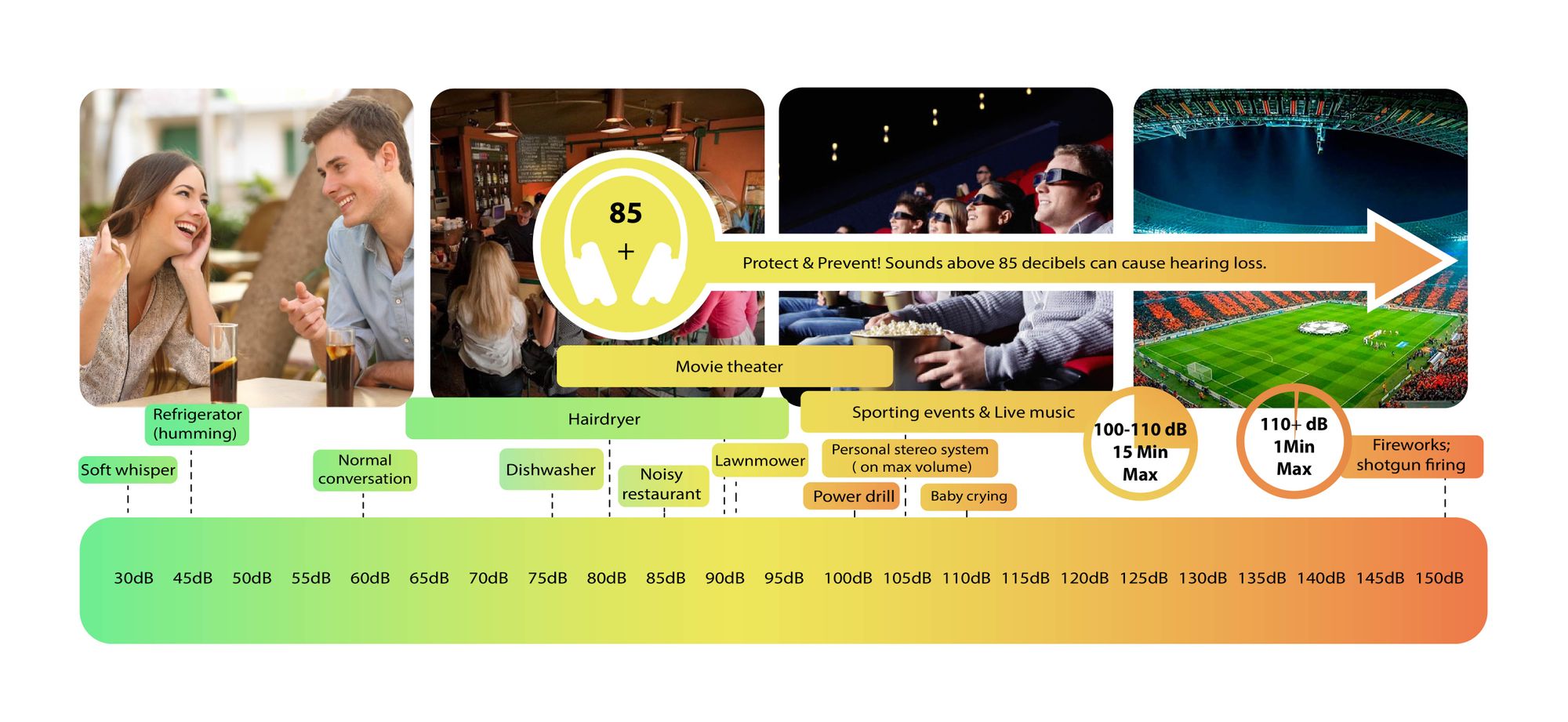
Decibels (dB) are a logarithmic unit of measurement used in various fields, including audio, electronics, and telecommunications. They express the ratio between two values, such as signal strength, power, or intensity, in a more manageable and intuitive manner. Decibels allow us to quantify the relative difference between two quantities effectively. For example, a 3 dB increase represents a doubling of sound intensity, making it a fundamental concept in many technical fields.
What are Decibels?
Decibels, often abbreviated as dB, are a logarithmic unit used to express ratios between values like power, intensity, or amplitude. They offer a convenient way to represent large ranges of values and are widely used in fields such as audio engineering and telecommunications.
Decibel Scale
The decibel scale is a logarithmic measurement system that quantifies the relative difference between two values. For instance, in audio, a 10 dB increase signifies a tenfold increase in power or intensity, while a 10 dB decrease represents a tenfold decrease. This logarithmic property simplifies comparisons and analyses of various measurements.
Applications of Decibels
Decibels play a pivotal role in various applications, particularly in electronics. They are used to measure signal strength, gain, noise levels, and more. Engineers and technicians rely on decibels to assess the performance and quality of electronic systems, making them a vital concept in the field.
Video Compression
Video compression is a crucial component of modern multimedia content delivery. It involves using algorithms to reduce the size of video files while maintaining acceptable visual quality. Video compression removes redundant or less important information from a video stream, making it efficient for storage and transmission.
Video Quality
Video quality is a critical factor in the viewing experience, influenced by factors like resolution, bit rate, frame rate, and compression. Resolution, measured in pixels (e.g., 1080p or 4K), determines detail levels. Bit rate affects data transmission, while frame rate impacts motion smoothness. Video compression balances quality and file size, with codecs like H.264 and H.265 playing significant roles in the industry. Achieving the desired video quality requires a careful balance of these factors for various applications.
Digital Bit Depth in AudioDigital Bit Depth in Audio
Digital bit depth in audio is a fundamental concept that impacts the quality and fidelity of digital sound. Bit depth, also known as audio resolution, refers to the number of bits used to represent the amplitude of an audio signal at a specific point in time. It essentially quantifies how finely audio samples are taken in the digital domain.
To put it simply, the bit depth determines the precision with which sound is captured and stored digitally. Common bit depths in digital audio are 16-bit, 24-bit, and 32-bit, with higher numbers providing greater precision.
Audio Bit Depth Explained
Understanding audio bit depth is essential for anyone seeking to grasp the intricacies of digital audio recording and playback. At its core, audio bit depth is a measure of how accurately an analog sound wave’s amplitude is captured and converted into a digital signal.
In practical terms, a higher bit depth signifies that the digital representation of an audio waveform closely mirrors the original analog signal, resulting in reduced quantization error or “noise.” Quantization error occurs when an analog value is approximated to the nearest digital value, and lower bit depths can make this error more noticeable, especially in quieter sections of audio.
Bit Depth and Audio Quality
Bit depth plays a pivotal role in determining the quality and precision of digital audio. The relationship between bit depth and audio quality is akin to an artist’s palette of colors. A higher bit depth provides a broader spectrum of shades and nuances, making the digital representation of sound more faithful to the original analog source.
For example, a 16-bit system offers 65,536 discrete amplitude levels, whereas a 24-bit system provides an astonishing 16,777,216 levels. This heightened precision results in smoother and more detailed audio representation, particularly in the subtle and quiet passages of a recording.
Digital Audio Resolution
Digital audio resolution, closely linked to bit depth, is a critical factor in capturing and reproducing sound accurately. It refers to the level of detail and clarity in digital audio. The greater the bit depth, the higher the resolution, and the finer the nuances that can be captured.
In the realm of audio production, higher digital audio resolution means that the subtle nuances, such as the intricacies of a singer’s voice or the delicate harmonics of a musical instrument, are preserved with remarkable fidelity.
Bit Depth in Music Recording
In the world of music recording, selecting the appropriate bit depth is a crucial decision that profoundly affects the final audio quality. Musicians and producers carefully consider bit depth when recording to ensure that the nuances and dynamics of their performances are accurately captured.
In practice, 24-bit recording is a popular choice among music professionals. This bit depth provides an ideal balance between precision and file size, allowing for the capture of subtle details while minimizing the risk of bit-depth noise in quieter sections of the recording.
Audio Signal Precision
Audio signal precision, often measured by bit depth, is a key consideration in professional audio production. It relates to how faithfully an audio system can reproduce the original sound. The higher the bit depth, the greater the precision in representing the analog signal, resulting in cleaner and more accurate audio playback.
For audio engineers and producers, achieving optimal audio signal precision is paramount. It ensures that the music they create is heard as intended, with all the intricacies and subtleties faithfully reproduced.
Bit Depth in Analog-to-Digital Conversion
Understanding how bit depth influences analog-to-digital conversion is essential for maintaining audio fidelity. Analog-to-digital conversion is the process of transforming continuous analog signals into discrete digital values. Bit depth determines the number of discrete values that can represent the amplitude of the analog signal during this conversion.
In essence, higher bit depth means that the analog-to-digital conversion process captures more precise details from the analog signal. This is particularly critical when working with high-quality audio sources where preserving every nuance is paramount.
Sound Fidelity and Bit Depth
Sound fidelity, the faithfulness with which audio is reproduced, is intricately linked to bit depth. A higher bit depth generally results in better audio fidelity, as it allows for the accurate representation of both subtle nuances and powerful crescendos in music.
Consider classical music or jazz, where dynamics play a significant role. With a higher bit depth, the audio system can faithfully reproduce the full range of soft and loud passages, ensuring that the listener experiences the music as intended by the performers and composers.
Impact of Bit Depth on Audio Playback
The impact of bit depth on audio playback is a critical factor in delivering a high-quality listening experience. When you listen to digital audio, the bit depth of the source file significantly affects what you hear.
In simple terms, higher bit depth in the source audio file results in a more faithful and detailed listening experience. This becomes especially noticeable in acoustic instruments, where the subtle nuances of a violin’s bowing or a pianist’s touch can be lost in lower bit depth recordings.
How Does Bit Depth Affect the Quality of Digital Audio?
Exploring how bit depth affects the quality of digital audio is crucial for audiophiles and audio professionals alike. It’s the bit depth that determines how accurately the audio signal is captured and reproduced, ultimately influencing the overall audio quality.
A higher bit depth translates to a more faithful representation of the original sound, with fewer imperfections or noise introduced during the recording and playback processes. This improvement in audio quality is particularly noticeable in genres that require a wide dynamic range and high levels of detail.
What Is the Role of Bit Depth in Recording Music Digitally?
The role of bit depth in recording music digitally is a multifaceted aspect of audio production. When musicians and engineers step into the studio, they must make critical decisions about bit depth to ensure that their recordings capture the essence of the music.
Choosing the appropriate bit depth is a balancing act. While higher bit depths provide greater precision and fidelity, they also result in larger file sizes. Musicians often opt for 24-bit recordings as they strike a harmonious balance between capturing subtle details and managing storage requirements.
How Is Audio Fidelity Influenced by Digital Bit Depth?
Understanding how digital bit depth influences audio fidelity is key to achieving top-tier sound quality. Audio fidelity, often described as the faithfulness of audio reproduction to the original source, is a critical consideration for audio professionals and enthusiasts.
With a higher bit depth, audio fidelity is enhanced because the digital representation of the sound is more detailed and accurate. This is especially crucial in professional audio production, where maintaining the highest possible fidelity is paramount.
Can You Explain the Importance of Bit Depth in Analog-to-Digital Conversion for Audio?
Explaining the importance of bit depth in analog-to-digital conversion sheds light on the intricacies of audio processing. Analog-to-digital conversion is the bridge that allows analog sound to be translated into a digital format that can be manipulated and stored. Bit depth plays a pivotal role in this process.
Higher bit depths ensure that the analog-to-digital conversion process captures more fine-grained details from the original analog signal. This is essential for preserving the richness and subtleties of audio, whether it’s a soaring vocal performance, the resonance of a musical instrument, or the ambiance of a recording environment.
What Is the Relationship Between Bit Depth and Dynamic Range in Digital Audio?
The relationship between bit depth and dynamic range in digital audio is a crucial one to understand. Dynamic range refers to the difference between the softest and loudest sounds that an audio system can reproduce. Bit depth plays a pivotal role in defining this dynamic range.
Higher bit depths translate to a wider dynamic range, allowing for the faithful reproduction of both subtle nuances and powerful crescendos in music. This is essential for maintaining audio fidelity, especially in genres with a wide range of dynamics, such as classical music and jazz.
How Does Bit Depth Impact the Accuracy of Audio Playback?
The impact of bit depth on the accuracy of audio playback cannot be overstated. When you listen to music or any digital audio content, the bit depth of the source file has a profound influence on what you hear.
Higher bit depth in the source audio file means that the playback faithfully represents the original recording. It allows for the subtlest details and nuances to shine through, creating a more immersive and engaging listening experience. In essence, higher bit depth contributes to the accuracy and realism of audio playback.
Are There Industry Standards for Bit Depth in Digital Audio Recording?
In the world of professional audio recording, industry standards play a vital role in guiding the use of bit depth. While there’s flexibility in choosing bit depths based on specific requirements, certain standards are commonly followed.
For instance, most audio CDs use 16-bit resolution, which offers high-quality playback suitable for the majority of consumers. However, in the realm of studio recording and mastering, 24-bit and even 32-bit formats are commonly employed to ensure the highest level of fidelity.
What Are the Advantages of Using Higher Bit Depth in Audio Processing?
Using higher bit depth in audio processing offers several distinct advantages. These advantages extend to both recording and post-production stages, and they significantly impact the overall quality of audio content.
Enhanced Audio Fidelity
One of the primary advantages is enhanced audio fidelity. Higher bit depths provide more precision in capturing and reproducing audio, resulting in recordings that faithfully preserve the original sound. This is particularly important in professional music production and critical listening environments.
Greater Dynamic Range
Higher bit depths also grant a greater dynamic range, allowing for the faithful representation of a wide range of sound intensities. This is particularly beneficial in genres of music or audio content with stark differences in volume, as it ensures that both delicate subtleties and powerful peaks are accurately reproduced.
How Can I Optimize Bit Depth for Better Audio Resolution?
For those involved in audio production or seeking the best listening experience, optimizing bit depth is crucial. It’s not just about using the highest available bit depth but also considering the entire audio workflow and ensuring that bit depth aligns with specific needs.
Matching Bit Depth to Audio Source
When recording audio, it’s essential to match the bit depth to the dynamic range of the audio source. For instance, a live jazz performance with wide dynamic swings benefits from 24-bit recording, while a podcast with a more consistent volume may suffice with 16-bit. This approach minimizes bit-depth noise while preserving audio quality.
Post-Production Considerations
During post-production, maintaining a high bit depth throughout the editing and mixing process is advisable. Only when preparing the final distribution format, such as a CD or streaming file, should the audio be converted to a lower bit depth to match the destination format.
The Benefits of Greater Bit Depth in Digital Audio Systems
As technology advances, digital audio systems are offering higher bit depths as an option. But what are the practical advantages of embracing these extended bit depths?
Future-Proofing Audio
One significant advantage is future-proofing your audio recordings. With higher bit depths, your recordings are better equipped to stand the test of time. As playback systems and formats improve, your high-bit-depth recordings will continue to sound exceptional, ensuring that your music or audio content remains relevant for years to come.
Editing Flexibility
Greater bit depths also provide increased editing flexibility. Audio engineers can apply effects and processing without worrying as much about introducing quantization errors or compromising audio quality. This freedom allows for more creative experimentation during the mixing and mastering stages, ultimately leading to more polished and refined audio content.
In conclusion, digital bit depth is a critical factor in the world of audio, influencing both recording and playback quality. Understanding its importance, selecting the appropriate bit depth for various scenarios, and embracing higher bit depths when possible can lead to an audio experience that is richer, more immersive, and of the highest fidelity. Whether you’re a musician, audio engineer, or simply a music enthusiast, appreciating the role of bit depth can elevate your audio journey to new heights.
Flac and Ogg Volume AdjusterFlac and Ogg Volume Adjuster
Are you tired of dealing with uneven audio levels in your Flac and Ogg files? Well, you’re not alone. Many audio enthusiasts and professionals often face the challenge of maintaining consistent sound quality across their collections. In this article, I’ll delve into the world of Flac and Ogg volume adjustment and explore various methods to tackle this issue effectively.
Audio File Format Adjustments
Before we dive into volume adjustments, it’s crucial to understand the nature of Flac and Ogg audio formats. Flac, short for Free Lossless Audio Codec, and Ogg Vorbis are popular choices for storing high-quality audio. Flac provides lossless compression, preserving audio quality without sacrificing file size, while Ogg is known for its open-source nature and efficient compression.
Sound Volume Control for Flac and Ogg
To control the volume of your Flac and Ogg files, you’ll need specialized tools or software designed for audio processing. These tools allow you to adjust the volume levels without compromising the overall audio quality. Keep in mind that it’s essential to maintain a balance between amplifying the audio and preventing distortion.
Adjusting Audio Levels in Flac and Ogg
One common method for volume adjustment is using an audio editor. These editors offer precise control over the audio, enabling you to increase or decrease the volume as needed. It’s important to preview the changes and make incremental adjustments to achieve the desired result.
Whether you’re a music enthusiast or a professional sound engineer, the ability to adjust volume levels in Flac and Ogg files is invaluable. By understanding the intricacies of these audio formats and utilizing the right tools, you can ensure a consistent and enjoyable listening experience.
Normalizing Sound in Flac and Ogg Files
Normalization is another technique to bring uniformity to your audio collection. This process adjusts the volume of each file to a standard level, eliminating extreme variations. Normalization algorithms analyze the audio content and adjust the gain accordingly, making it ideal for batch processing large libraries.
Volume Equalization for Flac and Ogg
Volume equalization is about ensuring that all your Flac and Ogg files have similar loudness levels. This technique is essential when you’re creating playlists or organizing audio for playback. Volume equalization tools use various methods to balance the audio, providing a seamless listening experience.
Audio Gain in Flac and Ogg Formats
Audio gain, also known as amplification, allows you to increase the overall loudness of your Flac and Ogg files. This can be particularly useful if you have older recordings or content with low volume levels. However, it’s crucial to exercise caution and avoid over-amplification, which can lead to distortion.
Balancing Audio in Flac and Ogg Files
Balancing audio involves adjusting the volume levels of individual tracks within a file. This is handy when dealing with live recordings or albums where tracks may have varying loudness. Balancing tools provide a means to fine-tune each track’s volume to create a consistent listening experience.
Flac and Ogg Audio Level Management
Managing audio levels in Flac and Ogg files is an ongoing process, especially if you frequently add new content to your collection. Regularly reviewing and adjusting volume levels ensures that your audio library remains enjoyable and free from sudden volume spikes or drops.
Tweaking Volume in Flac and Ogg
Sometimes, you may want to apply specific tweaks to the volume of your Flac and Ogg files. This could involve emphasizing certain frequencies or applying dynamic range compression to enhance the audio quality. Experimenting with these tweaks can lead to a more personalized listening experience.
Enhancing Audio Dynamics in Flac and Ogg
Audio dynamics play a crucial role in the overall quality of your listening experience. Adjusting volume levels in Flac and Ogg files can help bring out the nuances in your music. By carefully managing audio dynamics, you can ensure that every note and sound is delivered with precision and clarity.
Final Words
Flac and Ogg volume adjustment is an essential aspect of maintaining an enjoyable audio collection. Whether you’re a music enthusiast or a professional, understanding the tools and techniques available can significantly enhance your listening experience. With the right approach, you can achieve balanced and consistent audio quality in your Flac and Ogg files.
Audio normalization is a crucial process in the world of audio production. It involves adjusting the volume levels of audio tracks to ensure a consistent and balanced listening experience. Whether you’re a music producer, a filmmaker, or a podcaster, the need to normalize audio tracks frequently arises to deliver high-quality content.
Normalize audio files
When you normalize audio files, you’re essentially making sure that the loudest and softest parts of your track are brought to a consistent level. This means that no part of your audio will be too quiet or too loud, allowing your listeners to enjoy a seamless experience without constantly adjusting the volume.
Audio track leveling
Audio track leveling is the process of ensuring that all the individual tracks in your audio project have a similar volume level. This is particularly important in music production, where you want all instruments and vocals to blend harmoniously without any one element overpowering the others.
Audio track equalization
Equalization (EQ) is another aspect of audio track optimization. While normalization focuses on overall volume levels, EQ allows you to fine-tune the frequency balance of your tracks. By adjusting the EQ settings, you can enhance the clarity and presence of different elements in your audio, such as vocals, instruments, or ambient sounds.
Soundtrack volume adjustment
In the world of film and video production, soundtrack volume adjustment plays a vital role. You want the dialogue, background music, and sound effects to be well-balanced to create an immersive cinematic experience. Normalizing the audio tracks ensures that viewers won’t have to constantly adjust their volume settings to hear the dialogue clearly.
Audio track enhancement
Audio track enhancement goes beyond normalization. It involves using various audio processing techniques to improve the overall quality of your tracks. This can include reducing background noise, adding special effects, or applying dynamic processing to make the audio more engaging.
Audio track optimization
Optimizing audio tracks is a comprehensive approach to ensuring the best possible sound quality. It combines normalization, equalization, and other audio processing techniques to create audio that sounds professional and polished.
Normalize sound in tracks
Normalizing sound in tracks is particularly useful when working with multiple audio sources or recordings that have inconsistent volume levels. It guarantees that all tracks will blend seamlessly and sound cohesive when played together.
Track audio balancing
Track audio balancing is an essential skill for mixing and mastering engineers. It involves adjusting the volume levels of individual tracks within a multitrack recording to achieve a well-balanced and harmonious final mix.
Track audio improvement
Audio improvement is the ultimate goal when working with audio tracks. It’s about taking the raw audio material and transforming it into something that sounds exceptional. This may involve not only normalization but also editing, effects, and creativity to make the audio truly stand out.
Final Words
Normalizing audio tracks is just one step in the journey of audio production and enhancement. Whether you’re an aspiring musician, a filmmaker, or a content creator, understanding how to effectively normalize and optimize audio tracks is essential for delivering a top-notch listening experience to your audience.
Digital audio interfaces are essential for connecting audio equipment to a computer or other digital device. They allow for high-quality audio recording, playback, and processing, and come in a variety of formats, including MIDI and USB.
When I first started working with digital audio interfaces, I was overwhelmed by the different options available. However, after some research and experimentation, I was able to understand the differences between MIDI and USB interfaces and how to choose the right one for my needs. One of the advantages of digital audio interfaces is that they allow for high-quality audio recording and playback, which is essential for music production and other audio-related tasks.
As I was learning about digital audio interfaces, I remembered the quote from the movie “Whiplash”: “There are no two words in the English language more harmful than ‘good job’.” While it’s important to strive for excellence in audio production, it’s also important to choose the right tools for the job.
MIDI vs. USB
MIDI and USB are two common digital audio interface formats. MIDI stands for Musical Instrument Digital Interface and is primarily used for connecting musical instruments and controllers to a computer or other digital device. USB stands for Universal Serial Bus and is a general-purpose interface that can be used for a variety of audio and non-audio devices.
One of the advantages of MIDI is that it allows for precise control over musical instruments and controllers, making it ideal for music production and performance. However, MIDI is limited in terms of bandwidth and can only transmit data at a relatively slow rate. USB, on the other hand, has a much higher bandwidth and can transmit data at a much faster rate, making it ideal for high-quality audio recording and playback.
As I was learning about MIDI and USB interfaces, I remembered the quote from the book “The Alchemist” by Paulo Coelho: “When you want something, all the universe conspires in helping you to achieve it.” Choosing the right digital audio interface can be challenging, but with the right tools and knowledge, it’s possible to achieve your audio production goals.
Final Words
Digital audio interfaces are essential for connecting audio equipment to a computer or other digital device. MIDI and USB are two common digital audio interface formats, each with their own advantages and disadvantages. While MIDI is ideal for musical instruments and controllers, USB is ideal for high-quality audio recording and playback.
At MP4Gain, we understand the importance of audio quality and file size. Our software is designed to normalize and convert audio files to the most popular formats, with an integrated equalizer for fine-tuning the audio. If you’re looking for a solution to your audio needs, give MP4Gain a try.
Digital audio interfaces, MIDI vs. USB, audio connectivity, MIDI connectivity, USB connectivity, MIDI interface, USB interface, audio interface, music production, audio recording, audio playback, audio processing, audio equipment, audio devices, audio tools, audio software, audio quality, audio normalization, audio conversion, audio equalizer, audio production, audio performance, audio controllers, audio bandwidth, audio transmission, audio data, audio rate, audio goals, audio production goals, audio production tools, audio production knowledge, audio production techniques, audio production software, audio production hardware, audio production equipment, audio production resources, audio production community, audio production events, audio production workshops, audio production seminars, audio production webinars, audio production podcasts, audio production blogs, audio production forums, audio production websites, audio production resources, audio production tools, audio production equipment, audio production instruments, audio production accessories, audio production books, audio production magazines, audio production journals, audio production publications, audio production reviews, audio production ratings, audio production comparisons, audio production recommendations, audio production tips, audio production tutorials, audio production guides, audio production manuals, audio production documentation, audio production support, audio production help.
Digital audio is a method of storing audio data on a computer or digital device. Audio data is essentially a collection of sound waves, and to store it digitally, we need to convert these sound waves into a series of numbers that a computer can understand.
What is Digital Audio?
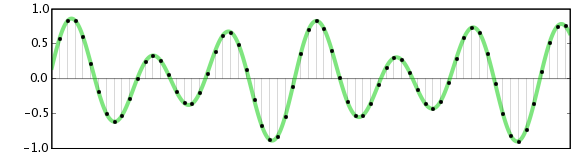
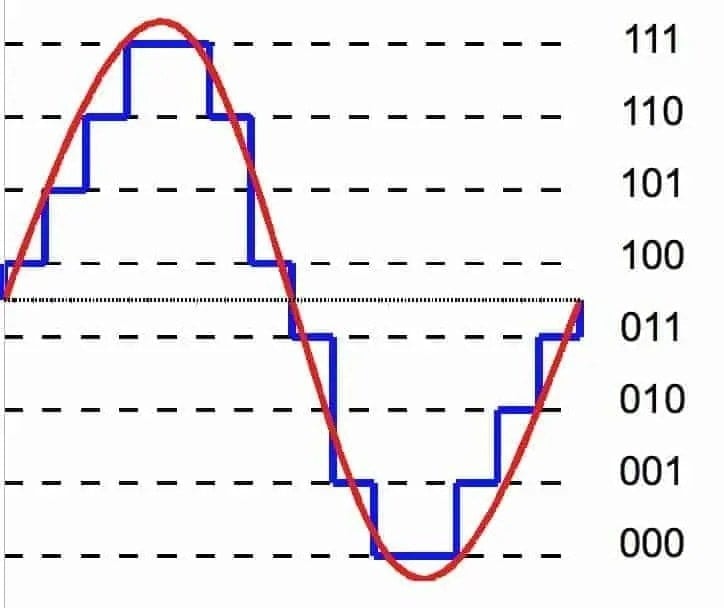
To do this, we use a process called “analog-to-digital conversion”. Analog audio signals are transformed into digital data by measuring the sound wave at regular intervals and assigning each measurement a numerical value. The process of measuring sound waves is called “sampling”, and the numerical values assigned to each sample are known as “bit depth”.
In essence, the audio signal is converted into a series of binary digits (1s and 0s) that can be stored on a computer. This allows us to manipulate, edit, and reproduce audio data in various ways.
How is Audio Converted to Digital Audio?
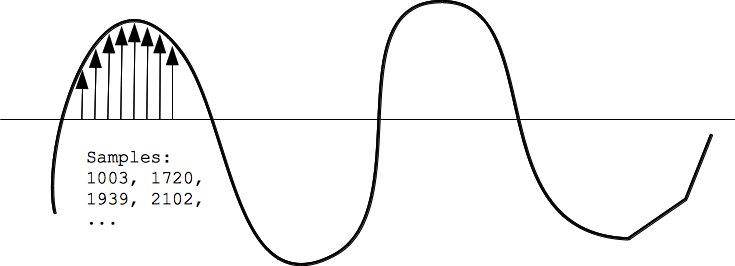
As mentioned earlier, audio is converted to digital audio using a process called “sampling”. Sampling involves taking snapshots of the audio signal at regular intervals, known as the “sampling rate”. The more samples that are taken per second, the more accurately the original sound can be reconstructed.
Imagine taking a picture of a person running. If you take one picture per second, you’ll see the person moving, but the motion won’t be smooth. If you take 10 pictures per second, the motion will be smoother, and if you take 60 pictures per second, the motion will be very smooth.
The same principle applies to digital audio. By taking many samples per second, the original sound can be accurately reconstructed. The number of samples taken per second is called the “sampling rate”, and it’s usually measured in Hertz (Hz). For example, a typical sampling rate for CD-quality audio is 44.1kHz, which means that 44,100 samples are taken per second.
Once the audio has been sampled, each sample is converted into a digital number. The number represents the amplitude of the sound wave at that particular moment. The amplitude of a sound wave is the height of the wave, and it determines how loud or quiet the sound is.
The digital numbers obtained from each sample are stored as binary data, which can be easily stored, edited, and reproduced on a computer.
What is an MP3?
An MP3 is a type of digital audio file that uses a technique called “lossy compression”. This means that some of the data in the original audio file is removed in order to reduce the file size. The removed data is typically inaudible to the human ear, so the overall quality of the audio is not significantly affected.
MP3s achieve this compression by using a technique called “perceptual coding”. This involves analyzing the audio signal and identifying the parts that are less important to the overall sound quality. These parts are then removed, leaving only the most important parts of the audio signal intact.
For example, let’s say you have a song that is 4 minutes long and takes up 40MB of storage space on your computer. If you were to convert that song into an MP3 file, the resulting file might only be 4MB in size, while still maintaining a high level of audio quality.
MP3 files are a popular choice for digital audio because they take up less space than other audio formats, making them easier to store and share. They’re also supported by most digital audio players and software, making them a versatile and widely used format.
How are Sound Waves Converted into Digital Numbers?
As we mentioned earlier, sound waves are converted into digital numbers using a process called “analog-to-digital conversion”. This process involves several steps:
Sampling: The analog audio signal is measured at regular intervals, known as the sampling rate. Each sample is a snapshot of the audio signal at that particular moment.
Quantization: Each sample is assigned a numerical value that represents the amplitude of the sound wave at that moment. This is done using a process called quantization, which assigns a specific digital value to each sample.
Encoding: The digital values obtained from quantization are then converted into binary data. This is done using a process called encoding, which converts each digital value into a series of 1s and 0s.
Compression: Depending on the file format being used, the digital audio data may be compressed in order to reduce its file size. Lossy compression, as we discussed earlier, involves removing some of the data from the original audio file to reduce its size, while maintaining a high level of audio quality. Lossless compression, on the other hand, compresses the file size without sacrificing any data or quality.
Once the audio has been converted into digital data, it can be easily manipulated, edited, and reproduced on a computer or digital device. This allows us to do things like change the volume, apply special effects, and even create entirely new compositions using existing audio samples.
In summary, digital audio is a way of storing and manipulating audio data using a series of numbers that a computer can understand. Analog-to-digital conversion is the process of converting sound waves into digital data, which involves sampling, quantization, encoding, and compression. MP3s are a popular type of digital audio file that use lossy compression to reduce file size, while maintaining a high level of audio quality.









Comments:
Wow, this article really helped me understand the differences between MP3 and M4A. I’ve been struggling to choose the right format for my music library, but now I feel confident in my decision. Thanks!
– MusicEnthusiast23
I never realized how much impact the choice of audio format could have on sound quality until I read this article. The explanations were clear, and I appreciate the expert insights!
– SoundMaster99
This article provided valuable information on the pros and cons of MP3 and M4A. However, I wish there was more emphasis on emerging formats like FLAC and WAV.
– Audiophile123
As a music producer, I’ve struggled with compatibility issues when using M4A for my projects. After reading this article, I’m convinced that sticking with MP3 is the right choice for me.
– BeatMaker456
I found the comparison between MP3 and M4A to be enlightening, but I was hoping for more in-depth technical analysis regarding encoding algorithms
and compression techniques.
– TechSavvyMusician
Great article! I’ve been debating whether to switch from MP3 to M4A for my music collection, and this article provided the clarity I needed to make an informed decision.
– DigitalListener789
As a casual listener, I never paid much attention to audio formats until now. This article opened my eyes to the world of digital audio and helped me appreciate the importance of choosing the right format.
– MusicNovice123
Although MP3 seems to be the more popular choice, I’m intrigued by the superior sound quality of M4A. This article provided valuable insights into both formats, helping me weigh the pros and cons.
– AudioExplorer567
Thanks for shedding light on the differences between MP3 and M4A. I’ve been using both formats for years, but now I have a better understanding of their strengths and weaknesses.
– MusicLover321
This article was a great starting point for understanding audio formats, but I would love to see more discussion on emerging trends and technologies shaping the future of digital audio.
– FutureSoundTech