Sound leveling is like having a perfect balance on a seesaw. In my years working with audio, I’ve seen firsthand how jarring uneven audio can be. Think about listening to a music album where one song is whisper-quiet and the next blasts your eardrums. That’s where sound leveling comes in. It creates a consistent listening experience, so you don’t have to constantly fiddle with the volume. Sound leveling smooths out the sonic rollercoaster, making everything a pleasant and predictable ride.
Why Sound Leveling Matters
Sound leveling is crucial for a smooth and enjoyable listening experience. It’s the difference between a bumpy dirt road and a freshly paved highway for your ears. I’ve used it to create professional-sounding podcasts, even out audio in home movies, and make music compilations flow seamlessly.
How Sound Leveling Works
Sound leveling analyzes audio and adjusts the volume to achieve a consistent target loudness. Think of it as a sculptor chipping away at a block of stone (the audio) to create a smooth, even surface (consistent volume).
Peak Normalization
Peak normalization adjusts the audio so the loudest peak reaches a target level. It’s like trimming the tallest branches of a tree to make it a uniform height.
Loudness Normalization
Loudness normalization considers the perceived loudness of the audio, not just the peaks. This method takes into account how our ears perceive sound, resulting in a more natural and balanced result. I find this particularly useful for dialogue-heavy content, ensuring voices are always clear.
Different Sound Leveling Techniques
There are several ways to achieve sound leveling, each with its advantages and disadvantages. Over the years, I’ve experimented with various methods, and each has its place depending on the type of audio.
ReplayGain
ReplayGain is a standard that embeds metadata in audio files to inform players how to adjust the volume. It’s like attaching instructions to a piece of furniture for easy assembly.
Normalization
Normalization is a process that adjusts the overall gain of an audio file. It’s similar to adjusting the brightness of a photo to achieve a consistent look.
Compression
Compression reduces the dynamic range, making quieter parts louder and louder parts quieter. Think of it as squeezing a sponge – the overall size changes, but the shape becomes more uniform.
Sound Leveling in Different Media
Sound leveling plays a vital role in various media, from music and movies to podcasts and broadcasts. I’ve worked on projects across these mediums, and consistent sound levels are always key.
Music
Sound leveling ensures consistent volume across tracks on an album.
Movies and TV
It balances dialogue, music, and sound effects for a cohesive experience.
Podcasts and Broadcasts
Sound leveling creates a professional and engaging listening experience.
Benefits of Sound Leveling
Sound leveling offers numerous benefits, from a more enjoyable listening experience to increased accessibility and professional-sounding results. I’ve seen it transform messy audio projects into polished, professional pieces.
Consistent Volume
No more sudden jumps in volume or quiet passages.
Improved Clarity
Dialogue and other important sounds become more distinct.
Enhanced Accessibility
Sound leveling can make audio easier to understand for people with hearing impairments.
Common Sound Leveling Mistakes
While sound leveling is a powerful tool, there are some common pitfalls to avoid. I’ve learned these through experience, and avoiding them can significantly improve your results.
Over-Compression
Over-compressing audio can make it sound flat and lifeless. It’s like over-mixing a cake batter – it loses its texture and becomes dense.
Ignoring Perceived Loudness
Focusing solely on peak levels can result in an unnatural and unbalanced sound.
Incorrect Target Levels
Choosing the wrong target level can lead to either too quiet or too loud audio.
FAQ about Sound Leveling
What is sound leveling used for?
Sound leveling creates consistent volume across audio tracks or within a single track, preventing jarring volume fluctuations.
How does sound leveling work?
It analyzes audio loudness and adjusts quieter sections up or louder sections down to achieve a uniform volume.
What’s the difference between peak and loudness normalization?
Peak normalization adjusts to the highest peak, while loudness normalization adjusts to the perceived loudness, which is often more natural.
Why is sound leveling important for podcasts?
It ensures a professional and consistent listening experience, preventing listeners from constantly adjusting their volume.
How can I sound level my music collection?
Many audio editing programs and dedicated tools can analyze and adjust the volume of your music library.
What are the benefits of audio leveling?
Benefits include consistent volume, improved clarity, enhanced accessibility, and a more professional sound.
Can sound leveling damage my audio?
Sound leveling itself doesn’t damage audio, but over-compression can lead to a flat and lifeless sound.
What is ReplayGain?
ReplayGain is a standard that embeds metadata in audio files, telling compatible players how to adjust playback volume for consistent loudness.
How do I choose the right target loudness level?
The ideal target loudness depends on the intended playback medium and listening environment. Research recommended levels for different platforms.
Is sound leveling the same as volume boosting?
Not exactly. While boosting increases overall volume, sound leveling aims for a consistent volume across a track or album, sometimes lowering peaks and raising valleys.
Latest words on Sound Leveling
Sound leveling has become an indispensable tool in my audio work. It brings a level of polish and professionalism that is hard to achieve otherwise. From creating smooth-sounding podcasts to mastering music, the benefits are immense. Remember to focus on perceived loudness and avoid over-compression for the best results. Mp4Gain can be a valuable asset for effective sound leveling.
Comments:
This article is a lifesaver! I’ve been struggling with uneven volume in my podcasts, and now I finally understand how to fix it. Thanks! – PodcastPete
Great explanation of sound leveling! I used to think all songs were supposed to be at the same volume, but now I get the nuances. – MusicManMike
Super helpful article! I’m going to try using ReplayGain on my music library. – AudiophileAlice
I make video tutorials, and this article gave me some great tips on how to balance my audio. – VideoVikki
Thanks for explaining the different sound leveling techniques. I’m going to experiment and see what works best for me. – SoundExplorerSteve
This article cleared up so many of my questions about sound leveling. I’m definitely going to recommend this to my fellow audio enthusiasts. – AudioGuruAmy
I’ve been using compression for sound leveling, but I think I’ve been overdoing it. Thanks for the tips on avoiding over-compression. – MixingMasterMatt
Wow, I never knew sound leveling was so important. I’m definitely going to start paying more attention to it in my audio projects. – SoundNewbieNancy
This was a fantastic read! Sound leveling is something I’ve always struggled with, but this article made it so much clearer. – LevelingLarry
Great job explaining how sound leveling works in different media. I learned a lot! – MediaMavenMary
Dynamic range compression (DRC) in MP3s isn’t a simple volume boost. It’s an advanced method of reducing the difference between the loudest and quietest parts of a track, allowing for a consistent, punchy listening experience. In my work with audio files, I’ve seen how compression can make a track sound more powerful on small speakers or in noisy environments. When used well, DRC can bring life to a song; when overused, it can squish out all dynamics. Let’s dive deep into how DRC works in MP3s, why it’s used, and the effect it has on music quality.
Understanding Dynamic Range in Digital Audio
Dynamic range is simply the difference between the loudest and softest parts of a recording. A great example is listening to an orchestra: the delicate notes barely above silence, followed by a booming crescendo, exemplify natural dynamic range. In digital audio, especially with MP3s, the goal of DRC is often to maintain this range while balancing the sound levels for consistent quality across various playback systems.
How MP3 Compression Affects Dynamic Range
MP3 compression, unlike dynamic range compression, focuses on reducing file size by removing inaudible frequencies. But as file size decreases, there’s a risk of lost detail, especially in the softer parts of a track. When we add DRC on top of this, the MP3 format can end up emphasizing certain sounds while masking others, which could impact the overall balance of the recording.
Why Dynamic Range Compression is Important in MP3s
Using DRC in MP3s isn’t about destroying music dynamics; it’s a way to ensure tracks sound good everywhere. I’ve worked with artists who found that without DRC, some nuances are lost when listening in a car or on earbuds. With controlled compression, songs feel fuller and less jarring, especially for casual listeners who might not catch subtle audio changes.
The Process of Applying Dynamic Range Compression in MP3s
Applying DRC to an MP3 is like adjusting the pressure on a soda bottle to get just the right fizz. Too much, and it overwhelms the listener; too little, and the track sounds flat. Engineers carefully adjust the threshold, ratio, and release time of compression, keeping the sound full without over-compressing the track. Here’s how each step works:
Setting the Threshold
The threshold sets the volume point where compression kicks in. Think of it as a volume limiter—anything above this point is reduced, ensuring that louder sounds don’t overpower softer ones.
Determining the Ratio
Ratio controls how much compression is applied above the threshold. Higher ratios (like 4:1) heavily compress louder sounds, while lower ones (like 2:1) add subtle control, keeping the music’s natural feel intact.
Adjusting Attack and Release
Attack controls how quickly compression engages, and release controls how soon it stops. Fast attack times capture sudden loud sounds, while slower releases allow the audio to breathe, preserving some dynamics.
Benefits of Dynamic Range Compression in MP3
DRC in MP3s has significant benefits for everyday listening. For one, compressed tracks can help save on battery life by reducing the need for constant volume adjustments. Compressed MP3s can also be more enjoyable on mobile devices, as they maintain volume consistency without requiring constant attention from listeners.
Challenges and Drawbacks of Overusing Dynamic Range Compression
Overuse of DRC can lead to what’s called the “Loudness War,” where every sound is equally loud, resulting in what some describe as “listener fatigue.” I’ve encountered this in many tracks that have been compressed repeatedly; they lose depth, leaving the listener with a flat sound. Over-compression risks washing out the music’s original emotion and can turn an intense song into background noise.
Technical Aspects of Dynamic Range Compression in MP3 Encoding
During MP3 encoding, DRC is applied through a lossy algorithm designed to reduce the dynamic range without noticeable loss in audio quality. Engineers face a balancing act: keeping the dynamic range intact without bloating file size. The right codec can make all the difference. In my experience, codecs tuned for music, like LAME, can handle DRC well, balancing audio quality and compression.
Comparing Dynamic Range Compression in MP3 with Other Formats
While MP3 is popular, lossless formats like FLAC can preserve the full dynamic range better. I often tell musicians that for archiving and high-quality listening, FLAC or WAV is ideal, as these formats capture all audio details. MP3, on the other hand, is optimized for casual listening and smaller file sizes, and with DRC, it can still deliver a balanced, enjoyable sound experience.
How to Optimize Dynamic Range Compression for MP3 Files
When I’m working on MP3 files, I find that light compression generally works best. Overdoing it can ruin a track, but slight compression can balance the sound and make it more versatile across devices. Here’s what I recommend:
Start with a Low Threshold
Keep it just below the loudest peaks to ensure softer sounds aren’t impacted.
Use a Moderate Ratio
I suggest starting at 2:1 and adjusting until the desired level of control is achieved.
Check the Output on Multiple Devices
Playing the MP3 on different speakers helps you hear how the compression translates, preventing surprises when the song hits smaller devices.
Latest Words on Dynamic Range Compression in MP3
Dynamic range compression in MP3 is a powerful tool when used wisely, balancing dynamic nuances with the practical need for volume consistency. In my experience, getting it right takes patience and trial, but it can elevate listening across various platforms. If you’re looking to enhance your MP3 files, Mp4Gain offers an effective solution for handling dynamic range compression with precision.
Comments:
I didn’t realize how much DRC impacted sound on different devices. This explains a lot, thanks!
This was super helpful! I’m still confused about setting the ratio, though. Any tips for beginners?
Great breakdown! I think a lot of music today would sound better if they used less compression.
Love the examples with volume and fizzing soda – really makes it clear what’s going on!
Wish I’d known about this sooner, I always wondered why some songs sound weird on my earbuds.
What a fantastic article! Clear and to the point, especially about the impact on MP3 quality.
This is exactly what I needed! I work with music production and this helped me explain DRC to a client.
So interesting! Can you do a follow-up explaining how to fix over-compressed MP3 files?
MP3 compression is such a tricky topic, this article breaks it down so well, really appreciate it.
Love how you used real-life examples to explain the compression. Makes it easier to understand.
Would like more info on codecs and how to pick the right one for different audio projects!
This article cleared up a lot of questions I had. I see why DRC can be good and bad!
Fascinating stuff! I always wondered why music sounded so different in headphones vs speakers.
Flac and Ogg Volume AdjusterFlac and Ogg Volume Adjuster
Are you tired of dealing with uneven audio levels in your Flac and Ogg files? Well, you’re not alone. Many audio enthusiasts and professionals often face the challenge of maintaining consistent sound quality across their collections. In this article, I’ll delve into the world of Flac and Ogg volume adjustment and explore various methods to tackle this issue effectively.
Audio File Format Adjustments
Before we dive into volume adjustments, it’s crucial to understand the nature of Flac and Ogg audio formats. Flac, short for Free Lossless Audio Codec, and Ogg Vorbis are popular choices for storing high-quality audio. Flac provides lossless compression, preserving audio quality without sacrificing file size, while Ogg is known for its open-source nature and efficient compression.
Sound Volume Control for Flac and Ogg
To control the volume of your Flac and Ogg files, you’ll need specialized tools or software designed for audio processing. These tools allow you to adjust the volume levels without compromising the overall audio quality. Keep in mind that it’s essential to maintain a balance between amplifying the audio and preventing distortion.
Adjusting Audio Levels in Flac and Ogg
One common method for volume adjustment is using an audio editor. These editors offer precise control over the audio, enabling you to increase or decrease the volume as needed. It’s important to preview the changes and make incremental adjustments to achieve the desired result.
Whether you’re a music enthusiast or a professional sound engineer, the ability to adjust volume levels in Flac and Ogg files is invaluable. By understanding the intricacies of these audio formats and utilizing the right tools, you can ensure a consistent and enjoyable listening experience.
Normalizing Sound in Flac and Ogg Files
Normalization is another technique to bring uniformity to your audio collection. This process adjusts the volume of each file to a standard level, eliminating extreme variations. Normalization algorithms analyze the audio content and adjust the gain accordingly, making it ideal for batch processing large libraries.
Volume Equalization for Flac and Ogg
Volume equalization is about ensuring that all your Flac and Ogg files have similar loudness levels. This technique is essential when you’re creating playlists or organizing audio for playback. Volume equalization tools use various methods to balance the audio, providing a seamless listening experience.
Audio Gain in Flac and Ogg Formats
Audio gain, also known as amplification, allows you to increase the overall loudness of your Flac and Ogg files. This can be particularly useful if you have older recordings or content with low volume levels. However, it’s crucial to exercise caution and avoid over-amplification, which can lead to distortion.
Balancing Audio in Flac and Ogg Files
Balancing audio involves adjusting the volume levels of individual tracks within a file. This is handy when dealing with live recordings or albums where tracks may have varying loudness. Balancing tools provide a means to fine-tune each track’s volume to create a consistent listening experience.
Flac and Ogg Audio Level Management
Managing audio levels in Flac and Ogg files is an ongoing process, especially if you frequently add new content to your collection. Regularly reviewing and adjusting volume levels ensures that your audio library remains enjoyable and free from sudden volume spikes or drops.
Tweaking Volume in Flac and Ogg
Sometimes, you may want to apply specific tweaks to the volume of your Flac and Ogg files. This could involve emphasizing certain frequencies or applying dynamic range compression to enhance the audio quality. Experimenting with these tweaks can lead to a more personalized listening experience.
Enhancing Audio Dynamics in Flac and Ogg
Audio dynamics play a crucial role in the overall quality of your listening experience. Adjusting volume levels in Flac and Ogg files can help bring out the nuances in your music. By carefully managing audio dynamics, you can ensure that every note and sound is delivered with precision and clarity.
Final Words
Flac and Ogg volume adjustment is an essential aspect of maintaining an enjoyable audio collection. Whether you’re a music enthusiast or a professional, understanding the tools and techniques available can significantly enhance your listening experience. With the right approach, you can achieve balanced and consistent audio quality in your Flac and Ogg files.
Boost the Volume of Lossy Audio FilesBoost the Volume of Lossy Audio Files
Amplify Sound in Lossy Audio Files
When it comes to enhancing the audio quality of your favorite songs or podcasts, you might find yourself dealing with lossy audio files. These files, while space-efficient, often suffer from reduced sound quality. Fortunately, there are ways to amplify the sound in lossy audio files, giving your listening experience a significant boost.
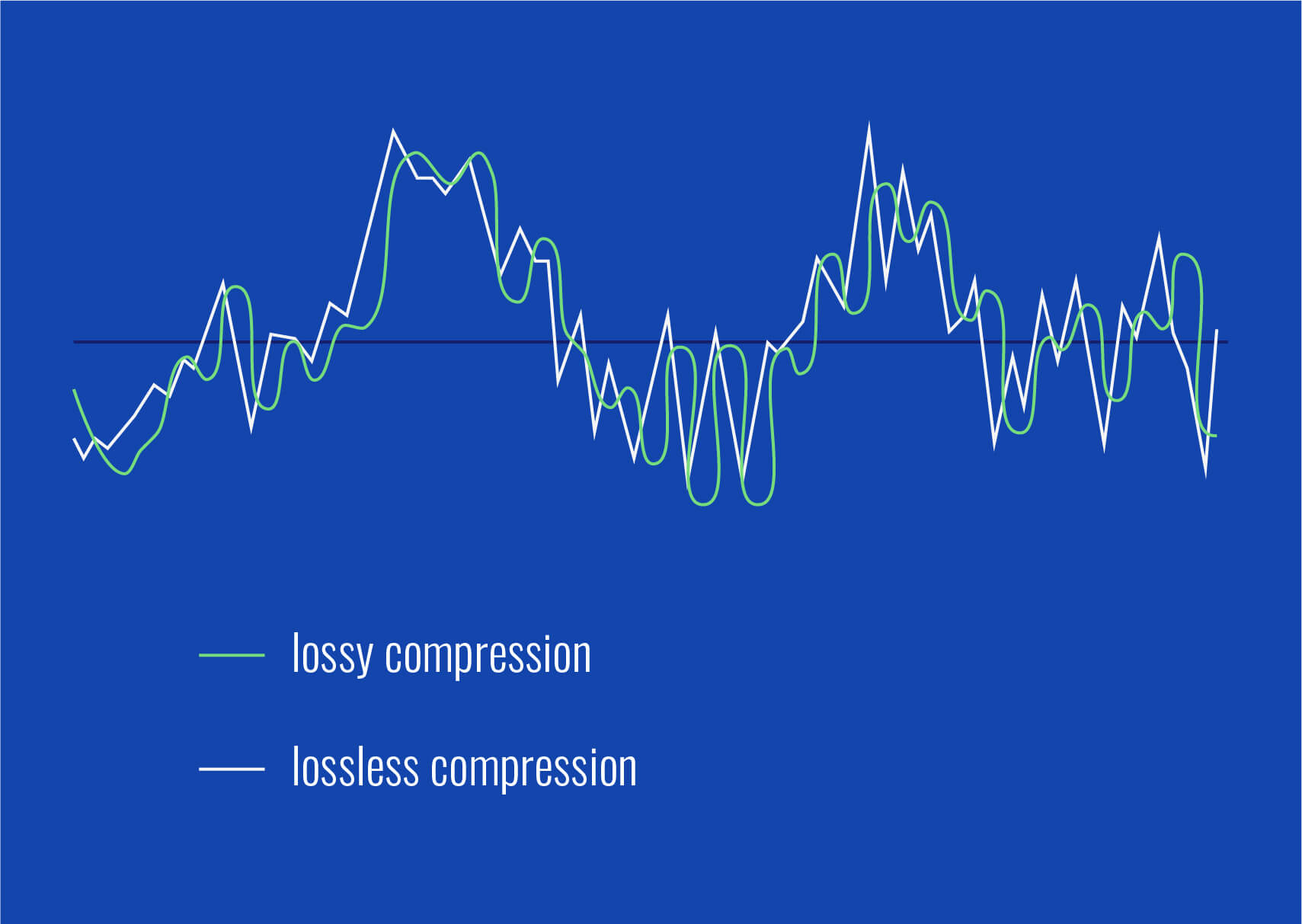
Lossy audio formats, such as MP3, AAC, or OGG, are designed to compress audio data to save storage space. However, this compression can lead to a loss of audio detail and a decrease in overall volume. To address this, you can use audio editing software to amplify the sound. By carefully adjusting the volume levels, you can make the audio more prominent and enjoyable. Just be cautious not to overdo it, as excessive amplification can lead to distortion.
Another effective way to amplify sound in lossy audio files is to use specialized audio processing tools. These tools often come with built-in volume normalization features that can help you increase the loudness while maintaining the audio’s quality. Whether you’re an aspiring musician, a podcast enthusiast, or simply looking to improve your music collection, amplifying sound in lossy audio files can breathe new life into your audio content.
Increase Volume of Compressed Audio
Compressed audio files have become the norm in today’s digital world due to their convenience and storage efficiency. However, one common drawback of these files is that they often lack the volume and punch of their uncompressed counterparts. If you’re wondering how to increase the volume of compressed audio, you’re in the right place.
To boost the volume of compressed audio files, you can start by using audio editing software. Most audio editing programs allow you to adjust the volume levels of individual tracks or sections of a file. Simply open your desired audio file in the software, locate the volume control, and gradually increase it until you achieve the desired loudness. Be cautious not to push the volume too high, as this can result in distortion and a loss of audio quality.
Additionally, consider using dynamic range compression (DRC) techniques. DRC helps balance the loud and quiet parts of an audio file, making it sound more consistent in volume. This technique is particularly useful when dealing with audio files that have uneven loudness levels. With the right adjustments, you can bring out the nuances in your compressed audio while maintaining clarity and preventing clipping.
By employing these techniques, you can effectively increase the volume of your compressed audio files, making them sound more vibrant and engaging.
Audio Volume Enhancement Techniques
Audio volume enhancement techniques are essential tools for anyone looking to improve the sound quality of their audio files, especially those in lossy formats. These techniques involve various methods to make audio files sound louder and more impactful.
One common technique is equalization, which allows you to adjust the balance of frequencies in your audio. By boosting certain frequency ranges, you can make your audio files sound fuller and more vibrant. This is particularly helpful for restoring lost detail in lossy audio files.
Another technique is the use of audio limiters and compressors. These tools help control the dynamic range of your audio, ensuring that loud parts aren’t too overpowering and quiet parts are audible. They can help you achieve a consistent and balanced volume throughout your audio file.
Additionally, you can explore mastering techniques. Mastering involves fine-tuning the overall sound of an audio file, including volume optimization. Professional mastering engineers use specialized software and hardware to enhance the loudness, clarity, and overall quality of audio recordings.
Enhance Audio Loudness in Lossy Formats
Enhancing audio loudness in lossy formats requires a combination of technical expertise and the right tools. Lossy formats like MP3 or AAC often sacrifice audio quality for smaller file sizes, which can result in lower volume levels. Here’s how you can address this issue effectively.
First, consider using audio editing software with volume normalization features. These features analyze the audio file and adjust the volume levels to ensure consistent loudness. This is particularly useful when dealing with a collection of lossy audio files with varying loudness levels.
Furthermore, explore dynamic range compression (DRC) to balance the audio’s dynamics. DRC reduces the difference between the loudest and quietest parts of an audio file, making it sound more uniform in volume. However, be cautious not to apply excessive compression, as it can lead to an unnatural and compressed sound.
Lastly, if you have a specific audio file that needs a volume boost, you can manually adjust the volume using your preferred audio editing software. Keep in mind that raising the volume too much may introduce distortion, so it’s crucial to find the right balance to enhance the loudness while preserving audio quality.
By utilizing these techniques, you can effectively enhance the audio loudness of your lossy format files and enjoy a more immersive listening experience.
Raise the Volume of Low-Quality Audio
Dealing with low-quality audio can be frustrating, especially when the volume is barely audible. Whether it’s an old recording or a poorly encoded audio file, there are ways to raise the volume and salvage the listening experience.
One approach is to use audio restoration software. These tools are designed to improve the quality of audio recordings, including boosting the volume. They often come with noise reduction features, which can help reduce background noise and further enhance the clarity of your audio.
Another option is to employ audio equalization. By adjusting the equalizer settings, you can emphasize the frequencies that are most critical for clarity and volume. Boosting the mid-range frequencies, for example, can make the vocals and instruments more prominent, resulting in a perceptible increase in volume.
If you have access to the original source of the audio, consider re-recording it or obtaining a higher-quality version. This approach eliminates the limitations of the existing low-quality audio file and ensures a better listening experience.
In summary, raising the volume of low-quality audio involves a combination of software tools and, when possible, improving the source material. These steps can help you enjoy clearer and louder audio, even from initially subpar recordings.
Boosting Sound Levels in Lossy Files
Boosting sound levels in lossy audio files is a common requirement for those looking to enhance their audio experience. Lossy formats, while efficient, often compromise on audio quality, resulting in lower volume levels. Here’s how you can effectively increase the sound levels in such files.
One of the simplest methods is to use audio editing software. Most audio editors provide volume adjustment controls that allow you to raise the volume of your lossy audio files. When doing this, be cautious not to push the volume too high, as it can lead to distortion and a loss of audio fidelity.
Additionally, you can explore the use of audio amplification plugins or tools. These specialized software options are designed to boost the loudness of audio files while minimizing the risk of distortion. They often come with presets and fine-tuning options to ensure optimal results.
When boosting sound levels, it’s essential to consider the intended playback environment. Different platforms and devices may have varying volume levels, so aim for a balance that ensures your audio remains clear and enjoyable across different systems.
By following these techniques and experimenting with volume adjustments, you can effectively boost sound levels in your lossy audio files and enjoy an improved listening experience.
Improving Audio Clarity in Compressed Formats
Improving audio clarity in compressed formats, such as MP3 or AAC, is a pursuit for audiophiles and music enthusiasts alike. While these formats offer excellent compression, they can sometimes sacrifice audio quality. Let’s explore how to enhance audio clarity in such files.
One approach is to use high-quality audio conversion tools. These tools can help you convert your compressed audio files into a lossless format, such as FLAC. Once in a lossless format, you can make edits and enhancements without further loss of audio quality. After the improvements, you can convert the file back to a compressed format with improved clarity.
Another technique involves applying equalization to your audio files. By fine-tuning the frequency balance, you can emphasize certain audio elements, such as vocals or instruments, and reduce any muddiness. This can result in clearer and more defined audio, even in compressed formats.
Furthermore, consider using noise reduction software to eliminate background noise and artifacts that may be present in your compressed audio. Reducing these unwanted elements can significantly enhance audio clarity.
Finally, if you have access to the original, uncompressed source of the audio, consider re-encoding it into a higher-quality compressed format. This can provide better clarity while still maintaining a smaller file size compared to lossless formats.
Enhancing audio clarity in compressed formats requires a combination of technical tools and careful adjustments. By experimenting with these techniques, you can achieve remarkable improvements in audio quality.
Loudness Enhancement for Lossy Audio
Loudness enhancement for lossy audio files can make a world of difference in your listening experience. Lossy formats, known for their space-saving benefits, often suffer from lower perceived volume levels. Here’s how you can effectively enhance the loudness of your lossy audio files.
One of the simplest methods is to use an audio player with built-in equalization settings. These settings allow you to boost specific frequency ranges, making the audio sound louder and more impactful. Experiment with different equalizer presets until you find the one that works best for your audio.
Another technique is to employ audio normalization. Many audio editing software tools provide normalization features that adjust the volume of your audio files to a consistent level. This ensures that all tracks play back at a similar loudness, enhancing the overall listening experience.
If you’re looking for a more advanced solution, consider using audio mastering techniques. Mastering involves fine-tuning the audio’s overall quality, including loudness optimization. Professional mastering engineers use specialized equipment and software to achieve the perfect balance of loudness and clarity.
Lastly, be mindful of the playback device you’re using. Some devices have built-in sound enhancements or equalization settings that can further enhance loudness. Experiment with these settings to find the right balance for your preferences.
By implementing these loudness enhancement techniques, you can breathe new life into your lossy audio files and enjoy them at a higher volume without sacrificing quality.
How to Make Quiet Audio Louder
Have you ever encountered audio that’s so quiet you strain to hear it even when you max out your volume controls? Learning how to make quiet audio louder is a valuable skill that can transform your listening experience.
One straightforward method is to use audio editing software. Open the quiet audio file in your chosen software and locate the volume adjustment controls. Gradually increase the volume until it reaches a comfortable level. Keep an eye on the audio waveform to ensure it doesn’t clip, which can result in distortion.
Another technique involves the use of audio normalization. This process analyzes the audio file and adjusts its volume to a consistent level, making quiet parts more audible without causing loud parts to become overly aggressive. Audio normalization is especially useful when you have multiple audio files with varying loudness levels.
Consider employing dynamic range compression (DRC) as well. DRC helps balance the dynamics of your audio, ensuring that the quietest parts are audible without overpowering the louder segments. However, use DRC judiciously to maintain natural audio quality.
Additionally, explore specialized audio enhancement software or plugins designed specifically for increasing the loudness of quiet audio. These tools often offer advanced algorithms to maximize loudness while minimizing distortion.
By mastering these techniques, you can effectively make quiet audio louder, bringing back the enjoyment in your audio content.
Audio Volume Optimization for Lossy Formats
Audio volume optimization for lossy formats is a crucial step to enhance the quality of your compressed audio files. These formats, while convenient, can suffer from reduced loudness. Let’s delve into the strategies for achieving audio volume optimization.
One method is to use audio editing software with volume adjustment capabilities. Open your lossy audio file in the software and increase the volume to your preferred level. Ensure that you maintain a balance between loudness and audio quality to prevent distortion.
Additionally, explore the use of volume normalization tools available in audio editing software. These tools analyze the audio and automatically adjust the volume to a consistent level. This is particularly useful when you have a collection of lossy audio files with varying loudness levels.
Dynamic range compression (DRC) is another technique to consider. DRC helps level out the loud and quiet parts of an audio file, resulting in a more uniform volume. However, exercise caution to avoid over-compression, which can lead to an unnatural sound.
Lastly, when exporting your audio, choose a higher bit rate if possible. This can improve the overall audio quality and contribute to better volume levels in lossy formats.
By applying these strategies for audio volume optimization, you can enjoy your favorite music and podcasts in lossy formats at a higher volume with improved clarity.
Final Words
In conclusion, whether you’re dealing with lossy audio files, compressed formats, or quiet audio, there are various techniques to boost volume and enhance your listening experience. Experiment with different methods, and remember to strike a balance between loudness and audio quality to achieve the best results. By mastering these techniques, you can enjoy your audio content at its fullest potential.
Audio normalization is a crucial process in the world of audio production. It involves adjusting the volume levels of audio tracks to ensure a consistent and balanced listening experience. Whether you’re a music producer, a filmmaker, or a podcaster, the need to normalize audio tracks frequently arises to deliver high-quality content.
Normalize audio files
When you normalize audio files, you’re essentially making sure that the loudest and softest parts of your track are brought to a consistent level. This means that no part of your audio will be too quiet or too loud, allowing your listeners to enjoy a seamless experience without constantly adjusting the volume.
Audio track leveling
Audio track leveling is the process of ensuring that all the individual tracks in your audio project have a similar volume level. This is particularly important in music production, where you want all instruments and vocals to blend harmoniously without any one element overpowering the others.
Audio track equalization
Equalization (EQ) is another aspect of audio track optimization. While normalization focuses on overall volume levels, EQ allows you to fine-tune the frequency balance of your tracks. By adjusting the EQ settings, you can enhance the clarity and presence of different elements in your audio, such as vocals, instruments, or ambient sounds.
Soundtrack volume adjustment
In the world of film and video production, soundtrack volume adjustment plays a vital role. You want the dialogue, background music, and sound effects to be well-balanced to create an immersive cinematic experience. Normalizing the audio tracks ensures that viewers won’t have to constantly adjust their volume settings to hear the dialogue clearly.
Audio track enhancement
Audio track enhancement goes beyond normalization. It involves using various audio processing techniques to improve the overall quality of your tracks. This can include reducing background noise, adding special effects, or applying dynamic processing to make the audio more engaging.
Audio track optimization
Optimizing audio tracks is a comprehensive approach to ensuring the best possible sound quality. It combines normalization, equalization, and other audio processing techniques to create audio that sounds professional and polished.
Normalize sound in tracks
Normalizing sound in tracks is particularly useful when working with multiple audio sources or recordings that have inconsistent volume levels. It guarantees that all tracks will blend seamlessly and sound cohesive when played together.
Track audio balancing
Track audio balancing is an essential skill for mixing and mastering engineers. It involves adjusting the volume levels of individual tracks within a multitrack recording to achieve a well-balanced and harmonious final mix.
Track audio improvement
Audio improvement is the ultimate goal when working with audio tracks. It’s about taking the raw audio material and transforming it into something that sounds exceptional. This may involve not only normalization but also editing, effects, and creativity to make the audio truly stand out.
Final Words
Normalizing audio tracks is just one step in the journey of audio production and enhancement. Whether you’re an aspiring musician, a filmmaker, or a content creator, understanding how to effectively normalize and optimize audio tracks is essential for delivering a top-notch listening experience to your audience.
People often ask themselves how to find a volume level software.
Either to normalize the loudness of the audio or video files.
This occurs much more frequently since the music was not recorded in analog form, to become digital music and digital video.
One of the reasons is because digital audio and video files can take up a lot of space if they have not been compressed.
Obviously when digital audio was used, the space it occupied did not matter much.
No one bought a music LP thinking about how much space it takes up.
But when that long play was digitized and saved on the computer’s hard drive, the amount of space it would take up was important and relevant.
That is why the need arose to create audio and video formats that had a quality very similar to the uncompressed Originals but that did offer good compression.
But of course it happens that to be able to compress a file you have to discard a lot of information.
You even have to rely on many strategies where volume is one of the main variables used to discard information.
One of several mechanisms that are used to compress in the case of MP3, for example, is what we call masking.
And this masking is based on a behavior of the human ear.
This behavior of the ear produces that if two sounds with similar frequencies occur more or less at the same time but one of them has a greater volume than the other, the human ear will not perceive the one that has a lower volume.
So it can be discarded and with it you have less information and therefore it takes up less space on the hard disk … but this mechanism, like others, uses the volume as one of the criteria with which it seeks to save space by compressing and the criterion for compressing is volume.
Another criterion for compressing is kilobytes per second and this directly affects the dynamics of the music which obviously has an effect on loudness.
That is, when we found the need to compress the audio, there was a side effect that generated a disparity in the volume and loudness levels, with all the problems that this implies.
And then people feel the need to find some software that can normalize the volume and loudness levels of audio or video files.
Mp4gain is the only software that can successfully normalize audio and video files of the main formats. You can even convert audio or video files, between different formats or even extract the audio from a video and generate an audio file, of the audio format we choose.
For this reason, mp4gain has practically become the norm for normalizing the level and loudness of audio in video and audio files.
Mp4Gain: The next generation of audio normalizers 2013
The new generation of the liderea normalizers undoubtedly the Mp4Gain, as the only audio normalizer able to do all the things it offers Mp4 Gain
Audio Normalizer
Mp4Gain is the audio normalizer 2013-2014 by definition. With a completely innovative and efficiency never seen before. Achieve that song or video in perceived sounds, voices or instruments that almost went unnoticed before, the same tgiempo can maintain audio level perfectly audible throughout the song or video and also, gets all of his songs and all videos are audio level very similar, thus making them compatible.
Audio retoucher
Mp4Gain provides ample opportunities to tweak the audio.
On the one hand, allows you to change the pitch without affecting the speed or vice versa, change the speed without pitch afetcar at all.
It also offers the possibility of hacver bass booster or completely equalize vicdeo or digital song.
Allows you to change a single file or a batch of files, which is more comfortable for you.
No doubt it is a new experience appropriate to the time and audio needs now, with the technology we have. And of course, with the needs of you.
Volume Boost in audio and video formats with Mp4Gain
The best way to get all the volume levels of your digital music files (flac, oog, m4a, aac, ac3, etc) or video (mp4, flv, 3gp, avi, mpeg, etc) have a level of consistent volume, both for the entire duration of the saw or the song, as compared to other audio or video is Mp4Gain.
The audio normalizers are not new, but if a normalizer can normalizert so many audio formats and can, something nobody else can do, normalizer video files … Mp4Gain only.
Also offers other functions Mp4Gain much needed and sought after as change the pitch without affecting the speed of the song, or vice versa, change the speed of the song without affecting the pitch absoiluto. With these options you can achieve interesting results.
Also can you equalize your files thus improving sound quality and even giving them a bass booster when deemed necessary, it is as simple as handling an equalizer bands in your car or at home. And the results are maginificos.
Mp4Gain is the result of evolution that has emerged in the last five years compared to d audio and video formats and sound quality and volume necessary to fully enjoy them.
Mp4Gain is in this 2013 software ahead of its era, far away from other standards bodies. Download you and corroborelo tiral version.
Mp4Gain is the essential tool for anyone with tens or hundreds of digital files of music or video in almost any format.
Until very recently it was only possible to normalize mp3 files. Even the method of normalization used to be very rudimentary: in many cases simply were detected volume peaks of each mp3, were compared against the maximum possible and after that, all the mp3 was amplified by this factor.
That is, if it was observed that the maximum peak of an mp3 bear an increase of 10% before reaching the pñunto of distortion, was amplified throughout the mp3 for that 10 percent.
Very rudimentary? Yes, also gave very poor results.
Gradually it began to use the ingenuity (and mathematics) to try to improve and equalize the volume levels, the problem is that mediate the song as a whole and the factor applied global era: a single factor for the entire song.
Mp4Gain is 44 thousand times per second (each frame) and each of those frames taken every frequency (about 40 different frequencies), applies a different factor, thus resulting with a simply fantastic and very adequate. Perhaps one often has to give it a boost, while another frequency ue must attenuate slightly. Perhaps an instrument need to stand out more and other needs dimmed slightly …. is really a very detailed analysis, analyzing every word, every sound and every instrument to achieve a real effect of normalization efficient and modern, suitable to 2013.
In addition, is able to normalize Mp4Gain a large number of audio formats (the most popular) and a large number of video formats (the most popular), which no other normalizer dream of being able to perform and less, of doing so good.
80% of the questions we receive are treated on increasing the volume of either the video or audio of a volume increase of a song in mp3, m4a, aac, flac, ogg, etc.
It’s as if everyone look the best way to make your music volume booster or videos.
Mp4Gain can increase the volume or volume booster do these formats
Most of the problems that people encounter when having several tens or hundreds of videos or songs, is that the volumes do not match, there are significant differences between the volume levels between files and people start looking in urgent need as to solve that problem.
If it’s videos, definitely no other choice than to the Mp4Gain, no other software to do anything similar. No other software that normalizes the audio from video formats and less popular as modern as flv, mp4, 3gp, etc.
If it is looking for a multi-format audio normalizer, ie you can not only normalize mp3s, but several formats, there are not many options available.
And if this is the audio normalization is more professional than simply amplify everything regardless of each sound, then again we find that Mp4Gain is the ideal choice for your normalizacione algorithm is ultra modern and efficient and does not amplify couples the song, not amplifies all the same level, but goes analyzing frequency by frequency in each of the 7 or 8 million frames that about a song or video is 3 minutes and making the volume of each of these frames is the loudest, but with better deficnicion, quality, bright and sound. Every minute of audio has more or less one million seven hundred thousand frames and analyzes and optimizes Mp4Gain, at each frequency.
We have taken very seriously the issue of normalizing and designed an audio normalizer maintaining a consistently audible volume without increases or decreases in volume, and high quality audio.










Comments:
This article is a lifesaver! I’ve been struggling with uneven volume in my podcasts, and now I finally understand how to fix it. Thanks! – PodcastPete
Great explanation of sound leveling! I used to think all songs were supposed to be at the same volume, but now I get the nuances. – MusicManMike
Super helpful article! I’m going to try using ReplayGain on my music library. – AudiophileAlice
I make video tutorials, and this article gave me some great tips on how to balance my audio. – VideoVikki
Thanks for explaining the different sound leveling techniques. I’m going to experiment and see what works best for me. – SoundExplorerSteve
This article cleared up so many of my questions about sound leveling. I’m definitely going to recommend this to my fellow audio enthusiasts. – AudioGuruAmy
I’ve been using compression for sound leveling, but I think I’ve been overdoing it. Thanks for the tips on avoiding over-compression. – MixingMasterMatt
Wow, I never knew sound leveling was so important. I’m definitely going to start paying more attention to it in my audio projects. – SoundNewbieNancy
This was a fantastic read! Sound leveling is something I’ve always struggled with, but this article made it so much clearer. – LevelingLarry
Great job explaining how sound leveling works in different media. I learned a lot! – MediaMavenMary