Dynamic Range Compression in MP3


Free Download Mp4Gain
picture

Dynamic Range Compression in MP3

Dynamic Range Compression in MP3

Let’s talk about Dynamic Range Compression in MP3

Dynamic range compression (DRC) in MP3s isn’t a simple volume boost. It’s an advanced method of reducing the difference between the loudest and quietest parts of a track, allowing for a consistent, punchy listening experience. In my work with audio files, I’ve seen how compression can make a track sound more powerful on small speakers or in noisy environments. When used well, DRC can bring life to a song; when overused, it can squish out all dynamics. Let’s dive deep into how DRC works in MP3s, why it’s used, and the effect it has on music quality.

Understanding Dynamic Range in Digital Audio

Dynamic range is simply the difference between the loudest and softest parts of a recording. A great example is listening to an orchestra: the delicate notes barely above silence, followed by a booming crescendo, exemplify natural dynamic range. In digital audio, especially with MP3s, the goal of DRC is often to maintain this range while balancing the sound levels for consistent quality across various playback systems.

How MP3 Compression Affects Dynamic Range

MP3 compression, unlike dynamic range compression, focuses on reducing file size by removing inaudible frequencies. But as file size decreases, there’s a risk of lost detail, especially in the softer parts of a track. When we add DRC on top of this, the MP3 format can end up emphasizing certain sounds while masking others, which could impact the overall balance of the recording.

Why Dynamic Range Compression is Important in MP3s

Using DRC in MP3s isn’t about destroying music dynamics; it’s a way to ensure tracks sound good everywhere. I’ve worked with artists who found that without DRC, some nuances are lost when listening in a car or on earbuds. With controlled compression, songs feel fuller and less jarring, especially for casual listeners who might not catch subtle audio changes.

The Process of Applying Dynamic Range Compression in MP3s

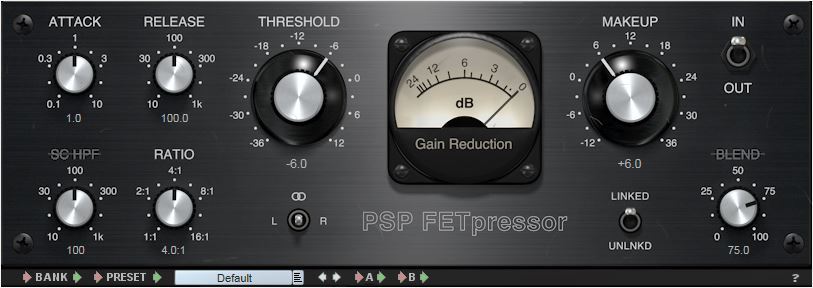
Applying DRC to an MP3 is like adjusting the pressure on a soda bottle to get just the right fizz. Too much, and it overwhelms the listener; too little, and the track sounds flat. Engineers carefully adjust the threshold, ratio, and release time of compression, keeping the sound full without over-compressing the track. Here’s how each step works:

  • Setting the Threshold

    The threshold sets the volume point where compression kicks in. Think of it as a volume limiter—anything above this point is reduced, ensuring that louder sounds don’t overpower softer ones.

  • Determining the Ratio

    Ratio controls how much compression is applied above the threshold. Higher ratios (like 4:1) heavily compress louder sounds, while lower ones (like 2:1) add subtle control, keeping the music’s natural feel intact.

  • Adjusting Attack and Release

    Attack controls how quickly compression engages, and release controls how soon it stops. Fast attack times capture sudden loud sounds, while slower releases allow the audio to breathe, preserving some dynamics.

Benefits of Dynamic Range Compression in MP3

DRC in MP3s has significant benefits for everyday listening. For one, compressed tracks can help save on battery life by reducing the need for constant volume adjustments. Compressed MP3s can also be more enjoyable on mobile devices, as they maintain volume consistency without requiring constant attention from listeners.

Challenges and Drawbacks of Overusing Dynamic Range Compression

Overuse of DRC can lead to what’s called the “Loudness War,” where every sound is equally loud, resulting in what some describe as “listener fatigue.” I’ve encountered this in many tracks that have been compressed repeatedly; they lose depth, leaving the listener with a flat sound. Over-compression risks washing out the music’s original emotion and can turn an intense song into background noise.

Technical Aspects of Dynamic Range Compression in MP3 Encoding

During MP3 encoding, DRC is applied through a lossy algorithm designed to reduce the dynamic range without noticeable loss in audio quality. Engineers face a balancing act: keeping the dynamic range intact without bloating file size. The right codec can make all the difference. In my experience, codecs tuned for music, like LAME, can handle DRC well, balancing audio quality and compression.

Comparing Dynamic Range Compression in MP3 with Other Formats

While MP3 is popular, lossless formats like FLAC can preserve the full dynamic range better. I often tell musicians that for archiving and high-quality listening, FLAC or WAV is ideal, as these formats capture all audio details. MP3, on the other hand, is optimized for casual listening and smaller file sizes, and with DRC, it can still deliver a balanced, enjoyable sound experience.

How to Optimize Dynamic Range Compression for MP3 Files

When I’m working on MP3 files, I find that light compression generally works best. Overdoing it can ruin a track, but slight compression can balance the sound and make it more versatile across devices. Here’s what I recommend:

  • Start with a Low Threshold

    Keep it just below the loudest peaks to ensure softer sounds aren’t impacted.

  • Use a Moderate Ratio

    I suggest starting at 2:1 and adjusting until the desired level of control is achieved.

  • Check the Output on Multiple Devices

    Playing the MP3 on different speakers helps you hear how the compression translates, preventing surprises when the song hits smaller devices.

Latest Words on Dynamic Range Compression in MP3

Dynamic range compression in MP3 is a powerful tool when used wisely, balancing dynamic nuances with the practical need for volume consistency. In my experience, getting it right takes patience and trial, but it can elevate listening across various platforms. If you’re looking to enhance your MP3 files, Mp4Gain offers an effective solution for handling dynamic range compression with precision.

Comments:

I didn’t realize how much DRC impacted sound on different devices. This explains a lot, thanks!

This was super helpful! I’m still confused about setting the ratio, though. Any tips for beginners?

Great breakdown! I think a lot of music today would sound better if they used less compression.

Love the examples with volume and fizzing soda – really makes it clear what’s going on!

Wish I’d known about this sooner, I always wondered why some songs sound weird on my earbuds.

What a fantastic article! Clear and to the point, especially about the impact on MP3 quality.

This is exactly what I needed! I work with music production and this helped me explain DRC to a client.

So interesting! Can you do a follow-up explaining how to fix over-compressed MP3 files?

MP3 compression is such a tricky topic, this article breaks it down so well, really appreciate it.

Love how you used real-life examples to explain the compression. Makes it easier to understand.

Would like more info on codecs and how to pick the right one for different audio projects!

This article cleared up a lot of questions I had. I see why DRC can be good and bad!

Fascinating stuff! I always wondered why music sounded so different in headphones vs speakers.


Free Download Mp4Gain
picture


Mp4Gain Main Window
picture


Mp4Gain Features
picture


Free Download Mp4Gain
picture

Mp3: Audio Compression.

Audio Digitization.

Sound is a continuous wave that propagates through air or other media, formed by
pressure differences, so that it can be detected by measuring the pressure level in a
point. Sound waves have the proper and measurable characteristics of waves in general,
such as reflection, refraction and diffraction. As it is a continuous wave, a
digitization process to represent it as a series of numbers. Currently, most of
the operations carried out on sound signals are digital, since both storage and
processing and transmission of the signal in digital form offers very significant advantages over
analog methods. Digital technology is more advanced and offers greater possibilities, less
sensitivity to transmission noise and ability to include error protection codes,
as well as encryption. With the appropriate decoding mechanisms, moreover, they can be treated
simultaneously signals of different types transmitted on the same channel. The disadvantage
main aspect of the digital signal is that it requires a much greater bandwidth than that of the signal
analog, hence an exhaustive study is carried out regarding data compression,
some of whose techniques will be the center of our study.
The digitization process consists of two phases: sampling and quantization. In the sampling,
Divide the time axis into discrete segments: the sampling frequency will be the inverse of time
that mediates between one measurement and the next. At this time the quantization is performed, which, in its
In the simplest way, it is simply to measure the signal value in amplitude and save it.

Nyquist’s theorem guarantees that the frequency necessary to sample a signal that has its
Higher components at a given frequency f is at least 2f. Therefore, the range being
higher than human hearing around 20 Khz., the frequency that guarantees a sampling
suitable for any audible sound will be about 40 Khz. Specifically, to get sound
High-quality frequencies of 44.1 Khz are used, in the case of CD, for example, and up to 48 Khz.
in the case of the DAT. Other typical values ​​are submultiples of the first, 22 and 11 Khz. According to
nature of the application of course the appropriate frequencies can be much lower
such that the voice process is usually carried out at a frequency of between 6 and 20 Khz. or
even less. Regarding quantization, it is evident that the more bits used for the
axis division of amplitude, the “finer” the partition will be and therefore the less error in attributing
a concrete amplitude to the sound at every moment. For example, 8 bits offer 256 levels of
quantization and 16, 65536. The dynamic range of human hearing is about 100 dB. The
axis division can be performed at equal intervals or according to a certain density function,
looking for more resolution in certain sections if the signal in question has more components in a certain
intensity zone, as we will see in the coding techniques.
The complete process is usually called PCM (Pulse Code Modulation) and so we
We will refer to it hereinafter. It has been described in a very simplistic way, mainly
because it is widely discussed and is well known, being the field of study of
this work. However, we will go into detail at any time that is necessary for the
development of the exhibition.
1.2 Coding and Compression.
Before describing compression and encoding systems, we must pause briefly.
analysis of human auditory perception, to understand why a quantity
Significant information that the PCM provides can be discarded. The heart of the matter,
as far as we are concerned, it is based on a phenomenon known as masking.
The human ear perceives a frequency range between 20 Hz. And 20 Khz. First of all, the
sensitivity is higher in the area around 2-4 Khz., so that the sound is more
hardly audible the closer to the ends of the scale. Second is the
masking, whose properties exhaustively use the most interesting algorithms:
when the component at a certain frequency of a signal has high energy, the ear cannot
perceive lower energy components at close frequencies, both lower and higher. TO
a certain distance from the masking frequency, the effect is reduced so much that
negligible; the range of frequencies in which the phenomenon occurs is called the critical band
(critical band). Components belonging to the same critical band influence each other and
they do not affect nor are affected by those that appear outside it

What is audio compression?

What is audio compression?

I have finally returned to the tutorials, we are going to talk about the compression of audio from the most basic to the most advanced, it is a subject that many as producers have had a hard time learning and understanding.

So what is audio compression and what can you do to help?

Basically, compression reduces the dynamic range of your recording by reducing the level of the loudest parts, which means that the noisy and silent parts are now closer together in volume and the natural volume variations are less obvious. The audio compressor unit can increase the overall level of this compressed signal.

So, the end result is that the quieter parts sound as if they had increased their volume to be closer to the louder parts. Dynamic changes in the volume of a recording are now under more control, and a side effect is that the overall level of the compressed recording can be increased within its mix. The recording will also be located within the entire mix much more easily.

What are the compression controls?

The compression device itself has many different controls that can affect the sound it is processing. We will review the main controls that are commonly found.

Input Gain
This controls the level of the signal entering the audio compressor.
Threshold
Compression reduces the overall level of the loudest parts of your recording. But how does the compressor know what part of the signal is “high” and what part of the signal is compressed? When setting the threshold.
The threshold sets the level at which the compressor starts and begins to change the recording dynamics. So, for example, if you set your threshold to -20 dB, everything below this level will not be affected by the compressor. But everything higher than this level (-20 dB) will be compressed.
Ratio
How much will the signal be compressed once it has exceeded this threshold? This is controlled with the relationship. The higher the ratio, the greater the compression.
The easiest way to show you how reason works is by showing you some numbers, if the ratio is 1: 1, there is no compression at all. On the other hand, if the ratio is set to 2: 1, for every 2 dB of sound that exceeds the threshold, you will get 1 dB of output above the threshold. So, if the signal exceeds the threshold by 10 dB, the compressor reduces this signal, so it is now 5 dB above the threshold.
If the ratio goes up to 8: 1, for every 8 dB of sound above the threshold you would get 1 dB of output above the threshold. Then, if the signal exceeds the threshold by 16 dB, the compressor reduces it, so only 2 dB exceeds the threshold.
Attack
This is the time it takes for the compressor to act on the input, once the sound level has exceeded the threshold. It is usually measured in milliseconds (ms).
Release
This is the time it takes for the compressor to let the signal return to normal once it has fallen below the threshold. Again, usually measured in ms.
Makeup
If the audio signal has been compressed, the overall level of the signal will be reduced. Increasing the output gain increases the level that comes out of the compressor, so the volume can more easily adapt to the levels of the rest of its tracks in its mix.
Knee
The soft compression of the knee is softer in the sound as it passes through the audio compressor: the change of uncompressed sound to compressed is softer. Hard knee compression is a more immediate and obvious effect.
Compressors are a very effective tool for us engineers, in the next post I will talk about the different types of compressors.