Audio compression


Free Download Mp4Gain
picture

Audio compression

Audio Compression

Well-established data compression methods such as RLE, statistical and dictionary methods can be used to compress lossless audio files, but the result is highly dependent on the specific audio data. Some sounds will compress well with RLE, but poorly with statistical algorithms. Statistical compression is more suitable for other sounds, but with a dictionary approach, on the contrary, expansion can occur. Here is a brief overview of the effectiveness of these three methods for compressing audio files.

Audio Compression

RLE works well with sounds that contain long series of repeating sound chunks – samples. With 8-bit sampling, this can happen quite often. Remember that the voltage difference between two 8-bit samples n and n – 1 is approximately 4 mV. A few seconds of homogeneous music, in which the sound wave changes by less than 4 mV, will generate a sequence of thousands of identical samples. With 16-bit sampling, obviously long repeats are less common and therefore the RLE algorithm will be less efficient.

Statistical methods assign variable length codes to audio samples according to their frequency. With 8-bit sampling, there are only 256 different samples, so the samples can be distributed evenly in a large audio file. A file of this type cannot be compressed well with the Huffman method. With 16-bit sampling, more than 65,000 sound bites are allowed. In this case, some samples may be more common and others less common. With a strong probability skew, good results can be achieved with the help of arithmetic coding.

Dictionary-based methods assume that some phrases will appear frequently throughout the file. This occurs in a text file in which individual words or sequences of them are repeated many times. However, the sound is an analog signal and the values ​​of the specific generated samples are highly dependent on the operation of the ADC. For example, with 8-bit sampling, an 8 mV waveform becomes a numeric sample of 2, but a nearby wave of, say 7.6 mV or 8.5 mV, can be converted to a different number. For this reason, voice snippets that contain overlapping phrases and sound the same to us may differ slightly when digitized. Then they will enter the dictionary in the form of different phrases, which will not give the expected compression. Therefore, dictionary methods are not very suitable for audio compression.

You can achieve better results in lossy audio compression by developing compression techniques that take into account the perception of sound. They remove the part of the data that remains inaudible to the audience. It is like compressing images, discarding information invisible to the eye. In both cases, we assume that the original information (image or sound) is analog, that is, part of the information has already been lost during quantization and digitization. Allowing a little more loss with care will not affect the quality of the uncompressed sound reproduction, which will not differ much from the original. We will briefly describe two approaches called silence suppression and compaction.

The idea behind silence suppression is to treat small samples as if they were not there (i.e. they are zero). Such a zeroing will generate a series of zeros, so the method of suppressing pauses is, in fact, a variant of RLE adapted to audio compression. This method is based on the peculiarity of sound perception, which consists of the tolerance of the human ear to rule out barely audible sounds. Audio files containing long stretches of quiet sound will be better compressed using the silence suppression method than files full of loud sounds. This method requires the participation of the user, who will control the parameters that establish the loudness threshold for the samples. This requires two more parameters, which are not necessarily controlled by the user. One parameter is used to determine the shortest sequences of silent samples, usually 2 or 3. And the second sets the smallest number of consecutive strong samples, when silence or pause occurs. For example, 15 silent samples can be followed by 2 strong and then 13 silent,

Consolidation is based on the property that the ear better distinguishes changes in the amplitude of soft sounds than loud sounds. A typical ADC for computer sound cards uses a linear conversion to convert the voltage into a numerical form. If the amplitude a became n, then the amplitude 2 a will become 2 n.


Free Download Mp4Gain
picture


Mp4Gain Main Window
picture


Mp4Gain Features
picture


Free Download Mp4Gain
picture

Audio Data compression

Data compression or the technique that changed everything

Without pretending to extend ourselves in the description of this critical concept, it is important to know that compression is understood as a scheme that allows, by means of a “decision” algorithm based on a series of “rules” (which in the case of audio are masking and audibility threshold) reduce the amount of data to transmit a certain message. In other words: if the song “x” occupies, in the format used to encode the sound of a CD, 1 million bits, the data compression allows that song to be reproduced with maximum intelligibility using only 50,000 of those bits.

In this way, the download of a complete CD from a certain website could be carried out in a reasonable period of time. But, of course, the price to pay was high in terms of quality because such “castration” of the original message (which in turn was not “continuous”, analog, but also digital, although “linear”, without compression) meant removing many nuances of music, a disaster that in reality did not care for many consumers but it did worry, and a lot, those who bet on that High Fidelity in the reproduction of the sound that we are so passionate about and who received a wound that was almost fatal . In this sense, it is worth knowing that the “philosophical” keys to data compression are summarized in two terms: redundancy and irrelevance. In the first case, it is about reordering the available data to eliminate the ones that are repeated (for whatever reason: security, etc.), a bit like a “zip” computer file. It is a formal remodeling that does not affect the sound message at all (but it does save space to transmit / save data, making it very practical), so in this case, we are talking about lossless compression or “lossless” ” It is the second term that has the greatest scope in terms of sound quality because the idea of ​​irrelevance implies deleting irrelevant data from a certain message. And, of course, who decides what is relevant or not? Well, an algorithm, a program that, obviously, can be more or less sophisticated but still makes decisions with which everyone will agree. It is easy to understand: what may be irrelevant to such a person and / or the team may not be so to someone else. The fact is that here musical information is deleted, which, fundamentally, can no longer be recovered. Well, the algorithms in which there are losses of musical information are known as “lossy” or lossless coding algorithms. From what has been said, it is easily deduced that the difference between the concepts “lossless” and “lossy” is the one that marks the border between high and low quality digital audio, between high resolution (with recording studio quality formats or “Studio Master” on the cusp) and that “practical” sound (in principle for portable players and cars) and very often unnatural formats like the once ubiquitous MP3, which, we insist, almost ruined with the improvements provided by the CD.
ADSL, the key to accessing High End audio via the Internet
Basically it was a purely technical progress that, logically, had to come. A progress that allowed breaking the limitations that prevented downloading a song recorded in PCM at 16 bits / 44’1 kHz and, over time, the files with much higher resolution than for a good decade and a half are the usual ones in studios of recording. So, thanks to ADSL, the High End in audio via the Internet, and therefore “without physical support” is available to everyone. At this point, it will be good to briefly review the small “soup” of acronyms with which we can find ourselves, otherwise the result of the availability of open and “closed” environments (Windows, Mac), in what CODEC’s (algorithms that compress and decompress data (in this case of music) refers to the fact that compression is the norm.


AAC (Advanced Audio Coding): It was designed to be the successor to MP3 and, although it is a lossy CODEC, the results in terms of sound quality are superior to those of MP3 for the same bit rate. The AAC has adopted a wide range of portable audio devices such as the iPod and its derivatives for use.
AIFF (Audio Interchange File Format): It is the version of WAV created by Apple. Works with uncompressed (ie “lossless”) files that maintain full resolution and size.
 

ALE (Apple Lossless Encoder), also known as ALAC (Apple Lossless Audio Codec): Uses lossless compression to save storage space. Once unzipped for listening, the file will be bit by bit identical to a full size WAV or AIFF encoded file. As in AIFF or FLAC, in ALE / A files

What is audio compression?

What is audio compression?

I have finally returned to the tutorials, we are going to talk about the compression of audio from the most basic to the most advanced, it is a subject that many as producers have had a hard time learning and understanding.

So what is audio compression and what can you do to help?

Basically, compression reduces the dynamic range of your recording by reducing the level of the loudest parts, which means that the noisy and silent parts are now closer together in volume and the natural volume variations are less obvious. The audio compressor unit can increase the overall level of this compressed signal.

So, the end result is that the quieter parts sound as if they had increased their volume to be closer to the louder parts. Dynamic changes in the volume of a recording are now under more control, and a side effect is that the overall level of the compressed recording can be increased within its mix. The recording will also be located within the entire mix much more easily.

What are the compression controls?

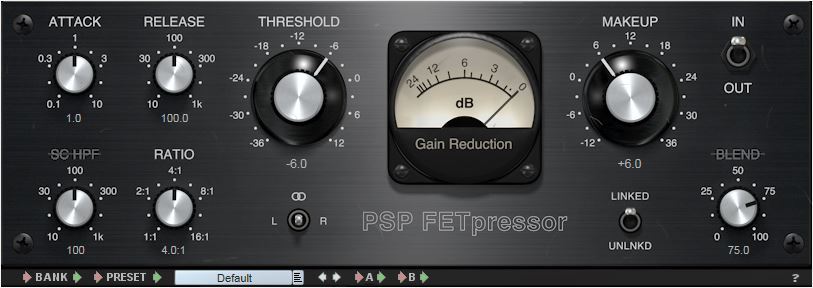
The compression device itself has many different controls that can affect the sound it is processing. We will review the main controls that are commonly found.

Input Gain
This controls the level of the signal entering the audio compressor.
Threshold
Compression reduces the overall level of the loudest parts of your recording. But how does the compressor know what part of the signal is “high” and what part of the signal is compressed? When setting the threshold.
The threshold sets the level at which the compressor starts and begins to change the recording dynamics. So, for example, if you set your threshold to -20 dB, everything below this level will not be affected by the compressor. But everything higher than this level (-20 dB) will be compressed.
Ratio
How much will the signal be compressed once it has exceeded this threshold? This is controlled with the relationship. The higher the ratio, the greater the compression.
The easiest way to show you how reason works is by showing you some numbers, if the ratio is 1: 1, there is no compression at all. On the other hand, if the ratio is set to 2: 1, for every 2 dB of sound that exceeds the threshold, you will get 1 dB of output above the threshold. So, if the signal exceeds the threshold by 10 dB, the compressor reduces this signal, so it is now 5 dB above the threshold.
If the ratio goes up to 8: 1, for every 8 dB of sound above the threshold you would get 1 dB of output above the threshold. Then, if the signal exceeds the threshold by 16 dB, the compressor reduces it, so only 2 dB exceeds the threshold.
Attack
This is the time it takes for the compressor to act on the input, once the sound level has exceeded the threshold. It is usually measured in milliseconds (ms).
Release
This is the time it takes for the compressor to let the signal return to normal once it has fallen below the threshold. Again, usually measured in ms.
Makeup
If the audio signal has been compressed, the overall level of the signal will be reduced. Increasing the output gain increases the level that comes out of the compressor, so the volume can more easily adapt to the levels of the rest of its tracks in its mix.
Knee
The soft compression of the knee is softer in the sound as it passes through the audio compressor: the change of uncompressed sound to compressed is softer. Hard knee compression is a more immediate and obvious effect.
Compressors are a very effective tool for us engineers, in the next post I will talk about the different types of compressors.