What is Audio Compression Threshold and How it Affects Sound Quality


Free Download Mp4Gain
picture

What is Audio Compression Threshold and How it Affects Sound Quality

Audio Compression
Audio Compression
Audio Compression
Audio Compression

Introduction

Audio compression is a technique used to reduce the dynamic range of an audio signal. It is commonly used in music production to make a recording sound louder and more impactful. However, compressing audio too much can lead to a loss of detail and a reduction in sound quality. In this article, we will explore the concept of audio compression threshold and how it affects sound quality.

Understanding Audio Compression

Audio compression is the process of reducing the dynamic range of an audio signal by attenuating the louder parts of the signal while leaving the quieter parts untouched. The main purpose of audio compression is to make the overall level of the audio signal more consistent, which can make it easier to listen to and mix with other tracks.

However, compression can also introduce artifacts such as pumping, breathing, and distortion, which can affect the quality of the sound. Therefore, it’s important to understand the parameters of audio compression, such as threshold, ratio, attack, and release, to achieve the desired sound.

“Compression is like a lens in photography. Just as a lens can bring certain parts of an image into focus while blurring others, compression can bring certain parts of an audio signal into focus while reducing the dynamic range.” – Bobby Owsinski, The Mixing Engineer’s Handbook

What is Audio Compression Threshold?

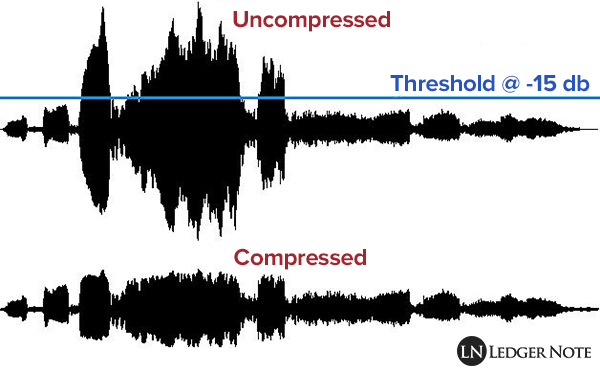
The compression threshold is the level at which the compressor starts to attenuate the audio signal. In other words, it’s the point at which the compressor kicks in and starts reducing the level of the audio signal. The threshold is usually set in decibels (dB), and it can range from -60 dB to 0 dB or higher.

Setting the compression threshold too low can result in over-compression, where the compressor is constantly active and the audio signal loses its natural dynamic range. On the other hand, setting the threshold too high can result in under-compression, where the compressor doesn’t kick in enough and the audio signal remains too dynamic. Therefore, finding the right compression threshold is crucial for achieving the desired sound.

“The compression threshold is the gatekeeper of the compressor. If you set it too low, the compressor will work too hard and the sound will lose its natural dynamics. If you set it too high, the compressor won’t work enough and the sound will be too dynamic.” – Bob Katz, Mastering Audio: The Art and the Science

How Compression Threshold Affects Sound Quality

The compression threshold can have a significant impact on the sound quality of an audio signal. Setting the threshold too low can result in a squashed and lifeless sound, while setting it too high can result in a dynamic and uncontrolled sound. Therefore, it’s important to find the right balance between dynamic range and consistency.

Additionally, different instruments and sounds require different compression thresholds. For example, a snare drum may require a higher threshold than a vocal track, as the snare drum has a shorter decay time and more transient peaks. Therefore, it’s important to adjust the compression threshold for each individual track to achieve the desired sound.

“The compression threshold is like a knife. Use it wisely,
Copy to Clipboard

clipboard emoji

User
continua donde te uedaste que fue en:

“The compression threshold is like a knife. Use it wisely,
ChatGPT

How to determine the right compression threshold

Determining the right compression threshold can be tricky, and it can take some trial and error to find the sweet spot. Here are a few tips to help you get started:

  • Start with a low threshold: A good starting point is a threshold of around -30dB. This will ensure that you are compressing the quieter parts of your audio, without squashing the louder parts.
  • Listen carefully: When you apply compression, listen carefully to the changes in the audio. You want to make sure that the compressor is not introducing any unwanted artifacts or distortion.
  • Experiment with different settings: Try adjusting the threshold up and down to see how it affects the audio. You may also want to experiment with the attack and release times, as well as the ratio setting.

Remember, there is no one-size-fits-all solution when it comes to compression. You will need to experiment to find the settings that work best for your particular audio.

“Compression is a great tool, but it’s easy to overdo it. Always err on the side of subtlety, and remember that sometimes a little goes a long way.”

– Brian Eno

The importance of a balanced mix

One of the most important aspects of audio compression is ensuring that your mix is balanced. If one element of the mix is too loud, you may be tempted to apply heavy compression to bring it down to the same level as the other elements. However, this can result in a dull and lifeless mix.

The key is to start with a well-balanced mix. This means that each element of the mix should be at a similar volume level, without any one element dominating the others. Once you have a balanced mix, you can then use compression to add subtle enhancements and make the mix sound even better.

“A good mix is all about balance. Each element of the mix should have its own space, and nothing should be too dominant.”

– Rick Rubin

The dangers of overcompression

While compression can be a powerful tool for enhancing the sound of your audio, it can also be easy to overdo it. Overcompression can result in a number of unwanted artifacts, including distortion, pumping, and breathing.

One of the main dangers of overcompression is the loss of dynamic range. Dynamic range refers to the difference between the loudest and quietest parts of your audio. When you apply too much compression, you reduce the dynamic range, resulting in a flat and lifeless sound.

Another danger of overcompression is the loss of transients. Transients are the short, sharp peaks in the audio that give it its punch and energy. When you apply too much compression, you can squash these transients, resulting in a dull and uninspired sound.

“Compression is a great tool, but it’s important to remember that it’s just one tool in the toolbox. Don’t rely on it too heavily, and always remember to use it in moderation.”

– Tony Maserati

Free Download Mp4Gain
picture


Mp4Gain Main Window
picture


Mp4Gain Features
picture


Free Download Mp4Gain
picture

Audio and Video Compression Basics

Audio and Video Compression Basics

Audio and Video Compression Basics


As we rely more and more on digital media, understanding the basics of audio and video compression becomes increasingly important. Compression is the process of reducing the size of digital files without sacrificing too much quality. Without compression, media files would take up a lot more space on our hard drives, making it difficult to store and share them. In this article, we’ll explore the fundamentals of audio and video compression and how it works.

Understanding Audio Compression

Audio compression is the process of reducing the dynamic range of an audio signal. Dynamic range is the difference between the quietest and loudest parts of a sound recording. Compression reduces this difference, making the quieter parts louder and the louder parts quieter. This is useful for improving the overall balance of a mix, and also for preventing distortion when the loudest parts of a recording exceed the maximum level of the recording medium.

Compression can be applied during recording or in post-production, using software tools like mp4gain. When done properly, compression can improve the clarity and punch of a recording, making it sound more polished and professional. However, overuse of compression can lead to a loss of detail and a “squashed” sound that lacks dynamics.

As musician David Byrne said in his book “How Music Works”:

“A good mix is one where the listener can hear and feel everything that the musicians and the engineer intended to be there.”

Understanding Video Compression

Video compression is the process of reducing the size of a video file by removing redundant or unnecessary data. This is done by encoding the video using a codec, which stands for “coder-decoder”. Codecs use complex algorithms to analyze each frame of a video and compress it in a way that minimizes the loss of quality.

There are two types of video compression: lossless and lossy. Lossless compression reduces the size of a video file without any loss of quality, but it’s not as effective as lossy compression in terms of file size reduction. Lossy compression, on the other hand, sacrifices some quality to achieve a smaller file size. The level of quality loss depends on the amount of compression applied.

When it comes to video compression, there are many factors to consider, including the resolution, bit rate, and frame rate. By adjusting these parameters, you can find the right balance between file size and quality for your particular needs.

As filmmaker and author Robert Rodriguez once said:

“Filmmaking is a chance to live many lifetimes.”

Compression Techniques for Audio and Video

There are many compression techniques used in audio and video, each with its own strengths and weaknesses. In audio, the most common type of compression is called “peak compression”, which reduces the volume of loud sounds that exceed a certain threshold. Another type of compression, called “multi-band compression”, divides the audio signal into multiple frequency bands and applies compression to each band separately.

For video compression, the most popular codecs are H.264 and HEVC (High-Efficiency Video Coding). H.264 is widely used for streaming video on the internet, while HEVC is more efficient but requires more processing

Audio Compression Techniques: Understanding the Basics

Audio Compression Techniques: Understanding the Basics

Audio Compression
Audio Compression
Audio Compression
Audio Compression

What is Audio Compression?

Audio compression is the process of reducing the size of digital audio files by removing redundant or unnecessary information, while maintaining the perceived quality of the original sound. This is done by using various algorithms that analyze and modify the audio data in a way that reduces its file size.

Types of Audio Compression Techniques

There are two main types of audio compression techniques: lossy and lossless.

Lossy Compression

Lossy compression algorithms are used to achieve high compression rates, but at the cost of some loss in quality. In lossy compression, some of the original audio data is discarded or modified in a way that reduces its size. The amount of data that is removed or modified depends on the compression algorithm used.

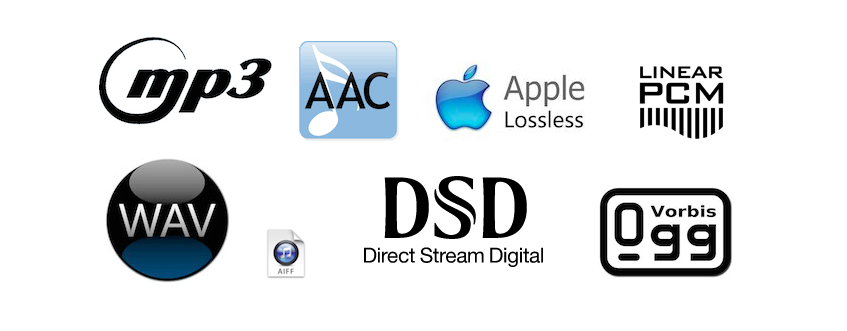
Some popular lossy compression algorithms include MP3, AAC, and WMA. These algorithms are commonly used for music streaming, online radio, and other applications where high compression rates are necessary.

Lossless Compression

Lossless compression algorithms are used to compress digital audio files without losing any information. These algorithms are designed to reduce the size of the file by removing redundancies in the data, but without modifying any of the original information.

Some popular lossless compression algorithms include FLAC, ALAC, and WAV. These algorithms are commonly used for high-quality music streaming and for archiving music collections.

How Audio Compression Works

Audio compression works by analyzing the original audio data and then modifying it in a way that reduces its size while maintaining its quality. This is done using various mathematical algorithms that compress the data.

The most common way to compress audio data is to use perceptual coding. This method takes advantage of the human ear’s limitations in hearing certain frequencies and sounds. By removing these sounds, the audio data can be compressed without the listener noticing any loss in quality.

Another method of audio compression is predictive coding. This method uses mathematical algorithms to predict the next sample in a waveform based on previous samples. The difference between the predicted sample and the actual sample is then compressed and stored.

Why Audio Compression is Important

Audio compression is important because it allows us to store and transmit audio data more efficiently. This means that we can store more audio files on our devices and transmit audio data faster over the internet. Without audio compression, it would be impossible to stream music or podcasts over the internet.

12 Common Questions About Audio Compression Techniques

1. What is the difference between lossy and lossless audio compression?

Lossy compression algorithms are designed to achieve high compression rates at the cost of some loss in quality, while lossless compression algorithms are designed to compress audio files without losing any information.

2. Which audio compression algorithm should I use?

The choice of audio compression algorithm depends on the intended use of the audio file. Lossy compression algorithms like MP3 and AAC are commonly used for music streaming and online radio, while lossless compression algorithms like FLAC and ALAC are commonly used for high-quality music streaming and archiving.

3. How much does audio compression affect the quality of the original sound?

The amount of quality loss in audio compression depends on the compression algorithm used and the degree of compression applied. Lossy compression algorithms generally result in some loss in quality, while lossless compression algorithms do not.

4. How can I tell if an audio file has been compressed?

You can usually tell if an audio file has been compressed by looking at its file extension. Lossy compressed files usually have extensions like MP3, AAC

Mp3: Audio Compression.

Audio Digitization.

Sound is a continuous wave that propagates through air or other media, formed by
pressure differences, so that it can be detected by measuring the pressure level in a
point. Sound waves have the proper and measurable characteristics of waves in general,
such as reflection, refraction and diffraction. As it is a continuous wave, a
digitization process to represent it as a series of numbers. Currently, most of
the operations carried out on sound signals are digital, since both storage and
processing and transmission of the signal in digital form offers very significant advantages over
analog methods. Digital technology is more advanced and offers greater possibilities, less
sensitivity to transmission noise and ability to include error protection codes,
as well as encryption. With the appropriate decoding mechanisms, moreover, they can be treated
simultaneously signals of different types transmitted on the same channel. The disadvantage
main aspect of the digital signal is that it requires a much greater bandwidth than that of the signal
analog, hence an exhaustive study is carried out regarding data compression,
some of whose techniques will be the center of our study.
The digitization process consists of two phases: sampling and quantization. In the sampling,
Divide the time axis into discrete segments: the sampling frequency will be the inverse of time
that mediates between one measurement and the next. At this time the quantization is performed, which, in its
In the simplest way, it is simply to measure the signal value in amplitude and save it.

Nyquist’s theorem guarantees that the frequency necessary to sample a signal that has its
Higher components at a given frequency f is at least 2f. Therefore, the range being
higher than human hearing around 20 Khz., the frequency that guarantees a sampling
suitable for any audible sound will be about 40 Khz. Specifically, to get sound
High-quality frequencies of 44.1 Khz are used, in the case of CD, for example, and up to 48 Khz.
in the case of the DAT. Other typical values ​​are submultiples of the first, 22 and 11 Khz. According to
nature of the application of course the appropriate frequencies can be much lower
such that the voice process is usually carried out at a frequency of between 6 and 20 Khz. or
even less. Regarding quantization, it is evident that the more bits used for the
axis division of amplitude, the “finer” the partition will be and therefore the less error in attributing
a concrete amplitude to the sound at every moment. For example, 8 bits offer 256 levels of
quantization and 16, 65536. The dynamic range of human hearing is about 100 dB. The
axis division can be performed at equal intervals or according to a certain density function,
looking for more resolution in certain sections if the signal in question has more components in a certain
intensity zone, as we will see in the coding techniques.
The complete process is usually called PCM (Pulse Code Modulation) and so we
We will refer to it hereinafter. It has been described in a very simplistic way, mainly
because it is widely discussed and is well known, being the field of study of
this work. However, we will go into detail at any time that is necessary for the
development of the exhibition.
1.2 Coding and Compression.
Before describing compression and encoding systems, we must pause briefly.
analysis of human auditory perception, to understand why a quantity
Significant information that the PCM provides can be discarded. The heart of the matter,
as far as we are concerned, it is based on a phenomenon known as masking.
The human ear perceives a frequency range between 20 Hz. And 20 Khz. First of all, the
sensitivity is higher in the area around 2-4 Khz., so that the sound is more
hardly audible the closer to the ends of the scale. Second is the
masking, whose properties exhaustively use the most interesting algorithms:
when the component at a certain frequency of a signal has high energy, the ear cannot
perceive lower energy components at close frequencies, both lower and higher. TO
a certain distance from the masking frequency, the effect is reduced so much that
negligible; the range of frequencies in which the phenomenon occurs is called the critical band
(critical band). Components belonging to the same critical band influence each other and
they do not affect nor are affected by those that appear outside it

Audio Data compression

Data compression or the technique that changed everything

Without pretending to extend ourselves in the description of this critical concept, it is important to know that compression is understood as a scheme that allows, by means of a “decision” algorithm based on a series of “rules” (which in the case of audio are masking and audibility threshold) reduce the amount of data to transmit a certain message. In other words: if the song “x” occupies, in the format used to encode the sound of a CD, 1 million bits, the data compression allows that song to be reproduced with maximum intelligibility using only 50,000 of those bits.

In this way, the download of a complete CD from a certain website could be carried out in a reasonable period of time. But, of course, the price to pay was high in terms of quality because such “castration” of the original message (which in turn was not “continuous”, analog, but also digital, although “linear”, without compression) meant removing many nuances of music, a disaster that in reality did not care for many consumers but it did worry, and a lot, those who bet on that High Fidelity in the reproduction of the sound that we are so passionate about and who received a wound that was almost fatal . In this sense, it is worth knowing that the “philosophical” keys to data compression are summarized in two terms: redundancy and irrelevance. In the first case, it is about reordering the available data to eliminate the ones that are repeated (for whatever reason: security, etc.), a bit like a “zip” computer file. It is a formal remodeling that does not affect the sound message at all (but it does save space to transmit / save data, making it very practical), so in this case, we are talking about lossless compression or “lossless” ” It is the second term that has the greatest scope in terms of sound quality because the idea of ​​irrelevance implies deleting irrelevant data from a certain message. And, of course, who decides what is relevant or not? Well, an algorithm, a program that, obviously, can be more or less sophisticated but still makes decisions with which everyone will agree. It is easy to understand: what may be irrelevant to such a person and / or the team may not be so to someone else. The fact is that here musical information is deleted, which, fundamentally, can no longer be recovered. Well, the algorithms in which there are losses of musical information are known as “lossy” or lossless coding algorithms. From what has been said, it is easily deduced that the difference between the concepts “lossless” and “lossy” is the one that marks the border between high and low quality digital audio, between high resolution (with recording studio quality formats or “Studio Master” on the cusp) and that “practical” sound (in principle for portable players and cars) and very often unnatural formats like the once ubiquitous MP3, which, we insist, almost ruined with the improvements provided by the CD.
ADSL, the key to accessing High End audio via the Internet
Basically it was a purely technical progress that, logically, had to come. A progress that allowed breaking the limitations that prevented downloading a song recorded in PCM at 16 bits / 44’1 kHz and, over time, the files with much higher resolution than for a good decade and a half are the usual ones in studios of recording. So, thanks to ADSL, the High End in audio via the Internet, and therefore “without physical support” is available to everyone. At this point, it will be good to briefly review the small “soup” of acronyms with which we can find ourselves, otherwise the result of the availability of open and “closed” environments (Windows, Mac), in what CODEC’s (algorithms that compress and decompress data (in this case of music) refers to the fact that compression is the norm.


AAC (Advanced Audio Coding): It was designed to be the successor to MP3 and, although it is a lossy CODEC, the results in terms of sound quality are superior to those of MP3 for the same bit rate. The AAC has adopted a wide range of portable audio devices such as the iPod and its derivatives for use.
AIFF (Audio Interchange File Format): It is the version of WAV created by Apple. Works with uncompressed (ie “lossless”) files that maintain full resolution and size.
 

ALE (Apple Lossless Encoder), also known as ALAC (Apple Lossless Audio Codec): Uses lossless compression to save storage space. Once unzipped for listening, the file will be bit by bit identical to a full size WAV or AIFF encoded file. As in AIFF or FLAC, in ALE / A files

Audio compression, an explanation

Audio compression can be somewhat confusing at first due to the fact that the tools to implement it often have many elements that interact with each other and can be a headache.

Added to all this is the fact that audio / sound compression is often confused with compression in terms of digital formats (MP3 for example), which is a much more complex principle.

That is why we made this guide that aims to attack the most common doubts regarding compressors. The ones I had and the ones you probably have at the moment.

Let’s move on to the important:

What are compressors?

They are essentially an automatic volume or level control.

Let me explain: They are the equivalent of the fader of a console operated by a person in real time, that person has the function of lowering the fader when the volume of an element suddenly rises excessively. All this to control the dynamic range of said element and prevent it from going out of plane.

So what the compressor does in essence is reduce the level of a signal with parameters that are set by the user and that modify how it behaves.

How do they work?

Threshold and knee audio compression
An example of an acting audio compressor showing a 4: 1 reduction contrasting it with the signal without any reduction (1: 1)

Comparing signals, that is to say: a signal enters the compressor, for example the voice we were talking about before and we set a certain level (threshold or treshold) which, if exceeded, causes the compressor to act reducing the level of said voice at the output as if it were the fader on a console.

So the compressor is all the time comparing the input signal against this threshold and reducing the signal at the output if it passes it. On the other hand, the amount of reduction at the output is not always the same, but can be modified by the user with another parameter.

What are all those knobs?

Compressors have various user-modifiable parameters that appear in the form of knobs on both digital and hardware models. Let’s see what they are:

Threshold or Treshold: we tell the compressor that if the signal goes above a certain level, it reduces it in gain. The lower the amount of signal enters the compression and therefore there will be greater reduction in gain. A detail to keep in mind is that in digital models the threshold will appear as a negative number, in essence the more negative that number is, the lower the threshold and the more signal is compressed.
Compression ratio or Ratio: here we tell the compressor to reduce the signal that exceeds the threshold by a certain proportion established by us. For example, if our signal passes the threshold by 10 decibels and we want it to decrease by 5 decibels, we put a ratio of 2: 1 (it works as a division). At higher rates, there will be a greater reduction, but also the compression may start to be noticeable, which that we generally don’t want to happen. What is sought is that it be transparent so that the listener does not realize that the signal was manipulated.

Attack or Attack: it is the time in seconds (generally in the order of milli seconds) that the compressor takes from the moment the signal passes the threshold to the complete reduction in gain that we set with the compression ratio. Keep in mind that the compressor essentially acts immediately, but it is this time that determines how it interacts with the envelope of the signal to be compressed.

Release: is the time in milli seconds that the compressor takes to return to unity gain once the signal stops being above the set threshold. In the same way that with the attack the release can modify the envelope of the sound in question and therefore is very important in the operation of the compressor.

Knee: it is a parameter found in some compressors that modifies the way in which the compressor begins to act, the name is due to the fact that the curve that describes the way in which the compressor begins to act is similar to a knee (knee in English ).
So that we understand better when we talk about soft knee we are talking about that the compressor starts to act gradually before the set threshold and reaches its compression ratio established in this way. Instead, a hard knee compressor will only act when the signal goes beyond the established threshold and therefore more aggressively.

Make up gain or output gain: is the parameter that controls the compressor’s output gain, after having activated and reduced the signal by a number of decibels. What is sought in general is that what was reduced in level is re-gained and therefore make the parts that had less volume now approach those that were compressed.