
Audio compression can be somewhat confusing at first due to the fact that the tools to implement it often have many elements that interact with each other and can be a headache.
Added to all this is the fact that audio / sound compression is often confused with compression in terms of digital formats (MP3 for example), which is a much more complex principle.
That is why we made this guide that aims to attack the most common doubts regarding compressors. The ones I had and the ones you probably have at the moment.
Let’s move on to the important:
What are compressors?
They are essentially an automatic volume or level control.
Let me explain: They are the equivalent of the fader of a console operated by a person in real time, that person has the function of lowering the fader when the volume of an element suddenly rises excessively. All this to control the dynamic range of said element and prevent it from going out of plane.
So what the compressor does in essence is reduce the level of a signal with parameters that are set by the user and that modify how it behaves.
How do they work?
Threshold and knee audio compression
An example of an acting audio compressor showing a 4: 1 reduction contrasting it with the signal without any reduction (1: 1)
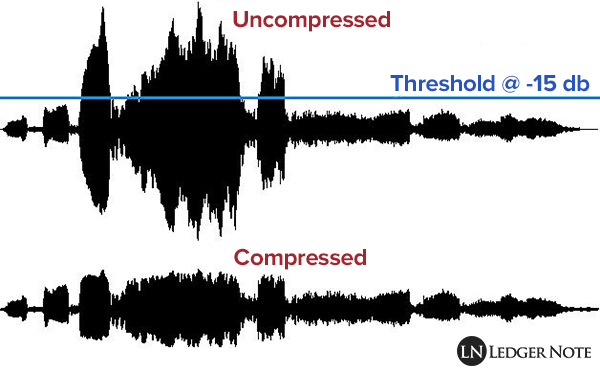
Comparing signals, that is to say: a signal enters the compressor, for example the voice we were talking about before and we set a certain level (threshold or treshold) which, if exceeded, causes the compressor to act reducing the level of said voice at the output as if it were the fader on a console.
So the compressor is all the time comparing the input signal against this threshold and reducing the signal at the output if it passes it. On the other hand, the amount of reduction at the output is not always the same, but can be modified by the user with another parameter.

What are all those knobs?
Compressors have various user-modifiable parameters that appear in the form of knobs on both digital and hardware models. Let’s see what they are:
Threshold or Treshold: we tell the compressor that if the signal goes above a certain level, it reduces it in gain. The lower the amount of signal enters the compression and therefore there will be greater reduction in gain. A detail to keep in mind is that in digital models the threshold will appear as a negative number, in essence the more negative that number is, the lower the threshold and the more signal is compressed.
Compression ratio or Ratio: here we tell the compressor to reduce the signal that exceeds the threshold by a certain proportion established by us. For example, if our signal passes the threshold by 10 decibels and we want it to decrease by 5 decibels, we put a ratio of 2: 1 (it works as a division). At higher rates, there will be a greater reduction, but also the compression may start to be noticeable, which that we generally don’t want to happen. What is sought is that it be transparent so that the listener does not realize that the signal was manipulated.
Attack or Attack: it is the time in seconds (generally in the order of milli seconds) that the compressor takes from the moment the signal passes the threshold to the complete reduction in gain that we set with the compression ratio. Keep in mind that the compressor essentially acts immediately, but it is this time that determines how it interacts with the envelope of the signal to be compressed.
Release: is the time in milli seconds that the compressor takes to return to unity gain once the signal stops being above the set threshold. In the same way that with the attack the release can modify the envelope of the sound in question and therefore is very important in the operation of the compressor.
Knee: it is a parameter found in some compressors that modifies the way in which the compressor begins to act, the name is due to the fact that the curve that describes the way in which the compressor begins to act is similar to a knee (knee in English ).
So that we understand better when we talk about soft knee we are talking about that the compressor starts to act gradually before the set threshold and reaches its compression ratio established in this way. Instead, a hard knee compressor will only act when the signal goes beyond the established threshold and therefore more aggressively.
Make up gain or output gain: is the parameter that controls the compressor’s output gain, after having activated and reduced the signal by a number of decibels. What is sought in general is that what was reduced in level is re-gained and therefore make the parts that had less volume now approach those that were compressed.


