Audio and Video Compression Basics


Free Download Mp4Gain
picture

Audio and Video Compression Basics


Audio and Video Compression Basics


As we rely more and more on digital media, understanding the basics of audio and video compression becomes increasingly important. Compression is the process of reducing the size of digital files without sacrificing too much quality. Without compression, media files would take up a lot more space on our hard drives, making it difficult to store and share them. In this article, we’ll explore the fundamentals of audio and video compression and how it works.

Understanding Audio Compression

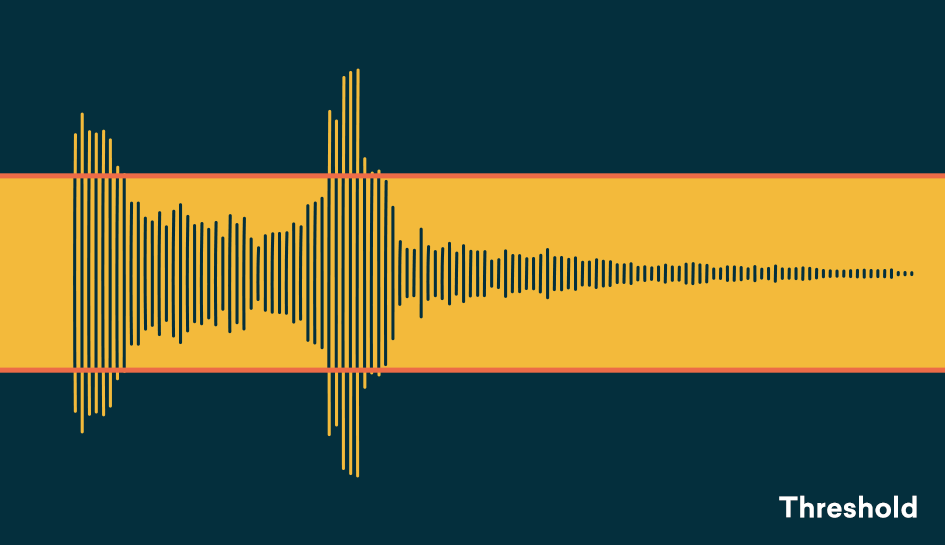
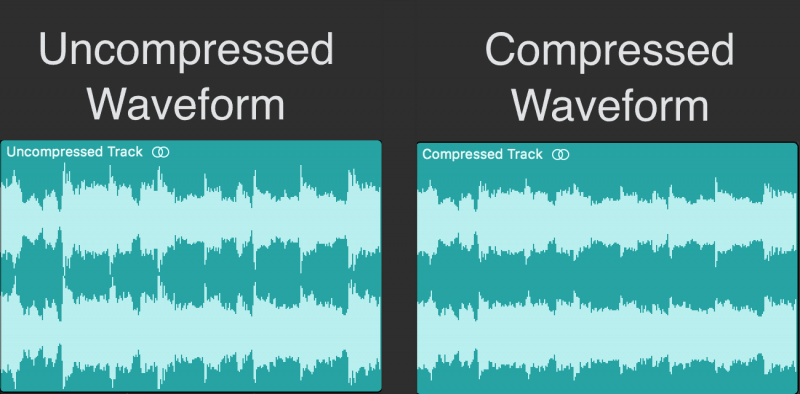
Audio compression is the process of reducing the dynamic range of an audio signal. Dynamic range is the difference between the quietest and loudest parts of a sound recording. Compression reduces this difference, making the quieter parts louder and the louder parts quieter. This is useful for improving the overall balance of a mix, and also for preventing distortion when the loudest parts of a recording exceed the maximum level of the recording medium.

Compression can be applied during recording or in post-production, using software tools like mp4gain. When done properly, compression can improve the clarity and punch of a recording, making it sound more polished and professional. However, overuse of compression can lead to a loss of detail and a “squashed” sound that lacks dynamics.

As musician David Byrne said in his book “How Music Works”:

“A good mix is one where the listener can hear and feel everything that the musicians and the engineer intended to be there.”

Understanding Video Compression

Video compression is the process of reducing the size of a video file by removing redundant or unnecessary data. This is done by encoding the video using a codec, which stands for “coder-decoder”. Codecs use complex algorithms to analyze each frame of a video and compress it in a way that minimizes the loss of quality.

There are two types of video compression: lossless and lossy. Lossless compression reduces the size of a video file without any loss of quality, but it’s not as effective as lossy compression in terms of file size reduction. Lossy compression, on the other hand, sacrifices some quality to achieve a smaller file size. The level of quality loss depends on the amount of compression applied.

When it comes to video compression, there are many factors to consider, including the resolution, bit rate, and frame rate. By adjusting these parameters, you can find the right balance between file size and quality for your particular needs.

As filmmaker and author Robert Rodriguez once said:

“Filmmaking is a chance to live many lifetimes.”

Compression Techniques for Audio and Video

There are many compression techniques used in audio and video, each with its own strengths and weaknesses. In audio, the most common type of compression is called “peak compression”, which reduces the volume of loud sounds that exceed a certain threshold. Another type of compression, called “multi-band compression”, divides the audio signal into multiple frequency bands and applies compression to each band separately.

For video compression, the most popular codecs are H.264 and HEVC (High-Efficiency Video Coding). H.264 is widely used for streaming video on the internet, while HEVC is more efficient but requires more processing


Free Download Mp4Gain
picture


Mp4Gain Main Window
picture


Mp4Gain Features
picture


Free Download Mp4Gain
picture

Audio Compression Techniques: Understanding the Basics

Audio Compression Techniques: Understanding the Basics

Audio Compression
Audio Compression
Audio Compression
Audio Compression

What is Audio Compression?

Audio compression is the process of reducing the size of digital audio files by removing redundant or unnecessary information, while maintaining the perceived quality of the original sound. This is done by using various algorithms that analyze and modify the audio data in a way that reduces its file size.

Types of Audio Compression Techniques

There are two main types of audio compression techniques: lossy and lossless.

Lossy Compression

Lossy compression algorithms are used to achieve high compression rates, but at the cost of some loss in quality. In lossy compression, some of the original audio data is discarded or modified in a way that reduces its size. The amount of data that is removed or modified depends on the compression algorithm used.

Some popular lossy compression algorithms include MP3, AAC, and WMA. These algorithms are commonly used for music streaming, online radio, and other applications where high compression rates are necessary.

Lossless Compression

Lossless compression algorithms are used to compress digital audio files without losing any information. These algorithms are designed to reduce the size of the file by removing redundancies in the data, but without modifying any of the original information.

Some popular lossless compression algorithms include FLAC, ALAC, and WAV. These algorithms are commonly used for high-quality music streaming and for archiving music collections.

How Audio Compression Works

Audio compression works by analyzing the original audio data and then modifying it in a way that reduces its size while maintaining its quality. This is done using various mathematical algorithms that compress the data.

The most common way to compress audio data is to use perceptual coding. This method takes advantage of the human ear’s limitations in hearing certain frequencies and sounds. By removing these sounds, the audio data can be compressed without the listener noticing any loss in quality.

Another method of audio compression is predictive coding. This method uses mathematical algorithms to predict the next sample in a waveform based on previous samples. The difference between the predicted sample and the actual sample is then compressed and stored.

Why Audio Compression is Important

Audio compression is important because it allows us to store and transmit audio data more efficiently. This means that we can store more audio files on our devices and transmit audio data faster over the internet. Without audio compression, it would be impossible to stream music or podcasts over the internet.

12 Common Questions About Audio Compression Techniques

1. What is the difference between lossy and lossless audio compression?

Lossy compression algorithms are designed to achieve high compression rates at the cost of some loss in quality, while lossless compression algorithms are designed to compress audio files without losing any information.

2. Which audio compression algorithm should I use?

The choice of audio compression algorithm depends on the intended use of the audio file. Lossy compression algorithms like MP3 and AAC are commonly used for music streaming and online radio, while lossless compression algorithms like FLAC and ALAC are commonly used for high-quality music streaming and archiving.

3. How much does audio compression affect the quality of the original sound?

The amount of quality loss in audio compression depends on the compression algorithm used and the degree of compression applied. Lossy compression algorithms generally result in some loss in quality, while lossless compression algorithms do not.

4. How can I tell if an audio file has been compressed?

You can usually tell if an audio file has been compressed by looking at its file extension. Lossy compressed files usually have extensions like MP3, AAC

Audio (audio) compression comparison [mp3, wma, ogg, atrac] Part 2

Audio (audio) compression comparison [mp3, wma, ogg, atrac] Part 2

AUDIO COMPRESSION

[Sound source used and points of interest]
・ 1kHz sine wave
Check for noise or correction. Investigate if abnormal sounds are mixed by emphasis or noise different from the originally generated range.

Audio Compression

· White noise
Check the frequency characteristics. Use sounds that are emitted at the same level for all sounds from 0 to 20 kHz and see if they are reproduced correctly.

·music
Use real music and investigate the differences with the original.

[Bitrate Settings]
Fixed bit rate: 96kHz, 128kHz, 256kHz, 320kHz Variable bit rate: 96-160kHz, 192-320kHz.
However, depending on the software, 320kHz cannot be set fixed and 350 can be set, or the upper and lower limit bits cannot be specified in the variable, and the sound quality standard can be specified in several steps ( medium sound quality, high sound quality). quality).be. Also, there are some that are configured with average bitrate instead of variable bitrate, so understand that it’s not a completely fair comparison.

[Software used [encoder]]
・ MP3 system
Afternoon Koda Ver.3.11a [gogo.exe ver.3.11]
Lame Ivy Frontend Encoder Ver.2.91 [Lame.exe Ver.3.93]
B’s GOLD Ver.7.12 [Unknown]
RipAudiCO Ver.3.70 [leme_enc.dll Ver.3.93]

・OGG system
oggdropXPd Ver.1.7.11 [Unknown]
B’s GOLD Ver.7.12 [Unknown]

・ WMA
B’s GOLD Ver.7.12 [Unknown]
(For WMA, I tried 3 types of software in my environment, but the result was exactly the same (maybe the encoder itself uses the same thing?) And it corresponds by software Since the bitrate range was narrow, only used a type).

・ ATRAC
nothing special. For ATRAC, we recorded analog from a CD player to an MD deck, optically connected an MD deck to a PC, and measured what was captured by WAV.

· To measure
Wave Space Ver.1.31

【others】
Although it is different from the main theme, I converted it to WAV for the visual measurement of each standard (because WaveSpace only supports wav), but the position where the sound of the WAVized data ends and the total playback. We discovered that there was a difference in time. , so we also investigated it.

3.Hardware 3.
Originally, the equipment used should be described in detail here, but the hardware environment is different for each individual, and this survey is only a guide in the first place, and it will be different if other people do the same. is a possibility of results, I will omit the detailed description of the hardware. (The thing is that I don’t have enough equipment to publish)

【Results of the test】
See the following for a summary of the results of each survey.
・White noise measurement result
・1kHz sine wave measurement result
・Music measurement results
・Simple file size and comment list

[Discussion]
ah There seems to be no big difference in file size (between the same bitrate)
stomach. Sound quality appears to be MP3 < WMA < OGG at low bit rates
(MP3: 128 = WMA: 96 < OGG: 96).
Hare. There is little difference at high bit rates
(there is a slight difference in the treble range, but it seems you won’t notice the difference unless you’re in a very good environment).
Worker. The difference in the encoder software was more than I expected
(especially in MP3)

“My conclusion”
[Less than 128]
If you’re worried about popularization (compatibility), [WMA] is good, and if you basically use it alone, [OGG] is good.
(I am worried about the amount of noise or the correction, but I sacrificed a bit on the sound quality anyway, so I chose the one that covers up to the high range as it is. Also, due to the relationship between ① and ②, mp3 is another with the same sound quality.The file size will be larger than

[With 256 and more]
The variable bit rate (192-320) of [Afternoon Koda] is good.
The fixed 320 is good for sound quality, but there is little difference between the fixed 256 and variable high-quality sound, and it seems that you can barely understand it even if you listen to it. If the sound quality is about the same, the smaller the file size, the better.

[Other impressions]
About OGG
I had high expectations for OGG, but I was concerned about the measurement result at 1 kHz, whether it was noise or correction. However, I find the relationship between sound quality (wide playback band) at low bit rates and file size to be excellent. At high bit rates the sound quality and file size are about the same as MP3s so I think MP3s are advantageous considering the penetration rate but I think they are doing pretty well considering the fact that they have just been developed. expected in the future

Audio (audio) compression comparison [mp3, wma, ogg, atrac]

Audio (audio) compression comparison [mp3, wma, ogg, atrac]

Compressed Audio

MP3-typed audio, etc., for storing music that was recorded on cassette tapes, music borrowed from CD rental shops or purchased music CDs, or for easy enjoyment with a portable player or car.

compressed audio

More and more people are recording with compression technology. However, there are many standards such as WMA recommended by Microsoft as well as MP3 when it comes to audio compression. Also, since the sound quality and compression rate of each standard change depending on the bit rate setting and the like, there is a wide variety of compression methods depending on the combination of the standard and the setting.

So, I wanted to check what the sound quality and file size would be when recording with which standard and with which settings, and select the standard that suits my purpose, so I took this survey. However, due to the investigation of the ideas of fans, the software and equipment used were covered by those that are freely obtainable in hand or on the net, so the result may be different from the original performance. , but it is only one. Take it as an example.
Since this test focuses on sound quality, it does not test at a low bit rate, which deteriorates sound quality.

Finally, in conducting this survey, I referenced many documents on the Internet. We would like to express our gratitude to each person (individual/corporation) for facilitating us to review materials that have been researched and created with considerable effort from their respective points of view. The sites I mainly referred to will be featured at the bottom of this page, so I recommend that those who are viewing this also take a look.

[Survey outline]
1. 1. Destination standards
As mentioned above, there are many audio compression standards, but here we have limited them to MP3, WMA, OGG, and ATRAC. The standards and reasons for the survey are shown below.

・MP3 ( Moving Picture Experts Group 1 Audio Layer – 3 )
I chose it because it is probably the best known and most popular standard and there are many compatible players for the same reason.

・WMA ( Windows Media Audio ) _ _
It is widely known alongside MP3. Recently, it has become compatible with car audio and DVD players. Also, according to a theory, the same bitrate is rumored to have higher sound quality and compression than MP3, so I chose it.

・OGG (Ogg Vorbis)
It may not be familiar to you yet, but although MP3 requires a license, the number of compatible players is gradually increasing due to the fact that it is unlicensed but offers high sound quality and high compression. Since it is (apparently) high-performance and license-free, it is easy to develop encoders and playback software, so we chose it with the expectation that it will spread in the future.

・ATRAC ( Advanced TR Transform Acoustic Coding ) _ _
This name may not be familiar to you, but you can understand the standard adopted by MD. Many people think that MD has the same high sound quality as CD, and since it is widely used as a storage medium for music, it was used as a reference for comparison.

・ Reason for not targeting other standards
There are many compression standards in addition to the above, but there are few compatible software and players, and considering the interaction with others (although I cannot say publicly), I judged that the comparison with the three types above is adequate. In addition, there is a standard called OpenMG (ATRAC3) recommended by SONY, etc., and there is no need to adopt other than SONY in mobile players, etc., but there are still few (limited) supported players, and recording is done. except for VAIO users, since it is difficult to do so, it was excluded from the target.

2. 2. Survey method
The three types of sounds selected for the survey were converted to various bit rates of each standard, visually compared to the original sounds, and listened to and evaluated. Also, I heard rumors that although the standard is the same, there are differences depending on the conversion software, so I used various types of software (encoder). the detail is just below.