
Dynamic Range Compression in MP3

Let’s talk about Dynamic Range Compression in MP3
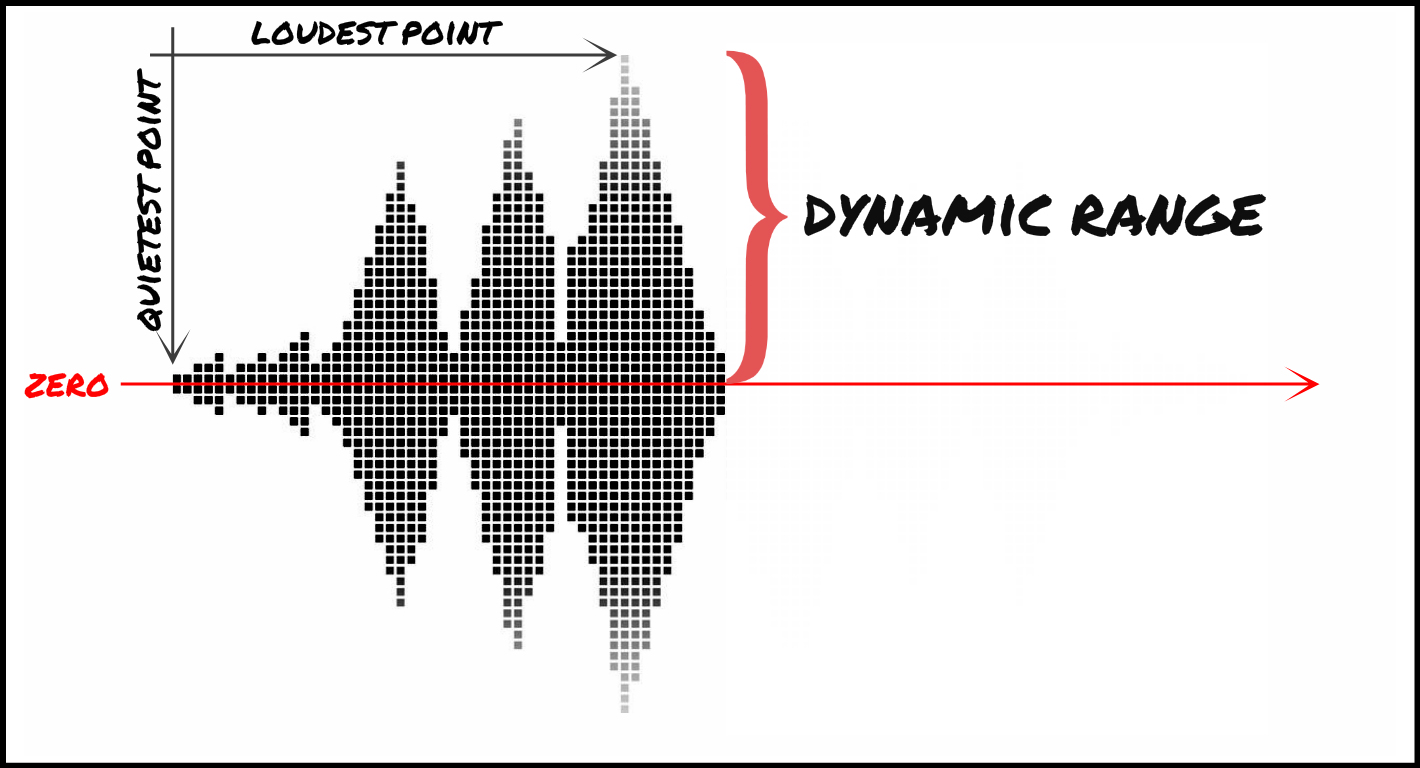
Dynamic range compression in MP3 is one of the most fascinating aspects of audio processing. It ensures that soft sounds in a track are made louder while loud sounds are brought down, creating a balanced audio experience. Imagine watching a movie where whispers are too quiet to hear, but explosions are unbearably loud. Dynamic range compression solves this by evening out the volume levels, making everything audible without extremes. In my years of working with MP3 audio, I’ve found this technique invaluable for both professional recordings and casual listening.
I often compare this process to adjusting the brightness of a photo. Just like you wouldn’t want some parts of an image to be too dark or others too bright, audio needs balance too. Without compression, certain details in a song might get lost in the mix or become overwhelming. For example, live concert recordings, which can have huge volume differences, benefit greatly from dynamic range compression, allowing you to hear the crowd and the instruments at appropriate levels.
How Dynamic Range Compression Works in MP3
Dynamic range compression works by analyzing the amplitude of an audio signal and applying gain reduction to louder sections while boosting quieter parts. When encoding MP3s, this technique is crucial for ensuring consistent playback quality across different devices. Think of it like a thermostat that keeps your room at a comfortable temperature—neither too hot nor too cold.
For instance, when I listen to MP3s on my phone, I notice how compression allows me to enjoy music even in noisy environments, like a subway. Without it, softer parts of a song might get drowned out by background noise. However, compression must be applied carefully. Too much can result in a “squashed” sound, where the music feels lifeless and lacks dynamics. This is especially noticeable in genres like classical music, where contrasts between soft and loud passages are vital for emotional impact.
Benefits of Dynamic Range Compression in MP3
- Enhanced listening experience in noisy environments.
- Balanced audio levels across devices and platforms.
- Improved clarity for spoken dialogue in podcasts and audiobooks.
- Consistent quality for professional music production.
One real-life example of its benefits is when creating workout playlists. Without compression, sudden spikes in volume could be jarring or even harmful, especially when using headphones. With properly compressed MP3s, the energy of upbeat tracks remains consistent, motivating and safe for prolonged use.
Challenges of Over-Compression
While dynamic range compression offers many benefits, it’s not without its challenges. Over-compression, often criticized in the music industry, can lead to what’s known as the “loudness war.” This phenomenon occurs when producers prioritize loudness over quality, sacrificing the natural dynamics of a song. The result? Fatiguing audio that lacks depth and character.
I remember listening to a remastered album from a favorite band and feeling disappointed. The compression made every track sound uniformly loud, robbing the music of its emotional highs and lows. It’s like reading a book where every sentence is written in bold—all the subtlety is gone. Proper dynamic range compression is about finding the perfect balance, preserving the integrity of the audio while enhancing its accessibility.
Applications of Dynamic Range Compression in Everyday Life
Dynamic range compression isn’t just for music production; it’s everywhere. From streaming services to gaming, this technology ensures audio is optimized for various scenarios. For example, in video games, compression helps players hear important sounds, like footsteps or dialogue, over background noise. Similarly, in streaming platforms, it ensures consistent playback quality across devices with different audio capabilities.
I’ve also noticed its impact on live broadcasting. Sports commentators, for instance, benefit from compression to ensure their voices remain clear even during loud crowd reactions. Without it, the commentary might get lost in the excitement, diminishing the viewer’s experience.
Latest words on Dynamic Range Compression in MP3
Dynamic range compression in MP3 is a powerful tool that enhances the listening experience by balancing audio levels. It’s essential for everything from music production to everyday listening, ensuring clarity and consistency. While over-compression can be a concern, when used correctly, it brings out the best in audio, making it accessible and enjoyable for everyone. If you’re looking to optimize your audio files, tools like Mp4Gain can help you achieve the perfect balance.
FAQ about Dynamic Range Compression in MP3
What is dynamic range compression in MP3?
Dynamic range compression in MP3 reduces the volume difference between the loudest and softest parts of an audio track, ensuring balanced playback.
Why is dynamic range compression important?
Dynamic range compression ensures consistent audio quality, making soft sounds audible and loud sounds manageable, especially in noisy environments.
How does over-compression affect music?
Over-compression can make music sound flat and lifeless, reducing its dynamic range and emotional impact.
Can dynamic range compression improve podcast audio?
Yes, it enhances clarity by balancing dialogue and minimizing abrupt volume changes, making podcasts easier to listen to.
What are some real-life uses of dynamic range compression?
It’s used in music, streaming, gaming, broadcasting, and even workout playlists to maintain consistent audio quality.
Is dynamic range compression necessary for MP3s?
Yes, it’s vital for optimizing MP3 audio, ensuring it sounds great across different devices and environments.
Does dynamic range compression affect file size?
No, it primarily alters the audio levels without significantly impacting the file size.
How does dynamic range compression differ from normalization?
Compression adjusts the range of audio levels, while normalization sets the overall peak volume to a consistent level.
What are the disadvantages of dynamic range compression?
Excessive compression can reduce audio quality, making it sound flat and less engaging.
Can dynamic range compression be undone?
No, once applied, the original dynamic range cannot be fully restored.



Comments:
I’ve always wondered why some songs feel so loud all the time. This article explained it perfectly. Thanks!
Dynamic range compression is something I didn’t understand until now. Really helpful examples, but I wish there were more details about how to avoid over-compression.
Great article! I use compression for my podcast, and it makes a world of difference. Clearer and easier to listen to.
Can anyone suggest tools for applying compression? I’m new to this and could use some advice.
As a music producer, I’ve struggled with over-compression. Glad to see this issue highlighted. More people need to understand the balance!
Cool stuff, but why do streaming platforms sometimes still mess up the volume levels?
This really opened my eyes to how much compression affects everyday audio. Thanks for such an in-depth article!
I wish more sites explained things like this. It’s like a whole science, and now I get it!
I was frustrated by loudness issues in my gaming setup. Didn’t know compression was the key. This article helped a ton!
Wish there was a section on how compression affects specific genres like jazz or metal. Still, great info!