Dynamic range compression in MP3 files


Free Download Mp4Gain
picture

Dynamic Range Compression in MP3 Files

Dynamic Range Compression in MP3 Files

Let’s talk about Dynamic Range Compression in MP3 Files

Dynamic range compression (DRC) in MP3 files is a process that can significantly affect the way we hear music. As someone who has worked extensively with audio encoding, I’ve seen how DRC can make audio tracks sound balanced, especially when played on devices with limited dynamic range like smartphones or car stereos. Simply put, DRC reduces the volume difference between the quietest and loudest parts of a track. This is incredibly useful when listening in noisy environments, where subtle details might otherwise get lost. Imagine being at a busy coffee shop and still being able to enjoy every lyric of your favorite song—that’s the magic of dynamic range compression.

How Dynamic Range Compression Works

Dynamic range compression works by attenuating the loudest parts of a track while boosting the quieter sections. It uses a combination of algorithms that analyze the waveform of an audio file and apply changes to ensure a consistent volume level. I often compare it to an automatic dimmer switch for lights—brightening dark areas and toning down overly lit ones, creating a balanced atmosphere.

In MP3 encoding, this process is applied during the compression phase, ensuring that the audio maintains clarity and impact despite the reduced file size. The encoder uses psychoacoustic models to decide which parts of the audio to modify, prioritizing sounds that our ears are most sensitive to. This ensures the compression doesn’t drastically alter the listening experience while still achieving significant data reduction.

Why Dynamic Range Compression Matters

Dynamic range compression is crucial for creating MP3 files that sound good across various playback systems. For example, when I’m mixing a track, I know it will be played on everything from high-end headphones to cheap Bluetooth speakers. Without compression, quieter parts might disappear entirely on less capable devices, while louder sections could cause distortion. This balance is especially important for genres like classical music, where dynamics are a key part of the listening experience.

Additionally, compression helps prevent listener fatigue. Overly dynamic tracks can be exhausting to listen to because of the constant need to adjust the volume. DRC ensures a smoother, more comfortable experience, especially during long playback sessions.

Advantages of Dynamic Range Compression in MP3 Files

  • Improved clarity in noisy environments
  • Better compatibility with a wide range of playback devices
  • Reduced listener fatigue during extended listening
  • Optimized file size without sacrificing perceived quality
  • Enhanced consistency across tracks in a playlist

Challenges and Limitations of Dynamic Range Compression

While dynamic range compression offers numerous benefits, it’s not without drawbacks. Over-compression can lead to a phenomenon called the “loudness war,” where tracks lose their dynamic depth and become overly uniform. I’ve encountered cases where over-compressed tracks sound harsh and unnatural, especially when played on high-quality audio systems that reveal these imperfections.

Another challenge is ensuring that the compression algorithms preserve the artist’s intent. For instance, a song’s dramatic crescendos might lose their impact if compressed too heavily. This balance requires careful tuning of compression settings, which can vary depending on the genre and intended use of the MP3 file.

How Dynamic Range Compression Impacts MP3 File Sizes

One of the lesser-known effects of dynamic range compression is its impact on file sizes. By evening out the audio levels, compression reduces the complexity of the waveform, which can result in slightly smaller files. However, this difference is often negligible compared to the overall compression achieved through MP3 encoding itself. I’ve noticed that the real benefit lies in how compression enhances the perceived quality rather than directly reducing file size.

Applications of Dynamic Range Compression

Dynamic range compression is widely used in various scenarios to enhance the listening experience:

  • Streaming services: Ensures consistent audio levels across different tracks and playlists.
  • Broadcasting: Maintains clarity and intelligibility in radio and television audio.
  • Gaming: Balances sound effects and dialogue for immersive gameplay.
  • Live performances: Prevents sudden spikes in volume that could damage equipment or harm listeners.
  • Mobile devices: Optimizes playback for speakers with limited dynamic range.

How to Adjust Dynamic Range Compression in MP3 Files

If you’re looking to fine-tune dynamic range compression in your MP3 files, there are several tools and techniques available. Personally, I prefer using software with advanced compression settings, allowing precise control over parameters like threshold, ratio, attack, and release times. These settings determine how much compression is applied and how quickly it reacts to changes in volume.

For example, setting a lower threshold compresses more of the audio signal, while a higher ratio applies stronger compression to loud sections. Experimenting with these settings can help you achieve the perfect balance for your specific needs.

Latest Words on Dynamic Range Compression in MP3 Files

Dynamic range compression is an essential aspect of creating MP3 files that sound great in a variety of environments. While it’s not without challenges, its benefits far outweigh the drawbacks when applied thoughtfully. From improving clarity in noisy settings to ensuring compatibility with diverse playback devices, compression plays a crucial role in the modern listening experience. If you’re looking to optimize your audio files, tools like Mp4Gain can help you achieve professional results with ease.

FAQs About Dynamic Range Compression in MP3 Files

What is dynamic range compression?

Dynamic range compression reduces the volume difference between the loudest and quietest parts of an audio track, making it easier to hear in various environments.

Why is dynamic range compression used in MP3 files?

It’s used to enhance clarity, ensure consistent audio levels, and optimize playback for a wide range of devices.

Does dynamic range compression affect file size?

While it can slightly reduce file size by simplifying the audio waveform, the primary benefit is improved perceived quality.

Can I adjust dynamic range compression in existing MP3 files?

Yes, using specialized software, you can adjust compression settings to better suit your needs.

What are the disadvantages of dynamic range compression?

Over-compression can make tracks sound unnatural and lose dynamic depth, especially on high-quality audio systems.

Is dynamic range compression necessary for all MP3 files?

Not always. Its necessity depends on the intended use and playback environment of the audio file.

How does dynamic range compression affect classical music?

While it can improve clarity, excessive compression may reduce the emotional impact of dynamic variations in classical music.

What settings are best for dynamic range compression?

The best settings depend on the genre and intended playback. Experiment with threshold, ratio, attack, and release for optimal results.

How does dynamic range compression affect live recordings?

It helps balance the volume, ensuring a consistent listening experience while preserving the energy of the performance.

Comments:

I’ve always wondered why some MP3s sound better in my car than others. Now it makes sense—thanks for explaining dynamic range compression so clearly!

Great article! But could you go into more detail about how compression settings like attack and release work? That part was a bit confusing.

This was super helpful! I’ve been trying to make my own MP3s, and now I know how to avoid over-compressing them.

I didn’t realize compression could make such a big difference in noisy places. I’m going to experiment with this on my podcast recordings.

Awesome breakdown of a technical topic! I’d love to see more examples of compression in action, maybe with specific genres?

This article explains so much about MP3s that I never knew! Wish I’d read this years ago when I started ripping my CDs.

I think this is a good starting point, but you could expand on how different encoders handle compression. That’s what I’m really curious about.


Free Download Mp4Gain
picture


Mp4Gain Main Window
picture


Mp4Gain Features
picture


Free Download Mp4Gain
picture

Audio Clipping in MP3 Compression

Audio Clipping in MP3 Compression

Audio Clipping in MP3 Compression

Let’s talk about audio clipping in MP3 compression

Audio clipping in MP3 compression is an issue that can make or break the quality of the music or sound you’re listening to. When sound is compressed to save storage or bandwidth, sometimes the peaks in the audio are cut off, or “clipped,” which can lead to a harsh, distorted listening experience. MP3 compression, which reduces file size by eliminating parts of the audio that are less likely to be noticed, can sometimes cause clipping if the original audio file has loud, sharp peaks. In this article, I’ll explain why audio clipping happens, what causes it, and how to recognize and prevent it to ensure high-quality audio.

Understanding audio clipping and how it impacts sound quality

Clipping occurs when an audio signal’s amplitude exceeds the maximum limit, creating distortion because the signal has nowhere to go but flat out. Imagine if you shouted directly into a microphone so loudly that it couldn’t capture all the sound; the result would be a rough, chopped-off noise rather than the clear, full sound of your voice. In audio terms, clipping means that the sound wave gets “cut off” at the peaks, which in digital audio becomes a harsh, unpleasant distortion. This type of distortion is particularly noticeable in compressed formats like MP3, as they’re designed to strip away data considered unnecessary.

How MP3 compression can lead to audio clipping

MP3 compression works by removing frequencies that human ears may not pick up as easily. However, if the original audio has intense peaks, the compression process can cut them off rather than preserve the quality. This happens because MP3 algorithms prioritize reducing file size over maintaining the original audio’s peak structure, which can result in clipping on louder sections. I’ve noticed that high-energy tracks with many peaks are particularly susceptible, as MP3 compression forces the audio into a smaller file while trying to preserve most of its integrity.

Factors contributing to clipping in MP3 compression

Various elements can contribute to clipping in MP3 compression, including the bit rate, loudness, and dynamics of the original track. Here are some major contributing factors:

  • High volume levels in the original file
  • Low bit rates used during compression
  • Complex or dynamic sound profiles
  • Poor quality or outdated compression algorithms

If you’ve ever tried converting a loud or heavily produced track to a lower bit rate, you might have noticed that the audio becomes scratchy or distorted. This is the result of inadequate data to capture the full detail of the sound peaks, leading to clipping.

Recognizing audio clipping in MP3 files

Knowing what clipping sounds like can help you recognize it quickly in your MP3 files. Typically, clipped audio will sound “crunchy” or “harsh” during peak moments in a song or recording. Imagine playing a song with loud drums or powerful vocals and hearing an unpleasant buzzing or crackling – that’s often a sign of clipping. Some listeners describe it as a “cut-off” effect, where the sound seems abruptly stopped or truncated.

How clipping affects listening experience and music enjoyment

Clipping can ruin an otherwise perfect listening experience. For instance, if you’re listening to a high-energy rock song, those clipped peaks can reduce the impact of the drums or make the vocals sound strained. As a music enthusiast, it’s frustrating because the song loses the richness and fullness intended by the artist. If you’re serious about sound quality, even subtle clipping can feel like a loss of detail, turning what should be immersive into a hollow experience.

Preventing clipping in MP3 compression

Avoiding clipping while compressing audio requires a balanced approach. First, selecting the right bit rate plays a huge role. Higher bit rates like 256 kbps or 320 kbps retain more audio data and reduce the chance of clipping. Choosing quality compression algorithms is also essential, as they are designed to handle dynamic ranges better. In my experience, I found that adjusting the volume of the original file before compressing can reduce clipping, as this allows more headroom for peaks without flattening them.

Testing for clipping in MP3 files

One way to check for clipping is by listening carefully to high-energy sections of a track. I typically pay attention to parts where the volume peaks, such as crescendos or intense vocal moments, to spot any unwanted distortion. Alternatively, audio analysis software can visually display clipping, showing waveforms that flatline at the top. Personally, I rely on both methods to ensure that my MP3s don’t suffer from clipping, especially when preparing tracks for live sound or digital releases.

Audio clipping vs. other audio distortions

Clipping isn’t the only type of distortion you might encounter, but it is among the most disruptive. Unlike hiss or background noise, which can sometimes be ignored, clipping is a glaring error that cuts into the core quality of a track. Clipping is unique because it specifically affects high peaks, while other distortions may impact a broader range of frequencies. Knowing the difference helps because if you’re hearing distortion only on the loudest parts, it’s likely due to clipping.

Latest words on audio clipping in MP3 compression

To sum up, audio clipping in MP3 compression can seriously affect the quality of your music or audio files. By understanding the causes and symptoms of clipping, you can take steps to prevent it, ensuring a clear and enjoyable listening experience. While MP3 compression has many benefits, being aware of its limitations and taking the proper steps, like adjusting bit rates or monitoring the original track’s levels, can go a long way toward preserving audio quality. For those looking to fine-tune their audio files, Mp4Gain offers an effective solution to prevent clipping and enhance your sound quality without sacrificing file size.

Comments:

Great article! I’ve been having issues with clipping in some of my favorite songs after converting them to MP3. Now I understand why it happens and how I can prevent it. Thanks!

This explains a lot! I always wondered why some songs sound distorted on certain devices. Didn’t know about the impact of bit rate on clipping. Really useful info!

Been struggling with this for a while. I produce music, and clipping has been a nightmare. Maybe I need to look at bit rates more closely. Thanks for the tips!

I love high-quality audio, and clipping ruins it for me every time. Wish more streaming services would be upfront about bit rates and clipping issues. Appreciate the insights here.

Very insightful. I never realized how much clipping affects my listening experience, especially with MP3s. This is a must-read for any audio lover.

Well written. Some parts of my old MP3 collection have this exact problem. Now I know what’s going on, thanks to your easy-to-understand breakdown.

I’m new to audio production, and this article gave me some solid guidance on preventing clipping. Still learning, but this was super helpful!

Thank you for explaining the details! I’m definitely going to try Mp4Gain to fix some of my old files with clipping issues.

Man, I hate when my favorite songs have that crunch sound from clipping. Nice to see some good advice on avoiding it.

I was skeptical, but I learned a lot! I didn’t realize MP3 bit rate had such an impact on clipping. I’ll try higher bit rates from now on.

This is the article I’ve been looking for! I had no idea clipping was such a common issue in MP3s. Thanks for the info.

Pretty good breakdown of clipping. I’ve had trouble understanding it before, but this makes sense now. Great job!

Dynamic Range in Audio

Understanding Dynamic Range in Audio

Dynamic Range in Audio

What is Dynamic Range in Audio?

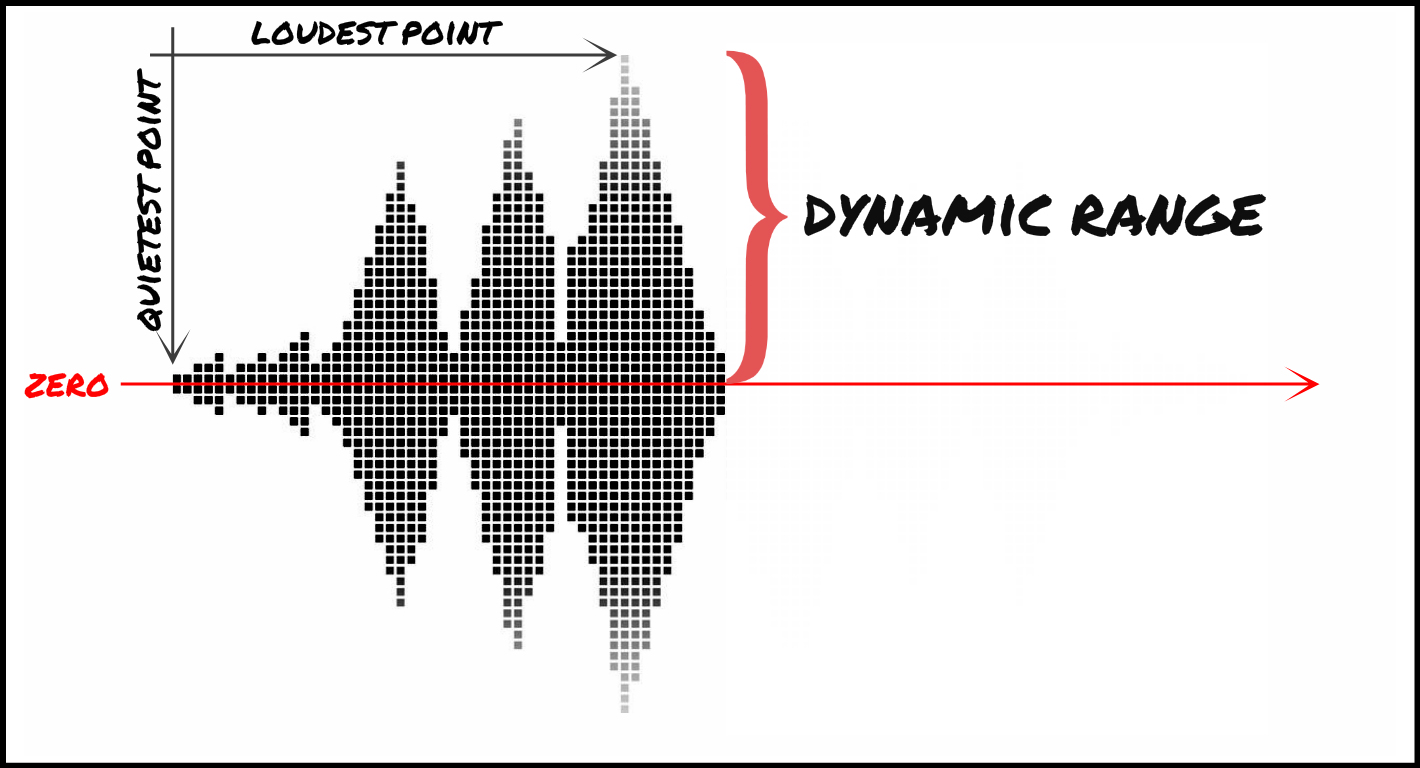
Dynamic range refers to the difference between the loudest and quietest parts of an audio signal. It is an important aspect of sound engineering that determines the quality of sound produced. As an audio engineer, I have come across numerous situations where the dynamic range of a recording was too wide or too narrow, making it difficult to produce a high-quality mix.

In the book “The Mixing Engineer’s Handbook” by Bobby Owsinski, he states: “The dynamic range is what gives a recording its emotional impact. Too much and it becomes tiresome, too little and it becomes boring.” This perfectly illustrates the importance of understanding and mastering dynamic range in audio.

When working with audio, it is important to use tools such as compressors, limiters, and expanders to manage the dynamic range. These tools can help reduce the difference between the loudest and quietest parts of a recording, resulting in a more balanced sound.

How does Dynamic Range Compression work?

Dynamic Range Compression (DRC) is a technique used in audio engineering to reduce the dynamic range of a recording. This is achieved by reducing the volume of the loudest parts of the recording while leaving the quieter parts unchanged.

DRC is commonly used in music production to create a consistent volume level throughout a song. It is also used in broadcasting to ensure that the volume of advertisements is consistent with the volume of the program being aired.

In the movie “Whiplash,” the character Terence Fletcher, played by J.K. Simmons, says, “There are no two words in the English language more harmful than ‘good job’.” While this quote is not related to audio engineering, it perfectly illustrates the idea behind dynamic range compression. By reducing the difference between the loudest and quietest parts of a recording, we create a more consistent and balanced sound.

Why is Understanding Dynamic Range important?

Understanding dynamic range is important for anyone working with audio. It allows us to create high-quality recordings that are both pleasing to the ear and emotionally impactful.

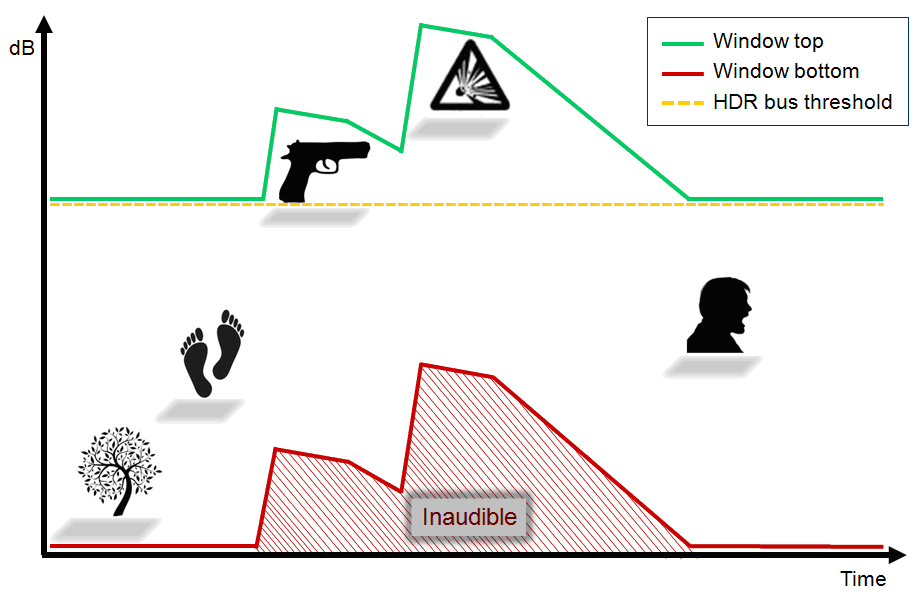
As a personal anecdote, I once recorded a live concert where the dynamic range was too wide. The quiet parts of the recording were barely audible, while the loud parts were painfully loud. After mastering the recording and reducing the dynamic range, the final product was much more enjoyable to listen to.

In conclusion, dynamic range is a crucial aspect of sound engineering that should not be overlooked. By understanding how it works and using the right tools, we can create recordings that are both balanced and emotionally impactful.

Final Words

When it comes to audio engineering, mastering dynamic range is key to creating high-quality recordings. By using tools such as compressors and limiters, we can reduce the difference between the loudest and quietest parts of a recording, resulting in a more balanced sound. As an audio engineer, I have seen firsthand the importance of mastering dynamic range, and I urge anyone working with audio to take the time to understand it fully.

discussion on dynamic range compression.

discussion on dynamic range compression.

dynamic range

Dynamic range compression is a scapegoat for poor musical sound, but heavily compressed music isn’t a new trend – listen to Motown albums from the sixties. The same can be said of the Led Zeppelin classics or the younger Wilco and Radiohead albums.

Dynamic Range

Records, especially older ones that were recorded and produced before 1982, were less likely to get mixed up and get louder. They reproduce natural music with a natural dynamic range that is preserved on record and lost in most standard or high definition digital formats.

Of course, there are exceptions – listen to Steven Wilson’s recently released album from MA Recordings or Reference Recordings and you’ll hear how good digital sound can be. But this is rare, most modern recordings are tall and compressed.

Music compression has been the subject of serious criticism lately, but I would say that almost all of your favorite recordings are compressed. Some of them are less, some more, but they are still compressed. Dynamic range compression is a scapegoat for poor musical sound, but heavily compressed music isn’t a new trend – listen to Motown albums from the sixties. The same can be said of the Led Zeppelin classics or the younger Wilco and Radiohead albums. Dynamic range compression reduces the natural ratio between the loudest and lowest recorded sounds, so whispers can be as loud as screams. It’s pretty hard to find pop music from the last 50 years that hasn’t been compressed.

I recently had a nice chat with Tape Op founder and editor Larry Crane about the good, bad and bad aspects of compression. Larry Crane has worked with bands and artists such as Stefan Marcus, Cat Power, Sleater-Kinney, Jenny Lewis, M. Ward, The Go-Betweens, Jason Little, Eliot Smith, Quasi, and Richmond Fontaine. He also runs the Jackpot recording studio! in Portland, Oregon, home to The Breeders, The Decemberists, Eddie Vedder, Pavement, REM, She & Him and many, many more.

Crane agreed with my arguments, but added: “The compression conversation needs to be approached from two different sides: are we talking about compressing the entire track in the mixing and mastering process, or compressing individual music tracks (instruments and vocals) in the recording and mixing process? “That’s right, compression is applied at all stages of music production, so some of the dynamic range may have been lost long ago when the mastering engineer performed the last run. If you don’t have access to the multitrack master copy, the two tracks after mixing, and the final master copy, then you won’t be able to understand why the recording sounds like this.

As an example of surprisingly unnatural sound, but still great songs, I cite Spoon They Want My Soul’s album, released in 2014. Crane laughs and says he listens to it in the car because he sounds great there. Which brings us to another answer to the question why music is compressed: because compression and the extra “clarity” make it sound better in noisy places.

Larry Crane at work. Photo by Jason Quigley

When people say they like the sound of an audio recording, I think they like music, as if sound and music are inseparable terms. But for me, I differentiate these concepts. From a music lover’s point of view, the sound may be harsh and raw, but that won’t matter to most listeners.

Many are in a hurry to accuse mastering engineers of abusing compression, but compression is applied directly during recording, during mixing, and only then during mastering. If you have not been personally present at each of these stages, then you will not be able to know what the instruments and voices sounded like at the beginning of the process.

Crane was on fire: “If a musician deliberately wants to make the sound crazy and distorted like Guided by Voices records, then there is nothing wrong with that: desire always outweighs sound quality.” The performer’s voice is almost always compressed, the same goes for bass, drums, guitars, and synthesizers. Compression keeps vocal volume at the desired level throughout the song or stands out slightly from other sounds.

Compression done correctly can make the drums sound more lively or intentionally strange. In order for the music to sound good, you must be able to use the instruments necessary for this. That’s why it takes years to figure out how to use compression and not go overboard.