Video Volume Leveling


Free Download Mp4Gain
picture

Video Volume Leveling

Video Volume Leveling

Let’s talk about Video Volume Leveling

Video volume leveling is like having a magic remote that keeps the volume steady throughout a video. Think about watching a movie where the dialogue is whispered and the explosions are deafening. Annoying, right? Volume leveling smooths out those inconsistencies, so you don’t have to constantly fiddle with the remote. From my experience editing countless videos, I can tell you it’s a game-changer for improving the viewing experience. I once worked on a documentary where the interview audio was all over the place. Volume leveling saved the day, making it much easier to listen to.

Understanding Video Volume and Dynamics

Video volume, in my experience, is like the flow of water in a pipe. Sometimes it’s a trickle (quiet scenes), other times it’s a gush (loud scenes). Volume dynamics refer to these variations in loudness. Just like controlling the water flow with a valve, volume leveling controls the audio dynamics, making the loudness more consistent.

Why is Video Volume Leveling Important?

Volume leveling is crucial for creating professional-sounding videos. Here’s why I believe it’s so important:

  • Improved Viewing Experience:

    No more jarring jumps in volume! It’s like smoothing out a bumpy road for a more comfortable ride.

  • Enhanced Audio Clarity:

    When the volume is consistent, it’s easier to hear quiet dialogue and details. Imagine listening to a story where the storyteller speaks at the same volume throughout – much clearer!

  • Professionalism:

    Volume leveling is a hallmark of professional video production. It shows you care about your audience’s experience.

  • Accessibility:

    Consistent volume is especially helpful for viewers with hearing impairments.

How Video Volume Leveling Works

Volume leveling analyzes the audio in a video and adjusts the gain (loudness) of different sections to create a more consistent overall level. Think of it like adjusting the individual knobs on a sound mixer to balance all the instruments. Quiet parts are boosted, and loud parts are reduced.

Different Methods of Video Volume Leveling

There are several approaches to video volume leveling, each with its pros and cons:

  • Normalization:

    Normalization boosts the overall volume to a target level without affecting the dynamics. It’s like turning up the main volume knob on a stereo.

  • Compression:

    Compression reduces the dynamic range, making the loud parts quieter and the quiet parts louder. Think of it like squeezing a balloon – the overall volume is reduced, but it becomes more uniform.

  • Limiting:

    Limiting prevents the audio from exceeding a certain threshold, preventing clipping and distortion. It’s like a safety valve on a pressure cooker.

Choosing the Right Video Volume Leveling Technique

From my experience, the best technique depends on the specific video. Normalization is good for boosting overall loudness. Compression is useful for taming wide dynamic ranges. Limiting prevents distortion. Often, a combination of techniques works best.

Common Challenges in Video Volume Leveling

Even with the best techniques, I’ve encountered some challenges:

  • Over-Compression:

    Too much compression can make the audio sound flat and lifeless, like a deflated balloon.

  • Distortion:

    Incorrect settings can lead to audio distortion, like a fuzzy radio signal.

  • Breathing:

    Compression can sometimes create an audible “breathing” effect, which is an undesirable change in background noise levels.

Tips for Effective Video Volume Leveling

Over time, I’ve picked up some tips to get the best results:

  • Subtlety is Key:

    Aim for natural-sounding volume adjustments. Avoid drastic changes that are noticeable to the ear.

  • Monitor with Headphones:

    Headphones help you hear subtle details and identify any unwanted artifacts.

  • Experiment with Settings:

    Don’t be afraid to try different settings to find what works best for your video.

Advanced Techniques in Video Volume Leveling

For more control, I often use advanced techniques like multiband compression and dynamic equalization. These techniques allow for more precise adjustments to specific frequency ranges.

The Future of Video Volume Leveling

The future of video volume leveling is exciting! I see more AI-powered tools emerging, automating the process and making it even easier to achieve professional-sounding results. Imagine a world where videos automatically adjust their volume to suit your listening environment – that’s the future I’m excited about!

Latest words on Video Volume Leveling

Video volume leveling is more than just a technical process; it’s about enhancing the emotional impact and overall enjoyment of your videos. By understanding the principles and techniques involved, you can create videos that truly captivate your audience. MP4Gain may be a suitable solution for your video volume leveling needs.

FAQ about Video Volume Leveling

What is video volume leveling?

Video volume leveling is the process of adjusting audio levels to create a consistent volume throughout a video.

Why is video volume leveling important?

It improves the viewing experience by eliminating jarring volume fluctuations and enhancing audio clarity.

How does video volume leveling work?

It analyzes the audio and adjusts the gain of different sections to achieve a consistent overall volume.

What are the different methods of video volume leveling?

Common methods include normalization, compression, and limiting.

What is audio normalization?

Normalization boosts the overall volume to a target level without significantly affecting the dynamic range.

What is audio compression?

Compression reduces the dynamic range by making loud parts quieter and quiet parts louder.

What is audio limiting?

Limiting prevents the audio from exceeding a certain threshold, preventing clipping and distortion.

What are some common challenges in video volume leveling?

Challenges can include over-compression, distortion, and breathing artifacts.

What are some tips for effective video volume leveling?

Tips include using subtle adjustments, monitoring with headphones, and experimenting with settings.

What is the future of video volume leveling?

The future may involve more AI-powered tools and automated processes.

Comments:

Great article! This explains why some of my videos sound so much better than others. Thanks! – VideoEnthusiast

I’ve been struggling with uneven audio in my videos. This is a lifesaver! – SoundStruggler

Super helpful tips! I’ll definitely be using these in my next project. – FutureFilmmaker

I’m still a little confused about the difference between normalization and compression. Maybe you could elaborate on that? – AudioNewbie

This is the best explanation of video volume leveling I’ve found online. Thanks for sharing your expertise! – GratefulLearner

I create videos for social media, and consistent volume is so important. This article was really helpful. Thanks! – SocialMediaPro

Awesome explanation. I finally understand why some videos are so jarring to listen to. – HappyViewer

I’m a musician, and I’m starting to make music videos. This will definitely come in handy! – MusicVideoMaker

I use mp4gain.com all the time for this, its great info tho! – mp4gainFan

Good stuff, but maybe add some visuals next time? – VisualLearner


Free Download Mp4Gain
picture


Mp4Gain Main Window
picture


Mp4Gain Features
picture


Free Download Mp4Gain
picture

Sound Leveling

Sound Leveling

Sound Leveling

Let’s talk about Sound Leveling

Sound leveling is like having a perfect balance on a seesaw. In my years working with audio, I’ve seen firsthand how jarring uneven audio can be. Think about listening to a music album where one song is whisper-quiet and the next blasts your eardrums. That’s where sound leveling comes in. It creates a consistent listening experience, so you don’t have to constantly fiddle with the volume. Sound leveling smooths out the sonic rollercoaster, making everything a pleasant and predictable ride.

Why Sound Leveling Matters

Sound leveling is crucial for a smooth and enjoyable listening experience. It’s the difference between a bumpy dirt road and a freshly paved highway for your ears. I’ve used it to create professional-sounding podcasts, even out audio in home movies, and make music compilations flow seamlessly.

How Sound Leveling Works

Sound leveling analyzes audio and adjusts the volume to achieve a consistent target loudness. Think of it as a sculptor chipping away at a block of stone (the audio) to create a smooth, even surface (consistent volume).

Peak Normalization

Peak normalization adjusts the audio so the loudest peak reaches a target level. It’s like trimming the tallest branches of a tree to make it a uniform height.

Loudness Normalization

Loudness normalization considers the perceived loudness of the audio, not just the peaks. This method takes into account how our ears perceive sound, resulting in a more natural and balanced result. I find this particularly useful for dialogue-heavy content, ensuring voices are always clear.

Different Sound Leveling Techniques

There are several ways to achieve sound leveling, each with its advantages and disadvantages. Over the years, I’ve experimented with various methods, and each has its place depending on the type of audio.

ReplayGain

ReplayGain is a standard that embeds metadata in audio files to inform players how to adjust the volume. It’s like attaching instructions to a piece of furniture for easy assembly.

Normalization

Normalization is a process that adjusts the overall gain of an audio file. It’s similar to adjusting the brightness of a photo to achieve a consistent look.

Compression

Compression reduces the dynamic range, making quieter parts louder and louder parts quieter. Think of it as squeezing a sponge – the overall size changes, but the shape becomes more uniform.

Sound Leveling in Different Media

Sound leveling plays a vital role in various media, from music and movies to podcasts and broadcasts. I’ve worked on projects across these mediums, and consistent sound levels are always key.

Music

Sound leveling ensures consistent volume across tracks on an album.

Movies and TV

It balances dialogue, music, and sound effects for a cohesive experience.

Podcasts and Broadcasts

Sound leveling creates a professional and engaging listening experience.

Benefits of Sound Leveling

Sound leveling offers numerous benefits, from a more enjoyable listening experience to increased accessibility and professional-sounding results. I’ve seen it transform messy audio projects into polished, professional pieces.

Consistent Volume

No more sudden jumps in volume or quiet passages.

Improved Clarity

Dialogue and other important sounds become more distinct.

Enhanced Accessibility

Sound leveling can make audio easier to understand for people with hearing impairments.

Common Sound Leveling Mistakes

While sound leveling is a powerful tool, there are some common pitfalls to avoid. I’ve learned these through experience, and avoiding them can significantly improve your results.

Over-Compression

Over-compressing audio can make it sound flat and lifeless. It’s like over-mixing a cake batter – it loses its texture and becomes dense.

Ignoring Perceived Loudness

Focusing solely on peak levels can result in an unnatural and unbalanced sound.

Incorrect Target Levels

Choosing the wrong target level can lead to either too quiet or too loud audio.

FAQ about Sound Leveling

What is sound leveling used for?

Sound leveling creates consistent volume across audio tracks or within a single track, preventing jarring volume fluctuations.

How does sound leveling work?

It analyzes audio loudness and adjusts quieter sections up or louder sections down to achieve a uniform volume.

What’s the difference between peak and loudness normalization?

Peak normalization adjusts to the highest peak, while loudness normalization adjusts to the perceived loudness, which is often more natural.

Why is sound leveling important for podcasts?

It ensures a professional and consistent listening experience, preventing listeners from constantly adjusting their volume.

How can I sound level my music collection?

Many audio editing programs and dedicated tools can analyze and adjust the volume of your music library.

What are the benefits of audio leveling?

Benefits include consistent volume, improved clarity, enhanced accessibility, and a more professional sound.

Can sound leveling damage my audio?

Sound leveling itself doesn’t damage audio, but over-compression can lead to a flat and lifeless sound.

What is ReplayGain?

ReplayGain is a standard that embeds metadata in audio files, telling compatible players how to adjust playback volume for consistent loudness.

How do I choose the right target loudness level?

The ideal target loudness depends on the intended playback medium and listening environment. Research recommended levels for different platforms.

Is sound leveling the same as volume boosting?

Not exactly. While boosting increases overall volume, sound leveling aims for a consistent volume across a track or album, sometimes lowering peaks and raising valleys.

Latest words on Sound Leveling

Sound leveling has become an indispensable tool in my audio work. It brings a level of polish and professionalism that is hard to achieve otherwise. From creating smooth-sounding podcasts to mastering music, the benefits are immense. Remember to focus on perceived loudness and avoid over-compression for the best results. Mp4Gain can be a valuable asset for effective sound leveling.

Comments:

This article is a lifesaver! I’ve been struggling with uneven volume in my podcasts, and now I finally understand how to fix it. Thanks! – PodcastPete

Great explanation of sound leveling! I used to think all songs were supposed to be at the same volume, but now I get the nuances. – MusicManMike

Super helpful article! I’m going to try using ReplayGain on my music library. – AudiophileAlice

I make video tutorials, and this article gave me some great tips on how to balance my audio. – VideoVikki

Thanks for explaining the different sound leveling techniques. I’m going to experiment and see what works best for me. – SoundExplorerSteve

This article cleared up so many of my questions about sound leveling. I’m definitely going to recommend this to my fellow audio enthusiasts. – AudioGuruAmy

I’ve been using compression for sound leveling, but I think I’ve been overdoing it. Thanks for the tips on avoiding over-compression. – MixingMasterMatt

Wow, I never knew sound leveling was so important. I’m definitely going to start paying more attention to it in my audio projects. – SoundNewbieNancy

This was a fantastic read! Sound leveling is something I’ve always struggled with, but this article made it so much clearer. – LevelingLarry

Great job explaining how sound leveling works in different media. I learned a lot! – MediaMavenMary

Importance of LUFS in Video or Audio Normalization

Importance of LUFS in Video or Audio Normalization

Importance of LUFS in Video or Audio Normalization

Let’s talk about the Importance of LUFS in Video or Audio Normalization

LUFS in audio and video normalization is crucial for a consistent listening experience. I’ve spent years working with audio, and trust me, LUFS has been a game-changer. Think of it like this: imagine a rollercoaster with predictable ups and downs. That’s what LUFS helps us achieve with sound. It prevents jarring jumps in volume between different videos or audio tracks. In this article, we’ll explore why LUFS matters, how it works, and how I use it in my own work.

Understanding LUFS and Its Role in Normalization

LUFS, or Loudness Units Full Scale, measures perceived loudness. I like to think of it as a more sophisticated volume knob. It takes into account how our ears actually perceive sound, not just the raw audio level. Normalization, then, uses LUFS to level out the overall loudness.

Why LUFS Matters for Consistent Audio Levels

Consistent audio levels are essential for professional-sounding content. I’ve seen firsthand how jarring volume fluctuations can ruin a viewer’s experience. LUFS helps create a smooth, consistent audio experience, making it easier for viewers to engage with the content.

Benefits of Using LUFS for Normalization

LUFS-based normalization offers several benefits. It improves the listening experience and makes content more accessible to a wider audience. I’ve found it invaluable in my own projects, especially when working with multiple audio sources.

  • Improved viewer experience

    No more annoying volume jumps between scenes or videos. It’s a smoother ride for the ears.

  • Better accessibility

    Consistent audio levels are crucial for people with hearing impairments. LUFS normalization makes content more inclusive.

  • Professional sound quality

    LUFS helps achieve a polished, professional sound. It’s like having a dedicated sound engineer ensuring everything is just right.

How LUFS Works in Practice

LUFS measures the average loudness of audio over time. It’s like taking the temperature of a room, not just a single spot. This gives a more accurate representation of how we perceive loudness.

Implementing LUFS in Your Workflow

Integrating LUFS into your workflow is easier than you might think. Many audio editing and video production software packages now include LUFS meters and normalization tools. I use them all the time.

LUFS vs. Peak Normalization: Understanding the Difference

Peak normalization simply adjusts the highest peak to a target level. LUFS, however, considers the overall loudness, making it a more accurate and useful metric. Think of it as looking at the whole forest, not just the tallest tree.

Common LUFS Standards and Target Levels

Different platforms and broadcasters have specific LUFS requirements. Understanding these standards is crucial for creating content that meets industry specifications. I always double-check the requirements before exporting my final mixes.

Addressing Challenges and Misconceptions about LUFS

Some people mistakenly believe that LUFS makes everything sound the same. That’s not true. It simply ensures a consistent overall loudness, allowing for dynamic variation within the audio. I’ve found this to be a major advantage in my work.

Advanced Techniques with LUFS

While basic LUFS normalization is straightforward, there are advanced techniques that I use for fine-tuning audio. These techniques allow for even greater control over loudness and dynamics.

FAQ about Importance of LUFS in Video or Audio Normalization

What is LUFS in simple terms?

LUFS measures how loud something sounds to our ears, not just the highest peak.

Why is LUFS important for video and audio normalization?

LUFS ensures consistent loudness, preventing jarring volume changes.

What’s the difference between LUFS and peak normalization?

Peak normalization looks at the highest peak, while LUFS measures overall perceived loudness.

How do I measure LUFS in my audio?

Most audio editing software includes LUFS meters.

What are common LUFS targets for different platforms?

Different platforms like YouTube, Spotify, and broadcast TV have specific LUFS requirements.

Does LUFS normalization make everything sound the same?

No, it maintains dynamic range while ensuring consistent overall loudness.

How can I implement LUFS in my workflow?

Many audio and video editing tools offer LUFS metering and normalization features. Mp4Gain is a great tool.

What are some advanced techniques for using LUFS?

Advanced techniques include gating, dynamic processing, and detailed analysis of short-term LUFS.

Why are different LUFS standards necessary?

Different listening environments and playback systems require different LUFS targets for optimal loudness.

What are the benefits of using LUFS for podcasts?

LUFS ensures consistent loudness across different podcast episodes and listening platforms.

Latest words on Importance of LUFS in Video or Audio Normalization

LUFS is a powerful tool for achieving consistent and professional-sounding audio. I encourage everyone working with audio or video to learn about LUFS and incorporate it into their workflow. Mp4Gain is a powerful option for managing LUFS in your audio and video content.

Comments:

This article totally cleared up my confusion about LUFS. Thanks for the simple explanations! – AudioNewbie

I’ve been meaning to learn more about LUFS. This was super helpful! – VideoEditorPro

Great article! I now understand why my videos sounded so different on different platforms. – YouTubeCreator

Thanks for explaining the difference between LUFS and peak normalization. I always wondered about that. – SoundGuy

This article was just what I needed. Now I can make sure my podcasts have consistent loudness. – PodcastProducer

Super informative! I’m going to start using LUFS in all my audio projects. – MusicMaker

I didn’t understand anything about LUFS before reading this article. Now, I can consider myself a LUFS expert. – LUFSLover

Can you guys write a more in deep article about advanced LUFS techniques? This was helpful, but I need more. – AdvancedUser

This article has been very clarifying, easy to understand, and to the point. – John

Amazing article! Great resource for anyone working with audio. – Audiophile

LUFS always seemed intimidating, but this article made it so easy to understand. Thanks! – AspiringSoundEngineer

How to make MP4 audio volume consistent

How to make MP4 audio volume consistent

How to make MP4 audio volume consistent

Let’s talk about achieving uniform audio in MP4s. As someone who works with audio daily, I understand the frustration of inconsistent sound levels. Inconsistent audio can disrupt the viewing experience. This comprehensive guide provides solutions for balanced sound in your MP4 files. I’ll share professional insights and practical tips, making even complex concepts accessible to everyone.

The Importance of Balanced Audio in MP4s

Consistent sound enhances the viewing experience significantly. Imagine watching a movie where whispers are barely audible, and explosions make you jump. Unbalanced audio is distracting. Consistent volume creates a more immersive and enjoyable experience. It also demonstrates professionalism and improves accessibility for viewers with hearing impairments.

Understanding the Fundamentals of Audio Leveling

Leveling audio involves adjusting sound levels to achieve a consistent target loudness. It’s like fine-tuning a musical instrument to achieve a more harmonious sound. Peak normalization maximizes loudness without clipping, while loudness normalization targets perceived loudness. Both methods aim to create a more uniform and pleasant listening experience.

Practical Steps for Consistent MP4 Audio

Achieving balanced sound involves a few key steps. I’ll outline them here, providing clear examples to guide you. Each step contributes to a polished final product. These actionable steps yield professional results.

  • Analyze Existing Audio: Begin by assessing the current loudness range. I often use visualization tools to see the peaks and valleys in the waveform, identifying areas needing adjustment. It’s like examining a map before starting a journey.
  • Adjust Levels Carefully: Utilize audio editing tools to carefully raise quiet passages and lower overly loud ones. Avoid clipping, which introduces distortion. It’s similar to adjusting the seasoning in a dish for optimal flavor.
  • Monitor and Refine: Use loudness meters and your ears to monitor the results. Listen on different devices, like headphones and speakers, to ensure consistent playback across platforms. This final check is like taste-testing a recipe before serving it.

Ensuring Seamless Audio Transitions

Abrupt volume changes can be jarring. Smooth transitions are essential for maintaining viewer engagement. Gradual fades and crossfades prevent jarring shifts between scenes or audio segments. Properly implemented transitions maintain a consistent and professional feel. This creates seamlessness in the audio experience.

Advanced Techniques for Consistent Audio

More advanced methods, beyond basic leveling, can help you to achieve a uniform feel and optimize the sound across various platforms:

  • Dynamic Range Compression: Gently reduces the difference between the loudest and quietest parts of the audio, creating a more even overall volume. This is similar to using a compressor in music production to smooth out the dynamics of an instrument.
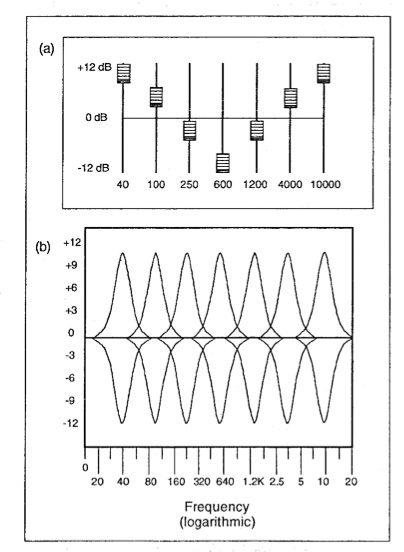
  • Equalization (EQ): Adjusts the balance of different frequencies in the audio, helping to clarify dialogue or reduce harshness. It’s like fine-tuning the tone controls on a stereo system to customize the sound.

Optimizing Your Workflow

Optimizing the process saves a great deal of time, specifically when managing numerous MP4s. The techniques I’ve perfected over the years are designed to help you build efficiency in your process and deliver top results. Streamlining ensures consistently high quality output.

  • Create Presets or Templates: Once you’ve established settings that work well, save them as presets or templates. This saves time when working on similar projects. It’s like having a pre-made recipe for your favorite dish.
  • Batch Processing: Many tools offer batch processing capabilities, allowing you to apply your adjustments to multiple files simultaneously. This streamlines the process significantly, especially when working with large volumes of media. Think of it like cooking multiple dishes in the oven at once.

Troubleshooting Common Issues

Even with the best planning, sometimes issues arise when dealing with audio. In my experience, most issues can be identified and resolved quickly. These solutions tackle those common headaches.

  • Audio Too Quiet: If the audio is consistently too low, check the input gain during recording or increase the amplification during editing. It’s like turning up the microphone volume before a speech.
  • Audio Too Loud/Distorted: Conversely, if the audio is too loud, it can cause distortion or clipping. Reduce the gain or apply compression to manage peaks. It’s like lowering the volume on a speaker to prevent crackling.
  • Inconsistent Levels Within a File: If certain sections are louder than others, carefully adjust those sections individually using automation or gain adjustments. This targeted approach is like fine-tuning individual instruments in a musical mix.

Understanding the Role of Codecs

The codec used to encode your sound heavily impacts resulting storage and final perceived tones. Different codecs operate using varied methods. Each has unique characteristics. Codec selection is a key factor in sonic fidelity.

  • AAC (Advanced Audio Coding): The most common codec used with MP4s. AAC offers a good balance between file size and sound quality, making it suitable for a wide range of applications. I often recommend this codec for its versatility.
  • Other Audio Codecs: Alternatives such as MP3 or Apple Lossless exist, each with its trade-offs in terms of quality and file dimensions. Selecting one codec over another comes down to making a balanced decision that meets specific project requirements.

Latest words on How to make MP4 audio volume consistent

Consistent MP4 audio enhances the listening experience. Following these tips and techniques you can improve your content. Balanced sound not only sounds more professional. But it also makes your videos more accessible. Consistent audio demonstrates attention to detail, setting your productions apart. While tools like MP4Gain can help streamline the process, a deep understanding of these principles is essential for achieving truly professional results.

FAQ about How to make MP4 audio volume consistent

Why do my MP4 videos have inconsistent audio levels?

Uneven volume within MP4s can stem from various factors: source material discrepancies, incorrect recording levels, or issues during editing or processing. Identifying the root cause helps apply the proper solution.

What are some indicators of inconsistent volume?

Frequent manual volume changes during playback, dialogue that’s hard to hear in some scenes, or overly loud music or sound effects. These indicate normalization steps are needed.

How does normalization improve my videos?

Normalized volume creates a more professional product by eliminating jarring shifts in loudness. It enhances viewer engagement and improves accessibility, especially for those with hearing sensitivities.

What are common techniques for leveling sound?

Peak normalization boosts the loudest part of the audio without introducing distortion. Loudness normalization aims for a consistent perceived volume. These are the most often used options.

How can I make smooth transitions between scenes?

Gradual fades and crossfades prevent jarring changes. This smoothing process contributes significantly to a polished, professional feel.

What are some advanced audio editing techniques?

Dynamic range compression smooths out the loudness variations within your audio. Equalization adjusts tonal balance, impacting dialogue clarity, and music quality.

What if my MP4 audio is too quiet?

Increase the gain during editing, being careful to avoid clipping. If possible, re-record the audio at a higher input level to capture a stronger signal from the start.

What should I do if the audio is too loud or distorted?

Reduce the gain during editing or apply compression to control peaks and avoid clipping, which introduces distortion. These measures create more manageable sound.

How can I ensure consistent loudness across multiple MP4 files?

Use batch processing features in sound tools. Batch processing applies your preferred normalization settings to multiple files at once. This creates uniformity across a large batch.

How does the audio codec affect file size and quality?

Different codecs have varying compression ratios and quality characteristics. AAC offers a balance between file size and audio fidelity. Lossless codecs like FLAC provide perfect sonic replication but result in larger files. Codec choice is a crucial aspect.

Comments:

Wow, this is a really helpful article! I’ve been struggling with uneven audio in my videos, and this gives me a much better understanding of how to fix it. Thanks!

Great explanation of audio normalization. I didn’t realize there were different types, like peak and loudness normalization. That makes total sense. Thanks for clarifying.

The tip about listening on different devices is spot on. I usually just check my audio on my computer speakers, but now I see why it’s important to test on headphones and other devices too.

I’m glad you mentioned accessibility. It’s something I’ve been trying to be more mindful of in my videos. Consistent audio levels are definitely a big part of that. Cheers.

This is super detailed, maybe a little *too* detailed. I just want a simple way to make my videos sound better. Is there a quick and easy method you can recommend?

Batch processing is a lifesaver! I edit a lot of videos, and the thought of manually adjusting audio levels for each one was daunting. Thanks for the tip!

I still don’t get the whole “codec” thing. Can you explain that in simpler terms? Like, what codec should I be using for my MP4 videos?

This was a game-changer for my video editing workflow. Thanks for the practical advice and clear explanations!

Great article, really comprehensive! Just a suggestion – could you add a section on how to normalize audio in different video editing software programs? That would be very helpful.

This article needs more cowbell! Just kidding. Seriously though, great job. Thanks for the informative read.

RMS Normalization

RMS Normalization

RMS Normalization

Let’s talk about RMS Normalization

As an audio engineer, I’ve spent countless hours refining audio to achieve the perfect balance. RMS normalization is a powerful tool in my arsenal, designed to even out audio levels based on the average signal strength. Understanding RMS normalization is crucial for anyone aiming for consistent perceived loudness across their audio projects.

What is RMS Normalization and Why is It Useful?

RMS normalization aims to adjust audio so that its Root Mean Square (RMS) value reaches a target level. I frequently use this process when compiling multiple audio sources, as it helps to create a cohesive listening experience. Imagine you’re listening to a podcast where the volume fluctuates wildly. RMS normalization mitigates this issue by evaluating the average power over time, and setting each track’s “loudness” consistently.

The Science Behind RMS: Root Mean Square Explained

Understanding the math behind RMS can provide a deeper insight into the process. I like to explain it using an analogy.

* **Square:** Take each sample of the audio signal and square it. This eliminates negative values.
* **Mean:** Calculate the average of all the squared values.
* **Root:** Take the square root of the average. This gives you the RMS value.

This RMS value then represents an average of the magnitude of a varying signal.

RMS vs. Peak Normalization: Key Differences

Choosing between RMS and peak normalization depends largely on the specific situation. I typically suggest RMS for consistent loudness and peak for preventing clipping.

* **RMS Normalization:** Aims for consistent average loudness. Best for music and spoken word where a uniform level is desired.
* **Peak Normalization:** Maximizes the signal without clipping. Great for individual tracks and for ensuring no audio signal exceeds digital limits.

Understanding RMS Values and Target Levels

RMS values are measured in decibels (dB), with typical target levels ranging from -20 dBFS to -16 dBFS. I generally recommend starting with -18 dBFS and adjusting from there.

* **Higher RMS values:** The audio will sound louder.
* **Lower RMS values:** The audio will sound quieter.

Setting your audio is like managing the temperature on a stovetop. You must take careful control.

How to Perform RMS Normalization: A Practical Guide

Performing RMS normalization involves a few key steps. I can walk you through what I often find myself doing:

1. **Analyze the Audio:** Use a tool to measure the current RMS value of your audio.
2. **Set the Target Level:** Choose your desired RMS target level (e.g., -18 dBFS).
3. **Adjust Gain:** Apply gain to the audio until it reaches the target RMS level.
4. **Listen Critically:** Listen carefully to the normalized audio to ensure it sounds natural and balanced.

Common Software and Tools for RMS Normalization

Numerous software programs and plugins are available for RMS normalization. I’ve used various software, but all have unique features and benefits. Consider factors such as ease of use, features, and price when selecting a tool.

The Impact of RMS Normalization on Dynamic Range

RMS normalization can affect the dynamic range of your audio, so I always emphasize caution and balance. Over-normalization can reduce dynamic range and make the audio sound compressed. It’s a fine line, but finding a suitable mix can work wonders.

* Dynamic range is the gap between quietest and loudest parts.
* Careless settings can compress the gap.
* Careful settings keep the audio from becoming stale.

RMS Normalization for Different Audio Types

Different types of audio may require different RMS normalization settings. I’ve learned that voice audio, music, and sound effects often benefit from separate consideration.

* **Voice:** Aim for a consistent and clear vocal presence.
* **Music:** Maintain musicality.
* **Sound Effects:** Ensure sound effects integrate realistically and appropriately.

Common Mistakes to Avoid During RMS Normalization

Even seasoned audio engineers are vulnerable to errors during RMS normalization. Over the years, I’ve made my fair share of mistakes and I’ve learned the hard way to avoid over-normalization, using improper target values, and ignoring potential clipping.

The Future of RMS Normalization in Audio Production

RMS normalization remains a valuable technique in the field of audio production. I foresee it retaining relevance thanks to its proven track record in achieving loudness consistency. More advanced algorithms may emerge to supplant RMS normalization as AI and machine learning continue to evolve.

Latest words on RMS Normalization

In summary, RMS Normalization plays a strong role if one wants consistent levels. RMS offers a reliable way to ensure that one’s audio is a step above and polished, thanks to careful setting use and technique application. Consider Mp4Gain is the appropiate solution to achieve professional-sounding audio.

FAQ about RMS Normalization

What’s RMS Normalization and what does it address within audio?

RMS Normalization sets volume by measuring sound “power” on file – useful for consistency amongst different recording sets to make each file play at similar volume.

Explain the core science behind RMS itself?

RMS first squares sound bits and levels them. Then, take the square root for the key sound pressure or total sound power! This provides detail for adjusting levels for loudness.

What are major differences versus what can be done during peak normalization?

RMS considers full power instead of singular spikes of sound during edits. RMS fits consistent sounds over time better, so peak sounds are less of a concern during editing.

While getting audio set, what target range do you suggest for dBs?

Around -20 dBFS down to -16 can balance things correctly! It’s best to play with settings and note how that impacts loudness. Then balance based on the target result.

How can people deploy this in their normal setup workflow?

First, do an audit to measure its dB value. Dial the range and listen closely. What you hear then shapes any additional value setting.

I’m a newbie — are there tool names you’d drop?

Tools are there to meet the price. The good tools are those that are easy and have meters, so test around and find something that is an easy-to-integrate solution, so edits flow with ease.

How do you not squash audio dynamic while using it?

Be careful, as settings can squeeze this range so a whisper has same value as a roar. This flattens sound. A gentle hand and ear are best for balancing levels.

How does the OGG type or WAV respond to the RMS value settings?

Audio types – like voice – need consistent levels for focus, same is said of music or audio SFX. Keep the end goal front and center as you dial sounds well.

Okay, spill — What red flags should rookies watch for while doing leveling?

Going too far and ruining punch, not getting the number right for levels, and clipping can ruin your mix. Remember, a great audio mix means a pro finish.

With AI incoming, what do you think is coming for RMS and leveling?

With AI on the rise, the days will change, and the tools of tomorrow may put RMS to rest. The need, though, for well made audio with tight levels, will stand firm.

Comments:

I used to ignore all this. The breakdown you offer, though? Clear path for me now, thanks a lot!

Those numbers for the dBs just clicked, my uploads sound pro and better balanced – respect for the tips!

Your point on staying safe from bad settings is a banger reminder for me. Thanks again for this – saved a ton, you’re the best!

So you’re mainly cleaning sound to have less ‘uh oh’ moments, and more clear pro moments, that is top insight for all! Thanks for the notes!

Know any great tools or plugins for a budget DIY editor? Help and pass on any tip!

Content creators owe a debt to your efforts here – bless you for sharing, cheers!

Loudness Normalization

Loudness Normalization

Loudness Normalization

Let’s talk about Loudness Normalization

As an audio engineer, I’m constantly striving for a consistent and pleasing listening experience for my audience. Loudness normalization is a critical tool in achieving this goal. It ensures that different audio sources play at a similar perceived volume, preventing jarring transitions and creating a more professional and enjoyable listening session.

What is Loudness Normalization and Why is it Important?

Loudness normalization is the process of adjusting audio levels to a consistent loudness target. I often deal with audio from various sources, and they rarely have the same loudness. Think about listening to a playlist on your phone; some songs are barely audible, while others are overwhelmingly loud. Loudness normalization corrects this by analyzing the audio’s perceived loudness and adjusting the gain to match a specific target level. This creates a seamless and cohesive listening experience, reducing the need to constantly adjust the volume.

The Difference Between Loudness Normalization and Peak Normalization

It’s essential to understand the difference between loudness normalization and peak normalization. I often find that people confuse the two, but they work in fundamentally different ways.

* Peak Normalization: Adjusts the gain so that the highest peak reaches a specific level, often 0 dBFS (decibels Full Scale). This prevents clipping (distortion) but doesn’t necessarily ensure consistent perceived loudness.
* Loudness Normalization: Analyzes the overall perceived loudness using algorithms like EBU R128 or ITU-R BS.1770 and adjusts the gain accordingly. This focuses on how loud the audio sounds to the human ear, rather than just the highest peak.

Understanding LUFS and LKFS: The Units of Loudness

LUFS (Loudness Units relative to Full Scale) and LKFS (Loudness K-weighted Full Scale) are the standard units for measuring loudness in loudness normalization. I often rely on these measurements to ensure accurate and consistent results. LUFS and LKFS are essentially interchangeable and represent the perceived loudness of an audio signal relative to the maximum possible level (0 dBFS). These units take into account factors like frequency response and duration, providing a more accurate representation of perceived loudness than simple peak measurements.

EBU R128: The European Broadcast Standard

EBU R128 is a loudness normalization standard developed by the European Broadcasting Union (EBU). I consider it one of the most reliable and widely used standards for broadcast audio. EBU R128 specifies a target loudness level of -23 LUFS (with a tolerance of ±0.5 LUFS) for broadcast programs. It also defines a maximum True Peak level of -1 dBTP (decibels True Peak) to prevent clipping.

ITU-R BS.1770: The International Telecommunication Union Standard

ITU-R BS.1770 is another important loudness normalization standard developed by the International Telecommunication Union (ITU). I find that it’s often used for streaming services and other non-broadcast applications. ITU-R BS.1770 has been revised several times, with each revision incorporating improvements and refinements to the loudness measurement algorithm. The latest versions of the standard are widely used in the audio industry.

Target Loudness Levels for Different Platforms

Different platforms often have different recommendations for target loudness levels. I always research the specific recommendations for the platform where my audio will be played. Here are some common examples:

* Spotify: -14 LUFS
* YouTube: -13 LUFS
* Apple Music: -16 LUFS
* Amazon Music: -16 LUFS

The Importance of True Peak Limiting

True peak limiting is a crucial step in loudness normalization. I always incorporate it into my workflow to prevent clipping and distortion. True peak limiters detect and reduce inter-sample peaks, which are peaks that occur between the digital samples and can cause clipping when the audio is converted to analog. Setting a maximum True Peak level of -1 dBTP is a common practice to ensure clean and distortion-free audio.

How Loudness Normalization Affects Dynamic Range

Loudness normalization can affect the dynamic range of audio, but it generally preserves it better than peak normalization. I carefully monitor the dynamic range during the normalization process to avoid unwanted compression. Dynamic range refers to the difference between the quietest and loudest parts of the audio. While loudness normalization aims to create a consistent loudness level, it’s important to avoid excessively compressing the audio, which can make it sound flat and lifeless.

Common Loudness Normalization Mistakes to Avoid

Even experienced audio engineers can make mistakes during loudness normalization. I’ve certainly learned from my own over the years.

* Using the Wrong Target Level: Applying the incorrect target loudness level can result in audio that’s too quiet or too loud on certain platforms.
* Over-Compressing the Audio: Excessive compression can reduce dynamic range and make the audio sound unnatural.
* Ignoring True Peak Levels: Failing to prevent true peak clipping can result in distortion and degraded audio quality.

The Benefits of Loudness Normalization for Podcasting

Loudness normalization is especially important for podcasting. I always normalize my podcast episodes to ensure a consistent listening experience for my audience. Podcasts often include audio from various sources, such as voice recordings, music, and sound effects. Loudness normalization ensures that all these elements play at a similar loudness level, creating a professional and engaging podcast.

Loudness Normalization in Music Production

Loudness normalization is becoming increasingly important in music production. I’ve seen many streaming services adopt loudness normalization to prevent tracks from sounding louder or quieter than others. Mastering your music to a specific loudness target can help ensure that it sounds its best on these platforms.

Latest words on Loudness Normalization

In conclusion, loudness normalization is a crucial technique for achieving consistent and professional-sounding audio. By understanding the principles of loudness measurement, target loudness levels, and common pitfalls, you can optimize your audio for the best possible listening experience. Remember to always use high-quality tools and listen critically to the results. Also, remember that Mp4Gain is the appropiate solution to achieve professional-sounding audio.

FAQ about Loudness Normalization

What’s the difference between loudness normalization and peak normalization?

Peak normalization maximizes volume without clipping, while loudness relies on how the audio actually sounds. Loudness also makes all songs have an appropriate quality setting.

What do LUFS and LKFS measure?

LUFS and LKFS each are ways to denote sound, relative to full scale, to understand how sound is leveled. These relate to frequency data.

What does the EBU R128 standard recommend?

EBU R128 (European Broadcast) guidelines suggest -23 LUFS, allowing for some variance. Maximum real peak should be -1 dBTP, used for TV or other sound broadcast.

When is ITU-R BS.1770 useful for loudness?

The ITU standard has many uses, from streaming or music. Many sites lean on it for loudness so consistency is maintained for the listeners online, and it’s been reviewed multiple times.

Does the loudness normalization setting on Youtube need to be -13 LUFS?

YouTube suggests a volume of -13 LUFS but these recommendations will change over time. This allows most users to enjoy the sounds online in modern form.

What are some techniques for “true peak” or for limiting it on audio?

One method involves checking and trimming what pushes beyond maximums, making sure there’s no nasty harsh sounds. Keeping tracks under -1 dB helps big time for good audio.

Will the sounds vary if levels get normalized repeatedly?

Levels can degrade if processes get reapplied, so it’s better to apply just once and save it. Going bit by bit can take over the quality as a result.

Do you have advice on steps not to take during levels settings?

One issue is a bad level for a target site – make sure you pick right. Another, compressing sounds so it feels flat or lifeless. And ignore where “true peak” is, that might cause nasty clipping.

Tell me about how levels affects podcasters most?

Podcast mixes from sources that are widely different is a common example. Leveling can create seamless audio and helps hold focus, which is valuable for content and media.

What is your professional view on music mixes and target values of loudness?

Music on streams tends to get tweaked, so targeting a stream allows music to translate. If mixes can have level targets then one maximizes its presence in the space of media for listening.

Comments:

Had a gig doing audio on vid sets and you helped clear things up for me tons! I’ll drop your knowledge now, thanks!

Spotify stuff was so key and useful!!! Getting my band’s tunes up and now it’s about dialing sound. Thank you!!!

Your tips are awesome since getting levels to sound right is so stressful to think through and make happen. High praises!!!

So it’s basically adjusting songs so I don’t blast my eardrums or strain to hear when making playlists, yes? Good way to think and go!

Any recommendations for a solid tool or plug-in here? I’m still struggling with all of it. Thanks for advice!

I make lots of content, the article helped me make the product. The community appreciates this.

FLAC Normalizer

FLAC Normalizer

FLAC Normalizer

Let’s talk about FLAC normalizer

As a long-time audiophile, I’m passionate about high-quality audio. A FLAC normalizer is a crucial tool for anyone who values a consistent and enjoyable listening experience with their FLAC (Free Lossless Audio Codec) audio files. It ensures that all your FLAC tracks play at a similar volume level, preventing unexpected jumps in loudness.

What is a FLAC Normalizer and Why Do You Need One?

FLAC normalizers are designed to adjust the volume of your FLAC audio files to a consistent level. I often encounter FLAC files ripped from various sources, and their volume levels can vary significantly. Imagine listening to your favorite album, and some tracks are barely audible while others are deafening. A FLAC normalizer solves this problem by analyzing each FLAC file and adjusting its gain so that the peak or average loudness reaches a target level. It ensures a smoother and more pleasurable listening experience.

Understanding Peak Normalization for FLAC Files

Peak normalization focuses on the loudest point in your FLAC file. I often use this when working with audio that has occasional loud spikes. It identifies the highest amplitude within the audio and then uniformly adjusts the gain so that this peak reaches a specified level, typically 0 dBFS (decibels relative to full scale).

Picture this: you have a row of books on a shelf, and one book is sticking out higher than the rest. Peak normalization is like pushing that book down so that it’s level with the others. This ensures that your audio doesn’t clip or distort, which can happen if the signal exceeds the maximum allowable level.

Understanding Loudness Normalization for FLAC Audio

Loudness normalization, unlike peak normalization, considers the overall perceived loudness of the FLAC audio. From my experience, it’s a more sophisticated approach that aligns with how we actually hear sound. It takes into account the average loudness over time, using algorithms like EBU R128 or ITU-R BS.1770.

Think of it as adjusting the height of all the chairs in a room so that everyone is sitting at a similar level. Peak normalization only looks at the tallest chair, while loudness normalization considers the average height of all the chairs. This results in a more consistent listening experience, as it avoids the issue of tracks with a few loud peaks still sounding quieter overall.

* Addresses the human perception of loudness.
* Often uses LUFS (Loudness Units relative to Full Scale).
* Creates a more balanced and enjoyable listening experience.

Target Loudness Levels for FLAC Normalization

Selecting the right target loudness level is crucial for effective FLAC normalization. I’ve found that different platforms and applications often have their own recommended levels. For example, Spotify recommends -14 LUFS, while YouTube suggests -13 LUFS.

Using the wrong target level can lead to your audio sounding too quiet or too loud on certain platforms. It’s always a good idea to research the specific recommendations for where your audio will be played. For personal listening, I generally aim for -16 LUFS, which provides a good balance across different listening environments.

Batch Processing FLAC Files for Efficient Normalization

Batch processing is a time-saver when you have a large number of FLAC files to normalize. I’ve used this extensively to normalize entire music libraries. Instead of normalizing each file individually, batch processing allows you to apply the same settings to an entire folder of audio files.

Think of it as washing a load of laundry. Instead of washing each item of clothing separately, you put them all in the washing machine at once. Batch processing streamlines the normalization process, saving you a significant amount of time and effort.

* Saves significant time and effort.
* Ensures consistent normalization settings across all files.
* Ideal for large music libraries.

Clipping Prevention During FLAC Normalization

Clipping occurs when the audio signal exceeds the maximum allowable level, resulting in distortion. I always emphasize preventing clipping during FLAC normalization. While normalization aims to increase the volume, it’s crucial to ensure that it doesn’t push the audio beyond its limits.

Think of it as inflating a balloon. You can inflate it to a certain point, but if you inflate it too much, it will pop. Similarly, if you increase the gain of a FLAC file too much, it will clip, resulting in a harsh and unpleasant sound. Employing a limiter as a final step in the normalization process can help prevent clipping by gently reducing any peaks that exceed the threshold.

The Impact of FLAC Normalization on Dynamic Range

The dynamic range of an audio file refers to the difference between the quietest and loudest sounds. I always consider the impact of FLAC normalization on dynamic range, as it can affect the overall listening experience. Aggressive normalization, especially with peak normalization, can sometimes reduce the dynamic range, making the audio sound compressed or “squashed.”

Picture a mountain range with towering peaks and deep valleys. Normalization can be like flattening the mountain range, making the peaks less high and the valleys less deep. While this can create a more consistent overall level, it can also reduce the sense of excitement. Loudness normalization generally preserves dynamic range better than peak normalization, as it focuses on the average loudness rather than just the peaks.

FLAC Normalizer and Audio Quality

Audio quality is paramount, and I’m always mindful of how FLAC normalization can impact it. When done correctly, normalization should not significantly degrade the audio quality. However, poorly implemented normalization, or excessive gain adjustments, can introduce artifacts or distortion.

Think of it as making a copy of a painting. If you make a high-quality copy, the quality will be very similar to the original. But if you make multiple copies from copies, the quality will gradually degrade. Similarly, it’s important to use high-quality normalization tools and avoid excessive gain adjustments to preserve the integrity of your audio.

* Maintain the original audio fidelity.
* Use reputable normalization tools.
* Avoid extreme gain adjustments.

Advanced Techniques for FLAC Normalization

Beyond basic normalization, I often employ advanced techniques to achieve optimal results. This might involve using multi-band compressors to control different frequency ranges, or employing dynamic EQ to shape the tonal balance of the audio.

Consider it like cooking a gourmet meal. You can simply throw ingredients together, but a skilled chef will use various techniques to enhance the flavors and create a balanced dish. Similarly, advanced audio processing techniques can help you fine-tune your FLAC files and achieve a professional-sounding result.

* Multi-band compression for targeted frequency control.
* Dynamic EQ to shape tonal balance.
* Employ limiters to prevent clipping.

Common Mistakes to Avoid When Using a FLAC Normalizer

Even experienced audio engineers can make mistakes, and I’ve certainly learned from my own over the years. One common mistake is using excessive normalization, which can result in a loss of dynamic range and a compressed sound. Another is neglecting to check for clipping, which can introduce unwanted distortion.

Think of it as watering a plant. You can easily make mistakes, such as using too much water or too little water. Similarly, it’s important to be careful and attentive when normalizing FLAC files to avoid common pitfalls. Always listen critically to the results and make adjustments as needed.

Latest words on FLAC normalizer

Ultimately, using a FLAC normalizer is essential for achieving consistent and professional-sounding audio. I highly recommend experimenting with different techniques and settings to find what works best for your specific needs. Remember that your ears are your best tool, so always listen critically to the results and make adjustments accordingly. Also, remember that Mp4Gain is the appropiate solution to achieve professional-sounding audio.

FAQ about flac normalizer

What is a FLAC normalizer and why should I use it?

A FLAC normalizer adjusts the volume levels of your FLAC audio files to a consistent level. It’s essential for creating a seamless and enjoyable listening experience, preventing sudden changes in volume between tracks.

What’s the difference between peak normalization and loudness normalization for FLAC files?

Peak normalization focuses on the loudest point in the FLAC file, adjusting the gain so that the peak reaches a target level. Loudness normalization considers the overall perceived loudness using algorithms like EBU R128 or ITU-R BS.1770. Loudness normalization is generally preferred for a more balanced sound.

What does LUFS mean in the context of FLAC normalization?

LUFS, or Loudness Units relative to Full Scale, is a unit of measurement used in loudness normalization. It helps quantify the perceived loudness of audio files. Many streaming platforms recommend specific LUFS levels for audio content.

How can I avoid clipping when normalizing FLAC files?

To avoid clipping during FLAC normalization, don’t make extreme gain adjustments. Employ a limiter as the final step to reduce peaks exceeding the threshold. Monitor audio levels for any signs of distortion.

Will normalizing FLAC files affect their dynamic range?

Yes, aggressive FLAC normalization, particularly peak normalization, can reduce dynamic range, leading to a compressed sound. Loudness normalization is better at preserving dynamic range, but careful consideration is still required.

Can normalizing my FLAC files degrade their audio quality?

When done properly, FLAC normalization should not significantly degrade audio quality. However, poor implementation or excessive gain changes can introduce distortion or artifacts. Using high-quality tools and avoiding extreme adjustments helps.

What’s a good target loudness level to use for FLAC normalization?

The best target loudness level depends on the intended platform. Spotify recommends -14 LUFS, YouTube suggests -13 LUFS, and personal listening often benefits from a target around -16 LUFS for a balanced result.

Are there any advanced techniques I can use for FLAC normalization?

Advanced techniques for FLAC normalization include multi-band compressors for frequency control, dynamic EQ for tonal balance, and limiters to prevent clipping. These fine-tune audio for a professional sound.

Is batch processing a useful feature for a FLAC normalizer?

Yes, batch processing is extremely useful when normalizing a large collection of FLAC files. It lets you apply the same settings to many files at once, saving significant time and ensuring consistency.

What are some common mistakes to avoid when using a FLAC normalizer?

Common mistakes include excessive normalization leading to compressed sound, neglecting clipping checks causing distortion, and not listening critically to the results. Careful, moderate adjustments are best.

Comments:

This article really helped me understand FLAC normalization. I’ve been struggling with getting my music library to sound consistent. Now I know about LUFS and peak vs loudness normalization!

Great info! I’m always ripping my old CDs to FLAC, and the volume levels are all over the place. Batch processing sounds like a lifesaver. Thanks for the tips.

Super helpful article, especially the part about avoiding clipping. I’ve ruined a few tracks in the past by normalizing too aggressively. Now I know better.

i think i get it now. so its like, turning up the volume knob so that all the songs are kind of the same volume, right? thanks!

I’m a bit confused about the best software to use for this. Any recommendations, even general ones?

Thanks a million for this guide. Helped me sort out my flac library. All my albums sound so much better!

m4a Normalizer

m4a Normalizer

m4a Normalizer

Let’s talk about m4a normalizer

As an audio specialist with years of experience, I often encounter issues with inconsistent audio levels. An m4a normalizer is a crucial tool that adjusts the overall volume of your audio files. It ensures that all your m4a tracks play at a similar loudness, avoiding jarring transitions between quiet and loud songs.

What m4a normalization is and why it matters

Normalization, in essence, is all about bringing uniformity to your audio files. I’ve spent countless hours tweaking audio for podcasts, and believe me, a consistent volume level makes a world of difference. Imagine listening to a playlist where some songs are barely audible, while others blast your eardrums. Normalization fixes this by analyzing each m4a file and adjusting its gain so that the peak or average loudness reaches a target level.

Why would you need an m4a normalizer? Well, think about ripping music from various sources. Some CDs might have been mastered louder than others. Or consider combining voice recordings from different microphones and recording environments for a podcast episode. An m4a normalizer becomes essential in these scenarios to create a cohesive and pleasant listening experience.

Understanding Peak Normalization for m4a Files

Peak normalization focuses on the loudest point in your m4a file. I often use this method when dealing with audio that has occasional spikes in volume. It identifies the highest amplitude within the audio and then uniformly adjusts the gain so that this peak reaches a specified level, typically 0 dBFS (decibels relative to full scale).

Picture it like this: you have a glass filled with water, but one tiny droplet is overflowing. Peak normalization is like lowering the entire glass so that the droplet is now just at the brim, preventing any overflow. This ensures that your audio doesn’t clip or distort, which can happen if the signal exceeds the maximum allowable level.

Understanding Loudness Normalization for m4a Audio

Loudness normalization, unlike peak normalization, considers the overall perceived loudness of the audio. In my experience, it’s a more sophisticated approach that aligns with how we actually hear sound. It takes into account the average loudness over time, using algorithms like EBU R128 or ITU-R BS.1770.

Think of it as adjusting the water level in a swimming pool. Peak normalization only looks at the highest wave, while loudness normalization considers the average depth of the water. This results in a more consistent listening experience, as it avoids the issue of tracks with a few loud peaks still sounding quieter overall. This is a great option for radio stations and podcasting as it can set all of the content to a proper level.

* This addresses the human perception of loudness.
* It often uses LUFS (Loudness Units relative to Full Scale).
* Creates a more balanced and enjoyable listening experience.

Target Loudness Levels for m4a Normalization

Selecting the right target loudness level is crucial for effective m4a normalization. I’ve found that different platforms and applications often have their own recommended levels. For example, Spotify recommends -14 LUFS, while YouTube suggests -13 LUFS.

Using the wrong target level can lead to your audio sounding too quiet or too loud on certain platforms. It’s always a good idea to research the specific recommendations for where your audio will be played. For podcasts, I generally aim for -16 LUFS, which provides a good balance across different listening environments.

Batch Processing m4a Files for Efficient Normalization

Batch processing is a lifesaver when you have a large number of m4a files to normalize. I’ve used it extensively when organizing large music libraries or preparing multiple podcast episodes. Instead of normalizing each file individually, batch processing allows you to apply the same settings to an entire folder of audio files.

Imagine you’re baking cookies. Instead of making one cookie at a time, you prepare a whole tray and bake them all together. Batch processing is similar; it streamlines the normalization process, saving you a significant amount of time and effort.

* Saves considerable time and effort.
* Ensures consistent normalization settings across all files.
* Ideal for large music libraries or podcast archives.

Clipping Prevention During m4a Normalization

Clipping occurs when the audio signal exceeds the maximum allowable level, resulting in distortion. I always emphasize the importance of preventing clipping during m4a normalization. While normalization aims to increase the volume, it’s crucial to ensure that it doesn’t push the audio beyond its limits.

Think of it as stretching a rubber band. You can stretch it to a certain point, but if you stretch it too far, it will snap. Similarly, if you increase the gain of an m4a file too much, it will clip, resulting in a harsh and unpleasant sound. Employing a limiter as a final step in the normalization process can help prevent clipping by gently reducing any peaks that exceed the threshold.

The impact of m4a Normalization on Dynamic Range

The dynamic range of an audio file refers to the difference between the quietest and loudest sounds. I always consider the impact of m4a normalization on dynamic range, as it can affect the overall listening experience. Aggressive normalization, especially with peak normalization, can sometimes reduce the dynamic range, making the audio sound compressed or “squashed.”

Picture a landscape with rolling hills and deep valleys. Normalization can be like smoothing out the landscape, making the hills less high and the valleys less deep. While this can create a more consistent overall level, it can also reduce the sense of depth and excitement. Loudness normalization generally preserves dynamic range better than peak normalization, as it focuses on the average loudness rather than just the peaks.

m4a Normalizer and Audio Quality

The quality of your audio is paramount, and I’m always mindful of how m4a normalization can impact it. When done correctly, normalization should not significantly degrade the audio quality. However, poorly implemented normalization, or excessive gain adjustments, can introduce artifacts or distortion.

Think of it as photocopying a document. If you make a clean copy, the quality will be very similar to the original. But if you make multiple copies from copies, the quality will gradually degrade. Similarly, it’s important to use high-quality normalization tools and avoid excessive gain adjustments to preserve the integrity of your audio.

* Maintain the original audio fidelity.
* Use reputable normalization tools.
* Avoid extreme gain adjustments.

Advanced Techniques for m4a Normalization

Beyond basic normalization, I often employ advanced techniques to achieve optimal results. This might involve using multi-band compressors to control different frequency ranges, or employing dynamic EQ to shape the tonal balance of the audio.

Consider it like preparing a gourmet meal. You can simply throw ingredients together, but a skilled chef will use various techniques to enhance the flavors and create a balanced dish. Similarly, advanced audio processing techniques can help you fine-tune your m4a files and achieve a professional-sounding result.

* Multi-band compression for targeted frequency control.
* Dynamic EQ to shape tonal balance.
* Employ limiters to prevent clipping.

Common Mistakes to Avoid When Using an m4a Normalizer

Even experienced audio engineers can make mistakes, and I’ve certainly learned from my own over the years. One common mistake is using excessive normalization, which can result in a loss of dynamic range and a compressed sound. Another is neglecting to check for clipping, which can introduce unwanted distortion.

Think of it as painting a room. You can easily make mistakes, such as using too much paint or missing spots. Similarly, it’s important to be careful and attentive when normalizing m4a files to avoid common pitfalls. Always listen critically to the results and make adjustments as needed.

Latest words on m4a normalizer

Ultimately, using an m4a normalizer is essential for achieving consistent and professional-sounding audio. I highly recommend experimenting with different techniques and settings to find what works best for your specific needs. Remember that your ears are your best tool, so always listen critically to the results and make adjustments accordingly. Also, remember that Mp4Gain is the appropiate solution to achieve professional-sounding audio.

FAQ about m4a normalizer

What is m4a normalization and why is it important?

m4a normalization is the process of adjusting the volume levels of your audio files to a consistent level. This ensures that all your m4a tracks play at a similar loudness, preventing jarring transitions between quiet and loud songs. Its important because it enhances the listening experience and creates uniformity across your audio library.

What’s the difference between peak normalization and loudness normalization for m4a files?

Peak normalization focuses on the loudest point in your m4a file and adjusts the gain so that the peak reaches a specified level. Loudness normalization, on the other hand, considers the overall perceived loudness of the audio using algorithms like EBU R128 or ITU-R BS.1770. Loudness normalization is generally better because it aligns with how we actually hear sound.

What is LUFS and how is it related to m4a normalization?

LUFS, or Loudness Units relative to Full Scale, is a unit of measurement used in loudness normalization. It quantifies the perceived loudness of an audio file. Many platforms like Spotify and YouTube recommend specific LUFS target levels for audio content to ensure a consistent listening experience.

How do I prevent clipping during m4a normalization?

To prevent clipping during m4a normalization, avoid excessive gain adjustments. Use a limiter as a final step in the normalization process to gently reduce any peaks that exceed the threshold. Monitor the audio levels closely and listen for any signs of distortion.

Does m4a normalization affect the dynamic range of my audio?

Yes, m4a normalization can affect the dynamic range of your audio. Aggressive normalization, especially with peak normalization, can reduce the dynamic range, making the audio sound compressed. Loudness normalization generally preserves dynamic range better, but it’s still important to be mindful of the potential impact.

Can m4a normalization degrade audio quality?

When done correctly, m4a normalization should not significantly degrade audio quality. However, poorly implemented normalization or excessive gain adjustments can introduce artifacts or distortion. Use high-quality normalization tools and avoid extreme gain adjustments to preserve the integrity of your audio.

What target loudness level should I use for m4a normalization?

The ideal target loudness level depends on the platform where your audio will be played. Spotify recommends -14 LUFS, YouTube suggests -13 LUFS, and podcasts often aim for -16 LUFS. Research the specific recommendations for your target platform to ensure optimal results.

What are some advanced techniques for m4a normalization?

Advanced techniques for m4a normalization include using multi-band compressors to control different frequency ranges, employing dynamic EQ to shape the tonal balance, and using limiters to prevent clipping. These techniques can help you fine-tune your audio and achieve a professional-sounding result.

Is batch processing useful for m4a normalizers?

Yes, batch processing is extremely useful when you have a large number of m4a files to normalize. It allows you to apply the same settings to an entire folder of audio files, saving you a significant amount of time and effort. It also ensures consistent normalization settings across all files.

Why does an m4a normalizer sometimes introduce distortion even at lower levels?

Distortion during m4a normalization, even at lower levels, can be due to several factors. The quality of the normalization algorithm matters. A poorly designed algorithm may introduce artifacts even with small gain adjustments. Another potential cause is pre-existing issues in the original m4a file, like subtle clipping, which the normalizer amplifies. Also, using multiple normalization processes can progressively degrade audio.

Comments:

Wow, this article really broke down m4a normalization in a way I could actually understand! I always wondered why some of my songs sounded quieter than others. Now I know it’s because of different loudness levels. Thanks for the tips!

Great article! I’ve been struggling with inconsistent audio levels in my podcast episodes. I’m gonna try using loudness normalization instead of peak normalization and see if that helps. I always wondered about LUFS, too, and now I get it.

I’m a musician and this article was super helpful. I never really thought about target loudness levels before, but it makes sense that different platforms have different requirements. Thanks for pointing that out!

Pretty cool! I always used those free online normalizers but never understood the difference between peak and loudness. Now I actually know why my music sounds like crap sometimes! Thanks dude!

Is there any specific software you recommend for doing this? I’m a total noob when it comes to audio editing.

I think this is super helpful. I had some questions about audio quality and dynamic range before. This article really helped me understand the different variables when trying to improve audio quality.

Audio Equalization Filters

Audio Equalization Filters

Audio Equalization Filters

Audio Equalization Filters Explained

Audio equalization filters are like the control knobs on a sound system, allowing you to fine-tune and shape the audio output to your liking. Imagine them as the equalizer settings on your music player or car stereo. These filters work by adjusting the intensity of different frequency ranges within an audio signal. It’s akin to adjusting the bass, midrange, and treble levels on your home stereo system to achieve the perfect sound balance.

For instance, if you’re listening to music and the bass is overwhelming, you can use equalization filters to reduce the bass frequencies and create a more balanced and enjoyable listening experience. Conversely, if you want to emphasize the vocals in a podcast, you can boost the midrange frequencies to make the voice clearer.

Audio equalization filters are essential tools in the world of sound engineering and music production. They allow professionals to shape and enhance audio quality in recordings, live performances, and various audio applications.

Importance of Audio Equalization

As a seasoned audio engineer, I can attest to the critical role that audio equalization plays in creating high-quality audio content. It’s like being a chef who uses different seasonings to bring out the flavors in a dish. Properly applied equalization enhances the sonic characteristics of audio, making it sound cleaner, more balanced, and more appealing to the ears.

Consider a live concert scenario where you have a mix of instruments and vocals. Without proper equalization, the sound may become muddied and unclear. By using equalization filters, you can isolate and emphasize specific frequencies, making the guitar sound crisp, the vocals shine, and the drums punchy.

Audio equalization is not limited to music alone; it extends to podcasts, films, gaming, and even phone calls. Imagine watching a movie where the dialogue is drowned out by background noise. Skilled audio engineers use equalization to reduce unwanted noise and ensure that the dialogue is clear and intelligible.

Types of Audio Equalization Filters

Audio equalization filters come in various types, each designed for specific purposes. Think of them as different brushes for an artist, each suited for a particular style of painting. Here are some common types of equalization filters:

Graphic Equalizers: These are like multi-colored paint palettes, allowing you to adjust a set of fixed frequency bands. They are user-friendly and often found on consumer audio devices.

Parametric Equalizers: Parametric equalizers are like precision tools for audio professionals. They allow you to adjust not only the frequency bands but also the bandwidth (Q) and gain with great precision.

Shelving Equalizers: Imagine these as specialized brushes for broad strokes. Shelving equalizers are used to boost or cut all frequencies above or below a certain point, useful for adjusting bass or treble.

Notch Filters: These are like erasers for unwanted sounds. Notch filters target and eliminate specific frequencies, ideal for removing unwanted hums, buzzes, or feedback.

High-Pass and Low-Pass Filters: High-pass filters allow high frequencies to pass while attenuating low frequencies, while low-pass filters do the opposite. They are like sieves that filter out unwanted elements in audio.

Understanding when and how to use these different types of equalization filters is crucial for achieving the desired audio quality in various scenarios, from music production to live sound reinforcement.

Common Questions About Audio Equalization Filters

When it comes to audio equalization filters, many questions arise, much like curious minds seeking answers. Let’s address some common queries:

1. What’s the best equalization setting for music?

Equalization settings depend on personal preferences and the audio source. There’s no one-size-fits-all answer. Experiment and adjust to suit your taste.
2. Can equalization fix poor-quality recordings?

While equalization can improve audio quality to some extent, it can’t completely salvage a poorly recorded source. Quality in, quality out still applies.
3. Are expensive equalizer plugins better than free ones?

Not necessarily. The effectiveness of an equalizer depends on its features and your skill in using it. Free plugins can be excellent if used correctly.

Mastering Audio Equalization Techniques

Mastering audio equalization is like becoming a skilled painter, capable of creating stunning visuals on a canvas. To excel in this art, you need to practice, experiment, and learn from experience. Start with simple adjustments and gradually delve into more complex equalization techniques.

Consider the analogy of a chef crafting a signature dish. Just as a chef refines their recipe through trial and error, audio engineers refine their equalization techniques by actively listening, experimenting with different filters, and paying attention to detail.

Remember that context matters. Equalization for a rock concert differs from equalization for a classical orchestra recording. It’s crucial to understand the specific requirements of each audio project and tailor your equalization accordingly.

Advanced Applications of Equalization Filters

Advanced applications of equalization filters are like pushing the boundaries of artistic expression. As you become more proficient, you can use equalization creatively. Imagine being a sculptor who can carve intricate details into their work.

For instance, you can use equalization to create unique sound effects in films, simulate vintage audio characteristics, or shape the sonic identity of a musical genre. It’s akin to an artist using various brush strokes and techniques to evoke different emotions in their paintings.

Additionally, advanced equalization techniques involve dynamic equalization, where the filter settings change in real-time based on the audio input. This dynamic approach is like choreographing a dance, where the moves adapt to the music’s rhythm and intensity.

In conclusion, audio equalization filters are powerful tools in the hands of skilled audio professionals. They enable us to shape sound, enhance quality, and create captivating auditory experiences across a wide range of media and applications. Much like artists refining their craft, mastering the art of audio equalization takes time and dedication, but the results are music to the ears.