Sound Leveling


Free Download Mp4Gain
picture

Sound Leveling

Sound Leveling

Let’s talk about Sound Leveling

Sound leveling is like having a perfect balance on a seesaw. In my years working with audio, I’ve seen firsthand how jarring uneven audio can be. Think about listening to a music album where one song is whisper-quiet and the next blasts your eardrums. That’s where sound leveling comes in. It creates a consistent listening experience, so you don’t have to constantly fiddle with the volume. Sound leveling smooths out the sonic rollercoaster, making everything a pleasant and predictable ride.

Why Sound Leveling Matters

Sound leveling is crucial for a smooth and enjoyable listening experience. It’s the difference between a bumpy dirt road and a freshly paved highway for your ears. I’ve used it to create professional-sounding podcasts, even out audio in home movies, and make music compilations flow seamlessly.

How Sound Leveling Works

Sound leveling analyzes audio and adjusts the volume to achieve a consistent target loudness. Think of it as a sculptor chipping away at a block of stone (the audio) to create a smooth, even surface (consistent volume).

Peak Normalization

Peak normalization adjusts the audio so the loudest peak reaches a target level. It’s like trimming the tallest branches of a tree to make it a uniform height.

Loudness Normalization

Loudness normalization considers the perceived loudness of the audio, not just the peaks. This method takes into account how our ears perceive sound, resulting in a more natural and balanced result. I find this particularly useful for dialogue-heavy content, ensuring voices are always clear.

Different Sound Leveling Techniques

There are several ways to achieve sound leveling, each with its advantages and disadvantages. Over the years, I’ve experimented with various methods, and each has its place depending on the type of audio.

ReplayGain

ReplayGain is a standard that embeds metadata in audio files to inform players how to adjust the volume. It’s like attaching instructions to a piece of furniture for easy assembly.

Normalization

Normalization is a process that adjusts the overall gain of an audio file. It’s similar to adjusting the brightness of a photo to achieve a consistent look.

Compression

Compression reduces the dynamic range, making quieter parts louder and louder parts quieter. Think of it as squeezing a sponge – the overall size changes, but the shape becomes more uniform.

Sound Leveling in Different Media

Sound leveling plays a vital role in various media, from music and movies to podcasts and broadcasts. I’ve worked on projects across these mediums, and consistent sound levels are always key.

Music

Sound leveling ensures consistent volume across tracks on an album.

Movies and TV

It balances dialogue, music, and sound effects for a cohesive experience.

Podcasts and Broadcasts

Sound leveling creates a professional and engaging listening experience.

Benefits of Sound Leveling

Sound leveling offers numerous benefits, from a more enjoyable listening experience to increased accessibility and professional-sounding results. I’ve seen it transform messy audio projects into polished, professional pieces.

Consistent Volume

No more sudden jumps in volume or quiet passages.

Improved Clarity

Dialogue and other important sounds become more distinct.

Enhanced Accessibility

Sound leveling can make audio easier to understand for people with hearing impairments.

Common Sound Leveling Mistakes

While sound leveling is a powerful tool, there are some common pitfalls to avoid. I’ve learned these through experience, and avoiding them can significantly improve your results.

Over-Compression

Over-compressing audio can make it sound flat and lifeless. It’s like over-mixing a cake batter – it loses its texture and becomes dense.

Ignoring Perceived Loudness

Focusing solely on peak levels can result in an unnatural and unbalanced sound.

Incorrect Target Levels

Choosing the wrong target level can lead to either too quiet or too loud audio.

FAQ about Sound Leveling

What is sound leveling used for?

Sound leveling creates consistent volume across audio tracks or within a single track, preventing jarring volume fluctuations.

How does sound leveling work?

It analyzes audio loudness and adjusts quieter sections up or louder sections down to achieve a uniform volume.

What’s the difference between peak and loudness normalization?

Peak normalization adjusts to the highest peak, while loudness normalization adjusts to the perceived loudness, which is often more natural.

Why is sound leveling important for podcasts?

It ensures a professional and consistent listening experience, preventing listeners from constantly adjusting their volume.

How can I sound level my music collection?

Many audio editing programs and dedicated tools can analyze and adjust the volume of your music library.

What are the benefits of audio leveling?

Benefits include consistent volume, improved clarity, enhanced accessibility, and a more professional sound.

Can sound leveling damage my audio?

Sound leveling itself doesn’t damage audio, but over-compression can lead to a flat and lifeless sound.

What is ReplayGain?

ReplayGain is a standard that embeds metadata in audio files, telling compatible players how to adjust playback volume for consistent loudness.

How do I choose the right target loudness level?

The ideal target loudness depends on the intended playback medium and listening environment. Research recommended levels for different platforms.

Is sound leveling the same as volume boosting?

Not exactly. While boosting increases overall volume, sound leveling aims for a consistent volume across a track or album, sometimes lowering peaks and raising valleys.

Latest words on Sound Leveling

Sound leveling has become an indispensable tool in my audio work. It brings a level of polish and professionalism that is hard to achieve otherwise. From creating smooth-sounding podcasts to mastering music, the benefits are immense. Remember to focus on perceived loudness and avoid over-compression for the best results. Mp4Gain can be a valuable asset for effective sound leveling.

Comments:

This article is a lifesaver! I’ve been struggling with uneven volume in my podcasts, and now I finally understand how to fix it. Thanks! – PodcastPete

Great explanation of sound leveling! I used to think all songs were supposed to be at the same volume, but now I get the nuances. – MusicManMike

Super helpful article! I’m going to try using ReplayGain on my music library. – AudiophileAlice

I make video tutorials, and this article gave me some great tips on how to balance my audio. – VideoVikki

Thanks for explaining the different sound leveling techniques. I’m going to experiment and see what works best for me. – SoundExplorerSteve

This article cleared up so many of my questions about sound leveling. I’m definitely going to recommend this to my fellow audio enthusiasts. – AudioGuruAmy

I’ve been using compression for sound leveling, but I think I’ve been overdoing it. Thanks for the tips on avoiding over-compression. – MixingMasterMatt

Wow, I never knew sound leveling was so important. I’m definitely going to start paying more attention to it in my audio projects. – SoundNewbieNancy

This was a fantastic read! Sound leveling is something I’ve always struggled with, but this article made it so much clearer. – LevelingLarry

Great job explaining how sound leveling works in different media. I learned a lot! – MediaMavenMary


Free Download Mp4Gain
picture


Mp4Gain Main Window
picture


Mp4Gain Features
picture


Free Download Mp4Gain
picture

Volume Booster

Volume Booster

Volume Booster

Let’s talk about Volume Booster

I’ve spent years working with audio, and let me tell you, the quest for louder sound is a constant. Think of it like trying to get a bigger splash in a pool. You can jump higher (increase the gain), but sometimes you just need more water (a higher volume level). That’s where a volume booster comes in. In my experience, from boosting quiet recordings of birdsong to pumping up the volume on movie dialogue, these tools are invaluable.

A volume booster is like a magnifying glass for sound. It takes existing audio and amplifies it, making it louder. There are different types, from simple sliders in media players to dedicated software and apps. I remember trying to hear a faint recording of a lecture, and a simple volume booster made all the difference. But choosing the right one depends on your needs.

Understanding Volume and Gain

Volume and gain are often confused, but they are distinct. Imagine a faucet. The volume is the total amount of water coming out, while the gain is how much you’ve opened the tap. A volume booster increases the overall “water flow” of your audio.

What is Volume?

Volume is the perceived loudness of a sound. It’s what you adjust with the volume knob on your phone or stereo.

What is Gain?

Gain is the amplification applied to a signal. Think of the amplifier in a guitar rig—it boosts the signal from the guitar, increasing its volume.

Different Types of Volume Boosters

Volume boosters come in various forms, each with its strengths and weaknesses. From software for your computer to apps for your phone, there’s a booster for every situation. I’ve used them all, from simple browser extensions for quick boosts to professional software for detailed audio editing.

Software Boosters

Software boosters are installed on your computer and offer more control over the boosting process.

App Boosters

App boosters are perfect for mobile devices, allowing you to quickly adjust the volume on the go.

Browser Extensions

Browser extensions offer a convenient way to boost the volume of online content.

How Volume Boosters Work

Volume boosters essentially increase the amplitude of the audio signal. Think of a swing. A small push creates a small swing (low volume). A bigger push creates a bigger swing (higher volume). The booster provides that bigger push.

Digital Signal Processing

Volume boosters use digital signal processing (DSP) to manipulate the audio. It’s like adjusting the recipe of a cake – changing the ingredients (audio data) to get a different outcome (louder sound).

Amplification

The core function of a volume booster is amplification – increasing the amplitude of the audio signal. I’ve used this to make quiet dialogues in movies audible without blasting the sound effects.

Safe Volume Limits

While boosting volume can be helpful, it’s crucial to be mindful of safe listening levels. Think of your ears like delicate flowers. Too much sun (loud noise) can damage them.

Protecting Your Hearing

Prolonged exposure to loud sounds can cause permanent hearing damage. Like overwatering a plant, too much volume can be harmful.

Choosing the Right Volume Booster

Selecting the right volume booster depends on your specific needs and devices. From enhancing music to making online videos louder, different tools excel in different areas.

Consider Your Needs

What are you trying to boost? Music, movies, podcasts? Different boosters offer various features and levels of control.

Device Compatibility

Make sure the booster is compatible with your device (computer, phone, etc.).

Benefits of Using a Volume Booster

Volume boosters offer a range of benefits, from improving the audibility of quiet audio to enhancing your overall listening experience. I’ve used them to make soft-spoken narrators in audiobooks clearer and to enjoy podcasts in noisy environments.

Improved Audio Clarity

Boosting the volume can make quiet sounds more audible and improve clarity.

Enhanced Listening Experience

A volume booster can transform a weak audio signal into a richer, more enjoyable experience.

FAQ about Volume Booster

What are the benefits of using a volume amplifier?

A volume amplifier can improve clarity in quiet audio and enhance the overall listening experience, especially for soft sounds or in noisy environments.

How do volume boosters differ from equalizers?

Volume boosters increase overall loudness, while equalizers adjust specific frequency bands to balance sound. It’s like adjusting the overall volume versus fine-tuning individual instruments in a band.

Can volume boosters damage my speakers?

Excessively boosting volume can distort audio and potentially damage speakers if they are pushed beyond their limits. Think of it like overfilling a balloon; too much air and it can burst.

Are volume boosters safe for headphones?

Similar to speakers, boosting volume too much can strain headphone drivers and potentially damage your hearing if listened to at high volumes for extended periods.

What are some common uses for a volume increaser?

Volume increasers can be useful for improving the audibility of quiet dialogues in movies, making online videos easier to hear, or enhancing music playback on devices with low volume output.

How can I boost volume without distortion?

Avoid extreme boosting. Gradual increases are less likely to cause distortion. It’s like adding spices to food; a little at a time is better than a sudden dump.

What’s the difference between a volume booster and a sound amplifier?

The terms are often used interchangeably. Generally, “volume booster” refers to software or apps, while “sound amplifier” can include physical devices as well.

Can I use a volume maximizer on live audio?

Yes, volume maximizers can be used in live settings, often as part of a mixing console or sound system to optimize audio levels. However, careful adjustments are essential to avoid feedback and distortion.

div>

What’s the best volume booster for my phone?

Many volume booster apps are available for smartphones. The best one depends on your device’s operating system and your specific needs. User reviews and ratings can help you choose.

Can a volume booster improve the quality of a low-quality recording?

While a volume booster can make a quiet recording louder, it won’t necessarily improve the underlying audio quality. It’s like zooming in on a blurry picture – it gets bigger, but not clearer.

Latest words on Volume Booster

From boosting quiet podcasts to enhancing music, volume boosters have become an essential tool in my audio toolkit. Just like a good pair of glasses improves your vision, a volume booster clarifies and enhances your audio experience. Remember to use them responsibly to protect your hearing and avoid damaging your equipment. For a reliable and user-friendly solution, Mp4Gain is a great option.

Comments:

Wow, this is a goldmine of info! I always wondered about the difference between volume and gain. Thanks for clearing that up! – AudioNewbie

Great article! I’ve been looking for a way to boost the volume on my laptop without distorting the sound. Any specific software recommendations? – SoundSeeker

Super helpful explanation of how volume boosters work. I used to think they were magic, but now I actually understand the science behind it! – TechieTom

I’ve been having trouble hearing dialogue in movies, and this article gave me some great ideas. Gotta try a volume booster app! – MovieFanatic

This is the best explanation I’ve found on volume boosters. Thanks for sharing your expertise! – AudiophileAnnie

I’m a musician and I’m always looking for ways to improve my audio. This article is bookmarked! – GuitarGuyGreg

This was really insightful. I’m a podcaster, and I’m definitely going to explore some of these volume boosting tools. – PodcastProPatty

Learned a ton from this article! Thanks for the tips on safe listening levels. – EarCareEddie

I have some old recordings that are really quiet. I’m hoping a volume booster can help make them listenable again. – MemoryLaneMike

The Science of Audio Equalization

The Science of Audio Equalization

The Science of Audio Equalization

The Science of Audio Equalization

Let’s talk about Audio Equalization

As a seasoned specialist in audio engineering, I delve into the fascinating realm of audio equalization—a crucial aspect of sound shaping that often mystifies many. The top Google results merely scratch the surface, and today, I aim to provide you with a comprehensive guide that not only clarifies the fundamentals but also goes beyond the conventional wisdom.

Understanding the Basics

Let’s start with the basics. Audio equalization, commonly known as EQ, is the process of adjusting the balance between different frequency components of an audio signal. Picture it as a chef refining the flavors in a dish; in audio, we’re refining the sonic spectrum. The key frequencies—bass, midrange, and treble—act as the ingredients in our sonic recipe.

The Frequency Spectrum

  • **Bass:** Think of it as the foundation, like the deep notes of a booming drum.
  • **Midrange:** This is where most vocals and instruments thrive, akin to the heart of a melody.
  • **Treble:** Imagine the sparkle of cymbals or the crispness of high-pitched strings.

By grasping this analogy, you’re well on your way to mastering the art of audio equalization.

Let’s Talk about EQ Techniques

Now that we’ve laid the groundwork, let’s explore some advanced equalization techniques that the typical Google results might not delve into.

Dynamic Equalization

Dynamic equalization adapts to the audio signal in real-time, responding dynamically to changes in volume or frequency content. It’s like having an intelligent assistant adjusting the levels on the fly, ensuring a consistent and polished sound experience, much like a live concert adapts to the energy of the crowd.

Linear Phase EQ

Linear Phase EQ is like a surgeon’s precision knife. Unlike traditional EQ, it minimizes phase shifts, preserving the integrity of the original audio waveform. Think of it as a high-definition TV for your ears, offering pristine clarity without distortion.

The Art of Parametric EQ

Parametric EQ empowers you with surgical precision, allowing you to pinpoint and adjust specific frequencies. Imagine it as an artist’s palette, where each knob represents a color on the sonic canvas. This technique provides unparalleled control, letting you sculpt the audio landscape to perfection.

Let’s Talk about Room Acoustics

Now, let’s step into the real world—your living room. Room acoustics play a pivotal role in how you perceive sound. Just as a well-designed theater enhances the movie-watching experience, optimizing your room’s acoustics ensures that the audio equalization efforts shine.

Bass Traps and Diffusers

Ever noticed booming bass or echoes in your room? Bass traps and diffusers are like interior decorators for sound. Bass traps absorb excess low frequencies, while diffusers scatter sound waves, creating a balanced acoustic environment akin to a concert hall.

The Future of Audio Equalization

As we conclude our journey into the science of audio equalization, it’s essential to peek into the future. Emerging technologies, such as AI-driven EQ algorithms, promise even more personalized and immersive audio experiences. Just as your smartphone adapts to your preferences, future audio systems may tailor the sonic landscape to your unique tastes.

Latest Words on Audio Equalization

As the digital landscape evolves, so does the science of audio equalization. Staying updated on the latest advancements ensures that your audio setup remains at the forefront of sonic excellence. Remember, the journey to audio perfection is ongoing, and with each new discovery, we uncover more layers of the intricate tapestry that is sound.

Comments:

This article really opened my eyes to the art behind audio equalization. I never thought of it like adjusting flavors in a dish, but it makes so much sense now. Kudos!

Could you provide more examples of dynamic equalization in real-life scenarios? I’m intrigued by the concept and would love to understand it better.

Great read! The analogies used here make complex concepts easy to grasp. I’d love to see more articles breaking down technical topics in this way.

This article left me wanting more details on linear phase EQ. Are there any specific situations where it outshines traditional EQ, and how do I apply it in my own projects?

As a musician, I appreciate the room acoustics section. It’s often overlooked, but it makes a massive difference. Would love to see more tips on optimizing home studios for better sound!

Thanks for shedding light on the future of audio equalization. Exciting times ahead! Can’t wait to see how AI-driven EQ will revolutionize our listening experiences.

I’m a newbie in audio, and this article was a fantastic starting point. It’s written in a way that even beginners like me can understand. Looking forward to exploring more!

Impressive insights! The comparisons to real-life situations really make the concepts stick. Keep up the excellent work!

Are there any specific brands or tools you recommend for implementing dynamic equalization? I’d love to experiment with it in my home setup.

Bravo! This article not only educated me but also sparked my curiosity. Looking forward to more articles from this source!

Could you dive deeper into the science behind room acoustics? I’m fascinated by how the physical space affects sound, and I want to optimize my studio further.

This article made me appreciate the intricacies of audio engineering. It’s like a backstage pass to the world of sound manipulation. More, please!

Any tips for someone just starting with audio production? This article provided a solid foundation, and I’m hungry for more knowledge!

Audio Transients

Exploring Audio Transients: The Heartbeat of Sound

Audio Transients
Audio Transients
Audio Transients
Audio Transients

Audio transients are like the heartbeat of sound, the dynamic moments that give life and character to music and audio recordings. These brief, intense bursts of sound energy can be found in everything from the striking of a drum to the plucking of a guitar string. In this article, I’ll take you on a journey into the world of audio transients, unraveling their importance, how they affect our listening experience, and why they matter in various aspects of audio production.

Unveiling Audio Transients: The Basics

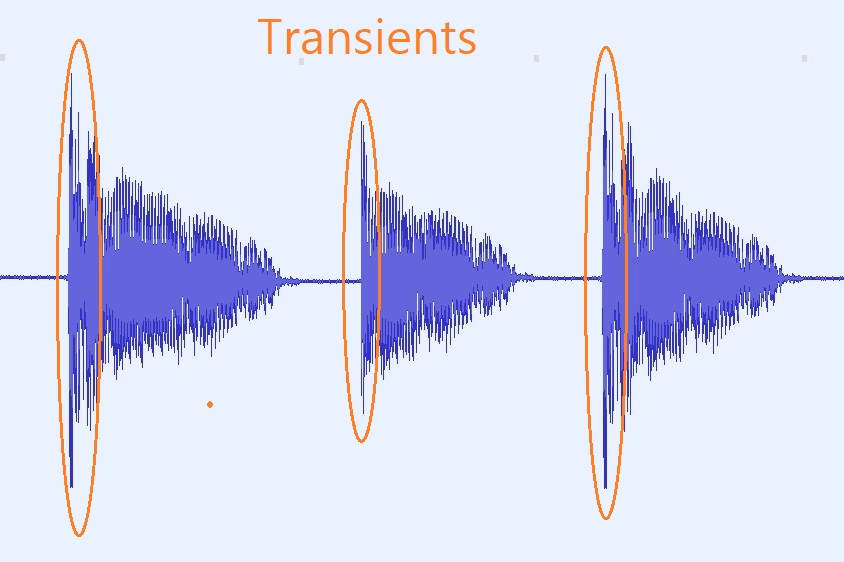
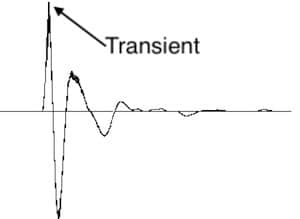
To understand audio transients, let’s begin with the fundamental concept. A transient is a sudden, short-lived spike in audio signal amplitude. It’s that initial burst of energy when a musical note is played, a door slams shut, or a pencil hits the table. Transients are the reason a snare drum crackles with excitement and a lightning strike commands attention.

Think of audio transients as the punctuation marks in a sentence. They emphasize and give context to the sound that follows. Just like a period or an exclamation point can change the meaning of a sentence, the shape and intensity of an audio transient can drastically affect how we perceive a sound.

People Also Asked: Answering Your Curiosities

Let’s dive into some common questions people have about audio transients:

How Do Audio Transients Impact Music?

Audio transients are the pulse of music. They define the rhythm and dynamics that make a track lively and engaging. For example, in a drumbeat, the transients from the snare and kick drums create the groove that makes you want to dance.

Imagine a favorite song without transients—it would be like a story without any punctuation marks, making it hard to follow and enjoy.

Can Audio Transients Be Controlled?

Yes, they can! Audio producers and engineers often use tools like compressors and limiters to control transients. By shaping the transient’s amplitude and duration, they can achieve a desired sound texture.

Think of it as adjusting the force with which a hammer strikes a nail. Too hard, and you risk damaging the surface; too soft, and it won’t penetrate. Engineers find that sweet spot to shape the sound precisely.

What Is Peak vs. RMS in Audio Transients?

Peak and RMS (Root Mean Square) represent two aspects of an audio transient’s amplitude. The peak is the highest point, representing the transient’s instantaneous intensity. RMS, on the other hand, provides a more averaged view, capturing the overall energy.

Picture a heartbeat monitor. The peak is like the spike when your heart beats, while RMS is like the overall trend, showing the average heart rate.

Keywords with Identical Search Intent

Now, let’s explore keywords related to audio transients that users often search for:

Transient Shaping Techniques: Crafting Audio Dynamics

Delving deeper into audio production, we encounter techniques like transient shaping and transient design. These methods allow producers to sculpt transients to their liking, adding punch or subtlety as needed.

Consider transient shaping as sculpting clay. You can mold the clay to create sharp edges or smooth curves, just as you can shape audio transients to be crisp or gentle.

Audio Transients in Live Sound: A Vital Element

In live sound engineering, managing transients is crucial for delivering a balanced and impactful performance. Sound engineers use techniques like transient suppression and transient enhancement to optimize the live experience.

Imagine a live concert as a massive puzzle. Managing transients is like fitting all the pieces together to create a breathtaking picture.

Mastering Transients in Audio Recording

Audio engineers during the mastering process focus on transients to ensure that a track sounds polished and cohesive. Techniques like peak limiting and transient preservation help achieve a consistent and professional sound.

Think of mastering as the final touch-up on a painting. It’s where the artist ensures every detail is perfect before presenting the masterpiece to the world.

Last Words

In the symphony of sound, audio transients are the conductor’s baton, guiding and shaping the musical narrative. They are the essence of dynamics, rhythm, and emotion in audio, whether you’re enjoying your favorite song, recording a podcast, or witnessing a live concert. Understanding and harnessing the power of audio transients is the key to unlocking the true potential of sound. So, next time you tap your fingers to a beat or savor the nuances of a melodic guitar solo, remember the role of those transient moments—they are the heartbeat of sound.

Audio Equalization Filters

Audio Equalization Filters

Audio Equalization Filters

Audio Equalization Filters Explained

Audio equalization filters are like the control knobs on a sound system, allowing you to fine-tune and shape the audio output to your liking. Imagine them as the equalizer settings on your music player or car stereo. These filters work by adjusting the intensity of different frequency ranges within an audio signal. It’s akin to adjusting the bass, midrange, and treble levels on your home stereo system to achieve the perfect sound balance.

For instance, if you’re listening to music and the bass is overwhelming, you can use equalization filters to reduce the bass frequencies and create a more balanced and enjoyable listening experience. Conversely, if you want to emphasize the vocals in a podcast, you can boost the midrange frequencies to make the voice clearer.

Audio equalization filters are essential tools in the world of sound engineering and music production. They allow professionals to shape and enhance audio quality in recordings, live performances, and various audio applications.

Importance of Audio Equalization

As a seasoned audio engineer, I can attest to the critical role that audio equalization plays in creating high-quality audio content. It’s like being a chef who uses different seasonings to bring out the flavors in a dish. Properly applied equalization enhances the sonic characteristics of audio, making it sound cleaner, more balanced, and more appealing to the ears.

Consider a live concert scenario where you have a mix of instruments and vocals. Without proper equalization, the sound may become muddied and unclear. By using equalization filters, you can isolate and emphasize specific frequencies, making the guitar sound crisp, the vocals shine, and the drums punchy.

Audio equalization is not limited to music alone; it extends to podcasts, films, gaming, and even phone calls. Imagine watching a movie where the dialogue is drowned out by background noise. Skilled audio engineers use equalization to reduce unwanted noise and ensure that the dialogue is clear and intelligible.

Types of Audio Equalization Filters

Audio equalization filters come in various types, each designed for specific purposes. Think of them as different brushes for an artist, each suited for a particular style of painting. Here are some common types of equalization filters:

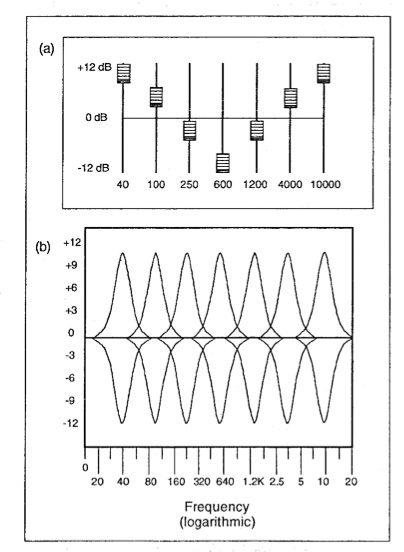
Graphic Equalizers: These are like multi-colored paint palettes, allowing you to adjust a set of fixed frequency bands. They are user-friendly and often found on consumer audio devices.

Parametric Equalizers: Parametric equalizers are like precision tools for audio professionals. They allow you to adjust not only the frequency bands but also the bandwidth (Q) and gain with great precision.

Shelving Equalizers: Imagine these as specialized brushes for broad strokes. Shelving equalizers are used to boost or cut all frequencies above or below a certain point, useful for adjusting bass or treble.

Notch Filters: These are like erasers for unwanted sounds. Notch filters target and eliminate specific frequencies, ideal for removing unwanted hums, buzzes, or feedback.

High-Pass and Low-Pass Filters: High-pass filters allow high frequencies to pass while attenuating low frequencies, while low-pass filters do the opposite. They are like sieves that filter out unwanted elements in audio.

Understanding when and how to use these different types of equalization filters is crucial for achieving the desired audio quality in various scenarios, from music production to live sound reinforcement.

Common Questions About Audio Equalization Filters

When it comes to audio equalization filters, many questions arise, much like curious minds seeking answers. Let’s address some common queries:

1. What’s the best equalization setting for music?

Equalization settings depend on personal preferences and the audio source. There’s no one-size-fits-all answer. Experiment and adjust to suit your taste.
2. Can equalization fix poor-quality recordings?

While equalization can improve audio quality to some extent, it can’t completely salvage a poorly recorded source. Quality in, quality out still applies.
3. Are expensive equalizer plugins better than free ones?

Not necessarily. The effectiveness of an equalizer depends on its features and your skill in using it. Free plugins can be excellent if used correctly.

Mastering Audio Equalization Techniques

Mastering audio equalization is like becoming a skilled painter, capable of creating stunning visuals on a canvas. To excel in this art, you need to practice, experiment, and learn from experience. Start with simple adjustments and gradually delve into more complex equalization techniques.

Consider the analogy of a chef crafting a signature dish. Just as a chef refines their recipe through trial and error, audio engineers refine their equalization techniques by actively listening, experimenting with different filters, and paying attention to detail.

Remember that context matters. Equalization for a rock concert differs from equalization for a classical orchestra recording. It’s crucial to understand the specific requirements of each audio project and tailor your equalization accordingly.

Advanced Applications of Equalization Filters

Advanced applications of equalization filters are like pushing the boundaries of artistic expression. As you become more proficient, you can use equalization creatively. Imagine being a sculptor who can carve intricate details into their work.

For instance, you can use equalization to create unique sound effects in films, simulate vintage audio characteristics, or shape the sonic identity of a musical genre. It’s akin to an artist using various brush strokes and techniques to evoke different emotions in their paintings.

Additionally, advanced equalization techniques involve dynamic equalization, where the filter settings change in real-time based on the audio input. This dynamic approach is like choreographing a dance, where the moves adapt to the music’s rhythm and intensity.

In conclusion, audio equalization filters are powerful tools in the hands of skilled audio professionals. They enable us to shape sound, enhance quality, and create captivating auditory experiences across a wide range of media and applications. Much like artists refining their craft, mastering the art of audio equalization takes time and dedication, but the results are music to the ears.

Mp3 Sound Booster

Boosting MP3 Sound Quality and Loudness

Mp3 Sound Booster
Mp3 Sound Booster
Mp3 Sound Booster
Mp3 Sound Booster

Mp3 Sound Booster

In today’s digital age, where music and audio are an integral part of our lives, it’s crucial to ensure that our MP3 files sound their best. Whether you’re a casual listener or an audiophile seeking perfection, this comprehensive guide is here to help you master the art of enhancing MP3 sound quality. I’m an audio expert, and I’ll take you on a journey through various techniques and strategies to elevate your MP3 listening experience.

The Importance of Quality MP3 Sound

Before we dive into the nitty-gritty details of improving MP3 sound, let’s first understand why it matters. MP3 is one of the most popular audio formats, known for its compatibility and convenience. However, the sound quality of MP3 files can vary widely, depending on factors like compression, source material, and encoding settings.

Factors Affecting MP3 Sound Quality

To achieve the best MP3 sound quality, you need to consider several key factors:

Bitrate

The bitrate determines the amount of data used to represent audio. Higher bitrates generally result in better sound quality but larger file sizes.

Compression

MP3 files are compressed to reduce their size. Understanding the balance between compression and quality is essential.

Source Material

The quality of the original audio source greatly influences the final MP3 sound. Starting with high-quality recordings is crucial.

Encoding Settings

Adjusting parameters during encoding, such as sample rate and stereo mode, can impact sound quality significantly.

Techniques for Enhancing MP3 Sound Quality

Now that we’ve established the importance of quality MP3 sound, let’s explore various techniques and strategies to enhance it. Whether you’re dealing with older low-bitrate MP3s or you want to optimize your new downloads, these methods will help you achieve the best possible sound.

1. Bitrate Selection

The choice of bitrate plays a fundamental role in MP3 sound quality. Higher bitrates, such as 320 kbps, preserve more audio details, resulting in clearer and more immersive sound. However, they also lead to larger file sizes, so you should strike a balance based on your storage capacity and listening preferences.

2. Source Material Enhancement

Improving MP3 sound quality starts with the source material. If you have control over the recording process, use high-quality microphones, eliminate background noise, and ensure proper mixing and mastering techniques are employed. Starting with a pristine source will yield better MP3s.

3. Proper Encoding Settings

When converting audio to MP3 format, it’s crucial to choose the right encoding settings. Opt for a higher sample rate (e.g., 44.1 kHz or 48 kHz) and stereo mode for richer sound. Experiment with different settings to find the sweet spot for your audio.

4. Noise Reduction

If your MP3s suffer from background noise or artifacts, consider using noise reduction software. This can help eliminate unwanted hisses, clicks, and pops, resulting in a cleaner listening experience.

5. Equalization (EQ)

Using an equalizer allows you to adjust the balance of frequencies in your MP3s. You can enhance bass, boost treble, or make other custom adjustments to tailor the sound to your preferences.

6. Volume Normalization

Normalization ensures consistent volume levels across your MP3 library. This prevents sudden volume jumps between tracks, providing a more enjoyable listening experience.

7. High-Quality Playback Devices

Investing in high-quality headphones or speakers can make a significant difference in how you perceive MP3 sound. Look for devices with accurate sound reproduction and comfortable fit for extended listening sessions.

8. Room Acoustics

If you primarily listen to MP3s in a room, consider optimizing the acoustics. Simple changes like adding acoustic panels or rearranging furniture can reduce reflections and enhance sound quality.

9. Lossless Formats

Consider archiving your favorite music in lossless formats like FLAC or WAV for the utmost audio fidelity. While these formats result in larger file sizes, they preserve audio quality without compression.

10. Regular Maintenance

Maintaining your MP3 library is essential. Periodically check for corrupted files, update metadata, and back up your collection to prevent data loss.

Final Words

Enhancing the sound quality of your MP3 files is a rewarding endeavor for any music lover. By understanding the factors influencing sound quality and employing the right techniques, you can elevate your MP3 listening experience to new heights. Whether you’re a casual listener or an audiophile, these strategies will help you make the most of your digital music collection. Remember, the quest for perfect sound is a journey, so enjoy every moment of it. Happy listening!