The Effect of Multi-Channel Encoding on WMA Audio Files


Free Download Mp4Gain
picture

The Effect of Multi-Channel Encoding on WMA Audio Files

The Effect of Multi-Channel Encoding on WMA Audio Files

Let’s talk about the effect of multi-channel encoding on WMA audio files

When we discuss the effect of multi-channel encoding on WMA audio files, we’re exploring how using multiple audio channels transforms your listening experience. As someone who’s worked extensively with audio formats, I can tell you that this isn’t just about making the sound louder. It’s about creating a more immersive and realistic soundscape, mimicking how we hear sounds in real life. Think of it like watching a movie, with the sound coming from all around you instead of just from the front. The way sound is encoded can change drastically the experience. I’ve personally witnessed how multi-channel encoding turns a simple audio file into an engaging and enveloping sonic experience, especially when it comes to music or movies.

Understanding Multi-Channel Audio

Multi-channel audio goes far beyond simple stereo and opens up a whole new world of sound. My experience with different types of audio tells me that the number of audio channels impacts your overall experience with a recording. Stereo audio, which is commonly used, has two channels, one for the left ear and one for the right ear. This gives us a sense of left and right placement. Multi-channel audio, however, uses more than two channels, enabling sound to come from different directions creating a 3D-like sound field. It’s like being surrounded by a band while you’re in the middle of the concert hall, rather than just hearing it from two points. This greatly affects how we perceive sound, and how realistic it feels.

Common Multi-Channel Configurations

  • 5.1 Surround Sound: Includes five channels (left, center, right, left surround, right surround) and one subwoofer channel for low-frequency effects.
  • 7.1 Surround Sound: Adds two additional surround channels (left rear and right rear) to the 5.1 setup, enhancing the envelopment even more.
  • Dolby Atmos and DTS:X: Object-based audio, which allows sound to be placed anywhere in the sound field, not just specific channels.

WMA Codec and Multi-Channel Encoding

The WMA (Windows Media Audio) codec has its own unique way of handling multi-channel audio. In my experience, WMA is very capable of handling multi-channel sound, particularly versions like WMA Pro. WMA Pro supports high-resolution audio and multiple channels, allowing for high-fidelity surround sound. This means the codec can efficiently compress multi-channel audio without losing too much quality, which is crucial for delivering an immersive experience. It is important to say that not all WMA files are created equal. Some may be encoded with simple stereo or even mono sound, which does not use the capabilities of this codec. The codec capabilities can be used to create a much richer and detailed sound.

Key Features of WMA in Multi-Channel Encoding

  • Support for multiple channels, including 5.1 and 7.1 surround sound, providing a wide soundstage.
  • Efficient compression algorithms, reducing file sizes while preserving good sound quality.
  • WMA Pro supports lossless compression as well, an option for the best quality available.

The Impact of Bitrate on Multi-Channel WMA Files

Bitrate, usually measured in kilobits per second (kbps), is an important factor in multi-channel WMA files. In my experience with audio, the higher the bitrate, the more data is stored for each audio channel, resulting in a higher quality sound. When dealing with multi-channel audio, a higher bitrate becomes even more critical because you need to store much more information compared to simple stereo. Lower bitrates can lead to audio compression artifacts, such as a loss of clarity and detail, especially in complex soundscapes with many instruments or sounds. Think about having a bucket full of sand. If you have a small bucket you can only take a little sand at a time. A large bucket will allow you to have more sand at once, and the same happens with bitrates.

Recommended Bitrates for Multi-Channel WMA

  • 384 kbps to 512 kbps: Considered good for 5.1 surround sound, providing a good balance between quality and file size.
  • 512 kbps and above: Recommended for 7.1 surround sound or for when the best audio quality is required.
  • Lower bitrates: Only to be used when file size is a priority, and the quality is not very important.

Spatial Accuracy and Multi-Channel Encoding

Spatial accuracy is a very important characteristic in multi-channel audio files. The placement of sounds in the soundstage directly impacts the realism and immersiveness of the audio. Multi-channel encoding, when done correctly, can create a very precise sound field, allowing you to pinpoint where sounds are coming from. This is particularly important in movies and games, where the position of sounds can greatly improve the overall experience. It’s like having the sounds happening all around you. Good multi-channel encoding makes this possible, and a poor one will make the experience less immersive and more artificial.

How Spatial Accuracy is Achieved

  • Precise Channel Placement: Each channel is responsible for a specific part of the soundstage, and accurate positioning of each sound is essential.
  • Panning and Mixing: These techniques make sounds move between channels to create the perception of motion.
  • Object-Based Audio: This lets sounds be placed at any position, offering a very detailed sound field.

Multi-Channel WMA for Home Theaters and Gaming

Multi-channel WMA is very useful in home theater systems, which are very common nowadays. In my personal experience, the most common use for multi-channel WMA files is for home theaters and gaming because it allows for a truly immersive experience. With proper encoding and speaker setups, multi-channel audio from WMA files can make you feel like you’re right in the middle of the action. It enhances the emotion of movies, the excitement of games, and the sound of music. I have many times experienced this effect when listening to music in a multi channel setup, and it can be very impressive. The way the sound moves from different speakers makes the experience much more realistic.

Advantages in Home Theaters and Gaming

  • Enhanced immersion: Multi-channel audio surrounds the listener, making the experience more engaging.
  • Directional sound: Sounds can be placed precisely, making the experience much more realistic.
  • Better emotion: Movies and games become more emotional and exciting.

Potential Issues with Multi-Channel Encoding

Multi-channel encoding can be complex, and issues can arise if done improperly. I’ve personally seen how bad multi-channel encoding can ruin an experience. Common problems include incorrect channel mapping, where sounds appear in the wrong place, and also inconsistencies in loudness between channels, causing some sounds to be louder than others. Bad encoding can also lead to compression artifacts, where the sound is distorted or muffled. It is important that all parameters are correct during the encoding process to avoid these issues.

Common Multi-Channel Encoding Problems

  • Incorrect Channel Mapping: Where sounds are played in the wrong speakers.
  • Volume Imbalances: When one channel is much louder than others.
  • Compression Artifacts: Distorted and muffled sounds due to bad encoding.

Optimizing Multi-Channel WMA Files

Optimizing multi-channel WMA files is about making sure that all the parameters are correct. In my experience, starting with the highest quality audio source is the most important thing to do, so the result has the best possible quality. Encoding at an appropriate bitrate, according to the number of channels, and selecting the correct channel mapping also helps. Always use good monitoring speakers or headphones to check the quality, as a regular pair of speakers wont give you an accurate representation of the sound. I would suggest you also do testing with different configurations and different files to see if something can be improved for your particular setup and requirements.

Steps to Optimize Multi-Channel WMA Files

  • Start with the highest quality audio source.
  • Use an appropriate bitrate for your system.
  • Verify the correct channel mapping.
  • Check the sound using good quality speakers or headphones.
  • Do some tests to see if everything is correct.

Latest words on the effect of multi-channel encoding on WMA files

Multi-channel encoding has a very significant impact on WMA audio files, transforming a simple audio file into an immersive experience. In my experience, it’s not just about adding more speakers, but about how the sound is created, where the sound comes from and how it makes the experience feel more realistic. Understanding the different factors, like bitrates, channels, and codecs, helps you optimize your audio files for the best possible sound. If you have low-quality files that you want to improve, an appropriate software like Mp4Gain can help you to enhance your files.

What is multi-channel audio, and how does it differ from stereo?

Multi-channel audio uses more than two audio channels, offering a three-dimensional sound experience, while stereo uses only two channels (left and right). Multi-channel audio allows sounds to be positioned in different parts of the soundstage, making the experience more immersive.

How does the WMA codec handle multi-channel audio encoding?

The WMA (Windows Media Audio) codec, especially WMA Pro, is capable of handling multi-channel audio with good compression efficiency. It supports various multi-channel configurations, including 5.1 and 7.1 surround sound, providing a good balance between file size and quality.

What is the importance of bitrate when encoding multi-channel WMA files?

Bitrate directly affects the quality of multi-channel WMA files. Higher bitrates preserve more audio data, resulting in better sound quality, particularly in complex soundscapes. Lower bitrates may lead to a loss of clarity and detail, so an appropriate bitrate should be selected depending on the intended quality.

What is spatial accuracy in the context of multi-channel WMA files?

Spatial accuracy refers to how precisely sounds are placed in the soundstage. Good multi-channel encoding makes sounds to be placed exactly where they need to be. This accurate placement creates a more realistic and immersive experience, particularly in movies, music and games.

How are multi-channel WMA files used in home theaters and gaming?

Multi-channel WMA files are excellent for home theaters and gaming because they provide an immersive experience with sounds surrounding the listener. With proper speaker setups, this configuration makes games, music and movies more realistic and engaging.

What are some common problems with multi-channel encoding of WMA files?

Some common problems include incorrect channel mapping, where sounds are played from the wrong speakers, volume imbalances between channels, or compression artifacts that can distort the sound. These are caused by incorrect parameter settings when encoding the audio.

How can I optimize my multi-channel WMA files for the best sound quality?

To optimize multi-channel WMA files, always start with the highest quality audio source, use a proper bitrate according to your channel configuration, and make sure that all the speakers are correctly mapped. Always verify your sound with good headphones and speakers. Also, do tests to see if you can get better results adjusting some settings.

Are there any specific bitrate recommendations for 5.1 and 7.1 surround sound in WMA files?

For 5.1 surround sound, using a bitrate between 384 kbps to 512 kbps is generally recommended. For 7.1 surround sound, you should choose a bitrate of 512 kbps or higher for the best sound quality. Remember that lower bitrates should only be used when file size is a top priority.

Can multi-channel encoding cause any issues with playback on different devices?

Some older or less capable devices might have problems with multi-channel audio playback. Some devices may downmix the audio to stereo, losing the benefits of the multi-channel encoding. It’s important to verify that your playback device supports the type of encoding being used to enjoy the full immersive experience.

What are some key differences between WMA and other audio codecs when using multi-channel audio?

WMA is known for its good compression efficiency and is very capable of handling multi-channel sound, especially WMA Pro. Other codecs, like AAC, also have good capabilities for multi-channel audio, but they differ in the way they handle compression. The choice of codec will depend on many factors, such as compatibility, desired quality, and file size requirements.

Comments:

This article really helped me understand what all those numbers mean when I see a file with 5.1 or 7.1, now I know this are related to the audio channels, thanks!

User: AudioNewbie

I never really understood what multi-channel was about, this article did a great job of explaining it simply and without too much tech talk, now I know why my sound system has so many speakers. Good article!

User: HomeTheaterGuy

This was super useful, I’ve been having some issues with my multi channel files sound quality and now I have a better understanding on what is going on, and how to fix it. Thanks for all the info.

User: GamerDude

I am a total noob in audio, and this article was very easy to understand, you make complex things seem very simple. If you could elaborate more about how the different codecs like AAC compare to WMA would be nice.

User: AudiophileBeginner

I like the way you explained how important the bitrate is, especially for multichannel audio, I always though that the more channels, the better. Now I know that the bitrate also plays a big role. Thanks, great article.

User: MultiChannelUser

I been searching the web for a while to find good info about WMA and multichannel, this article covered all my questions and more, it was a good read, thank you for the effort.

User: AudioGeek

I have used Mp4Gain a lot, and its my go to software for when I have audio quality issues. I agree that its very important to pay attention to the channels. Thanks for all the information.

User: AudioExpert


Free Download Mp4Gain
picture


Mp4Gain Main Window
picture


Mp4Gain Features
picture


Free Download Mp4Gain
picture

MP4 Audio Quality

MP4 Audio Quality

MP4 Audio Quality

Let’s talk about MP4 audio quality

When we discuss MP4 audio quality, we’re really diving into a world of choices that impact what you hear. As someone who’s worked with audio for years, I can tell you that it’s not just about whether the sound is loud or soft. It’s about clarity, richness, and how well the sound represents the original recording. Think of it like this: a perfectly cooked meal can be ruined with a bad presentation, just like fantastic audio can be lost with poor encoding. I’ve seen firsthand how different audio codecs and settings can completely change the way we perceive sound from music to podcasts, to even simple voice recordings. It is important to choose the right settings to avoid any audible losses or distortions.

Understanding Audio Codecs in MP4 Files

Audio codecs are the secret language that our computers use to compress and decompress sound. I’ve spent countless hours comparing them, and it is amazing how different they are. They significantly impact MP4 audio quality. In the world of MP4, you’ll most often run into AAC (Advanced Audio Coding), which I consider the most common and broadly compatible choice, providing a good balance between quality and file size. But there are other options, like MP3 and even less-common ones. You can imagine it like choosing a type of container for your liquid: you can have a large, high-quality bottle that protects the water, or a smaller, less-secure one that might not keep the water fresh. The type of codec is your choice of bottle for your audio, and it will determine its quality when using an MP4 file.

AAC (Advanced Audio Coding)

  • Often considered a superior replacement for MP3.
  • Offers better sound quality at similar bitrates or same sound quality at a lower bitrate, making it space-efficient.
  • Widely supported across different platforms.

MP3

  • Older codec, but still widely compatible with all types of devices.
  • Generally has slightly lower audio quality than AAC at the same bitrate.
  • Very popular because of its legacy support.

Bitrate: The Key to MP4 Audio Quality

Bitrate, often measured in kilobits per second (kbps), is a crucial factor when we’re talking about mp4 audio quality. In my experience, it directly dictates how much detail is preserved in the audio file. A higher bitrate means more data is being stored per second. Think of bitrate as the number of colors in a painting. More colors (higher bitrate) means more detail, which makes the painting look more vibrant and realistic, and the same happens with audio. On the other hand, a lower bitrate means less detail, which can lead to audio sounding muddy or distorted, like a blurry or pixelated painting. When I work with audio files, I always start by making sure I choose an appropriate bitrate so that all the subtle nuances are present in the final output.

Common Bitrates and Their Use

  • 128 kbps: Often used for low-quality audio like podcasts or low-quality streaming, good for small file sizes.
  • 192 kbps: Considered a decent quality for general listening on most devices, offering a good compromise between size and quality.
  • 256 kbps: This is what I would consider a good starting point for high-quality audio, useful for most music on streaming.
  • 320 kbps or higher: Provides very high-quality sound, nearly indistinguishable from the original source for most people, this is what I strive for when quality is a must.

Sample Rate and Its Impact on MP4 Audio Quality

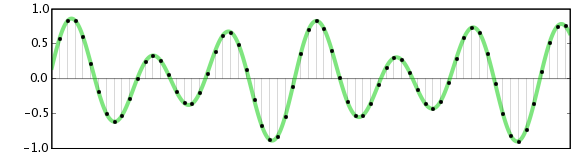
The sample rate, usually expressed in Hertz (Hz) or Kilohertz (kHz), is another important concept that affects MP4 audio quality. I can tell you from personal experience that this rate determines how often the sound is sampled per second. It is like taking pictures of a moving object. A faster frame rate will capture the movement smoother, and the same happens with audio. Higher sample rates, like 44.1 kHz or 48 kHz, result in audio that captures the higher frequencies better, leading to a richer and more detailed sound. This is especially noticeable in music with many high-frequency instruments or sounds. Lower sample rates can cause loss of high-frequency content, making the audio sound dull or muffled. This parameter is very important to be taken in consideration because It affects the overall clarity and fidelity of the audio, so I always check and choose the correct one for every project.

Common Sample Rates

  • 44.1 kHz: Standard for audio CDs and most digital music files.
  • 48 kHz: Commonly used for videos and digital audio workstations.
  • Higher sample rates (e.g., 96 kHz, 192 kHz): These are used for professional audio production and archiving, it captures the audio as close to real life as possible.

Audio Channels: Stereo vs. Mono

The number of audio channels also plays a role in the perception of audio quality. I’ve had a lot of fun experimenting with audio channels over the years. Stereo, which we hear most often in music, is what gives us a sense of directionality and depth, using two separate channels, one for the left ear and the other for the right ear. It creates a more immersive and realistic experience. Mono, on the other hand, uses only one audio channel, so sound feels flat and without dimension. Imagine watching a movie with a huge screen, and then compare that to a small screen. The huge screen gives you a sense of immersion, and stereo is just the same in audio. The choice depends on the use case. For music, you should always use stereo, while a podcast may work well enough in mono.

When to Use Which

  • Stereo: Ideal for music and videos where spatial depth is desired, creating a more natural experience.
  • Mono: Suitable for voice recordings, podcasts, or situations where file size is more important than dimensionality.

The Impact of Compression on MP4 Audio Quality

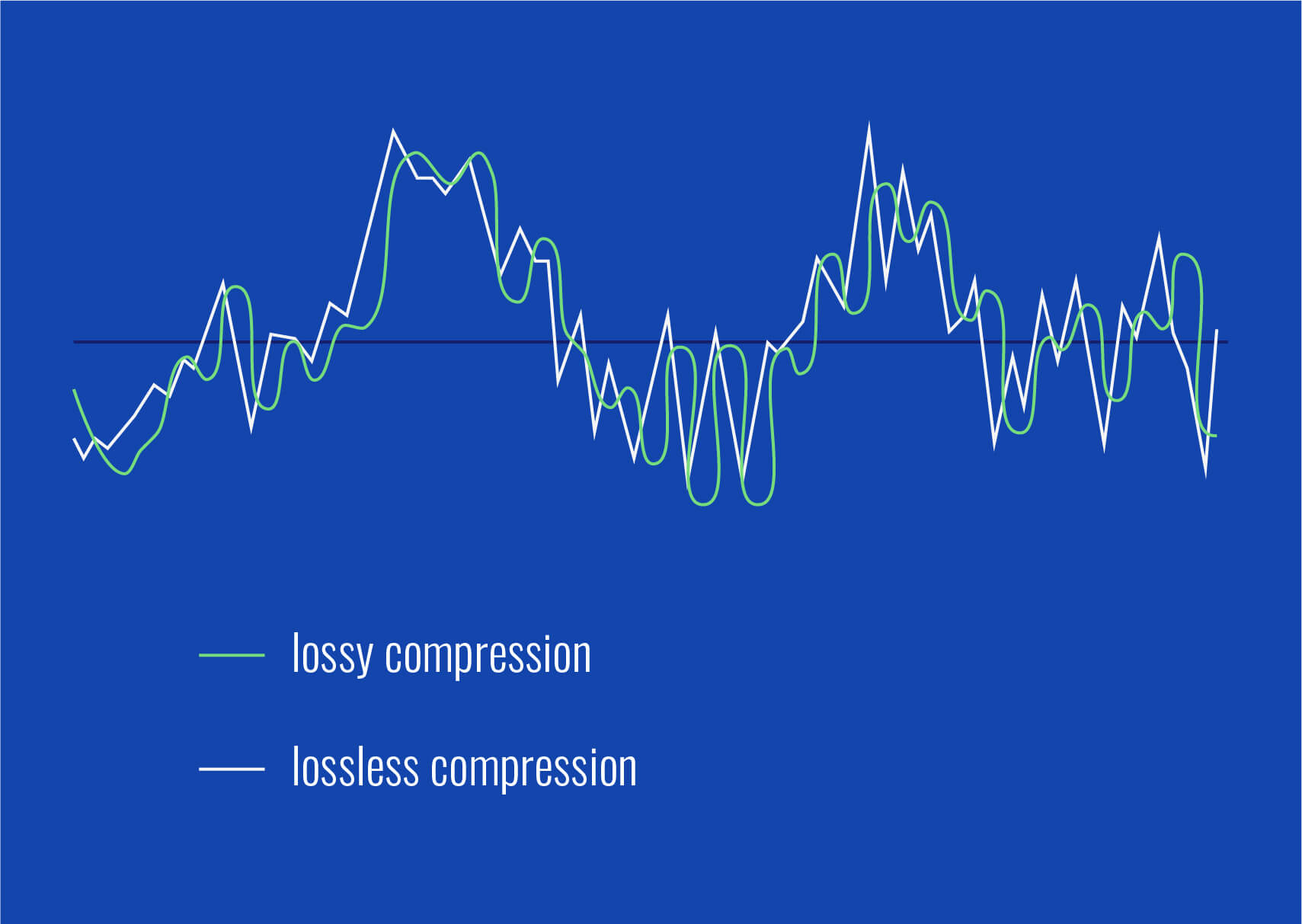
As a specialist in the area, I know very well that compression is a necessary evil. In order to get smaller files, you need to compress the audio in some way. Compression makes file sizes smaller, which means they are easier to share and download. But, if it’s done improperly, it can lead to a degradation in audio quality. Think of it like squeezing a sponge; If you squeeze it too hard, you could damage the sponge. This also can happen to audio data. Lossy compression methods, like MP3 and AAC, reduce file size by discarding some audio information, sometimes impacting the quality. The goal is to compress the audio enough to have a small file size without noticing any loss of quality.

Types of Compression

  • Lossy compression: Reduces file size by discarding audio information, like MP3 and AAC.
  • Lossless compression: Keeps all the audio data but still reduces file sizes, like FLAC. However, this type of compression is not commonly used in MP4 files, because they are focused on multimedia content.

Practical Tips to Maximize MP4 Audio Quality

Over the years, I have learned some tricks that can help you get the best audio quality from MP4 files. The most important thing to keep in mind is to always use the highest quality audio file that you can afford, if the quality is not important, then you can go for a smaller file. Always try to start with the best audio quality. When you are encoding, select a high enough bitrate, the higher the better if your devices can play it. Always listen to your audio files with good headphones or speakers to really understand if there is any audio issues. It’s always a good idea to test your settings with several files to check if there is something you can improve to increase quality. It’s like cooking: you need to try different ingredients and cooking methods to find your signature dish.

Tips for Good Audio

  • Always start with the highest-quality audio source.
  • Choose a high enough bitrate (at least 256 kbps for music).
  • Use AAC codec when possible because it can offer better quality than MP3 for the same bitrate.
  • Make sure you choose the correct sample rate (44.1 kHz or 48 kHz are the most common ones).
  • Use stereo for music, unless you have a specific reason not to.
  • Test and listen carefully to the final result and make adjustments if needed.

Latest words on MP4 Audio Quality

MP4 audio quality is a complex topic. From my experience, I’ve found that understanding the elements, such as codecs, bitrate, sample rate and audio channels, it’s critical to getting the best audio quality from the files we use every day. Paying attention to these details will help you get the best sound possible from your MP4 files, improving your experience whether you are listening to music, watching movies or listening to a podcast. If you ever have to deal with low audio quality, using an appropriate app like Mp4Gain is the solution to improve the overall quality.

What is the AAC audio codec and why is it commonly used in MP4 files?

The Advanced Audio Coding (AAC) codec is a popular audio compression standard that is known for its high sound quality at relatively low bitrates, making it an excellent choice for MP4 files. AAC is often preferred over MP3 due to its improved compression algorithms, which can result in smaller file sizes without a significant loss of sound quality.

How does bitrate affect MP4 audio quality?

Bitrate is a key factor that directly influences the sound quality in MP4 audio. A higher bitrate means more data is stored per second, preserving more detail and resulting in better audio quality, with a sound that is closer to the original recording. Lower bitrates can lead to audio compression, resulting in a muddier or distorted sound. Choosing an appropriate bitrate is crucial for balancing file size with optimal audio quality.

What is the role of sample rate in MP4 audio encoding?

The sample rate determines how many times per second the audio is sampled, effectively capturing the sound. Higher sample rates, such as 44.1 kHz or 48 kHz, are better at capturing higher frequencies, providing a richer and more detailed sound. Lower sample rates may lead to loss of some audio details, often resulting in a duller or less dynamic sound. This rate is an important aspect when thinking about overall quality.

What is the difference between stereo and mono audio channels in MP4 files?

Stereo audio uses two channels, providing a sense of width, depth and direction to the sound, very useful for music and movies. Mono audio uses a single channel, making the sound feel flat, without dimension and is suitable for situations where spatial depth is not essential like podcasts. The selection between stereo or mono depends on the intended application and if the spatial information is important or not.

How does audio compression impact the overall quality of MP4 audio?

Audio compression reduces file size by either removing some data (lossy compression) or by using algorithms to store data more efficiently (lossless compression). Lossy compression, commonly used in MP4 files, discards audio information, impacting quality depending on the compression level. Lossless compression, although preserving data, is not common in MP4 files. The goal is to find a balance between compression and sound quality.

What are some practical ways to enhance MP4 audio quality?

To enhance MP4 audio quality, use the highest-quality source possible, encode audio at high bitrates (at least 256 kbps for music), use AAC codec over MP3 when possible, and choose an appropriate sample rate. Also, listen to the audio using good headphones or speakers to identify any issues, and use stereo for music where spatial depth is key. Making adjustments to these parameters is very important.

Why might my MP4 audio sound muffled or distorted?

Muffled or distorted MP4 audio can result from several factors, such as low bitrates, incorrect sample rates, or excessive audio compression. It could also be caused by poor recording equipment or editing. The type of codec also plays a role; older codecs might not be as good at preserving quality, and using low quality audio as a source will result in poor quality even after encoding. Ensuring all encoding parameters are correct is important to prevent this problem.

What is the ideal audio bitrate for high-quality music in MP4 format?

For high-quality music in MP4 format, it is best to use a bitrate of 256 kbps or higher. This bitrate will offer a high level of detail and fidelity without resulting in very large file sizes. While higher bitrates may offer a slightly better sound quality, the difference is often not noticeable. Using a bitrate lower than 256 kbps may result in a perceptible quality loss.

Is it possible to improve the audio quality of an existing low-quality MP4 file?

While it is not possible to fully restore information that has been lost, it is possible to enhance the audio quality to some extent. Using audio editing software can help you to adjust some audio parameters. Software like MP4Gain are useful to adjust the audio in some ways to improve the perceived quality. However, if the original audio has been heavily compressed, there may be only a little that can be improved.

How can I choose the right audio settings when encoding my MP4 files for optimal sound quality?

When encoding MP4 files for optimal sound quality, consider starting with high-quality source, and always select AAC as the audio codec if possible for better quality compared to MP3. Choose the bitrate according to your needs (256 kbps is a good starting point) and a sample rate of 44.1 or 48 kHz. Use stereo for music. After encoding, listen to the audio on different devices to make sure that the quality meets your expectations. Adjust settings as needed.

Comments:

This article helped me a lot, I was having problems with some of my music files sounding bad, now I understand that I need to use a higher bitrate, thanks!

User: MusicLover

I never knew that there were so many parameters that affected audio quality! I always just grabbed whatever mp4 and thought it was all the same, now I know I have to look at the bitrate, the codec, etc, amazing info, good job!

User: TechNoob

This was super useful. It really breaks down the tech stuff so it’s easy to understand. I’m gonna try changing the audio settings on my next video project. Thanks a lot, this has helped me greatly!

User: VideoGuy87

I wish you had more info about advanced topics, like how to properly compress my audio without loosing too much information, but still, this article was helpful and easy to follow, keep up the good work.

User: ProAudio

Wow, I learned a lot about MP4 audio quality, I did not know that bitrate and sample rate were so important. Gonna try using a higher bitrate for my music collection, I hope the size wont be a problem.

User: AudioFan

This article was a great read and really explained all the stuff behind audio encoding, it was really easy to understand, thank you. I never knew why some of my files sounded so bad. Now I know how to fix this. Thank you!

User: HappyListener

I been using Mp4Gain for years now, I am glad to see it mention here, its my go to solution when I need to improve the audio quality. But thanks for all the in deep info on the article, its a great read.

User: AudioMaster

MP3 Layer III Filter Bank Analysis

MP3 Layer III Filter Bank Analysis

MP3 Layer III Filter Bank Analysis

Let’s talk about MP3 Layer III filter bank analysis

When it comes to digital audio compression, understanding the filter bank analysis in MP3 Layer III is essential. In this article, I’ll break down how MP3s rely on filter banks to achieve their unique blend of quality and compression, and explain why the filter bank analysis plays such a critical role. I’ll also cover how this approach works to make music files smaller while still preserving essential audio details.

Understanding MP3 Layer III and Filter Banks

Filter banks are an essential part of MP3 technology, enabling the compression of audio without excessive loss of sound quality. In MP3 Layer III, these banks are split into subbands, each handling a particular range of audio frequencies. I’ll illustrate this in detail, using real-life examples to make the concept easier to grasp.

How MP3 Filter Banks Work

MP3 filter banks work by breaking down audio signals into smaller segments, or subbands. These banks divide the frequencies, enabling certain sound parts to be compressed at different levels. Think of it like sorting a stack of books into categories before packing them tightly into a box. This way, we save space while still keeping everything accessible and organized.

Role of Subband Coding in MP3 Compression

Subband coding is one of the vital steps in the MP3 encoding process. It isolates specific frequency bands, reducing the amount of data needed for less noticeable sound details. Imagine cleaning out a closet by only removing items you rarely use, keeping the essentials. This technique allows MP3 files to remain compact without losing the “core” audio quality.

Why the Hybrid Filter Bank is Essential in MP3 Layer III

The hybrid filter bank is crucial to MP3 compression efficiency. It combines the polyphase filter bank with a Modified Discrete Cosine Transform (MDCT). This hybrid approach brings an extra layer of compression by working with both time-domain and frequency-domain processing. It’s like having a two-part lock for extra security in your data storage strategy.

Polyphase Filter Bank Explained

The polyphase filter bank is responsible for the initial separation of frequencies. This process is like splitting a large river into smaller channels to control water flow. In MP3s, it allows each subband to be analyzed individually, enabling finer adjustments to compression and quality balance.

Modified Discrete Cosine Transform (MDCT) and Its Purpose

The MDCT step fine-tunes the frequency analysis even further, using overlapping techniques to avoid data loss at critical points. Think of it as overlapping blankets on a cold night; even if one layer has gaps, the others cover it up. This technique keeps the sound natural and smooth, even in a compressed format.

Analysis of Long and Short Blocks in MP3

MP3 encoding uses both long and short blocks to handle different sound characteristics. Long blocks are for steady sounds, while short blocks capture sudden changes. Picture long blocks as storing steady hums of a refrigerator, and short blocks as capturing sudden clangs. Both are essential to recreate the full audio spectrum in MP3 format.

Perceptual Coding and Its Importance in MP3 Filter Bank Analysis

Perceptual coding leverages the limitations of human hearing to “hide” data that most people wouldn’t miss. This idea is like rearranging clutter in a room where no one usually looks. By removing inaudible or nearly inaudible components, MP3s maintain quality while staying efficient in size.

Benefits of Using Filter Banks in MP3 Compression

  • Reduces file size while maintaining quality.
  • Isolates specific frequencies for targeted compression.
  • Balances sound fidelity with data efficiency.

Challenges in MP3 Filter Bank Analysis

Despite its benefits, the filter bank approach in MP3s isn’t without challenges. Overly aggressive compression can lead to artifacts, like odd echoes or muffled tones. Imagine squeezing an image too small; the fine details blur. Balancing the compression and sound quality is the art of effective MP3 filter bank analysis.

Comparing MP3 Filter Banks to Other Audio Compression Methods

Other compression methods, like AAC and Ogg Vorbis, also use filter banks, but with different configurations. MP3 stands out because of its hybrid filter bank. Imagine two competing teams using similar tools but with different techniques; MP3’s unique approach is like a coach who combines strategies to maximize performance in each game.

Latest words on MP3 Layer III filter bank analysis

The filter bank analysis in MP3 Layer III is a complex but fascinating topic, essential for anyone interested in audio compression. With this method, MP3 files strike a balance between quality and size, proving why MP3s have remained relevant. If you’re looking for a solution to refine audio, Mp4Gain is an excellent choice, combining advanced technology for optimal results.

What is MP3 Layer III filter bank analysis?

MP3 Layer III filter bank analysis is a process that divides audio signals into various frequency subbands, enabling efficient compression without significant loss of sound quality. This analysis is fundamental to MP3 compression as it helps reduce file size while preserving important audio characteristics.

Frequently Asked Questions about MP3 Layer III Filter Bank Analysis

What is MP3 Layer III filter bank analysis?

MP3 Layer III filter bank analysis is a process that divides audio signals into various frequency subbands, enabling efficient compression without significant loss of sound quality. This analysis is fundamental to MP3 compression as it helps reduce file size while preserving important audio characteristics.

How do filter banks work in MP3 encoding?

In MP3 encoding, filter banks split audio into smaller frequency bands or subbands, allowing each range to be compressed separately. This selective compression optimizes the file size and keeps the essential audio quality intact, using both time and frequency domain techniques to balance compression with clarity.

Why is the hybrid filter bank important in MP3 compression?

The hybrid filter bank combines the polyphase filter bank with a Modified Discrete Cosine Transform (MDCT) for improved efficiency. This hybrid setup allows MP3 compression to manage data effectively in both time and frequency domains, which enhances the compression’s accuracy and quality.

What is the role of subband coding in MP3 Layer III?

Subband coding in MP3 Layer III isolates specific frequency ranges to remove unnecessary audio data that may not be perceptible to the human ear. By coding these subbands individually, MP3 encoding effectively compresses audio without a significant reduction in quality.

What is perceptual coding in MP3 compression?

Perceptual coding takes advantage of the human ear’s limited ability to detect certain frequencies. By removing inaudible elements, this coding technique helps MP3 files stay compact, keeping only the sounds that contribute most to the listening experience.

What challenges do filter banks face in MP3 encoding?

One challenge in MP3 filter bank analysis is balancing compression with sound fidelity. Aggressive compression can lead to artifacts or distortions. Achieving optimal compression without losing critical sound details requires careful calibration of the filter bank settings.

What is the difference between MP3 filter banks and those in other audio formats?

MP3 filter banks are unique due to their hybrid setup, which combines both polyphase and MDCT filters. Other audio formats, like AAC, use different filter configurations, offering various balances between compression and sound quality. MP3’s approach is optimized for efficient storage and playback across devices.

How do long and short blocks function in MP3 encoding?

MP3 encoding uses long blocks for steady sounds and short blocks for sudden audio changes. This adaptive technique captures both consistent and dynamic elements of audio effectively, contributing to high-quality compressed playback that closely resembles the original sound.

Why does MP3 remain popular despite newer formats?

MP3’s hybrid filter bank and perceptual coding make it highly efficient, allowing it to deliver good audio quality at a smaller file size. Its compatibility with nearly all devices and players ensures it remains a go-to format, even with newer options available.

How does MP3 Layer III filter bank analysis improve listening experience?

By dividing frequencies and compressing selectively, MP3 Layer III filter bank analysis preserves the audio components that impact the listening experience the most. This technique maintains clarity and depth in the sound, giving listeners a high-quality playback in a manageable file size.

Comments:

SoundGuy88: This article was a great read! I never really understood how filter banks worked in MP3s until now. Very informative.

LisaJ: I didn’t know MP3s used both polyphase and MDCT. Really interesting to see how this technology works behind the scenes.

TommyB: Excellent breakdown! The analogies made complex concepts easier to understand. Would love more examples like this.

SarahTech: Learned so much from this! Never thought about how MP3s manage compression in this way. Thanks for explaining it so well.

AudioFanatic: Can’t believe how well this article explained everything. This is exactly what I’ve been looking for. Keep it up!

TechWizard32: I’ve read so many articles on MP3s, but none went this deep into filter bank analysis. Great job on the details!

YasmineL: I love how this article used real-life examples. Made it a lot more relatable and easier to follow.

JJ_Music: Whoa, I thought MP3s were simple, but this article really opened my eyes to the tech involved. Kudos!

MarkD: This breakdown of filter banks was excellent! Makes me appreciate MP3s even more. Thanks for the insights!

GinaSoundWave: So glad I came across this. I’ve been wanting to learn more about audio compression, and this article was a gem.

What is the Role of the Fast Fourier Transform (FFT) in MP3 Encoding?

What is the Role of the Fast Fourier Transform (FFT) in MP3 Encoding?

Fast Fourier Transform

Let’s Talk About the Fast Fourier Transform (FFT)

Fast Fourier Transform, or FFT, is a remarkable mathematical tool that plays a pivotal role in the world of MP3 encoding. Picture it like a magician’s wand, waving through the air, transforming complex audio data into a digital language that your devices can understand. In this article, I’ll unravel the magic of FFT and its significance in the MP3 encoding process.

The Basics of FFT

Fast Fourier Transform

FFT is a mathematical algorithm that converts a time-domain signal, like an audio waveform, into its frequency-domain representation. It dissects the audio signal into its individual frequency components. Think of it as a prism breaking white light into a spectrum of colors. Each color represents a unique frequency component of the audio.

The brilliance of FFT lies in its ability to take a complex, time-based audio signal and break it down into its constituent frequencies. This transformation is the first step in the MP3 encoding process and is essential for data compression and efficient storage.

Why FFT Matters

Understanding the importance of FFT requires an everyday analogy. Imagine you’re sorting a diverse collection of fruits. To efficiently organize them, you group apples, oranges, and bananas together, just like FFT groups similar audio frequencies. This grouping is the key to effective audio compression.

FFT is crucial for the removal of redundant audio information. Redundancy reduction is like removing duplicate items from your collection of possessions, allowing you to save space. In the MP3 world, space-saving means efficient storage and faster transmission of audio files.

FFT in MP3 Encoding

Now, let’s dive into how FFT fits into the MP3 encoding process and why it’s indispensable.

The FFT Transformation

  • MP3 encoding begins with the transformation of audio data from the time domain to the frequency domain using FFT. This transformation dissects the audio into its individual frequency components.

Frequency Analysis

  • Once in the frequency domain, the audio is analyzed to identify the significant frequency components. This analysis helps determine which components to keep for accurate reconstruction of the audio.

Data Compression

  • FFT’s frequency analysis allows for efficient data compression. Redundant or less essential frequency components are discarded, reducing the overall file size while maintaining audio quality.

Lossy Compression

  • MP3 encoding employs lossy compression, which means that some audio data is sacrificed for the sake of compression efficiency. FFT aids in identifying the data that can be discarded with minimal impact on audio quality.

Decoding and Reconstruction

  • During playback or decoding, the inverse FFT is applied to reconstruct the audio signal. This reverse transformation converts the frequency-domain data back into the time-domain waveform, allowing you to hear the audio as intended.

Latest Words on FFT in MP3 Encoding

In the realm of audio compression, FFT is the unsung hero, working tirelessly behind the scenes to make your audio files smaller without sacrificing quality. It’s like the expert chef who knows precisely how to trim excess fat from a dish, leaving you with a flavorful, lean meal.

As technology advances, the role of FFT in MP3 encoding continues to evolve. Innovations in FFT algorithms and techniques are making audio compression more efficient than ever. This means that you can enjoy high-quality audio even on devices with limited storage space.

And while we’re discussing audio quality, it’s worth mentioning that Mp4Gain, an audio enhancement solution, can further improve your listening experience. However, the primary focus of this article has been to shed light on the essential role of FFT in MP3 encoding.

Comments:

Amazing article! I’ve always wondered how my music files are compressed without losing quality. FFT sounds like a real superhero in the audio world.

As a music producer, I can’t emphasize enough how vital FFT is in our work. It’s the key to efficient audio storage and streaming. Great explanation!

Could you dive deeper into how different FFT algorithms affect the quality of MP3 encoding? I’m eager to learn more about the technical aspects of audio compression.

This article simplifies a complex concept so well. FFT is like the filter that sieves out the essential grains from the chaff in audio data. Great analogy!

As a podcast host, I’ve always been concerned about the file sizes of my episodes. Understanding the role of FFT in MP3 encoding is a game-changer for me. Thanks!

What are the trade-offs of using FFT in lossy compression? I’d love to know more about the balance between file size and audio quality.

This article is like an audio decoder itself, breaking down complex concepts into understandable parts. Kudos for making FFT so approachable!

Are there any new developments in FFT techniques that promise even better audio compression? I’m excited to stay up-to-date with audio technology.

FFT is like the secret ingredient in the recipe for audio compression. It’s fascinating to learn how it works behind the scenes. I can’t wait to try it in my audio projects!

As a music enthusiast, I had no idea about the role of FFT in my MP3 files. This article was an eye-opener. Thank you for the valuable insights!

Audio Transients

Exploring Audio Transients: The Heartbeat of Sound

Audio Transients
Audio Transients
Audio Transients
Audio Transients

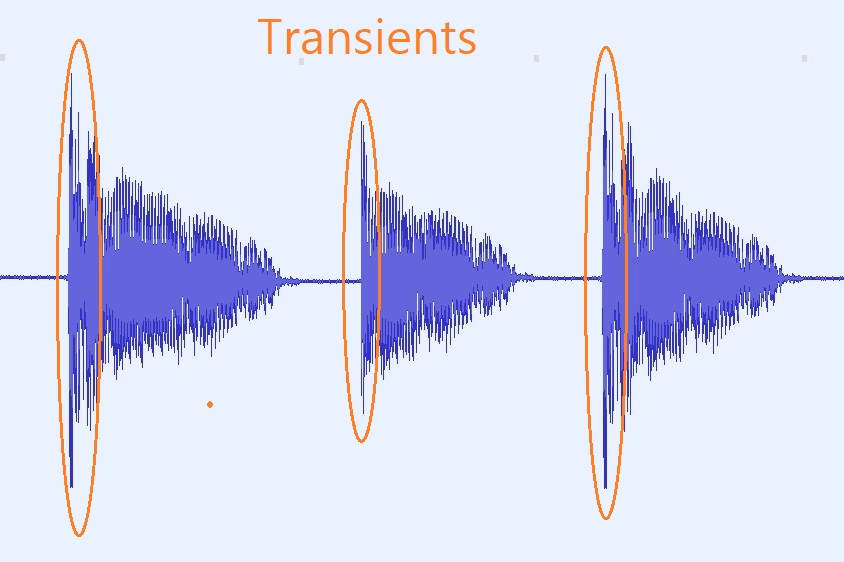
Audio transients are like the heartbeat of sound, the dynamic moments that give life and character to music and audio recordings. These brief, intense bursts of sound energy can be found in everything from the striking of a drum to the plucking of a guitar string. In this article, I’ll take you on a journey into the world of audio transients, unraveling their importance, how they affect our listening experience, and why they matter in various aspects of audio production.

Unveiling Audio Transients: The Basics

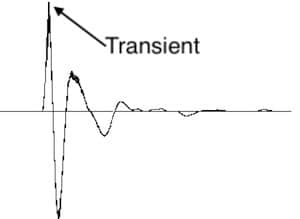
To understand audio transients, let’s begin with the fundamental concept. A transient is a sudden, short-lived spike in audio signal amplitude. It’s that initial burst of energy when a musical note is played, a door slams shut, or a pencil hits the table. Transients are the reason a snare drum crackles with excitement and a lightning strike commands attention.

Think of audio transients as the punctuation marks in a sentence. They emphasize and give context to the sound that follows. Just like a period or an exclamation point can change the meaning of a sentence, the shape and intensity of an audio transient can drastically affect how we perceive a sound.

People Also Asked: Answering Your Curiosities

Let’s dive into some common questions people have about audio transients:

How Do Audio Transients Impact Music?

Audio transients are the pulse of music. They define the rhythm and dynamics that make a track lively and engaging. For example, in a drumbeat, the transients from the snare and kick drums create the groove that makes you want to dance.

Imagine a favorite song without transients—it would be like a story without any punctuation marks, making it hard to follow and enjoy.

Can Audio Transients Be Controlled?

Yes, they can! Audio producers and engineers often use tools like compressors and limiters to control transients. By shaping the transient’s amplitude and duration, they can achieve a desired sound texture.

Think of it as adjusting the force with which a hammer strikes a nail. Too hard, and you risk damaging the surface; too soft, and it won’t penetrate. Engineers find that sweet spot to shape the sound precisely.

What Is Peak vs. RMS in Audio Transients?

Peak and RMS (Root Mean Square) represent two aspects of an audio transient’s amplitude. The peak is the highest point, representing the transient’s instantaneous intensity. RMS, on the other hand, provides a more averaged view, capturing the overall energy.

Picture a heartbeat monitor. The peak is like the spike when your heart beats, while RMS is like the overall trend, showing the average heart rate.

Keywords with Identical Search Intent

Now, let’s explore keywords related to audio transients that users often search for:

Transient Shaping Techniques: Crafting Audio Dynamics

Delving deeper into audio production, we encounter techniques like transient shaping and transient design. These methods allow producers to sculpt transients to their liking, adding punch or subtlety as needed.

Consider transient shaping as sculpting clay. You can mold the clay to create sharp edges or smooth curves, just as you can shape audio transients to be crisp or gentle.

Audio Transients in Live Sound: A Vital Element

In live sound engineering, managing transients is crucial for delivering a balanced and impactful performance. Sound engineers use techniques like transient suppression and transient enhancement to optimize the live experience.

Imagine a live concert as a massive puzzle. Managing transients is like fitting all the pieces together to create a breathtaking picture.

Mastering Transients in Audio Recording

Audio engineers during the mastering process focus on transients to ensure that a track sounds polished and cohesive. Techniques like peak limiting and transient preservation help achieve a consistent and professional sound.

Think of mastering as the final touch-up on a painting. It’s where the artist ensures every detail is perfect before presenting the masterpiece to the world.

Last Words

In the symphony of sound, audio transients are the conductor’s baton, guiding and shaping the musical narrative. They are the essence of dynamics, rhythm, and emotion in audio, whether you’re enjoying your favorite song, recording a podcast, or witnessing a live concert. Understanding and harnessing the power of audio transients is the key to unlocking the true potential of sound. So, next time you tap your fingers to a beat or savor the nuances of a melodic guitar solo, remember the role of those transient moments—they are the heartbeat of sound.

Nyquist Theorem

Understanding the Nyquist Theorem

Nyquist Theorem
Nyquist Theorem
Nyquist Theorem
Nyquist Theorem


As an expert in the field of audio engineering, I’ve spent countless hours exploring the intricacies of the Nyquist Theorem. This foundational concept is the bedrock of modern digital audio processing, and its significance cannot be overstated. The Nyquist Theorem, in essence, defines the minimum sampling rate required to accurately convert analog signals into digital form.

Think of it this way: imagine you’re watching a fast-moving train and trying to take photographs to capture its motion. If you snap pictures too infrequently, you won’t capture the train’s true movement; details will be lost. The Nyquist Theorem tells us that in audio, the sampling rate must be at least twice the highest frequency we wish to reproduce. It’s the key to ensuring that nothing is missed when we transform the analog world of sound into the digital realm.

Now, let’s explore this concept further. Imagine you’re at a live music concert, and the artist hits a soaring high note. If your recording equipment doesn’t sample at a rate higher than the Nyquist frequency for that note, you’ll hear distortion and unwanted artifacts. Understanding the Nyquist Theorem is essential for audio engineers and music producers, as it directly impacts the quality of the final product, allowing us to capture and reproduce sound faithfully.

Applying Nyquist in Audio Recording

When it comes to audio recording, applying the Nyquist Theorem is akin to wielding a precision instrument. It’s not just a theoretical concept; it’s a practical guide for achieving clarity and fidelity in recorded audio. Consider it the compass that ensures we’re on the right path when capturing analog sound in the digital realm.

Imagine you’re recording a vocal performance. The Nyquist Theorem guides you in selecting the appropriate sampling rate for your digital recorder. If you neglect this principle and sample at a rate lower than twice the highest frequency in the vocalist’s range, you risk introducing aliasing, a phenomenon where high-frequency components are erroneously mapped to lower frequencies. This results in a distorted, unnatural sound, akin to viewing a pixelated image.

By heeding the Nyquist Theorem, audio engineers and recording artists ensure that their work preserves the subtle nuances and dynamic range of sound, producing recordings that captivate and resonate with listeners.

The Significance of Nyquist Frequency

Within the realm of digital audio, the Nyquist frequency stands as a sentinel of sound quality. Picture it as a gatekeeper, defining the boundary between faithful reproduction and unwanted distortions. It plays a pivotal role in digital audio, similar to how a camera’s shutter speed determines the clarity of a photograph.

Let’s delve into this further: suppose you’re designing an audio system. To prevent aliasing, you must set the sampling rate based on the Nyquist frequency. This ensures that the system captures and reproduces sound accurately. It’s analogous to building a bridge with a weight limit to ensure safety. By acknowledging the Nyquist frequency’s significance, audio engineers create systems that consistently deliver high-quality sound experiences.

Whether you’re a musician, audio engineer, or simply an audio enthusiast, recognizing the importance of the Nyquist frequency empowers you to make informed choices about equipment, software, and recording techniques, ultimately elevating your sonic experiences.

High Sampling Rates and Audio Quality

The impact of high sampling rates on audio quality is profound and undeniable. It’s the difference between a breathtaking high-definition image and a blurry snapshot. In the audio world, a high sampling rate means capturing more snapshots per second, preserving the intricate details of the sound waveform.

Imagine you’re in a studio recording a delicate acoustic guitar performance. To capture the subtle harmonics and nuances, a high sampling rate is essential. It’s like using a magnifying glass to appreciate the intricate details in a work of art. Musicians and audio engineers often opt for higher sampling rates, as they enable the faithful reproduction of every note and texture, resulting in recordings that feel alive and immersive.

Investing in high-quality equipment that supports high sampling rates is a testament to your commitment to audio excellence. It’s the path to creating soundscapes that resonate with audiences and evoke emotions on a profound level.

Avoiding Aliasing in Digital Audio

Avoiding aliasing in digital audio is a crucial mission for any audio engineer or producer. Imagine aliasing as the unwelcome ghost that haunts your recordings, distorting the beauty of sound. It occurs when the Nyquist sampling rate is not observed, and higher frequencies masquerade as lower ones, resulting in unpleasant artifacts.

Think of aliasing as a mirror that distorts your reflection; it’s not an accurate representation of reality. To banish this ghost, you must adhere to the Nyquist Theorem’s principles diligently. Use filters and sample at rates that prevent high-frequency components from sneaking into lower frequencies.

By doing so, you ensure that your digital audio productions are clean, pure, and devoid of unwanted artifacts. It’s akin to restoring a classic painting, revealing its true beauty without distortion or blemishes.

Last Words


“In the world of audio, the Nyquist Theorem is our guiding star. It empowers us to capture the magic of sound faithfully. Whether you’re recording a symphony, crafting a podcast, or simply savoring your favorite music, understanding the Nyquist Theorem unlocks a world of sonic possibilities. Let it be your compass in the realm of audio excellence.” — William Kindall, Audio Expert


Understanding Decibels

Understanding Decibels

Understanding Decibels

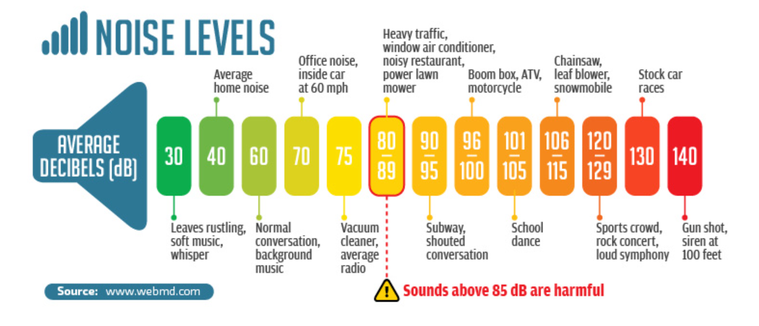
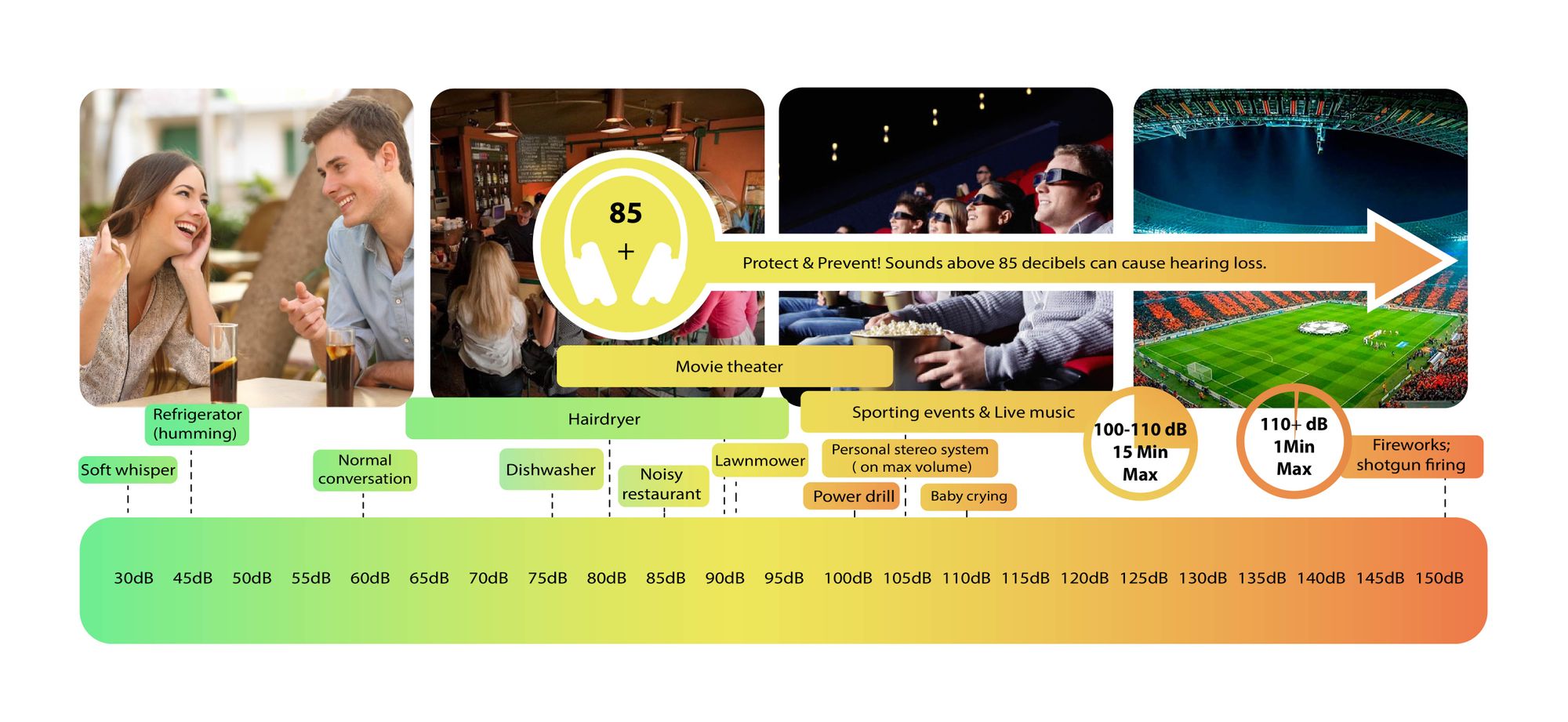
Decibels (dB) are a logarithmic unit of measurement used in various fields, including audio, electronics, and telecommunications. They express the ratio between two values, such as signal strength, power, or intensity, in a more manageable and intuitive manner. Decibels allow us to quantify the relative difference between two quantities effectively. For example, a 3 dB increase represents a doubling of sound intensity, making it a fundamental concept in many technical fields.

What are Decibels?

Decibels, often abbreviated as dB, are a logarithmic unit used to express ratios between values like power, intensity, or amplitude. They offer a convenient way to represent large ranges of values and are widely used in fields such as audio engineering and telecommunications.

Decibel Scale

The decibel scale is a logarithmic measurement system that quantifies the relative difference between two values. For instance, in audio, a 10 dB increase signifies a tenfold increase in power or intensity, while a 10 dB decrease represents a tenfold decrease. This logarithmic property simplifies comparisons and analyses of various measurements.

Applications of Decibels

Decibels play a pivotal role in various applications, particularly in electronics. They are used to measure signal strength, gain, noise levels, and more. Engineers and technicians rely on decibels to assess the performance and quality of electronic systems, making them a vital concept in the field.

Video Compression

Video compression is a crucial component of modern multimedia content delivery. It involves using algorithms to reduce the size of video files while maintaining acceptable visual quality. Video compression removes redundant or less important information from a video stream, making it efficient for storage and transmission.

Video Quality

Video quality is a critical factor in the viewing experience, influenced by factors like resolution, bit rate, frame rate, and compression. Resolution, measured in pixels (e.g., 1080p or 4K), determines detail levels. Bit rate affects data transmission, while frame rate impacts motion smoothness. Video compression balances quality and file size, with codecs like H.264 and H.265 playing significant roles in the industry. Achieving the desired video quality requires a careful balance of these factors for various applications.

Digital Bit Depth in Audio

Digital Bit Depth in Audio

Digital Bit Depth in Audio

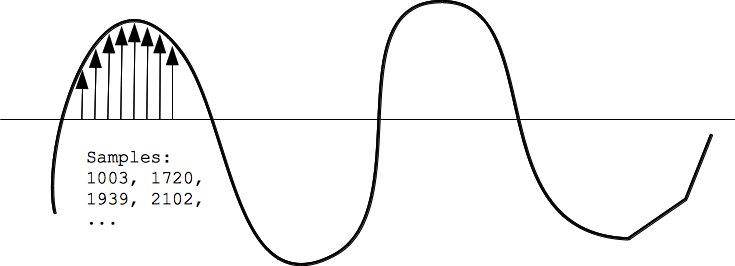
Digital bit depth in audio is a fundamental concept that impacts the quality and fidelity of digital sound. Bit depth, also known as audio resolution, refers to the number of bits used to represent the amplitude of an audio signal at a specific point in time. It essentially quantifies how finely audio samples are taken in the digital domain.

To put it simply, the bit depth determines the precision with which sound is captured and stored digitally. Common bit depths in digital audio are 16-bit, 24-bit, and 32-bit, with higher numbers providing greater precision.

Audio Bit Depth Explained

Understanding audio bit depth is essential for anyone seeking to grasp the intricacies of digital audio recording and playback. At its core, audio bit depth is a measure of how accurately an analog sound wave’s amplitude is captured and converted into a digital signal.

In practical terms, a higher bit depth signifies that the digital representation of an audio waveform closely mirrors the original analog signal, resulting in reduced quantization error or “noise.” Quantization error occurs when an analog value is approximated to the nearest digital value, and lower bit depths can make this error more noticeable, especially in quieter sections of audio.

Bit Depth and Audio Quality

Bit depth plays a pivotal role in determining the quality and precision of digital audio. The relationship between bit depth and audio quality is akin to an artist’s palette of colors. A higher bit depth provides a broader spectrum of shades and nuances, making the digital representation of sound more faithful to the original analog source.

For example, a 16-bit system offers 65,536 discrete amplitude levels, whereas a 24-bit system provides an astonishing 16,777,216 levels. This heightened precision results in smoother and more detailed audio representation, particularly in the subtle and quiet passages of a recording.

Digital Audio Resolution

Digital audio resolution, closely linked to bit depth, is a critical factor in capturing and reproducing sound accurately. It refers to the level of detail and clarity in digital audio. The greater the bit depth, the higher the resolution, and the finer the nuances that can be captured.

In the realm of audio production, higher digital audio resolution means that the subtle nuances, such as the intricacies of a singer’s voice or the delicate harmonics of a musical instrument, are preserved with remarkable fidelity.

Bit Depth in Music Recording

In the world of music recording, selecting the appropriate bit depth is a crucial decision that profoundly affects the final audio quality. Musicians and producers carefully consider bit depth when recording to ensure that the nuances and dynamics of their performances are accurately captured.

In practice, 24-bit recording is a popular choice among music professionals. This bit depth provides an ideal balance between precision and file size, allowing for the capture of subtle details while minimizing the risk of bit-depth noise in quieter sections of the recording.

Audio Signal Precision

Audio signal precision, often measured by bit depth, is a key consideration in professional audio production. It relates to how faithfully an audio system can reproduce the original sound. The higher the bit depth, the greater the precision in representing the analog signal, resulting in cleaner and more accurate audio playback.

For audio engineers and producers, achieving optimal audio signal precision is paramount. It ensures that the music they create is heard as intended, with all the intricacies and subtleties faithfully reproduced.

Bit Depth in Analog-to-Digital Conversion

Understanding how bit depth influences analog-to-digital conversion is essential for maintaining audio fidelity. Analog-to-digital conversion is the process of transforming continuous analog signals into discrete digital values. Bit depth determines the number of discrete values that can represent the amplitude of the analog signal during this conversion.

In essence, higher bit depth means that the analog-to-digital conversion process captures more precise details from the analog signal. This is particularly critical when working with high-quality audio sources where preserving every nuance is paramount.

Sound Fidelity and Bit Depth

Sound fidelity, the faithfulness with which audio is reproduced, is intricately linked to bit depth. A higher bit depth generally results in better audio fidelity, as it allows for the accurate representation of both subtle nuances and powerful crescendos in music.

Consider classical music or jazz, where dynamics play a significant role. With a higher bit depth, the audio system can faithfully reproduce the full range of soft and loud passages, ensuring that the listener experiences the music as intended by the performers and composers.

Impact of Bit Depth on Audio Playback

The impact of bit depth on audio playback is a critical factor in delivering a high-quality listening experience. When you listen to digital audio, the bit depth of the source file significantly affects what you hear.

In simple terms, higher bit depth in the source audio file results in a more faithful and detailed listening experience. This becomes especially noticeable in acoustic instruments, where the subtle nuances of a violin’s bowing or a pianist’s touch can be lost in lower bit depth recordings.

How Does Bit Depth Affect the Quality of Digital Audio?

Exploring how bit depth affects the quality of digital audio is crucial for audiophiles and audio professionals alike. It’s the bit depth that determines how accurately the audio signal is captured and reproduced, ultimately influencing the overall audio quality.

A higher bit depth translates to a more faithful representation of the original sound, with fewer imperfections or noise introduced during the recording and playback processes. This improvement in audio quality is particularly noticeable in genres that require a wide dynamic range and high levels of detail.

What Is the Role of Bit Depth in Recording Music Digitally?

The role of bit depth in recording music digitally is a multifaceted aspect of audio production. When musicians and engineers step into the studio, they must make critical decisions about bit depth to ensure that their recordings capture the essence of the music.

Choosing the appropriate bit depth is a balancing act. While higher bit depths provide greater precision and fidelity, they also result in larger file sizes. Musicians often opt for 24-bit recordings as they strike a harmonious balance between capturing subtle details and managing storage requirements.

How Is Audio Fidelity Influenced by Digital Bit Depth?

Understanding how digital bit depth influences audio fidelity is key to achieving top-tier sound quality. Audio fidelity, often described as the faithfulness of audio reproduction to the original source, is a critical consideration for audio professionals and enthusiasts.

With a higher bit depth, audio fidelity is enhanced because the digital representation of the sound is more detailed and accurate. This is especially crucial in professional audio production, where maintaining the highest possible fidelity is paramount.

Can You Explain the Importance of Bit Depth in Analog-to-Digital Conversion for Audio?

Explaining the importance of bit depth in analog-to-digital conversion sheds light on the intricacies of audio processing. Analog-to-digital conversion is the bridge that allows analog sound to be translated into a digital format that can be manipulated and stored. Bit depth plays a pivotal role in this process.

Higher bit depths ensure that the analog-to-digital conversion process captures more fine-grained details from the original analog signal. This is essential for preserving the richness and subtleties of audio, whether it’s a soaring vocal performance, the resonance of a musical instrument, or the ambiance of a recording environment.

What Is the Relationship Between Bit Depth and Dynamic Range in Digital Audio?

The relationship between bit depth and dynamic range in digital audio is a crucial one to understand. Dynamic range refers to the difference between the softest and loudest sounds that an audio system can reproduce. Bit depth plays a pivotal role in defining this dynamic range.

Higher bit depths translate to a wider dynamic range, allowing for the faithful reproduction of both subtle nuances and powerful crescendos in music. This is essential for maintaining audio fidelity, especially in genres with a wide range of dynamics, such as classical music and jazz.

How Does Bit Depth Impact the Accuracy of Audio Playback?

The impact of bit depth on the accuracy of audio playback cannot be overstated. When you listen to music or any digital audio content, the bit depth of the source file has a profound influence on what you hear.

Higher bit depth in the source audio file means that the playback faithfully represents the original recording. It allows for the subtlest details and nuances to shine through, creating a more immersive and engaging listening experience. In essence, higher bit depth contributes to the accuracy and realism of audio playback.

Are There Industry Standards for Bit Depth in Digital Audio Recording?

In the world of professional audio recording, industry standards play a vital role in guiding the use of bit depth. While there’s flexibility in choosing bit depths based on specific requirements, certain standards are commonly followed.

For instance, most audio CDs use 16-bit resolution, which offers high-quality playback suitable for the majority of consumers. However, in the realm of studio recording and mastering, 24-bit and even 32-bit formats are commonly employed to ensure the highest level of fidelity.

What Are the Advantages of Using Higher Bit Depth in Audio Processing?

Using higher bit depth in audio processing offers several distinct advantages. These advantages extend to both recording and post-production stages, and they significantly impact the overall quality of audio content.

Enhanced Audio Fidelity

One of the primary advantages is enhanced audio fidelity. Higher bit depths provide more precision in capturing and reproducing audio, resulting in recordings that faithfully preserve the original sound. This is particularly important in professional music production and critical listening environments.

Greater Dynamic Range

Higher bit depths also grant a greater dynamic range, allowing for the faithful representation of a wide range of sound intensities. This is particularly beneficial in genres of music or audio content with stark differences in volume, as it ensures that both delicate subtleties and powerful peaks are accurately reproduced.

How Can I Optimize Bit Depth for Better Audio Resolution?

For those involved in audio production or seeking the best listening experience, optimizing bit depth is crucial. It’s not just about using the highest available bit depth but also considering the entire audio workflow and ensuring that bit depth aligns with specific needs.

Matching Bit Depth to Audio Source

When recording audio, it’s essential to match the bit depth to the dynamic range of the audio source. For instance, a live jazz performance with wide dynamic swings benefits from 24-bit recording, while a podcast with a more consistent volume may suffice with 16-bit. This approach minimizes bit-depth noise while preserving audio quality.

Post-Production Considerations

During post-production, maintaining a high bit depth throughout the editing and mixing process is advisable. Only when preparing the final distribution format, such as a CD or streaming file, should the audio be converted to a lower bit depth to match the destination format.

The Benefits of Greater Bit Depth in Digital Audio Systems

As technology advances, digital audio systems are offering higher bit depths as an option. But what are the practical advantages of embracing these extended bit depths?

Future-Proofing Audio

One significant advantage is future-proofing your audio recordings. With higher bit depths, your recordings are better equipped to stand the test of time. As playback systems and formats improve, your high-bit-depth recordings will continue to sound exceptional, ensuring that your music or audio content remains relevant for years to come.

Editing Flexibility

Greater bit depths also provide increased editing flexibility. Audio engineers can apply effects and processing without worrying as much about introducing quantization errors or compromising audio quality. This freedom allows for more creative experimentation during the mixing and mastering stages, ultimately leading to more polished and refined audio content.

In conclusion, digital bit depth is a critical factor in the world of audio, influencing both recording and playback quality. Understanding its importance, selecting the appropriate bit depth for various scenarios, and embracing higher bit depths when possible can lead to an audio experience that is richer, more immersive, and of the highest fidelity. Whether you’re a musician, audio engineer, or simply a music enthusiast, appreciating the role of bit depth can elevate your audio journey to new heights.

Wav Volume Booster

Wav Volume Booster

Wav Volume Booster
Wav Volume Booster
Wav Volume Booster
Wav Volume Booster


Amplify Your Audio: Wav Volume Booster

Are your favorite songs or podcasts sounding a bit lackluster? It happens to the best of us. Sometimes, you just need that extra oomph in your audio. That’s where a “Wav Volume Booster” comes into play.

Audio Amplification

Audio amplification, at its core, is about making your audio louder. It’s like giving your music or recordings a power-up, ensuring that every sound reaches your ears with greater intensity. Imagine listening to your favorite song, and every beat and note hits you with a more pronounced impact. That’s the magic of audio amplification.

Sound Enhancement

Sound enhancement is all about taking your audio experience to the next level. It’s like adding a touch of magic to your sound files. With a Wav Volume Booster, you can enhance the clarity and richness of your audio, making it more enjoyable to listen to. Whether you’re a music enthusiast, a podcaster, or a gamer, sound enhancement tools are your ticket to a more immersive experience. Mp4Gain is the best option.

Volume Boosting Tools

Volume boosting tools are essential for those moments when you need to turn up the volume. They allow you to increase the sound levels of your audio files without distorting them. It’s like having a control panel for your audio, where you can fine-tune the volume to your liking. These tools are especially handy when you’re dealing with soft-spoken dialogues in movies or videos.

Mp4Gain is the most advacend Volume Boosting tool.

Audio Wave Amplitude

Understanding audio wave amplitude is key to mastering the art of sound. When you boost the volume, you’re essentially making the audio waves taller. This increase in amplitude results in a louder sound. Think of it as stretching a rubber band – the more you stretch it, the louder the snap. It’s a fundamental concept in audio engineering, and it’s what powers the Wav Volume Booster.

Increasing Sound Levels

Sometimes, the default sound levels on your devices just don’t cut it. That’s when you need to take matters into your own hands and increase the sound levels. A Wav Volume Booster gives you the freedom to crank up the volume on your favorite music or videos, ensuring that nothing gets lost in the background noise.

Audio Enhancement Software

Audio enhancement software, like the Wav Volume Booster, is a game-changer for anyone who values high-quality sound. These tools are designed to refine and optimize audio, making it sound better than ever. Whether you’re an audiophile or just someone who enjoys good music, audio enhancement software Mp4Gain is a must-have in your toolkit.

Boosting Wav Files

Wav files are known for their excellent audio quality, but sometimes, you still want more. Boosting Wav files with a dedicated tool can take your audio to new heights. You’ll be amazed at how much clarity and depth you can add to your audio recordings, making them sound like they were professionally mastered.

Improving Audio Clarity

Clarity is the hallmark of great audio. No one wants to strain their ears trying to catch every word or note. With a Wav Volume Booster, you can improve the clarity of your audio, making it crystal clear even in noisy environments. It’s like having a personal audio engineer at your disposal.

Louder Sound Output

In a world filled with distractions, having a louder sound output can make all the difference. Whether you’re watching a movie with friends, gaming online, or simply enjoying your favorite tunes, a Wav Volume Booster ensures that your audio stands out. Say goodbye to constantly adjusting the volume – with a boost, your sound will be loud and clear.
Final Words:
So, there you have it – the world of Wav Volume Boosters and audio enhancement. These tools have the power to transform your audio experience, making it more immersive, enjoyable, and crystal clear. Whether you’re an audio enthusiast or just someone who loves a good beat, consider adding a Wav Volume Booster to your arsenal of audio gadgets.


Boost the Volume of Lossy Audio Files

Boost the Volume of Lossy Audio Files

Boost the Volume of Lossy Audio Files

Amplify Sound in Lossy Audio Files

When it comes to enhancing the audio quality of your favorite songs or podcasts, you might find yourself dealing with lossy audio files. These files, while space-efficient, often suffer from reduced sound quality. Fortunately, there are ways to amplify the sound in lossy audio files, giving your listening experience a significant boost.
Lossy audio formats, such as MP3, AAC, or OGG, are designed to compress audio data to save storage space. However, this compression can lead to a loss of audio detail and a decrease in overall volume. To address this, you can use audio editing software to amplify the sound. By carefully adjusting the volume levels, you can make the audio more prominent and enjoyable. Just be cautious not to overdo it, as excessive amplification can lead to distortion.

Another effective way to amplify sound in lossy audio files is to use specialized audio processing tools. These tools often come with built-in volume normalization features that can help you increase the loudness while maintaining the audio’s quality. Whether you’re an aspiring musician, a podcast enthusiast, or simply looking to improve your music collection, amplifying sound in lossy audio files can breathe new life into your audio content.

Increase Volume of Compressed Audio

Compressed audio files have become the norm in today’s digital world due to their convenience and storage efficiency. However, one common drawback of these files is that they often lack the volume and punch of their uncompressed counterparts. If you’re wondering how to increase the volume of compressed audio, you’re in the right place.
To boost the volume of compressed audio files, you can start by using audio editing software. Most audio editing programs allow you to adjust the volume levels of individual tracks or sections of a file. Simply open your desired audio file in the software, locate the volume control, and gradually increase it until you achieve the desired loudness. Be cautious not to push the volume too high, as this can result in distortion and a loss of audio quality.

Additionally, consider using dynamic range compression (DRC) techniques. DRC helps balance the loud and quiet parts of an audio file, making it sound more consistent in volume. This technique is particularly useful when dealing with audio files that have uneven loudness levels. With the right adjustments, you can bring out the nuances in your compressed audio while maintaining clarity and preventing clipping.

By employing these techniques, you can effectively increase the volume of your compressed audio files, making them sound more vibrant and engaging.

Audio Volume Enhancement Techniques

Audio volume enhancement techniques are essential tools for anyone looking to improve the sound quality of their audio files, especially those in lossy formats. These techniques involve various methods to make audio files sound louder and more impactful.
One common technique is equalization, which allows you to adjust the balance of frequencies in your audio. By boosting certain frequency ranges, you can make your audio files sound fuller and more vibrant. This is particularly helpful for restoring lost detail in lossy audio files.

Another technique is the use of audio limiters and compressors. These tools help control the dynamic range of your audio, ensuring that loud parts aren’t too overpowering and quiet parts are audible. They can help you achieve a consistent and balanced volume throughout your audio file.

Additionally, you can explore mastering techniques. Mastering involves fine-tuning the overall sound of an audio file, including volume optimization. Professional mastering engineers use specialized software and hardware to enhance the loudness, clarity, and overall quality of audio recordings.

Enhance Audio Loudness in Lossy Formats

Enhancing audio loudness in lossy formats requires a combination of technical expertise and the right tools. Lossy formats like MP3 or AAC often sacrifice audio quality for smaller file sizes, which can result in lower volume levels. Here’s how you can address this issue effectively.
First, consider using audio editing software with volume normalization features. These features analyze the audio file and adjust the volume levels to ensure consistent loudness. This is particularly useful when dealing with a collection of lossy audio files with varying loudness levels.

Furthermore, explore dynamic range compression (DRC) to balance the audio’s dynamics. DRC reduces the difference between the loudest and quietest parts of an audio file, making it sound more uniform in volume. However, be cautious not to apply excessive compression, as it can lead to an unnatural and compressed sound.

Lastly, if you have a specific audio file that needs a volume boost, you can manually adjust the volume using your preferred audio editing software. Keep in mind that raising the volume too much may introduce distortion, so it’s crucial to find the right balance to enhance the loudness while preserving audio quality.

By utilizing these techniques, you can effectively enhance the audio loudness of your lossy format files and enjoy a more immersive listening experience.

Raise the Volume of Low-Quality Audio

Dealing with low-quality audio can be frustrating, especially when the volume is barely audible. Whether it’s an old recording or a poorly encoded audio file, there are ways to raise the volume and salvage the listening experience.
One approach is to use audio restoration software. These tools are designed to improve the quality of audio recordings, including boosting the volume. They often come with noise reduction features, which can help reduce background noise and further enhance the clarity of your audio.

Another option is to employ audio equalization. By adjusting the equalizer settings, you can emphasize the frequencies that are most critical for clarity and volume. Boosting the mid-range frequencies, for example, can make the vocals and instruments more prominent, resulting in a perceptible increase in volume.

If you have access to the original source of the audio, consider re-recording it or obtaining a higher-quality version. This approach eliminates the limitations of the existing low-quality audio file and ensures a better listening experience.

In summary, raising the volume of low-quality audio involves a combination of software tools and, when possible, improving the source material. These steps can help you enjoy clearer and louder audio, even from initially subpar recordings.

Boosting Sound Levels in Lossy Files

Boosting sound levels in lossy audio files is a common requirement for those looking to enhance their audio experience. Lossy formats, while efficient, often compromise on audio quality, resulting in lower volume levels. Here’s how you can effectively increase the sound levels in such files.
One of the simplest methods is to use audio editing software. Most audio editors provide volume adjustment controls that allow you to raise the volume of your lossy audio files. When doing this, be cautious not to push the volume too high, as it can lead to distortion and a loss of audio fidelity.

Additionally, you can explore the use of audio amplification plugins or tools. These specialized software options are designed to boost the loudness of audio files while minimizing the risk of distortion. They often come with presets and fine-tuning options to ensure optimal results.

When boosting sound levels, it’s essential to consider the intended playback environment. Different platforms and devices may have varying volume levels, so aim for a balance that ensures your audio remains clear and enjoyable across different systems.

By following these techniques and experimenting with volume adjustments, you can effectively boost sound levels in your lossy audio files and enjoy an improved listening experience.

Improving Audio Clarity in Compressed Formats

Improving audio clarity in compressed formats, such as MP3 or AAC, is a pursuit for audiophiles and music enthusiasts alike. While these formats offer excellent compression, they can sometimes sacrifice audio quality. Let’s explore how to enhance audio clarity in such files.
One approach is to use high-quality audio conversion tools. These tools can help you convert your compressed audio files into a lossless format, such as FLAC. Once in a lossless format, you can make edits and enhancements without further loss of audio quality. After the improvements, you can convert the file back to a compressed format with improved clarity.

Another technique involves applying equalization to your audio files. By fine-tuning the frequency balance, you can emphasize certain audio elements, such as vocals or instruments, and reduce any muddiness. This can result in clearer and more defined audio, even in compressed formats.

Furthermore, consider using noise reduction software to eliminate background noise and artifacts that may be present in your compressed audio. Reducing these unwanted elements can significantly enhance audio clarity.

Finally, if you have access to the original, uncompressed source of the audio, consider re-encoding it into a higher-quality compressed format. This can provide better clarity while still maintaining a smaller file size compared to lossless formats.

Enhancing audio clarity in compressed formats requires a combination of technical tools and careful adjustments. By experimenting with these techniques, you can achieve remarkable improvements in audio quality.

Loudness Enhancement for Lossy Audio

Loudness enhancement for lossy audio files can make a world of difference in your listening experience. Lossy formats, known for their space-saving benefits, often suffer from lower perceived volume levels. Here’s how you can effectively enhance the loudness of your lossy audio files.
One of the simplest methods is to use an audio player with built-in equalization settings. These settings allow you to boost specific frequency ranges, making the audio sound louder and more impactful. Experiment with different equalizer presets until you find the one that works best for your audio.

Another technique is to employ audio normalization. Many audio editing software tools provide normalization features that adjust the volume of your audio files to a consistent level. This ensures that all tracks play back at a similar loudness, enhancing the overall listening experience.

If you’re looking for a more advanced solution, consider using audio mastering techniques. Mastering involves fine-tuning the audio’s overall quality, including loudness optimization. Professional mastering engineers use specialized equipment and software to achieve the perfect balance of loudness and clarity.

Lastly, be mindful of the playback device you’re using. Some devices have built-in sound enhancements or equalization settings that can further enhance loudness. Experiment with these settings to find the right balance for your preferences.

By implementing these loudness enhancement techniques, you can breathe new life into your lossy audio files and enjoy them at a higher volume without sacrificing quality.

How to Make Quiet Audio Louder

Have you ever encountered audio that’s so quiet you strain to hear it even when you max out your volume controls? Learning how to make quiet audio louder is a valuable skill that can transform your listening experience.
One straightforward method is to use audio editing software. Open the quiet audio file in your chosen software and locate the volume adjustment controls. Gradually increase the volume until it reaches a comfortable level. Keep an eye on the audio waveform to ensure it doesn’t clip, which can result in distortion.

Another technique involves the use of audio normalization. This process analyzes the audio file and adjusts its volume to a consistent level, making quiet parts more audible without causing loud parts to become overly aggressive. Audio normalization is especially useful when you have multiple audio files with varying loudness levels.

Consider employing dynamic range compression (DRC) as well. DRC helps balance the dynamics of your audio, ensuring that the quietest parts are audible without overpowering the louder segments. However, use DRC judiciously to maintain natural audio quality.

Additionally, explore specialized audio enhancement software or plugins designed specifically for increasing the loudness of quiet audio. These tools often offer advanced algorithms to maximize loudness while minimizing distortion.

By mastering these techniques, you can effectively make quiet audio louder, bringing back the enjoyment in your audio content.

Audio Volume Optimization for Lossy Formats

Audio volume optimization for lossy formats is a crucial step to enhance the quality of your compressed audio files. These formats, while convenient, can suffer from reduced loudness. Let’s delve into the strategies for achieving audio volume optimization.
One method is to use audio editing software with volume adjustment capabilities. Open your lossy audio file in the software and increase the volume to your preferred level. Ensure that you maintain a balance between loudness and audio quality to prevent distortion.

Additionally, explore the use of volume normalization tools available in audio editing software. These tools analyze the audio and automatically adjust the volume to a consistent level. This is particularly useful when you have a collection of lossy audio files with varying loudness levels.

Dynamic range compression (DRC) is another technique to consider. DRC helps level out the loud and quiet parts of an audio file, resulting in a more uniform volume. However, exercise caution to avoid over-compression, which can lead to an unnatural sound.

Lastly, when exporting your audio, choose a higher bit rate if possible. This can improve the overall audio quality and contribute to better volume levels in lossy formats.

By applying these strategies for audio volume optimization, you can enjoy your favorite music and podcasts in lossy formats at a higher volume with improved clarity.

Final Words
In conclusion, whether you’re dealing with lossy audio files, compressed formats, or quiet audio, there are various techniques to boost volume and enhance your listening experience. Experiment with different methods, and remember to strike a balance between loudness and audio quality to achieve the best results. By mastering these techniques, you can enjoy your audio content at its fullest potential.