MP3-to-MP4 Transcoding Quality Loss


Free Download Mp4Gain
picture

MP3-to-MP4 Transcoding Quality Loss
MP3-to-MP4 Transcoding Quality Loss

Let’s talk about MP3-to-MP4 transcoding quality loss

When you convert MP3 files to MP4, you might wonder what happens to the audio quality. Transcoding between formats can lead to loss of fidelity if you’re not careful. I’ve spent years working with digital audio, and one thing is clear: understanding how these formats work is essential to minimizing quality loss. Think of it like making a photocopy of a photo—you might get a usable result, but it won’t capture every detail of the original.

MP3 files are already compressed using lossy algorithms, which means some audio data has been permanently removed to reduce file size. When you transcode an MP3 to MP4, which can contain audio and video, you’re essentially re-encoding an already compressed file. This process can amplify artifacts such as muffled sounds, reduced clarity, or background noise.

Why transcoding can cause quality loss

Transcoding quality loss happens because the original MP3 compression removes data, and the MP4 re-encoding process adds its own layer of compression. Each step reduces the amount of audio information available. Imagine shrinking a high-resolution image twice—it may still look good, but the fine details will blur.

MP4 files are designed to handle audio and video streams, often optimized for compatibility with different devices and platforms. However, their compression methods might not preserve the nuances of the original MP3, especially if the settings aren’t properly adjusted.

Factors influencing audio quality during transcoding

Several factors determine how much quality is lost during MP3-to-MP4 transcoding. Understanding these can help you make better decisions.

  • Original MP3 quality: Lower bitrates in the source MP3 file leave less data to preserve during transcoding.
  • Target MP4 settings: Using low bitrates or incompatible codecs in the MP4 can degrade the sound further.
  • Transcoding tools: Some software programs handle compression better than others, reducing artifact buildup.

How to minimize quality loss

Reducing quality loss during MP3-to-MP4 transcoding is possible with the right approach. Over the years, I’ve learned some simple yet effective techniques to preserve audio fidelity.

Start with the highest-quality MP3 you have. If your MP3 file is already heavily compressed, transcoding will magnify the flaws. Aim for bitrates of 256 kbps or higher to ensure there’s enough data to work with.

Choose the right MP4 settings. Use a high audio bitrate (at least 192 kbps) to maintain quality. Selecting a lossless codec like AAC-LC instead of HE-AAC can also make a big difference.

Avoid transcoding more than once. Each conversion strips away more audio data, so working directly with the original file format whenever possible is ideal.

When transcoding is unavoidable

Sometimes, transcoding from MP3 to MP4 is necessary, like when you need to combine audio with video or adapt files for specific devices. In these cases, using the best tools and settings becomes even more critical.

Look for transcoding software that supports advanced settings for both MP3 and MP4. These tools often provide options to adjust bitrates, sample rates, and codecs, giving you greater control over the output quality.

Real-world applications of MP3-to-MP4 transcoding

In my experience, most people need MP3-to-MP4 transcoding for multimedia projects. For example, if you’re creating a slideshow or video montage, you might need to combine audio tracks with visual content. Choosing the right settings ensures your audience hears crisp, clear sound.

Another common use is optimizing files for streaming. MP4’s flexibility with audio and video streams makes it an excellent choice for platforms like YouTube or social media. However, understanding how transcoding affects your audio ensures the final product sounds professional.

Latest words on MP3-to-MP4 transcoding quality loss

Transcoding MP3 to MP4 doesn’t have to mean sacrificing quality if you take the right precautions. Always start with the best source material, select compatible codecs, and adjust settings to suit your needs. With these steps, you can preserve audio fidelity while benefiting from MP4’s versatility. If you need reliable tools for handling transcoding, Mp4Gain offers a simple and effective solution for professional results.

What causes quality loss in MP3-to-MP4 transcoding?

Quality loss occurs because MP3 is already a lossy format. When re-encoded into MP4, additional compression artifacts may appear, further degrading the sound.

Can you avoid quality loss when transcoding?

While complete preservation isn’t possible, you can minimize loss by starting with high-quality MP3s and using appropriate MP4 settings, such as high bitrates and compatible codecs.

What MP4 audio codec is best for preserving quality?

AAC-LC is the best codec for maintaining quality in MP4 files, offering a good balance between efficiency and fidelity.

Does transcoding multiple times worsen audio quality?

Yes, each transcoding pass removes more audio data, compounding quality loss. Avoid multiple conversions whenever possible.

What bitrate should I use for MP4 audio?

For most applications, use at least 192 kbps to maintain quality. Higher bitrates, like 256 kbps, are ideal for professional use.

Can MP4 files use lossless audio?

Yes, MP4 can include lossless audio codecs like ALAC or FLAC, although these increase file size significantly.

How does the sample rate affect transcoding?

Sample rates determine how accurately audio is captured. Mismatched rates between MP3 and MP4 can cause noticeable artifacts.

Should I convert MP3 to MP4 for video projects?

Yes, if combining audio with video. Ensure proper settings to avoid degrading the MP3 audio during conversion.

What are the best tools for MP3-to-MP4 transcoding?

Look for software that allows custom settings for bitrates, codecs, and sample rates, ensuring maximum control over the output.

Can transcoding improve the audio quality of an MP3?

No, transcoding cannot improve quality. Once data is lost during MP3 compression, it cannot be restored.

Comments:

Why does this always seem more complicated than it should be? I tried converting some old MP3s to MP4, and the sound got worse. Thanks for explaining why!

This article is packed with useful information. I didn’t know that using high bitrates could make such a difference. Definitely going to try that next time.

Honestly, I wish you’d go even deeper into the settings part. Which exact MP4 codecs should we avoid?

I work with audio editing, and I can confirm this advice is solid. Transcoding quality loss is a real problem if you don’t use the right settings.

Super helpful! I didn’t realize that re-encoding multiple times would keep degrading the quality. Makes total sense now.

Thanks for this breakdown. It’s good to know about AAC-LC—I’ve been using HE-AAC and wondering why it sounded off.

Wow, I’ve been doing this wrong for years. Thanks for shedding light on how MP3 quality affects the final MP4 output.

I used Mp4Gain for a recent project, and it worked like a charm! Didn’t expect such a difference in sound quality.


Free Download Mp4Gain
picture


Mp4Gain Main Window
picture


Mp4Gain Features
picture


Free Download Mp4Gain
picture

Audio sample rates and bit depths in MP4 files

Audio sample rates and bit depths in MP4 files

Let’s talk about audio sample rates and bit depths in MP4 files

Understanding audio sample rates and bit depths in MP4 files is essential for anyone working with audio or video. These two elements directly impact audio quality, file size, and playback compatibility. As someone deeply familiar with digital audio, I’ve found that knowing how sample rates and bit depths function can help create better audio experiences. Think of them as the resolution and color depth of a photo—they define clarity and richness.

Sample rates determine how many times audio is measured per second, while bit depth defines the accuracy of those measurements. For example, recording a live concert at 44.1 kHz and 16-bit is like taking clear snapshots of the performance, capturing both nuances and dynamics. Yet, adjusting these parameters for MP4 files involves balancing quality, compatibility, and efficiency.

What are audio sample rates?

Sample rates are the backbone of digital audio. They represent the number of audio samples taken per second, measured in kilohertz (kHz). A common analogy I use is to think of sample rates as frames in a movie—the higher the frame rate, the smoother the video.

The most widely used sample rate is 44.1 kHz, suitable for CDs and most streaming platforms. However, higher sample rates like 48 kHz or 96 kHz are used in professional audio production for increased clarity. But does a higher sample rate always mean better sound? Not necessarily. Beyond 48 kHz, the human ear often can’t perceive the difference, though it may matter in certain editing contexts.

  • 44.1 kHz: Standard for CDs and MP3s.
  • 48 kHz: Common for video and film production.
  • 96 kHz and above: Used for high-resolution audio.

Explaining bit depth in digital audio

Bit depth is like the precision of a ruler—it dictates how finely audio signals are measured. A higher bit depth means more accurate representations of sound, especially during quieter moments. For instance, 16-bit audio provides 65,536 levels of dynamic range, while 24-bit allows over 16 million.

Imagine recording rain. At 16-bit, you’ll hear the general ambiance. At 24-bit, you’ll pick out subtle drops hitting different surfaces. This depth can elevate the listening experience but comes at the cost of larger file sizes.

  • 8-bit: Limited dynamic range, often used in retro games.
  • 16-bit: Standard for CDs and streaming audio.
  • 24-bit: Preferred for professional audio work.

How sample rates and bit depths affect MP4 audio

When encoding audio for MP4 files, sample rates and bit depths affect playback quality and compatibility. Lower settings save space but compromise audio fidelity. Higher settings preserve detail but may not work on all devices.

For example, I’ve optimized MP4 files by converting studio recordings at 96 kHz/24-bit to 48 kHz/16-bit. This reduced the file size while maintaining excellent quality. The key is to assess the intended use—streaming, archival, or professional editing.

Why does sample rate conversion matter?

Sample rate conversion is essential when integrating audio into MP4 files. If mismatched sample rates occur, playback issues such as clicks or distortion may arise. By ensuring consistent sample rates, you achieve smooth audio integration.

A practical tip I often share is to use 48 kHz for MP4 files intended for video. This aligns with the industry standard for syncing audio with visuals, ensuring better compatibility across platforms.

Choosing the right bit depth for MP4 audio

Selecting the right bit depth balances quality and practicality. For most MP4 files, 16-bit is sufficient, offering CD-quality audio with manageable file sizes. However, 24-bit may be preferable for professional audio projects where preserving dynamic range is crucial.

When I mix music for MP4, I consider the audience. Casual listeners prefer compact files, while audiophiles appreciate the richness of higher bit depths.

Does higher quality always mean better audio?

Higher sample rates and bit depths don’t always result in better audio for MP4 files. Factors like playback equipment, intended use, and file size constraints play significant roles. For instance, a 96 kHz/24-bit audio file on standard earbuds won’t sound dramatically different from a 48 kHz/16-bit file.

I often recommend testing files in real-world scenarios. Use different devices and listening environments to gauge the impact of your settings.

Common challenges with sample rates and bit depths

Dealing with sample rates and bit depths can be tricky. Common issues include mismatched settings, compatibility problems, and unnecessary file size increases. I’ve encountered cases where a 192 kHz file caused playback issues on older devices, requiring downsampling.

To avoid such challenges, use tools that simplify the process. Maintain consistency across your project and adhere to common standards like 48 kHz/16-bit for most MP4 files.

Latest words on audio sample rates and bit depths in MP4 files

Understanding audio sample rates and bit depths in MP4 files is vital for creating high-quality content. By balancing quality, compatibility, and efficiency, you can optimize your files for various applications. Remember, higher isn’t always better—choose settings that suit your goals.

If you’re looking for a simple way to manage these settings, Mp4Gain can help. It’s an effective tool for optimizing audio parameters in MP4 files, ensuring clarity and consistency without unnecessary complexity.

What are audio sample rates in MP4 files?

Audio sample rates in MP4 files determine the number of audio samples captured per second, impacting sound quality and file size.

Why is 44.1 kHz a standard sample rate?

44.1 kHz is standard because it meets CD-quality requirements, offering excellent audio fidelity without excessive file size.

What is the difference between 16-bit and 24-bit audio?

16-bit audio provides 65,536 levels of detail, while 24-bit offers over 16 million, enhancing dynamic range and clarity.

What sample rate is best for MP4 files?

48 kHz is the best sample rate for MP4 files, aligning with video industry standards and ensuring smooth audio-visual sync.

Does higher bit depth improve MP4 audio?

Higher bit depth improves audio detail but may not always be noticeable in casual listening scenarios.

Why is sample rate conversion important?

Sample rate conversion ensures smooth integration of audio into MP4 files, preventing playback issues.

Can I mix sample rates in one MP4 file?

Mixing sample rates in an MP4 file is not recommended as it can cause playback inconsistencies and sync issues.

Is 96 kHz better for MP4 files?

96 kHz offers higher audio resolution but may not provide noticeable benefits for MP4 files used in everyday playback.

What bit depth should I use for MP4 files?

16-bit is sufficient for most MP4 files, balancing quality and file size effectively for general use.

Does Mp4Gain help with audio optimization?

Mp4Gain simplifies audio optimization by managing sample rates and bit depths, ensuring consistent quality

across MP4 files.

Comments:

I always wondered what bit depth really meant, and this article finally cleared it up. Thanks for explaining it so well!

Why do some people use 192 kHz if most of us can’t hear the difference? I think that part could use more detail!

This helped me a lot with optimizing my podcast files. I had no idea about the importance of using 48 kHz for video files. Great tip!

Fantastic explanation! I’ve been working with MP4 files for years, and this is the most thorough guide I’ve seen so far.

I wish there was more info on which bit depth to use for specific use cases. Otherwise, really helpful article.

Man, this makes so much sense now. I was always confused about sample rates when making my YouTube videos. Thanks!

Great read! It’s interesting how higher sample rates don’t always mean better sound. Saved me a ton of storage space.

Very informative! I’m a beginner, and now I feel more confident adjusting audio settings in my files.

MP3 Layer III Filter Bank Analysis

MP3 Layer III Filter Bank Analysis

MP3 Layer III Filter Bank Analysis

Let’s talk about MP3 Layer III filter bank analysis

When it comes to digital audio compression, understanding the filter bank analysis in MP3 Layer III is essential. In this article, I’ll break down how MP3s rely on filter banks to achieve their unique blend of quality and compression, and explain why the filter bank analysis plays such a critical role. I’ll also cover how this approach works to make music files smaller while still preserving essential audio details.

Understanding MP3 Layer III and Filter Banks

Filter banks are an essential part of MP3 technology, enabling the compression of audio without excessive loss of sound quality. In MP3 Layer III, these banks are split into subbands, each handling a particular range of audio frequencies. I’ll illustrate this in detail, using real-life examples to make the concept easier to grasp.

How MP3 Filter Banks Work

MP3 filter banks work by breaking down audio signals into smaller segments, or subbands. These banks divide the frequencies, enabling certain sound parts to be compressed at different levels. Think of it like sorting a stack of books into categories before packing them tightly into a box. This way, we save space while still keeping everything accessible and organized.

Role of Subband Coding in MP3 Compression

Subband coding is one of the vital steps in the MP3 encoding process. It isolates specific frequency bands, reducing the amount of data needed for less noticeable sound details. Imagine cleaning out a closet by only removing items you rarely use, keeping the essentials. This technique allows MP3 files to remain compact without losing the “core” audio quality.

Why the Hybrid Filter Bank is Essential in MP3 Layer III

The hybrid filter bank is crucial to MP3 compression efficiency. It combines the polyphase filter bank with a Modified Discrete Cosine Transform (MDCT). This hybrid approach brings an extra layer of compression by working with both time-domain and frequency-domain processing. It’s like having a two-part lock for extra security in your data storage strategy.

Polyphase Filter Bank Explained

The polyphase filter bank is responsible for the initial separation of frequencies. This process is like splitting a large river into smaller channels to control water flow. In MP3s, it allows each subband to be analyzed individually, enabling finer adjustments to compression and quality balance.

Modified Discrete Cosine Transform (MDCT) and Its Purpose

The MDCT step fine-tunes the frequency analysis even further, using overlapping techniques to avoid data loss at critical points. Think of it as overlapping blankets on a cold night; even if one layer has gaps, the others cover it up. This technique keeps the sound natural and smooth, even in a compressed format.

Analysis of Long and Short Blocks in MP3

MP3 encoding uses both long and short blocks to handle different sound characteristics. Long blocks are for steady sounds, while short blocks capture sudden changes. Picture long blocks as storing steady hums of a refrigerator, and short blocks as capturing sudden clangs. Both are essential to recreate the full audio spectrum in MP3 format.

Perceptual Coding and Its Importance in MP3 Filter Bank Analysis

Perceptual coding leverages the limitations of human hearing to “hide” data that most people wouldn’t miss. This idea is like rearranging clutter in a room where no one usually looks. By removing inaudible or nearly inaudible components, MP3s maintain quality while staying efficient in size.

Benefits of Using Filter Banks in MP3 Compression

  • Reduces file size while maintaining quality.
  • Isolates specific frequencies for targeted compression.
  • Balances sound fidelity with data efficiency.

Challenges in MP3 Filter Bank Analysis

Despite its benefits, the filter bank approach in MP3s isn’t without challenges. Overly aggressive compression can lead to artifacts, like odd echoes or muffled tones. Imagine squeezing an image too small; the fine details blur. Balancing the compression and sound quality is the art of effective MP3 filter bank analysis.

Comparing MP3 Filter Banks to Other Audio Compression Methods

Other compression methods, like AAC and Ogg Vorbis, also use filter banks, but with different configurations. MP3 stands out because of its hybrid filter bank. Imagine two competing teams using similar tools but with different techniques; MP3’s unique approach is like a coach who combines strategies to maximize performance in each game.

Latest words on MP3 Layer III filter bank analysis

The filter bank analysis in MP3 Layer III is a complex but fascinating topic, essential for anyone interested in audio compression. With this method, MP3 files strike a balance between quality and size, proving why MP3s have remained relevant. If you’re looking for a solution to refine audio, Mp4Gain is an excellent choice, combining advanced technology for optimal results.

What is MP3 Layer III filter bank analysis?

MP3 Layer III filter bank analysis is a process that divides audio signals into various frequency subbands, enabling efficient compression without significant loss of sound quality. This analysis is fundamental to MP3 compression as it helps reduce file size while preserving important audio characteristics.

Frequently Asked Questions about MP3 Layer III Filter Bank Analysis

What is MP3 Layer III filter bank analysis?

MP3 Layer III filter bank analysis is a process that divides audio signals into various frequency subbands, enabling efficient compression without significant loss of sound quality. This analysis is fundamental to MP3 compression as it helps reduce file size while preserving important audio characteristics.

How do filter banks work in MP3 encoding?

In MP3 encoding, filter banks split audio into smaller frequency bands or subbands, allowing each range to be compressed separately. This selective compression optimizes the file size and keeps the essential audio quality intact, using both time and frequency domain techniques to balance compression with clarity.

Why is the hybrid filter bank important in MP3 compression?

The hybrid filter bank combines the polyphase filter bank with a Modified Discrete Cosine Transform (MDCT) for improved efficiency. This hybrid setup allows MP3 compression to manage data effectively in both time and frequency domains, which enhances the compression’s accuracy and quality.

What is the role of subband coding in MP3 Layer III?

Subband coding in MP3 Layer III isolates specific frequency ranges to remove unnecessary audio data that may not be perceptible to the human ear. By coding these subbands individually, MP3 encoding effectively compresses audio without a significant reduction in quality.

What is perceptual coding in MP3 compression?

Perceptual coding takes advantage of the human ear’s limited ability to detect certain frequencies. By removing inaudible elements, this coding technique helps MP3 files stay compact, keeping only the sounds that contribute most to the listening experience.

What challenges do filter banks face in MP3 encoding?

One challenge in MP3 filter bank analysis is balancing compression with sound fidelity. Aggressive compression can lead to artifacts or distortions. Achieving optimal compression without losing critical sound details requires careful calibration of the filter bank settings.

What is the difference between MP3 filter banks and those in other audio formats?

MP3 filter banks are unique due to their hybrid setup, which combines both polyphase and MDCT filters. Other audio formats, like AAC, use different filter configurations, offering various balances between compression and sound quality. MP3’s approach is optimized for efficient storage and playback across devices.

How do long and short blocks function in MP3 encoding?

MP3 encoding uses long blocks for steady sounds and short blocks for sudden audio changes. This adaptive technique captures both consistent and dynamic elements of audio effectively, contributing to high-quality compressed playback that closely resembles the original sound.

Why does MP3 remain popular despite newer formats?

MP3’s hybrid filter bank and perceptual coding make it highly efficient, allowing it to deliver good audio quality at a smaller file size. Its compatibility with nearly all devices and players ensures it remains a go-to format, even with newer options available.

How does MP3 Layer III filter bank analysis improve listening experience?

By dividing frequencies and compressing selectively, MP3 Layer III filter bank analysis preserves the audio components that impact the listening experience the most. This technique maintains clarity and depth in the sound, giving listeners a high-quality playback in a manageable file size.

Comments:

SoundGuy88: This article was a great read! I never really understood how filter banks worked in MP3s until now. Very informative.

LisaJ: I didn’t know MP3s used both polyphase and MDCT. Really interesting to see how this technology works behind the scenes.

TommyB: Excellent breakdown! The analogies made complex concepts easier to understand. Would love more examples like this.

SarahTech: Learned so much from this! Never thought about how MP3s manage compression in this way. Thanks for explaining it so well.

AudioFanatic: Can’t believe how well this article explained everything. This is exactly what I’ve been looking for. Keep it up!

TechWizard32: I’ve read so many articles on MP3s, but none went this deep into filter bank analysis. Great job on the details!

YasmineL: I love how this article used real-life examples. Made it a lot more relatable and easier to follow.

JJ_Music: Whoa, I thought MP3s were simple, but this article really opened my eyes to the tech involved. Kudos!

MarkD: This breakdown of filter banks was excellent! Makes me appreciate MP3s even more. Thanks for the insights!

GinaSoundWave: So glad I came across this. I’ve been wanting to learn more about audio compression, and this article was a gem.

How Audio Sample Rate Affects Sound Quality

How Audio Sample Rate Affects Sound Quality

Audio Sample Rate
Audio Sample Rate
Audio Sample Rate
Audio Sample Rate

Audio Sample Rate Explained

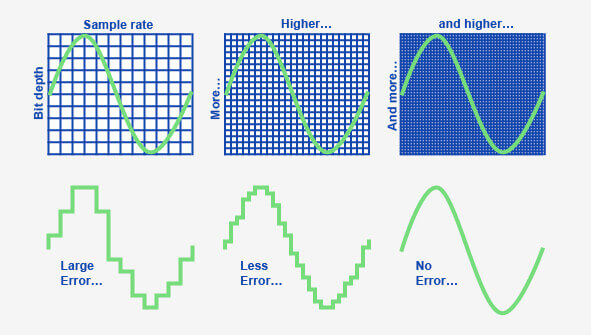
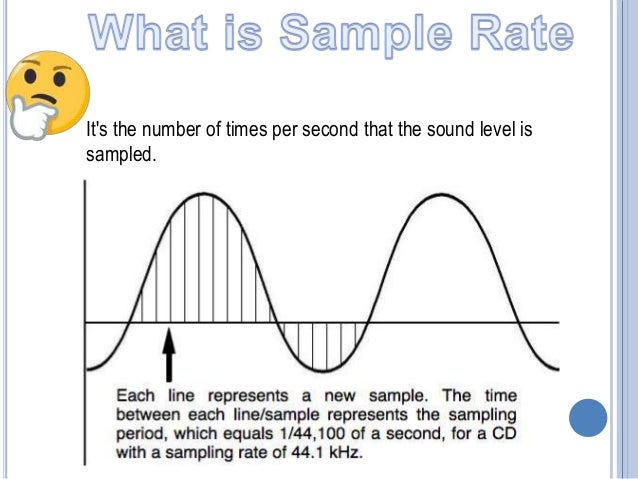
When it comes to digital audio, sample rate refers to the number of samples of sound that are taken per second to create a digital representation of an analog signal. In other words, it’s the number of times per second that the analog sound wave is measured and converted to a digital signal. The higher the sample rate, the more accurately the sound can be represented in the digital domain.

Personally, I’ve noticed that when I’m working on a music production project and I choose a higher sample rate, the resulting audio files tend to sound clearer and more detailed. As an avid music listener, I also appreciate the difference in sound quality when listening to high sample rate audio files on my headphones or speakers.

According to Ethan Winer, author of “The Audio Expert”, “In general, using a higher sample rate than the minimum required for the material being recorded or processed is good practice. However, there is no benefit to using a higher rate than twice the highest frequency that needs to be captured or processed.”

The Relationship Between Audio Sample Rate and Sound Quality

As mentioned earlier, the higher the sample rate, the more accurately the sound can be represented in the digital domain. This means that a higher sample rate can lead to a higher quality sound, with more accurate representation of the original analog sound wave.

I’ve also found that the relationship between sample rate and sound quality is not always linear. That is, going from 44.1 kHz to 48 kHz may not make as much of a difference as going from 48 kHz to 96 kHz. This is because the higher sample rates allow for more accurate representation of the sound wave, even in the higher frequency ranges.

As Julian Dunn, author of “Mastering Digital Audio”, explains, “Higher sample rates…provide more ‘headroom’ in the recording, which means that the recording can capture more of the dynamic range of the original sound. This can result in a richer, more natural sound.”

Choosing the Right Sample Rate

When it comes to choosing the right sample rate, it’s important to consider the specific needs of your project. If you’re recording a podcast or a voiceover, a sample rate of 44.1 kHz may be sufficient. However, if you’re recording music or other complex audio, a higher sample rate may be necessary to capture all the nuances and details of the sound.

It’s also important to note that a higher sample rate means larger file sizes, which can impact storage and processing requirements. So, it’s important to find a balance between the sample rate and file size that works best for your specific needs.

As author and sound engineer Bob Katz explains, “The most important factor is not the numbers, but how the system sounds. Choose the sample rate that sounds best to you, taking into account the practical considerations of your production environment.”

Final Words:

In conclusion, the sample rate of digital audio plays a significant role in the quality of the resulting sound. By understanding the relationship between sample rate and sound quality, and choosing the right sample rate for your specific needs, you can ensure that your digital audio sounds as good as possible.

Sampling rate (sampling)

Sampling rate (sampling)

Sample Rates

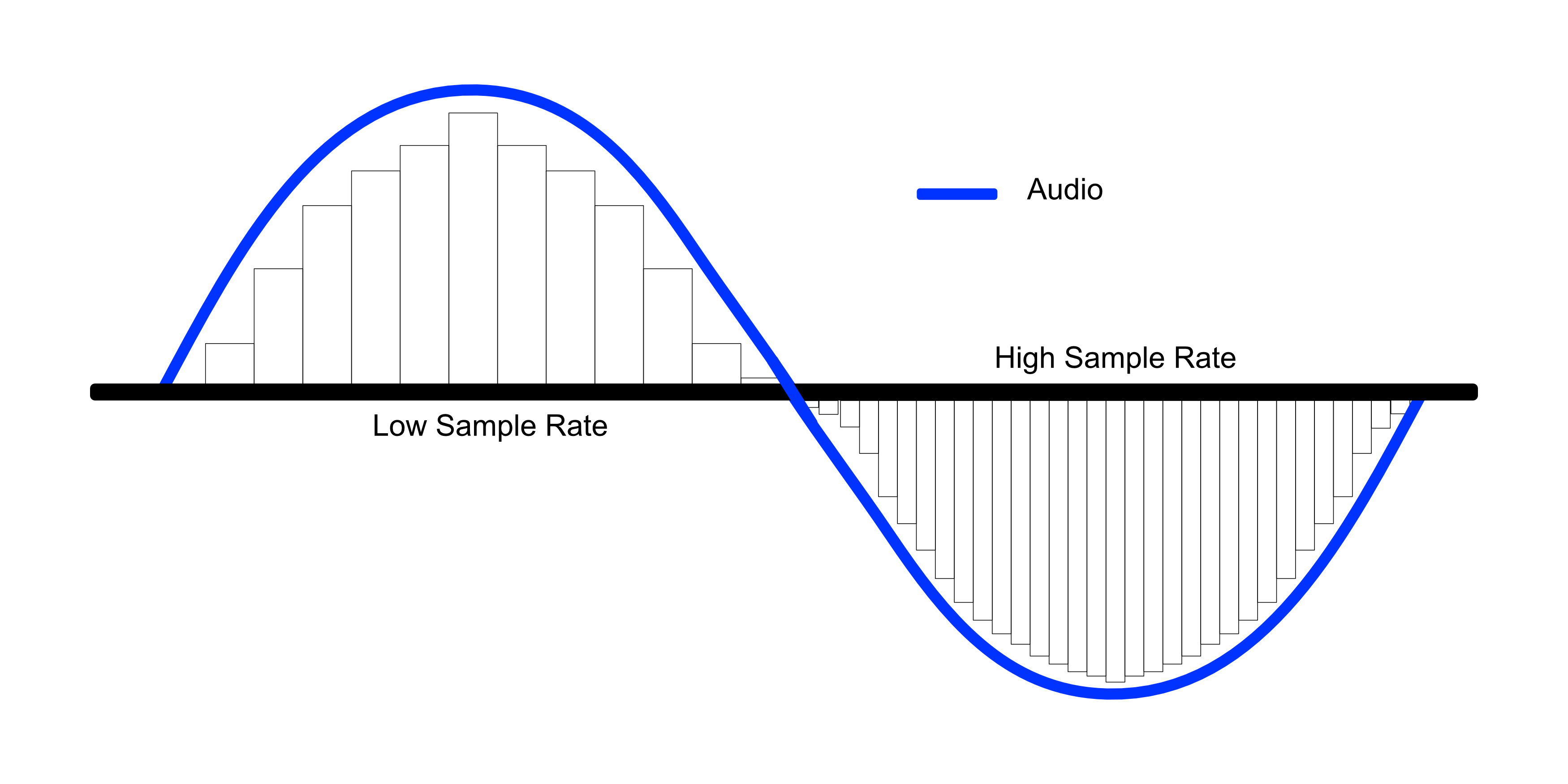
A higher sample rate describes sound more precisely, but at the same time describes those frequencies that the human ear can no longer hear, although changes in sound in the inaudible frequency range can still affect audible frequencies, so that studio recording is performed at a higher sample rate.

Sample rate

Since consumer equipment is primarily designed to reproduce sound with a sample rate of 44.1 kHz, when the recording is ready, it is re-encoded to a generally accepted standard. If the difference in sound quality between 32 and 44.1 kHz is obvious, then the higher the sampling frequency, the less perceptible or not at all perceptible to the ear the difference in quality between the two different frequencies will be. A higher sample rate describes sound more precisely, but at the same time describes those frequencies that the human ear can no longer hear, although changes in sound in the inaudible frequency range can still affect audible frequencies, so that studio recording is performed at a higher sample rate. Since consumer equipment is primarily designed to reproduce sound with a sample rate of 44.1 kHz, when the recording is ready, it is re-encoded to a generally accepted standard. If the difference in sound quality between 32 and 44.1 kHz is obvious, then the higher the sampling frequency, the less perceptible or not at all perceptible to the ear the difference in quality between the two different frequencies will be. A higher sample rate describes sound more precisely, but at the same time describes those frequencies that the human ear can no longer hear, although changes in sound in the inaudible frequency range can still affect audible frequencies, so that studio recording is performed at a higher sample rate. Since consumer equipment is primarily designed to reproduce sound with a sample rate of 44.1 kHz, when the recording is ready, it is recoded to a generally accepted standard. the difference in quality between two different frequencies is less noticeable or not at all noticeable to the ear. A higher sample rate describes sound more precisely, but at the same time describes those frequencies that the human ear can no longer hear, although changes in sound in the inaudible frequency range can still affect audible frequencies, so that studio recording is performed at a higher sample rate. Since consumer equipment is primarily designed to reproduce sound with a sample rate of 44.1 kHz, when the recording is ready, it is recoded to a generally accepted standard. the difference in quality between two different frequencies is less noticeable or not at all noticeable to the ear. A higher sample rate describes sound more precisely, but at the same time describes those frequencies that the human ear can no longer hear, although changes in sound in the inaudible frequency range can still affect audible frequencies, so that studio recording is performed at a higher sample rate. Since consumer equipment is primarily designed to reproduce sound with a sample rate of 44.1 kHz, when the recording is ready, it is recoded to a generally accepted standard. Although changes in sound in the inaudible frequency range can still affect audible frequencies, studio recordings are made at a higher sample rate. Since consumer equipment is primarily designed to reproduce sound with a sample rate of 44.1 kHz, when the recording is ready, it is recoded to a generally accepted standard. Although changes in sound in the inaudible frequency range can still affect audible frequencies, studio recordings are made at a higher sample rate. Since consumer equipment is primarily designed to reproduce sound with a sample rate of 44.1 kHz, when the recording is ready, it is recoded to a generally accepted standard.

Recording at a sampling rate of 8 kHz

If you watch the sound recording at a low sample rate of 8 kHz, you will notice that its waveform has sharp edges. After all, to smooth out the wave, you would need more precision in your description and a larger number of samples, as in the example below with a sample rate of 44.1 kHz.