MP3-to-MP4 Transcoding Quality Loss


Free Download Mp4Gain
picture

MP3-to-MP4 Transcoding Quality Loss
MP3-to-MP4 Transcoding Quality Loss

Let’s talk about MP3-to-MP4 transcoding quality loss

When you convert MP3 files to MP4, you might wonder what happens to the audio quality. Transcoding between formats can lead to loss of fidelity if you’re not careful. I’ve spent years working with digital audio, and one thing is clear: understanding how these formats work is essential to minimizing quality loss. Think of it like making a photocopy of a photo—you might get a usable result, but it won’t capture every detail of the original.

MP3 files are already compressed using lossy algorithms, which means some audio data has been permanently removed to reduce file size. When you transcode an MP3 to MP4, which can contain audio and video, you’re essentially re-encoding an already compressed file. This process can amplify artifacts such as muffled sounds, reduced clarity, or background noise.

Why transcoding can cause quality loss

Transcoding quality loss happens because the original MP3 compression removes data, and the MP4 re-encoding process adds its own layer of compression. Each step reduces the amount of audio information available. Imagine shrinking a high-resolution image twice—it may still look good, but the fine details will blur.

MP4 files are designed to handle audio and video streams, often optimized for compatibility with different devices and platforms. However, their compression methods might not preserve the nuances of the original MP3, especially if the settings aren’t properly adjusted.

Factors influencing audio quality during transcoding

Several factors determine how much quality is lost during MP3-to-MP4 transcoding. Understanding these can help you make better decisions.

  • Original MP3 quality: Lower bitrates in the source MP3 file leave less data to preserve during transcoding.
  • Target MP4 settings: Using low bitrates or incompatible codecs in the MP4 can degrade the sound further.
  • Transcoding tools: Some software programs handle compression better than others, reducing artifact buildup.

How to minimize quality loss

Reducing quality loss during MP3-to-MP4 transcoding is possible with the right approach. Over the years, I’ve learned some simple yet effective techniques to preserve audio fidelity.

Start with the highest-quality MP3 you have. If your MP3 file is already heavily compressed, transcoding will magnify the flaws. Aim for bitrates of 256 kbps or higher to ensure there’s enough data to work with.

Choose the right MP4 settings. Use a high audio bitrate (at least 192 kbps) to maintain quality. Selecting a lossless codec like AAC-LC instead of HE-AAC can also make a big difference.

Avoid transcoding more than once. Each conversion strips away more audio data, so working directly with the original file format whenever possible is ideal.

When transcoding is unavoidable

Sometimes, transcoding from MP3 to MP4 is necessary, like when you need to combine audio with video or adapt files for specific devices. In these cases, using the best tools and settings becomes even more critical.

Look for transcoding software that supports advanced settings for both MP3 and MP4. These tools often provide options to adjust bitrates, sample rates, and codecs, giving you greater control over the output quality.

Real-world applications of MP3-to-MP4 transcoding

In my experience, most people need MP3-to-MP4 transcoding for multimedia projects. For example, if you’re creating a slideshow or video montage, you might need to combine audio tracks with visual content. Choosing the right settings ensures your audience hears crisp, clear sound.

Another common use is optimizing files for streaming. MP4’s flexibility with audio and video streams makes it an excellent choice for platforms like YouTube or social media. However, understanding how transcoding affects your audio ensures the final product sounds professional.

Latest words on MP3-to-MP4 transcoding quality loss

Transcoding MP3 to MP4 doesn’t have to mean sacrificing quality if you take the right precautions. Always start with the best source material, select compatible codecs, and adjust settings to suit your needs. With these steps, you can preserve audio fidelity while benefiting from MP4’s versatility. If you need reliable tools for handling transcoding, Mp4Gain offers a simple and effective solution for professional results.

What causes quality loss in MP3-to-MP4 transcoding?

Quality loss occurs because MP3 is already a lossy format. When re-encoded into MP4, additional compression artifacts may appear, further degrading the sound.

Can you avoid quality loss when transcoding?

While complete preservation isn’t possible, you can minimize loss by starting with high-quality MP3s and using appropriate MP4 settings, such as high bitrates and compatible codecs.

What MP4 audio codec is best for preserving quality?

AAC-LC is the best codec for maintaining quality in MP4 files, offering a good balance between efficiency and fidelity.

Does transcoding multiple times worsen audio quality?

Yes, each transcoding pass removes more audio data, compounding quality loss. Avoid multiple conversions whenever possible.

What bitrate should I use for MP4 audio?

For most applications, use at least 192 kbps to maintain quality. Higher bitrates, like 256 kbps, are ideal for professional use.

Can MP4 files use lossless audio?

Yes, MP4 can include lossless audio codecs like ALAC or FLAC, although these increase file size significantly.

How does the sample rate affect transcoding?

Sample rates determine how accurately audio is captured. Mismatched rates between MP3 and MP4 can cause noticeable artifacts.

Should I convert MP3 to MP4 for video projects?

Yes, if combining audio with video. Ensure proper settings to avoid degrading the MP3 audio during conversion.

What are the best tools for MP3-to-MP4 transcoding?

Look for software that allows custom settings for bitrates, codecs, and sample rates, ensuring maximum control over the output.

Can transcoding improve the audio quality of an MP3?

No, transcoding cannot improve quality. Once data is lost during MP3 compression, it cannot be restored.

Comments:

Why does this always seem more complicated than it should be? I tried converting some old MP3s to MP4, and the sound got worse. Thanks for explaining why!

This article is packed with useful information. I didn’t know that using high bitrates could make such a difference. Definitely going to try that next time.

Honestly, I wish you’d go even deeper into the settings part. Which exact MP4 codecs should we avoid?

I work with audio editing, and I can confirm this advice is solid. Transcoding quality loss is a real problem if you don’t use the right settings.

Super helpful! I didn’t realize that re-encoding multiple times would keep degrading the quality. Makes total sense now.

Thanks for this breakdown. It’s good to know about AAC-LC—I’ve been using HE-AAC and wondering why it sounded off.

Wow, I’ve been doing this wrong for years. Thanks for shedding light on how MP3 quality affects the final MP4 output.

I used Mp4Gain for a recent project, and it worked like a charm! Didn’t expect such a difference in sound quality.


Free Download Mp4Gain
picture


Mp4Gain Main Window
picture


Mp4Gain Features
picture


Free Download Mp4Gain
picture

Dequantization in MP3 Decoding

Dequantization in MP3 Decoding

Dequantization in MP3 Decoding

Let’s talk about Dequantization in MP3 Decoding

Dequantization in MP3 decoding is one of those steps that makes an enormous difference in audio quality. Every time we listen to an MP3, dequantization brings back some of the original sound detail that was lost during compression. In simple terms, it’s the process of transforming the compressed data in MP3 files into something our ears recognize as rich, layered audio. With dequantization, the MP3 decoder works hard to reconstruct these audio layers, giving us the best listening experience possible from a compact file.

Understanding MP3 Compression and Quantization

Compression in MP3 files is about reducing file size without losing too much sound quality. This involves a process called quantization, where certain sound details are minimized to save space. Imagine trying to draw a detailed landscape with just a few crayons; you’d have to leave out some details. Quantization does something similar with audio data, simplifying it so the file takes up less room. Dequantization, then, becomes necessary to fill in those gaps, recreating as much of the original sound as possible.

The Role of Psychoacoustics in MP3 Compression

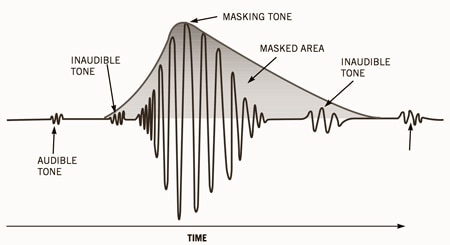
Psychoacoustics is crucial in MP3 compression because it focuses on what we actually hear and don’t hear. By understanding the way human hearing works, especially our thresholds for different sound frequencies, MP3 encoding can cut out “inaudible” sounds. Think of it as noise reduction—if you’re in a busy cafe, your brain filters out certain background sounds. Psychoacoustics in MP3 compression applies similar principles to save space, and during dequantization, the decoder brings back as much detail as possible within the file’s limits.

How Dequantization Works in MP3 Decoding

Dequantization is all about reversing quantization. When an MP3 is played, the decoder uses algorithms to reassign values to the compressed data. Imagine reading a book where words are replaced with abbreviations to save space. As you read, you mentally “fill in” the missing words. Similarly, dequantization works to “fill in” sound details, making the music sound fuller and closer to the original recording.

Steps in the MP3 Decoding Process

MP3 decoding involves a series of steps that transform compressed data into audible sound. Here’s a simplified breakdown:

  • Parsing the file structure: Identifying data frames and headers in the MP3 file.
  • Decompression: Expanding the data to make it usable for audio playback.
  • Dequantization: Applying algorithms to approximate the original sound frequencies.
  • Reconstruction of frequency bands: Grouping frequencies to recreate the audio spectrum.
  • Output as audible sound: Sending the reconstructed sound data to your speakers or headphones.

Each of these steps, especially dequantization, plays a key role in delivering a recognizable and pleasant sound experience.

Challenges in Dequantization

One of the biggest challenges in dequantization is balancing quality and efficiency. High-quality dequantization demands advanced algorithms that require more processing power. Think of it like zooming into a photo and seeing pixel details; more clarity requires more resources. Dequantization has to work within the limitations of MP3’s compact size and bitrate, which limits how precisely it can reconstruct the original sound.

Dequantization and Bitrate: What’s the Connection?

The bitrate of an MP3 affects dequantization because it determines the level of detail in the compressed data. Higher bitrates mean more detailed data, allowing the dequantization process to restore sound more accurately. A higher bitrate is like taking a high-resolution photo; you get more clarity and detail. Lower bitrates make dequantization harder, as there’s less information to work with, similar to trying to make a low-res image look sharp.

Frequency Bands and Dequantization

Dequantization often focuses on specific frequency bands to bring back detail. MP3 files divide sound into frequency bands, allowing the decoder to prioritize certain ranges. Low frequencies, like bass, are typically easier to reconstruct, while high frequencies might lose more detail. The dequantization process restores these bands to make the sound feel richer and fuller, even within the constraints of MP3 compression.

Impact of Dequantization on Audio Quality

The impact of dequantization is clear when you compare MP3s at different bitrates. Low-quality MP3s sound “flat” because they lack the dequantization power to restore full sound detail. Higher-bitrate MP3s benefit from a more effective dequantization process, resulting in clearer, more vibrant audio. So, dequantization doesn’t just enhance sound; it’s essential for making MP3 files enjoyable to listen to.

Advantages of Effective Dequantization

Effective dequantization enhances the MP3 listening experience significantly. Here’s what it brings:

  • Improved sound clarity: Bringing out details lost during compression.
  • Enhanced depth in audio: Creating a more layered sound experience.
  • Better frequency balance: Ensuring bass, mid, and treble are well represented.

Dequantization is a small but powerful step that makes MP3s sound closer to the original recording, even in a compressed format.

Limitations of Dequantization in MP3 Decoding

Dequantization has its limitations, especially at low bitrates. When there’s minimal data to work with, even the best algorithms can’t fully restore sound detail. Think of it as trying to “un-squash” a squashed item—the original shape is partly lost. For audiophiles, these limitations mean that MP3s may never quite match the quality of lossless formats, although high-bitrate MP3s come close.

How Modern Technology Improves Dequantization

Advancements in digital processing have allowed for improved dequantization techniques. Some newer MP3 decoders use machine learning to predict and restore lost sound detail. Imagine having a super-advanced “spell checker” for audio, which can fill in the gaps more accurately. These developments help bring MP3s closer to CD-quality sound, which is great news for casual listeners and audiophiles alike.

Choosing the Right Bitrate for Optimal Dequantization

Selecting the right bitrate is crucial for effective dequantization. A higher bitrate allows for more detailed restoration of sound quality. Here’s a quick guide:

  • 128 kbps: Basic quality, less effective dequantization, noticeable quality loss.
  • 192 kbps: Better quality, sufficient for most listeners.
  • 320 kbps: Excellent quality, near-CD quality with high dequantization detail.

For the best balance of file size and sound quality, I recommend 192 kbps or higher, especially for music.

Dequantization in Comparison with Lossless Formats

MP3s rely on dequantization, but lossless formats like WAV don’t require it. With a lossless format, all original sound data is preserved, so there’s no need to reconstruct details. Think of it as the difference between a high-quality print and an original painting. Dequantization works to make MP3s as close to lossless as possible, but there’s always some quality trade-off in compressed formats.

Common Myths About Dequantization in MP3s

There’s a lot of misinformation about dequantization and MP3s. Let’s clear up a few myths:

  • MP3s always sound bad: High-bitrate MP3s with good dequantization can sound excellent.
  • Dequantization makes MP3s lossless: Dequantization restores detail, but MP3s are still lossy.
  • Low-bitrate MP3s are fine for any use: They’re best for casual listening, not critical audio work.

Understanding these myths helps set realistic expectations about MP3 quality and dequantization.

Latest words on Dequantization in MP3 Decoding

Dequantization is essential in MP3 decoding, turning compressed data into the sounds we recognize and enjoy. Through this process, MP3s can offer a high-quality listening experience that’s also efficient in terms of file size. While MP3s will never be completely lossless, a well-chosen bitrate and effective dequantization can bring them surprisingly close. For anyone looking to maximize their audio experience, understanding dequantization and choosing the right bitrate makes a world of difference. To further improve MP3 quality, Mp4Gain offers tools that help in optimizing audio clarity and balance, making it a solid choice for enhancing your MP3 files.

Frequently Asked Questions about Dequantization in MP3 Decoding

What is dequantization in MP3 decoding?

Dequantization is a crucial step in MP3 decoding, where the compressed audio data is processed to approximate the original sound. During compression, some audio details are minimized to save space; dequantization aims to restore as much of this lost detail as possible, enhancing audio quality for the listener.

How does dequantization affect sound quality in MP3s?

Dequantization plays a key role in MP3 sound quality by recreating some of the audio layers that were lost during compression. This process can make the audio sound clearer and more vibrant, especially at higher bitrates, where there is more data for the dequantization algorithm to work with.

Why is quantization used in MP3 encoding?

Quantization in MP3 encoding is used to reduce the file size by simplifying some audio details that are less likely to be noticed by human ears. This helps keep MP3s compact, allowing more storage and faster streaming, but it also means that dequantization is necessary during playback to attempt to recreate some of the lost audio depth.

Does a higher bitrate improve dequantization quality?

Yes, a higher bitrate generally leads to better dequantization results because there is more audio data available to work with. Higher bitrates provide more detailed information, allowing the dequantization process to recreate a fuller, more detailed sound. For best results, bitrates of 192 kbps or higher are recommended.

What role does psychoacoustics play in MP3 compression?

Psychoacoustics is used in MP3 compression to identify and remove audio details that are less perceivable to human ears. By focusing on what listeners actually notice, MP3 encoding saves space without drastically impacting perceived quality. Dequantization later works to restore as much of the audible range as possible during playback.

Can dequantization make MP3 files sound like lossless audio?

While dequantization significantly improves MP3 sound quality, it does not make MP3s equivalent to lossless audio formats. MP3s remain “lossy” by nature, meaning that some audio data is permanently discarded. Dequantization helps MP3s sound closer to the original recording, but for the most accurate sound, lossless formats like WAV or FLAC are preferred.

What bitrate should I use to ensure good dequantization quality in my MP3s?

To achieve the best dequantization results, a bitrate of 192 kbps or higher is recommended. Higher bitrates provide more data for the dequantization process, resulting in clearer and more detailed audio. Lower bitrates may lead to noticeable quality loss, particularly in complex music tracks.

Comments:

I always wondered what dequantization really meant in MP3 files. Super interesting, I feel like I can really hear the difference now!

This article cleared up a lot for me! Still, I’d like to understand more about how dequantization differs between audio formats.

Great read! Never thought so much work goes into decoding an MP3. This explains why higher

bitrates sound way better!

Wow, didn’t know dequantization had such an impact. Can you explain more about how frequency bands affect it?

I knew MP3s were lossy, but this article gave me a new appreciation for how much detail they can actually retain. Thanks for breaking it down!

Finally an article that explains this stuff in a way that’s easy to understand! I’m definitely switching to 320 kbps MP3s after this.

I’m still a little confused about the difference between MP3s and lossless files after dequantization. Could you go into that a bit more?

Been listening to MP3s for years and never thought about this. It’s amazing how much detail goes into decoding. Loved the real-life examples!

This info on psychoacoustics was a game-changer for me. Makes so much sense why we can’t hear the difference sometimes. Great article!

Good explanation but still think there’s more depth to cover on MP3 artifacts. Would love to read about it in future articles!

Really good breakdown of dequantization. Feels like I learned a lot more than I expected from this. Thanks for making it so understandable!

I never thought about choosing bitrate based on dequantization! Switching my whole library to 320 kbps now.

This article was amazing! Not many go into dequantization like this. I still wonder if it could be better than lossless someday though.

Bit Reservoir Overflow in MP3

Bit Reservoir Overflow in MP3

Bit Reservoir Overflow in MP3

Let’s talk about Bit Reservoir Overflow in MP3

When we talk about MP3 compression, there’s an intricate concept called the bit reservoir that’s crucial for audio quality. Picture the bit reservoir as a flexible “bit bank” that temporarily holds extra bits to manage complex sound sections efficiently. But like any bank, there’s a limit to how much it can store. If these limits are exceeded, we encounter what’s known as bit reservoir overflow. This overflow can significantly impact the sound quality, particularly in audio files that require consistent clarity. Today, I’ll be diving deep into what causes bit reservoir overflow, how it impacts audio quality, and how we can work to manage it.

Understanding the Bit Reservoir Concept in MP3

The bit reservoir, in simplest terms, is an intelligent way to manage bits dynamically across MP3 frames. In MP3 encoding, each frame typically holds a fixed number of bits, which may sometimes be insufficient for complex sound data. To address this, the bit reservoir borrows bits from simpler sections to store extra information for challenging segments, making it a highly efficient approach in maintaining quality across frames.

How Bit Reservoir Overflow Occurs

Bit reservoir overflow happens when there are simply too many bits to fit within the allocated “bank” capacity of an MP3. If the demand for bits in complex segments consistently exceeds the bit reservoir’s limit, overflow can occur, leading to a reduction in audio quality. Imagine trying to fit too much data into a storage space with rigid restrictions; the result can be audio artifacts or reduced clarity as the encoder struggles to keep up.

Impact of Bit Reservoir Overflow on Audio Quality

When the bit reservoir overflows, listeners may experience sudden dips in quality, unexpected noise artifacts, or a muddy sound profile. As an audio engineer, I can tell you that the difference in quality can be quite jarring, particularly in files with fluctuating sound demands. Bit reservoir overflow typically affects genres or segments with complex sounds, like classical music or tracks with high dynamic ranges.

Signs of Bit Reservoir Overflow in Your Audio Files

Identifying bit reservoir overflow is crucial, especially if you work with high-quality audio regularly. Here are some tell-tale signs:

  • Noticeable distortion in high-dynamic-range sections
  • Uneven sound quality across different segments of the track
  • Random noise artifacts or “clicks” that are hard to isolate

Why Bit Reservoir Overflow Happens in Low-Bitrate MP3 Files

Bit reservoir overflow is especially common in MP3 files with low bitrates, where each frame has fewer bits available. For instance, in a 128 kbps file, there is less flexibility for the bit reservoir to hold additional bits, increasing the likelihood of overflow. If you’re working with spoken word or simpler audio, you may not notice, but with music, especially intricate compositions, the overflow becomes apparent.

Techniques to Prevent Bit Reservoir Overflow

In my experience, preventing bit reservoir overflow requires balancing bitrate and audio complexity. Here are some effective methods:

  • Increase bitrate to give each frame more bits
  • Simplify the audio mix, especially in complex sections
  • Use a codec with better handling of bit reservoirs like AAC or Ogg

Optimizing MP3 Encoding to Avoid Overflow

One way to prevent overflow during encoding is to fine-tune the compression settings. Setting a higher bitrate or allowing for variable bitrate (VBR) encoding can help, as it gives each frame a bit more “breathing room.” This makes a notable difference, especially in detailed audio work where quality is essential.

Is Bit Reservoir Overflow Always Avoidable?

There’s no definitive way to avoid bit reservoir overflow altogether. However, choosing the right settings and understanding the limitations of MP3 encoding can go a long way. In cases where overflow is unavoidable, switching to a codec with greater flexibility may be a better solution for preserving audio quality.

Choosing the Right Codec: A Look Beyond MP3

If bit reservoir overflow becomes a persistent problem, it may be worth considering other formats like AAC, which handle bit allocation more efficiently. As an audio professional, I’ve seen how these formats allow for a better balance in managing bits across frames, reducing overflow risks.

Latest Words on Bit Reservoir Overflow in MP3

Bit reservoir overflow is an often-overlooked aspect of MP3 encoding, yet it plays a significant role in determining audio quality. Understanding the mechanics of the bit reservoir and learning to manage overflow can make all the difference in achieving a cleaner, more professional sound. If you’re looking for a tool to help manage your MP3 quality, Mp4Gain is designed to offer optimal audio adjustments to keep overflow issues at bay.


Bit Reservoir Overflow in MP3: Frequently Asked Questions

What is bit reservoir overflow in MP3 encoding?

Bit reservoir overflow in MP3 encoding occurs when there is insufficient space in the bit reservoir—a flexible buffer that helps store bits across audio frames for complex audio passages. Overflow happens when complex audio demands exceed this buffer’s capacity, causing audio artifacts or quality loss.

Why does bit reservoir overflow impact audio quality?

When overflow happens, the MP3 encoder lacks enough bits to faithfully reproduce complex sections of audio, leading to quality issues such as distortion, unwanted noise, or loss of detail. It’s especially noticeable in music with high dynamic ranges or intricate passages.

Can bit reservoir overflow be avoided in MP3 files?

Completely avoiding bit reservoir overflow can be challenging, especially in low-bitrate MP3 files. However, using higher bitrates or switching to codecs like AAC can significantly reduce overflow. For most complex audio, balancing bitrate and compression settings helps mitigate these issues.

Is bit reservoir overflow more common in low-bitrate MP3 files?

Yes, low-bitrate MP3 files are more susceptible to bit reservoir overflow since each frame has fewer bits available, making it harder for the bit reservoir to handle complex audio demands. This limitation often results in quality loss in intricate or high-dynamic audio.

What are some signs of bit reservoir overflow in MP3 audio?

Signs of bit reservoir overflow include unexpected distortion, clicks, or “muddy” sound quality in sections with complex audio. These artifacts often appear in files with high compression, especially if intricate audio segments exceed the bit reservoir’s limits.

How can I prevent bit reservoir overflow when encoding MP3 files?

To prevent overflow, adjust encoding settings by increasing the bitrate or opting for variable bitrate (VBR) encoding, which allocates bits dynamically. Additionally, simplifying audio complexity or switching to a more flexible codec, like AAC, can help manage overflow more effectively.

Should I consider alternative formats to avoid bit reservoir overflow?

Yes, using alternative formats like AAC or Ogg may be beneficial. These formats handle bit allocation differently, reducing the risk of overflow while often providing better audio quality at comparable bitrates.

Comments:

Had no idea bit reservoir overflow was even a thing! This article explains so much, especially for anyone working with MP3 quality issues. Appreciate the deep dive here.

Been struggling with strange noises in my MP3s and finally understand why. Wish I’d known this sooner, but now I know what to adjust. Thanks!

Honestly, I had no clue about this technical stuff with MP3s, but it totally makes sense. Interesting to learn how MP3s handle complexity with the bit reservoir, and the overflow explanation really helped!

Great article. You really nailed the tech details without it feeling overwhelming. I’d love to see even more examples of what files are most affected by overflow.

Not sure I completely get how to prevent overflow, but the article is very clear. Learned more here than from most guides.

Been using MP3 for years, but never realized how much went on behind the scenes with audio quality. This really clarifies things—thanks!

Fascinating read! So bit reservoir overflow happens with low bitrate files? Always thought it was just a generic quality drop. Very insightful!

Read a lot about audio compression, but this is the first I’m hearing about bit reservoir overflow. Makes sense, though, and now I know how to handle it. Thanks!

This breakdown was super helpful. Been curious about bit reservoir limits for a while now, and this cleared up a lot. Thumbs up for the deep insights!

Well explained. I’m a beginner, but this article was easy to follow. Could do with a few more examples, though.

High Bitrate Music

High Bitrate Music

High Bitrate Music
High Bitrate Music
High Bitrate Music
High Bitrate Music

Introduction to High Bitrate Music

High bitrate music has become a buzzword in the music industry in recent years. It refers to audio files with a higher bitrate, or the number of bits of information processed per second, than the standard compressed audio formats like MP3 or AAC. The higher the bitrate, the more information can be captured and the better the quality of the sound. In this article, we will dive deep into the world of high bitrate music, discussing its benefits, potential drawbacks, and answering frequently asked questions about this topic.

What is High Bitrate Music and Why is it Important?

High bitrate music refers to audio files that contain more data than standard compressed audio formats. It is important because it offers a more accurate representation of the original sound recording, resulting in better sound quality. The higher the bitrate, the more information is captured, resulting in a more detailed and nuanced sound.

Benefits of High Bitrate Music

There are several benefits to high bitrate music, including:

1. Better sound quality: As mentioned earlier, high bitrate music captures more information, resulting in better sound quality.

2. More accurate representation of the original recording: High bitrate music captures more detail in the original recording, resulting in a more accurate representation of the artist’s intended sound.

3. Increased dynamic range: High bitrate music can capture a wider range of sound, from the quietest whispers to the loudest screams, resulting in increased dynamic range.

4. Improved listening experience: High bitrate music provides a more immersive and engaging listening experience.

Potential Drawbacks of High Bitrate Music

While high bitrate music offers many benefits, there are also some potential drawbacks to consider, including:

1. Larger file sizes: High bitrate music files are larger than standard compressed audio files, which can take up more storage space on your device.

2. Increased bandwidth requirements: High bitrate music files require more bandwidth to stream or download, which can be an issue for those with slower internet connections.

3. Compatibility issues: Some devices and software may not be able to play high bitrate music files.

How to Access High Bitrate Music

There are several ways to access high bitrate music, including:

1. Purchasing high-resolution audio files: Many online music stores offer high-resolution audio files in various formats.

2. Streaming services: Some streaming services offer high-quality audio streaming, including Tidal and Qobuz.

3. Local music libraries: Some users may have their own high bitrate music files stored locally on their devices.

Common Formats for High Bitrate Music

There are several formats for high bitrate music, including:

1. FLAC: FLAC stands for Free Lossless Audio Codec and is a popular format for high-resolution audio files.

2. ALAC: ALAC stands for Apple Lossless Audio Codec and is the Apple version of FLAC.

3. WAV: WAV stands for Waveform Audio File Format and is a popular format for high-quality audio files.

FAQ

Q: Can high bitrate music be played on any device?

A: Not all devices are compatible with high bitrate music. Some older devices or software may not be able to play high bitrate music files.

Q: Is high bitrate music worth the extra cost?

A: This is a personal preference. If you value high-quality sound and are willing to invest in it, then high bitrate music may be worth the extra cost. However, if you are content with standard compressed audio formats, then high bitrate music may not be worth the added expense.

Q: Can high bitrate music improve the sound of low-quality recordings?

A: High bitrate music can only capture what is in the original recording. It cannot improve the quality of a low-quality recording or fix any issues with the original source. However, it can provide a more accurate representation of the original recording and may sound better than a compressed version of the same recording.

Q: Do I need special equipment to listen to high bitrate music?

A: While you don’t necessarily need special equipment to listen to high bitrate music, you will need a device that is compatible with the format and can handle the larger file sizes. Additionally, high-quality headphones or speakers can enhance the listening experience.

Q: How can I tell if a music file is high bitrate?

A: The bitrate of a music file can usually be found in the file’s properties or metadata. It is typically measured in kilobits per second (kbps) or megabits per second (mbps). High bitrate music files will typically have a bitrate of 1,411 kbps or higher.

Q: Can high bitrate music improve the sound of streaming services?

A: Some streaming services offer high-quality audio streaming, including high bitrate music. However, the quality of the sound will also depend on the quality of your internet connection and the device you are using to stream the music.

Q: Is there a noticeable difference between high bitrate music and standard compressed audio formats?

A: Yes, there is a noticeable difference between high bitrate music and standard compressed audio formats. High bitrate music captures more detail in the original recording, resulting in a more accurate and nuanced sound.

Q: Are there any free sources of high bitrate music?

A: While most high bitrate music sources require payment, some websites offer free high-resolution audio downloads, such as the Free Lossless Audio Codec website.

Q: How do I convert standard compressed audio files to high bitrate music?

A: You cannot convert standard compressed audio files to high bitrate music, as the information captured in the original recording cannot be added back. To access high bitrate music, you will need to acquire a high-resolution audio file in the desired format.

Q: Are there any downsides to converting standard compressed audio files to high bitrate music?

A: Yes, converting compressed audio files to high bitrate music will not improve the quality of the original recording and may result in larger file sizes without any added benefits.

Conclusion

High bitrate music offers many benefits, including better sound quality, increased dynamic range, and an improved listening experience. However, there are also potential drawbacks to consider, including larger file sizes and compatibility issues. Understanding the formats and sources for high bitrate music can help you access and enjoy this high-quality audio format.

Audio Bitrate Calculation

Audio Bitrate Calculation

MP3 bit rate
MP3 bit rate

Generally, the files we read will know the following parameters:

MP3 bit rate
MP3 bit rate

Sampling frequency: the number of sampling points that pass one second; by
For example, the most common sample rate of 44.1k means that there are 44,100 sampled data points in one second;

Bit depth: Bit depth is also called sampling bit depth, and the bit depth of the audio determines the dynamic range.
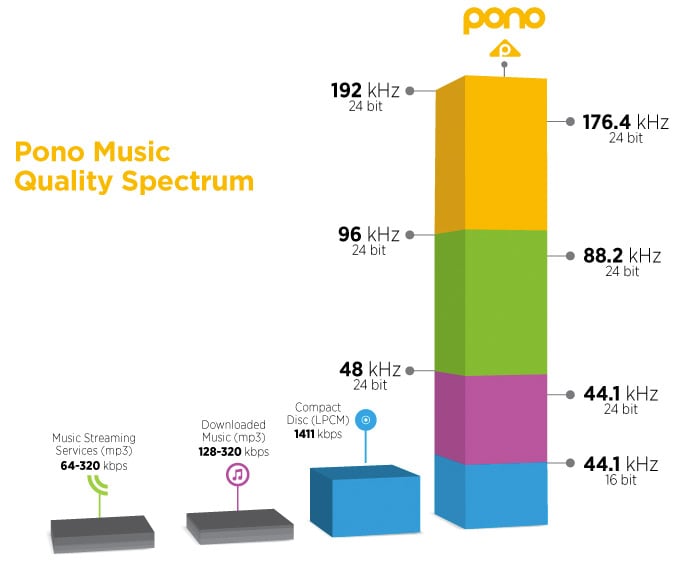
Our common 16-bit (16-bit) can record a dynamic range of about 96 decibels. Well, roughly you can know that each bit can record about 6 decibels of sound. Similarly, the 20-bit recordable dynamic range is about 120 dB; 24 bits is about 144 dB.

If we define 0dB as the maximum value, then the amplitude of the sound is calculated by extending down, then the dynamic range of CD audio is “-96dB ~ 0dB”. And so on, the dynamic range of 24-bit HD-Audio is “-144dB~0dB”. It can be seen that at higher bit depths, a greater dynamic range is available and lower levels of detail can be recorded.

Number of channels: usually single channel or two channels

Through the above parameters, the bit rate of the audio can be calculated

\color{blue}{code rate = sample rate (44.1k) * bit depth (16) * number of channels (2) = 1411.2kbps}

Audio bitrate, also known as bitrate: Refers to the amount of data that can pass through an audio stream per second. For example, 128 kbps, where ps (per second) is per second and kb is thousand bits, then 128 kbps means that the amount of data that can be transmitted in one second is 128 thousand bits. For files of the same format, the higher the bitrate, the better the sound quality. But for audio files of different formats, the same bitrate does not mean the same sound quality.

CD quality sound, usually two channels, compressed at 128kbps MP3, one second of data is converted to 128kbits. Some details are lost, which saves a lot of disk space or bandwidth.

After knowing the audio code rate, you can get the size of the whole audio file = duration (300s) * code rate (1411.2)/1024/8=51.67M

3 Ways to Change Bitrate of MP3 Files Part 2

3 Ways to Change Bitrate of MP3 Files Part 2

mp3 bit rate
mp3 bit rate

The second thing you want to read is that you should never convert to a lower bitrate. bitrate to a higher bitrate stream and I hope it sounds better. You cannot gain quality by increasing the bit rate. This is absolutely correct. If you try to convert the bitrate, you will actually lower the quality of the MP3 file.

mp3 bit rate
mp3 bit rate

If you want an MP3 with a higher bitrate than it currently has, you’ll need to go back to the source (CD, etc.) and extract the audio at full quality. You can then convert that file to a higher bitrate MP3 file.

The last thing you need to know is that converting between lossy formats is not recommended as you will still lose quality. However, it is possible to convert between formats losslessly while preserving quality.

On the other hand, many tests done even with recording engineers or professional musicians have shown that less than 1% of the population can distinguish between an mp3 with good bitrate (196 for example) and a samplerate of 44100 or more.

There is a sector of puritanism that defends tooth and nail the use of losless formats, because in theory they seem to be better, but the limitations and peculiarities of human hatred mean that a loosy file with a high bitrate and a high samplerate is enough for the human ear.

Mp4Gain is the most professional and polished program to help you in all these matters and you can achieve the highest sound quality with any format.

3 Ways to Change the Bitrate of MP3 Files

3 Ways to Change the Bitrate of MP3 Files

Mp3 bitrate
Mp3 bitrate

Do you want to change the bitrate of an MP3 file?

Mp3 bitrate
Mp3 bitrate


This can be useful if, for example, you need to reduce the size of an MP3 file. A 320kbps MP3 file, the highest bit rate allowed for MP3 files, can be reduced to 192kbps to significantly reduce the size of the MP3 file.

There is a drop in quality, but the difference is negligible for most listeners using standard speakers or headphones. If you’re an audiophile, you’ll probably never use the MP3 format, except for expensive audio equipment.

You are most likely using a lossless format such as PCM, WAV, AIFF, FLAC, ALAC, or APE audio, compressed or uncompressed. Uncompressed PCM audio files are about 10 times larger than CD-quality MP3 files.

The MP3 format is a lossy format, which means sacrificing audio quality to keep the file size relatively small. Almost every site will tell you not to convert lossless audio files to MP3 unless you might lose some audio quality.

<Almost all the time. The only time it might make sense is if you have a high bitrate audio file in a low quality format like WAV. For example, it might make sense to convert a 96kbps WAV file to MP3, but only if you choose a bitrate of 192kbps or higher. A higher bitrate in an MP3 file will allow it to maintain the same quality as a WAV file, even if it has a lower bitrate.

Audio Bitrate: What is the Bitrate of Music Part 3

Audio Bitrate: What is the Bitrate of Music Part 3

Audio Bitrate
Audio Bitrate

How should bitrate be interpreted in an audio file?

Audio Bitrate
Audio Bitrate

That is, the higher the bitrate, the better the audio and video quality, but the larger the encoded file, the lower the bitrate, the situation is reversed. For example: encode audio and video at 500 Kbps. Where bps is bit 1K=1010=1024 b is bit (bit) s is second (second) p is per (per) So encoding with 500kbps means that audio data and video encoded need to use 500K bits per second to Indicates that the bit rate is used to represent the code rate of information transmitted in the baseband transmission system. The bit rate Rb refers to the number of binary bits transmitted per unit of time, and the unit is b/s. For example, the transmission code rate of a computer serial port is up to 115200b/s. The symbol rate or baud rate Rs refers to the number of modulation symbols transmitted per unit of time, that is, the information transmission rate of ternary and more than ternary digital code streams, and the unit is baud/s In M-ary modulation, bit The relationship between the rate Rb and the baud rate Rs is: Rb=Rslog2M In a word, the bit rate indicates the amount of data transmitted per second.

What is the proper bit rate for mp3 music files?
Bitrate is simply the number of bits per second transmitted by the media file and the unit is Kbp/s. The default bit rate of compressed MP3 files is 128 Kbp/s and the sound quality is similar to that of a CD. However, the bit rate of MP3 downloaded from the Internet is usually 192Kbp/s, the sound quality of 192Kbp/s is better than that of 128Kbp/s, and the space occupied by the file is not too large, so which is widely used. . However, if you want to get better sound quality, the bit rate should be higher than 320Kbp/s, and the sound quality can be really comparable to CD quality. However, the price you pay for doing this is that one song will take up about 10M of hard drive space. Generally speaking, the higher the bitrate, the better the sound quality, but it will take up more disk space.

What does “bitrate” mean in audio?
For example, 128kbps MP3 means that the amount of information per second is 128kb converted into bytes is 16KB 320kbps MP3, so the quality does not improve, on the contrary, it may decrease. There are also lossy compression formats such as MP3, wma, ogg .. These are lossy compression formats, which means that there will be loss in the compression process, but each compression algorithm is different, and the quality of the compressed sound is different. For example, when comparing the same bit rate, the sound quality of different formats is different. Hope it can help you.

Audio Bitrate: What is the Bitrate of Music Part 2

Audio Bitrate: What is the Bitrate of Music Part 2

Audio Bitrate
Audio Bitrate

What do sample rate and bit rate mean in a song?

Audio Bitrate
Audio Bitrate


Bit rate Bit rate refers to the sampling rate at which digital sound is converted from analog to digital format. The higher the sampling rate, the better the quality of the restored sound. The bit rate value is compared with the actual audio: 16 KBPS = phone sound quality 24 KBPS = increase phone sound quality, shortwave transmission, longwave transmission, European standard medium wave transmission 40 KBPS = American standard medium wave transmission 56 KBPS = voice 64 KBPS = voice boost (best bit rate for mobile phone ringtones) Setting value, the best mobile phone mono MP3 player setting value) 112 KBPS = FM radio stereo FM 128 KBPS = tape (best setting value of mobile phone stereo MP3 player, best setting value of low-end MP3 player) 160KBPS= HIFI HIFI (best setting for MP3 players mid- to high-end) 192KBPS=CD (best setting for high-end MP3 players) 256KBPS=Studio Music Studio (for music enthusiasts) The sample rate is when the analog signal is ca is converted to a digital signal The sampling rate is related to the quality of the sound. The higher the sample rate, the better the high-frequency restoration of the sound file. The following is the different quality corresponding to different sampling rates 1.11,025Hz The sound of this sampling rate is similar to the sound quality of AM radio 2.22,050Hz The sound of this sampling rate is similar to the sound quality of FM radio, but less than 3.32 000 Hz This sample The sound of this frequency is higher than the sound quality of FM broadcast 4.44 100 Hz The sound of this sampling frequency reaches the sound quality of the CD audio 5.48000 Hz Sound at this sampling rate reaches DAT audio sound quality 6.96000 Hz Sound at this sampling rate reaches DAT audio sound quality The higher the sampling rate sound quality of the DVD audio, the more disk space the final sound file will take up. Usually we can choose 44.1KHZ sampling rate.

Audio Bitrate: What is the bitrate of music

Audio Bitrate: What is the bitrate of music

Audio Bitrate
Audio Bitrate

Bit rate refers to the amount of binary data per unit of time after converting an analog sound signal to a digital sound signal.

Audio Bitrate
Audio Bitrate

The higher the bitrate, the better the sound quality (under the same encoding format, different formats cannot be compared). audio bitrate. Bit rate is a benchmark of digital music compression efficiency. Bit rate indicates the rate of the number of bits bps (bit per second, bits per second) transmitted in a unit of time (1 second). Kbps (in layman’s terms is 1000 bits per second) is usually used as the unit. The bit rate of digital music on the CD is 1411.2 kbps (i.e. to burn 1 second of CD music, 1411.2 × 1000 data bits are required), the high bit rate of the music file means that the data must be processed in a unit of time (1 second) The amount (BIT) is large, that is, the sound quality of the music file is good. However, when the BITRATE is high, the file size increases, which will occupy a large amount of memory capacity. ranges in this sense, most of them are 32-256 Kbps. Of course, the wider the index, the better, but 320 Kbps is the highest level for the moment.