MP3 file format


Free Download Mp4Gain
picture

MP3 file format

MP3 file format
MP3 file format

The full name of MP3 is MPEG-1 or MPEG-2 Audio Layer III, which is a popular format for digital audio coding and lossy compression of minor parts, to achieve the purpose of compressing into smaller files.

MP3 file format
MP3 file format

source
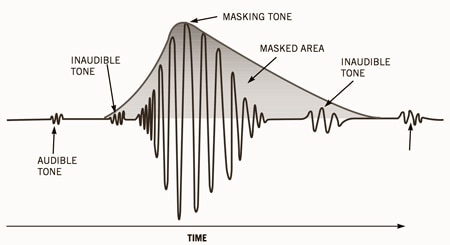
The MP3 format was invented in the mid-1980s by a group of engineers at the Fraunhofer research organization in Erlangen, Germany, and standardized in 1991. The association is committed to research in low-rate, high-quality sound coding of data. Although MP3 is a lossy compression format, for the listening experience of most users, the sound quality of MP3 does not have a noticeable decrease compared to the original uncompressed audio.

Later, with the popularization of the MP3, it had an impact and influence in the music industry.

MPEG audio standard
MPEG (Motion Picture Experts Group) is a moving picture expert group under ISO, and the MPEG standard formulated by it is widely used in various multimedia. MPEG standards include video and audio standards, from which MPEG-1, MPEG-2, MPEG-2AAC, and MPEG-4 audio standards have been developed.

The MPEG-1 and MPEG-2 standards use the same family of audio codecs: Layer1, 2, 3. A new feature of MPEG-2 is the use of low sample rate expansion to reduce data traffic, and another feature is multi-channel expansion, which increases the number of main channels to five. The MPEG-2AAC (MPEG-2 Advanced Audio Coding) standard was launched by FraunhoferIIS and AT&T in 1997 to significantly reduce data traffic. The Modified Discrete Co2sine Transform (MDCT) algorithm adopted by MPEG22AAC, the sampling rate It can be between 8KHz and 96KHz, and the number of channels can be between 1-48.

All three layers of MPEG Audio Layer1, 2, and 3 use the same filter bank, bitstream structure, and header information, and the sample rate is either 32 KHz, 4411 KHz, or 48 KHz.

Layer1 is designed for DCC (DigitalCompactCassette) digital compression tape, with a data rate of 384kbps.
Layer2 balances complexity and performance, and data traffic drops to 256kbps-192kbps.
Layer3 was designed for low data traffic from the beginning, and the data traffic is 128Kbps-112Kbps. Layer3 adds MDCT transform, which makes its frequency resolution 18 times than Layer 2. Layer3 also uses EntropyCoding similar to MPEGVid2eo Redundant information is reduced.
Currently, most MP3s use the MPEG21 standard.


Free Download Mp4Gain
picture


Mp4Gain Main Window
picture


Mp4Gain Features
picture


Free Download Mp4Gain
picture

Change the bit rate of an MP3 file

Change the bit rate of an MP3 file

mp3 bit rate
mp3 bit rate

Do you want to change the bit rate of an MP3 file?

mp3 bit rate
mp3 bit rate

This can be useful, for example, if you need to reduce the size of an MP3 file. A 320 kbps MP3 file, the highest bit rate allowed for an MP3 file, can be lowered to 192 kbps to significantly reduce the size of the MP3 file.

There will be some loss in quality, but the difference will be negligible to most listeners using standard speakers or headphones. If you’re an audiophile, chances are you’ll never use the MP3 format outside of expensive audio equipment.

Most likely, you are using a lossless format, such as compressed or uncompressed PCM audio, WAV, AIFF, FLAC, ALAC, or APE. Uncompressed PCM audio files are approximately 10 times larger than CD-quality MP3 files.

The MP3 format is a lossy format, which means sacrificing audio quality to keep file sizes relatively small. Almost all sites will tell you that you shouldn’t convert lossless audio files to MP3 unless you can afford to lose some audio quality.

Almost all the time. The only time it might make sense is if you have a bitrate audio file in a low quality format like WAV. For example, it might make sense to convert a 96 kbps WAV file to MP3, but only if you choose a bit rate of 192 kbps or higher. A higher bit rate in an MP3 file will allow it to maintain the same quality as a WAV file even though it has a lower bit rate.
The second thing to read is that you should never switch to a lower bitrate. bitrate stream to a higher bitrate stream and hope it sounds better. You cannot gain quality by increasing the bit rate. This is absolutely true. If you try to convert the bitrate, it will actually reduce the quality of the MP3 file.

Audio Bitrate Calculation

Audio Bitrate Calculation

MP3 bit rate
MP3 bit rate

Generally, the files we read will know the following parameters:

MP3 bit rate
MP3 bit rate

Sampling frequency: the number of sampling points that pass one second; by
For example, the most common sample rate of 44.1k means that there are 44,100 sampled data points in one second;

Bit depth: Bit depth is also called sampling bit depth, and the bit depth of the audio determines the dynamic range.
Our common 16-bit (16-bit) can record a dynamic range of about 96 decibels. Well, roughly you can know that each bit can record about 6 decibels of sound. Similarly, the 20-bit recordable dynamic range is about 120 dB; 24 bits is about 144 dB.

If we define 0dB as the maximum value, then the amplitude of the sound is calculated by extending down, then the dynamic range of CD audio is “-96dB ~ 0dB”. And so on, the dynamic range of 24-bit HD-Audio is “-144dB~0dB”. It can be seen that at higher bit depths, a greater dynamic range is available and lower levels of detail can be recorded.

Number of channels: usually single channel or two channels

Through the above parameters, the bit rate of the audio can be calculated

\color{blue}{code rate = sample rate (44.1k) * bit depth (16) * number of channels (2) = 1411.2kbps}

Audio bitrate, also known as bitrate: Refers to the amount of data that can pass through an audio stream per second. For example, 128 kbps, where ps (per second) is per second and kb is thousand bits, then 128 kbps means that the amount of data that can be transmitted in one second is 128 thousand bits. For files of the same format, the higher the bitrate, the better the sound quality. But for audio files of different formats, the same bitrate does not mean the same sound quality.

CD quality sound, usually two channels, compressed at 128kbps MP3, one second of data is converted to 128kbits. Some details are lost, which saves a lot of disk space or bandwidth.

After knowing the audio code rate, you can get the size of the whole audio file = duration (300s) * code rate (1411.2)/1024/8=51.67M

3 Ways to Change Bitrate of MP3 Files Part 2

3 Ways to Change Bitrate of MP3 Files Part 2

mp3 bit rate
mp3 bit rate

The second thing you want to read is that you should never convert to a lower bitrate. bitrate to a higher bitrate stream and I hope it sounds better. You cannot gain quality by increasing the bit rate. This is absolutely correct. If you try to convert the bitrate, you will actually lower the quality of the MP3 file.

mp3 bit rate
mp3 bit rate

If you want an MP3 with a higher bitrate than it currently has, you’ll need to go back to the source (CD, etc.) and extract the audio at full quality. You can then convert that file to a higher bitrate MP3 file.

The last thing you need to know is that converting between lossy formats is not recommended as you will still lose quality. However, it is possible to convert between formats losslessly while preserving quality.

On the other hand, many tests done even with recording engineers or professional musicians have shown that less than 1% of the population can distinguish between an mp3 with good bitrate (196 for example) and a samplerate of 44100 or more.

There is a sector of puritanism that defends tooth and nail the use of losless formats, because in theory they seem to be better, but the limitations and peculiarities of human hatred mean that a loosy file with a high bitrate and a high samplerate is enough for the human ear.

Mp4Gain is the most professional and polished program to help you in all these matters and you can achieve the highest sound quality with any format.

3 Ways to Change the Bitrate of MP3 Files

3 Ways to Change the Bitrate of MP3 Files

Mp3 bitrate
Mp3 bitrate

Do you want to change the bitrate of an MP3 file?

Mp3 bitrate
Mp3 bitrate


This can be useful if, for example, you need to reduce the size of an MP3 file. A 320kbps MP3 file, the highest bit rate allowed for MP3 files, can be reduced to 192kbps to significantly reduce the size of the MP3 file.

There is a drop in quality, but the difference is negligible for most listeners using standard speakers or headphones. If you’re an audiophile, you’ll probably never use the MP3 format, except for expensive audio equipment.

You are most likely using a lossless format such as PCM, WAV, AIFF, FLAC, ALAC, or APE audio, compressed or uncompressed. Uncompressed PCM audio files are about 10 times larger than CD-quality MP3 files.

The MP3 format is a lossy format, which means sacrificing audio quality to keep the file size relatively small. Almost every site will tell you not to convert lossless audio files to MP3 unless you might lose some audio quality.

<Almost all the time. The only time it might make sense is if you have a high bitrate audio file in a low quality format like WAV. For example, it might make sense to convert a 96kbps WAV file to MP3, but only if you choose a bitrate of 192kbps or higher. A higher bitrate in an MP3 file will allow it to maintain the same quality as a WAV file, even if it has a lower bitrate.

Audio Bitrate: What is the Bitrate of Music Part 3

Audio Bitrate: What is the Bitrate of Music Part 3

Audio Bitrate
Audio Bitrate

How should bitrate be interpreted in an audio file?

Audio Bitrate
Audio Bitrate

That is, the higher the bitrate, the better the audio and video quality, but the larger the encoded file, the lower the bitrate, the situation is reversed. For example: encode audio and video at 500 Kbps. Where bps is bit 1K=1010=1024 b is bit (bit) s is second (second) p is per (per) So encoding with 500kbps means that audio data and video encoded need to use 500K bits per second to Indicates that the bit rate is used to represent the code rate of information transmitted in the baseband transmission system. The bit rate Rb refers to the number of binary bits transmitted per unit of time, and the unit is b/s. For example, the transmission code rate of a computer serial port is up to 115200b/s. The symbol rate or baud rate Rs refers to the number of modulation symbols transmitted per unit of time, that is, the information transmission rate of ternary and more than ternary digital code streams, and the unit is baud/s In M-ary modulation, bit The relationship between the rate Rb and the baud rate Rs is: Rb=Rslog2M In a word, the bit rate indicates the amount of data transmitted per second.

What is the proper bit rate for mp3 music files?
Bitrate is simply the number of bits per second transmitted by the media file and the unit is Kbp/s. The default bit rate of compressed MP3 files is 128 Kbp/s and the sound quality is similar to that of a CD. However, the bit rate of MP3 downloaded from the Internet is usually 192Kbp/s, the sound quality of 192Kbp/s is better than that of 128Kbp/s, and the space occupied by the file is not too large, so which is widely used. . However, if you want to get better sound quality, the bit rate should be higher than 320Kbp/s, and the sound quality can be really comparable to CD quality. However, the price you pay for doing this is that one song will take up about 10M of hard drive space. Generally speaking, the higher the bitrate, the better the sound quality, but it will take up more disk space.

What does “bitrate” mean in audio?
For example, 128kbps MP3 means that the amount of information per second is 128kb converted into bytes is 16KB 320kbps MP3, so the quality does not improve, on the contrary, it may decrease. There are also lossy compression formats such as MP3, wma, ogg .. These are lossy compression formats, which means that there will be loss in the compression process, but each compression algorithm is different, and the quality of the compressed sound is different. For example, when comparing the same bit rate, the sound quality of different formats is different. Hope it can help you.

Audio Bitrate: What is the Bitrate of Music Part 2

Audio Bitrate: What is the Bitrate of Music Part 2

Audio Bitrate
Audio Bitrate

What do sample rate and bit rate mean in a song?

Audio Bitrate
Audio Bitrate


Bit rate Bit rate refers to the sampling rate at which digital sound is converted from analog to digital format. The higher the sampling rate, the better the quality of the restored sound. The bit rate value is compared with the actual audio: 16 KBPS = phone sound quality 24 KBPS = increase phone sound quality, shortwave transmission, longwave transmission, European standard medium wave transmission 40 KBPS = American standard medium wave transmission 56 KBPS = voice 64 KBPS = voice boost (best bit rate for mobile phone ringtones) Setting value, the best mobile phone mono MP3 player setting value) 112 KBPS = FM radio stereo FM 128 KBPS = tape (best setting value of mobile phone stereo MP3 player, best setting value of low-end MP3 player) 160KBPS= HIFI HIFI (best setting for MP3 players mid- to high-end) 192KBPS=CD (best setting for high-end MP3 players) 256KBPS=Studio Music Studio (for music enthusiasts) The sample rate is when the analog signal is ca is converted to a digital signal The sampling rate is related to the quality of the sound. The higher the sample rate, the better the high-frequency restoration of the sound file. The following is the different quality corresponding to different sampling rates 1.11,025Hz The sound of this sampling rate is similar to the sound quality of AM radio 2.22,050Hz The sound of this sampling rate is similar to the sound quality of FM radio, but less than 3.32 000 Hz This sample The sound of this frequency is higher than the sound quality of FM broadcast 4.44 100 Hz The sound of this sampling frequency reaches the sound quality of the CD audio 5.48000 Hz Sound at this sampling rate reaches DAT audio sound quality 6.96000 Hz Sound at this sampling rate reaches DAT audio sound quality The higher the sampling rate sound quality of the DVD audio, the more disk space the final sound file will take up. Usually we can choose 44.1KHZ sampling rate.

Audio Bitrate: What is the bitrate of music

Audio Bitrate: What is the bitrate of music

Audio Bitrate
Audio Bitrate

Bit rate refers to the amount of binary data per unit of time after converting an analog sound signal to a digital sound signal.

Audio Bitrate
Audio Bitrate

The higher the bitrate, the better the sound quality (under the same encoding format, different formats cannot be compared). audio bitrate. Bit rate is a benchmark of digital music compression efficiency. Bit rate indicates the rate of the number of bits bps (bit per second, bits per second) transmitted in a unit of time (1 second). Kbps (in layman’s terms is 1000 bits per second) is usually used as the unit. The bit rate of digital music on the CD is 1411.2 kbps (i.e. to burn 1 second of CD music, 1411.2 × 1000 data bits are required), the high bit rate of the music file means that the data must be processed in a unit of time (1 second) The amount (BIT) is large, that is, the sound quality of the music file is good. However, when the BITRATE is high, the file size increases, which will occupy a large amount of memory capacity. ranges in this sense, most of them are 32-256 Kbps. Of course, the wider the index, the better, but 320 Kbps is the highest level for the moment.

What is the capacity of the high resolution sound source?

What is the capacity of the high resolution sound source?

Hi-Res audio

High resolution sound source with more information than conventional CDs.

HiRes Audio

Since the data size is large, you can enjoy high-quality sound with a three-dimensional effect, but the problem is that when managing multiple high-resolution audio sources, the required storage capacity becomes huge.

Then I will introduce what is the capacity of the high resolution sound source, including the management method.

What is the capacity of Hi-Res Audio sources compared to CDs?
In determining the capacity (file size) of a high-resolution sound source, the sampling frequency and bit depth of the sound source are important factors.

The sample rate (sample rate) is a numerical value that is used as an index when converting analog data, such as speech, to a digital signal.

It indicates how many times per second an information sample was measured, and is expressed in “Hz (hertz)”.

If sampling is done every 44,100 seconds, it will be “44.1 kHz”.

On the other hand, the bit depth is a numerical value that indicates how many pieces are recorded in each divided data.

It is represented by “bit”.

Both the sample rate and the bit depth mean that the higher the number, the more information there will be, that is, the higher the resolution.

The amount of music data per second is called the bit rate.

Bit rate is the sample rate multiplied by the bit depth and is expressed in “bps”.

The calculation formula is as follows.

Bit rate (bps) = sample rate (Hz) x bit depth (bit) x 2

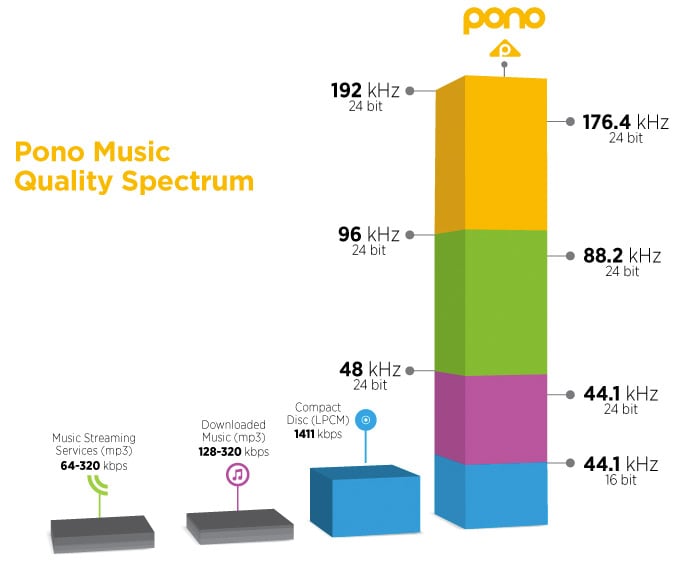
For example, the bit rate and sample rate of a CD sound source are generally “44.1 kHz / 16 bits”.

Most so-called “CD sound quality” sound sources are based on this number.

The size of the 5 minute 44.1 kHz / 16 bit / sound source file is about 50 MB.

But what about hi-res audio sources?

High resolution sound source capacity per song (5 minutes) varies depending on the music data format, as shown below.

WAV: 192 kHz / 24-bit: capacity for 5 minutes is 330 MB
FLAC: 192 kHz / 24 bit: capacity for 5 minutes is 200 MB
ALAC: 192 kHz / 24 bits: capacity for 5 minutes is 200 MB
What you can see from this is that the capacity of the high resolution sound source is 4 to 6 times that of the CD sound source in 5 minutes.

Large capacity high resolution music management equipment
If you download 5 high-resolution songs for 4 minutes, it will take up about 700MB (for 96kHz / 24-bit WAV files).

In the case of 10 songs, it exceeds 1400MB, that is, 1GB.

If so, I would like to have enough storage to handle that amount of data.

An effective way to do this is to build a NAS-centric network audio system that incorporates a large-capacity hard drive.

For example, if you can prepare a 4TB (terabyte) hard drive, it can store around 20,000 high-resolution songs.

Next, we will explain what NAS and network audio are like.

NAS
NAS stands for “Network Attached Storage” and it reads like aubergine.

It stands for network attached storage, and it is also called a network hard drive or network compatible HDD.

In other words, it is an external hard drive that is used when connecting to a network (LAN).

A normal external hard drive used when connecting to a PC = PC via USB etc. can basically be used with only one PC.

However, if it is a NAS, it can be used with multiple devices participating in the LAN.

Files saved on the hard drive can also be used and shared from, for example, the personal computers of each family member participating in the home LAN, smartphones connected via Wi-Fi, and TVs in the living room to be.

It is also possible to access the data on the NAS from the outside via the Internet.

The NAS is often used in the home to store and share data for music, video (video / TV recording data), photos (images), etc.

Meaning and relationship of sample rate, bit depth, and bit rate

Meaning and relationship of sample rate, bit depth, and bit rate

bit depth

Sampling rate
Bit depth
Bit rate

bit depth audio

I will present the three meanings and relationships of.

Table of Contents
What is the sampling rate?
What is bit depth?
What is a bit rate?
resume
Sponsorship

What is the sampling rate?
For example, let’s say you say “Ah” for 1 second.

When recording this “Ah” sound on a personal computer, the “Ah” sound is divided into tens of thousands per second, each divided into tens of thousands.

“The height of this section was about this.”
“The length of this section was about this.”
Record it as data like this.

The personal computer continually reads each of this divided data and outputs it as a “voice” called “Ah”.

At this time, “how many tens of thousands of sounds are collected per second” is called the “sample rate.” (Also called “sample rate”)

Sampling rate
▲ Sample rate image

The more divisions you make, the smoother the sound will be, and as a result, you will feel that the sound quality has improved!

What is bit depth?
The sample rate is “how many tens of thousands of sounds are collected per second”.

“How much capacity is given to each divided data (sample)” is called “bit depth”.

Figure_bit depth
▲ Bit depth image

Also called “number of quantization bits”, “number of sample bits”, “bit offset”, and so on.

For example, if the bit depth is “16 bits”, the amount of information is 2 to the 16th power (65536) for one sample.

The higher the bit depth, the greater the expressiveness of the sound’s fineness and volume, and as a result, I feel like the sound quality has improved!

By the way, the bit depth of most of the world’s sound sources is 16 bit.

that’s why

“Import music from CD!”
“Import music downloaded from the Internet!”
In such cases, 16 bits is sufficient.

On the other hand, if you say “What you recorded in your DAW comes out wav!”, It is better to have 16 bits or more.

This is because, for example, when processing audio effects with audio editing software, sound deterioration can be reduced to zero by assigning an additional bit depth (for example, 32-bit). (Although 16 bit is fine for final output)

What’s more,
note that “bit depth” on this page has a different meaning than “bit depth” in video.

Reference: What is Bit Depth (Color Depth)? Differences like 10bit / 24bit / 30bit

What is a bit rate?
Bit rate is the “amount of data per second”.

Reference: What is a bit rate? Relationship between image quality, sound quality and codec [Video / Audio]

The “sample rate” and “bit depth” presented above are

Sample rate: how many tens of thousands of sounds are collected per second
Bit depth: how much to give to each divided data
Therefore, the product of these two values ​​is the “bit rate”.