Video bit rate


Free Download Mp4Gain
picture

Video bit rate

Video bit rate
Video bit rate

Today, we are going to popularize the concept of bitrate in video playback.
Video bit rate
Video bit rate

When formulating RMVB/RM, the main consideration is network communication and the purpose is to use unpleasant network speed to deliver visually acceptable image quality. Therefore, the characteristic of RMVB/RM encoding format is that better video quality can be obtained at lower bit rate. However, in the case of high bitrate, it is not as good as other encoding formats. It is also an RM/RMVB suffixed file, and its internal encoding format is subdivided into R8/R9/R10, etc., but in general, the above-mentioned characteristics are maintained. It’s just that the compression rate is higher, so RMVB is not used in the field of HD encoding. RMVB looks for a high compression rate and acceptable image quality, so it often compresses some details that are not easy to notice. At first glance, the image is good, but if you look closely, you will find that the image is not sharp, the layers are not clear, and it always gives people a feeling of being blurry all the time. The audio encoding part of the RMVB/RM suffix file also has that situation. The sound compression rate is very high, but it can only be heard. Don’t expect beautiful sound.


The popularity of RMVB is due to the fact that the REAL format is suitable for low-speed network transmission and can achieve acceptable image quality with a smaller file size. Second, with the use of RMVB, relatively full-featured transcoding software and solutions have begun to appear, which is convenient for video lovers and expands the video source. However, as network speeds get faster, better encoders like H264 appear, and because RMVB is not suitable for high-definition video production, and if other hardware manufacturers want to support the format RMVB/RM, you have to pay REAL quite expensive The patent fee caused many hardware manufacturers to stop supporting RMVB files. RMVB documentation is not the completely overwhelming advantage it once was.


Many video files spread on the Internet now have suffixes like AVI, MKV, MP4 and 3GP. Among them, MKV is mainly used for HD video files, MP4, 3GP, etc. They are mainly used in mobile phones and portable devices, etc. AVI is more widely used, not only in high-definition video files, but also in portable devices.


The video encoding format used by VCD is MPEG1, and DVD is MPEG2. Both VCD and DVD are mainly used for home video and audio playback, and generally speaking, VCD is encoded with MPEG1 as a fixed bit rate encoding. DVD can support dynamic bit rate MPEG2 encoding.

In order to ensure the clarity of the image when the image changes drastically, the default encoding rate is high, the standard encoding rate of VCD is 1152Kbps, and the DVD is more open. According to the playing time of the movie, it is generally set between 5000Kbps -8000Kbps, so as not to waste DVD discs Under the premise of capacity, please use a higher bit rate as much as possible to get a higher definition. MPEG1 and MPEG2 are not very effective in the case of ultra-low bit rate, and if the bit rate increases too much, the indications generated by the image effect are not obvious. MKV is encoded in H.264 for high definition video and the 1080p image reaches a bit rate of 30 Mbps.


Note:

VBR: “variable bit rate”, VBR encoding means that the encoder’s output bit rate (or decoder’s input bit rate) can be adaptively adjusted based on the complexity of the encoder’s input source signal , to keep The output quality remains the same instead of keeping the output bitrate the same. VBR is suitable for storage (not very suitable for streaming) and can use limited storage space more efficiently: use more codewords to encode high-complexity segments and use fewer codewords to encode low-complexity segments .

CBR: “fixed bit rate”, CBR encoding means that the output bit rate of the encoder (or the input bit rate of the decoder) must be a fixed (constant) value. CBR is very useful when performing multimedia communications on a channel with limited bandwidth, because the higher bit rate is limited at this time, and CBR can use that channel more easily. But CBR is not suitable for storage,


Free Download Mp4Gain
picture


Mp4Gain Main Window
picture


Mp4Gain Features
picture


Free Download Mp4Gain
picture

video bit rate

Video bit rate

Video Bitrate
Video Bitrate

Today, we are going to popularize the concept of bitrate in video playback.

Video Bitrate
Video Bitrate

Data rate refers to the data flow used by a video file in a unit of time, also called bit rate, sampling rate, and bit stream rate. A popular understanding is that it is the most important part of image quality control in video encoding. Generally, the unit we use is kb/s or Mb/s. Generally speaking, at the same resolution, the higher the code stream of the video file, the lower the compression ratio and the higher the image quality. The higher the bit stream, the higher the sampling rate per unit time, the higher the data stream, the higher the accuracy, the closer the processed file is to the original file, the better the image quality, the clearer the image quality and the higher the decoding capability of the playback device is required.


Of course, the larger the code stream, the larger the file size. The calculation formula is file size = time X code rate/8. For example, a 720P RMVB file with a 1 Mbps stream of 90 minutes is common on the Internet and its volume is = 5400 seconds × 1 Mb/8 = 675 MB.


Generally speaking, a video file includes both image and sound, such as an RMVB video file, which contains both video information and audio information. Audio and video have their own sampling methods and different bit rates, that is, the same video Audio and video file bit rate is not the same. And what we’re talking about is the bitrate of a video file, which generally refers to the sum of the bitrate of the audio and video information in the video file.


Taking the most popular and familiar RMVB video file in China as an example, VB in RMVB refers to VBR, which is short for Variable Bit Rate. The Chinese meaning is variable bit rate, which means that RMVB adopts the dynamic encoding method. , use a higher sampling rate for complex dynamic images (singing and dancing, flying cars, wars, actions, etc.), and use a lower sampling rate for static images, make rational use of resources and achieve the image quality and volume effect


The most fundamental difference between code rate and sample rate is that the code rate is for the source file.


There are many types of encoding formats. With the continuous advancement of technology, various encoding formats have been produced for different purposes. The compression rates of different encoding formats are different and have their own characteristics. Some of them can maintain high image quality in the case of low bitrate, but in the case of high bitrate, the image quality indication is not great and some are suitable for high bit rates. High definition image is maintained, but may not work well at low bit rates. Present some common ones.

How does bitrate affect video quality?

How does bitrate affect video quality?

How does bitrate affect video quality


To understand how bitrate affects video quality, we first need to understand how video compression works.

Video Bitrate vs Resolution

When you’re compressing video, the compression algorithm does two things:

Convert video from “pixel domain” to “frequency domain” by DCT (Discrete Cosine Transform). If you are not familiar with DCT, you can read our previous article: How to explain DCT to a 5-year-old?

Some of the information in the frequency domain is discarded through a technique called quantization, with the expectation that the human eye will not perceive this loss of information.

Essentially, when you compress a video, you’re throwing away some information while hoping there’s no loss in video quality. When you overcompress the video, you throw away a lot of information, and the human eye perceives the encoding loss. If you don’t compress the video too much, the file size will be huge, while the video quality will be excellent.

This is known as the “rate-distortion exchange (RDT)” in video compression, and the lower the bitrate, the worse the video quality (assuming the resolution is fixed).

What does RTD mean?

Let’s look at the example below. We use FFmpeg to compress the example video (CrowdRun) to 1.5 mbps and 5 mbps, respectively. With the video screenshots below, can you tell me which one is from the higher bitrate video and which one is from the lower bitrate video?


Obviously the bitrate in the image above is lower and the bitrate in the image below is higher. When using a bitrate of 5 mbps @ 1080p, the video quality is excellent. For the same video, when we use a bitrate of 1.5 mbps, the video quality of CrowdRun becomes very poor.

But is it always like this? Does low bitrate always produce poor quality video? We answer this question with a simple experiment.

Let’s test the “low bitrate = low quality” hypothesis using animated videos. For the following video, we used the popular Simpsons trailer and compressed the video to 2.5mbps and 1mbps using H.264/AVC (make sure all encoder settings are consistent).

Bitrate vs. Video Resolution

Bitrate vs. Video Resolution

Bitrate vs. Video Resolution

which is more important for streaming video?

Bitrate vs. Video Resolution

Many people have this confusion because these two factors can have a profound effect on the encoder’s output.

How do you think it should be chosen?

Choose 1080p or 720p?

Choose 5mbps or 3mbps?

Choose 1080p@5mbps or 1080p@7mbps?

If you don’t know what to choose, great. That’s why I wrote this article: to explain the relationship between bitrate and resolution in simple terms, and to help you choose the right encoder settings.

Let’s start by understanding bitrate.

What is the bitrate of the video?

Video bitrate or bit rate refers to the number of bits transmitted per second of video information. The code rate unit is usually:

kbps or kilobits per second

mbps or megabits per second

When you are compressing video, you usually need to set the video compression software not to exceed a certain bit rate.

For example, if you set the video compression software’s bitrate to 3mbps, the software will compress the video at 3mb per second (on average) and stream it to the decoder or player. This is the code rate.

When you talk about bitrate, you’re really talking about: the relationship between video compression and video quality loss. The more you compress, the lower the quality of the video (and this is not always the case, as we will see later).

When compressing video, the following algorithms can be used for speed control, these are:

CBR (Constant Bitrate) – It is best to keep the bitrate constant if video quality is lost.

VBR (Variable Bitrate) – Maintains consistent video quality, allowing for bitrate fluctuations.

Capped VBR – Keep the video quality as constant as possible, allowing the bitrate to fluctuate within a set range.

This article will not discuss the above frequency control methods in detail. Friends who want to know more, welcome to read: Understanding Frequency Control Modes: What are CBR, VBR, CRF and Capped-CRF?

So when we talk about the bit rate, we should pay attention to the following points:

The quality of high bitrate video is usually higher than that of low bitrate video. I say generally, because the video quality reaches a certain point where it will no longer improve (no matter how much the bitrate increases).

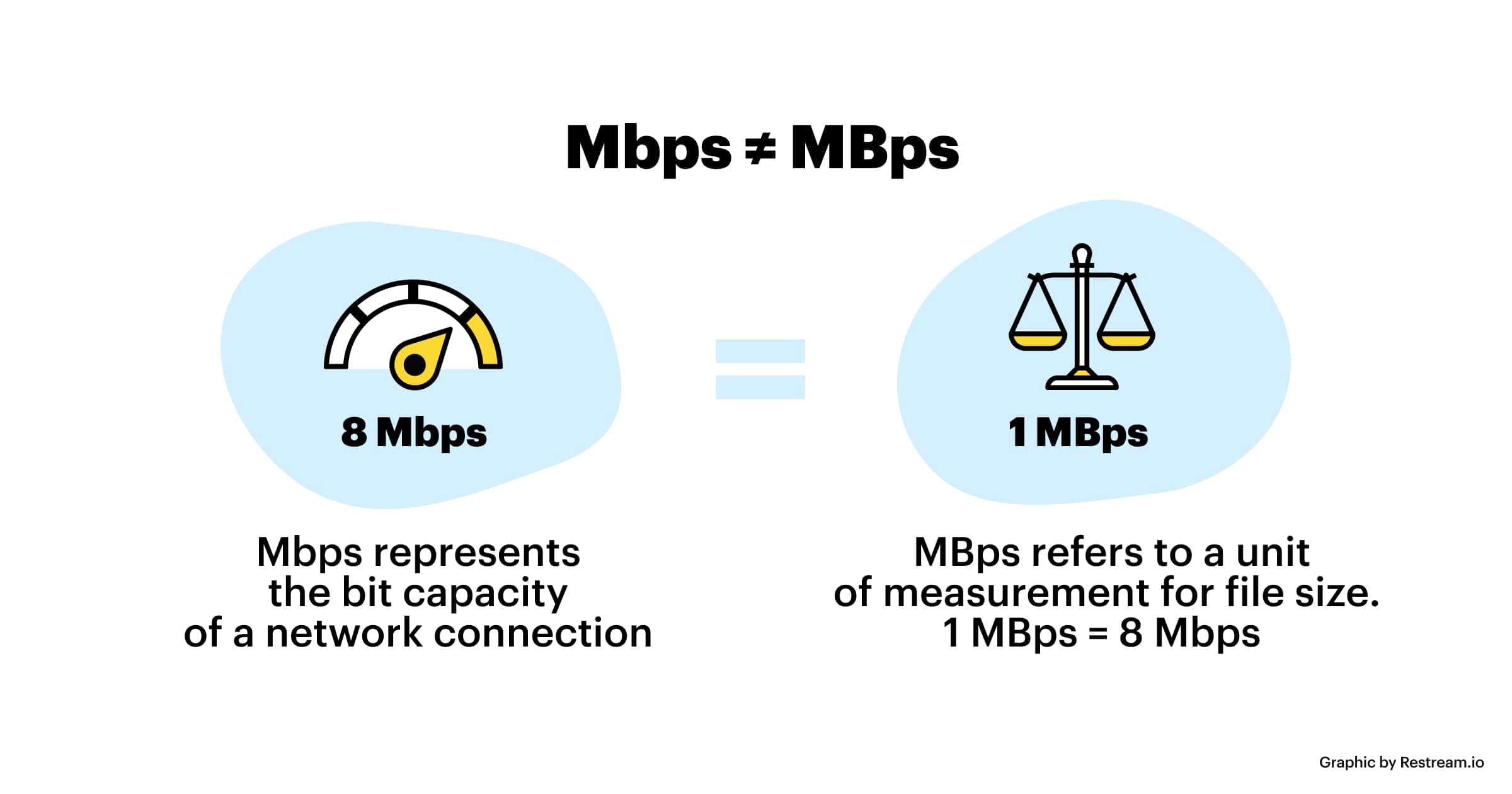
The code rate refers to bits (bit) instead of bytes (byte).

The bit rate alone does not determine the quality of the video, you have to take into account factors like resolution, frame rate, screen size, etc.

Codecs for video compression: H.264/AVC, HEVC, VP9, ​​AV1? If you change the video codec and its settings (or encoding tools), the same bitrate will provide a very different video quality.

What is the capacity of the high resolution sound source?

What is the capacity of the high resolution sound source?

Hi-Res audio

High resolution sound source with more information than conventional CDs.

HiRes Audio

Since the data size is large, you can enjoy high-quality sound with a three-dimensional effect, but the problem is that when managing multiple high-resolution audio sources, the required storage capacity becomes huge.

Then I will introduce what is the capacity of the high resolution sound source, including the management method.

What is the capacity of Hi-Res Audio sources compared to CDs?
In determining the capacity (file size) of a high-resolution sound source, the sampling frequency and bit depth of the sound source are important factors.

The sample rate (sample rate) is a numerical value that is used as an index when converting analog data, such as speech, to a digital signal.

It indicates how many times per second an information sample was measured, and is expressed in “Hz (hertz)”.

If sampling is done every 44,100 seconds, it will be “44.1 kHz”.

On the other hand, the bit depth is a numerical value that indicates how many pieces are recorded in each divided data.

It is represented by “bit”.

Both the sample rate and the bit depth mean that the higher the number, the more information there will be, that is, the higher the resolution.

The amount of music data per second is called the bit rate.

Bit rate is the sample rate multiplied by the bit depth and is expressed in “bps”.

The calculation formula is as follows.

Bit rate (bps) = sample rate (Hz) x bit depth (bit) x 2

For example, the bit rate and sample rate of a CD sound source are generally “44.1 kHz / 16 bits”.

Most so-called “CD sound quality” sound sources are based on this number.

The size of the 5 minute 44.1 kHz / 16 bit / sound source file is about 50 MB.

But what about hi-res audio sources?

High resolution sound source capacity per song (5 minutes) varies depending on the music data format, as shown below.

WAV: 192 kHz / 24-bit: capacity for 5 minutes is 330 MB
FLAC: 192 kHz / 24 bit: capacity for 5 minutes is 200 MB
ALAC: 192 kHz / 24 bits: capacity for 5 minutes is 200 MB
What you can see from this is that the capacity of the high resolution sound source is 4 to 6 times that of the CD sound source in 5 minutes.

Large capacity high resolution music management equipment
If you download 5 high-resolution songs for 4 minutes, it will take up about 700MB (for 96kHz / 24-bit WAV files).

In the case of 10 songs, it exceeds 1400MB, that is, 1GB.

If so, I would like to have enough storage to handle that amount of data.

An effective way to do this is to build a NAS-centric network audio system that incorporates a large-capacity hard drive.

For example, if you can prepare a 4TB (terabyte) hard drive, it can store around 20,000 high-resolution songs.

Next, we will explain what NAS and network audio are like.

NAS
NAS stands for “Network Attached Storage” and it reads like aubergine.

It stands for network attached storage, and it is also called a network hard drive or network compatible HDD.

In other words, it is an external hard drive that is used when connecting to a network (LAN).

A normal external hard drive used when connecting to a PC = PC via USB etc. can basically be used with only one PC.

However, if it is a NAS, it can be used with multiple devices participating in the LAN.

Files saved on the hard drive can also be used and shared from, for example, the personal computers of each family member participating in the home LAN, smartphones connected via Wi-Fi, and TVs in the living room to be.

It is also possible to access the data on the NAS from the outside via the Internet.

The NAS is often used in the home to store and share data for music, video (video / TV recording data), photos (images), etc.

Meaning and relationship of sample rate, bit depth, and bit rate

Meaning and relationship of sample rate, bit depth, and bit rate

bit depth

Sampling rate
Bit depth
Bit rate

bit depth audio

I will present the three meanings and relationships of.

Table of Contents
What is the sampling rate?
What is bit depth?
What is a bit rate?
resume
Sponsorship

What is the sampling rate?
For example, let’s say you say “Ah” for 1 second.

When recording this “Ah” sound on a personal computer, the “Ah” sound is divided into tens of thousands per second, each divided into tens of thousands.

“The height of this section was about this.”
“The length of this section was about this.”
Record it as data like this.

The personal computer continually reads each of this divided data and outputs it as a “voice” called “Ah”.

At this time, “how many tens of thousands of sounds are collected per second” is called the “sample rate.” (Also called “sample rate”)

Sampling rate
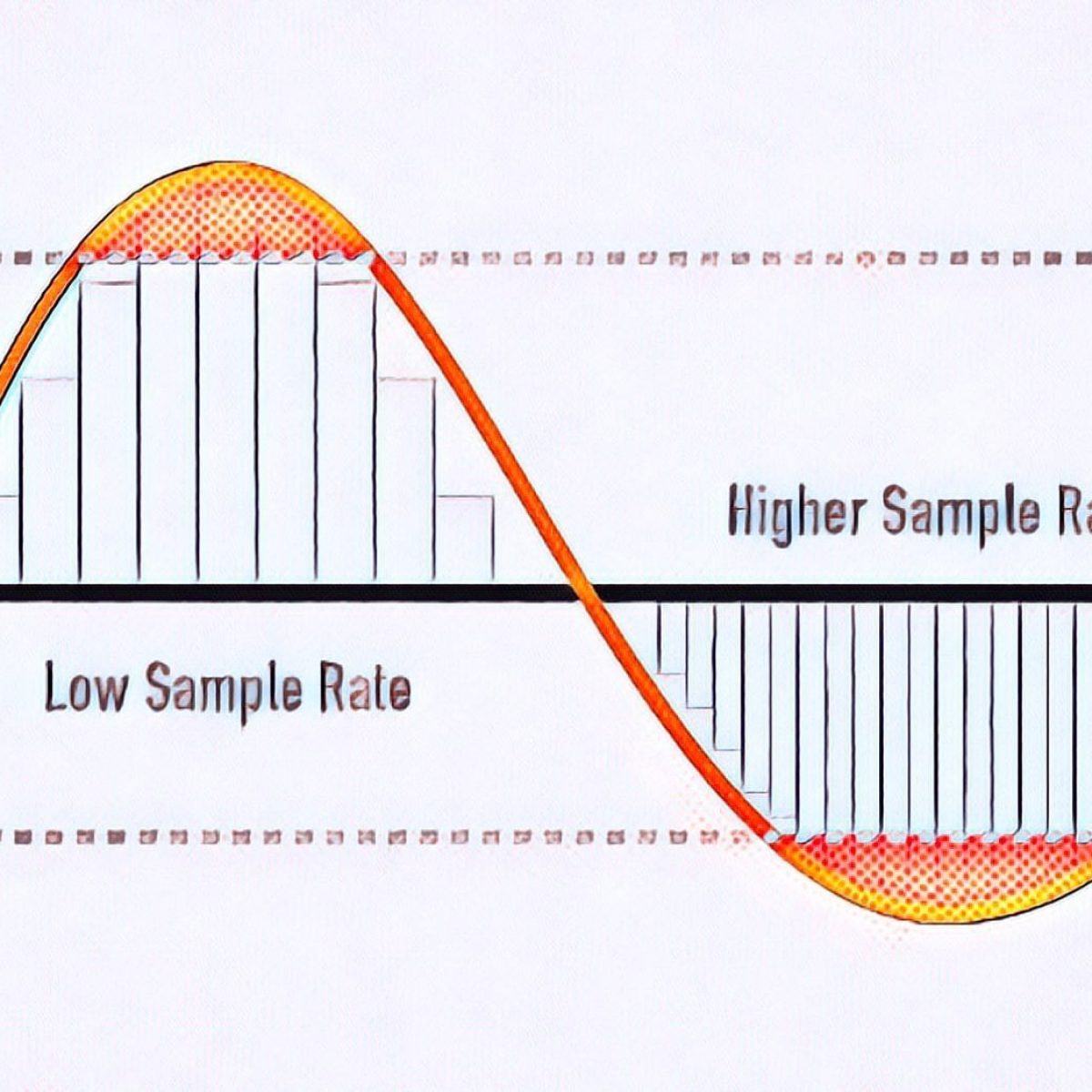
â–² Sample rate image

The more divisions you make, the smoother the sound will be, and as a result, you will feel that the sound quality has improved!

What is bit depth?
The sample rate is “how many tens of thousands of sounds are collected per second”.

“How much capacity is given to each divided data (sample)” is called “bit depth”.

Figure_bit depth
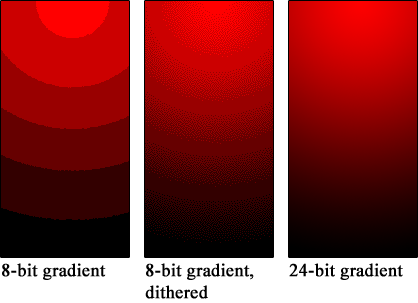
â–² Bit depth image

Also called “number of quantization bits”, “number of sample bits”, “bit offset”, and so on.

For example, if the bit depth is “16 bits”, the amount of information is 2 to the 16th power (65536) for one sample.

The higher the bit depth, the greater the expressiveness of the sound’s fineness and volume, and as a result, I feel like the sound quality has improved!

By the way, the bit depth of most of the world’s sound sources is 16 bit.

that’s why

“Import music from CD!”
“Import music downloaded from the Internet!”
In such cases, 16 bits is sufficient.

On the other hand, if you say “What you recorded in your DAW comes out wav!”, It is better to have 16 bits or more.

This is because, for example, when processing audio effects with audio editing software, sound deterioration can be reduced to zero by assigning an additional bit depth (for example, 32-bit). (Although 16 bit is fine for final output)

What’s more,
note that “bit depth” on this page has a different meaning than “bit depth” in video.

Reference: What is Bit Depth (Color Depth)? Differences like 10bit / 24bit / 30bit

What is a bit rate?
Bit rate is the “amount of data per second”.

Reference: What is a bit rate? Relationship between image quality, sound quality and codec [Video / Audio]

The “sample rate” and “bit depth” presented above are

Sample rate: how many tens of thousands of sounds are collected per second
Bit depth: how much to give to each divided data
Therefore, the product of these two values ​​is the “bit rate”.

Audio encoding

Audio encoding

Audio Encoding

I wrote over audio files last time, but if you reduce the file size (code at a lower bit rate), the sound quality tends to deteriorate. How much should it really be? .. ..

audio encoding

When compressing using audio encoding (AAC, MP3, etc.), the compression rate is determined by the bit rate at the time of encoding. Specifically, if you set a low bit rate, the compression rate will be higher and the file size when saved will be smaller, but first of all, what is the bit rate for uncompressed original sound source (PCM) ?
If you save it as PCM, the sound quality will be that of the original sound, but it can be a bit awkward to save without worrying about the file size. Also, depending on the application, I think the memory capacity is sufficient even for the original sound size and the communication speed is fine. Therefore, I would like to write about the sample rate and bit rate that are often heard in digital audio.

The bit rate of digital audio is determined by the sampling frequency, the number of bits assigned to a sample (number of quantization bits), and the number of channels (stereo, monaural, etc.).

PCM bit rate (uncompressed) = sample rate x number of quantization bits x number of channels
As I wrote a bit last time, in file containers like wav and mp4 format, this information is attached as a header, so that the application can see the header and play it back. The compression rate of the encoding is determined by the bit rate specified at the time of encoding for this PCM (uncompressed) bit rate.
For example, as many of you know about music CDs, with 44.1 kHz stereo, this is the next bit rate.

Music CD bit rate: 44100Hz x 16bit x 2ch (stereo) = 1411.2kbps
When encoding this with MP3, AAC, etc., it is natural to specify a bit rate lower than 1,411.2 kbps. For example, when encoding at 256 kbps, the compression rate is around 18% when the original sound is 100% and the file size is 1/5 or less.

Encode a music CD at 256 kbps: 256 kbps / 1,411.2 kbps = about 18%
In general, the sample rates of audio devices connected to PCs are 48 kHz and 44.1 kHz for music, 16 kHz and 8 kHz for audio such as microphones and headphones, and 32 kHz, 24 kHz, 22.05 kHz. , etc.

The bit rate of PCM (uncompressed sound source) with 16-bit quantization bits is as follows.

Stereo (for music) PCM 16-bit bit rate (example)
Sampling frequency Number of quantization bits Number of channels Bit rate Comments
48kHz 16 16 2 1536 kbps
44.1 kHz 16 16 2 1,411.2 kbps Music CD
32kHz 16 16 2 1,024 kbps
24kHz 16 16 2 768 kbps
22.05 kHz 16 16 2 705.6 kbps
Monaural (for audio) PCM 16-bit bit rate (example)
Sampling frequency Number of quantization bits Number of channels Bit rate Comments
32kHz 16 16 1 512 kbps Super Wide Band
24kHz 16 16 1 384 kbps
16kHz 16 16 1 256 kbps broadband
8kHz 16 16 1 128 kbps Narrow band

Sampling rate
If you check the web, there are explanations such as the sampling required to convert analog waveforms to digital conversion. For example, it shows how many samples of an audio signal input from a microphone are taken per second and digitized. The larger the sample, the greater the range that can be recorded. When an analog waveform is digitized, the frequency that can be expressed is half the sampling frequency (sampling theorem). For example, with a sample rate of 48kHz, it is possible to express up to 24kHz. At 8kHz (narrowband) and 16kHz (wideband), which are often used for audio, you can only hear up to 4kHz and 8kHz, respectively. The higher the sample rate, the higher the bit rate.

sampling theorem
It is a very simple explanation, but it can express up to half the sample rate. When sampling a signal, if the interval is small, it can be restored close to the original signal, but if it is too thick, it cannot be restored (I would like to write a little more detail when talking about signal processing or other time ).

What is the bit rate? Simple explanation

What is the bit rate? Simple explanation

bitrate

Bit rate is a unit of data transfer.

BITRATE

When used in video or audio, as in video editing, it indicates how much data is represented per unit of time, and “bits per second (bps)” is generally used.
A bit is the smallest unit of data that a computer handles.
Two states of “0” and “1” can be expressed by 1 bit. (1 binary digit)
Similarly, a byte representing the size of a file is a unit of data handled by a computer. (1 byte = 8 bits)
Here are some things to keep in mind about bit rates.
In home appliance hard disk recorders, it is sometimes expressed as a recording mode such as XP, SP, LP.
The higher the bit rate value (numerical value), the better the picture and sound quality, but the greater the amount of data (file size).
The unit of bit rate is usually Mbps, which means 10 6 (10 to the sixth power) for video, and kbps, which means 10 3 (10 to the third power) for audio.
When burning a video to DVD, there is a limit to the amount of data that can be burned to DVD, and if you try to burn a long video, you will have to lower the bit rate, resulting in poor image quality. . To record high-quality video, the bit rate must be increased, which increases the amount of data required and shortens the recording time.
Even if the bit rate used is the same, the image quality and sound quality will differ depending on the encoder and compression method used for digitizing.

What are “bit depth” and “sample rate”? Part 2

What are “bit depth” and “sample rate”? Part 2

Understanding Sample Rate, Bit Depth, and Bit Rate - Headphonesty

What is the sample rate?

Bit Depth

Next, I will explain the sample rate.

The sample rate is like the “resolution” of the audio.

The higher the sample rate, the more samples per second = you can hear better.

Requires double sample rate

One thing to keep in mind here is that you need twice the sample rate to hear sound at that frequency.

For example, if you want to hear a 1000 Hz (1 kHz) sound accurately and clearly, the sampling frequency must be at least 2000 Hz (2 kHz).

If the sample rate is less than twice the value you want to hear, “aliases” will occur and you will not be able to process the sound accurately, such as crackle or noise.

Nyquist frequency

By the way, to use a little technical word, it also means not to exceed the “Nyquist Frequency”.

The Nyquist rate is exactly half the supported sample rate.

For example, if the sampling frequency is 44.1 kHz, the Nyquist frequency will be 22.05 kHz.

If you try to handle this high-pitched sound that exceeds 22.05 kHz, the above-mentioned “aliasing” will occur and you will not be able to reproduce the sound correctly.

Range recognizable by the human ear

The loudest sound that can be recognized by the human ear is said to be 20 kHz, so to hear a 20 kHz sound, you only need to have a sample rate of at least 40 kHz.

After that, to avoid aliasing, apply an anti-aliasing filter until the Nyquist (Transition Band) frequency is reached.

For 44.1 kHz, 2050 samples x 2 are required.

In other words, a sample rate of 44.1 kHz is all that is needed to minimize the limit of sound (20 kHz) that the human ear can hear.

When the sampling frequency is high (96 kHz, 192 kHz)

Recently, it can be set to a high sample rate, such as 96 kHz or 192 kHz.

Unfortunately, even with such a high sample rate, it’s hard to tell the difference.

As shown in the image above, non-human animals can hear higher frequency sounds.

However, it is a level that we do not have to worry about because it is a completely inaudible zone for the human ear.

By the way, many audio interfaces cover up to 192 kHz.

Controversy over sampling rate

In fact, in the 1970s, many media outlets were controversial about sample rates.

At the time, 48 kHz was the audio standard used in radio, television, and video work.

However, broadcasting stations have decided to use 44.1 kHz as a standard to prevent data from being copied to consumers (viewers) by intentionally breaking compatibility (or making conversion difficult) …

It’s difficult to change data from 44.8 kHz to 44.1 kHz, so it prevented the average viewer from converting it to the sample rate used for home devices.

By the way, the article “Comparison of professional versus cheaper audio interface” is summarized here, which is also explained from the point of view of bit rate and sample rate.

What are “bit depth” and “sample rate”?

What are “bit depth” and “sample rate”?

Bit Depth

What are “bit depth” and “sample rate”?
What are “bit rate” and “sample rate”?
I wrote it in the DTM project file settings and audio interface specs, but I don’t understand the meaning …

Bit Depth

This time, we will answer those questions.

Here’s a quick rundown of “What is a Bit Rate / Sample Rate ?,” Explained by Professional Drummer / Engineer / Producer Ed Thorne.

Once you know this, you will be able to export the sound source in the appropriate format and you will be able to understand the standards for the equipment that you will buy in the future.

Please take a look to the end!

What is bit-deapth?

Bit depth refers to the range in which the dynamics (inflection) of the sound can be processed.

For example, if the bit depth is “16-bit”, the range of up to 96 dB can be reproduced and processed from the silent state.

96dB is all about the volume when the audience is excited at the live venue.

On the other hand, if the bit depth is “24 bit”, the 144 dB dynamics can be reproduced and processed.

144dB is roughly the volume of a jet airplane.

Dynamics in the age of streaming

Not long ago, there was no volume limit like current streaming services like YouTube and Spotify.

The louder the sound, the better the music itself, which is why the producers always wanted to make the song louder and bigger than any other music.

Today, many platforms where you can listen to music have volume restrictions, so the idea that “the more music you can play loud sounds, the better” has changed, and times have changed.

So, in this age, 16-bit or 24-bit might not make much of a difference.

The amount of data also changes

By the way, if the bit depth is high, the amount of data will change as well.

When recording a lot, it may be better to consider this a bit.