Bitrate vs. Video Resolution


Free Download Mp4Gain
picture

Bitrate vs. Video Resolution

Bitrate vs. Video Resolution

which is more important for streaming video?

Bitrate vs. Video Resolution

Many people have this confusion because these two factors can have a profound effect on the encoder’s output.

How do you think it should be chosen?

Choose 1080p or 720p?

Choose 5mbps or 3mbps?

Choose 1080p@5mbps or 1080p@7mbps?

If you don’t know what to choose, great. That’s why I wrote this article: to explain the relationship between bitrate and resolution in simple terms, and to help you choose the right encoder settings.

Let’s start by understanding bitrate.

What is the bitrate of the video?

Video bitrate or bit rate refers to the number of bits transmitted per second of video information. The code rate unit is usually:

kbps or kilobits per second

mbps or megabits per second

When you are compressing video, you usually need to set the video compression software not to exceed a certain bit rate.

For example, if you set the video compression software’s bitrate to 3mbps, the software will compress the video at 3mb per second (on average) and stream it to the decoder or player. This is the code rate.

When you talk about bitrate, you’re really talking about: the relationship between video compression and video quality loss. The more you compress, the lower the quality of the video (and this is not always the case, as we will see later).

When compressing video, the following algorithms can be used for speed control, these are:

CBR (Constant Bitrate) – It is best to keep the bitrate constant if video quality is lost.

VBR (Variable Bitrate) – Maintains consistent video quality, allowing for bitrate fluctuations.

Capped VBR – Keep the video quality as constant as possible, allowing the bitrate to fluctuate within a set range.

This article will not discuss the above frequency control methods in detail. Friends who want to know more, welcome to read: Understanding Frequency Control Modes: What are CBR, VBR, CRF and Capped-CRF?

So when we talk about the bit rate, we should pay attention to the following points:

The quality of high bitrate video is usually higher than that of low bitrate video. I say generally, because the video quality reaches a certain point where it will no longer improve (no matter how much the bitrate increases).

The code rate refers to bits (bit) instead of bytes (byte).

The bit rate alone does not determine the quality of the video, you have to take into account factors like resolution, frame rate, screen size, etc.

Codecs for video compression: H.264/AVC, HEVC, VP9, ​​AV1? If you change the video codec and its settings (or encoding tools), the same bitrate will provide a very different video quality.


Free Download Mp4Gain
picture


Mp4Gain Main Window
picture


Mp4Gain Features
picture


Free Download Mp4Gain
picture

What video bitrate is appropriate for video?

What video bitrate is appropriate for video?

Video Bit Rate
Video Bit Rate

At present, 720p video recommended minimum bitrate is above, h.264 encoding 2M bitrate is adequate, 1080p is 4M enough
to get a high-quality video, convert it with different bitrates, and then compare the image quality.

Video Bit Rate
Video Bit Rate

The most commonly used are: h.264 encoding, 1080P, 2.5M bit rate or more.
Summary: [h.264 encoding, 2.5M bitrate (up to 4M), maximum 4M bitrate (add 2M to target), most platforms are Blu-ray. 】

1. If the bitrate is higher than the original video, it will not be a bit higher than the original video. When you move, you’ll pick a lower point to compress the file a bit.
2. 1080P 1M bitrate has distortion feeling to watch on computer, and 2M can’t see distortion, you can adjust the bitrate to 4M to get the best.
The following are the bitrate upload requirements for a platform:

How much video bitrate is appropriate (above H.264 bitrate, 720P, 1080P output bitrate setting)

How much video bitrate is appropriate (above H.264 bitrate, 720P, 1080P output bitrate setting)

***Normal 240p, 320p SD, 480p HD, 720p Ultra HD, 1080p Full HD (Blu-ray), 2K, 4k Ultra HD ***
Normal 240P (320×240 standard resolution, it was 3GP, this is basically nobody used)
SD 270P<0.8M (360×270 standard resolution, was 3GP, rarely used) [140M when storing 422 materials]

High definition 480P (360P)>=0.8M (standard resolution of 640 × 480, minimum 480 * 360, was 3GP) [480 re-advertising is called high definition, but the normative statement can only be regarded as standard definition]

Bit rate, what is it?

Bit rate, what is it?

Bit Rate

as a feature of digital audio and video

Bit rate

Bitrate: literally, the information bit rate. It is common to use the bit rate when measuring the effective information transmission rate through the channel, that is, the “payload” transmission rate (in addition to that, the channel can transmit service information, for example, start and stop symbols for asynchronous transmission or control symbols for redundant coding). The baud rate, which takes into account the total bandwidth of the channel, is measured in baud.

Bit rate is the number of units of information required to store (transmit) one second of a stream of data (generally audio and video files). It is generally measured in ‘kbps’, kilobits per second.

The term bit rate is used in two basic meanings
: channel or device characteristic: the maximum number of bits that can be transmitted per unit of time.
– The size of the data stream transmitted in real time (the minimum size of the channel that can pass this stream without delay).
– A special case is the compressed video or audio bit rate.
Bitrate is expressed in bits per second (bit / s, bps), as well as values ​​derived with the prefixes kilo, mega, etc.

The term bit rate (in conjunction with subjective quality criteria) is often used as a characteristic to evaluate the performance of lossy compression algorithms.

Bitrate characterizes both the density of the information package and its quality. For example, out of two MP3 files compressed with different bit rates, a file with a higher bit rate will have higher sound quality (close to the original). At the same time, a file of a different format, with the same bit rate, can offer both better and worse sound quality.

On an audio CD, information is losslessly encoded at a constant 1407 kbps bit rate.

The MP3 format allows you to encode audio information with constant or variable bit rates from 32 to 320 kbps, that is, they provide five times the compression compared to CD.

Bit rate as a characteristic of digital video and audio

In streaming video and audio formats (such as MPEG and MP3) that use lossy compression, the bit rate parameter expresses the degree of compression of the stream and therefore determines the size of the channel for which it is compressed data transmission. Most of the time, the audio and video bit rate is measured in kilobits per second (kilobits per second in English – kbps), less often – in megabits per second (for video only).

There are three compression modes for data transmission:

– with a constant bit rate (constant bit rate in English – CBR)
– with a variable bit rate (variable bit rate in English – VBR)
– with an average bitrate (English Average Bitrate – ABR)

Variable and average bit rate

The codec chooses the required bit rate based on the parameters (the level of the desired quality) and, during the encoded chunk, the bit rate may change. When compressing audio, the desired bit rate is determined based on the psychoacoustic model. ABR is a variation of VBR in which the codec is compressed to a specified average value.

What is the optimal bit rate?

What is the optimal bit rate?

Optimal Bitrate

To decide what the flow can be, it is necessary to understand how it works, at least in the first approximation.

BitRate

In the H.264 codec (MPEG-4 Part 10), the construction of the video image is as follows: the camera creates a reference frame (I-frame) and, based on it (therefore, it is called a frame of reference), subtract the still parts of the picture from the frame – a P- frame. The third of this second frame is then subtracted and a modified P-frame is also created. Thus, a series of P-frames is created, which only carry changes between two adjacent frames. Since in the process of “subtracting” frames, errors may occur leading to artifacts, then after a certain number of frames the scheme is repeated, a reference frame is sent again, and then a series is sent of frames with changes across the network. The resulting keyframes and modified P-frames are sent over the LAN to recreate a series of full frames on the display device. It does this by “appending” or “superimposing” P-frames to a reference frame and sending the resulting series of frames to the monitor. This is how codecs work with interframe compression. Of course, in practice everything is more complicated by an order of magnitude (there are also B-frames, which, based on the analysis of a large set of frames, predict where a particular object will move in the field of view of the camera, which allows to significantly reduce the flow when observing the translational movement, for example, that -to the mechanisms).

With a slight change in the observed scene, the changes between adjacent frames will also be minimal, respectively, and the traffic on the network will be minimal. The reverse is also true: if the scene changes significantly, the changes between frames will be significant, consequently affecting the network load.

Do not forget about the peculiarities of codecs with interframe compression, they introduce quite a noticeable delay between the moment of the event itself and the moment it is displayed on the screen. This is due to the work of the codec itself, as the camera needs to receive both frames, then subtract one from the other, send it to the image output device, and overlay it on the reference frame, which takes time and therefore introduces a delay.

There is no point in talking about optimal resolutions without referring to the observed scene, since, for example, when observing an empty corridor at a quality of 1080p / 25 fps, the transmission can be approximately 1 Mbps, and when observing a station of meter at rush hour, an image in the 720p / 25 fps format may take up to 20-30 Mbps

What is the bit rate?

What is the bit rate?

Bitrate

Bitrate, or as they say the width of the sequence

Bitrate

It is the amount of data transmitted or processed in 1 second. The concept mainly applies to multimedia content, for example, video bit rate is nothing more than the amount of video information that is displayed on the screen in one second. To measure the bit rate, the designation “Kbit / s (kbps)” is used, that is, kilobits per second, less frequently Mbit / s, and so on. The more information that is transmitted during a specific period of time, the higher the quality of the image.

When people say “low bit rate video” they are generally referring to low quality video. Blur, opacity, and pixelation are characteristic of such video, while high-bit-rate video has a detailed image with rich colors. Like video, audio also comes with low and high bit rates. Music with a low bit rate loses in the frequency range, words and chords become less distinguishable, and itself takes on an unnatural sound, as if it were an electronic sound.

Bit rate types
When compressing video, you have 3 modes to choose from: constant, variable, and average. Let’s start in order:

Constant Bit Rate (CBR). Sets the desired value and does not change throughout the video. The advantage of this option is that you know in advance what the size of the final file will be. But there is also a downside, especially in relation to sound. It may grow during playback, which may require changing the bit rate. Since you don’t get what you want, quality suffers.
Changes in sound level

Variable (VBR). In this case, you are working in conjunction with a codec. Your task is to set the maximum bitrate and programs must select the required value for each scene. Thus, the “minus” of the previous regime has been eliminated. Also, the file size may be even smaller than expected, but the outcome is impossible to predict.
Average (ABR). From the name it is clear: this is a cross between the first and second mode. Here you set not only the maximum, but also the minimum bitrate, and the codec itself selects it within these limits, based on the dynamics of the video. Its quality is better than that of the variable option, because the bit rate does not fall below the set value.
YI 4K video bit rate increase
Although action cameras have been in our lives for a long time, not everyone understands their true purpose. More than once I have come across the fact that people see them as a compact analog of ordinary consumer camcorders and make corresponding demands on them. First of all, it comes down to the quality of the footage shot. “I just want to take the camera out of my pocket, start recording, and get a picture like on film.”

… This is impossible in principle. And it is doubly impossible in an action camera, since it is a compromise between “action” (a set of characteristics for operation in extreme conditions) and the quality of the shot: improving one thing, the other will deteriorate proportionally.

However, you can do something. For example, replace the lens or increase the video bit rate. What will increase the bit rate? Some improvement in image quality. It should be understood that although the camera shoots at a fairly high bit rate (up to 60 Mbps), the built-in codec uses a fast profile. In other words, video recorded with a 60 Mbps camera will be worse than video recorded on a computer with the same bit rate. First of all, areas of almost uniform color and “jerky” undergo such coding. For example, grass, ripples in the water, or foliage. Increasing the bitrate is not a panacea here, but a tangible step forward. It is true that you need to understand that the developer set a limit of 60 Mbit / s for a reason and that increasing the bit rate is done at your own risk and risk. Also, this increases the requirements for the memory card used and the writing speed on it.

If you use a camera, for example, for video blogs with video uploading to YouTube, you don’t need to change anything, as the video host will recode your video by itself, regardless of the initial parameters. If you’re post-processing the footage, it makes sense to give it a try as there is minimal body movement.
DISCLAIMER OF LIABILITY
In many respects, this article expresses the subjective opinion of the author. Furthermore, the author is not responsible for possible damage to the camera.

What is bit rate and why is it important?

What is bit rate and why is it important?

What is bitrate?

With today’s technology, we can expect high speed and quality in everything we do on our computers, our smartphones, and any other newer devices. However, although this increase in speed and quality has several factors, many of them have to do with what is called the bit rate.

Bit rate

What bitrate means depends on the context you’re using it in, but it’s very important to know what it is and what benefits it might bring you (or what to expect instead).

What is the bit rate?

Bit rate is a term used to describe the amount of data that is transferred over a period of time. Depending on the context, common bitrate measures include kbps and Mbps, respectively, which means kilobits per second and megabits per second. Regardless of which drives are used, a higher number is usually good, indicating high speed or high quality.

However, it is also important to understand that smaller numbers can reduce the load on your hardware, which can be important for devices such as smartphones and netbooks.

When it comes to internet speed, a higher bit rate is always desirable – it doesn’t overload your own hardware, it just sends you the content you want faster. With higher bit rates, you can do more with an Internet connection – stream HD movies, play online games with minimal latency, and download large files in just seconds.

You can find out what bitrate you are getting by visiting a website like speedtest.net and running your tests. The numbers are good to compare with others, but generally don’t expect the expected number (other than the number your ISP announced). Certain parts of the world and Google Fiber users can get speeds of up to 1 Gbps (1000 Mbps), while typical cable broadband users in the US can get as low as 10 Mbps.

There has been a lot of discussion in online communities like Reddit about high internet prices in the US due to how slow speeds are, and initiatives like Google Fiber are starting to pay off.

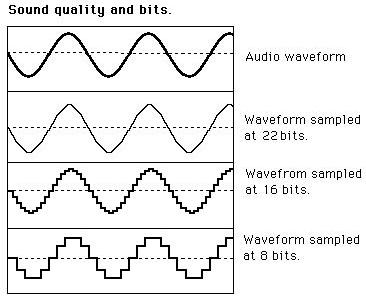
When it comes to audio and video, bit rates take on a different definition. In this context, bit rates refer to the amount of data stored per second of multimedia playback. For example, a 320 kbps MP3 audio file has a higher quality than the same file at just 128 kbps, as long as both files were created from the same ideal source. You will have to remember that you cannot improve an audio file that sounds bad by copying it to an audio file with a higher bit rate, as the source was bad from the beginning. So a higher bit rate is a general rule of thumb, but it is not 100% correct.

The same is true for video: a higher bitrate will have a higher quality when comparing the same video with the same resolution. The bit rate is expected to increase as the resolution increases as more data is processed. Consequently, high bit rates for audio and video can provide superior quality, but can also put a lot of pressure on your hardware, which can lead to stuttering.

Also, keep in mind that different file formats use different compression algorithms, which can result in lower bit rates and higher quality. However, for these algorithms, the processing load tends to increase.

What is the best bit rate for video and sound and what is it?

What is the best bit rate for video and sound and what is it?

Bitrate

Common characteristics of video and audio recordings include the so-called bit rate. Some users do not know how important this figure plays when playing files, along with their size and resolution.

BitRate

What is the bit rate? The bitrate is the number of bits that are used to process and transmit data during a certain period of time. This measurement is used to measure the effective transmission rate on a data stream channel. In other words, this is the minimum value of the channel capable of passing the flow without delay. The measure of video bit rate is bits per second and its derivatives (kbps, Mbps, etc.). In audio and video transmissions that use degrading compression, this term refers to the degree of compression of the transmission. Consequently, it indicates the size of the channel within which compression took place. Compression modes In practice, there are three modes of stream compression that cause quality loss: Constant Bit Rate (or CBR).

In this encoding option, the initial bit rate is set by the user and then does not change for the entire duration of the audio or video. Its advantage is that it is quite easy to calculate the size of the final file. However, this encoding is not very suitable for audio files that have dynamically changing sound, as it does not provide a good size / quality ratio. Variable bit rate (or VBR). The bitrate value is selected by the codec, depending on the parameters (the expected quality level). During the encoded fragment, the value of the bit rate may change. When audio is compressed, the required bit rate is set based on the psychoacoustic model. This encoding achieves the best sound quality ratio, but it is difficult to calculate the exact size of an audio or video recording. It can be very different. Average Bit Rate (or ABR). This is a hybrid of the first two modes.

The initial value of the bit rate is set by the user, but then independently changed by the program within certain limits. At the same time, the difference with VBR is that the codec uses the maximum and minimum values ​​within the limits set by the user, and does not exceed them. This encoding allows you to set the processing speed in the most flexible way and allows you to determine the file size with greater precision. What is the Getcontact application and how to use it

What and how is it measured? When quantifying high data rates, metric or decimal prefixes are used. It looks like this: Speed ​​1000 bps = 1 kbps (one kilobit or one thousand bits per second). Speed ​​1,000,000 bps = 1 Mbps (one megabit or one million bits per second). Speed ​​1,000,000,000 bps = 1 Gbps (one gigabit or one billion bits per second). What bit rate should I choose? In terms of the common MP3 audio format, it is the audio compression that results in data loss. The higher the bit rate, the better the sound quality. Speaking of the choice of the bit rate for this format, we can say the following: 32 kbps: very low quality sound (valid only for voice recording); 96 – May be applicable for low quality audio transmission or voice recording; 128 and 160: allows you to encode music recordings at an entry level; 192 – music encoding in acceptable quality; 256: high quality music recording; 320 is the highest quality you can get in MP3 format. In video formats, this value is calculated differently. For example, for videos on YouTube, a bit rate of 10-16 Mbps at 720p is sufficient. This will achieve a clear image and a small file size.

If better image quality is required, this value can be increased to 18-25 Mbps. The highest image quality will be achieved at 50 Mbps and 1080i resolution. In general, the effect of bitrate on video quality is expressed as follows: Yandex.Direct18 + Make money building websites! SITE.ONLINESCHOOL-PROFI.RU Make money writing articles COPYWRITING.ARTUR-GRANT.RU 400 kbps: low quality video at 240p; 750 kbps, 1 Mbps: can be used for some YouTube videos at 360p and 480p, respectively; up to 1.15 Mbps – compressed video in VCD format; 2.5 and 3.8 are compressed videos for YouTube, recorded at 720p; 4.5 and 6.8 are sharper YouTube videos but still compressed at 1080p resolution. 9.8 – DVD video recordings; 8-15 – high definition video recording using compression; 19 and 25 are HDV (high definition) recordings created at 720p and 1080i, respectively; 29.4 – high quality HD DVD video; 40 – Blu-Ray Disc recorded at 1080p; 250 – DCP format; 4Gbps: Uncompressed 1080p video recording.

WHAT IS IT AND WHAT DOES THE BIT RATE AFFECT?

WHAT IS IT AND WHAT DOES THE BIT RATE AFFECT?

Bit Rate

Bit rate, a value that, in digital audio and video material, is the rate of data flow (the number of units of information) transmitted per unit of time (second). It can be indicated as the minimum value required to reproduce the original or compressed format, without delays and stops of video, audio, and the average or maximum quality value for the data storage format used. Most of the time, it is expressed in bits per second for audio and megabits for video.

Bitrate

It can have a constant, average, or variable value.

CBR (constant bit rate): data rate, remains unchanged, from the beginning to the end of the file.
ABR (Average Bit Rate): An average value, usually fixed, is used that is greater than the minimum limit, but less than the maximum possible.
VBR (Variable Bit Rate) – Bit rate varies throughout the file and depends on many factors, the end result can be unpredictable.

The higher the bitrate, the better the video and audio quality? It is not entirely true .

The bit rate, or the number of information units spent per unit of time, one second, is similar to the flow of water, the speed of which will change the filling time of the container, but the quality of the water itself.

The best quality requires high quality source video or audio material, therefore equipment capable of providing it. The same goes for water, for better water quality the composition is important first, not the force of the flow.

In other words, it makes no sense to increase the value of the bitrate (water stream), expecting to improve the quality if the quality of the initial data (water) is worse. Similarly, and vice versa, reducing the bit rate, to obtain a better material, will worsen the final result, but it will reduce the size needed to store data.

Bit rate is not a primary indicator of quality, but rather options for the minimum and maximum allowable flow conditions necessary to meet the remaining conditions to obtain the desired quality, provided that materials similar to the desired quality are used.