What video bitrate is appropriate for video?


Free Download Mp4Gain
picture

What video bitrate is appropriate for video?

Video Bit Rate
Video Bit Rate

At present, 720p video recommended minimum bitrate is above, h.264 encoding 2M bitrate is adequate, 1080p is 4M enough
to get a high-quality video, convert it with different bitrates, and then compare the image quality.

Video Bit Rate
Video Bit Rate

The most commonly used are: h.264 encoding, 1080P, 2.5M bit rate or more.
Summary: [h.264 encoding, 2.5M bitrate (up to 4M), maximum 4M bitrate (add 2M to target), most platforms are Blu-ray. 】

1. If the bitrate is higher than the original video, it will not be a bit higher than the original video. When you move, you’ll pick a lower point to compress the file a bit.
2. 1080P 1M bitrate has distortion feeling to watch on computer, and 2M can’t see distortion, you can adjust the bitrate to 4M to get the best.
The following are the bitrate upload requirements for a platform:

How much video bitrate is appropriate (above H.264 bitrate, 720P, 1080P output bitrate setting)

How much video bitrate is appropriate (above H.264 bitrate, 720P, 1080P output bitrate setting)

***Normal 240p, 320p SD, 480p HD, 720p Ultra HD, 1080p Full HD (Blu-ray), 2K, 4k Ultra HD ***
Normal 240P (320×240 standard resolution, it was 3GP, this is basically nobody used)
SD 270P<0.8M (360×270 standard resolution, was 3GP, rarely used) [140M when storing 422 materials]

High definition 480P (360P)>=0.8M (standard resolution of 640 × 480, minimum 480 * 360, was 3GP) [480 re-advertising is called high definition, but the normative statement can only be regarded as standard definition]


Free Download Mp4Gain
picture


Mp4Gain Main Window
picture


Mp4Gain Features
picture


Free Download Mp4Gain
picture

What does MP3 bitrate mean?

What does MP3 bitrate mean?

MP3 bitrate

Bit rate

mp3 bit rate

The rate at which a digital channel transmits digital signals is called the data transfer rate or bit rate.
The word bitrate has many translations, such as bitrate, etc., which indicates how many bits per second the encoded (compressed) audio data should be represented, and a bit is the smallest binary unit, either 0 or 0. 1. The relationship between bitrate and audio and video compression is simply that the higher the bitrate, the better the quality of the audio and video, but the larger the encoded file; if the bitrate is lower, the situation is reversed.

For example: encode audio and video at 500 Kbps.
where bps are bits 1K = 1010 = 1024
b is little
s is the second
p is for (for)
Therefore, encoding at 500 kbps means that the encoded audio and video data must be represented at 500 K bits per second.
In the baseband transmission system, the bit rate is used to represent the code rate of transmitted information.
The bit rate Rb refers to the unit of time
The number of binary bits transmitted within the unit, the unit is b/s. For example, the transmission speed of a computer serial port is up to 115200b/s.
The symbol rate or baud rate Rs refers to the number of modulation symbols transmitted per unit of time, that is, ternary and ternary
The information transmission rate of the multivariate digital code stream in the

In M-ary modulation, the relationship between the bit rate Rb and the baud rate Rs is:
Rb=Rslog2M
The sampling rate refers to the ratio of the sampling samples to the total number of samples, and the sampling rate refers to the number of samples per unit of time. If it is an instrument, the sampling rate is 40MSa/s, which indicates that the number of samples per second is 40M, but it cannot be represented by 40MHz.

The process of converting analog audio to digital audio is called sampling. In a nutshell, how much data is needed to record a 1 second duration of sound via waveform sampling. A sound with a sample rate of 44 KHz requires 44,000 data points to describe a 1-second sound waveform. In principle, the higher the sample rate, the better the sound quality.

What is bit rate? Knowledge of the MP3 audio format. Part 2

What is bit rate? Knowledge of the MP3 audio format. Part 2

mp3 bit rate

Bitrate is a benchmark indicator of the efficiency of digital music compression.

mp3 bitrate

The bit rate represents the number of bits bps (bit per second, bits per second) transmitted per unit of time (1 second). We usually use kbps (in simple terms, it is per second) clock 1000 bits) as the unit. The bit rate of digital music on CD is 1411.2 kbps (ie recording 1 second of CD music requires 1411.2 × 1024 bits of data). The higher the bit rate of the music file, the more data (Bit) must be processed in a unit of time (1 second), and the better the sound quality of the music file. However, when the bit rate is high, the file size increases, which will occupy a large amount of storage capacity. 8 to 320 kbps.

1. WMA (Windows Media Audio, Windows Media Audio)

As a Microsoft media compression method, it is a part of the technology that compresses only audio data in Windows Media Technologies. The sound quality is similar to MP3 and can be compressed with half the technology of MP3. It has the copyrighted Windows Media Rights Manager, which can be played by installing in WMP (Windows Media Player, Windows Media Player). Due to the strong influence of Microsoft and Windows, as well as major copyright reasons, the major American record companies EMI and BMG have officially confirmed that they use the WMA method developed and produced by Microsoft. It is believed that this advanced method will become even more popular in the future.

2. MP3 (CBR, VBR, ABR)

MP3 is currently the most widely used and widely used lossy compressed digital audio format, which has been explained above and will not be repeated here.

CBR (constant bit rate)

CBR is the oldest and simplest MP3 encoding (compression) method. When this method is used for encoding, the bit rate of the entire file is the same, in other words, the bit rate used by the MP3 file per second is the same. Although the music file has sections of varying complexity, the encoder always keeps the bit rate constant, unless you use the highest sound quality, otherwise the sound quality of the different sections of the MP3 file will vary. The more complex the passage, the worse the sound quality. Its biggest advantage is that the file size is fixed, which is convenient for calculating storage space.

What is bit rate? Knowledge of the MP3 audio format.

What is bit rate? Knowledge of the MP3 audio format.

mp3 bit rate

Digital audio formats are audio signals that are recorded, processed, and reproduced in digital form.

Mp3 bit rate

The emergence of digital audio formats is to meet the needs of high-fidelity playback, storage and transmission. Simply put, early analog audio formats had issues with playback distortion and glitches due to media wear. Since the advent of CD discs, audio files in digital format have become popular, but another problem has arisen: the limitation of storage volume and the phenomenon of CD disc wear is still present. Saving to a hard drive (in connection with longer storage time) is also not a good solution when storage media (mainly hard drives) are still expensive at the time. The rise of the Internet has created a requirement for long-distance file transmission. Under the restriction of bandwidth, the demand to reduce file size has become more intense. All this has led to the generation of lossy compressed digital audio formats from external factors!

In terms of internal factors, with the improvement of computing and coding capabilities, the progress of various acoustic psychological models has promoted the emergence of various lossy compressed digital audio formats. Some of the most commonly used audio formats in MP3 players are briefly introduced below: MP3 (CBR, VBR, ABR), WMA, WAV, ADPCM, and the emerging audio formats AAC, ASF, and OGG.

Before introducing various digital audio formats, let’s clarify one concept: bitrate.

In the field of computing, all information is digitized. Bit is the smallest unit of data in a computer, it refers to a number of 0 or 1, which is a mathematical binary number, a “0” or “1” , is a bit. For example, when we say a 2-digit number, it means that it is a two-digit binary number, and there are 4 combinations of “00”, “01”, “10” and “11”, which represent 0, “11” in decimal respectively. 1, 2 and 3 are four numbers.

What if the bit rate is high?

What if the bit rate is high?

Bitrate

High bit rate = a lot of data can be transferred per second

bitrate
.

Sounds like a good thing.

The network cameras managed by my company send the captured video data to a personal computer for viewing over the network.

If you want to see the video, you want to see a beautiful video that moves sharply with high image quality, right?
However, the amount of data in a beautiful image is surprisingly large …

In such case, if the bit rate is high, a lot of data can be transferred per second, so you can deliver beautiful images to your computer. On the other hand, if the bit rate is low, the amount of data that can be transferred per second is small, resulting in choppy and poor quality moving images.

“Then the bitrate should be high anyway!”

… That is not the case.
In fact, in a surveillance camera system, there are the following disadvantages to increasing the bit rate.

Disadvantages of high bit rate!
Transferring a large amount of data increases the load on the network line and equipment.

There is an upper limit to the bit rate that can be transferred depending on the network environment. This depends on the LAN cable you are using, the performance of the hub, etc., but it will be difficult so I will skip it. Just think that there is an upper limit for the bit rate depending on the environment.

“So what happens if it exceeds the upper limit?”

In the case of video from a network camera, the connection often drops. If you exceed the upper limit, the line will be punctured and you will lose connection with the camera. The image may be interrupted for a moment, but if it is too bad, you will not be able to see the image from the camera at all.
If this happens, it will be very troublesome …

Also, if the bit rate is high, a large amount of data will reach the browsing computer and the recording NVR. When a lot of data arrives, the computer or NVR will not be able to process the data, which may cause abnormal operation (reboot, etc.).

Therefore, the System Kay NVR defines the maximum bit rate that can be supported as a specification. The bit rate that the entire NVR can process such as performance and bandwidth limit per channel are described in the specifications.

Video distribution Advantages and disadvantages of a high bit rate

Video distribution Advantages and disadvantages of a high bit rate

bit rate

The video bit rate is calculated separately for video and audio and added together.

Bit Rate

The sum of the video and audio bit rates is called the oval bit rate (total bit rate).

Expressed in the formula
Oval bit rate = video bit rate + audio bit rate

Will be.

High bit rate benefits
The higher the bit rate, the better the picture and sound quality, and the lower the bit rate, the worse the picture and sound quality.
However, note that if the video bit rate is high, there are cases where the video bit rate is high and the image quality is good, but the audio bit rate is low and the sound quality is poor. On the contrary, there may be cases where the image quality is poor and the sound quality is good.

High bit rate video basically has the advantage of improving image quality and sound quality, but you also need to understand the disadvantages.

Disadvantages of high bit rate
The higher the bitrate, the more net bandwidth is consumed and the more playback load is applied.
For example, increasing the bit rate from 500 Kbps to 1000 Kbps doubles the net bandwidth usage and doubles the playback load or more.

It is easy to increase the bit rate for high image quality, but if you increase the bit rate too much, the CPU will become overloaded and you may not be able to reproduce it well, so be careful.

Especially when the radio wave of the smartphone is bad or the band is limited, it may not play smoothly at a high bit rate.

Even if the bit rate is increased, the image quality and sound quality do not improve above a certain level.
In fact, increasing the bit rate does not mean that the image quality and sound quality will increase without an upper limit.

For example, if the image quality of the original video material shot by the camera is 100, even if it is converted at a high bit rate by video editing software or encoding software, a high-quality video with a quality of 100 or more image of the original video will be created. You can not.

No matter how high the bit rate is, if the quality of the original video material is poor, the quality will not be better.

Let’s think about the optimal bitrate for each video.
When creating a video, you need to think about how to set the optimal codec, resolution, frame rate, and bit rate yourself.

Then
The higher the bit rate, the better the picture and sound quality.
If the bit rate is high, the network and the playback terminal will be overloaded.
Even if the bit rate is increased, the picture quality and sound quality should not be higher than that of the original video material.
It is useful to remember that.

Also, almost all video editing software, encoding software, YouTube, and other free video publishing services commonly used when creating and publishing videos have preset settings with preset codecs, resolutions, frame rates, and bit rates.

However, the image quality of the presets is not always optimal, so use this bit rate knowledge when you need to make fine adjustments.

What is a bit rate? Basic bit rate knowledge required for video distribution.

What is a bit rate? Basic bit rate knowledge required for video distribution.

Video Bitrate

Bit rate / bit rate

BitRate


Bit rate is the amount of data per second. Video quality is determined by factors such as “resolution”, “frame rate”, “bit rate” and “codec”. Bit rate is an important factor related to video quality. Therefore, this time, I will explain the basic knowledge of bit rates required for Internet video distribution.

” Table of Contents ”

1. What is a bit rate?
2. Relationship between video bit rate and video image quality
3. Estimated video bit rate
4. Advantages and disadvantages of a high video bit rate
1. What is a bit rate?
The amount of data per second is called the bit rate. Use bps as the unit. This is an abbreviation for Bit Per Second. For example, if it is written as 500 kbps, k is 1,000, which means “the amount of data of 500,000 bits per second.”

There are two types of video bit rates: “video bit rate” and “audio bit rate”. The total value of “video bit rate” and “audio bit rate” is the total bit rate (oval bit rate) of the video file.

Video Bit Rate / Audio Bit Rate

■ Voice bit rate
The audio bit rate is the bit rate associated with the audio in the video file. Generally, the audio bit rate is lower than the video bit rate.
The guideline for the audio bit rate is as follows.

Lossy codecs like MP3, AAC, WMA … 96kbps-128kbps
Sound quality oriented video … 192 to 320 kbps
A codec is a program that encodes (encodes) / decodes (decodes) video and audio data. A lossy codec is a codec that dilutes the data and reduces its weight without affecting it. For more information on codecs, see the following.

[Reference article] What is a codec? Basic knowledge of the codecs required for video distribution.
■ Video bit rate
The video bit rate is the bit rate of the video in the video file. Generally, the video bit rate value is higher than the audio bit rate. The appropriate video bit rate will differ depending on the size of the resolution and the content of the video, such as amount of movement / small amount of movement.

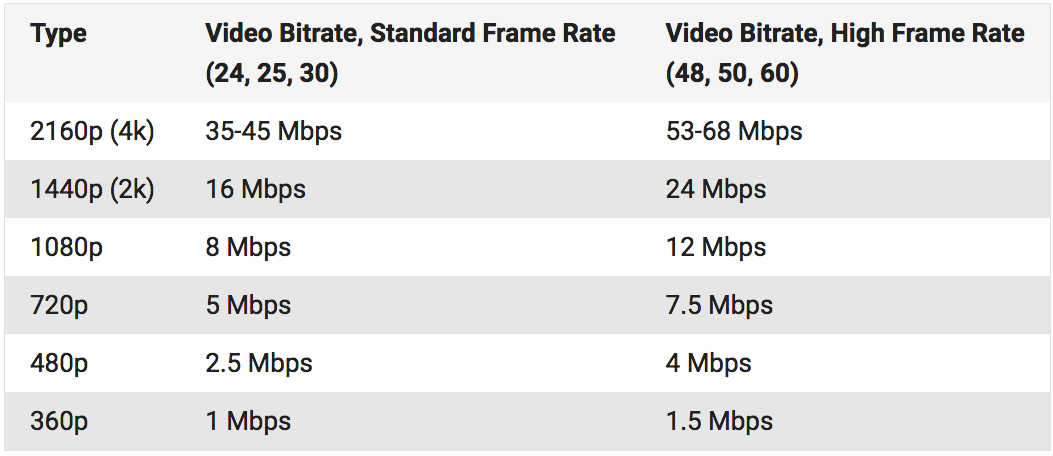
The guideline for video bit rate is explained in “3. Guideline for bit rate”, but the value varies depending on the image quality you want to deliver, such as 500 kps to 70 Mbps. Since the standard for audio is “approximately 96 kbps to 128 kbps”, the video bit rate occupies most of the bit rate of the entire video file.

It can be said that the higher the value of the video bitrate, the better the image quality, but that does not mean that “the higher the value, the better”. When displayed at a small resolution, the roughness is not as noticeable even if the bit rate is reduced. On the contrary, even if you encode at a high bit rate, you will not notice the difference in image quality, and in many cases the file size will only increase.

From now on, we will focus on the bitrate of the video.

What is the encryption mechanism? Part 2

What is the encryption mechanism? Part 2

Video Bitrate

However, in the case of moving images, the quality of the image at the time of encoding will vary depending on whether the video material has a lot of movement or the video material has little movement, even if the bit rate is the same. Therefore, it is necessary to thoroughly judge and encode not only the bit rate, but also the frame rate and keyframe settings, which will be explained later, according to the video material. I hope you understand that “there is a relationship between resolution and proper bit rate” as a determining factor for high definition.

videro bit rate

Point 2: Increase the frame rate if movement is important and lower the frame rate if image quality is important.
While the frame rate (number of frames) is set at 29.97 fps for televisions and 24 fps for movies, the frame rate is freely configurable for Internet video encoding. A video is a collection of continuous images (frames) like a flip book. The more frames per second, the smoother the movement.

In video encoding, the bit rate per second is fixed, so if you increase the frame rate, the number of images in the flip book will increase and the movement will be smoother, but the amount of data allocated per frame will decrease, so the image quality will be better to fall.
On the other hand, if you reduce the number of frames, the number of images in the flip book will decrease and the smoothness of the movement will be a little slower, but the image quality will improve because a large amount of data will be allocated to each frame. .

If you want to emphasize the smoothness of motion in a video with a lot of motion, increase the frame rate (video demo 1). On the other hand, if the video has little movement, it is not necessary to increase the number of frames as much (depending on the degree), so it is effective to lower the frame rate and give priority to improving the image quality

Point 3: insert “keyframes” at short intervals for moving images
A keyframe is a frame that exists as a single still image (an image that is not compressed between frames) and is the starting point for difference information. Depending on the encoder settings, the keyframes are inserted when there is a scene change and the difference information is inserted at regular intervals, such as XX frames and once every XX seconds.

■ Keyframes for moving images
In a moving image, things move or change significantly in a short time. Therefore, inserting keyframes at short intervals improves the reproducibility of small movements.
There is also the advantage that the search is smoother for images with many keyframes. The reason is that the search is based on keyframes, so the more keyframes you have, the easier it is to stop at the target scene. If the position where the search stops is not a keyframe but a difference information frame, the information is fetched to a nearby keyframe, but that time is short.
However, if you increase the number of keyframes too much, the keyframe bit rate will be taken over and the overall video quality will deteriorate, so be careful.
For moving images, the keyframe is approximately once every 3 seconds.

■ Keyframes for images with little movement
Since there is little difference information in a video with little motion, you won’t notice much difference in change even if there are few keyframes. However, if you insert keyframes for too long, search may not work properly and playback may take a long time to start. This is the opposite of the case where there are many keyframes, and if the rewind position is far from the keyframes, it will take time to read.
For those with little movement, the guideline for keyframes is approximately once every 6 to 8 seconds.

So far, “What is the encoding mechanism? Five points to consider for encoding HD video [Part 1]”, “Understanding the appropriate bit rate for the resolution you want to distribute”, motion oriented or image quality I explained three points how to change the “frame rate” and “how to insert keyframes” depending on whether it is important. In [Part 2], we will explain “the advantages and disadvantages of bit rate settings

What is the encryption mechanism?

What is the encryption mechanism?

Video Bitrate

5 points to consider for HD video encoding

Video Bit Rate

Encode

The image quality of Internet videos is almost proportional to the bit rate. However, if the bit rate increases unnecessarily, the file size will increase. “Keep bit rate low”, “Reduce file size” and “Reduce load time” are linked, and there is nothing to say if you can encode in high definition while keeping the bit rate low.
Also, at the beginning, I wrote that “image quality is almost proportional to bit rate”, but I think some of you may have experienced that “I increased the bit rate and encoded, but I am not satisfied with the quality of the image. “So, this time, I will explain five points that are often used to do high definition video encoding.

Encoding Mechanism
First, I will briefly explain the encoding mechanism.
An image is a collection of continuous images (frames), and by changing this in a short time like a flip book, it appears that you are visually moving. Japanese television images are 29.97 frames per second (short for 29.97 fps / frame per second) and most movies and animations are standard 24 fps. Since a large number of frames are required for video, the amount of data is also huge. Therefore, data compression is indispensable for distributing videos on the Internet.

When coding

“Prediction in frame” that compresses data within a frame
“Prediction between frames” that compresses data into consecutive frames
The information is reduced to the extent that it does not affect the visual sense and the data is compressed.

■ What is in-frame prediction?
There are various methodologies for data compression, so I will skip the details here, but the basic idea of ​​within-frame prediction is to divide a frame into small blocks called cells and the colors adjacent to each other in the block. they are the same or similar, they are compressed together.
For example, if there is information “blue blue blue blue blue blue blue blue blue blue red red yellow yellow yellow” information in the divided block, the amount of data can be reduced by combining this with “blue 11, red 2, yellow 3”. It’s an image.

An example of data compression in in-frame prediction (image)

■ What is cross-frame prediction?
However, in the case of video with a time axis, the number of frames is large, so there is a limit to the overall weight reduction based solely on the prediction within the frame. On the other hand, in the prediction between frames, based on the idea that “the contents are similar before and after the consecutive frames”, the cells that do not change from the previous frame reduce the amount of data by reusing information, and the cells that change is converted to data as difference information.

Point 1: learn a suitable bit rate guideline for resolution

The above three are excerpts of the same 640x360px image, but the file sizes are different at 1MB, 250KB, and 50KB. The image quality of 250 kB is lower than that of 1 MB and is much coarser at 50 kB. This is because the amount of data allocated per pixel is reduced, resulting in poor image quality.

The same phenomenon can be said of the videos. Bit rate is the amount of data allocated per second and affects the image quality of the video. If you want to view a video on a large screen, such as viewing it full screen on a computer or TV monitor, you need a sufficient bit rate according to the resolution. On the other hand, when displayed at a small resolution, the roughness is not as noticeable even if the bit rate is reduced. On the contrary, even if you encode at a high bit rate, you will not notice the difference in image quality, and in many cases the file size will only increase.

What is bitrate in a video? | Improve QUALITY

Video Bitrate

Bitrate is, without a doubt, one of the main characteristics that determine the quality of a video.

I’m glad you made it this far to continue learning about video. If you still don’t know about video or editing, remember that you can learn the basics with my video courses (among others).

bit rate

What is video bitrate?

The bitrate or bit rate is the amount of information per second that the video has. It is measured in megabits per second and is directly proportional to its quality.

Generally, we tend to confuse the size of the video with its quality, thinking that 4k size is the video that offers the highest quality. However, this is flatly incorrect.

A high bitrate offers quality: Size VS Quality

Continuing with the topic I was talking about, it is very common for videos with 4k (at least those from professional cameras) have a higher bitrate. This is what makes the video look better quality, mainly, regardless of whether the video is larger or smaller.

How do you notice the difference between a high bitrate and a less high one?

The bitrate tends to show significant differences not simply when recording, but when editing. As I have already told you, with a bitrate of 10-15 mbps / s (at 25 fps) you have more than enough for most jobs. However, and if you are very exquisite, you may want to use a higher bitrate to have more margin for error when correcting and color grading. By the way, if you are interested in learning about color correction and color grading, check out my course.

With a higher bitrate you will notice the following differences than with a lower one:

Sharpness increase.

Superior ability to edit color without the appearance of banding or other unwanted disturbances.
Greater file weight (the higher the bitrate, the larger the file occupies).
However, this is not to say that it will be noticeable for most jobs. If you work in events, I assure you that you will not have a problem.

Bitrate types

If you are one of those who want to know more about everything you study, you can stay and delve deeper with me.

There are two types of bitrate, the constant bitrate and the variable bitrate.

CBR: this is the bitrate that always, whatever is on the plane, the exact same transfer rate will be used. The good news is that a video recorded at a specific size and bitrate will always occupy the same amount. However, it is not the most efficient.
VBR: this is the variable bitrate, and it consists in that a different bitrate will be applied depending on the information that is being recorded. Obviously, if you are recording a super dark black background, you don’t need as much information as if you are recording a scene with a very wide color gamut and a histogram that is padded from blacks to whites. In this case, the bit transfer rate will vary according to the needs of what is being recorded. Of course, we will try to keep an average (the chosen one).
How to know the bitrate of a video, both on Windows and Mac?
I am going to explain to you, both for Windows and Mac, how to find out the bitrate that a video clip has. This is very good because you can see that a video loses quality the more compressed it is. And one of the ways to compress it is by lowering the bitrate.

Windows: right-click on the clip> properties> details tab> video section> total bit rate
Mac: you open the video with the quicktime player> while it is playing press cmd + I> data rate
It is important that you pay attention to whether this data is in kbps or in mbps, because the first is 1000 times less than the second (so that you take it into account in case you want to compare looking from two different computers).

When to compress a video by lowering its bitrate?

There are times when you have already finished editing the video and obviously want to compress it. For this I recommend that you learn about codecs and video formats.

Obviously when you compress the video you will lose quality (the bitrate will decrease). This, a priori, should not be noticed in excess if it is a good compression, since you will no longer edit that video.

Of course I am talking about compressing the final file, never the raw ones used to create the video. You always have to lower the bitrate or compress the final file (in case you want to compress) to avoid losing image quality.