What does MP3 bitrate mean?


Free Download Mp4Gain
picture

What does MP3 bitrate mean?

MP3 bitrate

Bit rate

mp3 bit rate

The rate at which a digital channel transmits digital signals is called the data transfer rate or bit rate.
The word bitrate has many translations, such as bitrate, etc., which indicates how many bits per second the encoded (compressed) audio data should be represented, and a bit is the smallest binary unit, either 0 or 0. 1. The relationship between bitrate and audio and video compression is simply that the higher the bitrate, the better the quality of the audio and video, but the larger the encoded file; if the bitrate is lower, the situation is reversed.

For example: encode audio and video at 500 Kbps.
where bps are bits 1K = 1010 = 1024
b is little
s is the second
p is for (for)
Therefore, encoding at 500 kbps means that the encoded audio and video data must be represented at 500 K bits per second.
In the baseband transmission system, the bit rate is used to represent the code rate of transmitted information.
The bit rate Rb refers to the unit of time
The number of binary bits transmitted within the unit, the unit is b/s. For example, the transmission speed of a computer serial port is up to 115200b/s.
The symbol rate or baud rate Rs refers to the number of modulation symbols transmitted per unit of time, that is, ternary and ternary
The information transmission rate of the multivariate digital code stream in the

In M-ary modulation, the relationship between the bit rate Rb and the baud rate Rs is:
Rb=Rslog2M
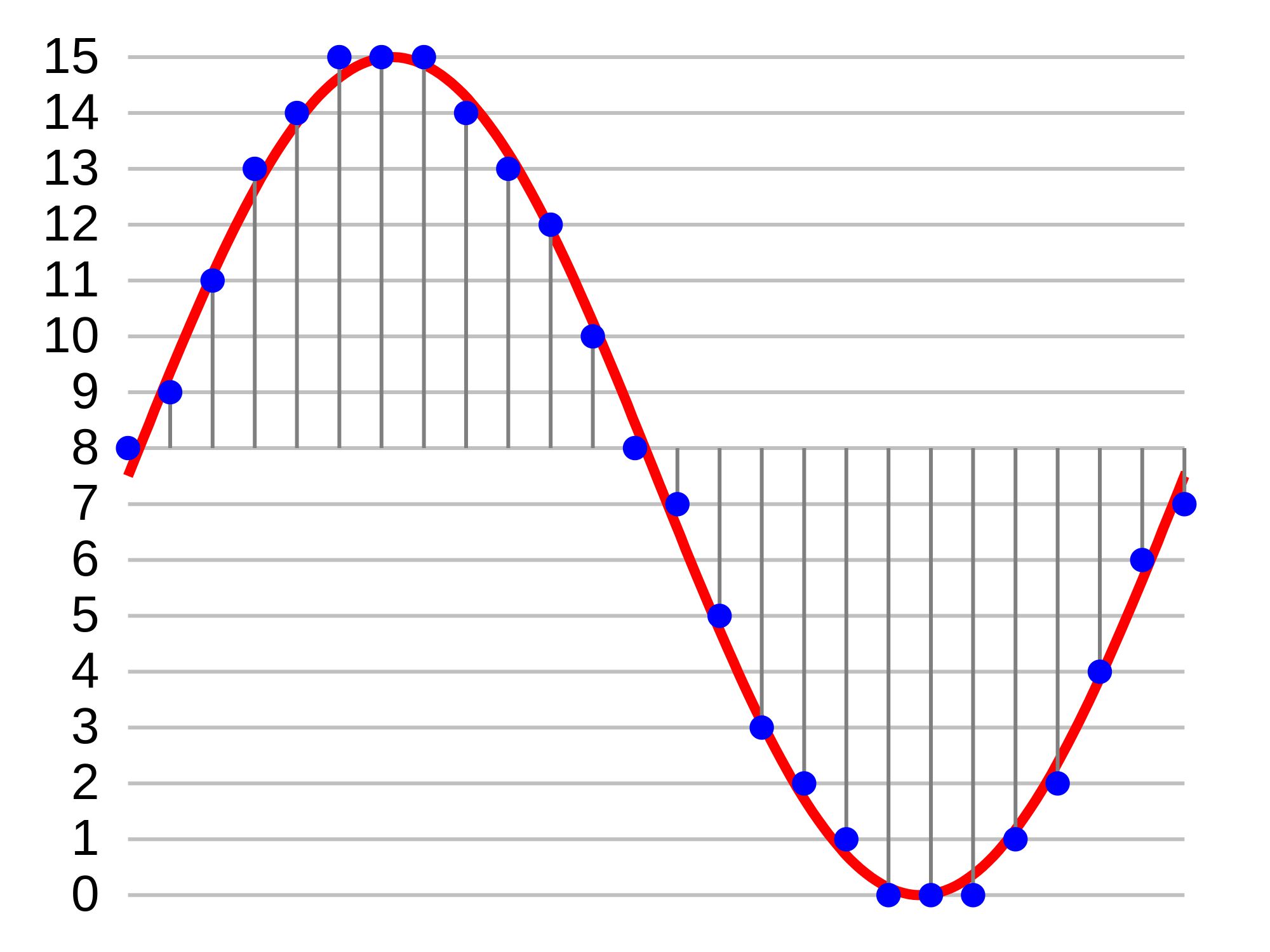
The sampling rate refers to the ratio of the sampling samples to the total number of samples, and the sampling rate refers to the number of samples per unit of time. If it is an instrument, the sampling rate is 40MSa/s, which indicates that the number of samples per second is 40M, but it cannot be represented by 40MHz.

The process of converting analog audio to digital audio is called sampling. In a nutshell, how much data is needed to record a 1 second duration of sound via waveform sampling. A sound with a sample rate of 44 KHz requires 44,000 data points to describe a 1-second sound waveform. In principle, the higher the sample rate, the better the sound quality.


Free Download Mp4Gain
picture


Mp4Gain Main Window
picture


Mp4Gain Features
picture


Free Download Mp4Gain
picture

What is bit rate? Knowledge of the MP3 audio format.

What is bit rate? Knowledge of the MP3 audio format.

mp3 bit rate

Digital audio formats are audio signals that are recorded, processed, and reproduced in digital form.

Mp3 bit rate

The emergence of digital audio formats is to meet the needs of high-fidelity playback, storage and transmission. Simply put, early analog audio formats had issues with playback distortion and glitches due to media wear. Since the advent of CD discs, audio files in digital format have become popular, but another problem has arisen: the limitation of storage volume and the phenomenon of CD disc wear is still present. Saving to a hard drive (in connection with longer storage time) is also not a good solution when storage media (mainly hard drives) are still expensive at the time. The rise of the Internet has created a requirement for long-distance file transmission. Under the restriction of bandwidth, the demand to reduce file size has become more intense. All this has led to the generation of lossy compressed digital audio formats from external factors!

In terms of internal factors, with the improvement of computing and coding capabilities, the progress of various acoustic psychological models has promoted the emergence of various lossy compressed digital audio formats. Some of the most commonly used audio formats in MP3 players are briefly introduced below: MP3 (CBR, VBR, ABR), WMA, WAV, ADPCM, and the emerging audio formats AAC, ASF, and OGG.

Before introducing various digital audio formats, let’s clarify one concept: bitrate.

In the field of computing, all information is digitized. Bit is the smallest unit of data in a computer, it refers to a number of 0 or 1, which is a mathematical binary number, a “0” or “1” , is a bit. For example, when we say a 2-digit number, it means that it is a two-digit binary number, and there are 4 combinations of “00”, “01”, “10” and “11”, which represent 0, “11” in decimal respectively. 1, 2 and 3 are four numbers.

What is the difference between bitrate 128 and 320.

What is the difference between bitrate 128 and 320.

128 kbps vs 320 kbps MP3

Have you ever wondered what exactly you lose by compressing from lossless to 128kbps or 320kbps mp3?

128 kbps and 320 kbps MP3

I checked it and the result seemed interesting to me. First of all, I propose to take a survey to understand for yourself if you hear the difference. If you are not sure what you are hearing or you are sure you are not listening, then I bring you a simple and elegant idea: you should take and collide with your forehead two sound waves, one of which will be in antiphase, respectively, when you mix two. tracks, you will mainly hear what is not extinguished. I don’t promise cool graphics yet, but on your own system you can hear exactly what sounds were lost when compressed from flac to mp3 128 \ 320 kbps, file with examples at the end of the article.

You need to download and listen to 12 tracks for 30 seconds. Then specify one of the 3 options for each of the 4 songs (128 kbps, 320 kbps, or lossless).
The survey is anonymous, but you can specify a unique hash and tell me, as a last resort, post your opinion here, but always under the spoiler. The survey will last until February 25, after you publish the key and statistics.
Files on Yandex Disk, mirror on Dropbox (~ 80Mb).

Description of the experiment

Source files are cut into 10-second chunks, each chunk is exported to wav. After importing the resulting tracks, 2 seconds of silence and a second tone signal are added at the beginning of each, then converted to mp3. After importing mp3 files, it turns out that relative to the original, the resulting file “went ahead”. This is not a bug, it is. We sync against the given pitch signal from the original (I tried various values ​​for each mp3 file, which I then refined to get the best result), remove the pitch signal, mute, and export the resulting tracks to wav. Now it remains to invert the tracks so that we obtain multidirectional peaks, and mix with the original.

Outcome

Yes, there is a difference. Yes, especially when compressing up to 128 kbps. Yes, it depends on the music. Yes, even more of the audio path.
You can draw an independent conclusion and hear the difference by downloading the files at
Bit rate is indicated as one of the main characteristics of video and audio recordings. Most users are used to thinking that it determines the quality of the downloaded file. But what are bit rates and how do they really characterize music files and videos?

Bit rate, what is it?

Bit rate, what is it?

Bit Rate

as a feature of digital audio and video

Bit rate

Bitrate: literally, the information bit rate. It is common to use the bit rate when measuring the effective information transmission rate through the channel, that is, the “payload” transmission rate (in addition to that, the channel can transmit service information, for example, start and stop symbols for asynchronous transmission or control symbols for redundant coding). The baud rate, which takes into account the total bandwidth of the channel, is measured in baud.

Bit rate is the number of units of information required to store (transmit) one second of a stream of data (generally audio and video files). It is generally measured in ‘kbps’, kilobits per second.

The term bit rate is used in two basic meanings
: channel or device characteristic: the maximum number of bits that can be transmitted per unit of time.
– The size of the data stream transmitted in real time (the minimum size of the channel that can pass this stream without delay).
– A special case is the compressed video or audio bit rate.
Bitrate is expressed in bits per second (bit / s, bps), as well as values ​​derived with the prefixes kilo, mega, etc.

The term bit rate (in conjunction with subjective quality criteria) is often used as a characteristic to evaluate the performance of lossy compression algorithms.

Bitrate characterizes both the density of the information package and its quality. For example, out of two MP3 files compressed with different bit rates, a file with a higher bit rate will have higher sound quality (close to the original). At the same time, a file of a different format, with the same bit rate, can offer both better and worse sound quality.

On an audio CD, information is losslessly encoded at a constant 1407 kbps bit rate.

The MP3 format allows you to encode audio information with constant or variable bit rates from 32 to 320 kbps, that is, they provide five times the compression compared to CD.

Bit rate as a characteristic of digital video and audio

In streaming video and audio formats (such as MPEG and MP3) that use lossy compression, the bit rate parameter expresses the degree of compression of the stream and therefore determines the size of the channel for which it is compressed data transmission. Most of the time, the audio and video bit rate is measured in kilobits per second (kilobits per second in English – kbps), less often – in megabits per second (for video only).

There are three compression modes for data transmission:

– with a constant bit rate (constant bit rate in English – CBR)
– with a variable bit rate (variable bit rate in English – VBR)
– with an average bitrate (English Average Bitrate – ABR)

Variable and average bit rate

The codec chooses the required bit rate based on the parameters (the level of the desired quality) and, during the encoded chunk, the bit rate may change. When compressing audio, the desired bit rate is determined based on the psychoacoustic model. ABR is a variation of VBR in which the codec is compressed to a specified average value.

What is bitrate: a clear explanation for beginners

Bit Rate

Once a student was teaching a class and asked me to give him the clearest possible explanation of what bitrate meant.

Today I am going to share with you that explanation that although it does not refer to sound but an image in the background, it is the same and is very easy to understand.

bit rate

Imagine that you put me in front of a beautiful landscape full of rivers and trees, mountains and Valleys with some Villas with Fields full of flowers and animals.

There is a lot of information there if I had to make a detailed description.

Imagine that you ask me to give you a description in 4 words.

It would have to make a very general description that, being very brief, Nova contains details. Maybe I’ll say something like “a beautiful autumn landscape.”

if after that you tell me that now I will have 14 words to describe what I am seeing.
I’ll be able to give more information Although it will really continue to be very summary, but you could already give some details.
“a beautiful autumn landscape with fields and mountains that have houses, flowers and animals”

If they ask me for the following explanation and they already allow me to use 50 words, I will be able to give many more details.
Although of course I will still have to omit a lot of details.

How many words might I need to give a detailed, spoken portrait of what I am looking at?

Well, this example that I just gave of the four words at the beginning then 15 words later have maybe 500 words later is exactly what the bit rate is.

We are talking about what is the amount of information that our audio or video file can transmit per second and obviously The higher the information There will be more details and therefore a higher quality and on the contrary the lower the information the lower the details and therefore lower quality.

That’s why a bit rate of 320 thousand bits per second will have a much higher audio quality than one of 90,000 bits per second.

Because in music, images and video, the quality always depends on the amount of information.

And in the specific case of audio and video, the amount of information is measured by seconds.

This means how much information it can transmit per second, that is, how many bits it can transmit per second, which means How much information and therefore How much detail, which is synonymous with quality.

With this we will understand very easily that as well as the sampling frequency is also very important and we will explain it in another article.
The rate of bits that are transmitted per second is crucial in determining the quality that an audio or video will have.

Of course, it must be understood that the higher the bit rate per second, the larger the size of the audio file will be because the greater the amount of information stored will be, but this will result in higher quality and greater definition.

Because here the definition concept is crucial.
The higher the bit rate the higher the definition and therefore the higher the quality.

The definition would be the detail of our initial explanation, if they let me use 2000 words to describe a landscape, I will be able to give many details and define them with great clarity. And that will mention a lot of quality.

This As-is applies to audio or video files.

Surely with this explanation it has been much clearer what is the rate of bits per second and why it is important.

WHAT IS THE NORMAL BITS SPEED ON AN MP3?

BIT RATE

The bit rate of an MP3 indicates the density of the audio information contained in the file. Therefore, every second on a 192 kbps MP3 contains 192 kilobits (24 bytes) of data. The higher the bit rate, the more information the MP3 contains; The more information it contains, the quality will be closer to the original audio recording. The bit rate also determines the size of the MP3 file: a four-minute song encoded at 128 kbps takes up just over 3.5 MB, while the same song encoded at 320 kbps requires more than 9 MB of space.

Bitrate

CHOOSE A BIT RATE

When converting an audio file or ripping the CD collection to MP3, you must specify the bit rate you want the encoder to use. Choose a bit rate based on the type of audio you are encoding and the desired purpose. If you are converting a conference or other piece of vocal audio, a 128 kbps bit rate is more than enough. If you encode MP3 files for use with a portable media player, a 192 kbp bitrate generally provides a good balance between audio quality and file size. If you are converting your CD collection to MP3 for archiving, encode your files with 320kbps bit rate.

Mp3 Bitrate

VARIABLE BIT SPEED

Encoding with a variable bit rate changes the MP3 bit rate based on the type of data present at a certain point in the audio. For example, a variable bit rate encoder can encode dense information from an MP3 at 320 kbps; however, when the audio contains a mute section, the encoder reduces the bit rate to 32 kbps. If the bit rate of an MP3 has an unusual number (for example 204 kbps), this indicates that the MP3 creator has encoded it with a variable bit rate.

BITS SPEED CONVERSION

Although most MP3 encoding and conversion programs can modify an MP3 with a different bit rate, this is not a good idea in general. Converting an MP3 to a higher bit rate does not add audio information to the file, so the sound quality does not increase. Converting an MP3 to a lower bit rate reduces the file size, but it could also have audio defects as the encoder is compressing an already compressed file. If you need an MP3 file to have a different bit rate, re-encode an MP3 from the original audio CD or WAV file.

What is bitrate, a thorough explanation

Normally when people read or listen to some of the terms they use frequently referred to music or video when playing on a digital device, it is possible that some terms are very confusing for the common user.

Sometimes people do not understand at all what these terms refer to and therefore make bad decisions in this regard, it may also happen that they completely ignore this information which generates an unsatisfactory result.

That is bitrate, a complete explanation.

When we play music or video, we are transmitting information from a file to the medium that reproduces that information. Bitrate measures the amount of information What is transmitted every second.

let’s look at an example that will allow us to understand very clearly what exactly bitrate is.
Imagine that I must tell you what happened at a dinner, but I can only use three words to tell you what dinner was like.

I could say For example “it was very tasty” and already there use the three words you could use. Of course the description and information is too short.
and instead, I can use 10 words, my description will have information and therefore it will be a higher quality description.
“It was a tasty dinner, with a very familiar and warm atmosphere” if you look closely at crypto contains more information so much makes a better portrait of what happened that night.

And if instead of using 10 words I can use 300 words it could be a much clearer story, with better quality.

Well that’s exactly what happens with bitrate. when a song or video is played if only a small amount of bits can be transmitted every second, detail that can be displayed will be poor because many details will have to be omitted. on the other hand, as the amount of bits increases every second, the audio will continue to be enriched so much will be of higher quality.

So now we are clear. Because it is important the amount of information transmitted every second, going to have greater wealth is to say higher quality. then act to what the term bitrate refers and now we understand exactly what it means. It is obvious that more bits per second will take up more space on the hard disk. Why the file will contain much more information And in return we will get more details and more richness in reproduction.
We will have to decide if what we want is to save disk space and therefore we will choose a low bit rate or on the contrary our priority will be quality and in that case we will choose a higher bit rate, with much more information per second. but that will take up much more space on the hard drive.
in the same way that a description of three words occupied much less space but transmitted a much poorer description, on the other hand a description of 400 words will occupy much more space But it will offer description in much more detail and therefore with greater quality.
Did you see that it was very easy to understand what bitrate means?

What is the Bit Rate or Bitrate in the audio?

Do you want to change the bit rate in your MP3 files? This can be useful if you need to reduce the size of your MP3 files, for example. A 320 kbps MP3 file, the highest bit rate allowed for MP3 files, could be reduced to 192 kbps to significantly reduce the size of the MP3 file.

bitrate

There would be a loss of quality, but the difference would be insignificant for most listeners who use standard speakers or headphones. If you are an audiophile, in addition to having expensive audio equipment, you probably never use the MP3 format anyway.

Most likely, you will use a compressed or uncompressed lossless format such as PCM Audio, WAV, AIFF, FLAC, ALAC or APE. An uncompressed PCM audio file is approximately 10 times larger than a CD-quality MP3 file.

The MP3 format is a lossy format, which means that the audio quality is sacrificed to maintain the relatively small size of the files. Almost all sites will tell you that you should never convert an audio file from lossless format to MP3 format unless you are well with the loss of audio quality.

BITRATE

What is the normal bit rate in an MP3?

A normal bit rate for an MP3 is between 128 kilobits per second, or kbps, and 320 kbps. Different bit rates in this range have different advantages; To extract music from a CD to MP3, choose the bit rate that best suits your purposes. In general, the higher the bit rate of an MP3, the better the audio quality, but the larger the file size. The most common bit rates in MP3s are 128 kbps, 192 kbps and 320 kbps.

BitRate

Bit rate

The bit rate of an MP3 indicates the density of the audio information contained in the file. Therefore, every second in a 192 kbps MP3 contains 192 kilobits (24 bytes) of data. The higher the bit rate, the more information the MP3 contains; The more information it contains, the quality is closer to the original audio recording. The bit rate also determines the size of the MP3 file: a four-minute song encoded at 128 kbps occupies a little more than 3.5 MB, while the same song encoded at 320 kbps requires more than 9 MB of space.

Choice of a bit rate

When you convert a sound file or extract your CD collection to MP3, you must specify the bit rate you want the encoder to use. Choose a bit rate based on the type of audio you are encoding and on your desired purpose. If you are converting a conference or other piece of vocal audio, a bit rate of 128 kbps is more than enough. If you are encoding MP3 files for use with a portable media player, a bit rate of 192 kbps usually provides a good balance between audio quality and file size. If you are converting your CD collection to MP3 for archiving, encode the files with a bit rate of 320 kbps.

Variable bit rate VBR

Coding with a variable bit rate changes the bit rate of the MP3 depending on the type of data present at a certain point in the audio. For example, a variable bit rate encoder could encode a portion of dense information from an MP3 at 320 kbps; however, when the audio contains a silent section the encoder lowers the bit rate to 32 kbps. If the bit rate of an MP3 has an unusual number (for example, 204 kbps), this indicates that the creator of the MP3 encoded it with a variable bit rate.

Bit Rate Conversion

Although most MP3 conversion and encoding programs can modify an MP3 at a different bit rate, this is not a good idea, generally speaking. Converting an MP3 to a higher bit rate does not add audio information to the file, so the sound quality does not increase. Converting an MP3 to a lower bit rate reduces the size of the file, but it could also introduce audio defects, since the encoder is compressing a file that is already compressed. If you need an MP3 file to have a different bit rate, re-encode an MP3 from the original audio CD or WAV file.