Perceptual Entropy and Its Role in MP3 Quality


Free Download Mp4Gain
picture

Perceptual Entropy and Its Role in MP3 Quality
Perceptual Entropy and Its Role in MP3 Quality

Let’s talk about perceptual entropy and MP3 quality

Perceptual entropy is a concept that holds the key to understanding why MP3 files sound the way they do. As someone with years of experience delving into audio compression technologies, I find it fascinating how perceptual entropy helps achieve a balance between sound quality and file size. Imagine trying to pack your favorite songs into a suitcase for a trip. You want to carry everything, but you only have so much space. Perceptual entropy works like a smart packer, deciding what to keep and what to leave behind so that the audio remains clear and enjoyable.

MP3 encoding relies heavily on perceptual entropy to decide which parts of a song are important for listeners and which parts can be discarded without a noticeable loss in quality. This selective process mimics how our ears perceive sound, allowing MP3s to maintain their characteristic compact size while still sounding great.

Understanding perceptual entropy

Perceptual entropy measures the complexity of a sound signal as perceived by the human ear. It’s not just about raw data; it’s about how we experience that data. Think about how a crowded room might sound to you: you focus on the conversation in front of you, tuning out other noises. Perceptual entropy in MP3s works similarly, focusing on the most critical sounds and ignoring the less important ones.

This approach is rooted in psychoacoustics, the study of how humans perceive sound. By understanding what our ears prioritize, audio compression algorithms can remove parts of the audio that are less significant. This keeps the file size small without noticeably impacting quality.

How perceptual entropy shapes MP3 encoding

The MP3 format uses perceptual entropy to decide what to compress and what to keep. For example, if two frequencies are played together and one is much louder, the quieter frequency might be masked and therefore omitted. This process allows the MP3 format to save space while preserving the overall listening experience.

Perceptual entropy also influences bitrate selection. Lower bitrates mean more aggressive compression, which can lead to noticeable artifacts in complex audio like symphonies or live recordings. Higher bitrates, on the other hand, preserve more details, which is crucial for audiophiles or professional applications.

Real-life examples of perceptual entropy

When I explain perceptual entropy to friends, I like to use the example of a photograph. Imagine shrinking a high-resolution image to fit on your phone screen. You don’t need every pixel from the original because the screen can’t display all that detail. Similarly, MP3 encoding removes audio details that you won’t miss in typical listening environments, like on a car stereo or earbuds.

Another example is streaming services. They often use perceptual entropy to optimize files for quick loading and minimal buffering while maintaining acceptable sound quality. This is why you can stream music on your phone without consuming massive amounts of data.

The role of psychoacoustics in MP3 quality

Psychoacoustics plays a vital role in how perceptual entropy is applied. Our ears are more sensitive to certain frequencies, like those in the midrange where voices and most instruments lie. High and low frequencies, though still important, are less perceptible in some contexts and can be compressed more aggressively.

This understanding allows MP3 encoders to allocate more bits to the parts of the audio signal that matter most. For example, in a rock song, the vocals and guitar might receive higher priority than the subtle nuances of the cymbals.

Challenges with perceptual entropy

While perceptual entropy is highly effective, it’s not perfect. Some listeners with trained ears or high-quality audio equipment may notice compression artifacts, such as a loss of clarity in the highs or a “swirling” effect in the background. This is especially true at lower bitrates.

Additionally, not all audio is equally suited to MP3 compression. Complex, dynamic music like orchestral pieces may lose more fidelity compared to simpler tracks like podcasts or pop songs. Understanding these limitations is crucial for achieving the best balance between file size and quality.

Improving MP3 quality through perceptual entropy

To improve MP3 quality, you need to make thoughtful choices about bitrates and encoding settings. For casual listening, a bitrate of 128 kbps might be sufficient. However, for critical applications, higher bitrates like 320 kbps are recommended. This allows the encoder to preserve more audio detail, minimizing the perceptual loss caused by entropy.

It’s also worth experimenting with different encoders. Not all MP3 encoders handle perceptual entropy the same way, and some are better at preserving specific audio qualities. Choosing the right tools can make a significant difference in the final output.

Perceptual entropy in other audio formats

MP3 isn’t the only format that uses perceptual entropy. Other codecs like AAC and Ogg Vorbis also rely on similar principles. However, these formats often offer better efficiency, meaning they can deliver similar or better quality at lower bitrates.

For example, AAC is widely used in streaming services because it offers a more refined approach to perceptual entropy. This allows platforms to deliver high-quality audio while conserving bandwidth, enhancing the user experience.

Latest words on perceptual entropy and MP3 quality

Perceptual entropy is a cornerstone of MP3 technology, making it possible to enjoy high-quality music in a compact format. By understanding how it works, we can make informed decisions about encoding settings and achieve the best balance between quality and file size.

If you’re looking to optimize your MP3 files, consider tools like Mp4Gain, which can help you fine-tune settings for better results. With the right approach, you can ensure your audio files sound their best, no matter the playback device.

FAQ about perceptual entropy and its role in MP3 quality

What is perceptual entropy?

Perceptual entropy measures the complexity of a sound signal as perceived by the human ear, helping to optimize audio compression.

How does perceptual entropy impact MP3 quality?

It determines which parts of the audio can be compressed without noticeable loss, balancing quality and file size.

Comments:

Wow, this article really helped me understand MP3 quality better. I didn’t know about perceptual entropy before!

I always wondered why some MP3s sound better than others. Now it makes sense—thanks for the info!


Free Download Mp4Gain
picture


Mp4Gain Main Window
picture


Mp4Gain Features
picture


Free Download Mp4Gain
picture

MPEG-1 vs MPEG-2 Layer III Differences

MPEG-1 vs MPEG-2 Layer III Differences

MPEG-1 vs MPEG-2 Layer III Differences

Let’s Talk About MPEG-1 vs MPEG-2 Layer III Differences

When you’re looking at MPEG-1 and MPEG-2 Layer III, it’s all about understanding how these formats work differently in terms of audio and video encoding. Although they seem quite similar, the distinctions are essential, especially if you’re into video editing or streaming. I’ve been working with both formats for years, and I can tell you firsthand that each has its own strengths and limitations. From compression techniques to practical applications, there’s a lot to explore.

What Is MPEG-1 Layer III?

MPEG-1 Layer III, commonly known as MP3, is one of the most widely used audio compression formats. Initially designed for digital storage and broadcast, MPEG-1 Layer III compresses audio by discarding data that the human ear can’t easily detect. This method, known as “psychoacoustic compression,” allows it to shrink file sizes significantly without a major loss in perceived audio quality.

Understanding the Psychoacoustic Model

  • Psychoacoustic compression analyzes sound frequencies and removes inaudible frequencies.
  • This method was groundbreaking because it enabled high-quality sound in small file sizes.
  • MP3s became the backbone of digital music due to this efficiency, allowing for easy storage and distribution.

Key Characteristics of MPEG-1 Layer III

  • Focuses on audio only, no support for video.
  • Standard sampling rates of 32, 44.1, and 48 kHz.
  • Bit rates typically range from 32 to 320 kbps.
  • Designed primarily for low-bandwidth audio distribution.

Exploring MPEG-2 Layer III: An Enhanced Audio Codec

MPEG-2 Layer III expands on MPEG-1 by supporting lower bit rates and additional channels. While MPEG-1 focused on stereo, MPEG-2 introduced support for multi-channel audio, an essential improvement for home theater and professional audio. I’ve seen how this format enables surround sound and higher quality in applications where MPEG-1’s stereo limitation falls short.

Advantages of MPEG-2 Layer III

  • Allows for 5.1-channel audio, making it suitable for surround sound.
  • Supports lower bit rates, ideal for constrained environments like online streaming.
  • Retains quality at lower file sizes, making it versatile for various applications.

Sampling Rates and Bit Rate Flexibility

  • Offers sampling rates as low as 16 kHz for greater compression efficiency.
  • Adaptable bit rate settings accommodate different audio quality needs.
  • Supports compatibility with MPEG-1 at common sampling rates, enhancing usability.

Compression and Audio Quality: How MPEG-1 and MPEG-2 Compare

The difference in compression between MPEG-1 and MPEG-2 isn’t just technical—it impacts the user experience. With MPEG-1, you get efficient compression but with some audio limitations at lower bit rates. MPEG-2, on the other hand, takes it a step further by offering high fidelity, multi-channel support, which is a game-changer in media production and broadcasting. I’ve found that MPEG-2 Layer III shines in scenarios requiring high audio quality without compromising on file size.

Compression Ratios

  • MPEG-1: Compression aims at reducing file sizes for low-bandwidth use, ideal for music.
  • MPEG-2: Optimizes compression while allowing for more audio channels, enhancing clarity in movies and broadcasts.
  • MPEG-2 retains fidelity better at low bit rates compared to MPEG-1.

Audio Fidelity and Surround Sound

  • MPEG-1: Primarily supports stereo audio.
  • MPEG-2: Enhanced for 5.1-channel surround, providing a more immersive audio experience.
  • Better suited for high-quality, multi-dimensional sound in film and broadcast.

Real-World Applications and Compatibility

Both formats have specific applications where they excel. MPEG-1 is fantastic for digital audio files that prioritize size, like music libraries. MPEG-2 Layer III, on the other hand, is well-suited for DVDs and digital TV, where multi-channel sound enhances the viewing experience. Having used MPEG-2 extensively in home theater setups, I can tell you it makes a noticeable difference when watching movies or live broadcasts.

Popular Uses for MPEG-1 Layer III

  • Widely used in digital audio files, especially for music.
  • Ideal for streaming audio at low bit rates with moderate quality requirements.
  • Compatible with nearly all audio playback devices, from phones to laptops.

Where MPEG-2 Layer III Excels

  • Favored in DVDs and digital broadcasting for multi-channel audio support.
  • Used in applications requiring immersive audio, such as surround sound systems.
  • Compatible with a range of multimedia devices supporting MPEG-2 formats.

Decoding and Processing: How MPEG-1 and MPEG-2 Layer III Differ

When it comes to decoding and playback, MPEG-1 is simpler and faster, often preferred for quick processing in low-power devices. MPEG-2, however, requires more processing power due to its multi-channel capability and extended bit rate support. From my experience, you’ll notice that MPEG-2 playback offers richer sound, but it can be demanding on hardware, especially older systems.

Decoding Requirements

  • MPEG-1: Lower processing power, ideal for basic audio playback.
  • MPEG-2: Higher processing requirements due to complex audio structure.
  • MPEG-2 might lag on outdated devices, but it shines in high-end setups.

Hardware Compatibility

  • MPEG-1: Almost universally compatible with audio devices.
  • MPEG-2: Commonly supported in DVD players and some advanced audio systems.
  • Consider device capabilities if choosing between formats for home theater.

Licensing and Patent Differences

Licensing considerations can influence the choice between MPEG-1 and MPEG-2 Layer III. MPEG-1 is widely accessible, as patents have expired in many regions, making it free to use. MPEG-2, however, still carries licensing fees in some cases, which can impact its adoption for certain projects. For developers or content creators, this can be an essential factor in deciding between these formats.

Licensing Costs

  • MPEG-1: Generally free to use, as many patents have expired.
  • MPEG-2: May still require licensing, depending on the application and region.
  • Budget-conscious projects might lean toward MPEG-1 for this reason.

Impact on Adoption

  • MPEG-1: Widespread adoption in consumer electronics and media applications.
  • MPEG-2: Primarily adopted in professional media, such as broadcasting and DVDs.
  • Licensing costs affect MPEG-2’s widespread use, especially in budget projects.

Latest Words on MPEG-1 vs MPEG-2 Layer III Differences

Choosing between MPEG-1 and MPEG-2 Layer III depends on your priorities: MPEG-1 excels in simplicity and accessibility, ideal for music files or lower-quality audio. MPEG-2 shines with multi-channel support, high-quality audio, and a more immersive experience, making it excellent for film, broadcasting, and high-end audio setups. Both have unique benefits, so whether you’re working on a streaming project or setting up a home theater, understanding these differences helps you make the right choice. If you need a reliable solution for managing these formats, Mp4Gain offers the features you need to ensure optimal playback and quality control for both MPEG-1 and MPEG-2 audio files.

FAQs on MPEG-1 vs MPEG-2 Layer III Differences

What is the main difference between MPEG-1 and MPEG-2 Layer III?

The main difference between MPEG-1 and MPEG-2 Layer III lies in their audio capabilities and bit rate flexibility. MPEG-1 Layer III, or MP3, focuses on audio compression for stereo sound, while MPEG-2 Layer III supports multi-channel audio, allowing for surround sound and higher fidelity, which is ideal for DVD and broadcasting.

Which format provides better audio quality, MPEG-1 or MPEG-2?

MPEG-2 Layer III typically provides better audio quality, especially at lower bit rates and in multi-channel settings. It is optimized for applications requiring high-fidelity sound, such as DVDs and digital broadcasting, making it superior for immersive audio experiences compared to MPEG-1, which is limited to stereo sound.

Can MPEG-1 Layer III support surround sound?

No, MPEG-1 Layer III is designed for stereo audio only, which limits it to two channels. For surround sound, MPEG-2 Layer III is the better choice as it supports multi-channel audio setups, allowing for 5.1 surround sound configurations ideal for home theaters and cinemas.

Why is MPEG-2 Layer III more commonly used in DVDs?

MPEG-2 Layer III is more common in DVDs because it supports multi-channel audio, allowing for immersive surround sound. This enhances the viewing experience with richer, multi-dimensional audio, which is essential for films and high-quality video content found on DVDs.

Is MPEG-1 Layer III still widely used today?

Yes, MPEG-1 Layer III, or MP3, remains widely used for music and audio files because of its simplicity and compatibility with most devices. Despite the advances in audio formats, MP3 continues to be popular for digital audio due to its efficient file compression and universal support.

How do MPEG-1 and MPEG-2 differ in terms of licensing?

MPEG-1 is generally free to use, as most patents have expired, making it more accessible. However, MPEG-2 may still require licensing fees in some regions, especially in professional applications, which can influence its use in large-scale or budget-sensitive projects.

Which format is better for streaming audio: MPEG-1 or MPEG-2 Layer III?

For audio streaming, MPEG-1 Layer III (MP3) is often preferred due to its efficiency and lower processing requirements, making it ideal for consistent audio quality on low-bandwidth connections. MPEG-2 Layer III, with its multi-channel capabilities, is more suited for high-quality audio where bandwidth allows.

What devices support MPEG-1 and MPEG-2 Layer III?

Most devices support MPEG-1 Layer III (MP3), including smartphones, computers, and audio players. MPEG-2 Layer III is commonly supported in devices like DVD players and home theater systems that require multi-channel audio capabilities, although it may not be as universally compatible as MP3.

Comments:

Chris45: Wow, didn’t realize there were so many differences between MPEG-1 and MPEG-2. This explains a lot about why my DVD audio sounds so different from my MP3s. Thanks for the clear explanation!

AudioExpert: Been looking for something that dives deep into MPEG codecs. Most articles just scratch the surface. This one actually gave me useful info on bit rates and decoding. Great job!

DigitalJoe: Nice breakdown! Was confused about which format to use for a project—this cleared it up. Now I know why MPEG-2 works better for my audio system.

LindaG: Awesome article! I thought MPEG-1 and MPEG-2 were practically the same. Now I get why they’re used for different things.

SonyPro: Very informative! MPEG-1’s simplicity is perfect for my audio files, but for my home theater, I’ll definitely consider MPEG-2 from now on. Thanks for the insight!

SammyD: This article explains everything I’ve been wondering about MPEG layers. MPEG-2 sounds amazing for surround sound, didn’t know it was so different from MPEG-1. Really helpful!

PixieDust: Great explanation, but could you add more on which format is better for video streaming? Trying to decide between these for a low-bandwidth project.

SoundGuy72: Thanks for going deep into the technical stuff but keeping it easy to understand. Really helps us who aren’t total tech experts.

TrevorB: I didn’t know MPEG-2 was still under some licensing. That’s a big deal for anyone on a budget. This article’s got info you don’t find everywhere else!

BeckyBee: So useful! I’m setting up my first home theater, and now I get why MPEG-2 will be better for movies. Didn’t realize MPEG-1 was mostly just for music.

BigJimbo: Clear and detailed, just what I needed. Especially the part on decoding requirements—MPEG-2 makes sense now. Thanks!

Rachel88: Finally understand why my MP3s sound different from my DVDs! This breaks it all down in a way I can actually get. Appreciate it!

YaraC: Good job on explaining bit rates and why MPEG-2 uses lower ones for better sound. Always wondered about that! Very helpful read.

CodeWriter23: Great article, but I’d like to see more on how to convert between these formats. I use both in different settings and want them compatible.

Tony: This really helped! Most sites just give the basics, but this actually explains when each format is best to use. Thank you!

MooseMan84: Thanks for the info. MPEG-2 sounds way better for my home setup, but MPEG-1 is fine for my car audio. Didn’t know all this before!

OpenDML Enhancements in AVI

OpenDML Enhancements in AVI

OpenDML Enhancements in AVI

Let’s Talk About OpenDML Enhancements in AVI

OpenDML enhancements in the AVI format changed how we view and manage large video files. AVI, or Audio Video Interleave, has been around since 1992, and while it was revolutionary then, it had significant limitations, especially in file size and overall flexibility. That’s where OpenDML came in. I have spent years diving into the technical aspects of video file formats, and OpenDML’s modifications to AVI are fascinating. Let’s break it down into simpler terms so you can understand why these enhancements are so valuable.

What Is OpenDML and Why Does It Matter for AVI?

OpenDML stands for “Open Digital Media Layer” and is a set of specifications created to expand the capabilities of the AVI format. When we think about video files, most of us want high quality, large resolutions, and compatibility across various devices. OpenDML addresses these desires by tackling AVI’s original 2GB file size limit. This enhancement allows video creators, editors, and even casual users to handle much larger files, opening up possibilities for high-definition content without the fear of exceeding the 2GB restriction.

Addressing the 2GB Limit: Why Was It an Issue?

The 2GB limit on AVI files was a significant hurdle for anyone working with video, especially as resolutions and quality improved. Imagine working on a film and realizing that halfway through, your file size maxes out! Before OpenDML, users had to break videos into smaller chunks or sacrifice quality to keep the file size down. OpenDML solved this by enabling an “Extended AVI” format, which broke free of that 2GB barrier, allowing for hours of HD footage in a single file. It’s like switching from a tiny flash drive to a massive hard drive—so much more space to work with!

Key Features Introduced by OpenDML in AVI

Understanding OpenDML enhancements means breaking down a few core features that make a difference. From extended file sizes to improved indexing, OpenDML introduced several powerful tools:

Extended File Sizes

One of the standout features of OpenDML’s impact on AVI was the allowance for extended file sizes. By enabling larger chunks of data, OpenDML helped AVI keep pace with the needs of modern media without users having to worry about file fragmentation.

Enhanced Indexing

Indexing was a challenge in older AVI files because, without a good index, files can become unmanageable. OpenDML introduced “super indexes” that make it easier to navigate and access specific frames within a video file quickly. This feature alone revolutionized editing and playback of larger video files.

High Compatibility with Existing Systems

Compatibility is critical in video formats, and OpenDML didn’t forget about that. By working with the original AVI structure rather than replacing it, OpenDML enhancements remained backward-compatible with systems and applications that only supported the original AVI format. It’s like upgrading your car with new features but still keeping it compatible with any standard gas pump.

How OpenDML Enhanced AVI’s Video Quality

The goal of OpenDML enhancements wasn’t just about file size; it was also about improving video quality. By supporting new codecs and higher bitrates, OpenDML gave AVI files a significant boost in terms of video clarity and detail. This was particularly useful for high-definition and 4K videos, which demand higher data rates. With OpenDML, we could pack more data into each second of video, making visuals sharper and more vibrant.

Common Applications and Benefits of OpenDML in the Real World

In practical terms, OpenDML’s enhancements make AVI files better suited for today’s high-demand video production and storage needs. Professionals in media production benefit from OpenDML’s expanded capabilities, from filmmakers handling massive HD projects to game developers who rely on clear, quality cutscenes. Even casual users benefit from smoother playback and compatibility with various media players.

Latest Words on OpenDML Enhancements in AVI

OpenDML brought a new era to the AVI format, pushing boundaries and making high-quality video files more accessible and manageable. This enhancement keeps AVI relevant today, offering a practical and powerful solution for larger files without sacrificing quality or compatibility. If you’re working with videos and need a reliable, high-quality format, AVI with OpenDML enhancements is a solid choice that stands the test of time.

Comments:

Wow, I finally understand why OpenDML is important! I always wondered why AVI files got so big.

This article cleared up so much for me. I didn’t know the 2GB limit was a thing for old AVIs. Really interesting read!

I’ve been using AVI for years, and this was super informative. It’s amazing to see how OpenDML keeps AVI relevant today.

Could you add more details on the indexing part? I’m curious about how “super indexes” work in real applications.

Thanks for the breakdown! I’m a video editor, and knowing about these AVI enhancements will help me a ton.

Great read, but I’d like more examples of where OpenDML shines in a professional setting. Anyone else think so?

This explained everything I needed to know! I’m planning to work on a big video project and will keep OpenDML AVI in mind.

Honestly, I didn’t think AVI had a place in modern video files, but this article showed otherwise!

What about playback compatibility? Sometimes my AVI files don’t work right on certain players.

Super helpful article. I learned a lot about why OpenDML changes make AVI so versatile!

Bitrate Part 2

Bitrate Part 2

bitrate

The amount of information transmitted through the channel per unit of time is called the bit rate, and the unit is bits per second (bit/s), called the bit rate.

BITRATE

Bitrate is often used in communications as a synonym for connection speed, transmission speed, channel capacity, peak throughput, and digital bandwidth capacity. The higher the bit rate, the higher the data transfer. Bit rate in video refers to the sampling rate at which an analog signal is converted to a digital signal [4] . Video file quality is often measured in terms of bitrate. [4] .
Distinction of conceptedit transmission
Baud rate is also known as waveform rate or modulation rate. The code for a data unit is represented by a finite combination of numbers, each of which is a symbol (or code point). In electrical communication, an electrical waveform is often used to represent one or more symbols. Waveforms with different characteristics may represent different symbol values ​​or symbol combination values, and the duration of the waveform corresponds to the duration of the symbol or symbol combination it represents. Obviously, the shorter the duration of an electrical waveform, the more waveforms are transmitted in a unit of time, or the more data is transmitted, that is, the higher the data rate. Therefore, we can define the baud rate as follows: In the process of data transmission, the number of waveforms transmitted per unit time on the line is the baud rate, and its unit is “baud” [5] .
“Bit rate” and “baud rate” are speed units defined in two different concepts, and it is often easy to confuse them when you are not careful. When binary waveform is used, baud rate and bit rate have the same value, but their meanings are different [5] .
Difference: Both bit rate and baud rate are units that measure the transmission rate of a modem. In data transmission, data information is represented by binary numbers “0” and “1”, and each binary number is called 1 bit. The number of bits transmitted through the channel per unit of time is called the bit rate, expressed in bits per second, usually abbreviated as bit/s. The number of symbols transmitted through the channel per unit of time is called the baud rate, also called the modulation rate. Bit rate and baud rate are consistent only when modulated with two values. For example, in quadrature modulation, every two bits of the data signal form a symbol, and there are 4 values: 00, 01, 10 and 11, which represent the phase changes of the 4 types of carrier signals respectively, for Therefore, send such a symbol. It is equivalent to transmitting two bits of data, and the baud rate is equivalent to half the bit rate. The usual transmission rates of 300, 600, 1200 and 9600, etc., refer to the baud rate, which indicates that the number of binary numbers transmitted per unit of time is 300, 600, 1200 and 9600 [6] .

Bit rate

Bit rate

Bitrate

Bit rate refers to the number of bits (bit) transmitted per unit of time, in bps (bit per second).

bit rate

Bit rate is also known as “binary bit rate”, commonly known as “code rate”. Indicates the number of bits transmitted per unit of time. It is used to measure the transmission speed of digital information, often written as bit/sec. According to the number of bits occupied by each image storage frame and the transmission bit rate, the digital image information transmission speed can be calculated [1].
In modern digital communication, the transmission volume of digitized video and other information is large, so it is often measured in kilobits per second or megabits per second, which are written as kbit/sec (or kbps) and Mbit/sec. (or Mbps respectively). ). For example, the amount of information digitized from an ordinary color TV signal can reach 216 Mbit/sec. A good digital broadcast channel can transmit dozens of color TV programs, and its capacity can reach several gigabits or gigabits per second (written as Gbit/sec or Gbps) [1] .
Bitrate is often used to measure the quality of video files.
flexibility edit stream
Because each network is unique and each access line has different conditions (such as length, attenuation, crosstalk environment, etc.), access lines from different telephone companies must support different data rates. For ADSL and VDSL modems, it is best to set the data rate to one of many possible data rates. For example, DMT-based ADSL and VDSL can theoretically change the tariff at fine intervals, and CAP-based RADSL (Rate Adaptive ADSL) also provides some flexibility in tariff configuration [2].
However, telephone companies may want to limit xDSL service to a small set of rates sufficient to provide a variety of services. If a limited set of tariffs can be adapted to a wide range of services, then the management of the services in this case is simpler than in the case of variable tariffs. Telephone companies want the choice of modem speed to be under the control of the network, not the user [2] .
In this mode, the selection of the transmission rate set of the xDSL network must be prudent. In this case, there is a possibility that two adjacent systems receive traffic at very different rates and the system must be able to handle such a situation. The other model, the “best match” approach using adaptive rate ADSL (similar to a voiceband modem), is more beneficial to new network operators and Internet Service Providers (ISPs) [2] .
Transmission control method
Most bit rate control schemes consist of two parts. Part of the encoded bit stream output by the encoder is fed into a buffer. For a constant bitrate channel, the data in the buffer is fetched at a constant rate, and if the buffer is large enough, the bitrate variation caused by the MPEG picture type, etc. can be smoothed out. This is necessary for both constant bit rate transmission and variable bit rate transmission in general. However, in practice, the buffer size is always limited. The buffering process will bring a delay to the system, and this delay is proportional to the size of the buffer. Latency is often a serious issue for real-time image communication, so buffers should be kept as small as possible. That is, long-term fluctuations in bitrate due to changes in scene content or changes, etc. they cannot be softened in this way, so another part is needed. This is to send some measure of the output bitrate to the encoder to control the encoding process, thus changing the output bitrate [3] .

What does MP3 bitrate mean?

What does MP3 bitrate mean?

MP3 bitrate

Bit rate

mp3 bit rate

The rate at which a digital channel transmits digital signals is called the data transfer rate or bit rate.
The word bitrate has many translations, such as bitrate, etc., which indicates how many bits per second the encoded (compressed) audio data should be represented, and a bit is the smallest binary unit, either 0 or 0. 1. The relationship between bitrate and audio and video compression is simply that the higher the bitrate, the better the quality of the audio and video, but the larger the encoded file; if the bitrate is lower, the situation is reversed.

For example: encode audio and video at 500 Kbps.
where bps are bits 1K = 1010 = 1024
b is little
s is the second
p is for (for)
Therefore, encoding at 500 kbps means that the encoded audio and video data must be represented at 500 K bits per second.
In the baseband transmission system, the bit rate is used to represent the code rate of transmitted information.
The bit rate Rb refers to the unit of time
The number of binary bits transmitted within the unit, the unit is b/s. For example, the transmission speed of a computer serial port is up to 115200b/s.
The symbol rate or baud rate Rs refers to the number of modulation symbols transmitted per unit of time, that is, ternary and ternary
The information transmission rate of the multivariate digital code stream in the

In M-ary modulation, the relationship between the bit rate Rb and the baud rate Rs is:
Rb=Rslog2M
The sampling rate refers to the ratio of the sampling samples to the total number of samples, and the sampling rate refers to the number of samples per unit of time. If it is an instrument, the sampling rate is 40MSa/s, which indicates that the number of samples per second is 40M, but it cannot be represented by 40MHz.

The process of converting analog audio to digital audio is called sampling. In a nutshell, how much data is needed to record a 1 second duration of sound via waveform sampling. A sound with a sample rate of 44 KHz requires 44,000 data points to describe a 1-second sound waveform. In principle, the higher the sample rate, the better the sound quality.

Sample rate and bit rate of MP3 Part 2

Sample rate and bit rate of MP3 Part 2

BIT RATE

The number of digits in the sound is equivalent to the number of colors on the screen, indicating the amount of data per sample.

bit rate

Of course, the larger the amount of data, the more accurate the playback sound, so as not to confuse the sound. of the teapot with the train whistle. In the same way, it is more clear and precise for the image, so as not to confuse blood and ketchup. [However, limited by the function of human organs, 16-bit sound and 24-bit image are basically the limits of ordinary humans, and the higher digits can only be distinguished by instruments. For example, the phone has 7-bit sound sampled at 3 kHz and the CD has 16-bit sound sampled at 44.1 kHz, so the CD is clearer than the phone. ]

When you understand the above two concepts, bitrate is easy to understand. Take the phone as an example, 3000 samples per second, each sample is 7 bits, then the phone’s bit rate is 21000. And the CD is 44100 samples per second, two channels, each sample is 13 bit PCM encoded, so the CD bit rate is 44100*2*13=1146600, which means the CD data volume per second is about 144KB. the capacity of a CD is 74 minutes equal to 4440 seconds, which is 639360KB=640MB.

Sound is actually a type of energy wave, so it also has the characteristics of frequency and amplitude, with frequency corresponding to the time axis and amplitude corresponding to the level axis. The wave is infinitely smooth, and the string can be considered to be made up of innumerable points. Since the storage space is relatively limited, in the process of digital encoding, the points of the string must be sampled. The sampling process consists of extracting the frequency value of a certain point. Obviously, the more points that are extracted in one second, the richer the frequency information that can be obtained. To restore the waveform, there must be two sampling points in one vibration. The highest frequency that can be felt is 20kHz, so to meet the auditory requirements of the human ear, at least 40k samples per second, expressed at 40kHz, and this 40kHz is the sample rate. Our common CD has a sample rate of 44.1 kHz. It is not enough to have only frequency information, we must also obtain and quantify the energy value of this frequency to represent the strength of the signal. The number of quantization levels is an integer power of 2, and the sample size of our common CD bit is 16 bits, that is, 2 to the power of 16. Sample size is harder to understand than bit rate. sampling, because it makes it seem abstract. For a simple example: suppose a wave is sampled 8 times, and the energy values ​​corresponding to the sampling points are A1-A8, but we only use 2-bit sampling size, as a result we can only keep the 4 point values ​​in A1-A8 and discard the other 4. If we use the 3bit sample size, all 8 point information is recorded. The higher the sample rate and sample size values, the closer the recorded waveform is to the original signal.

MP3 sample rate and bit rate

MP3 sample rate and bit rate

Bit Rate

When we listen to mp3 and watch movies, we will notice two parameters.

BIT RATE

The most common ones are 44.1 KHz sample rate and 192 Kbps bit rate. So what is the sample rate and what is the bit rate? What is the relationship between them? Explain:

The process of converting an analog audio signal to a digital audio signal is called sampling. In a nutshell, how many data points does it take to record a 1 second long sound via waveform sampling. For example: the sound sample rate of 44.1 KHz is equivalent to spending 44,000 data points to describe the sound waveform for 1 second. In principle, the higher the sample rate, the better the sound quality; sampling frequency is generally divided into three levels: 22.05KHz, 44.1KHz and 48KHz; 22.05KHz can only achieve FM radio sound quality, and 44.1KHz is the theoretical limit of CD sound quality, 48KHz has reached DVD quality.

Sampling rate refers to the sampling frequency when converting sound (analog signal) to mp3 (digital signal), i.e. how many data points are sampled per unit of time. (The data for a sample point is 8 (or even more) bits long.)

Bit rate refers to the number of bits (bits) transmitted per second. The unit is bps (bit per second). The higher the bitrate, the more data transmitted and the better the sound quality.

It can be said that the sample rate and bit rate are like the horizontal and vertical coordinates on the coordinate axis. The sampling frequency on the abscissa represents the data points sampled per second. The bit rate on the ordinate represents the precision when quantizing analog quantities with digital quantities.

The sample rate is similar to the number of frames of moving images. For example, the sampling rate of movies is 24 Hz, the sampling rate of PAL format is 25 Hz, and the sampling rate of NTSC format is 30 Hz. When we play back the still images sampled at the same rate as the sampling frequency, we see a continuous image. In the same way, when a CD recorded at a sampling rate of 44.1 kHz is played back at the same rate, a continuous sound can be heard. Obviously, the higher the sample rate, the more coherent the sound will be heard and the picture will be seen. [Of course, the sampling rate that human auditory and visual organs can distinguish is limited, which is basically higher than sound sampled at 44.1kHZ, and most people haven’t noticed the difference. ]

Quality (bit rate)

Quality (bit rate)

Bit Rate

In multimedia technology, quality is often used to judge the effect of audio, and quality here is actually bitrate.

Bit Rate

1. Introduction
2 sound control
3 encoding mode
Introductionedit transmission
The term quality is widely used.
In multimedia technology, quality is often used to judge the effect of audio, and quality here is actually bitrate.
On WINDOWS it is called “bit rate” and on some players it is described as ” bit rate “.
Quality refers to the bit rate at which digital sound is converted from analog to digital format. The higher the bitrate, the better the quality of the restored sound.
sound control edit stream
16 Kbps = phone quality
24 Kbps = increase phone quality, shortwave transmission, longwave transmission, European standard medium wave transmission
40 Kbps = American standard medium wave transmission
56Kbps=Voice
64 Kbps = boost voice (best bitrate setting for cell phone ringtones, best setting for cell phone mono MP3 players)
112 Kbps = FM stereo broadcast FM 128 Kbps = tape (best setting for mobile phone stereo MP3 player, best setting for low-end MP3 player)
160 Kbps = HIFI high fidelity (best setting for mid to high end MP3 players)
192Kbps=CD (best setting for high-end MP3 players)
256Kbps=Studio Music Studio (for music enthusiasts)
In fact, with the advancement of technology, the quality of music is also getting higher and higher, the highest quality of MP3 is 320Kbps, but some formats can achieve higher sound quality.
For example, the emerging APE audio format can provide real audiophile level lossless sound quality and smaller volume than WAV format, and its quality is usually 550kbps-950kbps.
encoding modeedit stream
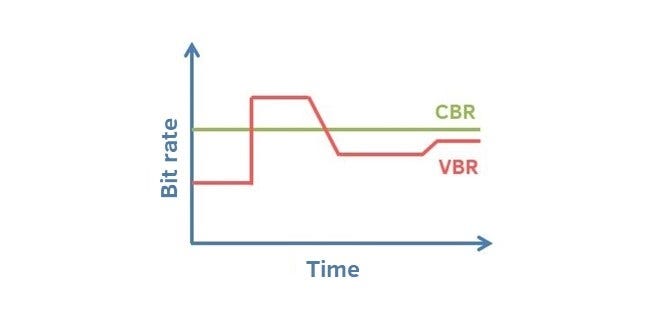
VBR (Variable Bitrate) Dynamic Bitrate means there is no fixed bitrate. The compression software immediately determines which bitrate to use based on the audio data being compressed. This is a method that takes quality as a premise and takes file size into account The recommended encoding mode;
ABR Average Bit Rate (Average Bit Rate) is an interpolation parameter of VBR. LAME created this encoding mode in response to the low file volume ratio of CBR and the variable size of files generated by VBR. Within the specified file size, ABR takes every 50 frames (about 1 second for 30 frames) as a segment. High-frequency and insensitive frequencies use relatively low traffic, and low-frequency and large dynamic performance use high traffic, which can be used as VBR and CBR, a compromise option.
CBR (constant bitrate), constant bitrate means the file has one bitrate from start to finish. Compared to VBR and ABR, the compressed file size is very large and the sound quality will not improve significantly compared to VBR and ABR.